الوسم: iOS 18

  • iOS 18 Feature Shares Photos With Apple How To Disable

    iOS 18 Feature Shares Photos With Apple How To Disable

    A newly introduced feature by Apple significantly enhances visual search capabilities but also brings up privacy issues, according to developer Jeff Johnson.

    With the release of iOS 18 and macOS 15, Apple rolled out Enhanced Visual Search (EVS) in the Photos app. This innovation builds on their existing Visual Look Up (VLU) feature, enabling devices to recognize landmarks and notable locations within images. As a result, users can provide prompts such as “Show me photos from the beach” or “Show me pictures of sunsets,” making the visual search experience even more user-friendly.

    Introduced with iOS 15, VLU requires the transmission of “limited” data to Apple servers. Johnson discovered two documents related to EVS that indicate the new feature may necessitate sending even more information to Apple than its predecessor.

    On this issue, Johnson expresses dissatisfaction, stating, “Naturally, this user has not consented to enhance my on-device experiences by contacting Cupertino [Apple’s headquarters in California]. This decision was made silently by Apple without my approval.”

    Johnson also notes that the details about the new feature and its data requirements have not received much attention from tech media. Furthermore, he claims that Apple has largely overlooked this topic in its communications.

    This assertion seems unfounded as several discussions have emerged regarding the new features of the Photos app in iOS 18, including the updated search capabilities. For instance, Digital Trends highlighted this in their iOS 18 overview, and some writers voiced critiques about specific changes made to the Photos app in this update.

    In contrast to Johnson’s claim, Apple does address EVS in two online documents regarding privacy. One is a user-facing “Photos & Privacy” document, while the other is a research-focused document.

    The user document states:

    “Enhanced Visual Search in Photos allows you to search for images using notable landmarks or points of interest. Your device matches locations in your photos with a global index maintained on our servers. We implement homomorphic encryption and differential privacy, alongside an OHTTP relay that conceals your IP address, ensuring Apple does not access the contents of your photos.”

    Isn’t this evidence that EVS has been discussed by both Apple and the media?
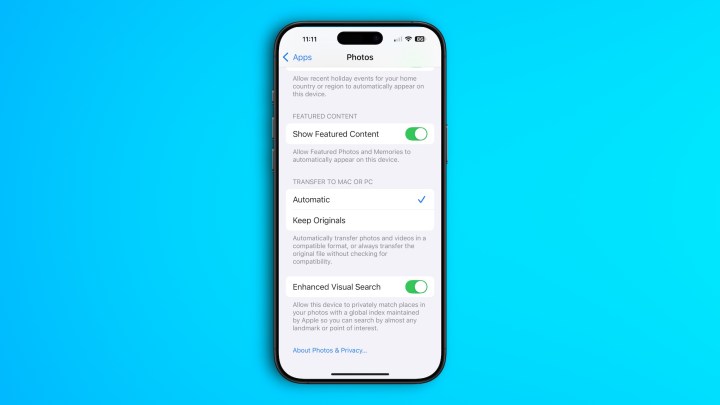
    Step to disable Enhanced Visual Search on iPhone on iOS 18.
    Bryan M. Wolfe / Digital Trends

    Additionally, Apple makes it straightforward to disable this feature on both iPhones and Macs. On an iPhone, navigate to Settings > Apps > Photos and scroll to the bottom to toggle off EVS. On a Mac, open Photos and go to Settings > General, then scroll down to disable EVS.

    Apple also provides a message on both devices stating: “Enable this device to privately match locations in your photos with a global index maintained by Apple, allowing you to search for nearly any landmark or point of interest.”

    While I understand Johnson’s concerns regarding EVS, particularly the default activation of the feature, I believe it will likely not trouble most users. The data transmitted to Apple is encrypted, and as the company claims, the method of uploading is designed to safeguard the privacy of your images, ensuring that your personal information remains inaccessible.

  • Upcoming iOS 18 Update Details You Should Know

    Upcoming iOS 18 Update Details You Should Know

    With the recent launch of iOS 18.2 just over a week ago, users gained access to highly anticipated features like Image Playground, Visual Intelligence, and enhanced writing tools. Now, it appears that an additional update, version 18.2.1, may be on the horizon.

    According to findings by MacRumors, there is evidence of this upcoming update within their analytics logs, which have previously hinted at several iOS releases before their official announcements. As this is a minor update, it is unlikely to introduce any significant new features. Instead, it is expected to focus on resolving bugs, though specific issues have yet to be identified. Expect this update to be available either in late December or early January, with a year-end release appearing more probable.

    Furthermore, iOS 18.3 is currently in the testing phase, with developers and beta testers actively working with the system. As this version is set to launch in January, it’s likely that the smaller update will precede it and serve as a hotfix rather than a substantial overhaul.

    Screenshot showing the iPhone screen where you can change default apps on iOS 18.2.
    Bryan M. Wolfe / Digital Trends

    Since the release of iOS 18.2, some users have reported a few annoying bugs, including excessive heat generation. The new features powered by Apple Intelligence have put additional strain on the hardware of older iPhone models, suggesting that the forthcoming update may include optimizations to help alleviate this pressure.

    Apple typically conducts internal testing on its devices before rolling out updates, allowing developers to catch and fix critical bugs prior to the public release. The recent analytics data indicating iOS 18.2.1 suggests that we should expect its launch in the near future.

  • iOS 18 Brings Top AI Tools In December, Siri Will Wait Longer

    iOS 18 Brings Top AI Tools In December, Siri Will Wait Longer

    The Apple Intelligence toolkit has experienced a mixed rollout, featuring both postponed functionalities and lackluster enhancements. However, it appears that the most promising set of AI tools unveiled by Apple during WWDC earlier this year will soon be available.

    According to the latest edition of his PowerOn newsletter, Mark Gurman from Bloomberg states that the iOS 18.2 update is expected to launch through the stable channel in the first week of December.

    This latest version of iOS is already undergoing beta testing and introduces an exciting trio of AI enhancements designed for the iPhone. One notable feature is Siri’s integration with OpenAI’s ChatGPT, which facilitates complex queries being processed through the chatbot.

    Another addition is Visual Intelligence, which enables users to simply point their phone’s camera at their surroundings and extract useful information about what they see. Currently, it can perform tasks such as identifying different dog breeds or reading details off a poster.

    Considering the extensive integration with OpenAI’s technology, it’s likely that Visual Intelligence will evolve to include capabilities similar to the latest version of ChatGPT, expanding its multi-modal understanding.

    Siri offloading user query to ChatGPT.
    Nadeem Sarwar / Digital Trends

    The iOS 18.2 beta also includes creative features like the Image Playgrounds app, allowing users to produce playful images based on their own snapshots. Furthermore, the new custom Genmoji system is part of the upcoming update.

    Mr. Gurman notes that with the iOS 18.4 release, Siri is poised to undergo a significant transformation that has fans excited about the digital assistant’s potential resurgence in the AI landscape. He mentions, “Siri will be able to access users’ data and respond to inquiries based on the information displayed on their screens.”

    Currently, Google’s Gemini can access both local text and media files and provide responses based on that information. Its deep integration with the Workspace platform enables it to reference documents in Google Drive and other essential tools, like Docs.

    Similarly, the Notebook LM tool can engage with YouTube videos and third-party web page URLs without requiring a subscription.

    In Apple’s scenario, Siri—enhanced by OpenAI’s technology—will be able to answer queries using information retrieved from local files and data stored on the device. This could include accessing travel details from emails, scheduling items from calendar events, and extracting business information from PDFs and spreadsheets.

    Visual Intelligence on iPhone.
    Jesse Hollington / Digital Trends

    Moreover, a significant feature will be enhanced integration with third-party applications, enabling the digital assistant to complete tasks in those apps using only voice or text commands.

    Apple plans to allow users to explore other third-party options like Gemini in the future. Additionally, Siri will be able to provide answers based on the content visible on the user’s screen.

    The release of iOS 18.4 is anticipated sometime in April of next year. This timeframe coincides with when Apple is expected to unveil the next-generation iPhone SE, featuring an updated design, enhanced processing capabilities, and support for Apple Intelligence.

  • iOS 18 To Notify If You Use Slow Charger

    iOS 18 To Notify If You Use Slow Charger

    iOS 18 introduces smart Charging and several other new features.

    Besides letting you freely place icons on the home screen and offering light and dark mode icons, a fully customizable Control Center, and more, the iOS 18 update, revealed at the recent WWDC 2024 event, brings some other cool features too.

    If you want to jazz up your home screen, you can grab the high-resolution iOS 18 wallpapers by clicking here.

    Apple has also added T9 dialer support in iOS 18, so now you can type a contact’s name using the number pad, and the dialer will show you matching contacts.

    ios 18 slow charger

    This feature has been around since the pre-smartphone days, and iPhones are finally getting it in 2024 with iOS 18.

    So, a Reddit user named freaktheclown mentioned that after installing iOS 18, their iPhone gives a warning when a slow charger is used.

    Plus, the battery graph now shows when you used a slow charger by marking that time with an orange color.

    The Reddit user noticed the slow charger warning when he used a 5W charger to charge his iPhone 15 Pro Max.

    He also mentioned that tapping the info button next to the “Slow Charger” warning leads to a support article that doesn’t exist yet, but it will be updated once iOS 18 is publicly released.

    Right now, it’s not clear what charging speed sets off the slow-charging warning message.

    The iOS 18 update also brings some detailed software changes. In the Settings app, you’ll find more options for setting a charging limit under the “Charging” section in the “Battery” settings menu.

    Before, Apple only let you set your charging limit to 80%. But with the iOS 18 update, you can now pick from several options like 85%, 90%, and 95%.

  • List of iPhones That Will Not Get AI Features in iOS 18

    List of iPhones That Will Not Get AI Features in iOS 18

    Apple’s iOS 18 is set to be revealed in two phases. Basic AI features will run directly on your device, while more advanced capabilities will need to connect with Apple’s servers.

    Apple is overhauling Siri as part of its AI upgrade, with engineers reworking the underlying software using large language models (LLMs), the tech behind generative AI.

    Bloomberg’s Mark Gurman reports that the new Siri will be able to handle tasks like organizing notes, summarizing articles, and more.

    Apple plans to use AI to analyze how you use your device and automatically enable certain features.

    Their large language model (LLM) will handle basic AI tasks directly on your iPhone, using its processor instead of relying on the cloud.

    While it’s unclear what these basic tasks will include, the LLM will decide if a request can be handled on the device or needs to go through Apple’s servers.

    Gurman notes that these on-device AI capabilities require an iPhone 15 Pro or a newer model. According to MacRumors, considering both reports, older iPhone models may not support some of Apple’s on-device AI features in iOS 18:

    • iPhone 15 and iPhone 15 Plus
    • iPhone 14, iPhone 14 Plus, iPhone 14 Pro and iPhone 14 Pro Max
    • iPhone 13, iPhone 13 mini, iPhone 13 Pro, and iPhone 13 Pro Max
    • iPhone 12, iPhone 12 mini, iPhone 12 Pro, and iPhone 12 Pro Max
    • iPhone 11, iPhone 11 Pro, and iPhone 11 Pro Max
    • iPhone XS, iPhone XS Max
    • iPhone XR
    • iPhone SE (second and third generation)
  • iOS 18 To Include Anthropic AI In Apps

    iOS 18 To Include Anthropic AI In Apps

    iOS 18 will see a good amount of new features from Apple, especially in the Artificial Intelligence (AI) department. Anthropic, a startup backed by Amazon and Google, will be powering the new iOS 18 update.

    Anthropic is also labeled as a potential competitor to OpenAI’s ChatGPT and Google’s Gemini.

    Recently, Anthropic released Claude 3, which is a suite of all AI models, if we look at the benchmarks, Claude 3 Opus beats OpenAI’s GPT-4 and Google’s Gemini 1.0 Ultra, both GPT-4 and Gemini 1.0 Ultra claimed to be the “most capable AI models ever” but Claude 3 Opus benchmarks overthrow their claims instantly.

    claude 3 vs gpt 4 vs gemini ultra

    This inclusion of Anthropic to iOS 18 clearly shows the company is at the top of the game in AI. Apple clearly shows much interest in Generative AI to enhance its app and overall software. This means, that with the anthropic-powered iOS 18, iPhone users no matter if they have an iPhone 12 or iPhone 15, will see a huge bump in the capabilities of the overall iOS system.

    This means Anthropic will bring features to the following apps;

    1. Siri
    2. Spotlight
    3. Apple Music
    4. iMessage

    Just like before, Apple hasn’t accepted or denied the news. Guess we will see it upon the release of the latest AI-powered iOS 18.