الوسم: iOS 18.1

  • iOS 18.1 Upgrade Hides Data Extraction From iPhones

    iOS 18.1 Upgrade Hides Data Extraction From iPhones

    The latest major enhancement that arrived with the iOS 18 series on iPhones is Apple Intelligence. Additionally, Apple has seemingly bolstered its security measures to better shield devices that haven’t been unlocked for an extended period from unauthorized access.

    This month, law enforcement officials expressed concerns about iPhones unexpectedly rebooting, as reported by 404Media. A source in Michigan highlighted that these unanticipated reboots complicate the ability to retrieve content from the devices using brute-force unlocking techniques.

    In response to the reported issues, wireless and mobile security researcher Dr.-Ing. Jiska Classen shared insights about a feature in iOS 18.1 known as “inactivity reboot.” This feature activates when there is an attempt to unlock an iPhone after a period of inactivity.

    “While forensic evaluations of mobile devices may be uncommon, stolen phones are a frequent occurrence. This development safeguards user data in both scenarios,” she explained. The entire system functions based on patterns of inactivity, triggering a secure state post-restart.

    Specifically, upon a restart, an iPhone enters a BFU (Before First Unlock) state, remaining there until it is unlocked. This BFU state is a crucial security feature, as it encrypts the data stored on the device, making files accessible only upon successful unlock.

    Cellebrite UFED device.
    A Cellebrite device used for extracting data from smartphones.
    Cellebrite

    When unlocking an iPhone after a restart (or during the BFU phase), a decryption key is generated, allowing access to the files on the device. “Nearly all content on an iPhone is encrypted until the user unlocks it, enabling the phone to function,” notes Cellebrite, a company that provides tools for law enforcement to extract data from mobile devices.

    While the BFU state doesn’t restrict access to all data, it does place significant limitations. “If you seize an iPhone that is already turned on, try to keep it powered on,” Cellebrite suggests to investigators in another blog post.

    With the introduction of the “inactivity reboot” feature, Apple has added a further hurdle for accessing data on devices that have remained locked for a while due to the automatic reboot that places the phone into BFU mode.

    Although the BFU state alone isn’t foolproof, Cellebrite claims that its Premium package—which includes specialized hardware and software—can assist in data extraction from devices in this state.

    However, a research study from the Department of Electrical Engineering at Universitas Indonesia revealed that using the Cellebrite Premium system facilitates the recovery of only about 40% of media from devices in a BFU locked state.

    Apple has yet to offer an official statement regarding the newly implemented “inactivity reboot” feature in iOS 18.1. Nonetheless, the company continues to collaborate with law enforcement when it comes to unlocking iPhones under proper legal procedures.
  • Apple Debuts iOS 18.1 Featuring ‘Apple Intelligence’ for iPhones

    Apple Debuts iOS 18.1 Featuring ‘Apple Intelligence’ for iPhones

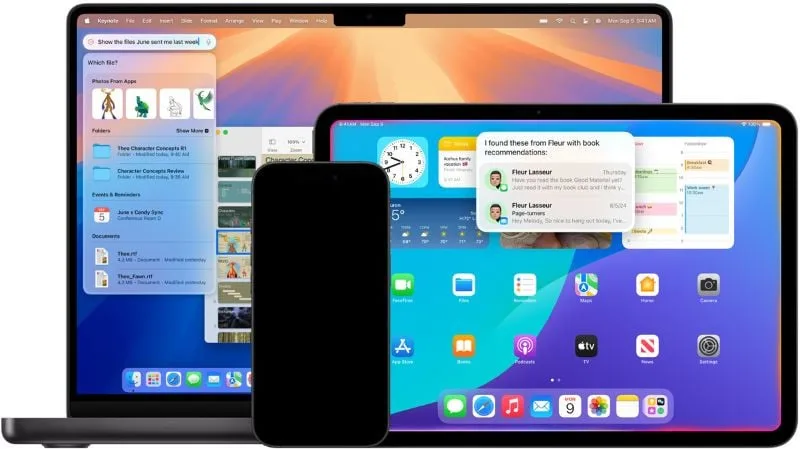
    On Monday, Apple rolled out iOS 18.1, unveiling its AI platform, Apple Intelligence, for the iPhone 16 and iPhone 15 Pro models. This update also extends Apple Intelligence’s features to iPads and Macs, marking a key development for Apple as it enhances its AI initiatives to generate excitement around the recently launched iPhone 16 series.

    Apple Intelligence is the company’s strategic answer to the rapid evolution of AI across the tech industry, especially as other major players concentrate on cloud-driven AI systems that depend on robust Nvidia hardware. In contrast, Apple maintains a device-focused approach that capitalizes on the internal chip capabilities of the iPhone, while some more complicated tasks are handled via Apple’s servers.

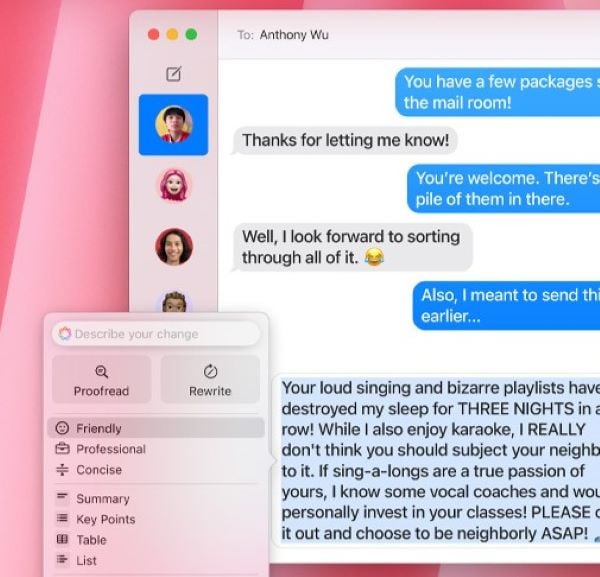
    To start, Apple Intelligence provides a range of functions, including text editing tools that can proofread or rewrite content, features for removing objects from photos, and notification summaries that condense alerts into a single message. Siri has also been refreshed in this update, presenting a new design that highlights the edges of the screen and an improved ability to respond to inquiries about Apple products. While Siri’s functionalities are still confined to specific apps, broader enhancements, including ChatGPT integration, are anticipated in the upcoming iOS 18.2 update next year.

    Wamsi Mohan, an analyst with Bank of America Securities, has voiced optimism about the potential of Apple Intelligence to drive iPhone sales, suggesting that interest may “increase after the initial rollout of Apple Intelligence at the end of October.” However, to use Apple Intelligence, users must sign up and join a waitlist. Eligibility requires owning an iPhone 15 Pro, iPhone 15 Pro Max, or an iPhone 16, and once enrolled, the device will download the necessary AI components.

    Key features include a notification summary tool that streamlines updates from sources like market alerts or group chats. Siri’s revamped text interface, accessed by swiping up, enables silent queries. The writing tools now empower users to rephrase text in both Apple and third-party apps, allowing for adjustments in tone to options like “friendly,” “professional,” or “concise.”

    Further updates have also been made to Apple’s Mail and Photos apps, where Photos can now conduct natural language searches and generate mini-movies from collections of images, enhancing the overall experience in iOS 18.1.

    To download iOS 18.1, navigate to Settings > General > Software Update. To register for the Apple Intelligence waitlist, go to Settings > Apple Intelligence and Siri > Join the Apple Waitlist.