Tag: Instagram

  • Paris Hilton Shares Birthday Bash Photos with Her Kids

    Paris Hilton Shares Birthday Bash Photos with Her Kids

    Los Angeles: Paris Hilton, the renowned American socialite and reality television personality, recently marked her birthday in style with two very special guests—her young children. She took to social media to share delightful moments from the celebration.

    The 44-year-old star celebrated her special day with her children, Phoenix Barron, who is 2, and 15-month-old London Marilyn, as reported by ‘People’ magazine.

    She shares both of her little ones with her husband, Carter Reum. The birthday celebration took place at their home in Los Angeles, and Hilton officially turned 44 on February 17.


    MS Creative School
    MS Creative School

    According to ‘People’, after the celebration, Hilton shared glimpses of the festivities on her Instagram, showcasing her children’s joy during the event.

    She posted a series of charming photos capturing her children at the party, featuring Phoenix holding her hand and enjoying a vibrant pink and white ball pit. Other highlights included shots of various arcade games provided by Parties by GEMS. In one sweet moment, she shared a snapshot of Phoenix in his pink tracksuit, which had “Paris” printed on the back of his sweatshirt. A video clip also featured the toddler enthusiastically greeting celebrity guests such as Sydney Sweeney and BLACKPINK’s Lisa.

    In addition to sharing photos of Phoenix, she also included images of little London. In her Instagram post, Hilton lovingly referred to her children as her “greatest gifts.”

    “I feel like the luckiest mama celebrating my birthday with my two little angels. Phoenix & London, you are my greatest gifts,” she expressed in her heartfelt caption. She also included hashtags like “#SlivingMom,” “#ThatsHot,” and “#BestBirthdayEver.”

    Besides her little ones, the star-studded guest list included names like Anya Taylor-Joy, Sofia Vergara, Julia Fox, Sia, Jessica Alba, Molly Shannon, Lukas Gage, Cara Delevingne, Jenna Dewan, Seth MacFarlane, Ashley Benson, Machine Gun Kelly, Scout Willis, Kiernan Shipka, Diplo, Will.i.am, and Snoop Dogg.

  • Generative AI Video Editing Is Coming To Instagram

    Generative AI Video Editing Is Coming To Instagram

    Instagram on iPhone against a colorful background.
    Bryan M. Wolfe / Digital Trends

    In an exciting development for content creators, Instagram is set to introduce a groundbreaking generative AI tool by 2025, which will simplify video editing to the point of just entering a text prompt, as announced by CEO Adam Mosseri on Thursday.

    This innovative tool, powered by Meta’s Movie Gen model, will give users the ability to modify nearly every aspect of their videos, according to Mosseri’s demonstration. The alterations can range from minor tweaks, such as adding a gold chain to his existing outfit or placing a hippo in the background, to significant transformations like changing his wardrobe or giving himself a whimsical, Muppet-like appearance.

  • Meta Verified Business Standard, Plus, Premium, and Max Review

    Meta Verified Business Standard, Plus, Premium, and Max Review

    Meta’s new Verified Business subscription tiers—Standard, Plus, Premium, and Max—promise businesses enhanced visibility, better reach, and exclusive features. However, after testing the highest tier, Meta Verified Business Max, priced at a whopping $400/month, the results are underwhelming. Here’s a breakdown of the experience with a focus on its pros, cons, and whether it’s worth the investment.

    Verdict

    Meta Verified Business Max offers high-priced features with limited tangible results. Despite promises of improved reach, personalized strategy consultations, and prioritized support, the overall experience feels incomplete and poorly executed.

    Rating: 2/5

    Pros and Cons of Meta Verified Business

    Pros:

    • Verification Badge: Adds authenticity to your page, which can enhance trustworthiness.
    • Prioritized Support: Theoretically faster responses to issues via chat and email (though real-life execution is lacking).
    • Potential for Content Strategy Calls: If implemented properly, these consultations could offer valuable insights.
    • Status Symbol: For businesses that care about appearances, being at the Max tier shows commitment to growth.

    Cons:

    • No Noticeable Reach Improvements: Organic reach and follower growth did not improve, despite being a key selling point.
    • Overpriced: At $400/month, the features do not justify the cost.
    • Content Strategy Feature Unavailable: Attempts to schedule the biannual call resulted in errors, with no resolution.
    • Generic Support: Chat responses felt automated and failed to address specific concerns.
    • Minimal Ad Replacement Value: This service does not reduce the need for traditional ad spend.

    Key Features Across All Tiers

    Standard ($49/month)Plus ($99/month)Premium ($199/month)Max ($400/month)
    • Blue verification badge for authenticity.• Includes all Standard features.• Everything from Plus.• Biannual content strategy consultations with a “real person.”
    • Access to basic support.• Slightly improved organic reach.• Prioritized support and case monitoring.• Alleged maximum visibility boost.

    Detailed Experience with Meta Verified Business

    1. The Verification Badge

    While the badge is a nice addition for credibility, it doesn’t seem to have a direct impact on engagement or organic reach. It’s more of a status symbol than a functional feature.

    2. Prioritized Support

    Support responses came quickly, but they felt generic and automated, offering little actual help. For example, when trying to schedule a content strategy call, I was told the feature was “not fully established yet.”

    3. Content Strategy Calls

    This was one of the most anticipated features, but it was entirely unavailable. Attempts to schedule a session resulted in error messages, and follow-ups with support provided no solutions.

    4. Organic Reach

    There was no noticeable improvement in organic reach or follower growth, despite Meta’s claims of visibility enhancements.

    5. Case Monitoring

    This feature seems promising for handling critical issues but wasn’t something I actively tested during the review.

    Who Should Buy It?

    • Large Enterprises: Companies with big budgets that can afford to experiment with new services.
    • Early Adopters: Businesses willing to invest in unproven features to stay ahead of competitors.

    Who Should Avoid It?

    • Small to Medium Businesses: The price is too high for the limited benefits.
    • Ad-Driven Marketers: If you rely heavily on boosting and ads, this subscription won’t reduce those costs or efforts.
    • Businesses Expecting Immediate Results: Organic reach improvements are marginal at best, making this a poor choice for those looking for quick wins.

    Meta Verified Business Max (and its lower-tier counterparts) feels like an unfinished product. While the promises of improved reach, personalized strategy, and enhanced support sound great on paper, the reality is far from satisfactory. At this stage, the service appears overpriced and underdelivered, making it hard to recommend for most businesses.

    Until Meta resolves the issues with this offering, businesses are better off sticking to tried-and-true growth strategies like targeted ads and content marketing.

  • 9 Reasons You’re Unable to Follow Someone on Instagram

    9 Reasons You’re Unable to Follow Someone on Instagram

    Encountering the inability to follow someone on Instagram can be quite irritating. This issue may arise for a variety of reasons.

    1 Your Network Connection Might be Faulty

    Even if Instagram seems to function without issues, it’s critical to check your internet connection. For instance, if your Wi-Fi router isn’t connected to the internet—an issue that often occurs when moving to a new location—it could be a reason for this problem. Additionally, your internet service provider might be experiencing technical difficulties.

    Sometimes, the issue might lie with your mobile device’s connectivity. If your internet is down, you could have reached your data cap or simply forgot to enable roaming. As a result, you’ll be unable to follow accounts or refresh your home feed.

    To resolve an unstable Wi-Fi connection, you can try changing the router’s channel, resetting the router, or switching to another network. If you’re using a smartphone, ensure the cellular data indicator is active. You might also consider resetting your network settings and checking if you have 4G or 5G enabled.

    2 You’ve Hit the Follow Limit on Instagram

    As outlined in the Instagram Help Center, users can follow up to 7,500 accounts. This limit is in place to help minimize spam. If you attempt to follow a 7,501st person, you’ll receive an error message unless you unfollow someone first.

    While 7,500 is a significant number of accounts to follow, you might still be near that limit without realizing it. Instagram has a follow rate limit, capping you at 60 follow/unfollow actions within an hour. If you haven’t hit the limit but still can’t follow anyone, wait a while before trying again. Conversely, if you have reached the maximum, simply unfollow an account to remedy the situation.

    3 The Other User May Have Blocked You

    It’s possible that the reason you can’t follow someone is that they’ve blocked you. If you’ve already unfollowed accounts or waited to see if the issue resolves itself, try checking if you can still view the user’s profile. One way to check this is by logging out of your account, then searching for their profile link. If you can see their page, chances are they have blocked you.

    Keep in mind that there won’t be a notification when someone blocks you. The user may choose to unblock you later, but until that happens, it’s best to respect their choice and move on.

    4 You Might Need to Re-Authenticate Your Account

    If there are problems with your account’s authentication, Instagram may prevent you from following new accounts. Fortunately, this issue is usually straightforward to fix—just sign out of your account and sign back in.

    1. Open the menu in the top right corner.
    2. Select Settings > Log out.
    3. Log back into your account.

    5 The Instagram App May Have Bugs

    Technical problems on Meta’s end can cause the Instagram app to glitch. It may also be necessary to ensure your app is updated. First, try closing and reopening the app to see if that resolves any issues.

    If problems persist, your app might need an update. Check for updates on the App Store or Google Play. If you still face difficulties, it might just be a matter of waiting a few hours before trying again.

    6 Instagram May Have Restricted Your Account

    The follow/unfollow strategy is an outdated and often annoying method of growing your Instagram presence. This behavior can lead Instagram to restrict your account, making it impossible to follow new users. Other reasons for account restrictions include liking too many posts simultaneously or posting spammy comments. If you suspect you might be in trouble, review Instagram’s rules to ensure you’re not violating any.

    Additionally, Instagram may flag your account if you’re logged in on different devices across various locations. Using the same account on your phone and computer is generally acceptable, but unusual login locations might raise a red flag.

    7 You May Be Using a VPN

    If you’ve activated a VPN, Instagram might detect varying IP addresses and mark your account for unusual activity. This could limit several features, including your ability to follow other accounts.

    Using Instagram simultaneously on a mobile device and desktop can also trigger similar restrictions. If you suspect that your VPN is the cause of this problem, try disconnecting to see if it resolves the issue.

    8 You Might Need to Clear Your Cache

    Neglecting to clear your app’s cache can disrupt various functionalities on Instagram, including following new accounts. Such issues often occur when the app data exceeds storage limits or becomes corrupt, impacting your experience.

    You can easily clear the cache of the Instagram app on Android devices. For iOS users, simply uninstalling and reinstalling the app serves the same purpose.

    9 Instagram Servers Might Be Down

    If Instagram’s servers are experiencing downtime, you won’t be able to follow new accounts or use other functions until the platform is back up. This is typically resolved within a few hours, though it could take longer in some cases. In such situations, it’s best to check whether Instagram’s servers are operational.

    Visit Downdetector to see if other users have reported similar issues and check the number of outages reported in the last 24 hours.

    At times, it can be challenging to identify why you can’t follow new accounts on Instagram. In the worst scenario, the user may have blocked you, leaving you with no options until they choose to unblock you. However, if Instagram is down, consider taking a break and enjoying some time away from social media.

  • How to Hide Old Instagram Posts Using the Archive Feature

    How to Hide Old Instagram Posts Using the Archive Feature

    Instagram offers a handy Archive feature that lets you hide a post from your followers while keeping it intact. Your photos and videos remain accessible, just stored in a private section of your profile that only you can access.

    How to Archive Your Instagram Posts

    Archiving posts on Instagram is quite simple. First, open your profile and scroll through to find the post you want to hide. Once you spot it, tap on the post to open it.

    Next, click on the three vertical dots located in the top-right corner of your post. From the menu that appears, select Archive. Just like that, the post disappears from your public profile.

    How to View and Restore Archived Instagram Posts

    If you ever want to access your archived posts again, head back to your profile and tap on the three horizontal lines at the top to open the menu. Select Archive. You might initially find yourself in the Stories archive, so you just need to switch to the posts you’ve hidden by tapping Stories Archive at the top and then choosing Posts Archive.

    Scroll through your archived posts and tap on the one you want to restore. Open it, then press the three dots in the top-right corner, and select Show on Profile from the menu that pops up. Your post will now reappear on your profile.

    Keep in mind that if you restore a post that you archived a while back, it won’t be flagged as new. It will return to your profile in the order it was originally posted. Plus, your archived posts retain all their original likes and comments, so you won’t lose any valuable engagement.

    I truly appreciate the Archive feature because it allows for flexibility. Deleting a post feels like throwing away an entire album of memories—it’s irreversible. Archiving, however, is akin to safely tucking that album away for potential future enjoyment.

  • Checking if Someone Has Deleted or Deactivated Their Instagram

    Checking if Someone Has Deleted or Deactivated Their Instagram

    We’ve all experienced that moment when someone seems to have vanished from Instagram. You search for their profile and can’t find it, leaving you to wonder: Did they deactivate their account, or have you been blocked?

    1 View “Deactivated Accounts” in Your Followers List

    Fortunately, Instagram provides an option to see if any of your followed accounts or followers have deactivated their profiles. If you have a mutual connection, this is a reliable way to find out. Here’s how to check:

    1. Go to your Instagram profile by tapping your profile picture at the lower right corner.
    2. Select Followers at the top of the screen.
    3. Click on Deactivated accounts.
    4. Scroll through and find the account. If they are listed, they’ve deactivated their account.

    Remember, this method won’t work if the account doesn’t follow you or you don’t follow them. Also, if the account has been deleted, it won’t appear here. If you don’t see their name, don’t assume you’ve been blocked just yet; try the other methods provided.

    2 Locate the User

    If the Instagram account you’re looking for—and don’t follow—has disappeared, searching for them can help you determine if they’ve deactivated it.

    Tap the search icon in the menu at the bottom of the app, then type in their Name or Username into the search bar. If you can’t find them in the search results, it might mean they deactivated or deleted their account, or possibly blocked you.

    The best way to check if you’ve been blocked is to search for their profile using a different Instagram account. If they have deactivated or deleted their account, it becomes invisible to everyone.

    Consequently, if you can’t find their account when searching from another profile, it’s likely they have deactivated or removed their account. However, if their account is accessible from another account, it indicates you’ve been blocked.

    3 Review Your Messages

    Your Instagram Direct Messages can provide clues about whether someone has deactivated or deleted their account. This only works if you’ve previously messaged them and haven’t erased that conversation.

    To search for the user’s message history, tap the home icon at the bottom, then the Messages icon in the top right. Start by tapping the Search bar and entering their Name or Username. If that does not yield results, try searching for specific keywords from your conversations.

    For example, if you spoke about cats, search for “cats.” When you find the relevant chat, check their profile. If their account has been deactivated, their profile picture may be replaced with yours, giving a hint of their deactivated status.

    Usually, a deactivated account will appear as “Instagram User.”

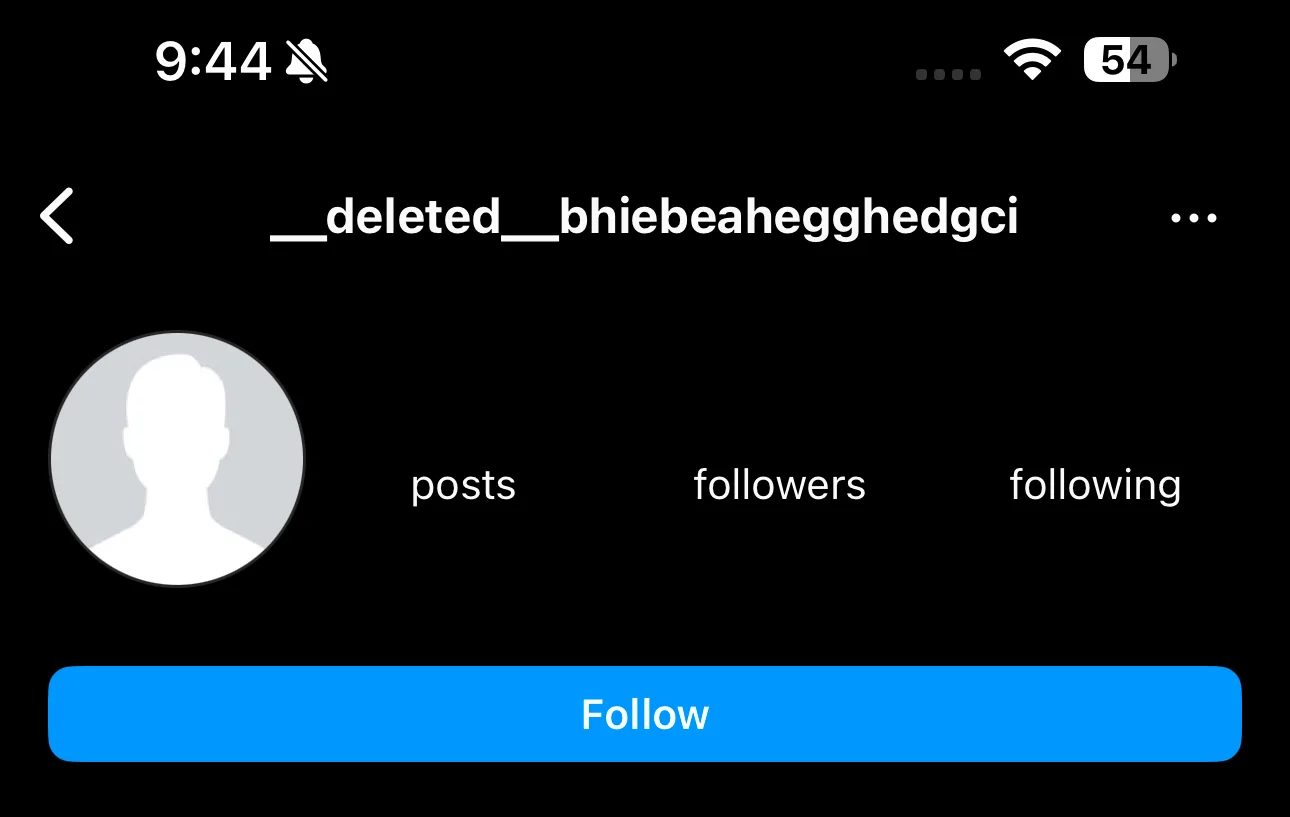
    In some instances, their username may remain, but tapping on their profile won’t load any account details like posts, followers, or following numbers.

    On the other hand, a deleted account won’t appear in search results. You’ll need to sift through your messages to locate them. Deleted account mentions in DMs often read as “__deleted__” followed by a string of random characters.

    To verify if the deleted account belongs to the individual you’re thinking about, simply click the chat and see if any of the messages jog your memory.

    4 Search Using a Web Browser

    Since Instagram is accessible through web browsers, you can also try looking for a deactivated account using that route. If you’re logged into Instagram on the browser, it’s best to log out or use an Incognito or Private window.

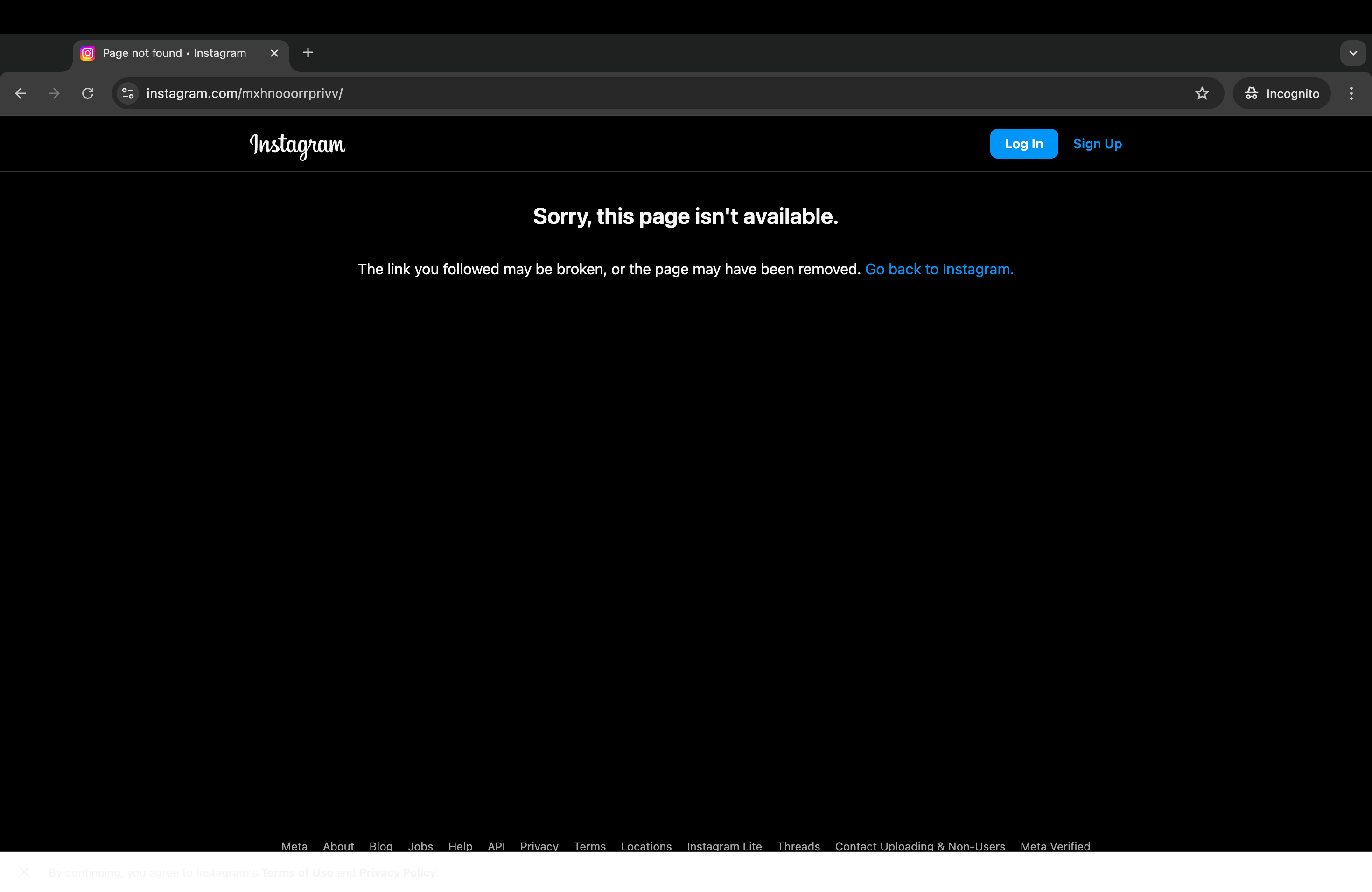
    This way, you can avoid the uncertainty of being blocked. Just type “instagram.com/username” into the address bar, replacing “username” with the exact username of the person you’re searching for. If they’ve blocked you, you’ll see their account, and be prompted to Sign Up or Log In.

    If they’ve deactivated or deleted their account, you’ll encounter a “Sorry, this page isn’t available” message. This indicates either a deactivation or a typo in the username you entered.

    %22Sorry, this page isn't available%22 error when searching for deactivated Instagram account

    Fortunately, it’s quite easy to determine if someone has blocked you on Instagram or if their account is deactivated or deleted. If the above methods don’t yield any results, consider simply asking the person directly whether they’ve deactivated or deleted their account before jumping to any conclusions.

  • WhatsApp, Instagram, and More Experience Outages in Pakistan

    WhatsApp, Instagram, and More Experience Outages in Pakistan

    Social media platforms like WhatsApp, Instagram, and Facebook are experiencing significant disruptions in Pakistan as the government implements measures designed to suppress political demonstrations.

    This instability coincides with increased security measures due to a march toward Islamabad organized by the Pakistan Tehreek-e-Insaf (PTI).

    Users nationwide have reported widespread access issues, with many finding it difficult to use social media and communication services.

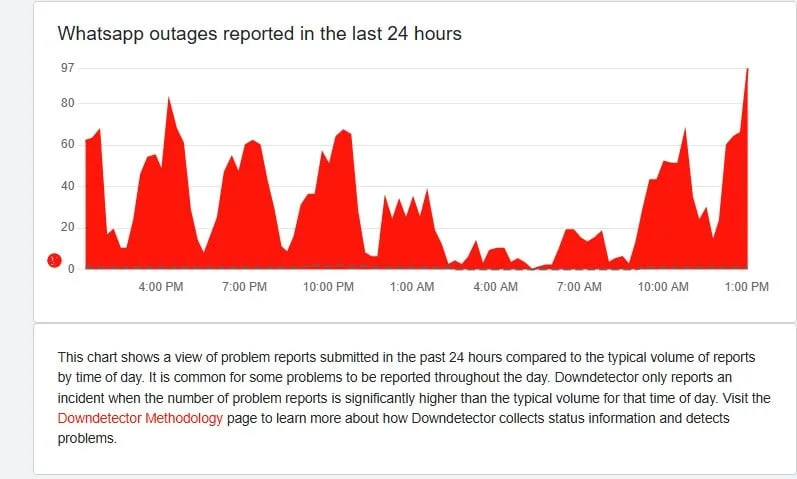
    Downdetector, a service that tracks outages, confirmed that individuals in Pakistan are encountering difficulties using these platforms, along with general reductions in internet speed.

    The government previously revealed plans to curtail internet services in sensitive areas for security reasons but has not officially explained the recent social media disruptions. The timing of these outages has led to speculation, especially given their proximity to the upcoming PTI protest.

    A journalist based in Islamabad voiced their frustration over the outages, explaining that they complicate everyday life. “In today’s world, managing without the internet is nearly impossible, whether for work or education,” they remarked.

    Meanwhile, a 27-year-old resident of Karachi expressed his irritation to local media, stating that the sluggish internet speeds have made it nearly impossible to share videos on WhatsApp. “It’s incredibly frustrating and slows everything down,” he added.

    In Lahore, a female resident described the internet shutdowns as a violation of citizens’ rights to information and free speech. “It’s ironic that the government itself relies on these platforms,” she pointed out, highlighting the inconsistencies in the authorities’ actions.

    Photo: Downdetector

    The outages are perceived as part of the government’s broader strategy to limit PTI’s ability to mobilize ahead of their scheduled protest.

    Prime Minister Shehbaz Sharif has deployed thousands of police and paramilitary personnel throughout Islamabad to manage any potential unrest.

    As PTI leader Imran Khan encourages his followers to assemble in the capital, the disruptions are anticipated to persist, raising further concerns about the implications of digital censorship for the people of Pakistan.

  • Instagram Eliminates “Rug Pull” Option for Better User Experience

    Instagram Eliminates “Rug Pull” Option for Better User Experience

    Instagram has addressed one of the most frustrating issues with its well-known social media platform. The “rug pull” feature, which caused posts to vanish unexpectedly, has been officially eliminated. This change, though minor on the surface, is likely to enhance the overall user experience for those who frequent the app.

    What Is Rug Pull?

    The rug pull feature was implemented by Instagram to present the most current content as soon as users opened the app. While the idea seemed beneficial in theory, allowing users to quickly access the newest posts, it often backfired.

    Unfortunately, this feature would sometimes cause engaging content to disappear without a trace. Many users found themselves filled with frustration as they attempted to retrieve interesting posts that had just been pulled out from under them, making it nearly impossible to recover the content they enjoyed.

    Rug Pull Increased Engagement

    Although it might appear that the rug pull was a mere oversight in programming, Instagram’s head honcho, Adam Mosseri, explained that it was designed specifically to boost user engagement and reduce loading times for content. However, Mosseri recognized the negative impact this feature had on the overall Instagram experience.

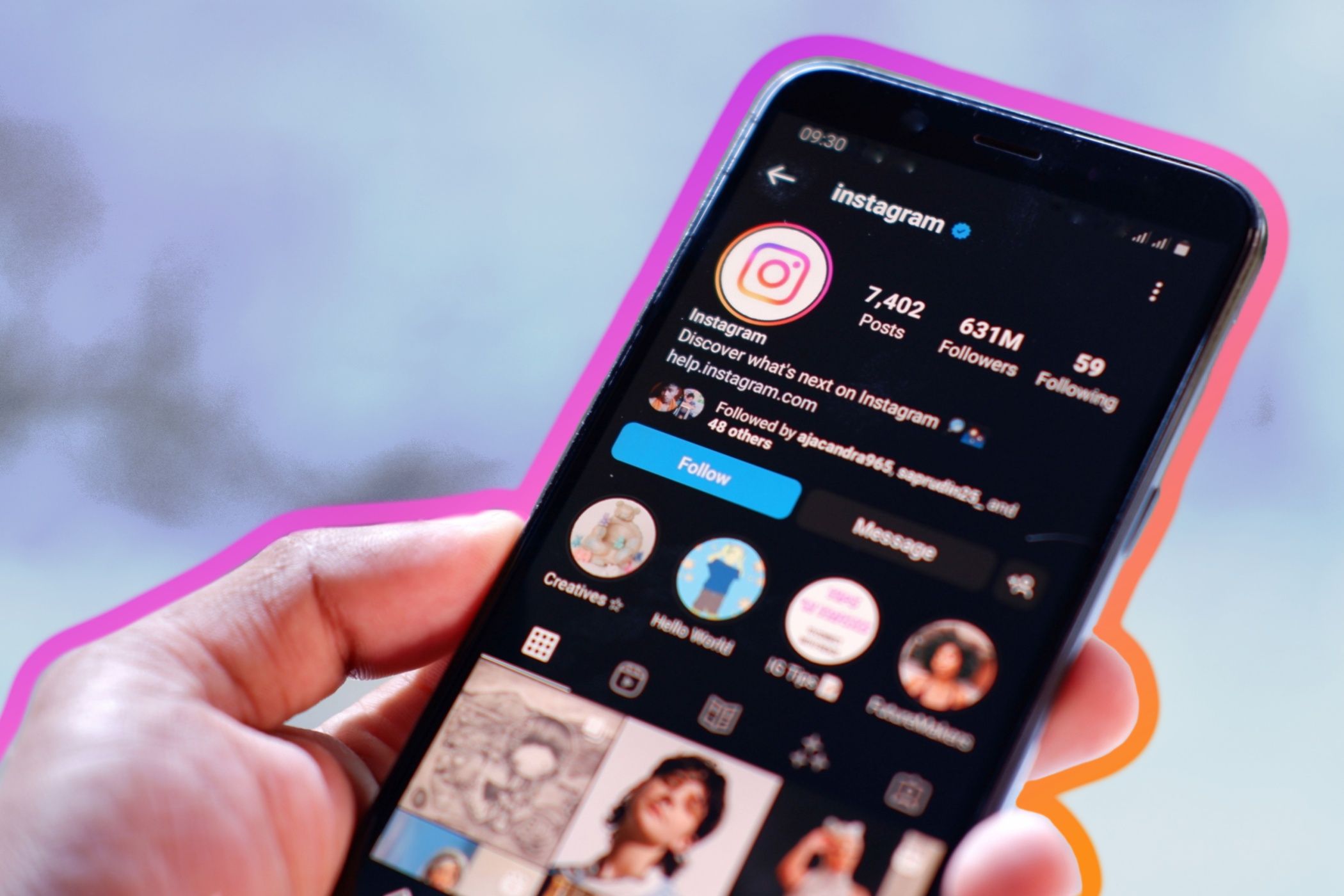
    Hand holding a smartphone with Instagram official account on screen

    “It’s really annoying,” Mosseri remarked in a Reels video shared on his Instagram profile. “So we stopped doing it. Now, we load new content in the background and won’t display it until you scroll. We’ll insert it further down the feed. We did take a slight hit in engagement from this change, but it really improved the user experience overall.”

    Instagram isn’t the only platform to employ a rug pull mechanism to enhance engagement. The X app (previously known as Twitter) also uses a similar tactic with its For You feed, where content frequently disappears, only for more recent updates to take their place—and it can definitely spark frustration among users.

    Instagram’s decision to eliminate the rug pull feature in favor of prioritizing user satisfaction is a refreshing development, especially given the recent scrutiny the platform has faced. Previously, Instagram came under fire for admitting it boosted video quality for more popular posts.

    However, this move away from the rug pull suggests a shift toward valuing user experience over mere engagement numbers. While this is a welcome improvement, it remains to be seen whether other social media platforms will follow suit.

  • Instagram Ends The Most Annoying Part Of Its Content Feed

    Instagram Ends The Most Annoying Part Of Its Content Feed

    One of the most frustrating experiences when launching a social media app is when you’re engrossed in a post, only for the app to refresh the feed unexpectedly before you’ve finished viewing it. This issue has been prevalent on platforms like Instagram and X.

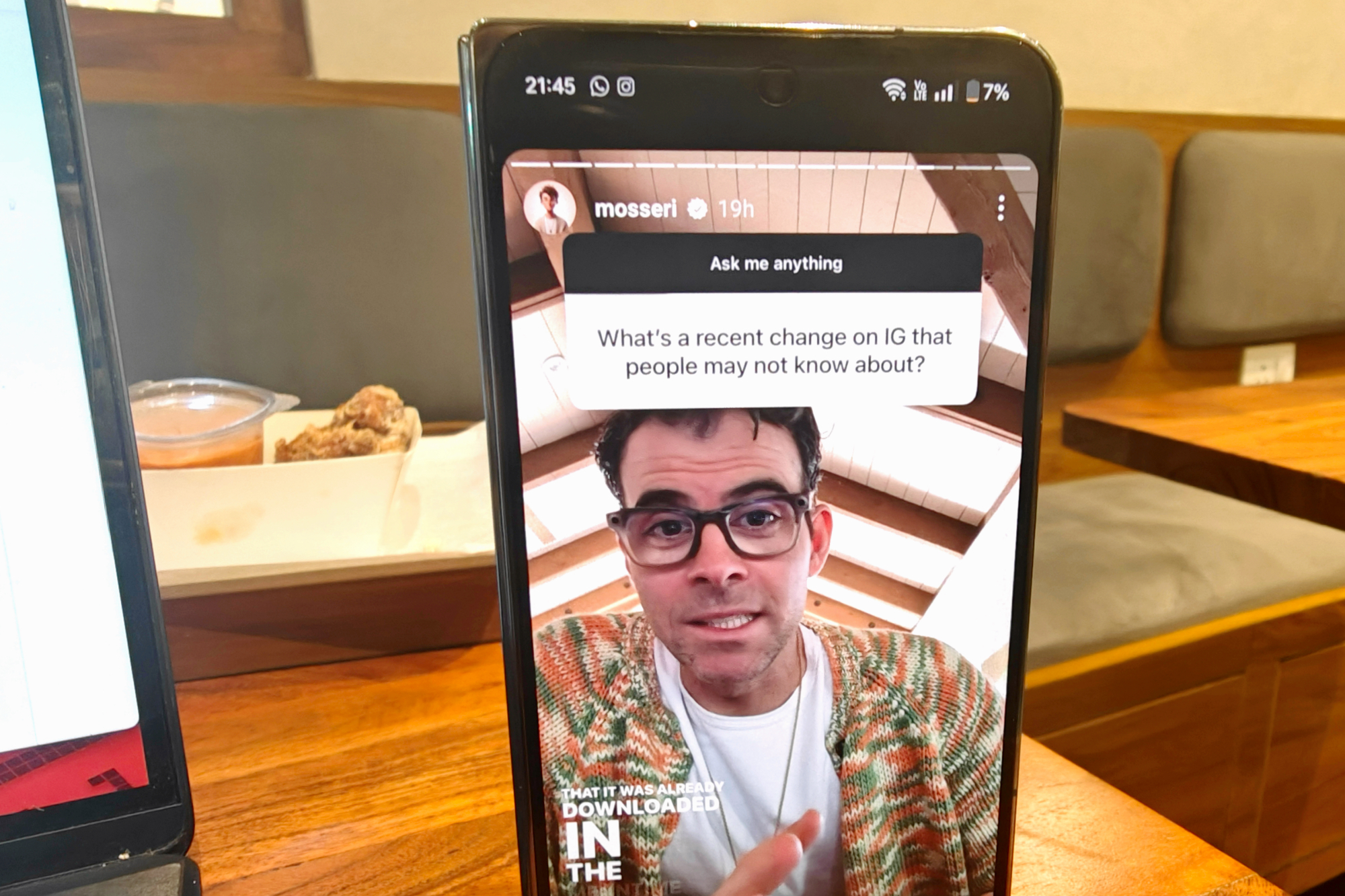
    Fortunately, Instagram appears to have addressed this irritating problem. The app will no longer auto-refresh the feed upon opening, unless users manually swipe to navigate. This update was confirmed by Adam Mosseri, the head of Instagram, during an AMA session.

    This was not merely an error, but a conscious design choice with technical reasons behind it. Mosseri referred to the previous system as a “rug pull,” playfully referencing a deceptive practice in the cryptocurrency world where perpetrators abandon projects after cashing in.

    Despite its playful roots, this approach was criticized, and Mosseri himself acknowledged it was a poor choice, stating, “It’s really annoying,” as he discussed ongoing changes to enhance user experience.

    So what prompted Instagram to adopt such a frustrating method in the first place? Mosseri explained, “We did that because we were trying to load content and it was taking a while, so we showed you something that was already downloaded in the meantime. Generally, it’s good for engagement.”

    Instagram CEO Adam Mosseri shares an update on a OnePlus phone.
    Nadeem Sarwar / Digital Trends

    Ultimately, the decision to eliminate the auto-refresh feature had negative repercussions for engagement, though Mosseri indicated it was a move towards improving overall user satisfaction. “We actually took a little bit of engagement hit for this, but it is a much better experience for the average user,” he remarked.

    In other updates, Instagram has recently introduced a collaboration with the National Center for Missing & Exploited Children (NCMEC) to address the issue of digital sextortion. This initiative aims to inform young users regarding the warning signs of potential exploitation.

    Additionally, the platform has implemented stricter controls for accounts owned by users under 16 years of age. These “Instagram Teen Accounts” include safeguards on interactions with strangers and require parental consent for modifications to safety settings.

    Just over a month ago, Instagram also unveiled enhancements to user communication features. New additions include AI stickers, derived from Meta’s advancements, now available across their social platforms.

    For user convenience, Instagram now allows individuals to pin up to three chats, whether personal or group, at the top of their Direct Messages. Other thoughtful functionalities have been added, such as the option to send silent messages and the ability to view content only once, similar to features found on WhatsApp.

  • Instagram’s Secret Two-Tier System Delivers Top-Quality Videos

    Instagram’s Secret Two-Tier System Delivers Top-Quality Videos

    If you’ve been curious about why some videos on Instagram appear clearer and more polished than others, there’s an explanation. On Sunday, Adam Mosseri, the head of Instagram, revealed that higher-quality video content is primarily offered to creators who generate more views, rather than being available equally to all videos.

    This recent update is disheartening for creators of short-form videos, who previously considered the platform a level playing field for various types of video content.

    Video Quality Is Tied to Viewer Engagement

    Ascannio/Shutterstock

    In a recent Instagram Reels post, Mosseri expressed, “We aim to showcase the finest video quality possible. However, if a video doesn’t maintain prolonged viewer engagement—since most views occur shortly after posting—we’ll downgrade the quality. If a video gets rewatched frequently, we’ll upgrade it back to higher quality.”

    The Instagram leader took to Threads in response to users’ inquiries about whether smaller content creators were being unfairly disadvantaged for having fewer followers. He clarified that the observed quality differences aren’t significant and shouldn’t be a major concern.

    “The impact on video quality isn’t drastic,” Mosseri stated on Threads, “and whether or not viewers engage with videos is more dependent on the content itself rather than the visual quality.”

    Creators Express Concerns Over Possible Bias

    A person editing a selfie on a smartphone, adjusting various settings with a social media profile in the background.
    GaudiLab / Valiantsin Suprunovich / Shutterstock

    Despite these reassurances, many smaller creators feel skeptical. Some voice concerns about being at a disadvantage compared to established influencers who enjoy a larger following. Others speculate that Instagram’s approach to video resolution may reflect a deeper issue of bias or censorship on the platform.

    As the U.S. presidential election approaches in the coming weeks, these concerns become even more significant—especially for those who utilize Instagram to consume or produce politically related video content. Nevertheless, there is currently no confirmed evidence that the social media platform is manipulating its video content in any unsubstantiated way. If you’re new to the landscape of Instagram videos, we’ve outlined the essential details for getting started.

    Mosseri maintained on Threads that the adjustments in video quality function on an “aggregate level, not an individual viewer level…It’s not a simple binary situation; instead, it’s a more nuanced scale.” This means that individuals are unlikely to face unfair treatment simply for having a smaller following—even if it might appear that way at first glance.

  • Meta Uses Facial Recognition To Tackle Celebrity Scam Ads

    Meta Uses Facial Recognition To Tackle Celebrity Scam Ads

    Meta has announced plans to implement facial recognition technology to combat scam ads involving celebrities that have been rampant on its Facebook and Instagram platforms.

    This initiative surfaces three years after Meta discontinued its facial recognition capabilities on Facebook due to widespread opposition. The company is hopeful that this latest endeavor will be more positively embraced by its user base.

    According to Meta, “Scammers frequently exploit images of well-known figures, including content creators and celebrities, to lure individuals into engaging with deceptive ads that redirect to fraudulent websites. These sites often request personal information or monetary payments.” This rationale was shared in a blog post highlighting the reintroduction of facial recognition technology.

    Meta already operates a system that flags fraudulent celebrity-related ads, but it intends to enhance its effectiveness. Going forward, if an ad is flagged as potentially fraudulent and features a public figure, the facial recognition technology will be used to match the ad’s image with the profile pictures of that public figure on Facebook and Instagram. If a match is confirmed and deemed a scam, the ad will be blocked.

    To avoid the backlash that led to the previous removal of facial recognition technology, which included automatic photo-tagging, Meta has stated it will erase any facial data captured for this one-time match, regardless of the outcome. The data will not be stored or utilized for any other purpose.

    Initial tests with a select group of celebrities and public figures have yielded encouraging outcomes. Meta plans to expand the program, inviting more celebrities who have been targeted in these types of scams. Those chosen will be informed and can opt out at any time.

    Regaining Access to Accounts

    In addition to its scam-fighting efforts, Meta is trialing facial recognition technology as a means for users to verify their identities and recover access to their Facebook and Instagram accounts if they forget their passwords, lose their devices, or fall victim to phishing scams.

    Currently, users with compromised accounts must verify their identities by uploading a government-issued ID or a certificate that contains their name. However, Meta is now testing a “video selfie” verification option to facilitate account recovery.

    As explained by Meta, “Users will upload a video selfie, which we will compare using facial recognition technology against the profile pictures associated with the account they wish to access.” This verification method is said to resemble the identity verification tools commonly used to unlock mobile devices or access other applications.

    All uploaded video selfies will be encrypted, securely stored, and will not be accessible on any Meta platform. The videos will be deleted immediately after they have been used for identity verification.

    Meta noted, “Video selfie verification broadens the options for users to recover their accounts, is quick and easy to complete, and provides a simpler method for verifying their identities.” The company acknowledges that while hackers will continue to attempt to exploit account recovery, this new verification method is expected to prove more challenging for them compared to traditional document-based identity checks.

  • Instagram’s Spotify Integration Makes Song Saving Easy

    Instagram’s Spotify Integration Makes Song Saving Easy

    Instagram and Spotify have introduced a new feature that allows users to link their accounts, enabling them to effortlessly save tracks they discover on Instagram directly to their Spotify favorites—all without leaving the Instagram app. This functionality started rolling out globally on October 17, and users do not need a Spotify Premium subscription to take advantage of it.

    With countless Instagram users sharing music-infused videos daily, it’s arguable that the Meta-owned platform has become a key player in music discovery (though TikTok might still be at the top). Up until now, tapping on a known track in the corner of a video simply redirected you to the song’s page on Instagram, revealing related clips, but capturing that track’s name for later listening was a hassle.

    Now, thanks to this new interlinking feature, a small Spotify “Add” button appears on song pages. Upon your first use of it, you’ll be prompted to connect your Spotify account. Once linked, you’ll receive a quick notification confirming that the track has been saved to your Liked Songs playlist. And that’s all there is to it! You can choose to switch to the Spotify app to check if the song was added, but you can simply continue scrolling to discover more music.

    The only enhancement that could elevate this feature further would be the option to categorize these finds into specific Spotify playlists instead of just adding them to the general Liked Songs. Regardless, this addition is a highly practical tool for music enthusiasts.

    In addition to this update, Spotify recently unveiled an AI-driven tool for playlist creation, and they teased what users can expect from the upcoming annual Spotify Wrapped. Word of advice: your beloved artists might play a role in it.

    As of July 2024, Spotify boasts 626 million monthly active users, marking a 14% increase year over year, with approximately one-third subscribed to the Premium tier.

  • Instagram’s “View Once” Feature Now Truly Secures Your Photos

    Instagram’s “View Once” Feature Now Truly Secures Your Photos

    When we engage on social media, we expose ourselves to a vast audience. Unfortunately, this openness means we are also vulnerable to those with malicious intent. Image-centric platforms like Instagram have become hotspots for scams, particularly with the rise of image extortion. To address the increasing occurrences of this issue, Instagram is introducing new safety features starting today.

    Instagram Introduces New Safety Tools to Combat Image Abuse

    Today, in an announcement shared through Meta’s Newsroom, Instagram revealed a partnership with the National Center for Missing and Exploited Children (NCMEC) and Thorn to enhance its measures against incidents such as “sextortion” and “intimate image abuse.” These scams predominantly target younger users, especially teens, threatening to share intimate photos if payments are not made.

    The new protective features on Instagram will include restricting the ability to take screenshots of disappearing images, monitoring follow requests more effectively, and implementing measures against nudity.

    Protection for Disappearing Images

    A feature that will soon be available to all Instagram users is the prevention of screenshots and screen recordings of ephemeral images. This pertains to photos or videos shared using the “view once” or “allow replay” options in Instagram DMs or Messenger.

    In the past, if a user sent a disappearing message, the recipient could take a screenshot, with the sender being notified of this action. Now, any attempt to screenshot a disappearing image will result in a black screen and a notification stating that “you can’t screenshot or record this.”

    Monitoring Follow Requests and Follower Lists

    Starting today, Instagram will also flag profiles that exhibit characteristics typical of scams, such as recently created accounts. If these profiles send follow requests to teen users, Instagram may either block them or redirect these requests to the spam folder. Additionally, if any suspicious account manages to reach a user, Instagram will alert them, particularly if the account is from a different country.

    Furthermore, given that lists of followers and following profiles have been used in extortion schemes, Instagram will restrict access to these lists for accounts identified as exhibiting “scammy behavior.”

    Nudity Detection for Teen Accounts

    Following the introduction of Teen Accounts last month, Instagram is now extending one of its beta features to all Teen Accounts, while also making it available as an optional tool for users worldwide. This nudity detection feature automatically blurs images flagged by the algorithm as containing nudity in Instagram DMs.

    More Resources for Crisis Support

    While these safety features are important, they can only go so far, as malicious individuals will always try to find loopholes. To assist users further, Instagram is offering additional resources, including a link to the Crisis Text Line for those in the U.S. who suspect they are being scammed.

    However, resources like this are only effective if people know to seek help. To address any stigma or reluctance to ask for support, Instagram has partnered with NCMEC and Thorn to launch an educational campaign. This initiative includes a video that highlights the warning signs and best practices for staying safe online.

    Tragically, reports indicate that this type of crime is on the rise, with the NCMEC citing a more than 300% increase in online enticement reports from 2021 to 2023. While social media often serves as a breeding ground for scams, awareness of what to be cautious about can help users steer clear of them. Education is crucial, and it’s encouraging to see a major platform like Meta dedicating resources toward both feature development and user education.

  • TikTok Lays Off Hundreds for AI Moderators, Instagram Blames Humans

    TikTok Lays Off Hundreds for AI Moderators, Instagram Blames Humans

    Someone using TikTok on their smartphone.
    CottonBro Studios / Pexels

    ByteDance, the parent company of TikTok, has reportedly laid off hundreds of human content moderators globally as it shifts toward an AI-driven content moderation model.

    According to Reuters, most of the approximately 500 positions eliminated were based in Malaysia. ByteDance employs over 110,000 people in total. A spokesperson for TikTok stated, “We’re making these changes as part of our ongoing efforts to enhance our global operating model for content moderation.”

    The company currently utilizes a combination of human and AI moderators, with machines handling about 80% of the workload. ByteDance intends to invest around $2 billion in its trust and safety initiatives in 2024. These dismissals come as the company is under heightened regulatory scrutiny, particularly in light of an increase in harmful content and misinformation on social media this year.

    On a related note, Adam Mosseri, head of Instagram, revealed that recent issues involving locked accounts, down-ranking of posts, and labeling them as spam were due to errors made by human moderators rather than the AI system. He acknowledged that the moderators were “making decisions without the necessary context,” which led to mistakes.

    However, Mosseri clarified that not all fault lay with the human team. He admitted that “one of the tools we developed malfunctioned,” which left moderators lacking important context.

    Over the past few days, users on Instagram and Threads reported their accounts being locked and disabled due to alleged violations of age restrictions, which prevent children under 13 from creating accounts. Despite providing age verification, many found their accounts remained inaccessible, as noted by The Verge.

    Interestingly, the company’s public relations team took a different stance from Mosseri, indicating to TechCrunch that “not all user issues were tied to human moderators.” They also mentioned that the investigation regarding the age verification problems is still underway.


  • Meta Introduces AI-Enhanced Ads for Facebook and Instagram

    Meta Introduces AI-Enhanced Ads for Facebook and Instagram

    As if social media advertisements weren’t already inauthentic enough, new AI editing tools are making their way into Meta’s Ads Manager. These tools enable advertisers to create and modify video ads that will appear in your Facebook and Instagram feeds. The rollout has started, and Meta has stated that these features should be available to advertisers worldwide as early as next year.

    New Tools Emphasizing Video Content

    Meta has outlined two key AI features in its official announcement. The first is Video Expansion, which generates “unseen pixels” to broaden a video’s aspect ratio. The second is Image Animation, allowing advertisers to convert static images into video content, perfect for platforms like Reels.

    These new developments expand Meta’s collection of AI advertising tools, which already includes Background Generation, Image Expansion, and Text Variations, primarily designed for images. The new enhancements place a stronger emphasis on video content because users reportedly spend about 60% of their time interacting with videos, according to Meta.

    There are already various methods to simplify the social media video creation process through AI. However, Meta’s announcement suggests its aim to alleviate some of the creative workload, helping advertisers avoid the burnout that often comes with marketing efforts.

    Expect to See More Ads

    In general, this means that the annoying targeted ads on Facebook and Instagram are expected to become even more precise, and you will likely encounter many more of them. And honestly, why wouldn’t advertisers want to take every opportunity to capture your attention in your news feed, competing for your hard-earned cash?

    This announcement follows initiatives by companies like Amazon and TikTok, which are already experimenting with AI to enhance their advertisements. This is an alarming trend that showcases the growing prevalence of generative AI, further blurring the lines between what is genuine and what is fake. A bigger concern, however, lies in consumer trust.

    While there has been excitement around certain aspects of AI, the potential downsides of generative AI are already well-recognized. Its integration into advertising seems expected, yet it carries significant risks. The use of AI in this field means it will depend heavily on the ethics and principles of companies that have sometimes shown questionable morals.

    This raises grave concerns about the necessity of establishing limits on the capabilities of generative AI, both in advertising and across the internet.

  • Meta Stole Aussie User Data for AI with No Opt-Out Available

    Meta Stole Aussie User Data for AI with No Opt-Out Available

    Meta is under fire for using the public posts of Australian users on Facebook and Instagram to develop its artificial intelligence without giving them an option to opt out, contrary to the situation in Europe, as reported by The Guardian.

    During a recent parliamentary committee meeting, Melinda Claybaugh, Meta’s director of privacy policy, confirmed that the company has been utilizing publicly shared content from Australian users. She added that, unlike in Europe, there is currently no opt-out feature available for users in Australia.

    The General Data Protection Regulation (GDPR) in the European Union forced Meta to pause its AI product launches in Europe and allowed users there to decline the use of their data for AI training. This action was a response to privacy issues and compliance required by GDPR.

    In stark contrast, users in Australia lack such an opt-out option, which has fueled frustration among both local lawmakers and the general public.

    Senator Tony Sheldon criticized Meta, advocating for Australian users to have the same choices as their European counterparts. Meanwhile, Greens senator David Shoebridge pointed out that Australian users who have been on Facebook or Instagram since 2007 have had their public posts collected unless they took the initiative to switch their settings to private.

    Claybaugh admitted that this historical data collection has taken place and stressed that future content could be safeguarded by adjusting privacy settings. However, she did not give any indication of a timeline or guarantee that an opt-out option would be made available to Australian users. This situation has sparked discussions about government action to address privacy issues and protect user rights on a global scale.

    This matter highlights a growing discontent with how tech giants manage user data and comply with privacy laws.

  • How to View Your Instagram Profile as Another User: A Step-by-Step Guide

    How to View Your Instagram Profile as Another User: A Step-by-Step Guide

    Quick Tips
    • Instagram does not offer a built-in option to view your profile as another user.
    • As a solution, you can either access your profile link through a browser in incognito mode or set up a second Instagram account.

    To use this method, you’ll need to open Instagram in a browser and either sign out of your current account or utilize incognito mode. Here’s the procedure:

    Step 1: Launch Instagram in incognito mode or ensure you are logged out of your account. Then, enter Instagram.com/yourusername, replacing “yourusername” with your actual Instagram username.

    Step 2: To find your username, go to your Instagram profile in the app and locate the text displayed at the upper-left corner. This is your username.

    Note: The name shown beneath your profile picture is not your username. Be sure to copy or remember your username and type it after Instagram.com/ in your browser. Refer to the second screenshot for an example of how my profile appears without logging in.

    Key Points:

    • If your Instagram account is private, you won’t be able to view any posts when accessing your profile. Only your name, bio, and follower/following counts will be visible.
    • However, if your account is public, all posts and highlights will be accessible on your feed.

    Method 2: Creating a Second Account

    Although the first method is simple and effective, you can also choose to set up a second Instagram account using a different email address. Just make sure not to follow your original account with this new profile. Once you’ve added the second account to your Instagram app, you can effortlessly switch to it whenever you want to see what your profile looks like from another user’s perspective.

    We appreciate your feedback!