الوسم: improve

  • Enhance Your Art Skills in Two Point Museum: Completing & Solving Arty-Facts

    Enhance Your Art Skills in Two Point Museum: Completing & Solving Arty-Facts

    As you move through Undee Docks in Two Point Museum, you’ll need to create high-quality original artworks for your objectives, with one of the last goals being to display ten pieces in total. Make sure your artists are prepared!

    If your artists have been producing subpar work from their Art Studio or you’re unsure how to boost their chances of creating top-quality pieces, here’s what you need to know to get their creativity flowing.

    ### Train Your Staff

    Don’t forget to train your staff! While any Art Expert can produce various types of artwork, improving their skills in 2D or 3D art can significantly enhance the quality of their work. You can train your Art Experts in the Staff Training Room by assigning them to 2D Art or 3D Art training, which each increases their Knowledge and the quality of their art by +1.

    For those already qualified in 2D or 3D art, further training in 2D Art II or 3D Art II can boost their Knowledge and work quality by another +1. To unlock additional training slots, you can send your staff on expeditions that give them experience points (EXP) to level up faster, or assign them to the XP-dition Journal cargo to increase their EXP.

    ### Create Deep Artwork

    Another way to improve your chances of having a high-quality art exhibit is to choose the “Deep” approach when commissioning artwork. This method takes more time but results in higher exhibit quality, making your displays more impressive and valuable.

  • How to Upgrade Gear in Where Winds Meet: Completing and Solving

    How to Upgrade Gear in Where Winds Meet: Completing and Solving

    There are many factors to consider when building your character in Where Winds Meet; it can be overwhelming. You need to think about set bonuses, tiers, rarity, paths, and synergy—there’s a lot to manage. And that’s even before you start tuning your equipment.

    As you level up, your gear will become stronger. Instead of just waiting for better weapons to find their way to you, you can invest time and resources into your current gear to customize it. This is where Tuning comes into play, helping to significantly boost your equipment’s power compared to its initial state.

    What Is Gear Tuning?

    Tuning refers to a system that allows you to enhance any piece of gear you equip, from weapons to accessories. The goal is to add extra effects beyond what the item already provides. These effects can improve utility and increase your Martial Mastery.

    Every piece of gear, regardless of how rare it is, can be tuned. However, rarer gear and higher tiers have greater tuning potential, sometimes unlocking unique skills on top of the enhancements. Tuning can also make weaker equipment more powerful until you find better gear as you progress. In some cases, tuned lower-tier gear may outperform higher-tier gear before tuning.

    Always keep your highest tier gear equipped and tuned because higher-tier equipment can be upgraded to surpass lower-tier gear at any time.

    How To Tune Gear

    Tuning gear is straightforward. While in the Gear menu, select the piece you want to tune and press the tune button. You don’t need to have the gear equipped to tune it.

    Tuning requires specific items. One type is Tuning Materials, which provide experience points during tuning and are tied to gear levels—meaning you’ll need different materials for gear levels 41-50, 51-60, etc. You can also use other pieces of equipment as materials, provided they are of the same tier as the gear you’re tuning.

    Tuning

    Tuning is the basic level used on gear below Epic rarity (which is purple). When you open the tuning menu, you’ll see your selected gear along with several circles and numbers. Offering Tuning Materials and matching-tier equipment fills these circles with experience, granting effects as you progress.

    You can overfill these circles with experience, so avoid wasting materials by pushing beyond what you need. When a circle is fully filled, a random tuning effect is applied—like increasing experience gain or boosting maximum damage with certain attributes such as Silkbind or Stonesplit.

    Attuning

    For Epic and higher gear, the process continues through the last node called Attunement, which differs slightly. Instead of gaining experience, you select an Attunement Path, choosing between skills effective against regular enemies or Arena-specific skills for PvP. These skills include options like Physical Penetration, Resistance, or Arena-only effects such as increased damage after defense breaks or vitality recovery.

    Attuning requires a special item to unlock the Attunement skill, and these are rarer than tuning materials. You choose your path and unlock the relevant skills, but you can’t pick specific effects—they’re randomly assigned when you fill the last node.

    Can You Retune Gear?

    As you upgrade to higher-tier gear, it takes more experience to tune them. Since the effects are random, sometimes you might get upgrades that don’t suit your build at all. The question arises: can you retune gear once it’s tuned? The answer is no. Once an item has been tuned, those effects are locked in forever. To change it, you need to get a new piece of gear and tune that instead. Because Attunement materials are scarce, it’s best to be sure about your gear before committing resources to it.

  • Ways to Improve Your Crown Power Through Completing and Solving in Europa Universalis 5

    Ways to Improve Your Crown Power Through Completing and Solving in Europa Universalis 5

    Managing crown authority in Europa Universalis 5 can be quite challenging. When playing as a monarchy, it’s important to monitor your Crown Power because subjects are less likely to support you if your Crown Power is weak.

    Balancing the privileges of different estates and preventing any one group from gaining too much power is crucial. Maintaining a proper balance between estate happiness and Crown Power is key to a country’s growth and stability.

    Crown Power Overview

    Your Crown Power measures how much authority you have within your country. A higher Crown Power means better control, while a weak Crown can lead to unrest. Satisfying your estates is necessary to keep things running smoothly, but the Noble class often opposes absolute control. Keeping nobles happy is especially important since they are the most likely to resist your authority.

    Automating your estates via the Government tab can help keep everyone satisfied enough to avoid unrest. This keeps your country’s legitimacy high, which boosts your Crown Power. A stronger Crown also improves the effectiveness of your cabinet, making it easier to pursue your agenda, reduce court costs, and revoke privileges from estates when needed.

    Improving Crown Power Through Advances

    Researching advances is vital to advancing your nation. You have control over which advances to study, so choose ones that enhance Crown Power, especially if you’re aiming for a centralized government that lasts through the ages. Examining research trees helps prioritize advances that strengthen your Crown and avoid those that weaken it by empowering estates.

    The most powerful period for Crown Power is during the Age of Absolutism beginning in January 1637. During this phase, you can select specific advances that significantly boost your Crown Power, helping to build an even stronger monarchy.

    Advances Affecting Crown Power

    Certain advances influence Crown Power directly or indirectly. Here are key examples:

    • Age of Traditions:

      • Distribution of Power: Decreases Crown Power by 10%, but increases estate satisfaction and legitimacy.
      • Monarchy Reform Traditions: Boosts Crown Power by 10%, improving central authority.
      • Royal Court Building (only in capital): Raises cabinet efficiency by 10%, strengthening governance.
    • Age of Renaissance:

      • Renaissance Thought: Adds a government reform slot, giving more tools to centralize.
      • Sovereignty: Increases Crown Power by 10.
      • Counting House: Boosts trade capacity by 33% and increases jobs and income.
    • Age of Discovery:

      • Statecraft: Improves Crown Power by 10%.
      • House of Parliament: Raises trade and noble jobs, boosts administrative control.
    • Age of Reformation:

      • Cuius Regio, Eius Religio and Legitimization of Power: Increase Crown Power by 10% each.
      • Supreme Court (in capital): Gains a 10% boost to control.
      • Trade Company Headquarters: Significantly reduces estate privileges, but increases noble jobs and trade capacity.
      • Age of Absolutism:
        • Absolute Rulership: Increases Crown Power by 50%.
        • Press Laws:
          • State Press Only: Boosts Crown Power by 20%, but increases serfdom.
          • Free Press: Lowers Crown Power by 20%, but raises literacy and individualism.
        • Rights of the Crown:
          • Absolute Rule: +20%
          • Estate Satisfaction: +5%
          • Figurehead Position: -20% (reduces estate satisfaction and can block Crown from cabinet)
          • Minting Office: +25%, improves control.
        • Age of Revolutions:
          • Nation: +50%
          • Tax Assessor Building: +25%, with bonus Crown Power if in capital.

    Most advances that influence Crown Power are most effective when established in your country’s capital. Be careful when choosing advances that might weaken it, especially those empowering estates or reducing royal authority. By strategically selecting advances, you can enhance your Crown Power and solidify your monarchy’s strength over time.

  • How to Upgrade and Improve Your Gear in Blue Protocol: Star Resonance and Solving

    How to Upgrade and Improve Your Gear in Blue Protocol: Star Resonance and Solving

    Embarking on a journey in Blue Protocol: Star Resonance is thrilling, but you’ll need the right weapons and gear to defeat tough enemies across the continent. Having a strong class is useless without proper equipment, and we’re here to help you find and upgrade the best set for your character.

    All the details about upgrading your gear—from the types of gems you can embed into your weapons to dismantling old equipment for parts—are included below. Use this guide to refine your epic and legendary items into a perfect set with great stats suited to your class.

    How to Upgrade Your Gear

    Until you reach end-game content, you’ll rely on the items you pick up along the way. Many of these will be basic or weak gear that needs refining and reforging to unlock their full potential. Whether these items stay with you long-term or just a few days, upgrading is essential.

    There are several ways to improve your gear and overall strength—refining weapons and armor, boosting talents and skills to do more damage, and more. Here’s a breakdown of what you can do and the best order to do it.

    Improving Your Ability Score

    Your ability score is visible from the Profile menu. It represents your overall toughness and includes stats that showcase your personal strengths and weaknesses. Even with the best gear, lacking skill or finesse won’t get you far, and vice versa.

    Your ability score is made up of:

    • Talents: Unique abilities that define your fighting style for your class.
    • Skill Training: Upgradable skills, from basic attacks to battle skills.
    • Gear: Equipment pieces like helmets, armor, shoes, jewelry, and more, which contribute to your stats.
    • Emblem: Unlocks at level 50, giving buffs and passive effects against void enemies.
    • Module: Unlocks at level 60, adds passive effects and attribute bonuses via random node lines.

    To upgrade your gear, visit Maxim in the Artisan’s guild hall, where you can refine and improve your equipment effectively.

    How to Refine Your Gear

    Refining boosts each gear slot’s power and allows you to pass traits across equipment rather than leveling each item separately. It requires specific materials, and success rates drop at higher levels, making the process more challenging.

    Materials needed include:

    • Starforge Crystals
    • Mystery Metal
    • Radiant Stone
    • Fine Forgestone
    • Bound Luno

    Adding Blessing Materials during refinement can increase your chances of success.

    How to Reforge Your Gear

    Reforging lets you increase the “perfection rating,” which caps at 80. It rerolls the values of your gear’s advanced attributes—two of the three attributes stay fixed, but one can change completely.

    Once the maximum reforge level is reached, you can reforge again to reroll again by using Reforge Stones. These stones can be obtained from trading, Chaotic Realm dungeons, Unstable Space, the Mystery Store, or using Honor Coins. Dismantling gear returns all used items, allowing you to craft better gear without losing materials.

    Embedding Gems in Your Gear

    Gems boost specific stats by being cut from raw materials found in the wild. Harvesting these materials and refining them at a Gemcrafting Station grants stat increases.

    Gems and their boosts include:

    • Ruby (Crit): Found in hills near the Andra Landing Battlefield.
    • Topaz (Luck): Located north of the Muku Chief Boss in Asteria Plains.
    • Emerald (Mastery): Near the pond by the Statue of the Hero west of Asterleeds.
    • Sapphire (Haste): Along the northern shore of Pale Azure Lake, past the bridge.

    Trade with other players or harvest materials yourself. After processing gems at the Gemcrafting Station, take them to Maxim to embed them into your gear for a significant boost tied to the gem’s attribute.

    How to Dismantle Gear

    If you find better equipment, you can have Maxim dismantle your current gear. This refunds materials used for upgrading, so you don’t waste resources. It’s a smart way to upgrade without feeling like you’re starting from scratch.

    How to Get Better Weapons and Armor

    Besides manual upgrades, defeating bosses in open-world areas can drop gear with higher base stats. While the odds are not always in your favor, a capable team can quickly overcome tough foes.

    You can also visit the Gear Forge to purchase equipment. Although this is faster, the stats are random, so there’s no guarantee of a perfect piece. You’ll need Alloy Shards to buy items, and the shop updates daily, offering one item per gear slot for your class. Use the dropdown menu to browse different class options.

  • How To Improve Your TV Picture Quality For Free: 6 Effective Ways

    How To Improve Your TV Picture Quality For Free: 6 Effective Ways

    You’ve invested a good amount of money in your television, but sometimes the picture doesn’t quite match the stunning cinematic quality you expected. Instead, it might look more like a radioactive swamp or a faded postcard. The reality is, most TVs don’t look their best right out of the box. The good news is, you don’t have to spend extra money to see a noticeable improvement.

    We spoke with Michael Price, a TV and home entertainment expert at Panasonic, who shared some insider tips. It turns out that a few simple adjustments to your TV settings — and perhaps rearranging your furniture — can make a big difference.

    ### 1. Ensure Your TV Isn’t in Showroom Mode

    If you’ve just bought your TV, Michael advises starting with the basics: “Make sure it’s not in ‘dynamic’ or ‘vivid’ mode,” he says. These modes are designed to catch your eye in a store, but they’re not realistic for everyday use. Switch your TV to ‘standard’ or ‘movie’ mode to get a more authentic picture. From there, you can fine-tune settings like color, contrast, and motion for the best results. This simple change alone can significantly improve the picture quality.

    ### 2. Combat Reflections

    Reflections are a major factor that can ruin your viewing experience. “Bright ambient light bouncing off the screen, especially from windows, can wash out the picture and crush the black levels,” Michael explains. If you have a south-facing room with lots of sunlight, it might be time to reconsider your space layout. Try not to position your TV directly opposite a window. Using curtains, blinds, or even repositioning a lamp can drastically improve picture clarity. Also, keep in mind that LED TVs can have their picture quality affected when viewed from an angle, so sit more directly in front of the screen whenever possible.

    ### 3. Adjust Brightness and Contrast Properly

    When watching a tense scene or a dark battle in a show, you might instinctively crank up the brightness. However, Michael advises against this. “Increasing brightness raises the base black level, making shadows look dull and gray,” he warns. Instead, focus on adjusting the contrast. “Turning up the contrast enhances the difference between dark and light areas,” he explains, helping details stand out without losing subtlety. Just be careful not to go overboard, as too much contrast can make your picture look overly harsh or artificial.

    ### 4. Fine-Tune Motion Settings

    Motion smoothing is another key area. While some love the ultra-smooth look, others find it too artificial, giving a “soap opera” effect. Modern high-end TVs, like Panasonic models, often feature a setting called “Intelligent Frame Creation,” which handles motion more subtly. For movies, it’s best to turn this feature off to preserve the director’s original vision. For sports or fast-paced action scenes, keeping it on at the lowest level can reduce judder and blur, creating a smoother viewing experience without the unwanted “video” effect. The trick is to find a balance—never max out the setting, but use just enough to improve clarity.

    ### 5. Warm Up the Color Tones

    Sometimes faces appear too orange, pale, or unnatural. Much of this is due to color temperature settings. “Set your TV to ‘movie’ or ‘filmmaker’ mode,” Michael recommends, since these modes are calibrated to produce more natural skin tones. If you prefer not to use those, adjusting the color temperature to ‘warm’ can also help. This setting mimics the warm hues of natural sunlight, making skin and other colors look more true-to-life. A little patience with these adjustments will help your picture look more realistic and reduce eye strain caused by harsh blue light.

    ### 6. Optimize Your Room Environment

    Beyond the TV settings, the room setup plays a vital role. “Mounting your TV too high on the wall or sitting at an awkward angle can diminish picture quality,” Michael notes. Aim to position the screen at eye level and sit directly facing it for the best experience. Lighting is equally important — avoid a pitch-dark room, which can cause eye fatigue, but also don’t have direct lights shining onto the screen. A bit of ambient light, like a small lamp or soft curtains, creates a comfortable viewing environment and reduces glare.

    In summary, you don’t need to buy a new television to improve your picture quality. Simple, cost-free tweaks to your settings and seating arrangement can breathe new life into your screen.

    —

    If you’re eager to get into more detailed adjustments tailored to your specific TV brand, there are comprehensive guides available for models from Hisense, LG, Panasonic, Samsung, Sony, TCL, and others.

    ### How to Enhance Your TV’s Sound

    Enhancing your TV’s audio can be achieved in several ways. While investing in a quality soundbar is a quick solution, there are also free methods to improve sound quality. Properly adjusting your TV’s audio settings, positioning speakers or standalone speakers correctly, and reducing room echo can help you enjoy richer, clearer sound without extra spend.

  • How To Improve TV Sound for Free

    How To Improve TV Sound for Free

    Remember the days when you could just turn on your TV, set the volume once, and everything was crystal clear? However, as screens have become slimmer and more minimalist, the audio experience has taken a hit—transforming watching TV into an unpredictable rollercoaster ride of sound.

    Dialogue often comes through so quietly and muffled that subtitles become a necessity just to keep up. Meanwhile, sudden explosions and soundtrack crescendos can practically shake the furniture, making the overall experience more jarring than relaxing. It’s frustrating, and it turns what should be a simple, enjoyable activity into a constant game of adjusting the volume—up, down, then up again—to find a comfortable balance.

    When this becomes a regular issue, many people consider investing in a soundbar or surround sound system to enhance their audio. But before spending extra money, it’s worthwhile to check your TV’s settings and placement. Small adjustments to how your TV is positioned or configured can make a significant difference in your sound quality.

    With insights from Michael Price, a TV and Home AV specialist at Panasonic, here are some practical tips and tricks that may help you achieve better audio performance without additional equipment or hefty expenses.

    ### 1. Correct TV Placement Matters
    Where you position your TV in the room can greatly affect how it sounds, especially depending on its built-in speakers. Many modern TVs feature speakers that fire from the back or downward, rather than forward. If you mount a TV with rear-firing speakers flush against a wall, sound can become muffled, echoey, or distant because the audio reflects back into the wall. The same applies if your TV’s downward-firing speakers are blocked by furniture or placed on a flat surface.

    To optimize sound, position your TV so that rear-firing speakers are a good distance from the wall—leaving space behind it. If your speakers face forward, make sure they’re unobstructed and angled toward your seating area for the best sound projection.

    ### 2. Ensure Your TV Isn’t in Store or Demo Mode
    Some TVs, especially those purchased in retail stores, may default to “Store Mode,” which emphasizes brightness and volume to attract buyers. This setting can produce overly loud, bass-heavy sound that isn’t ideal for everyday viewing. Check your TV’s settings to verify it’s in “Home” or “User” mode, then adjust the sound settings for more natural audio.

    ### 3. Use Your TV’s Spatial Sound Settings
    Higher-end models often come equipped with AI-driven sound calibration features that adapt to your room. For example, Panasonic’s Space Tune function can send test signals to your remote’s microphone, measure the room’s acoustics, and automatically adjust the speaker output and settings accordingly. To benefit from this, sit in your usual viewing spot, ensure the room is quiet, and hold the remote at ear level while the calibration runs.

    ### 4. Check for a Sound Wizard or Auto-Setup
    Many newer TVs come with built-in sound optimization features or “wizards” that guide you through customizing audio profiles. LG’s Personalized Sound Wizard, for instance, offers preset profiles for different listening preferences, like Vocal Enhancement or Spatial Sound. These prompts help you find a sound profile that fits your taste without manually fiddling with individual settings.

    ### 5. Start with Basic Sound Modes
    If advanced features aren’t available, begin with your TV’s standard or “Normal” mode, often labeled as “Standard,” “Auto,” or “Straight Through.” This mode typically disables unnecessary processing, delivering the most natural sound. From there, you can fine-tune using the equalizer to suit your preferences.

    ### 6. Adjust Bass on Wall-Mounted TVs
    If your TV is mounted on the wall, tweaking the bass can make a noticeable difference. Deep bass adds excitement but can also cause distortion, especially if your TV is close to or pressed against a wall. Moderating bass levels helps reduce unwanted rumbles and prevents audio from sounding muddy or distorted.

    ### 7. Brighten Up Dialogue with Treble
    If speech sounds muffled, increase the treble and lower the bass slightly. Turning up the treble emphasizes higher frequencies where voices reside, making dialogue clearer. Turning off surround sound effects or audio enhancements that add rumbling can also help voices stand out more prominently.

    ### 8. Perfect Your Room’s Acoustics
    In open-concept spaces with lots of hard surfaces—like tile floors, glass windows, and sleek countertops—sound reflection can cause echoes and reverberations. To improve clarity, incorporate soft furnishings such as curtains, cushions, or rugs to absorb excess sound. Switching to a “Music” or “Voice” mode on your TV can also help reduce harsh reflections and echo.

    ### 9. Make Use of Dolby Atmos
    Even if your TV lacks multiple built-in speakers, a high-quality decoder and digital tuner enable playback of immersive audio formats like Dolby Atmos, available on services such as Netflix, Disney+, and Apple TV+. Ensure your subscription plan supports Atmos (for example, Netflix’s Premium Plan), and confirm that your TV or sound system can process these signals for a richer, more enveloping sound experience.

    ### 10. Keep Your Firmware Up to Date
    Manufacturers periodically release firmware updates that can improve performance, including audio quality. Check your TV’s settings regularly for updates — a simple download and install might enhance dialogue clarity and overall sound without any extra cost.

    If nothing seems to improve the audio experience, investing in a good soundbar or surround sound system may be the next step. Remember, the quality of your speakers makes a significant difference. Thinner TVs often have smaller speakers that can’t produce the full range of sound, especially bass. Larger speakers with more room to vibrate tend to deliver richer, more dynamic audio.

    In the end, understanding and adjusting your TV’s placement and settings can go a long way toward enjoying better sound—sometimes even more than upgrading your hardware.

  • Boost Your Visibility in Kingdom Come: Deliverance 2

    Boost Your Visibility in Kingdom Come: Deliverance 2

    While navigating quests in Kingdom Come: Deliverance 2, you’ll encounter numerous stats that you should consider. While Strength and Agility play significant roles in your gameplay, other stats have their own unique advantages in specific scenarios.

    One important stat is Conspicuousness, which is influenced by Henry’s attire. This stat determines how easily you can be noticed while moving about. The lower your Conspicuousness, the more effectively you can commit crimes and roam through restricted zones. Guards tend to overlook you and will forget you quickly if your Conspicuousness is low.

    How to Enhance Your Disguise


    The key to improving your Conspicuousness is simple: choose clothing that blends in. The more you resemble the average person wandering through the game, the better your Conspicuousness will be.

    To boost your disguise, stay away from flashy armor that you might find later in the game, and avoid noble attire. You’ll likely notice that garments with high Charisma ratings will also increase your Conspicuousness.

    Instead, consider wearing basic hose and shoes from the beginning of the game. To check your current Conspicuousness, look at the bottom right of the stats screen; a lower number is preferable.

    Don’t forget to maintain personal hygiene so guards won’t notice you because of an unpleasant odor.

    Skills That Affect Your Disguise


    IMG_4508

    Additionally, there’s one key skill you can develop that will help you stay hidden in Kingdom Come: Deliverance 2. This skill is:

    Skill

    Category

    Level Requirement

    Description

    Inconspicuous

    Thievery

    18

    This skill lets you steal items from a person without them noticing, even reaching into their front pouch. However, they might still sense your presence while you search their pockets.

    While the Inconspicuous skill may not directly affect your Conspicuousness rating, it significantly helps with the goal of being less noticeable. This skill enables you to go unnoticed while stealing, which is precisely what you want to accomplish.

  • Boost Your Mouse Sensitivity in Marvel Rivals Effortlessly

    Boost Your Mouse Sensitivity in Marvel Rivals Effortlessly

    Marvel Rivals is a challenging game that demands precise aim and quick takedowns to secure advantages for your team. To sharpen your shooting skills, you can practice in the shooting range, use tools like AimLabs, or simply invest time playing the game.

    One vital element that higher-ranked players often consider, but newcomers may overlook, is mouse sensitivity. Adjusting your mouse sensitivity to match that of other shooters in Marvel Rivals can greatly enhance your gameplay experience.

    How to Adjust Mouse Sensitivity in Marvel Rivals

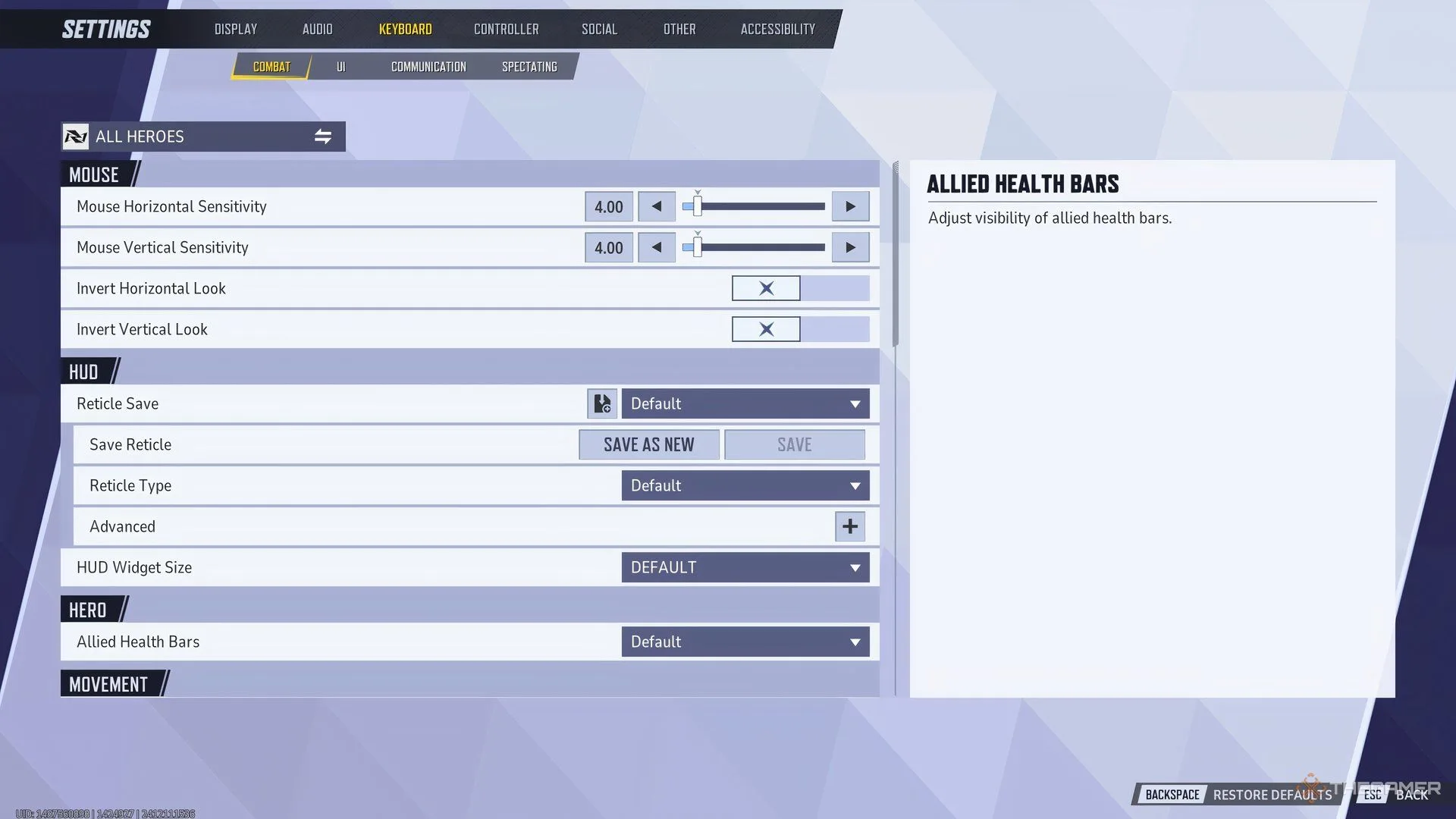
    If you’re getting started with Marvel Rivals, adjusting your mouse sensitivity should be one of the first things you do. However, if you’re unsure where to find this setting, here’s a straightforward guide:

    1. Go to the settings menu, which is represented by a gear icon in the main menu.
    2. Locate this button in the top right corner of the screen.
    3. Click on it to reveal a list of options.
    4. Select "Settings," which is usually the first choice on the list.
    5. A new window will pop up, displaying various options.
    6. Navigate to "Keyboard," the third option from the left.

    In this section, you will see options for both vertical and horizontal mouse sensitivity. Feel free to enter values that you are comfortable with from other games or adjust the slider to find what works best for you. Once you set your preferred sensitivity, jump into the Practice Range or a Quick Match to see if it feels right. If it doesn’t, you can easily adjust it again following the same steps.

    Why Mouse Sensitivity Matters in Marvel Rivals

    In Marvel Rivals, precise aiming is crucial, especially given the game’s rapid pace. Characters move quickly, and players often leap around, quickly charging to various objectives. This fast-paced environment requires you to rapidly switch between targets and eliminate them efficiently.

    It’s essential to be accustomed to your mouse sensitivity so you can anticipate how much to move your mouse to aim accurately at targets on the screen. While the speed at which you can aim is important, it ultimately comes down to how well you can transition between different targets during a fight. Successfully taking out two opponents in quick succession can significantly boost your team’s chances of winning.

    This is why every player should prioritize getting their sensitivity set right before diving into Marvel Rivals, especially if they’re aiming to climb the competitive ranks and excel in the game.