Tag: image generation

  • How To Stop Instagram From Generating AI Images of You

    How To Stop Instagram From Generating AI Images of You

    Instagram has recently launched Muse AI, its proprietary tool for generating images and videos. At first glance, it appears to be a powerful feature for creators eager to bring their ideas to life. However, beneath the surface, there’s a concerning detail that every Instagram user should be aware of.

    Even if you’re not concerned about the increased presence of AI-generated content, you should be alarmed by the fact that someone could be using your images and videos without your knowledge. Yes, it’s possible for others to take your Instagram photos and videos and leverage Muse AI to create AI-generated content using your media.

    What’s particularly alarming is that Instagram doesn’t notify you about this feature, yet you might already be enrolled in it by default. Here’s a quick guide on how to disable this setting to prevent others from using your media for AI creations:

    1. Open Instagram and go to your profile.
    2. Tap the menu icon and select “Settings.”
    3. Navigate to “Privacy” and then choose “Sharing and Reuse.”
    4. Turn off the options for allowing others to reuse your Posts and Reels.

    Why is Muse AI a privacy concern?

    If your profile is public, anyone can incorporate your photos into Muse AI to generate new images or videos. They can do this simply by tagging your profile in their prompts, which allows the AI to reference and use your content without your consent.

    While some creative collaborations could result from this, the potential for misuse is significant. With over three billion active users, the platform inevitably includes bad actors who might generate misleading, harmful, or non-consensual images of others. For example, there have been instances where AI tools were used to create inappropriate, sexualized images of minors, leading to serious concerns about safety and consent.

    The issue isn’t limited to Instagram. Other platforms, like X (formerly Twitter), have faced scrutiny after misuse of AI tools such as Grok, which was exploited to produce non-consensual adult content. In response, some platforms have added restrictions or paywalls to limit misuse, but Instagram’s current approach is more permissive, raising fears about increased risks.

    In conclusion, it’s crucial to safeguard your content. You can block others from reusing your posts, reducing the likelihood of your media being used to generate AI content or non-consensual images. Protecting your digital footprint is straightforward, and taking these steps can help ensure your privacy and prevent potential misuse.

    Remember, within just a minute, you can change your settings to protect yourself. Don’t leave it to chance—take control of your online content now.

  • Midjourney Unveils New Image Model To Compete With GPT-4o

    Midjourney Unveils New Image Model To Compete With GPT-4o

    Initially regarded as one of the leading image generation models in the early AI landscape, MidJourney has seemingly been outpaced by more user-friendly and free tools such as Gemini, ChatGPT, and Bing. The recent upgrade to OpenAI’s GPT-4o model, which offers outstanding image generation and the ability to replicate real photos alongside producing flawless text, has added to MidJourney’s challenges. To remain competitive—especially in light of the Studio Ghibli-inspired AI art trend captivating the internet—MidJourney is introducing a revamped model with numerous enhancements.

    CEO David Holz shared insights on the new V7 model via MidJourney’s official Discord server and in a blog post. According to Holz, the new model is “more intelligent with text prompts” and generates images with “significantly increased” quality and “stunning textures.”

    The new model is designed to produce images much faster, approximately ten times quicker than the existing version, making it ideal for brainstorming and iterative processes. Users can activate the Conversational mode (accessible only on web) to recreate portions of an image without needing to rewrite the entire prompt or enter Edit mode. These images are of relatively lower quality and only cost half of what regular images do.

    One of the most exciting new features for our new V7 model is something we call “Draft Mode.” Draft mode is half the cost and 10 times the speed and it might be the best way to iterate on ideas ever. Try it with voice, think out loud and let our ideas flow like liquid dreams. pic.twitter.com/ANfTMC6Ej1

    — Midjourney (@midjourney) April 4, 2025

    When using the Discord app on a computer or mobile device, the Conversational mode is replaced by a Voice mode, allowing users to “think out loud” and have images generated fluidly, much like flowing dreams. This function is also integrated into the newly launched Draft mode.

    Furthermore, MidJourney V7 can operate in both Relax and Turbo modes, providing high-resolution images (as opposed to Draft mode), with the latter using double the credits for expedited image creation.

    At present, the new V7 model is missing some functionalities, and workflows reliant on upscaling, inpainting, and retexturing will revert to the previous V6.1 model. The V7 model also introduces Personalization, allowing users to save their preferences for image styles. This setup process takes around five minutes and involves choosing from a selection of 200 images to refine preferences.

    MidJourney is currently conducting a community-driven alpha testing phase for the new model and promises additional features in the upcoming 60 days. To test it out, users can type /settings into the chat box on Discord or the web platform, send the message, and then change the default model to V7 from the available settings.

  • I Tested Google’s New AI Tool That Creates Fun Images

    I Tested Google’s New AI Tool That Creates Fun Images

    Using Google's Whisk AI tool with images.
    Google

    Google has introduced a new AI tool named Whisk, designed to streamline the process of image generation. Utilizing Google’s advanced Imagen 3 model, Whisk allows users to create images not just from text prompts but by starting with existing images.

    Currently in an experimental phase, Whisk has a user-friendly interface once you get accustomed to it. According to a blog post from Google, the tool is geared toward “quick visual exploration” rather than producing pixel-perfect imagery.

    The exploration experience of Whisk feels dynamic compared to traditional text-based tools, which often require precise wording to generate an image.

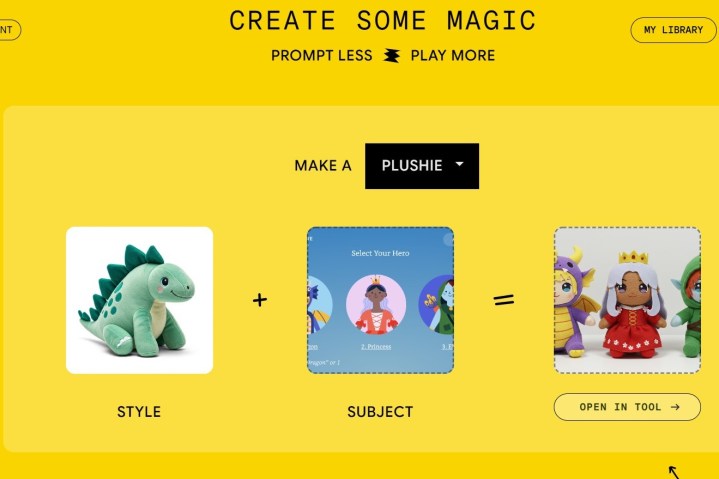
    After you navigate through the introductory pages, which outline key functionalities and provide options for email subscriptions and a privacy policy, you’re taken to the main interface of Whisk. There, you’re greeted with options to choose from various image styles, like a dinosaur plushie or an enamel pin.

    Demonstrating Google Whisk with uploaded images.
    Google

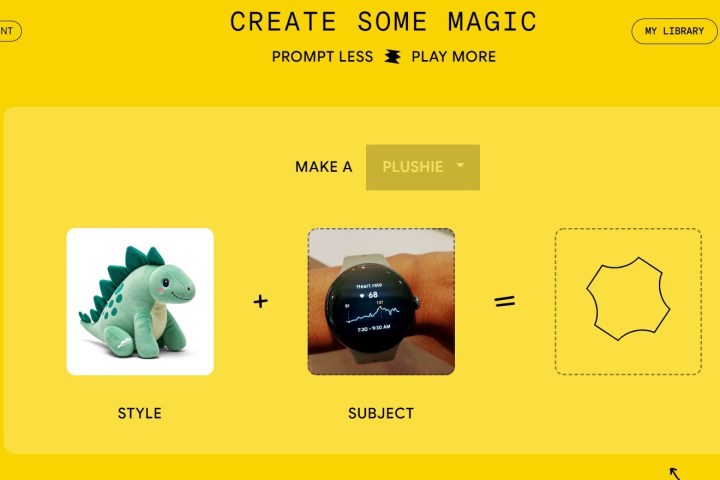
    Next, users can upload an image to serve as their topic. However, I encountered difficulties uploading a photo of a smartwatch. After switching to a more cartoonish image, the process completed swiftly, leading to the creation of plushie representations of three mythical creatures.

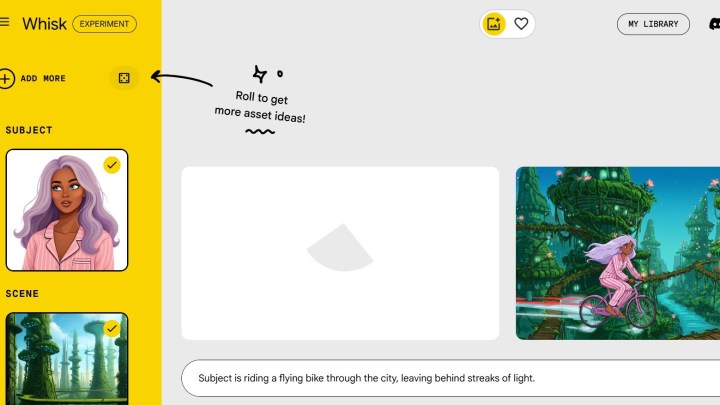
    Upon generating an image, you can enter an editing section that includes a text prompt area. By simply using a prompt like “the character is eating ice cream,” I was able to create more images featuring the same creatures enjoying ice cream cones.

    If you’re inclined to start fresh, you can select the “start from scratch” option, allowing you to upload your own images or enter text. Adding additional context for your characters is possible from the start, and if you find yourself stuck, an “Inspire Me” button is available to help generate ideas.

    Using the Google Whisk AI tool with generated images.
    Google

    The tool features a “My Library” section, where you can access all the images you’ve created. In this area, users have the option to enable or disable the library function if they wish to avoid saving their creations. You can also delete individual items or clear the entire library if needed.

    Whisk shares similarities with the Microsoft Designer tool, which allows for the creation of Funko Pop! figures. However, while Microsoft Designer is limited to text prompts, Whisk offers the flexibility of also starting with images.

    Despite its image-based foundation, Whisk still allows for the addition of text prompts. Google has included this feature in recognition of the tool’s occasional limitations, ensuring users can refine their inputs whenever necessary.