الوسم: I Tried Out Perplexity Assistant

  • Disabling Gemini on Your Android Device: A Quick Guide

    Disabling Gemini on Your Android Device: A Quick Guide

    Many tech companies are pushing AI products and tools onto users aggressively. Google, in particular, has integrated its Gemini AI into Android, replacing Google Assistant. This rapid rollout has raised concerns among users, especially regarding privacy, as AI models rely on user interactions unless opted out. Additionally, some individuals find Gemini to be less dependable than Google Assistant. If you’d like to disable Gemini on your Android device, follow the steps outlined below.

    Disabling Gemini on Android Devices

    The Gemini AI application is part of the Google app on Android, meaning it cannot be uninstalled entirely. However, you can disable it, which will remove it from your app drawer. Be aware that pressing the power button or saying “Hey Google” will still bring up the Gemini interface. Here’s how to turn it off:

    • Open the App Drawer on your Android device and find the “Gemini” app.
    • Press and hold the Gemini app icon, then tap on the “i (info)” icon.
    • Select “Force stop” and then disable the app.

    By following these steps, you’ll disable the Gemini app on your Android device. For a more comprehensive solution, consider replacing Gemini with Google Assistant.

    Switching from Gemini to Google Assistant on Android

    Since the Gemini app cannot be completely removed, you can choose to replace it with Google Assistant. This will prevent you from encountering the Gemini interface throughout your Android experience. Although Google plans to phase out Google Assistant by the end of 2025, you can still swap it for Gemini before that happens.

    • Open the Google app on your Android device and go to your profile.
    • Tap on “Settings” and navigate to “Gemini.”
    • Scroll down and select “Digital assistants from Google.”
    • Here, you can replace Gemini with Google Assistant.

    Disabling Gemini in Gmail, Docs, Sheets, and Slides

    Google has started implementing Gemini within applications like Gmail, Docs, Sheets, and Slides for individual users without charge. While this feature was originally intended for paid Workspace users, Google’s goal is now to encourage widespread adoption. If you’d like to disable Gemini in these applications, follow the instructions below.

    By following the steps in this guide, you can successfully turn off Gemini AI on your Android device. If you wish to remove AI Overviews from Google search results, be sure to check out our detailed guide. AI Overviews can sometimes generate misleading information on various topics. If you’re experiencing issues with Gemini, feel free to share your thoughts in the comments below.

  • Unlocking ChatGPT o3-mini: Your Guide to Free Use

    Unlocking ChatGPT o3-mini: Your Guide to Free Use

    After the launch of DeepSeek’s affordable R1 model, designed to rival OpenAI’s o1 model, OpenAI has rolled out its newest o3-mini reasoning model for all ChatGPT users at no cost. That’s right! Every user of free ChatGPT can access the o3-mini model, though there is a rate limit in place. OpenAI has introduced a “Reason” button next to the message input area in ChatGPT that utilizes the o3-mini model. If you’re unsure how to access this latest feature, simply follow the steps below:

    How to Use ChatGPT o3-mini for Free on the Web

    You can access the o3-mini model with “medium” reasoning capacity for free on ChatGPT. For users subscribed to ChatGPT Plus, there is an ‘o3-mini-high’ model available, which leverages more processing power and additional thinking time. A noteworthy feature of this update is that it allows users to combine web searches with the o3-mini model. Additionally, ChatGPT now displays a cleaned-up reasoning process, but this is not the unfiltered output.

    Keep in mind that file analysis isn’t supported with the reasoning model at this time. Although ChatGPT permits file uploads, the o3-mini model cannot currently analyze files, so you’ll want to remember that. Lastly, you can send up to 10 messages for free each day, depending on the system’s overall load.

    • Visit the ChatGPT website and log in with your free account.
    • Click the “Reason” button to start using the o3-mini model.
    • You can now ask complex questions related to coding, science, math, and more.
    • It’s worth noting that the o3-mini model might not always deliver the correct answer at the “medium” reasoning setting. In our comparison between ChatGPT o1 and DeepSeek R1, we found that even larger reasoning models sometimes faltered on accuracy.
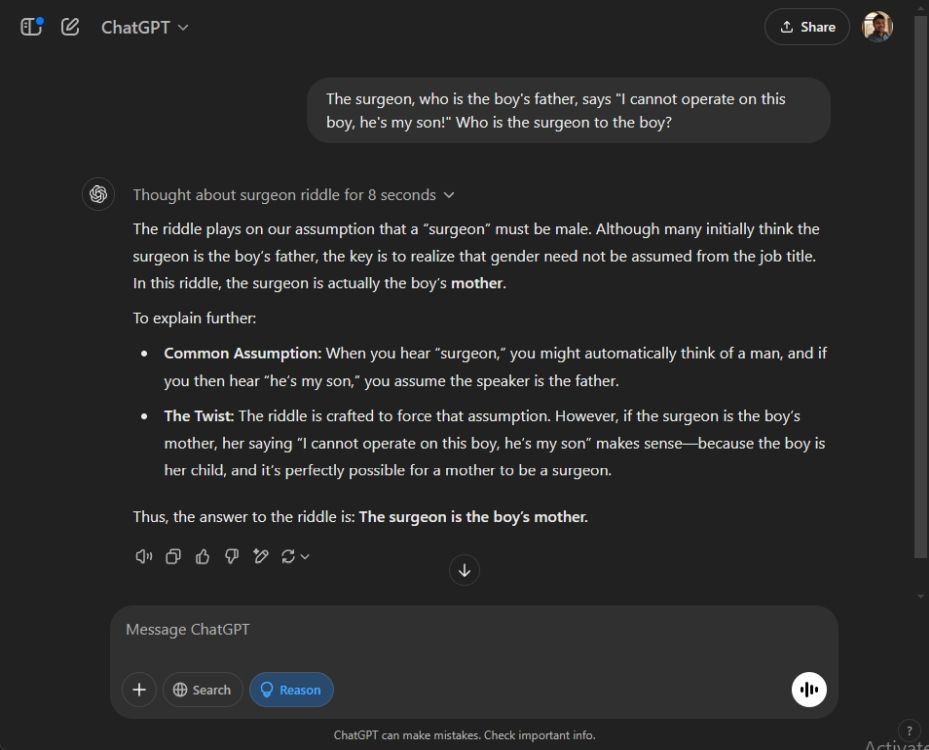
    chatgpt o3 mini responding

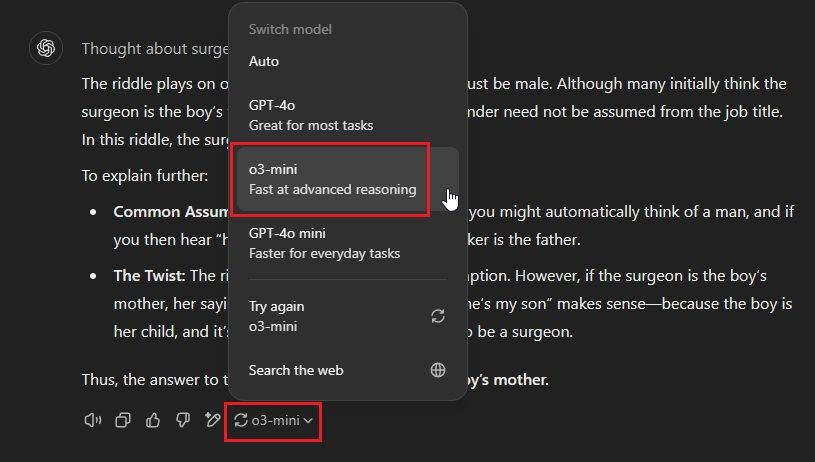
    You can also access the o3-mini model via the regenerate feature. After a response is generated, click on the drop-down menu and select “o3-mini.”

    choose o3 mini in model selector

    How to Use ChatGPT o3-mini for Free on Android and iOS

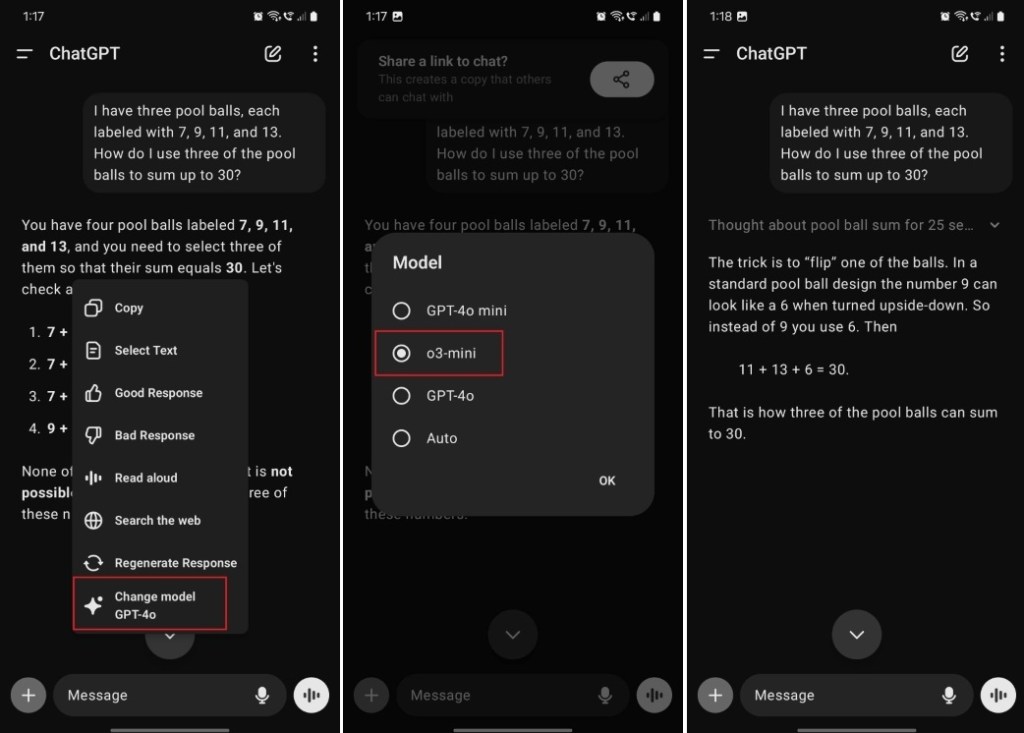
    Currently, the ChatGPT app on Android and iOS does not yet feature the “Reason” button. Therefore, you’ll need to regenerate the response and change the model afterwards. Here’s how to do that:

    • Launch the ChatGPT app on your Android device or iPhone.
    • Enter your question and execute the prompt.
    • Once the response is ready, press and hold the response, then select “Change model.”
    • Choose the “o3-mini” model and hit “OK.”
    • You’ll now receive a response from the o3-mini model.
    using chatgpt o3 mini model for free on android

    How to Use ChatGPT o3-mini on Windows and macOS

    • Open the ChatGPT desktop application on your Windows PC or Mac.
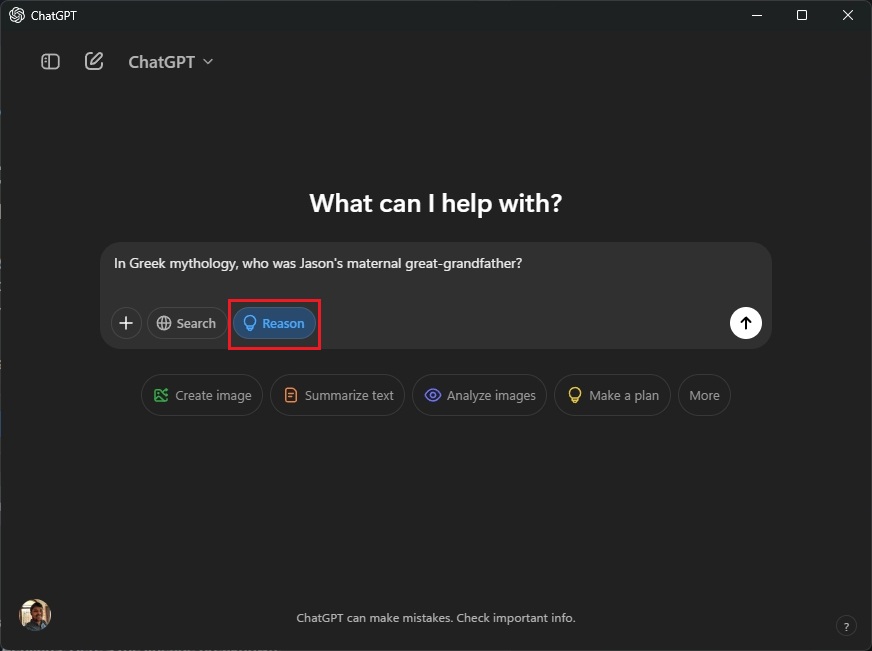
    • Click the “Reason” button and pose your question.
    • As previously mentioned, this will utilize the o3-mini model for the response.
    using chatgpt o3 mini in windows app

    That’s how you can access the o3-mini model for free on ChatGPT. From my own testing of the o3-mini at medium processing power, I found that the model does not quite reach the performance level of OpenAI’s o1 model. However, it appears to outperform GPT-4o and GPT-4o-mini when tackling complex challenges that were previously available to free users.

    So, give the advanced reasoning model a try and share your experience in the comments below!

    Arjun Sha

    I’m passionate about technology, including Windows, ChromeOS, and Android, with a keen interest in security and privacy issues. I love tackling everyday computing challenges.