AI agents are action-oriented systems powered by artificial intelligence designed to execute tasks on behalf of users. Currently, most AI agents need human oversight to ensure that they complete tasks accurately and reliably. However, autonomous AI agents elevate this concept by functioning entirely independently, eliminating the need for human guidance. In this guide, I will explore what Autonomous AI agents are, how they operate, and provide a real-world example to illustrate their capabilities.
What Are Autonomous AI Agents?
Autonomous AI agents are cutting-edge AI systems capable of executing actions without any human intervention. Unlike traditional AI agents, which often require some degree of human monitoring, autonomous AI agents are designed to plan, decide, and act independently. Essentially, these agents are self-directed and possess their own form of autonomy.
These advanced AI agents can interpret their environment by using sensors and data to construct an internal representation of the world. They possess memory, enabling them to remember past data and enhance their performance over time.
Generally, autonomous AI agents are categorized as model-based and goal-based agents, designed to achieve specific targets independently of human oversight. In simple terms, they can navigate complex, multi-step tasks by making decisions without needing human input.
How Do Autonomous AI Agents Work?
Since autonomous AI agents operate independently, their architecture is sophisticated enough to handle a wide range of scenarios. Initially, they contain a perception module that analyzes input data from sensors, APIs, or databases, which helps create an internal representation of the constantly changing environment.
In addition, they leverage a trained knowledge base for reasoning, planning, and decision-making. These systems also perform self-monitoring to identify and rectify errors. Depending on the task, autonomous AI agents may create hierarchical plans to manage uncertainty. Once a goal is established, they execute actions and monitor the outcomes.
This process repeats autonomously until the target is reached. That’s how autonomous AI agents function without requiring human intervention.
Real-World Example of an Autonomous AI Agent
To illustrate the concept of autonomous AI agents, let’s consider AI-powered self-driving cars. Waymo, which began as Google’s Self-Driving Car Project, is a technology that enables fully autonomous vehicles. Waymo cars operate without any human drivers at the wheel, making them a leading example of a completely autonomous ride-hailing service.
Waymo vehicles utilize a sophisticated perception system that collects and processes data from LiDAR, cameras, and radar to create a real-time map of their surroundings. This information empowers the cars to make decisions about stopping, accelerating, steering, and more—completely independently. They navigate through dense traffic and change lanes without any human assistance.
As mentioned earlier, autonomous AI agents prepare for uncertainty, allowing Waymo cars to respond to unpredictable situations, such as pedestrians crossing the road or vehicles making sudden U-turns. Over time, these cars learn from various situations and edge cases, demonstrating their capacity for continuous improvement.
Waymo vehicles operate in real-world environments where passenger safety is paramount. Decisions are made in milliseconds and aren’t always explicitly programmed into the system. According to Google, waymo cars have traveled over 25 million miles autonomously in cities like Phoenix, San Francisco, Los Angeles, and Austin.
Remarkably, Waymo’s self-driving cars have achieved a 92% reduction in bodily injury claims compared to human-operated vehicles. In terms of property damage, there’s an 88% reduction in claims against traditional, human-driven cars.
This represents a physical instance of an autonomous AI agent, but similar concepts apply in digital domains. For example, autonomous AI agents can manage extensive IT systems, identifying security threats and ensuring resources keep a website operational. They can also conduct autonomous financial trading based on risk assessments or serve as digital assistants to schedule meetings and make reservations, all without human intervention.
It’s clear that action-oriented AI agents are paving the way for the next wave of the AI revolution, and we’re already seeing some promising developments. From AI chatbots to agents that can manage your calendar and emails, we’re entering a new era dominated by these intelligent systems. To help you grasp the concept of AI agents better, I’ve detailed the various types of AI agents and highlighted leading companies that are currently deploying these technologies in the market. Let’s dive in.
1. Simple Reflex Agents
At the most basic level are Simple Reflex Agents, which act according to immediate data, relying on simple ‘if-then’ rules. A classic example is a thermostat that activates the heating when the temperature drops below a set threshold—it reacts solely based on the current conditions.
Image Credit: Public domain, via Wikimedia Commons
However, these agents have significant limitations. They only account for present information and do not retain past data or predict future states, acting solely based on current observations.
Simple Reflex Agents lack memory and are only effective in fully observable environments—situations where all the needed information is available to make a decision. Consequently, they do not maintain an internal representation of the world.
2. Model-Based Reflex Agents
Model-Based Reflex Agents build on the capabilities of Simple Reflex Agents by maintaining an internal model of their environment, which provides them with memory. These agents track their actions and the accompanying impact on their world, which enables them to update their internal representation. For example, a self-driving car can remember the positions of other vehicles even as they shift.
By leveraging both past observations and current data, these agents can create a more comprehensive internal picture of their environment, enabling them to function effectively in partially observable settings.
3. Goal-Based Agents
As their name implies, Goal-Based Agents are focused on achieving specific outcomes. They consider future actions and strategize to bring themselves closer to their ultimate objectives. These agents perform searches, plan actions, and evaluate various action sequences that lead them to the desired endpoint.
An example would be a GPS system that evaluates all potential routes to a destination, taking into account factors such as distance, time, and traffic conditions, to determine the best path.
4. Utility-Based Agents
Utility-Based Agents are similar to Goal-Based Agents but aren’t limited to a singular goal. Unlike the binary approach of Goal-Based Agents, these agents assess various scenarios and their potential outcomes based on diverse preferences, ultimately selecting the course of action that maximizes their “utility.”
This method involves assigning numerical values to different actions and opting for the one with the highest utility score. Utility-Based Agents excel in uncertain environments. For example, an AI-driven trading system aims to maximize profits while also weighing factors like user risk tolerance and current market conditions.
In essence, Utility-Based Agents evaluate various preferences and outcomes before making decisions, striving to find optimal actions rather than just achieving a specific goal.
5. Learning Agents
Learning Agents are designed to improve over time by learning from their past experiences. One of their strengths is their ability to adapt to unfamiliar environments by refining their actions based on feedback. A critical component of Learning Agents is the “critic,” which evaluates the agent’s performance.
Image Credit: Vector: Public domain, via Wikimedia Commons
For instance, think about how spam filters operate. Initially based on a basic set of rules, spam filters improve their performance over time as users mark emails as spam, allowing the agent to learn from this feedback and adapt its responses.
6. Hierarchical Agents
Hierarchical Agents break down complex objectives into smaller, more manageable sub-goals. Many intricate tasks necessitate multi-step problem-solving, and these agents organize these tasks into a hierarchy, delegating lower-level tasks to specialized agents while higher-level agents guide the overall strategy.
For example, if you ask an AI to prepare dinner, the high-level agent would outline the steps (like making pasta and sauce) and delegate specific tasks like boiling water or cooking ingredients.
7. Multi-Agent Systems
Multi-Agent Systems (MAS) consist of various autonomous agents working collaboratively to achieve shared objectives. These systems facilitate communication and cooperation among agents, allowing them to interact and coordinate their actions.
Each agent operates independently, equipped with its own decision-making ability, but all must adhere to a common protocol to prevent conflicts and ensure collective success. For example, in a supply chain, multiple agents might monitor inventory, generate procurement reports, and find optimal shipping routes.
Current AI Agents by Leading Tech Companies
The market is alive with numerous AI agents. Companies like OpenAI, Google, Microsoft, Anthropic, Salesforce, and others are advancing AI frameworks to harness the full potential of agentic AI. Here are some noteworthy AI agents available today.
OpenAI
OpenAI has launched a consumer-oriented Operator AI agent designed to automate tasks across the web. It can engage with web browsers to perform functions like filling out forms or ordering groceries. While it streamlines many tasks, it isn’t fully autonomous yet, as users still need to finalize payments and handle CAPTCHAs.
Operator AI Agent | Image Credit: OpenAI via YouTube
This agent likely functions as both a Goal-based and Learning agent, guiding actions while learning from website interactions. OpenAI’s Deep Research agent performs intricate multi-step tasks, analyzing text, images, and PDFs to create comprehensive reports, blending Goal-based, Learning, and Hierarchical functionalities.
OpenAI has also introduced the latest o3 and o4-mini systems, which function not merely as AI models but as intelligent systems that engage with various tools like web searches, interpreters, and image analysis. These can be categorized as Model-based and Goal-based agents.
Additionally, OpenAI’s Codex CLI tool allows developers to read, modify, and execute code from the terminal, making it capable of debugging, adding features, and editing files—qualifying it as a Goal-based agent integrated with Learning capabilities.
Google
Google has introduced the Deep Research AI agent via Gemini, which operates similarly to OpenAI’s offerings. It can canvas the web, determine necessary information, and assimilate it to produce detailed reports on various topics. This agent also falls into the Goal-based and Learning category.
Project Mariner | Image Credit: Google via YouTube
Moreover, Google is working on Project Mariner, aimed at automating tasks within the Chrome browser much like OpenAI’s Operator AI agent. Currently in beta testing among selected users, it will be launched soon.
Additionally, Google has revealed the new Agent2Agent (A2A) protocol, designed to facilitate communication among multiple AI agents, paving the way for Multi-Agent Systems.
Anthropic
Following in OpenAI’s footsteps, Anthropic has introduced a Computer Use AI agent currently in beta, which can engage with desktop environments and perform various operations. It can click, type, and manage files at the operating system level, making it a Goal-based and Learning agent.
Claude Computer Use | Image Credit: Anthropic
Additionally, Anthropic has launched a Research tool integrated with Workspace, capable of connecting to Gmail, Calendar, and Drive to pull insights. Another development, Claude Code, can handle coding tasks in the terminal, allowing for file editing and Git interactions—a feature that also characterizes it as a Goal-based agent.
The company has also created the Model Context Protocol (MCP), an open standard for linking AI models with external data sources, enhancing AI agents’ operational capabilities on services without APIs. While not an agent itself, it enables communication between AI models and other resources.
Microsoft
On the consumer front, Microsoft has unveiled several new agents for its Copilot chatbot, including a Deep Research agent that compiles thorough reports on specified topics and Copilot Actions that can reserve tickets, make bookings, and purchase online—though limited to partner sites.
For enterprise solutions, Microsoft has recently launched a Computer Use AI agent within Copilot Studio, enabling direct interactions with websites and desktop applications without requiring specialized APIs. They’ve also introduced a Security Copilot agent designed to assist with phishing alerts, data protection, and identity management.
The variety of Copilot agents allows for custom AI agent development tailored to business workflows, making integration with MCP servers, APIs, and external data sources straightforward for task automation.
Salesforce
Salesforce, too, has developed Agentforce for enterprise clients, offering customizable autonomous AI agents. Business users can create, deploy, and oversee multiple AI agents on the Agentforce platform for lead generation, sales enhancement, and marketing management.
Unlike Microsoft’s Copilot, Salesforce’s Agents can autonomously perform actions triggered by specific events or predefined conditions, such as updating database records, sending emails, scheduling meetings, and resolving open cases.
These are the various types of AI agents, along with current offerings in the market. As technology progresses, AI agents are set to become integral to online interactions, both for consumers and businesses alike.
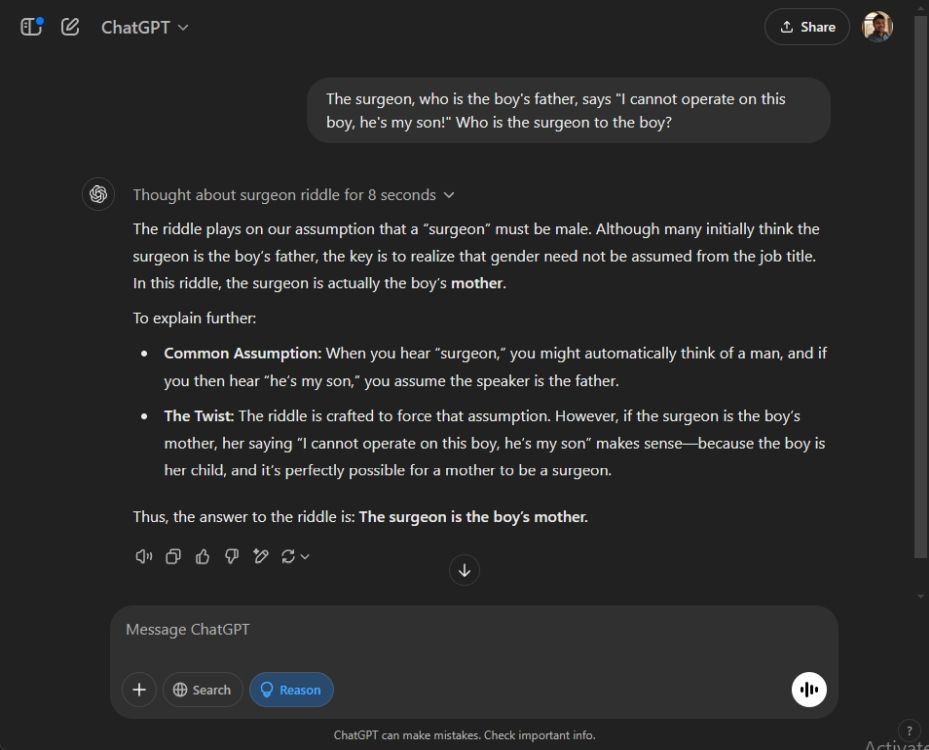
After the launch of DeepSeek’s affordable R1 model, designed to rival OpenAI’s o1 model, OpenAI has rolled out its newest o3-mini reasoning model for all ChatGPT users at no cost. That’s right! Every user of free ChatGPT can access the o3-mini model, though there is a rate limit in place. OpenAI has introduced a “Reason” button next to the message input area in ChatGPT that utilizes the o3-mini model. If you’re unsure how to access this latest feature, simply follow the steps below:
How to Use ChatGPT o3-mini for Free on the Web
You can access the o3-mini model with “medium” reasoning capacity for free on ChatGPT. For users subscribed to ChatGPT Plus, there is an ‘o3-mini-high’ model available, which leverages more processing power and additional thinking time. A noteworthy feature of this update is that it allows users to combine web searches with the o3-mini model. Additionally, ChatGPT now displays a cleaned-up reasoning process, but this is not the unfiltered output.
Keep in mind that file analysis isn’t supported with the reasoning model at this time. Although ChatGPT permits file uploads, the o3-mini model cannot currently analyze files, so you’ll want to remember that. Lastly, you can send up to 10 messages for free each day, depending on the system’s overall load.
Visit the ChatGPT website and log in with your free account.
Click the “Reason” button to start using the o3-mini model.
You can now ask complex questions related to coding, science, math, and more.
It’s worth noting that the o3-mini model might not always deliver the correct answer at the “medium” reasoning setting. In our comparison between ChatGPT o1 and DeepSeek R1, we found that even larger reasoning models sometimes faltered on accuracy.
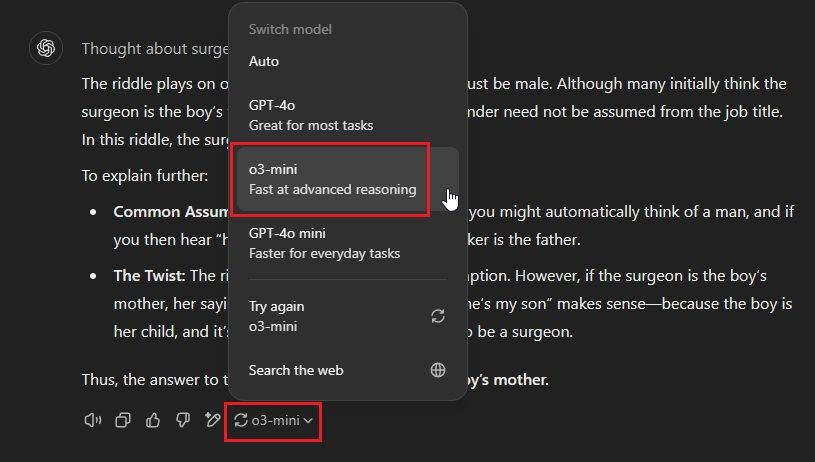
You can also access the o3-mini model via the regenerate feature. After a response is generated, click on the drop-down menu and select “o3-mini.”
How to Use ChatGPT o3-mini for Free on Android and iOS
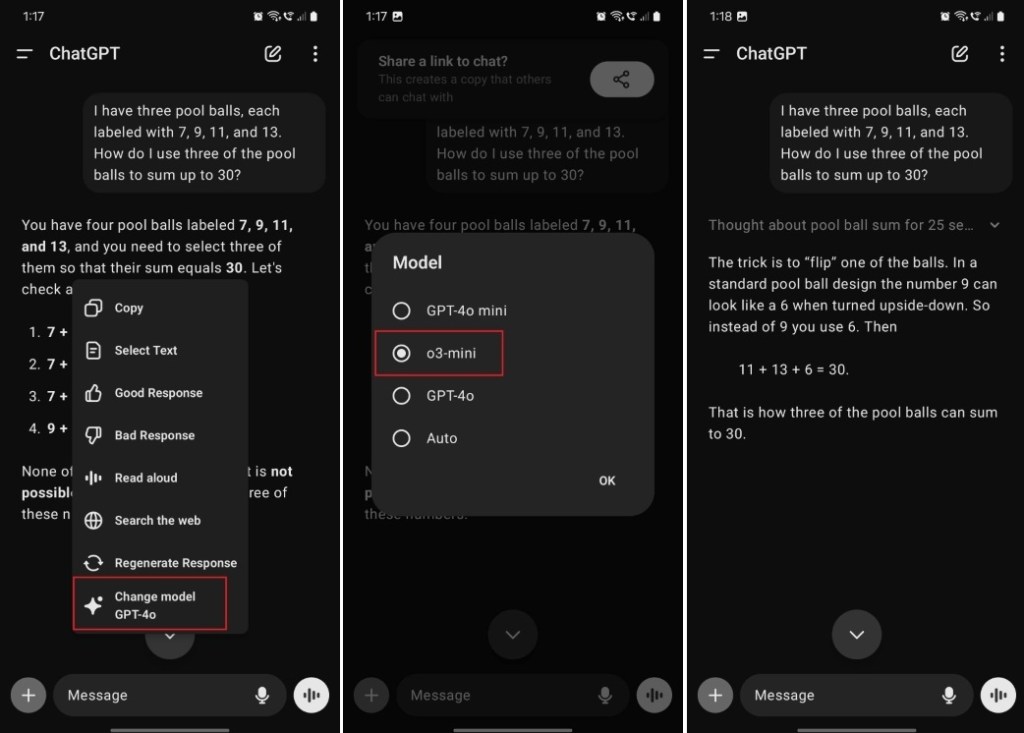
Currently, the ChatGPT app on Android and iOS does not yet feature the “Reason” button. Therefore, you’ll need to regenerate the response and change the model afterwards. Here’s how to do that:
Launch the ChatGPT app on your Android device or iPhone.
Enter your question and execute the prompt.
Once the response is ready, press and hold the response, then select “Change model.”
Choose the “o3-mini” model and hit “OK.”
You’ll now receive a response from the o3-mini model.
How to Use ChatGPT o3-mini on Windows and macOS
Open the ChatGPT desktop application on your Windows PC or Mac.
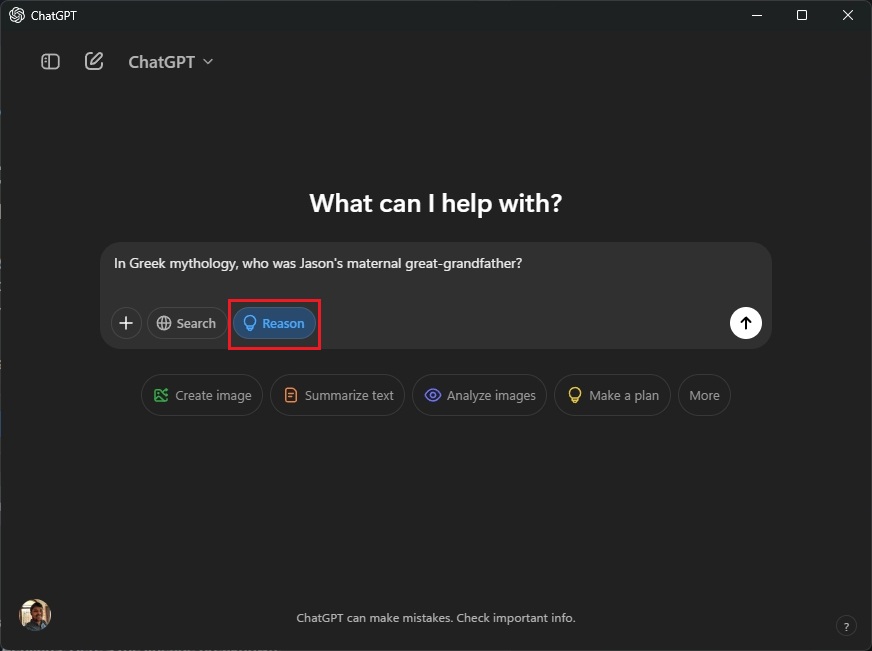
Click the “Reason” button and pose your question.
As previously mentioned, this will utilize the o3-mini model for the response.
That’s how you can access the o3-mini model for free on ChatGPT. From my own testing of the o3-mini at medium processing power, I found that the model does not quite reach the performance level of OpenAI’s o1 model. However, it appears to outperform GPT-4o and GPT-4o-mini when tackling complex challenges that were previously available to free users.
So, give the advanced reasoning model a try and share your experience in the comments below!
Arjun Sha
I’m passionate about technology, including Windows, ChromeOS, and Android, with a keen interest in security and privacy issues. I love tackling everyday computing challenges.
Perplexity has introduced its inaugural AI assistant for Android devices, known as the Perplexity Assistant. Competing head-to-head with Google Assistant, this new tool offers support for various functions, reminders, and some intriguing features. I decided to swap out Gemini (and Google Assistant) on my Galaxy S23 for Perplexity Assistant to discover what fresh experiences it offers. I must admit, I was quite impressed, and it made me recognize the shortcomings of Gemini. Here’s why I feel this way.
Perplexity Assistant: Making Calls, Sending Messages, and Emails
Having relied on Gemini (previously Google Assistant) for many years, my routine tasks typically involve making calls or sending texts. I kicked off my testing of Perplexity Assistant by requesting it to make a call after granting the necessary permissions. To my surprise, it outperformed Google Assistant.
Perplexity Assistant doesn’t waste time narrating its response before dialing. Instead, it directly initiates the call, making it nearly instantaneous and saving invaluable time. I appreciate this seamless, latency-free experience, and I love how it automatically selects the correct contact.
I then asked Perplexity Assistant to identify the movies nominated for the Oscars in 2025 and send the list to a contact. It smoothly integrated with my default messaging app and prepared to transmit the information generated by Perplexity via SMS.
This shows that Perplexity Assistant can keep the conversation going, retain context, and execute multiple tasks simultaneously. Although Gemini on Android can also perform multiple actions through the Utilities extension, I found it to be less reliable in practice.
I should note that while Perplexity Assistant does not currently support WhatsApp, it functions perfectly for emailing as well.
In conclusion, when it comes to basic calling and messaging, I found Perplexity Assistant superior to Google/Gemini Assistant. It doesn’t yet support nicknames for contacts, but I anticipate that Perplexity will enhance this feature in future updates.
Setting Smart Reminders with Perplexity Assistant
While Google Assistant allows you to set reminders, Perplexity Assistant takes it up a notch with intelligent reminders. You can provide descriptive prompts like, “remind me to watch the next season of Squid Games when it’s released,” and Perplexity Assistant will take care of the rest.
Thanks to advanced AI integration and web searches, Perplexity can discover dates and set reminders for you, sparing you the hassle of doing it manually. This feature exemplifies the strength of an AI-driven voice assistant. Just keep in mind that reminders are managed within the Perplexity app and don’t sync with your calendar.
Screen Analysis with Perplexity Assistant
While Google offers an impressive Circle to Search tool on Android, Perplexity Assistant excels at screen analysis too. You can activate it and say, “What am I looking at?” and it will analyze the active screen, providing an instant response. This is particularly useful when reading an article or PDF and seeking further understanding of the content.
Asking Perplexity Assistant to identify a person
You can also command it to “fact-check this article” or “explain this diagram.” The possibilities for this function are numerous. While Gemini on Android has a similar capability, it requires taking a screenshot before processing visual information, which can be cumbersome. I would consider screen analysis to be one of the standout features of Perplexity Assistant.
Engaging Perplexity Assistant Through Your Camera
Perplexity Assistant comes equipped with camera functionality, enhancing its utility. You can easily activate Perplexity Assistant and click the camera icon to show it what you’re observing. For example, point it at a book and ask for similar recommendations, or scan famous landmarks during your travels to gather more information.
Solving a math problem with Perplexity Assistant
In essence, you can process any visual information in real time. This is somewhat akin to ChatGPT’s Live Video mode, which allows for real-time interaction with the AI assistant based on what you show it. However, it’s important to note that Perplexity Assistant does not facilitate back-and-forth conversations.
Summarizing Notifications with Perplexity
Following the launch of AI-powered Notification Summary with iOS 18, Perplexity Assistant has now brought a notification summarization feature to Android, ahead of Google. You can simply say, “update me on my notifications,” and Perplexity will summarize all the vital notifications for you. It’s a slick feature that performed flawlessly on my Android device. Do remember to grant notification access to Perplexity to use this feature.
Booking Uber and Restaurants with Perplexity Assistant
Perplexity Assistant can also assist in booking Uber rides. Just say, “get me an Uber to [location],” and it will manage the booking for you—granted you’ve enabled location permissions. You can likewise use it to find directions and navigate without delay by launching Google Maps and opening the navigation screen immediately.
You can also make restaurant reservations through Perplexity Assistant. It can help you locate nearby eateries, provide recommendations, and even book a table for you.
Searching and Playing Songs and Videos
Like Google Assistant, Perplexity Assistant enables you to search for and play songs and videos. Nevertheless, Perplexity offers a unique twist by allowing descriptive prompts. For instance, you might say, “play the final song from Interstellar,” and it will understand your request, playing the exact track you’re looking for.
During my testing, I asked it to play the suspenseful music from The Social Network, and it correctly identified “Hand Covers Bruise.” Impressive!
You don’t have to mention the song or album title—just describe it, and Perplexity will do its best to find it for you. It connects with Spotify to play songs and uses YouTube for video content.
Overall, I found the Perplexity Assistant to be quite impressive, especially for its first release. It manages to get a lot of things right from the outset. I appreciate that it focuses on actions while minimizing unnecessary speech.
That said, it currently lacks support for several popular applications like Google Keep, Calendar, and WhatsApp. However, I foresee that with subsequent updates, Perplexity Assistant has the potential to become a strong contender to replace Google Assistant on Android devices.