الوسم: Home Security

  • Do Blink cameras require a monthly fee?

    Do Blink cameras require a monthly fee?

    In recent years, home security has taken on a new dimension with the advent of smart cameras. Blink, a widely recognized brand under Amazon, has made a name for itself in the arena of home surveillance. As more people opt for these devices, a common question arises: Do Blink cameras require a monthly fee? In this article, we will explore the answer, detailing the features and subscription options of Blink cameras.

    Understanding Blink’s Pricing Structure

    No Mandatory Monthly Fee

    One of the standout features of Blink cameras is that they do not impose a mandatory monthly fee for basic functionality. Users can enjoy many of the camera’s core features without entering into a subscription plan. Here’s what you can expect:

    • Live Streaming: Access real-time video feeds from the camera via the Blink app.
    • Motion Alerts: Receive notifications on your device whenever motion is detected.
    • Video Recording: Record clips when motion is detected and store them on the cloud or locally, depending on your setup.

    Optional Subscription Plan

    While Blink cameras do not require a monthly fee for basic usage, they do offer an optional subscription plan called Blink Subscription Plan. This service comes with enhanced features that may appeal to users looking for more comprehensive options.

    • Cloud Storage: With the subscription, users get access to cloud storage, allowing them to store and review recorded clips for a longer duration.
    • Extended Video History: Without subscribing, users can access the last 60 seconds of motion-activated clips. The plan allows access to stored videos for an extended period.
    • Multiple Camera Support: The subscription is beneficial for users with multiple Blink cameras, as it offers an easier way to manage storage across devices.

    Pricing for Blink Subscription Plan

    The Blink subscription comes at a reasonable price, making it accessible to many users. Here’s a breakdown of the costs:

    • Single Camera Plan: Approximately $3 monthly, providing cloud storage for one camera.
    • Multi-Camera Plan: About $10 monthly for up to 10 cameras, making it ideal for comprehensive home security setups.

    Free Trial Offering

    New users can often take advantage of a free trial period when signing up for the Blink Subscription Plan. This trial allows users to experience the benefits of cloud storage and extended video history without any commitment.

    Local Storage Options

    Sync Module with USB Drive

    For those who prefer not to pay a monthly fee, Blink cameras offer an alternative: local storage through a Sync Module equipped with a USB thumb drive. This feature allows users to store video clips locally, bypassing the need for cloud services entirely.

    • Cost-Effective: This option avoids ongoing fees, making it a one-time investment.
    • Immediate Access: Videos can be accessed quickly and securely from connected devices.

    Limitations of Local Storage

    While local storage is a viable option, it does come with some limitations compared to a subscription:

    • Manual Management: Users need to manage storage space actively, ensuring that available capacity is not exceeded.
    • Reduced Features: Users relying solely on local storage may miss out on some of the cloud-based features and conveniences, such as remote access to recordings.

    Choosing the Right Option

    When deciding whether to opt for a Blink camera with or without the subscription plan, consider the following factors:

    • Number of Cameras: If you plan to use multiple cameras, the monthly subscription may be more convenient.
    • Storage Needs: Evaluate how much storage you require for recorded footage.
    • Budget: Weigh the costs of the subscription against the one-time investment of local storage.

    Overall, Blink cameras provide flexibility, allowing each user to choose the model that best fits their security needs and budget constraints. Whether opting for local storage or taking advantage of cloud services, homeowners can enjoy peace of mind, knowing their properties are being monitored effectively.


  • What are the best cameras to put around your house?

    When it comes to home security, installing cameras around your property is an effective way to enhance safety and monitor activity. With a multitude of options available today, choosing the right ones for your home can be overwhelming. Below, we will explore some of the best cameras suited for indoor and outdoor use, taking into account features, reliability, and user satisfaction.

    Types of Security Cameras

    1. Indoor Cameras

    Indoor cameras are essential for monitoring the interior of your home. They can help keep an eye on kids, pets, or any unusual activity when you’re away.

    • Nest Cam Indoor

      • Features: 1080p HD video, night vision, two-way audio, Nest Aware service.
      • Best for: Integration with other smart devices and home automation.

    • Logitech Circle 2

      • Features: 1080p HD video, a wide 180-degree field of view, weatherproof design for flexibility.
      • Best for: Versatility in placement, both indoor and outdoor.

    2. Outdoor Cameras

    Outdoor cameras are built to withstand the elements while providing the necessary surveillance to deter intruders.

    • Ring Spotlight Cam

      • Features: 1080p HD video, night vision, built-in siren, and spotlight.
      • Best for: Active deterrence with features that allow you to interact with visitors remotely.

    • Arlo Pro 3

      • Features: 2K video resolution, color night vision, two-way audio, and a wireless design.
      • Best for: High-quality image clarity and flexibility in positioning due to its wireless capabilities.

    Essential Features to Look For

    When selecting the best security cameras for your home, consider the following features:

    Resolution

    • Higher resolution cameras (1080p or higher) provide clearer images, making it easier to identify faces or license plates.

    Field of View

    • A wider field of view means a larger surveillance area without needing multiple cameras. Look for models offering at least 130 degrees.

    Night Vision

    • Essential for monitoring at night, infrared night vision lets you see clearly in low-light conditions.

    Two-Way Audio

    • This feature allows you to communicate through the camera, which can be useful for interacting with visitors or pets.

    Motion Detection

    • Many modern cameras come with motion detection technology, sending alerts when activity is detected.

    Smart Features

    Integrating smart technology into your security system enhances functionality. Consider models compatible with:

    • Smart Assistants: Such as Amazon Alexa or Google Assistant for voice control.
    • Mobile Applications: For remote live streaming and notifications.
    • Cloud Storage: For easy access to recorded footage.

    Installation Considerations

    Choosing the right cameras is only part of the equation; proper installation ensures they work at their best.

    • Positioning: Aim for angles that cover critical entry points such as doors and windows.
    • Height: Place cameras high enough to avoid tampering but at an angle that captures faces.
    • Lighting: Ensure cameras are positioned to minimize glare and maximize visibility.

    Recommended Combos for Full Coverage

    To achieve comprehensive surveillance around your home, consider a combination of indoor and outdoor cameras. Here’s a suggested setup:

    • 1 Indoor Camera in the living room.
    • 2 Outdoor Cameras for front and back entry points.
    • 1 Additional Camera for monitoring the garage or any side entrances.

    With the right cameras in place, you can significantly improve your home’s security, keeping your loved ones and belongings safe. Be sure to evaluate your specific needs and budget to find the best solutions for your surroundings.

  • Do home security cameras need Wi-Fi?

    Do home security cameras need Wi-Fi?

    Home security cameras have become an essential part of modern home safety systems. They allow homeowners to monitor their property in real-time and capture critical footage. However, a common question arises: do these cameras really require Wi-Fi? This article explores different types of security cameras and their connectivity requirements.

    Understanding Wireless Security Cameras

    Wireless security cameras are popular due to their flexibility and ease of installation. However, the term "wireless" can be misleading. While these cameras do not require physical cables for video transmission, many still depend on Wi-Fi to function optimally.

    Advantages of Wi-Fi Security Cameras

    Wi-Fi-enabled security cameras come with several benefits, including:

    • Remote Access: Users can view live feeds and recorded footage from anywhere using a smartphone or tablet.
    • Cloud Storage Options: Many Wi-Fi cameras offer cloud storage solutions, ensuring that footage is stored securely and can be accessed from any device.
    • Integration with Smart Home Devices: Wi-Fi cameras can often be integrated with other smart devices, enhancing home automation systems.

    Do All Security Cameras Require Wi-Fi?

    While many modern security cameras require Wi-Fi, others do not. Understanding the types of cameras available can help in deciding what suits your needs.

    Types of Security Cameras

    1. Wi-Fi Cameras

    These cameras rely on an internet connection to work effectively. They send streams of data over the network, allowing for remote monitoring.

    • Features:

      • Cloud storage access
      • Mobile app compatibility
      • Often include motion detection alerts

    2. Wired Cameras

    Wired security cameras connect directly to a recording device, such as a DVR or NVR, using coaxial or Ethernet cables.

    • Advantages:

      • More reliable connection since they are less susceptible to signal interference
      • Typically, these systems can work without an internet connection
      • Often have higher-quality video transmission

    3. Local Storage Cameras

    Some cameras store footage locally on SD cards rather than relying on Wi-Fi for streaming and storage.

    • Benefits:

      • No internet dependency for recording and playback
      • Reduced risk of hacking since data is stored offline

    4. Cameras with SIM Card Capability

    Certain security cameras come with slots for SIM cards, which allow them to connect to cellular networks instead of relying on Wi-Fi.

    • Key Features:

      • Ideal for places with weak or no internet signals
      • Can be used for remote or mobile surveillance

    Factors to Consider When Choosing a Home Security Camera

    When deciding on a home security camera, consider the following aspects:

    • Location: If your property is in an area with good Wi-Fi coverage, a Wi-Fi camera may be ideal. However, in rural or signal-challenged areas, wired or SIM-based systems might be more effective.
    • Installation Complexity: Wireless cameras are generally easier to install compared to their wired counterparts, which may require professional installation.
    • Budget: Understand your budget constraints. Wi-Fi cameras might have additional costs related to cloud storage subscriptions, while wired systems generally involve one-time installation costs.

    Final Thoughts on Home Security Cameras and Wi-Fi

    The need for Wi-Fi in home security cameras ultimately depends on the specific type and intended use of the camera system. Understanding the differences among camera types can help you make an informed decision that meets your home security needs. Whether you’re looking for high-tech solutions or straightforward monitoring options, there are various systems available to suit your requirements.

  • What is the best DIY home security camera system?

    What is the best DIY home security camera system?

    In an age where home safety is a top priority, a DIY home security camera system can provide reliable monitoring without breaking the bank. With numerous options available, it’s important to identify which system is best suited for your needs. Below, we explore some of the top contenders, their features, and the factors to consider when choosing a system.

    Key Features to Consider

    When selecting a DIY home security camera system, consider the following key features:

    Video Quality

    • Resolution: Look for systems that offer at least 1080p resolution for clear and detailed images.
    • Night Vision: Ensure the cameras have infrared capabilities for night monitoring, allowing visibility even in low light conditions.

    Connectivity

    • Wi-Fi Enabled: Systems that connect to your home Wi-Fi allow for easier access to live feeds and stored videos.
    • App Integration: Choose cameras that come with mobile apps for remote viewing, notifications, and quick management.

    Storage Options

    • Cloud Storage: Many systems offer cloud storage plans, enabling you to save footage without worrying about local storage limitations.
    • Local Storage: Some users prefer systems with local storage options, such as SD cards or NVR (Network Video Recorders).

    Installation

    • Ease of Setup: Look for systems that offer straightforward installation instructions and minimal wiring.
    • Flexibility: Ensure the system allows you to add more cameras easily in the future.

    Top DIY Home Security Camera Systems

    Here are a few popular DIY security camera systems that have received positive reviews for their performance, usability, and features:

    1. Ring Stick Up Cam

    • Resolution: 1080p HD video
    • Features:

      • Battery and plug-in power options
      • Two-way audio for communication
      • Customizable motion zones
    • Storage: Cloud storage with subscription plans

    2. Arlo Pro 4

    • Resolution: 2K HDR video quality
    • Features:

      • Color night vision
      • Built-in spotlight and siren
      • Smart home compatibility (works with Amazon Alexa, Google Assistant)
    • Storage: Cloud and local storage options available

    3. Wyze Cam v3

    • Resolution: 1080p HD video
    • Features:

      • Color night vision
      • Waterproof design for outdoor use
      • Motion detection zones and alerts
    • Storage: Free cloud storage for 14 days; support for local recording with microSD

    Additional Considerations

    When deciding on the best DIY security camera system, here are more factors to think about:

    Pricing

    • Budget-Friendly Options: Consider systems that fit your financial plan without sacrificing essential features.
    • Subscription Costs: Be aware of ongoing costs for cloud storage or advanced features.

    Customer Support

    • Warranty: Look for systems that offer a warranty or satisfaction guarantee.
    • Technical Assistance: Choose brands that provide robust customer support options, including live chat, phone assistance, and online resources.

    User Reviews

    • Research Feedback: Read customer testimonials to gauge reliability and performance. Websites like Amazon, Best Buy, and specialized tech review sites can provide insight into user experiences.

    Final Thoughts

    With the right DIY security camera system, you can enhance your home’s safety efficiently and effectively. By thoroughly evaluating available options and focusing on essential features, you’ll be able to select a system that meets your unique needs and preferences.

  • Is wired cameras better than wireless?

    Is wired cameras better than wireless?

    When it comes to security systems, the debate between wired and wireless cameras is an ongoing one. Both options come with their own set of advantages and disadvantages, making it essential for users to assess their specific needs. This article explores the key differences between wired and wireless cameras, helping you make an informed decision for your security setup.

    Understanding Wired Cameras

    Wired cameras have been a long-standing choice for both residential and commercial security systems. They operate through cables, transmitting video and audio signals directly to a recording device or monitor.

    Advantages of Wired Cameras

    • Reliability: Wired cameras offer consistent video quality without interruptions. Since they are connected directly via cables, there’s no risk of signal loss due to interference.

    • Power Supply: These cameras are usually powered directly through the cables, meaning no need to worry about battery life or changing batteries frequently.

    • Security: Wired systems are generally perceived as more secure against hacking since they don’t rely on wireless signals that can be intercepted.

    • No Interference: Unlike wireless cameras, wired cameras are not susceptible to interference from other electronic devices or Wi-Fi congestion.

    Disadvantages of Wired Cameras

    • Installation Complexity: The installation process can be cumbersome and may require professional assistance, especially if wiring needs to be installed throughout a large area.

    • Limited Placement Flexibility: Due to the reliance on cables, there’s a restriction on where the cameras can be placed, which may limit the coverage area.

    • Cost of Installation: The need for cabling and labor can increase upfront costs significantly compared to wireless systems.

    Exploring Wireless Cameras

    Wireless cameras have surged in popularity over the past few years. They transmit data through Wi-Fi or other wireless communication methods, allowing for more flexible installation.

    Advantages of Wireless Cameras

    • Easy Installation: Wireless cameras are generally easier to set up. Many models come with plug-and-play features, enabling users to simply mount the camera and connect it to a Wi-Fi network.

    • Flexibility in Placement: Without the need for extensive wiring, these cameras can be placed in various locations, making it easier to cover all angles of your property.

    • Mobile Access: Many wireless security systems offer smartphone integration, allowing users to monitor their cameras in real-time, receive alerts, and review recordings from anywhere.

    • Aesthetic Appeal: Wireless cameras can be less intrusive and the absence of visible wiring can make them more visually appealing.

    Disadvantages of Wireless Cameras

    • Signal Interference: Wireless cameras can suffer from signal interference, which may affect video quality. Obstructions, such as walls or other electronic devices, can weaken the signal strength.

    • Battery Dependency: Some wireless cameras operate on battery power, necessitating regular battery changes or recharging to avoid downtime.

    • Vulnerability to Hacking: Wireless signals can be intercepted, making wireless systems potentially more vulnerable to unauthorized access if not properly secured.

    Key Considerations for Choosing Between Wired and Wireless Cameras

    When deciding between wired and wireless cameras, consider the following factors:

    • Installation Environment: Assess whether you can easily run cables through your property.
    • Monitoring Needs: Determine if remote access and mobile notifications are essential for your security setup.
    • Budget: Keep an eye on both initial and long-term costs.
    • Security Requirements: Understand how secure you need your system to be.
    • Future Upgrades: Consider if you might want to expand your system in the future.

    Regardless of which technology you choose, the ultimate goal is to create a secure environment. Evaluate your individual needs to find the best fit for your security solution.

  • Ring’s Smart Video Search Uses AI To Quickly Check Motion History

    Ring’s Smart Video Search Uses AI To Quickly Check Motion History

    Ring Smart Video Search on the mobile app.
    Ring

    Ring has introduced an innovative feature known as Smart Video Search, which is currently undergoing public beta testing. This tool is designed to simplify the process of locating specific events in your video recordings by allowing users to input text descriptions of incidents, enabling a tailored search for the matching clips.

    This Smart Video Search functionality leverages Ring’s AI along with Visual Language Modeling (VLM) to efficiently sift through your video history based on the text provided. For instance, entering “red bicycle in the driveway” will prompt the Ring app to retrieve any footage that showcases a red bike parked in your driveway.

    Users can search for a variety of criteria, such as “animals, locations, packages, people, time, vehicles, weather, or even specific actions like jumping, running, or playing,” making it a versatile tool for video retrieval.

    It’s now significantly easier to find a particular clip; no longer do you need to scroll through countless motion records. Just type in a descriptor to receive a list of relevant matches.

    This is an exciting development, and Ring seems to be taking a careful approach to ensure the feature functions properly before its widespread launch. Smart Video Search is initially accessible to a select group of beta testers starting today.

    As of November 5, this feature will be available to subscribers of Ring Home Premium for a monthly fee of $20, compatible with all Ring video doorbells and security cameras.

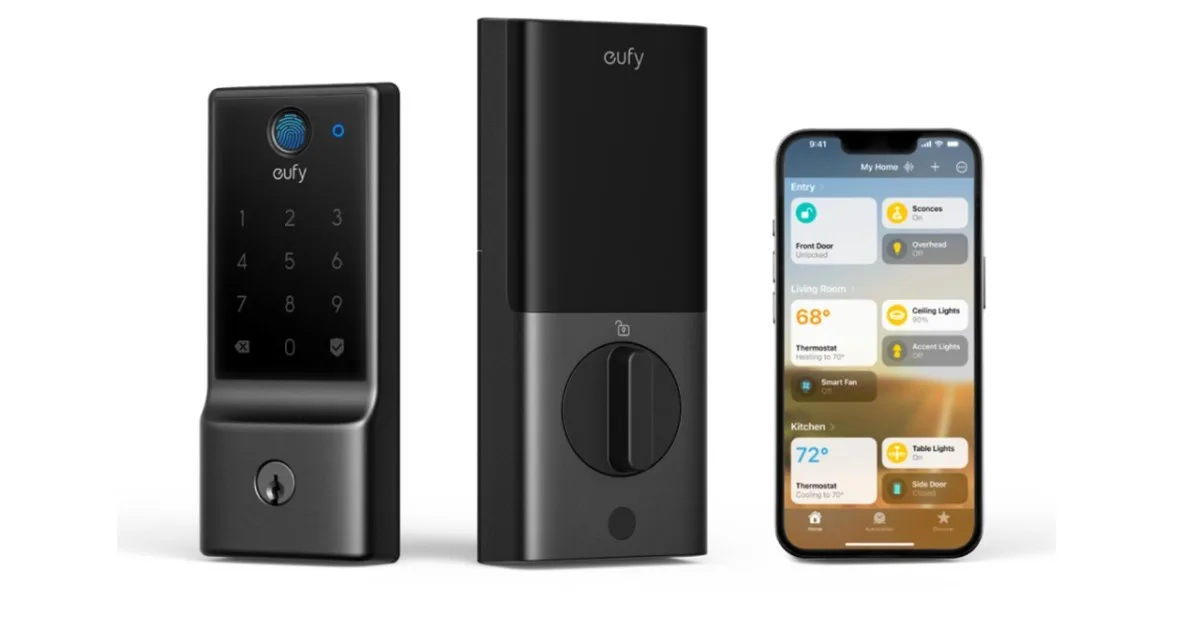
  • Eufy Launches First Smart Lock With Matter Support

    Eufy Launches First Smart Lock With Matter Support

    The Eufy Smart Lock E30 has been officially launched by Eufy, a smart home brand under Anker. Priced at $170, it’s available for purchase through the Eufy store. This model is a significant addition to Eufy’s range of smart locks, complementing popular options like the Video Smart Lock S330 and Smart Lock S230.

    For those who enjoy integrating their smart home devices, the Smart Lock E30 stands out with its Matter compatibility. This feature allows it to connect seamlessly with hubs like Apple Home, Google Home, Samsung SmartThings, and Amazon Alexa, offering a level of flexibility that is often missing in other smart lock options.

    You can also manage the lock using the Eufy mobile app, which provides a range of customization options to enhance your experience.

    Apart from its Matter integration, there are several exciting features to note in the Eufy Smart Lock E30. The lock has a sleek design that includes a traditional keyhole and keypad, along with a fingerprint scanner that can recognize prints in just 0.3 seconds—ideal for quick access.

    Another convenient aspect is the provided remote control, enabling you to lock or unlock your door without moving from your seat. Remarkably, the lock can last up to eight months using just eight AA batteries.

    At a price of $170, the Eufy Smart Lock E30 offers great value, being more budget-friendly than high-end models like the Yale Assure Lock 2, yet packed with handy technology. This makes it a viable option for those looking to enhance their home security without overspending.

    For additional reassurance, Eufy offers an 18-month warranty on the electronic components and a three-year warranty on the mechanical aspects, ensuring reliable performance for years.