الوسم: Hire

  • Winning at Baseball Cards: Solving Challenges in Mouse: P.I. For Hire

    Winning at Baseball Cards: Solving Challenges in Mouse: P.I. For Hire

    When you first enter the main hub area of Mouse: P.I. For Hire, which is your office, you’ll unlock several features. This includes a shop where you can buy ammo and missing collectibles, a weapons upgrade workshop, and a bar where you can relax and play Baseball Cards.

    Baseball Cards is just what it sounds like. It’s baseball, but instead of a ball, bat, and mitt, you play with a deck of playing cards. The game plays similarly to traditional baseball—the goal as a batter is to hit home runs, while as a pitcher, your aim is to throw the ball and prevent the batter from scoring. It’s tougher than it sounds.

    How to Play Baseball Cards

    If you’ve tried playing before, you know it seems simple but can be quite challenging. The same mouse is always your opponent, with a deck that’s heavily upgraded, making it hard to beat until you get some new cards. Your objectives can change during the game, so it’s important to understand what you need to do at each stage.

    Note: You do not earn Tokens for a tie; Tokens are only awarded when you win a match.

    You always start as the batter. You’ll play five rounds batting, then switch to pitch for five more rounds. The total is ten rounds. During batting, your goal is to hit home runs; during pitching, you try to stop the opponent from scoring.

    Unlike real baseball, there are only two innings—one batting and one pitching. The game ends after those two innings. Striking out doesn’t affect your score apart from the points you earn during batting. You will always play all ten rounds, five as batter and five as pitcher.

    This order matters because it lets you see how many points your opponent can score before your turn ends. For example, if you score 5 points during your turn, and your opponent can only score 4, you win. If you score just 1 point, you need to prevent them from scoring any points to win.

    How to Get More Cards

    To build a strong deck before spending money, complete missions and find collectibles. Typically, each mission has two or three collectibles, which you add to your deck when found. If you miss them, you can buy these collectibles afterwards from the shop in town, but you’ll have to pay for them.

    The shop also sells booster cards for your batter and pitcher, but they’re expensive and not necessary. It’s better to save your money for collectibles. The cards you get from missions usually have enough high stats to be effective, so extra booster cards aren’t essential.

    How to Score Home Runs

    When you’re batting, your main goal is to hit home runs. This means hitting the pitch and making your players (cards) travel around the bases back to home plate. Once a player crosses all three bases and reaches home, you earn a point.

    Any players left on the field at the end of your five rounds are discarded once a new inning begins—they won’t earn any points.

    Your success depends on both the card you play and what your opponent plays. Since you can’t see their cards until both are chosen, you need to pick your best option. There are three card types to pay attention to:

    Card Type Explanation
    Batters These are your players when batting. They display two numbers. The top is for Power Swing, the bottom for Speed Boost. Power Swing decides if you hit the ball; Speed Boost determines how far they run.
    Power Swing An extra point added to the batter’s Power Swing number. You can play one per turn, but not both Power Swing and Speed Boost cards on the same turn.
    Speed Boost Adds extra points to the batter’s Speed Boost number. Like Power Swing, only one boost card can be played per turn.
    Pitchers These are your players when pitching. They have two numbers: Pitch Focus and Fielding Play, which influence whether you strike the batter out and how your fielding affects hits.
    Pitch Focus Adds points to your pitcher’s Pitch Focus. Only one per round, cannot combine with Fielding Play.
    Fielding Play Adds points to your pitcher’s Fielding Play. Only one per round, cannot combine with Pitch Focus.

    Each round, you can play one batter card and optionally boost either Power Swing or Speed Boost. If you believe your batter’s stats are already high enough, you might skip boosts, but boosting is recommended because your opponent tends to have strong pitching stats, and you’ll draw more cards each turn.

    For hitting, your batter’s Power Swing needs to be higher than the opponent’s Pitch Focus. If it’s exactly equal, a coin toss determines the outcome. If your Power Swing exceeds their Pitch Focus by three points or more, you score an automatic home run. Achieving those high numbers boosts your chances of scoring.

    If your Power Swing isn’t higher, you’ll strike out, and all your cards will be discarded for that round. A successful hit moves your batter the number of bases on the bottom, plus any Speed Boost. The pitcher can reduce this movement by subtracting their Fielding Play from your batter’s speed, and this applies to any runners already on bases. High Fielding Play can even prevent your batter from advancing or cause them to stay on base.

    To maximize home run chances, prioritize high Power Swing for your players. Speed is secondary—most low-speed batters tend to have high Power Swing stats, and vice versa. Boosting your high Power Swing batter’s Speed can help them reach the bases faster.

    How to Stop the Batter from Scoring

    Defensively, your goal is to prevent the opponent from scoring. Just like batting, your pitcher has three card options: the main pitcher card and two optional boost cards. Focus on playing a pitcher with the highest Pitch Focus possible. If the Pitch Focus is over 8, enhancing your Fielding Play will also be important, especially if there are runners on base.

    Even if the opponent doesn’t hit, any runners on bases will still attempt to steal bases based on their Speed minus the Fielding Play. It’s crucial to assign some Fielding Play value to slow their advance.

    If they hit a home run, everyone on the field scores, regardless of speed, so don’t assign a low Pitch Focus to your pitcher without boosts. Having a Pitch Focus below six is risky unless you boost it.

    Once you get the hang of it, stopping your opponent is generally easier than scoring points yourself. Pay attention, play your best cards, and even scoring two or three points during your turn can give you an advantage.

    Inside the Prize D-Spenser

    Besides the satisfaction of winning, the game offers a reward for winning Baseball Cards matches. This requires winning 20 matches—more than just one—since you need 30 wins to unlock the associated achievement. Once you do, you’ll receive 20 Tokens to use on the Prize D-spenser located at the bar corner.

    Inserting tokens will unlock the X1 D-Mousifier, a powerful ray gun, which is a great addition to your weapons collection. This also unlocks the achievement called “Everyone Loves Raygun.”

  • How to Hire New Squad Leaders in Menace: Completing and Solving

    How to Hire New Squad Leaders in Menace: Completing and Solving

    Menace is centered around making decisions. You choose which factions to support, which missions to undertake, and what upgrades to install on your ship. But the ongoing choices you’ll face revolve around your squad and their leaders.

    Squad Leaders are the core of your squads, so it’s important to manage them well. This includes promotions, equipment, and the missions you assign to them.

    What Are Squad Leaders?

    At the start of the game, you select up to four squad leaders to form your initial squads. More can be added later, but their roles remain the same. Squad Leaders are unique individuals who influence how their entire squad operates.

    There are two types of squad leaders:

    • Pilots: They operate vehicles like troop transports and tanks. They don’t use squaddies, and their gear depends on the vehicle they are driving.
    • Infantry: The most common type, using a squad of squaddies who carry various tools and weapons. They tend to be less individually powerful than pilots.

    Squad leaders come with a set of perks that become available when they are promoted. These perks allow for specialization, such as removing the encumbered status from heavy weapons or increasing accuracy with repeated targeting.

    Hiring New Squad Leaders

    After the initial four, most new squad leaders are acquired from the game’s Black Market. This store operates through bartering, where you trade items and gear you no longer need for new squad leaders. When hiring, you can choose between pilots and infantry, but you can’t see who will appear in the pool before hiring.

    Once hired, a squad leader can go straight into missions. It’s wise to keep some available at all times in case a leader dies or becomes too tired to continue.

    Promotions and Outfitting

    Squad leaders can earn up to eight promotions, starting with one. Promotions are earned using Promotion points, gained by completing missions—more difficult missions yield more points. These points are a shared resource that you allocate to your leaders as you see fit.

    Before hiring, you can preview all potential perks available at each promotion. Promotions are organized into four tiers; as leaders reach higher tiers, promotions become more costly, indicated by a promotion tax. Some leaders, like those with the eager trait, can get upgrades at a lower cost, which is very helpful.

    Promoting a squad leader repeatedly allows for customizing their role. If you decide a leader’s perks aren’t right, you can demote them to regain some Promotion points and re-promote them with different perks.

    Outfitting Squad Leaders

    Gear management is crucial. Squad leaders determine what equipment their squads have, making it essential to equip them properly. Pilots don’t have squads but are assigned to vehicles; their gear focuses mainly on their vehicle’s weapons and accessories.

    For infantry leaders, you need to assign a primary weapon and can also equip a special weapon. Accessories like extra ammo pouches, backup pistols, or grenades can also be added. The equipment cost depends on the number of squad members, as more squaddies mean more health and damage but also higher supply costs.

    For vehicle pilots, the process is similar, though available slots and equipment types depend on the vehicle.

    What Are Squaddies?

    Squaddies are the individual troops in your squads. When creating a squad, you select the number of squaddies—minimum of two, maximum of eight. These are not just generic units; each squaddy is a unique, persistent character. If a squaddy dies, they’re permanently lost unless saved by a Med Bay.

    You can see your total squaddies on the resources screen between missions. Recruitment is slow—built up over time with Impetus components—or faster through the Black Market. Keeping your squaddies alive and healthy is important, so be cautious about how many you bring on missions. If your numbers drop too low, consider reducing squad sizes or being more selective to avoid costly losses.

  • Completing the Hire Mercenaries Quest in Path of Exile

    Completing the Hire Mercenaries Quest in Path of Exile

    The latest expansion for Path of Exile, titled Secrets of the Atlas, has debuted alongside a new seasonal league: Mercenaries of Trathus. Recently, Wraeclast has seen an influx of rogue Mercenaries, many of whom come equipped with notorious gear. Defeating these Mercenaries grants you the opportunity to claim their equipment.

    More notably, Mercenaries have introduced a new companion system to Path of Exile, reminiscent of the Mercenaries in Diablo 2. You can take these powerful NPCs with you through the campaign and into the endgame Atlas to strengthen your character’s weaknesses, provide additional aura buffs, or simply increase your loot gains. Below is a comprehensive guide to the Mercenary system in the Mercenaries of Trathus league.

    What Are Mercenaries?

    During the Mercenaries of Trathus league, you’ll encounter optional boss fights against Mercenaries. Almost every zone features a Mercenary NPC that you can challenge. If you win the duel, you can claim any item they possess or hire them as a permanent companion. Think of these Mercenaries as rogue allies who can battle alongside you.

    These Mercenaries will follow you into all types of content, including endgame maps and major boss encounters. They serve as an extension of your character, helping to mitigate your build’s weaknesses or simply boosting your loot—Mercenaries count as half a player for cooperative scaling. Almost every player will want a Mercenary at their side. As you defeat enough of them, you will earn a legendary status among their clans, unlocking new endgame activities and rewards.

    Encountering a Mercenary

    Starting in Act 1, Mercenaries will appear as fixed encounters in nearly every area. Keep an eye out for a crossed swords icon on your minimap. Speaking to a Mercenary will pause your game and display their current items, including weapons, armor, skills, and currency. You’ll have four options:

    1. Take an Item: Choose any item from their inventory. If you win the duel afterward, you’ll acquire that item.
    2. Hire for Work: Challenge the Mercenary to a duel. Winning means they become a permanent companion.
    3. Exile: Duel the Mercenary. Winning will prevent that type from appearing in the next ten encounters.
    4. Leave: Walk away without initiating combat. If the zone resets, you’ll incur a renown penalty.

    If you engage in combat, you must duel the Mercenary to earn a reward. You can choose any item from the Mercenary’s inventory as your reward before combat starts. If you take their currency pouch, all of their currency will drop instead, which is handy for collecting specific upgrades throughout the campaign and early maps.

    Hiring a Mercenary turns them into a permanent companion who acts much like a Specter or player summon. They will fight beside you until their health is depleted, after which they’ll retreat to town. You can heal injured Mercenaries for a small gold fee. You can have up to three Mercenaries at your service, but only one can accompany you at a time. The other two will be available in your hideout, ready for a swap when needed.

    If you consistently encounter a Mercenary type that doesn’t complement your playstyle, you can choose to exile them. This will remove that Mercenary type from spawning for the next ten zones. Only two types may be blocked simultaneously.

    If you feel your character is not strong enough to defeat a Mercenary, you have the option to walk away from the encounter. However, doing so and allowing the instance to end will decrease your renown score—a new league mechanic that affects Mercenary quality.

    Mercenary Renown

    Defeating Mercenaries in battle does more than just fill their pockets. Each victory raises your renown score. You can check your score by hovering over the Mercenary archetype icon in their UI. The higher your renown, the tougher the Mercenaries you will face. Stronger Mercenaries will wield better items with more modifiers, additional support gems linked to their skills, and a greater chance of showing up as Infamous Mercenaries.

    Renown increases up to a maximum of three consecutive kills. If you die to a Mercenary or walk away from a duel, your score will drop by one.

    Infamous Mercenaries

    As your renown grows and you reach PoE’s mapping endgame, you’ll start encountering Infamous Mercenaries. These stronger foes are fully armed and generally come equipped with at least one Unique item. Their rare gear is also likely to feature infamous modifiers, which are exclusive to these particular Mercenaries.

    Mercenary names will include their archetype in their build panel. If you see “Infamous” as part of their name, that means you’re up against an Infamous Mercenary. Pay attention to their skills and support gems. Some Infamous Mercenaries carry gilded gems that offer unique effects not available on regular Mercenaries.

    Hired Mercenaries

    Every Mercenary you encounter in Wraeclast belongs to one of seven archetypes. The archetype is determined by the Mercenary’s main attributes. For instance, a Strength archetype often excels with slam-based melee skills and warcries. In general, Mercenary types reflect popular builds for each character class.

    Archetype

    Build Type

    Notes

    Strength

    Melee (Tanky)

    • High health; typically has a defensive skill.
    • Prefers slam skills and warcries.

    Dexterity

    Bows

    • Great for clearing groups.
    • Avoids close combat.

    Intelligence

    Casters (Ranged), Summoners

    • Built for self-casting or summoning.
    • Utilizes buff spells like Sigil of Power.

    Strength/Intelligence

    Melee (Elemental)

    • Employs elemental attack skills.
    • Usually has an aura.

    Strength/Dexterity

    Melee (Fast)

    • Fast attack speed.
    • Highly aggressive.

    Intelligence/Dexterity

    Casters (Melee)

    • Focuses on blade-oriented spells.
    • Low health but high damage per second.

    Every Attribute

    Varies

    • Does not conform to a specific build archetype.
    • Usually has an aura.

    Once you’ve hired a Mercenary, you can find them in your hideout or any hub town. Talking to them allows you to view their current gear and skills. If you have multiple Mercenaries, you can choose which one to accompany you. The selected Mercenary will stay with you until they fall below critical health or you decide to swap them out for another.

    If a Mercenary dies, they’ll return to town. Healing them requires a small gold fee. Mercenaries do not lose items upon death.

    While checking out your Mercenaries, you can also adjust their inventory. You can swap any of their items with your own gear. Once you assign an item, the original will be lost. Keep in mind that you can’t take items that originally belonged to the Mercenary. It’s considered bad form to strip them of their possessions.

    Lastly, a Mercenary’s skill set, support gems, and levels are fixed. If you’re after better skills or a higher-level Mercenary, you’ll need to explore Wraeclast in search of a superior option.

  • Completing Your Schedule: Solving the Cleaner Hiring Process

    Completing Your Schedule: Solving the Cleaner Hiring Process

    In Schedule 1, you’ll need to bring on several employees as you advance through the game. Each worker has a specific role, and figuring out how to best utilize them can be challenging if it’s your first time.

    The Cleaner is one of the most affordable workers you can hire, and although they are inexpensive, their contribution is crucial for keeping your properties tidy. While picking up trash manually might be enjoyable initially, it can become repetitive as you progress into the later stages of the game, making Cleaners essential.

    How to Hire a Cleaner


    To hire a Cleaner, you need to talk to Manny inside the warehouse. The warehouse is located next to the pawn shop and opens daily after 6 PM. When you speak to Manny, select the option to hire an employee.

    After that, you can choose the type of employee you want, which is the Cleaner in this case. You’ll need to specify the property, and Manny will let you know that the upfront signing fee is about $1,000, and the daily wage for the Cleaner will be $100.

    If this is your first time hiring an employee, you’ll also receive a clipboard to use for managing tasks for your employees.

    How to Use a Cleaner


    Assigning a trash can to the Cleaner in Schedule 1.

    First, you’ll need to assign a bed to your Cleaner. Open your inventory, select the clipboard, and go to the Cleaner, who will be waiting outside your designated property. Choose the manage cleaner option, and this will bring up the Cleaner’s menu on the clipboard.

    Next, select the ‘assign bed’ option and tap on a free bed in the property to designate it for the Cleaner. After that, you’ll need to get trash cans. You can buy trash cans from any hardware store.

    A single Cleaner can manage up to three trash cans.

    Once you’ve purchased a trash can, place it inside your property near where the most trash accumulates. After setting up the trash cans, return to your Cleaner, open their menu on the clipboard, and select the option to assign a trash can from there.


    Cleaner packing the trash in a trash bag in Schedule 1.

    Finally, approach the trash cans in your property. You’ll see a green circle around the trash can, indicating the area the Cleaner will manage. You can assign up to three trash cans to them, and remember to place the daily wage inside the briefcase on the Cleaner’s bed to start their work.

    The Cleaner will automatically gather all the trash around the assigned trash cans. When a trash can is full, the Cleaner will pack it into a bag and dispose of it in the dumpster outside your property.

  • Hiring and Managing Sims 4 Employees: A Guide to Profits & Fun

    Hiring and Managing Sims 4 Employees: A Guide to Profits & Fun

    Managing a small business in The Sims 4: Businesses & Hobbies involves a lot of responsibilities, so why not lighten the load by hiring some employees? By bringing others onto your team, your Sim can focus on what really needs their attention.

    As the owner, you can hire several employees—anyone your Sim knows in the game. You have the option to bring family and friends on board for a more personal touch or to hire new faces for a professional atmosphere. The choice is entirely yours when starting a new business.

    Hiring and Managing Employees

    To get started with managing employees, navigate to the Owned Businesses tab, which is where you’ll open and close the business each day. Here, you’ll find various employee management options.

    Choosing Employees Based on Skills

    The first step in managing your employees is to hire them. Use the Manage Employees button to access an overview of potential hires, allowing you to bring on any Sim that your character knows. If your Sim is new to the neighborhood, they might need to mingle a bit before building a suitable team. While there’s no perfect candidate, selecting employees that match the requirements of your business is essential for success.

    When hiring, consider each Sim’s relevant skills that can boost your business. For instance, check their cooking or artistic skills for a café or a gallery. This way, you can ensure that you’re making the best hires for your specific needs.

    If you find that you need more qualified Sims, don’t hesitate to interact with new customers who visit your business. You never know when a hidden gem might walk through the door.

    Setting Uniforms and Pay

    After you’ve brought some employees on board, it’s time to choose their uniforms. You can select from a variety of predefined outfits suited for different business types or create custom uniforms in CAS if you have a specific look in mind.

    Once your team is set up, you can adjust their salaries through the Manage Employees menu. Everyone starts at a base rate, but it’s wise to offer higher pay if you want to keep your staff happy. Remember, satisfied employees can significantly contribute to your bottom line, while dissatisfaction over low pay may lead to high turnover. Regular check-ins on employee morale will help you avoid losing valuable team members.

    Delegating Tasks to Employees

    One of the perks of being a business owner is the ability to delegate tasks to your employees, allowing you to focus on strategic decisions. Assigning tasks that match each employee’s skill set can make a noticeable difference in the quality of service. For instance, artistic employees should be assigned creative tasks while charmers excel at customer interactions.

    It’s essential to align your employees’ tasks with your business activities. If your establishment offers food and drinks, make sure tasks related to food preparation are assigned accordingly. Each employee can handle up to five different tasks, giving you flexibility as your team grows.

    Keep in mind customer needs when delegating. Adjust assignments as necessary to meet demand—there’s no shame in reorganizing roles if you notice a shortfall in service.

    Through the tasks menu, you can explore various categories, including Food and Drink, Art and Music, Social interactions, and more, to find the right fit for your staff. By maintaining a keen awareness of your establishment’s needs and your employees’ strengths, you can cultivate a thriving business in The Sims 4!

  • NPC Hiring Guide for Fortnite Chapter 6, Season 1

    NPC Hiring Guide for Fortnite Chapter 6, Season 1

    In Fortnite: Chapter 6, Season 1, cherry blossoms frame the battlefield, making every fight feel like a samurai duel. Amidst the vibrant landscapes and quick firefights, you’ll find a group of NPCs ready to assist you — whether it’s through supplies, unique gear, or even companionship in battle. These characters play a vital role beyond mere background scenery.

    Understanding where to find them and what they offer can significantly improve your chances of thriving in this season’s battles. Check out the information below to learn how these NPCs can help you secure a victory royale.

    NPC Locations and Services


    You can typically find NPCs at named locations. For the best chances of encountering them, head to Nightshift Forest, which boasts the highest number of NPCs (three). Below is a complete list of NPC locations and their corresponding services, designed to enhance your gameplay.

    NPC

    Location

    Service

    Bushranger

    Roams the north, west, or south areas of Nightshift Forest.

    • Vault Key
    • Holo Twister Assault Rifle
    • Shield Potion

    Cinder

    Located at the Open-Air Onsen, south of Demon’s Dojo and north of Shining Span Bridge.

    • Heavy Specialist
    • Twinfire Auto Shotgun

    Helsie

    Found at the northern end of Canyon Crossing.

    • Medic Specialist
    • Patch Up
    • Veiled Precision SMG

    Jade

    Spotted in the northern part of Nightshift Forest at Sakura Plunge.

    • Patch Up
    • Veiled Precision SMG

    Daigo

    Located at the northern end of Masked Meadows.

    Mizuki

    Positioned at the eastern end of Lost Lake.

    • Supply Specialist
    • Sentinel Pump Shotgun

    Nyanja

    Hang out at the southeastern end of Canyon Crossing.

    • Twinfire Auto Shotgun
    • Shockwave Grenade

    Kendo

    Near Jade at Sakura Plunge in northern Nightshift Forest.

    Shadow Blade Hope

    Find him at the southern end of Hopeful Heights.

    • Rift To Go
    • Fury Assault Rifle

    Vengeance Jones

    Also located in southern Hopeful Heights, close to Shadow Blade Hope.

    Vi

    Found at the eastern edge of Rolling Blossoms Farm, just north of Hopeful Heights.

    • Scout Specialist
    • Surgefire SMG
    • Shockwave Grenade

    Talking to NPCs can often result in a shield potion reward, so it’s advisable to interact with them even if you aren’t looking to buy anything.

    Which NPCs Can You Hire?


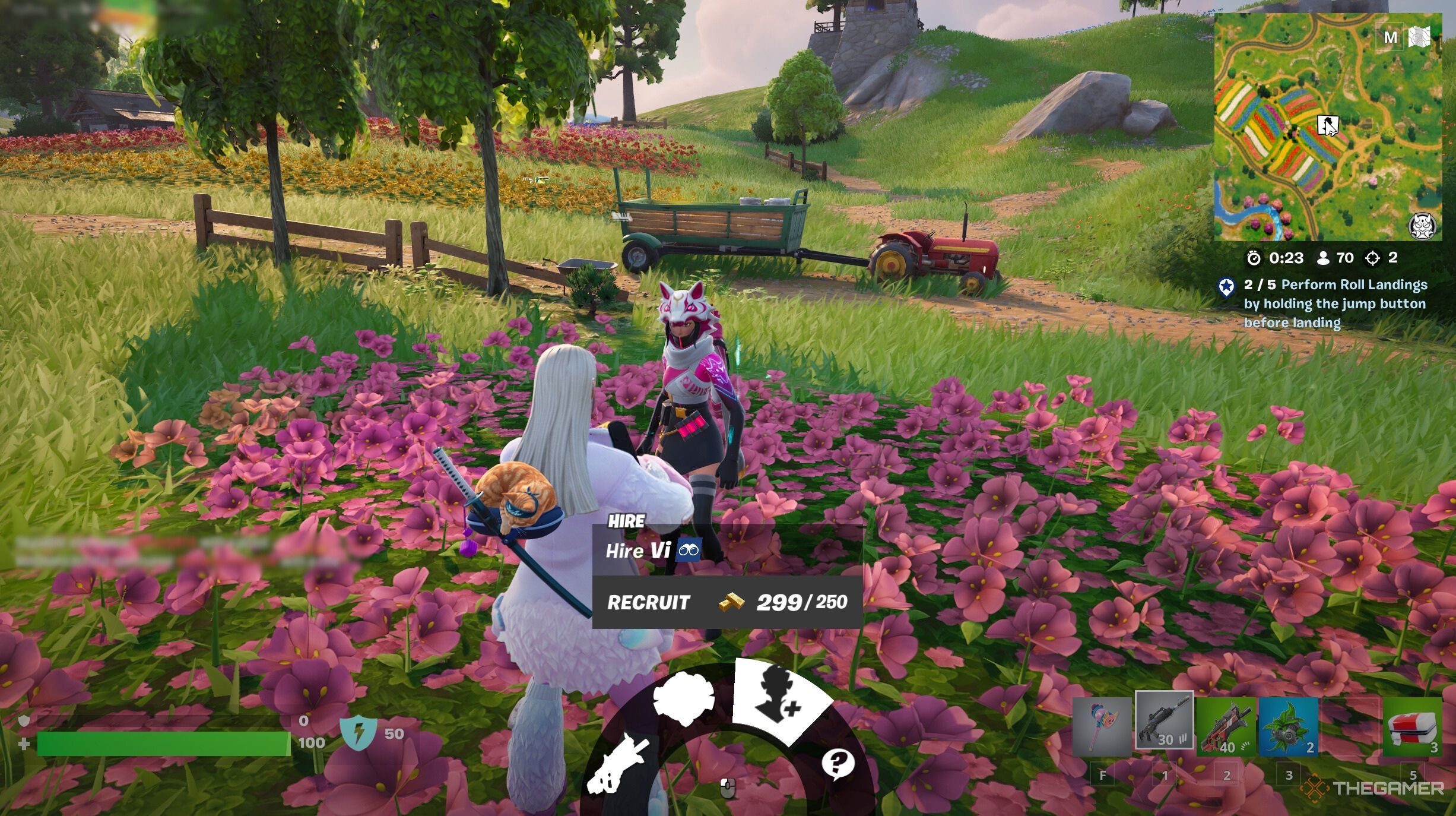
    A character being hired in Fortnite: Chapter 6, Season 1.

    Some NPCs can be hired for 250 gold to team up with you. They will provide support in combat, revive you if you’re downed, reveal hidden chests, and even offer shields under certain conditions. Here are the NPCs you can hire in Chapter 6, Season 1: