الوسم: helmet

  • Where To Find The Missing Helmet in Wreckage During Arc Raiders Completing

    Where To Find The Missing Helmet in Wreckage During Arc Raiders Completing

    If you’ve been listening to traders in Arc Raiders when they offer you a quest, you’ve probably noticed that most of the time they just ask you to do a quick task on the Topside. However, sometimes these tasks might be more meaningful.

    An example of this is the “Keeping The Memory” quest from Celeste. She simply wants you to honor someone’s memory by returning their helmet. But finding this helmet might be trickier than it initially sounds.

    Where to Find the Missing Helmet

    The first step in the Keeping The Memory quest is to go to the Wreckage area in Formicai Hills. You can locate these hills at the bottom right of the Dam Battlegrounds map when you zoom all the way out. To find the Wreckage site, zoom in on the green section of the map where it’s labeled on the right side of the Scrap Yard.

    Once you arrive at Wreckage, you’ll notice a large Arc machine ruin near a big tree — this is where the helmet is. Look for a small bush in front of the tree, and when you approach it, a yellow icon will appear. Interacting with this icon will reveal the helmet, which you can then pick up.

    Be cautious before grabbing the helmet. It acts like a battery you need to deliver somewhere later, so check your surroundings to avoid ambushes while collecting it.

    Where to Place the Helmet

    After you have the helmet, the next step is to deliver it to the memorial. The memorial is located nearby, and you’ll recognize it once you see it. The picture shows you a good view of the area where the helmet should be returned.

    When you pick up the helmet, you’ll see a blue outline of it above a small metal bar next to the bush where you found it. Walking close to this metal bar will allow you to interact and place the helmet on it. Doing so completes the Keeping The Memory quest.

    Once the helmet is placed, the quest is finished. Returning it to the memorial allows you to collect rewards such as Simple Gun Parts, Duct Tape, and Magnets.

  • Where To Find The Ghost Of Tsushima Helmet And Mask While Completing Ghost Of Yotei

    Where To Find The Ghost Of Tsushima Helmet And Mask While Completing Ghost Of Yotei

    Many players interested in Ghost of Yotei will likely be fans of Ghost of Tsushima, considering Yotei is a sequel. However, unlike many sequels, this one doesn’t continue right after the previous game. Instead, there are 400 years between the stories, so don’t expect many direct connections.

    Yotei is set in a different part of Japan with its own story, and the main character has no ties or knowledge of Jin Sakai. These games stand alone but are linked by being samurai games developed by the same studio. Think of it as an anthology series—if a third game happens, it might follow a different Japanese warrior in another region and period, dealing with new challenges.

    Despite the story differences, there are familiar elements from Tsushima in Yotei. Fans will recognize the gameplay mechanics and open-world activities, which are more advanced here. There’s also a small narrative link: you can find Jin’s old house and some relics from Tsushima.

    Where to find Jin Sakai’s house:
    To locate Jin’s house, first travel to the Oshima Coast region. When you arrive, go south-west to find the storyteller near the Forgotten Shrine. Talk to him to begin this part of the story and gain access to Jin’s house.

    Afterward, players will go through some platforming to reach a clearing with a waterfall, called the Lost Shinobi’s Den. Inside, you’ll discover Jin’s old hideout. Later, his house, surrounded by traditional pampas grass, becomes visible. During exploration, be sure to pick up the Stag Helmet inside.

    There’s also a cave where Jin’s Storm Blade sword is kept. However, when interacting with it, it will be stolen, setting up a chase. You’ll go through more platforming until you reach a withered tree by Jin’s grave. Here, you will fight enemies to retain the Storm Blade and recover Jin’s iconic Ghost Mask.

    What Tsushima items are in Ghost of Yotei:
    While Jin’s old armor is present in the game, it has rusted away and cannot be taken. Still, you can obtain three notable items from this story. Inside Jin’s house, find his antler helmet, known as the Stag Helmet. Shortly after, you’ll also find the Storm Blade, which will be taken from you and must be chased down—a key part of the story.

    At Jin’s grave, once you defeat enemies, you will gain the Storm Blade and be able to use it to fight. With the Blade, you unlock the Dance of Wrath ability. This attack can be used even if you aren’t wearing the Storm Blade cosmetic. After defeating all enemies, you can also collect Jin’s Ghost Mask.

  • Conceal Your Helmet or Hood in Assassin’s Creed Shadows

    Conceal Your Helmet or Hood in Assassin’s Creed Shadows

    For some time now, the Assassin’s Creed series has allowed players significant freedom in customizing their characters. This feature has been greatly enhanced in the RPG titles and has carried over to Assassin’s Creed Shadows.

    Although Shadows provides substantial options for personalizing the appearance of Naoe and Yasuke, a few details may be overlooked. One noteworthy aspect is the ability to hide your gear, which can be easily missed during customization.

    How to Hide Naoe and Yasuke’s Gear


    By default, both Naoe and Yasuke are equipped with some type of headwear once you acquire your first piece of gear. Interestingly, this headwear is removed during cutscenes, offering a glimpse of their appearance without helmets, hoods, or bandanas.

    There’s a way to hide this headwear during gameplay as well, although it’s not clearly explained in the game. To remove the gear, simply go to your Inventory menu, select the piece you don’t want visible, and then press R2 on PS5 or RT on Xbox.

    You can also hide body armor, but this may look a bit odd for both characters.


    Naoe without a hood in Assassin's Creed Shadows.

    After hiding your gear, the chosen items will no longer be visible, allowing you to see Naoe and Yasuke’s faces instead of having them obscured by a large helmet or hood. Just like applying modifications to your weapons or armor after unlocking the Forge, hiding your headwear doesn’t affect your character’s abilities.

    Choosing to hide your gear is simply a matter of personal preference. If you want to see Naoe and Yasuke more clearly during play, feel free to do so without worrying about any negative impact.

  • Concealing Your Helmet in Aeternum: A Guide for New World

    Concealing Your Helmet in Aeternum: A Guide for New World

    New World: Aeternum is a multiplayer action RPG that lets players explore the vast and mysterious Eternal Island, filled with unusual inhabitants. In this expansive game, you can equip various weapons to battle a range of monsters as you progress through levels.

    Not all players are keen on donning a cicrone or helmet, and many prefer their character’s appearance to reflect personal style rather than practicality. For players who value aesthetics, the ability to hide helmets is a fantastic feature. Here’s everything you need to know about it.

    How to Hide Your Helmet

    To conceal your helmet, you first need to have a piece of headgear equipped. If you don’t, you won’t be able to proceed. Once you’re all set, follow these simple steps:

    1. Open your inventory by pressing the Tab key.
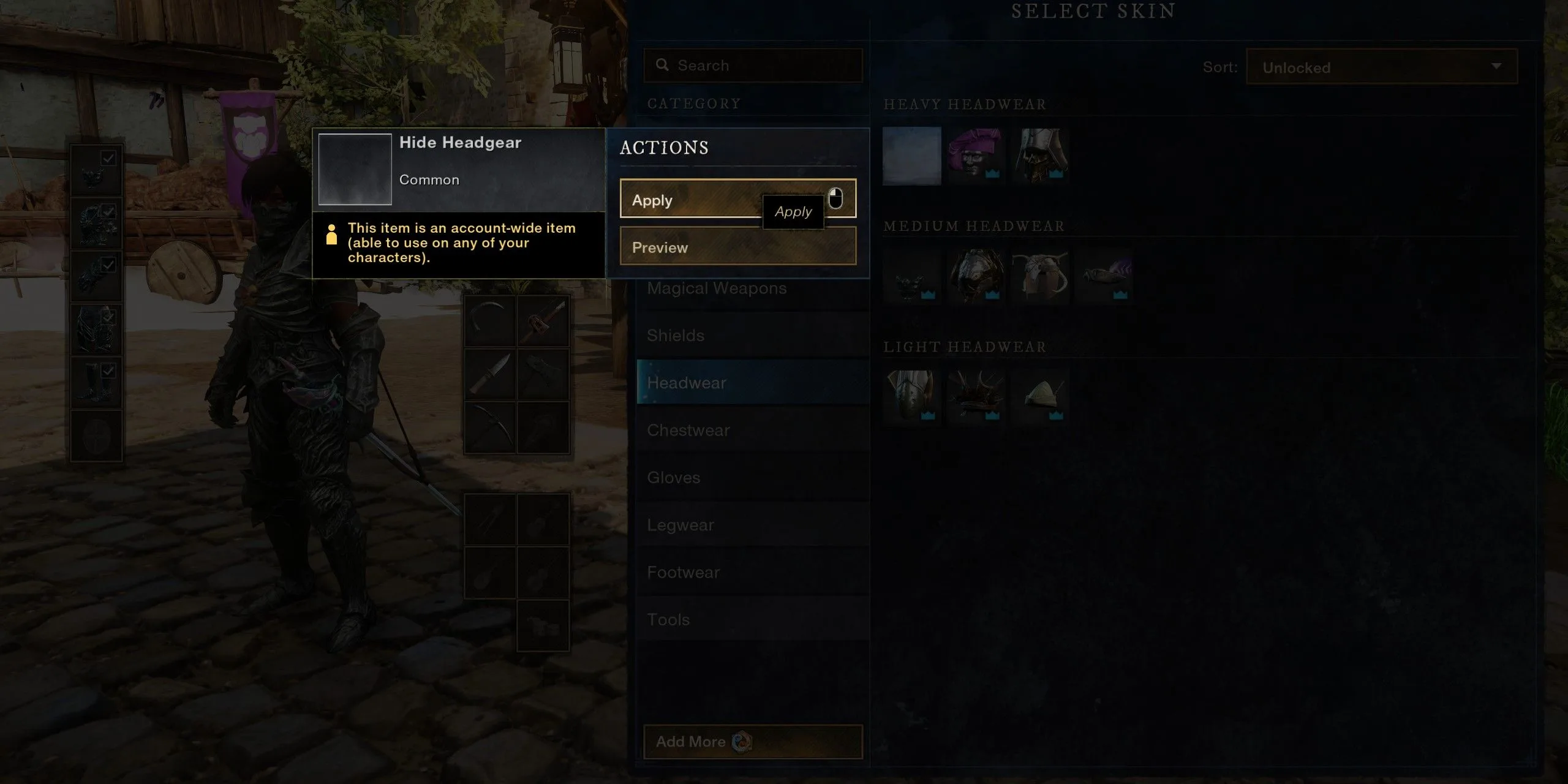
    2. Click on your headgear. When the menu appears, select “Change Skin.”
    3. A new menu will show different skin options for your headgear. Click on the empty icon, which represents the “Hide Headgear” option, then hit “Apply.”

    Note: This process can also be applied to any other gear where skins can be modified.

    And that’s all there is to it! Now you can dive into New World: Aeternum and flaunt your stylish hairstyles for everyone to see!