Digital Phablet – Hideki Sato, the visionary behind SEGA’s legendary consoles and a former president of the company, has passed away at the age of 77.
Japanese publication Beep21 confirmed the sad news through a social media post. Sato began his career with Sega in 1971 and remained with the Japanese technology giant until the early 2000s. He is widely recognized for developing Sega’s arcade games and home consoles, which became staples in many households of Generation X and Xennials.
Father of Sega Hardware, Hideki Sato, Dies at 77
According to a tweet from ToonHive, “Hideki Sato, the former SEGA president and creator of nearly every SEGA console, has passed away at 77. He started working in video games in the 1970s and is regarded as one of the pioneers who shaped the modern gaming industry.”
Sato was instrumental in designing all Sega consoles from the early 1980s through the late 1990s, including the SG-1000 (1983), Master System (1985), Genesis, Saturn (1994), and Dreamcast (1998).
Engadget reports, and Beep21, which frequently interviewed Sato, described him in Japanese as “a truly great figure who shaped Japanese gaming history and captivated Sega fans worldwide. The excitement and pioneering spirit of that era will forever remain in the hearts and memories of countless fans, for all eternity.”
Many fans took to social media to express their gratitude for Sato’s contributions to the gaming industry. One user on X (formerly Twitter) posted, “Rest in peace, Mr. Hideki Sato and the Sato family. I hope you find comfort in each other. Legendary game inventor of #Sega. #videogames.”
Another comment read, “Rest in power, legend. We cannot thank you enough for everything.”
A Japanese tweet further commemorated his legacy, saying, “As the father of Sega hardware, Hideki Sato passed away yesterday. He was a truly great figure who influenced the history of Japanese gaming and captivated Sega fans around the world. The excitement and spirit of challenge from that era will remain forever in the hearts of many fans. We pray for his soul’s rest.”
Many in the gaming community remember Sato as a pioneer who helped shape the industry into what it is today.
The Mesa biome in Peak isn’t just a large sandy area; it’s like an obstacle course through the desert. You start on flat ground, weaving between rock formations and gathering supplies. Then, you cross a cavern and face a mountain that tests your skills.
Some gear will help you climb faster, some will keep you safe, and a few might backfire spectacularly. Knowing what each item does and where to find it can make your journey easier. Here’s a guide to all the Mesa update items so you can approach the desert with confidence.
All Mesa Update Items and Their Functions
Here’s a detailed list of every item available in the Mesa update and what they do once you find them.
Note: Not all items are exclusive to the Mesa biome; some can be found elsewhere.
Item
Description
Where to Find
Balloons
Lighten your load by reducing weight, making climbs less tiring. Collect six to float freely.
Found in luggage
Scout Cannon
Launches your character a long distance when ignited. Use with caution, as it can be dangerous.
Found in luggage
Parasol
An umbrella-like item that shields you from heat damage caused by the sun.
Found in luggage
Sunscreen
Protects you from heat damage due to sun exposure.
Found in luggage
Aloe Vera
Heals burns caused by sun exposure but doesn’t prevent them.
Found growing on the ground
Dynamite
Explodes if approached too closely. Keep a safe distance.
All attention is focused on Nvidia and AMD as they prepare to unveil their latest graphics cards for the mainstream audience, specifically the RTX 5060 and RX 9060 XT. However, a recent leak suggests that Nvidia is developing a GPU expected to launch later this year that may finally meet high expectations. I’m referring to the RTX 5080 Super (or Ti).
This intriguing information comes from Baidu and was initially reported by Wccftech. The source, a moderator on the Baidu forums, claims that the RTX 5080S or RTX 5080 Ti will debut by year-end. While detailed specifications remain scarce, the leaker asserts that it’s “practically certain” this new graphics card will feature 24GB of VRAM—an increase of 8GB compared to the RTX 5080. This memory capacity would also align it with the RTX 4090 in terms of performance.
Upon its initial launch, the RTX 5080 fell short of expectations and was unable to rival the previous-gen RTX 4090. Even with overclocking, it couldn’t compete with Nvidia’s flagship. However, if the rumored specs for the RTX 5080 Super hold true, the two models might finally be able to compete on a more level playing field.
Jacob Roach / Digital Trends
While the increase in memory is promising, it won’t automatically enhance bandwidth; the GPU also needs a wider memory bus and ideally more CUDA cores. In the RTX 40-series lineup, the RTX 4080 and RTX 4080 Super had nearly identical specifications, with slight enhancements in CUDA cores for the Super variant, resulting in only a minor increase in speed of about 1-3%.
Related
Apple’s low-cost Vision Pro headset could launch sooner than anticipated.
Nvidia’s RTX 5060 Ti may be priced lower than expected.
Intel’s production update hints that Panther Lake could be arriving sooner than predicted.
What’s exciting about the potential RTX 5080 Super/Ti is that it might arrive sooner than originally thought. If Nvidia follows through with a late 2025 release, it would mark a shift from their typical release cycle, as previous Super refreshes typically debuted at the start of the year, just over a year after the initial release of the RTX 4080.
Even if these rumors hold weight, don’t expect any official announcements from Nvidia until the last quarter of the year, so patience will be key.
At least two companies specializing in retro gaming hardware have halted shipments to the United States due to tariffs imposed during the Trump administration, which they claim could lead to shipping delays and lost items. Recently, Retrotink announced a pause on U.S. orders, effective April 28, and Anbernic has since updated its shipping policy accordingly.
Mike Chi, the CEO of Retrotink, explained, “Because there’s no clear direction on how tariffs will be administered starting May 2nd, we’ve made the tough choice to temporarily stop shipments to the U.S.” He noted that there is still limited stock available within the United States, so customers might be able to purchase Retrotink products for a little while longer. “We are hopeful that this situation will be resolved, but it’s difficult to predict when or how,” Chi added.
Anbernic also updated its shipping guidelines, stating, “Due to modifications in U.S. tariff regulations, we are suspending all orders shipping from China to the United States starting today. We encourage customers to prioritize products shipped from our U.S. warehouse, which are currently unaffected by import fees and can be purchased with assurance.”
The company does not view these measures as permanent. They declared, “Once we have confirmed updates regarding import charges, we will inform our customers promptly and publish our revised policy on our website.”
The tariffs have significantly impacted the gaming industry. While the pricing for the Nintendo Switch 2 remained unchanged from its initial announcement, various accessories associated with it have experienced price increases. Other companies, like Razer, have also put a hold on their products directed at the U.S. market. While some businesses are discovering ways to adapt and maintain their supply chains without raising prices, others have opted to withdraw entirely from the market until conditions stabilize.
After the unveiling of the Nintendo Switch 2 yesterday, Nintendo hosted a series of roundtable Q&A sessions in New York City, addressing fans’ questions about the new console. During these discussions, the company confirmed that the Switch 2 leverages Deep Learning Super Sampling (DLSS) and ray tracing technology, although they did not disclose specific details about its operation.
Earlier leaks had hinted that Nintendo would adopt some form of AI-driven upscaling technology—precisely what DLSS offers—to keep game sizes manageable enough for cartridges without compromising on 4K resolution. The integration of DLSS, which is a product of Nvidia, was confirmed along with the use of an Nvidia GPU in the Switch 2. Tetsuya Sasaki, General Manager of Nintendo’s Technology Development Division, remarked, “Nintendo typically doesn’t disclose extensive hardware specifications. We prefer to concentrate on the value we can provide to our customers. However, I believe our partner Nvidia will be sharing more information.”
The use of DLSS could significantly expand possibilities for developers. Much like the abilities available on Xbox Series and PlayStation 5, there’s potential for games to feature both graphical fidelity and performance modes. Senior Director of the Programming Management Group, Takuhiro Dohta, stated, “We utilize DLSS upscaling technology, a necessity in our game development process.”
He elaborated that the hardware can output up to 4K resolution on TVs. “Whether a developer opts for native resolution or upscaling is their choice, but it certainly creates numerous options,” he noted. When questioned about ray tracing capabilities, Dohta confirmed that the GPU supports this technology, providing yet another tool for developers.
While Nintendo has shared a considerable amount of information, many specifics remain under wraps. It appears we may have to wait for an actual Switch 2 console to investigate internal components fully. Nevertheless, the confirmation of advanced graphic technologies like ray tracing and DLSS indicates a notable upgrade in power and suggests Nintendo could be narrowing the graphical gap with its competitors.
Nvidia’s RTX 4060 has officially secured its position as the most popular graphics card among gamers on Steam. Its appeal lies in its competitive pricing and reliable performance for 1080p gaming. Recent data from the Steam Hardware and Software Survey shows that this budget-friendly GPU has gained popularity since its launch in mid-2023, attracting casual gamers, esports competitors, and PC enthusiasts looking for cost-effective options.
For years, older budget models like the GTX 1650 and RTX 3060 dominated the charts on Steam. However, the RTX 4060 has surpassed both, capturing an impressive 8.57% share of the market as of February 2025. This ascent can be attributed to its attractive price range (approximately $300-$350), low power requirements, and advanced gaming technologies such as DLSS 3 and ray tracing capabilities.
Valve
The RTX 3060, once the go-to choice for many, now sits at 6.87% of the market, reflecting a slight 1.67% uptick since last month. The RTX 4060 Ti has experienced notable growth as well, rising by 3.11% to attain a market share of 6.56%. Meanwhile, the RTX 4070 has surged by 2.54%, bringing its total to 5.43%.
In comparison to its predecessor, the RTX 3060, the RTX 4060 boasts significant enhancements in ray tracing, DLSS 3 frame generation, and overall efficiency. While critics have pointed out its 8GB VRAM and narrower memory bus, it remains a robust option for 1080p gaming, fitting well with the typical setups among Steam users. As of this writing, the RTX 4060 is priced similarly to the RTX 3060, falling between $300 and $350.
The latest survey results reveal Nvidia’s commanding presence in the PC gaming GPU market. The company occupies virtually all leading positions, leaving competitors like AMD and Intel struggling to gain traction in the consumer space. Even as Nvidia prepares to launch its upcoming RTX 50-series later this year, the affordability and functionality of the RTX 4060 ensure its continued relevance among budget-minded gamers.
As new graphics cards roll out, including the RTX 50-series and AMD’s Radeon 9000 line, it will be intriguing to watch whether the RTX 4060 can maintain its crown or if a new contender will emerge in the coming months.
Get your weekly breakdown of the technology behind PC gaming
The latest 1.2.8 update for Alan Wake 2 has arrived, marking it as one of the initial titles to incorporate Nvidia’s innovative RTX Mega Geometry technology. According to a comparative analysis shared by Compusemble and reported by Wccftech, players can expect an average 13% decrease in VRAM consumption alongside an increase in frames per second, all while utilizing an RTX 4090 graphics card.
The comparison featured gameplay from both version 1.2.7 and the new 1.2.8 side by side, employing DLAA for one instance and DLSS for the other. The tests were conducted at 4K resolution with maximum settings on an RTX 4090. Observers can easily notice the drop in CPU usage percentages and the uplift in frame rates by examining the data closely.
While RTX Mega Geometry was launched alongside the new RTX 50-series GPUs, it is compatible with all RTX graphics cards. This indicates significant enhancements even for older models. The new RTX 5090 and 5080 GPUs, which feature fourth-generation ray tracing cores specifically designed to work with Mega Geometry, are anticipated to deliver even more impressive results.
You might not be familiar with RTX Mega Geometry, but this technology significantly boosts both performance and visual fidelity in ray-traced games. It achieves this by increasing the number of triangles that developers can ray-trace while reducing the CPU overhead involved. This efficiency is largely due to the application of artificial intelligence.
One of the major costs associated with ray tracing relates to the various levels of detail (LOD) each in-game object possesses. Objects that are closer to the camera display high-detail meshes with a greater number of small triangles, which are referred to as LOD 0. As objects recede into the distance, the LOD level rises, resulting in less detail and fewer triangles, which is more suitable for distant items.
As players navigate through the environment, the LODs of various objects continually adjust based on their distance from the camera. The overall performance improves as the number of triangles increases, allowing for more LODs to switch between seamlessly.
Images from an Nvidia demonstration at CES 2025, illustrating the vast number of triangles utilized in a fully ray-traced scene using RTX Mega Geometry.Digital Foundry
The traditional method of handling LODs has been in place for quite some time. However, as technology like ray tracing and Nanite progress, the complexity has escalated. Unreal Engine 5’s Nanite system enhances geometry detail dramatically, resulting in numerous triangles and levels of detail. In games designed with Nanite, each single frame could potentially involve hundreds or thousands of LOD transitions.
The challenge arises because, in ray-traced environments, a complete rebuild is necessary each time one LOD replaces another to apply ray tracing to the updated mesh. This process can be extremely resource-intensive; thus, an excessive number of LOD changes might hinder the ability to maintain real-time frame rates.
RTX Mega Geometry addresses this issue by updating clusters of triangles in batches, intelligently determining which ones to refresh and when to do so for maximum efficiency. The aim is to empower developers utilizing Nanite to apply ray tracing to every triangle in their projects while achieving viable real-time frame rates. The ultimate outcome? Enhanced ray tracing capabilities and improved performance for users! For the time being, this technology is exclusive to Nvidia RTX users, but it is likely to expand throughout the industry in the future.
With the integration of RTX Mega Geometry in Alan Wake 2, players can experience these enhancements automatically upon updating the game, provided they have an Nvidia RTX graphics card.
Recent findings by security researchers have unearthed vulnerabilities in Apple devices equipped with M2 and A15 chips and newer models. This includes a range of gadgets such as iPhones, iPads, MacBook laptops, and Mac desktops. The identified flaws, named SLAP and FLOP, were initially highlighted by Bleeping Computer, and may enable cybercriminals to extract data from a user’s active web tabs. Depending on the open tabs, this could expose private information such as passwords and banking details.
These vulnerabilities stem from a hardware issue rather than being a software-related concern. They impact the CPUs, making them susceptible to side-channel attacks. Such exploits analyze CPU performance, leveraging variables like power use, timing, and auditory cues to glean details about user activity—much like the Spectre and Meltdown weaknesses uncovered back in 2018.
While these revelations are complex, the key takeaway is that they open the door for attackers to access sensitive information even when it’s well-protected by software. This is not solely an Apple issue; rather, it’s linked to a performance enhancement technique that most modern CPUs incorporate.
At its core, computer programming involves a sequence of instructions for the CPU to follow, which branch out into numerous possible outcomes. For instance, scenarios can be set as “if A occurs, execute X; if B happens, proceed with Y.” As programs grow, they handle a myriad of decisions to drive functionality.
To increase operational speed, it has become commonplace to predict which path a CPU should pursue and begin executing instructions preemptively. This method allows multiple tasks to progress simultaneously instead of waiting sequentially.
This optimization technique, known as speculative execution or branch prediction, is based on anticipatory logic, which can sometimes lead to errors. When these predictions fail, the resulting vulnerabilities can be exploited by attackers.
The complete titles for these vulnerabilities are “Data Speculation Attacks via Load Address Prediction on Apple Silicon (SLAP)” and “Breaking the Apple M3 CPU via False Load Output Predictions (FLOP).” While both flaws essentially produce the same outcome, SLAP is confined to the Safari browser, whereas FLOP is also applicable to Chrome.
The research provides evidence that attacks utilizing these vulnerabilities are feasible, although there is currently no information suggesting that they have been exploited by hackers. The researchers disclosed their findings to Apple last year, which acknowledged receipt and mentioned intentions to resolve the vulnerabilities. However, since the papers’ publication, Apple has only issued a single statement, saying:
“We want to thank the researchers for their collaboration as this proof of concept advances our understanding of these types of threats. Based on our analysis, we do not believe this issue poses an immediate risk to our users.”
While these attacks don’t rely on malware, they typically initiate from visits to malicious websites. Thus, a prudent approach is to exercise caution with suspicious links and URLs until security patches are rolled out.
Nvidia has reassured users that the melting problems associated with the 12VHPWR power connectors seen in some RTX 40-series graphics cards will not be an issue with the upcoming RTX 50-series.
According to a report by QuasarZone, during the recent Nvidia RTX AI Day 2025 event held in South Korea, company representatives expressed their confidence that the overheating and melting problems of the RTX 4090’s 12VHPWR connector have been successfully addressed in the new RTX 50 series. “We don’t expect that to happen with the RTX 50 series. We made some changes to the connector based on the problems we encountered, and we’ve seen no signs of trouble now, nearly two years later,” stated an Nvidia spokesperson.
The 12VHPWR connector, also referred to as the PCIe 5.0 16-pin connector, first appeared with the RTX 4090 and 4080 models. While it was designed for compactness and could deliver high power levels of up to 600W, it soon garnered negative attention due to reports of overheating and subsequent GPU damage. Investigations revealed that improper seating of the connector was a significant contributor to these issues. In response, Nvidia and its partners established guidelines to ensure correct usage, though customer concerns remained.
In response to the feedback, Nvidia introduced several modifications with the 12V-2×6 connector. This new connector maintains the same design as the 12VHPWR but features slightly shorter sensing pins (by 0.1mm) and longer conducting terminals (by 0.15mm), enhancing the connector’s ability to establish a secure connection, thereby ensuring reliable power delivery. Importantly, the 12V-2×6 connector is backwards compatible with the 12VHPWR, alleviating the necessity for new cables.
As Nvidia gears up to launch the RTX 50-series GPUs—boasting increased total graphic power (TGP) ratings of up to 575W for the RTX 5090—it claims to have proactively tackled any potential issues. While Nvidia appears confident, users are encouraged to utilize modern power supply units (PSUs) that adhere to the ATX 3.1 standard, which natively supports the 12V-2×6 connector.
Nvidia, the prominent semiconductor manufacturer, is positioning itself as a key player in the AI PC market by 2025. They are set to launch a system on a chip (SoC) that will likely be incorporated into a forthcoming Lenovo laptop, potentially making its debut by mid-year.
Previously, Nvidia ventured into the CPU market with Project Digits, a desktop PC capable of running ChatGPT directly on the device. Now, the company appears poised to explore additional consumer-focused segments.
With various chip manufacturers like AMD, Intel, and Qualcomm actively collaborating with hardware makers to create AI PCs, recent leaks suggest that Nvidia is working on a chip utilizing the Blackwell architecture, designed to outperform its competition — and it may not be too far off.
Receive your weekly insights into the technology powering PC gaming
Data mining insights from Walking Cat suggest that Lenovo might incorporate a new Nvidia chip with an updated naming convention for its Yoga 2-in-1 16 2025 laptops. The leaks highlight an Nvidia N1x chip related to this model based on recent job postings by Lenovo. Additionally, Hoang Anh Phu reiterated that the chip is built on the Blackwell architecture and could be unveiled during Computex 2025, expected in late May.
According to Videocardz, Lenovo may be following a naming pattern where the first letter from each component partner’s name is included in its product line’s nomenclature. For instance, an AMD-powered Yoga model is labeled Yoga a, while an Intel-powered version is called Yoga i, and a Qualcomm-based one is designated Yoga q. Thus, a device powered by Nvidia would be termed Yoga n.
Lenovo utilizes a "platform code" system to denote the CPU, such as A?? for AMD, I?? for Intel, Q?? for Qualcomm, but the Yoga 2in1 16 2025 features the intriguing platform code "N1X", raising questions. 🥸 https://t.co/AvYchIelVGpic.twitter.com/tU09V4p1lV
Furthermore, there could be multiple tiers in this chip lineup, with a high-end N1x and a midrange N1 variant, as noted by Phu. This new Blackwell architecture is projected to deliver between 180 and 200 tera operations per second (TOPS) of neural processing unit (NPU) capability, significantly outperforming existing leading chips. Nvidia is also expected to collaborate with MediaTek and utilize TSMC’s 3nm fabrication process to produce this SoC.
Despite the leaked details, it is worth noting that Nvidia’s CEO, Jensen Huang, clarified at a CES Q&A session that there are currently no specific timelines for product launches.
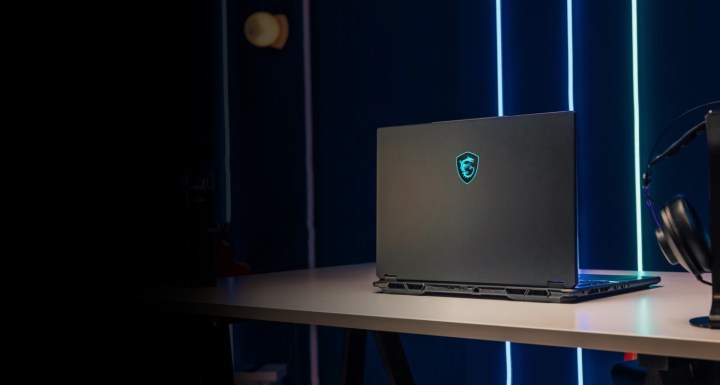
At CES 2025, MSI is unveiling a robust lineup of gaming laptops, featuring a surprising shift toward AMD processors in many new models—a notable deviation from their historical preference for Intel chips. Additionally, MSI is emphasizing larger laptops, showcasing five models with 18-inch displays alongside 17-inch and 16-inch options.
The premium models, including the Titan, Raider, and Vector, will benefit from PCIe 5.0 support, and they’ll incorporate enhanced thermal solutions with dedicated heatsinks for improved cooling of both the CPU and GPU. Improvements in speaker driver materials are also set to minimize resonance and enhance audio quality. Let’s dive into the various laptops MSI has just introduced.
MSI Titan
MSI
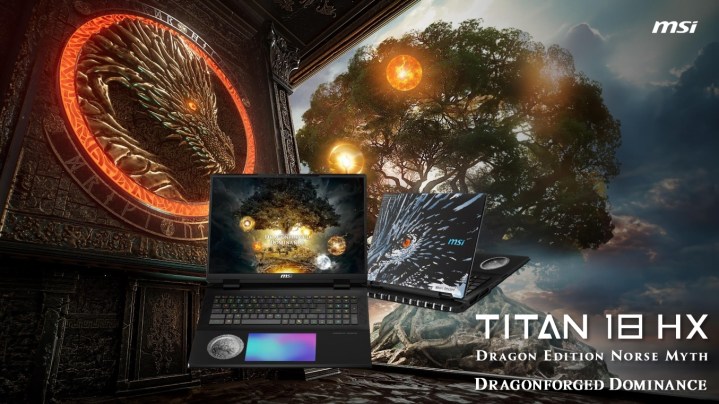
The Titan series continues its tradition of excellence with the new Titan 18 HX. This year's model showcases a Dragon Edition influenced by Norse mythology, featuring intricate designs including a dragon motif and rune-etched lid. The unique aesthetics are complemented by a textured metal finish and a Norse-themed coin set beneath glass in the palm rest, with designs illustrating Yggdrasil, the tree of life in Norse lore.
Also notable is the inclusion of a large RGB haptic touchpad and RGB-lit Cherry mechanical switches. Under the hood, the Titan 18 HX boasts Intel’s Core Ultra 9 275HX CPU and Nvidia's latest RTX 50-series GPUs. To manage its impressive 270W power usage (comprising 95W for CPU and 175W for GPU), MSI employs advanced vapor chamber cooling, alongside support for up to 96GB DDR5-6400 RAM and up to four SSDs.
The display features an 18-inch UHD+ (3,840 x 2,400) mini LED panel supporting a 120Hz refresh rate, 100% DCI-P3 color gamut, and VESA Display HDR 1000 certification. Connectivity includes two Thunderbolt 5 ports, three USB 3.2 Gen2 Type-A ports, a 2.5GbE LAN, Wi-Fi 7, Bluetooth 5.4, and HDMI 2.1.
This powerhouse weighs approximately 7.9 pounds and is powered by a substantial 99.9 watt-hour battery, rechargeable via a hefty 400W power supply. While official pricing hasn't been disclosed, last year's model was priced above $5,000, suggesting the latest Titan 18 HX may surpass that benchmark.
MSI Raider and Vector
MSI
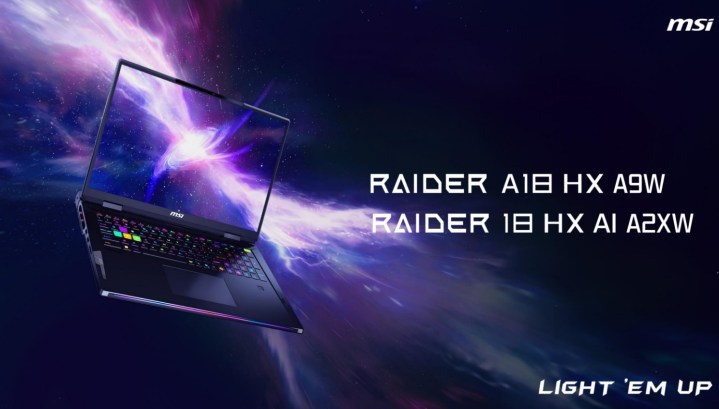
The Raider lineup also sees the introduction of an 18-inch model, which closely mirrors the Titan 18 HX in features and dimensions. Customers can choose between Intel’s Core Ultra 9 275HX (Raider 18 HX A2XW) and AMD’s Ryzen 9 9955HX3D (Raider A18 HX A9W) processors, complemented by Nvidia's RTX 50-series graphics cards.
Similar to its premium counterpart, it features the same 18-inch mini-LED display, options for up to 96GB DDR5 RAM, and dual M.2 SSD slots. Connectivity remains robust, offering dual Thunderbolt ports (version 4 on the AMD version), a 2.5GbE LAN port, Wi-Fi 7, a per-key RGB keyboard from SteelSeries, and a potent 400W power supply.
Meanwhile, the new Vector series, while a tad less premium than the Raider, still packs a punch. The 18-inch Vector 18 HX AI A2XW is available with an Intel Core Ultra 9 275HX, while the Vector A18 HX A9W can be configured with an AMD Ryzen 9 9955HX processor. While the GPU will still be Nvidia, it might not be as powerful as the Raider’s offerings. The display on the Vector series boasts a QHD+ (2,560 x 1,600) resolution, a 240Hz refresh rate, and 100% DCI-P3 coverage.
Interestingly, MSI specifies that the AMD model will sport a 99.9Whr battery paired with a 400W power supply, whereas the Intel model will have a 90Whr battery and a 330W adapter.
MSI Stealth
MSI
The Stealth series, known for its sleek design, is now offering an 18-inch variant equipped with either the Intel Core Ultra 9 275HX (Stealth 18 HX AI A2XW) or the AMD Ryzen AI 9 HX 370 (Stealth A18 AI+ A3HW). Users can choose a high-end Nvidia RTX 50-series GPU, paired with 96GB of DDR5 memory. Other features include a single NVMe M.2 PCIe Gen 4 SSD slot, a per-key RGB keyboard from SteelSeries, and a Dynaudio six-speaker audio system.
For its display options, MSI provides a choice between an 18-inch UHD+ (3840×2400) panel with a 120Hz refresh rate or a QHD+ (2560×1600) IPS panel with a higher 240Hz refresh rate. Both configurations come with a 99.9Whr battery and a 280W power supply.
In addition, there’s a compact 16-inch variant (Stealth A16 AI+ A3HW), which is solely powered by AMD’s Ryzen AI 9 HX 370 processor. This model supports up to an RTX 5090 GPU, 64GB of LPDDR5x memory, an NVMe M.2 PCIe Gen 4 SSD slot, and shares similar keyboard and speaker technologies with its larger counterpart. Display options include a 16-inch QHD+ (2560×1600) OLED panel that provides a 240Hz refresh rate, 100% DCI-P3 color gamut, and VESA DisplayHDR True Black 600 certification.
MSI Crosshair, Cyborg, and Venture
MSI is also launching mid-range gaming options with the Crosshair 18 HX AI A2XW and the Cyborg A17 AI B2HW. The Crosshair 18 model features an 18-inch screen and offers configurations up to an Intel Core Ultra 9 275HX, a QHD+ 240Hz IPS display, dual NVMe M.2 SSD slots, up to 96GB of DDR5 RAM, and a 240W power adapter.
Aiming at a more budget-conscious audience, the Cyborg A17 AI B2HW is available with up to an AMD Ryzen 7 260 processor, RTX 50-series graphics, and DDR5 memory up to 96GB. The display measures 17.3 inches, utilizes an FHD (1,920 x 1,080) IPS panel with a refresh rate of 144Hz. Other specifications include a modest 55.2Whr battery and a 150W power adapter.
MSI
Lastly, the Venture series fills the gap for everyday computing needs, offering a variety of models in 14-inch, 16-inch, and 17-inch sizes with options for both Intel Core Ultra and AMD Ryzen 300 processors.
Nvidia is gearing up for an exciting announcement. The company has officially hinted at the forthcoming RTX 50-series with an elaborate fan event leading up to the big reveal scheduled for January. Under the theme of #GeForceGreats, Nvidia is celebrating its legendary graphics cards while eagerly looking ahead. Here’s how you can get involved in the excitement.
After a prolonged period of silence, Nvidia’s GeForce social media channels have started buzzing with updates regarding their participation at CES 2025. Fans are invited to tune into the keynote presentation on January 6, 2025. While we knew the keynote was on the calendar, this marks the first concrete indication that there will be substantial news concerning next-generation gaming GPUs, in addition to Nvidia’s data center focus.
This announcement comes in tandem with Nvidia celebrating a remarkable milestone: it has been 25 years since the launch of its inaugural GPU, the GeForce 256. To honor this legacy, Nvidia encourages gamers and fans to engage on social media using the “GeForceGreats” hashtag, with opportunities to win exciting prizes for active participation.
By liking, commenting, and sharing posts with the designated hashtag, participants can contribute to Nvidia’s GeForce Hype Meter, which will be visible live on Nvidia’s Twitch channel. Although Nvidia hasn’t revealed the specifics of the prizes, it’s clear that as the hype meter fills, the incentive will grow, so keep an eye out for more details.
Nvidia is also reviving a memorable event from 2011: the GeForce LAN party. This exciting online and in-person gaming marathon will stretch over 50 hours, culminating just before CEO Jensen Huang’s keynote at CES 2025. The choice of a 50-hour duration is certainly intentional.
The original LAN party took place aboard a retired USS Hornet aircraft carrier. This time, much of the action will occur online, kicking off at 4:30 PM PT on January 4. Nvidia has hinted at “epic online GeForce LAN Missions,” offering in-game rewards alongside other opportunities to engage with the GeForceGreats hype. Live events will also be hosted in various global cities, including Las Vegas, Beijing, Taipei, and Berlin. While registration for these events isn’t open yet, fans can look forward to signing up through Nvidia’s LAN 50 website.
What’s next on the horizon? Fans can elevate Nvidia’s Hype Meter by actively engaging with their social media profiles, including GeForce, GFN, Studio, and AI_PC, utilizing the GeForceGreats hashtag. Additionally, keep your eyes peeled for potential leaks as anticipation mounts for the RTX 50-series. According to a recent leak, the RTX 5090 could potentially see performance increases of up to 70% compared to the RTX 4090.
As gaming technology continues to evolve, many players find themselves trying to balance performance with budget. A common question arises: is $1000 sufficient to build a gaming PC that can handle modern games? Let’s explore what you can accomplish with this budget.
Understanding the Components of a Gaming PC
Building a gaming PC requires knowledge of several critical components, each contributing to overall performance. Here’s a breakdown of essential parts:
Key Components
Processor (CPU)
The brain of the computer.
Popular choices include Intel Core i5 or AMD Ryzen 5.
Graphics Card (GPU)
Essential for gaming performance.
Options may include NVIDIA GeForce GTX 1660 or AMD Radeon RX 5600 XT.
Memory (RAM)
Typically, 16GB is the sweet spot for gaming.
Brands like Corsair and G.Skill offer reliable options.
Storage
Solid State Drive (SSD) for faster load times and a Hard Drive (HDD) for additional storage.
A common setup would be a 500GB SSD and a 1TB HDD.
Motherboard
Ensures compatibility among components.
Check for features like PCIe slots and RAM support.
Power Supply (PSU)
Supplies power to all components.
A reliable 500W or 600W PSU is generally sufficient.
Case
Aesthetic choice and provides airflow.
Ensure compatibility with chosen components.
Additional Considerations
Cooling Solutions: Stock coolers often included with CPUs may not be sufficient for heavy gaming.
Operating System: Don’t forget to budget for Windows or explore free Linux options.
Peripherals: Monitor, keyboard, and mouse are also necessary and can impact your overall budget.
Building within the Budget
When building a gaming PC under $1000, it’s crucial to prioritize components that will yield the best performance for your investment.
Sample Build Breakdown
Here is an example of how you might allocate your $1000 budget:
Component
Estimated Cost
CPU
$250
GPU
$350
RAM
$75
Storage (SSD)
$70
Motherboard
$100
PSU
$65
Case
$50
Total
$960
Tips for Savings
Consider Used Parts: Many gamers sell their older components at reasonable prices.
Look for Sales: Keep an eye out for seasonal sales, especially during Black Friday or back-to-school promotions.
DIY Assemble: Building your own PC can save costs compared to buying a pre-built system.
Performance Expectations
A gaming PC built with this budget can handle most modern titles at 1080p resolution with decent frame rates. However, the performance will vary based on the games you play:
Gaming Performance Targets
Esports Titles (e.g., CS:GO, Fortnite): High settings at 1080p with 60+ FPS.
Single-player Games (e.g., Witcher 3, Cyberpunk 2077): Medium settings at 1080p with 30-60 FPS.
Future-proofing: Consider upgrading components down the line to maintain performance.
Common Challenges
GPU Availability: The graphics card market can fluctuate, and finding a good deal may be challenging.
Compatibility Issues: Always check component compatibility before purchasing to avoid potential pitfalls.
Upgrade Path: Ensure your motherboard and PSU can support future upgrades.
Investing $1000 in a gaming PC can indeed yield a solid system, but it requires careful planning and consideration of current hardware trends. By prioritizing key components and looking for smart savings opportunities, you can create a gaming rig that delivers an enjoyable gaming experience without breaking the bank.
In the world of gaming, having the right equipment can make all the difference. Gamers often find themselves wondering how much they should invest in a quality gaming PC. With a $5000 budget, one might ask: is this amount sufficient to build a top-tier gaming machine? This article explores the components, benefits, and potential considerations when investing in a gaming PC at this price point.
Understanding the Components of a High-End Gaming PC
Before diving into whether $5000 is a good budget for a gaming PC, it’s essential to understand what components you are likely to upgrade or purchase within this range. A quality gaming rig consists of several key parts:
Central Processing Unit (CPU)
Performance: A premium CPU can handle multiple tasks and processes smoothly, crucial for gaming.
Popular Choices:
Intel Core i9-13900K
AMD Ryzen 9 7950X
Graphics Processing Unit (GPU)
Importance: The GPU is often the heart of a gaming PC, responsible for rendering graphics and an essential element for high-resolution gameplay and frame rates.
Top Models:
NVIDIA GeForce RTX 4090
AMD Radeon RX 7900 XTX
Memory (RAM)
Recommended Size: For a gaming PC, a minimum of 32GB of RAM is ideal for seamless performance in modern games.
Types:
DDR5 RAM for cutting-edge speed
Storage Solutions
Solid State Drive (SSD): Offers faster loading times than traditional hard drives.
Recommended Combo:
2TB NVMe SSD for gaming
4TB HDD for general storage
Motherboard
Compatibility: Ensure it is compatible with your CPU and has ample slots for future upgrades.
High-End Options: Look for features like PCIe 5.0 support and robust power delivery.
Cooling System
Need for Cooling: High-performance PCs generate heat, requiring either efficient air or liquid cooling systems.
Choices:
Custom liquid cooling kits
High-quality air coolers
Power Supply Unit (PSU)
Importance: Ensure you have a reliable and efficient PSU to power your components, ideally rated 80 Plus Gold or Platinum.
Wattage: A PSU rated between 850W to 1200W is typically sufficient for high-end builds.
Benefits of a $5000 Gaming PC
Investing $5000 into a gaming PC opens the door to several advantages:
Ultra Performance: Capable of handling the most demanding games at ultra settings with high frame rates.
Future-proofing: High-end components ensure that the system remains relevant for years to come.
Multitasking: A powerful CPU and ample RAM allow users to run multiple applications simultaneously, such as streaming and gaming.
VR Ready: Most components in this price range will support virtual reality gaming experiences.
Potential Considerations
While a $5000 gaming PC sounds enticing, certain factors should be kept in mind:
Diminishing Returns
Performance vs. Price: At high budgets, the incremental increase in performance may not justify the cost.
Realistic Needs: Consider whether you truly need the highest specifications for the games you play.
Software Costs
Operating System: Windows licensing can add to the overall expenses.
Game Titles and Subscriptions: Factor in the cost of games, expansions, and gaming subscriptions.
Build vs. Pre-Built
Customization: Building your rig can often save money, but pre-built systems could offer warranties and better support.
Time Investment: Building requires research, gathering components, and some technical skill, while pre-built options save time.
Change in Technology
Rapid Advancements: New components are regularly released; investing in a top-tier build might require regular upgrades to keep up.
Investing $5000 in a gaming PC certainly offers a plethora of choices to create a dream setup. Whether you choose to build your rig or purchase a pre-built system, this budget allows for exceptional quality, performance, and potential for future upgrades. Analyzing your specific needs and gaming preferences is crucial to making the most of your investment.
As the highly anticipated game Diablo 4 continues to draw in players, having the right laptop becomes crucial for an optimal gaming experience. Players need a machine that can handle the intense graphics, large open-world environments, and real-time action that the game offers. Here’s a thorough look at the best laptops that are suited for playing Diablo 4.
Minimum Requirements for Diablo 4
Before diving into specific laptop recommendations, let’s first review the minimum and recommended system requirements for Diablo 4. Understanding these requirements will help you make an informed decision.
Minimum Requirements
Operating System: Windows 10 (64-bit)
Processor: Intel Core i5-2500 or AMD FX-8100
Graphics: NVIDIA GeForce GTX 660 or AMD Radeon HD 7950
RAM: 8 GB
Storage: Solid State Drive (SSD) with at least 30 GB available space
Recommended Requirements
Operating System: Windows 10 (64-bit) or Windows 11
Processor: Intel Core i7-4770 or AMD Ryzen 5 2600
Graphics: NVIDIA GeForce GTX 970 or AMD Radeon RX 370
RAM: 16 GB
Storage: Solid State Drive (SSD) with at least 30 GB available space
Key Features to Look For
When searching for the best laptop for Diablo 4, several key features should be prioritized:
Performance
Processor: Look for at least a quad-core CPU that supports high clock speeds, such as Intel i5/i7 or AMD Ryzen 5/7.
RAM: A minimum of 16 GB is recommended for better multitasking and performance during intensive gameplay.
Graphics
GPU: A dedicated graphics card like NVIDIA GeForce RTX series or AMD Radeon RX series will offer the best visuals and frame rates.
Display
Resolution: A Full HD (1920 x 1080) display is standard, but opting for a higher resolution can enhance the gaming experience.
Refresh Rate: A higher refresh rate (144 Hz or more) can provide smoother gameplay.
Storage
SSD vs. HDD: SSDs are preferred due to their faster load times, helping you get into the game quicker.
Top Laptop Picks for Diablo 4
Based on the aforementioned requirements and features, here are recommendations for laptops that excel at running Diablo 4.
1. ASUS ROG Zephyrus G14
Processor: AMD Ryzen 9 5900HS
Graphics: NVIDIA GeForce RTX 3060
RAM: 16 GB
Storage: 1 TB SSD
Display: 14-inch Full HD, 144 Hz
Why Choose It?
Excellent performance for its size
Vibrant display with high refresh rate
Portable yet powerful
2. Dell G5 15 Gaming Laptop
Processor: Intel Core i7-10750H
Graphics: NVIDIA GeForce GTX 1660 Ti
RAM: 16 GB
Storage: 512 GB SSD
Display: 15.6-inch Full HD, 60 Hz
Why Choose It?
Balanced performance and affordability
Solid build quality
Good thermal management
3. Razer Blade 15
Processor: Intel Core i7-10875H
Graphics: NVIDIA GeForce RTX 3070
RAM: 16 GB
Storage: 512 GB SSD
Display: 15.6-inch Full HD, 144 Hz
Why Choose It?
Sleek design with high-end materials
Exceptional gaming performance
Customizable RGB keyboard
4. Lenovo Legion 5
Processor: AMD Ryzen 7 5800H
Graphics: NVIDIA GeForce RTX 3060
RAM: 16 GB
Storage: 512 GB SSD
Display: 15.6-inch Full HD, 165 Hz
Why Choose It?
Great performance-to-price ratio
Responsive keyboard and trackpad
Effective cooling system
Additional Considerations
When picking a laptop for Diablo 4, don’t forget to consider:
Battery Life: Look for laptops with decent battery life, even though gaming usually requires being plugged in.
Portability: Consider the weight and dimensions if you plan on traveling with your laptop.
Upgradeability: Laptops that allow RAM and storage upgrades can be beneficial for future-proofing your investment.
By considering these factors and recommendations, you’ll be well on your way to enjoying Diablo 4 with stunning graphics and smooth gameplay. Choosing the right laptop can significantly enhance your overall gaming experience and ensure you are prepared to battle through the world of Sanctuary.
Nvidia may soon play a pivotal role in your next gaming computer, not just via its graphics cards but also by incorporating its processors. The company is reportedly developing an Arm-based platform specifically for PCs, featuring a CPU and GPU designed by Nvidia, with aims to launch in September 2025, as reported by DigiTimes.
The report indicates that Nvidia intends to introduce a high-end computing framework based on Arm architecture in September, with a full commercial rollout expected by March 2026. While this marks the first known timeline for Nvidia’s Arm-based chips, discussions surrounding this initiative are not new. About a year ago, Reuters disclosed that Nvidia was exploring Arm-based CPUs as part of Microsoft’s initiative to assist chip manufacturers in developing Arm processors for Windows PCs.
As we move into 2024, the prior discussions come into clearer focus, especially with Microsoft promoting its Arm-based Copilot+ laptops. However, Nvidia appears to be aiming for a more advanced market, targeting premium users who are interested in high-performance gaming systems. If this information holds true, it offers new insights into Nvidia’s previous unsuccessful bid to acquire Arm.
There’s compelling evidence backing the validity of this report. Earlier this year, Nvidia’s CEO, Jensen Huang, hinted at the company’s work on a consumer-oriented Arm-based processor during a conversation with Dell’s CEO, Michael Dell. In terms of enterprise solutions, Nvidia has already established a significant track record in designing Arm-based CPUs. For instance, the Grace CPU is an integral component of its Grace Hopper platform, a cornerstone in many data centers.
The timing of this initiative is also noteworthy. Currently, Qualcomm has an exclusivity agreement with Microsoft for producing Arm-based chips for Windows PCs. Given the ongoing licensing disputes between Arm and Qualcomm, Arm is likely eager to engage additional brands to manufacture chips for consumers based on its designs. Arm has stated that it anticipates this exclusivity to conclude this year, potentially allowing companies like AMD, Nvidia, and Intel to begin producing Arm-based chips by 2025.
Nvidia has been contemplating the development of Arm-based CPUs for Windows PCs for several years, but it may finally be coming to fruition. The company’s substantial success in the data center sector has rapidly transformed it into one of the world’s wealthiest corporations, thanks to its advancements in AI accelerators. Now, it seems Nvidia is setting its sights on the consumer market.
Get your weekly breakdown of the technology behind PC gaming