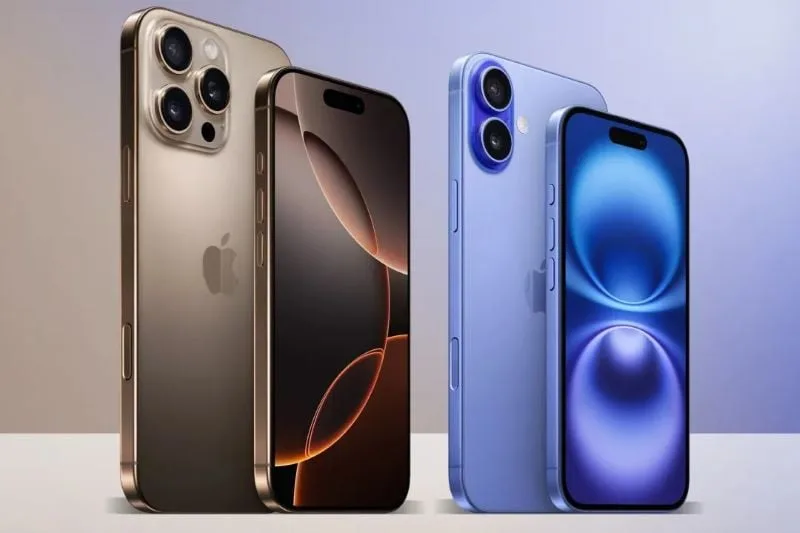
Thinking of upgrading to the iPhone 16? The next step is deciding which model best fits your needs. Apple has released four variants: the iPhone 16, iPhone 16 Plus, iPhone 16 Pro, and iPhone 16 Pro Max. The price points range from $829 for the base model up to $1,199 for the Pro Max, which is the premier option.
This guide aims to clarify the differences and similarities among the various models to help you make an educated decision. All models are currently available for preorder, with the official launch set for September 20th.
Our recommendation? Upgrade only if it’s necessary. If your current device is functioning well but struggling with battery life, consider getting a battery replacement through Apple’s service. However, if you find your phone increasingly challenging to use, it might be time for a new one.
Like the iPhone 15 series, all iPhone 16 models come with a USB-C port, and they will soon support Apple Intelligence, a collection of advanced AI features. If you’re intrigued by this technology or simply want to give it a spin, upgrading could be worthwhile.
Which iPhone 16 Is Right for You?
The iPhone 16 lineup consists of the iPhone 16, iPhone 16 Plus, iPhone 16 Pro, and iPhone 16 Pro Max. The main distinction between the iPhone 16 and 16 Plus lies in the screen size, which is similarly the case for the 16 Pro and Pro Max models. Generally, the larger models, such as the Plus and Pro Max, offer greater battery longevity, with Apple claiming that the Pro Max boasts the best battery performance of the series.
All models have the newly introduced configurable Action button that replaces the traditional Mute switch. This button can be customized to perform functions like activating the flashlight or launching the camera. Additionally, the Camera Control button allows for effortless changes to camera modes or zoom settings with a gentle press.
A notable new feature is **Audio Mix**, giving users enhanced control over video soundtracks. Options like “In-Frame” and “Studio” settings optimize focus and minimize background noise, with Pro models benefiting from improved microphones. The entire iPhone 16 lineup also includes updated Photographic Styles, enhancing control over skin tones and other image features, distinguishing them from similar offerings by competitors.
Apple Intelligence
Apple Intelligence is a highlight of the iPhone 16 and iPhone 15 Pro series. It includes a revamped Siri, emoji creation (Genmoji), and advanced writing support. If you’re eager to explore Apple’s AI innovations, you’ll need one of these newer models.
All iPhone 16 devices feature OLED displays with peak brightness reaching 2,000 nits, IP68 water resistance, and Apple’s Ceramic Shield for added toughness. They also support MagSafe wireless charging, compatible with the new Qi2 standard, which allows for faster charging and improved accessory compatibility.
Detailed Overview of Each Model
– **iPhone 16 ($829):** The iPhone 16 has a 6.1-inch display and runs on the A18 processor, which provides a 30% performance boost over the iPhone 15. Its 12-megapixel ultrawide camera has been improved with autofocus, enabling macro photography capabilities.
– **iPhone 16 Plus ($929):** This model is similar to the iPhone 16 but has a larger 6.7-inch screen and a bigger battery, making it ideal for users who need extended battery life.
– **iPhone 16 Pro ($999):** Featuring a 6.3-inch display with thinner bezels, this model is built from titanium for added durability. Its ProMotion display refreshes at 120Hz for a smoother experience, while the A18 Pro chip enhances processing speed and gaming performance.
– **iPhone 16 Pro Max ($1,199):** The Pro Max stands out with a 6.9-inch display and is touted to have the longest battery life. With its 48-megapixel Fusion camera, it excels at capturing dynamic subjects and performs well in low-light conditions. It also offers advanced video capabilities such as ProRes capture and Night mode portraits.
Additional Options
If the iPhone 16 lineup doesn’t resonate with you, Apple still has older models available like the iPhone 15 ($699) and iPhone 14 ($599). The iPhone SE (2022) is also an option at $429, although a refresh is anticipated in early 2025.
For those in the market for a new iPhone, we recommend opting for an unlocked model, providing the flexibility to switch carriers easily. Keep in mind that iPhones now utilize eSIM technology instead of traditional SIM card slots.
In summary, while the iPhone 16 series features several enticing upgrades, you might still find excellent value in older models or even refurbished devices from platforms like Swappa or Gazelle.