الوسم: fast food

  • Did Trump Serve Fast Food to King Charles? The Real State Dinner Menu

    Did Trump Serve Fast Food to King Charles? The Real State Dinner Menu

    Digital Phablet – Trump hosts an upscale dining experience during King Charles’s visit.

    On April 28, President Donald Trump and First Lady Melania Trump hosted a formal White House state dinner in honor of King Charles and Queen Camilla, emphasizing gourmet cuisine. Reports indicate that comfort foods were entirely absent, replaced by a meticulously curated spring banquet.

    While Trump has previously gained attention for serving fast food to sports teams during White House events, this occasion showcased a markedly different culinary approach. According to People magazine, Melania Trump personally curated the menu, which highlighted fresh, French-inspired dishes, ingredients grown on the White House grounds, and homage to Anglo-American relations.

    Donald Trump King Charles

    “This menu was crafted to symbolize the renewal of spring and the bond between our two nations,” a White House official stated before the event.

    The Elegant First Course

    Guests enjoyed a soup of garden herbs, inspired by traditional French sauces, served alongside a salad with hearts of palm topped with crispy shallots and microgreens.

    White House Garden Fresh Ingredients

    The second course featured spring herb ravioli filled with ricotta cheese, morel mushrooms, and fresh herbs, finished with a light Parmesan emulsion. This dish highlighted ingredients cultivated on the estate, drawing from initiatives like Michelle Obama’s vegetable garden and Melania Trump’s beekeeping efforts. The Parmesan emulsion was praised for elevating the dish’s flavor profile, according to White House sources.

    Traditional Royal Elegance

    For her main course, Melania selected Dover sole meunière—a French classic famously promoted by Julia Child. The fish was sautéed in hazelnut brown butter and served with ramps, snow peas, pavé potatoes, and parsley oil, embodying European culinary elegance.

    This choice was clearly aimed at impressing esteemed royal guests, as Dover sole has long been associated with European fine dining and formal tradition.

    Honey from the White House Beehive

    The dessert showcased a beehive-shaped chocolate gâteau layered with vanilla bean crémeux, almond joconde, and brown butter crumble, served alongside crème fraîche ice cream and honey harvested from the President’s beehive. King Charles and Queen Camilla sampled the honey a day prior, emphasizing the event’s emphasis on sustainable and locally sourced ingredients.

    American wines were served to toast the occasion, celebrating “the shared heritage and enduring friendship” between the U.S. and the U.K. The wine list included Hopkins Riesling “Heritage” 2024, Penner-Ash Pinot Noir from Willamette Valley (2022), and Newton Chardonnay Unfiltered (2022). The White House highlighted American winemaking as a source of national pride.

    The Transformation of the East Room

    The dining experience extended beyond the food. Instead of hosting in the typical State Dining Room, the event was set up in the East Room. The décor played a crucial role, with cherry blossoms arranged in the Grand Foyer and the room transformed into an English garden-like setting with trees and lush greenery.

    Tables were decorated with an array of flowers, including lilacs, butterfly ranunculus, phlox, and lily of the valley, reflecting the springtime theme.

    Music and cultural traditions were also part of the festivities, featuring performances by U.S. military musicians from the Marines, Army, and Air Force, adding a touch of patriotism and pageantry to the evening.

    While President Trump had previously gained attention for serving fast food at official dinners, Melania ensured that this event celebrated the finest European culinary traditions.

  • Tips for Organizing Items in Fast Food Simulator

    Tips for Organizing Items in Fast Food Simulator

    Fast Food Simulator gives you the chance to run your own restaurant, where you’ll whip up fast food dishes and ensure your customers are happy and satisfied. As the game progresses, you’ll need to manage an increasing variety of ingredients and menu items, which makes your role a bit more challenging.

    If you want to keep your customers happy and reduce their wait time, it’s important to stock up on supplies from the Market app. However, the challenge lies in storing everything properly, as any items left in the wrong place will vanish by the next day, leading to unnecessary losses.

    How To Store Items


    The game features three categories of items. Some, like packaging supplies and vegetables, won’t be lost no matter where you place them. However, other items must be kept in cold storage. Certain opened items must also be refrigerated to prevent spoilage.

    Properly storing items is crucial for your bottom line. It’s wise to stock up before opening your restaurant each day so you can quickly access everything based on what your customers want.

    You can place orders through the Market app during business hours, but this is not advised. Waiting for delivery can be time-consuming, possibly leading to unhappy customers.

    As you advance in the game, you’ll need to accumulate a substantial inventory. Fortunately, the kitchen offers plenty of room for efficient storage. However, remember that prepared foods for customers cannot be stored, and any leftovers will be automatically discarded the next day.

    Items That Can Be Stored On Shelves And Cabinets


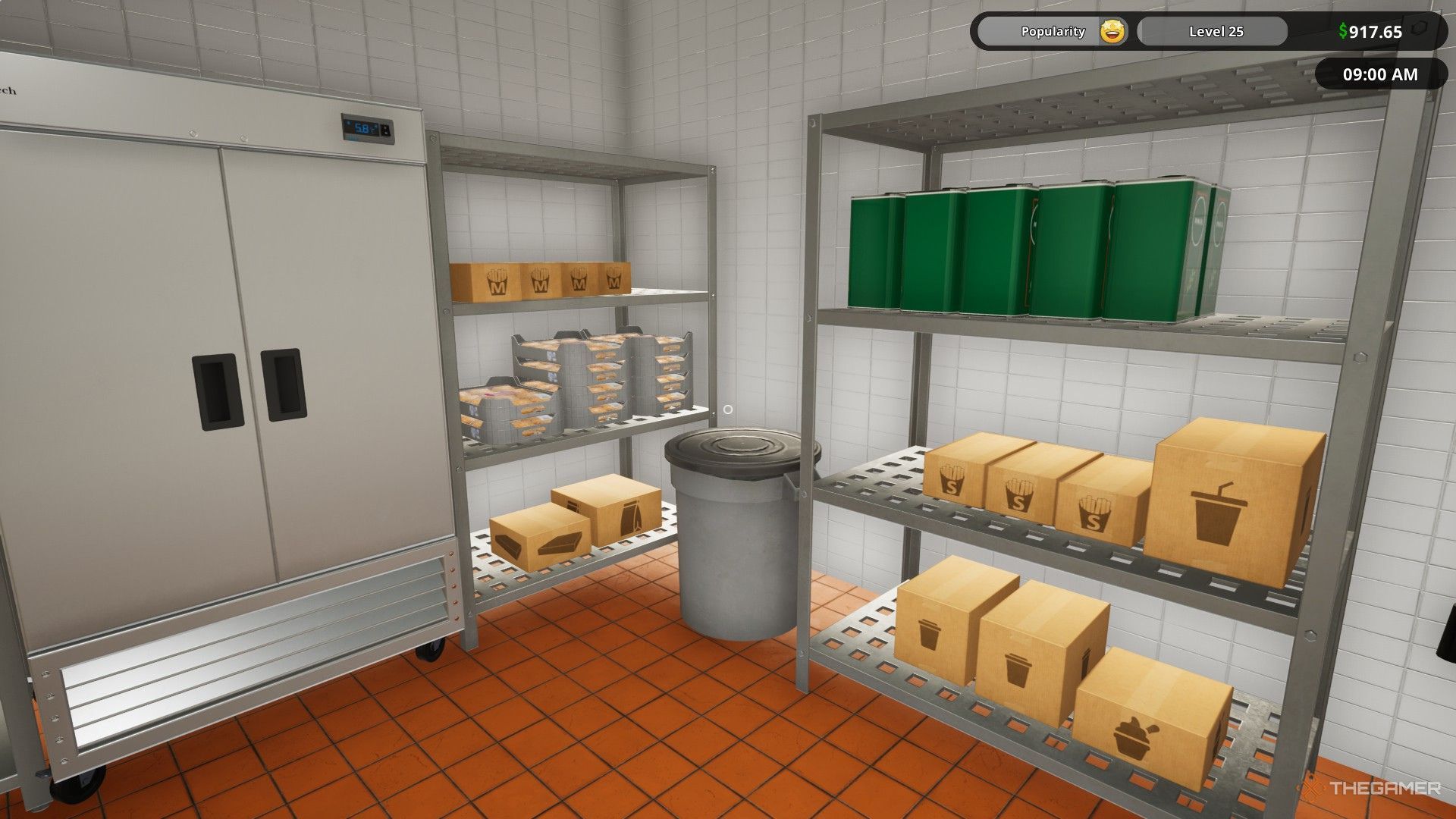
    The image shows the shelves inside the kitchen stocked up with items in Fast Food Simulator.

    Your kitchen features many shelves and cabinets, providing ample space for all kinds of items. There’s a shelf beyond the cold storage for overflow items as well.

    Below is a list of items that can be stored anywhere in the kitchen, although it’s best to put them on shelves or in cabinets:

    • Tomatoes
    • Onions
    • Lettuce
    • Pickles
    • Burger Buns
    • Soda Cups
    • Coffee Cups
    • Ice Cream Cups
    • French Fry Cups
    • Coffee
    • Burger Wrapping Paper
    • Frying Oil
    • Paper Bags
    • Nugget Boxes

    Ketchup, mayonnaise, and mustard containers can also be placed anywhere but must be refrigerated after opening.

    Items That Can Be Stored In Cold Storage


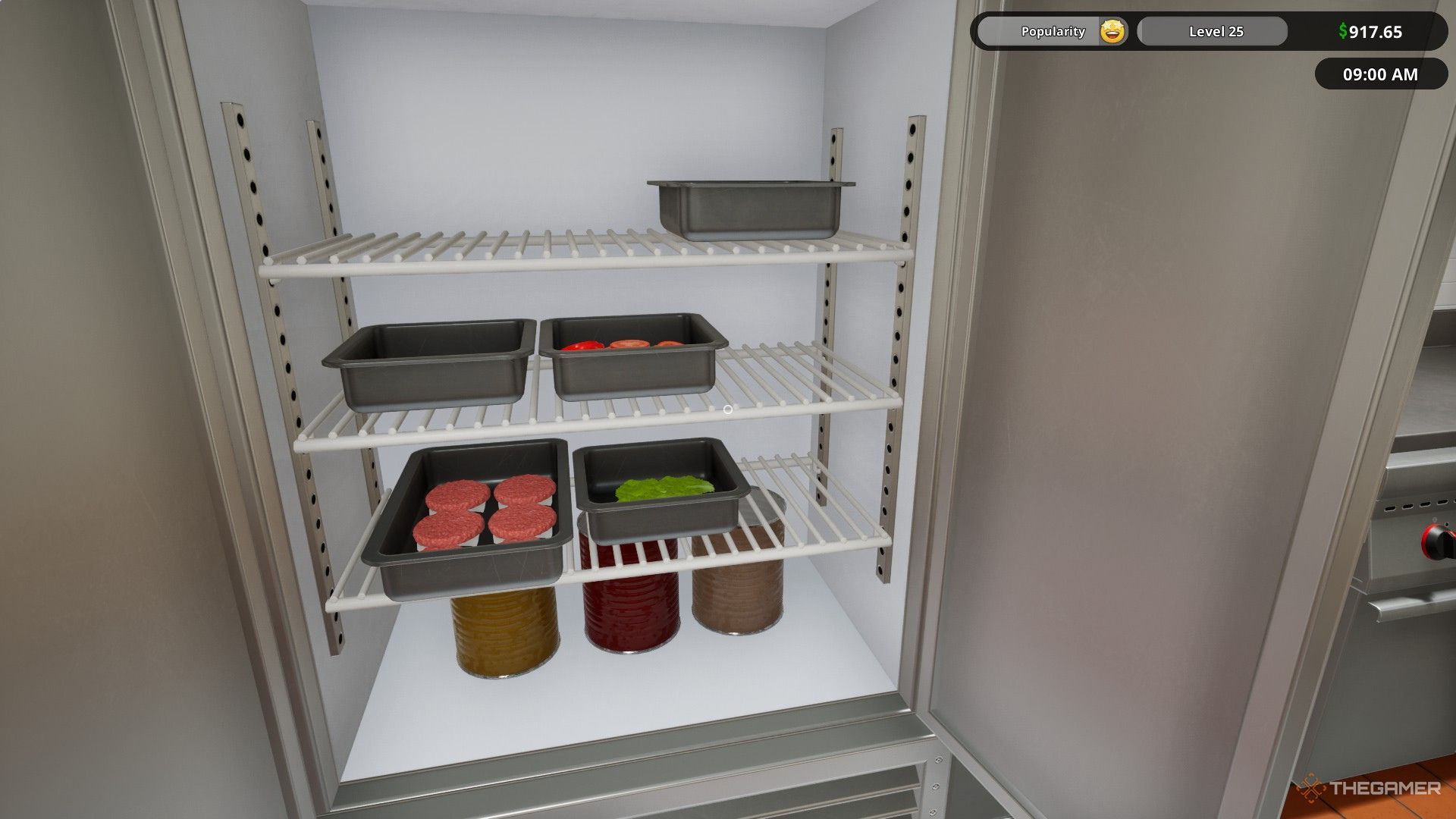
    The image shows several ingredient containers, beef patty container, and several sauce cans inside a fridge in Fast Food Simulator.

    There’s a large cold storage area at the back of the restaurant to keep items from spoiling. You can also make use of two refrigerators in the kitchen for this purpose.

    • Frozen Beef Patties
    • Frozen Chicken Patties
    • Frozen French Fries
    • Milk
    • Beef Patty Containers
    • Cheddar Cheese
    • Frozen Chicken Nuggets
    • Ingredient Containers
    • Opened Ketchup Can
    • Opened Mayonnaise Can
    • Opened Mustard Can

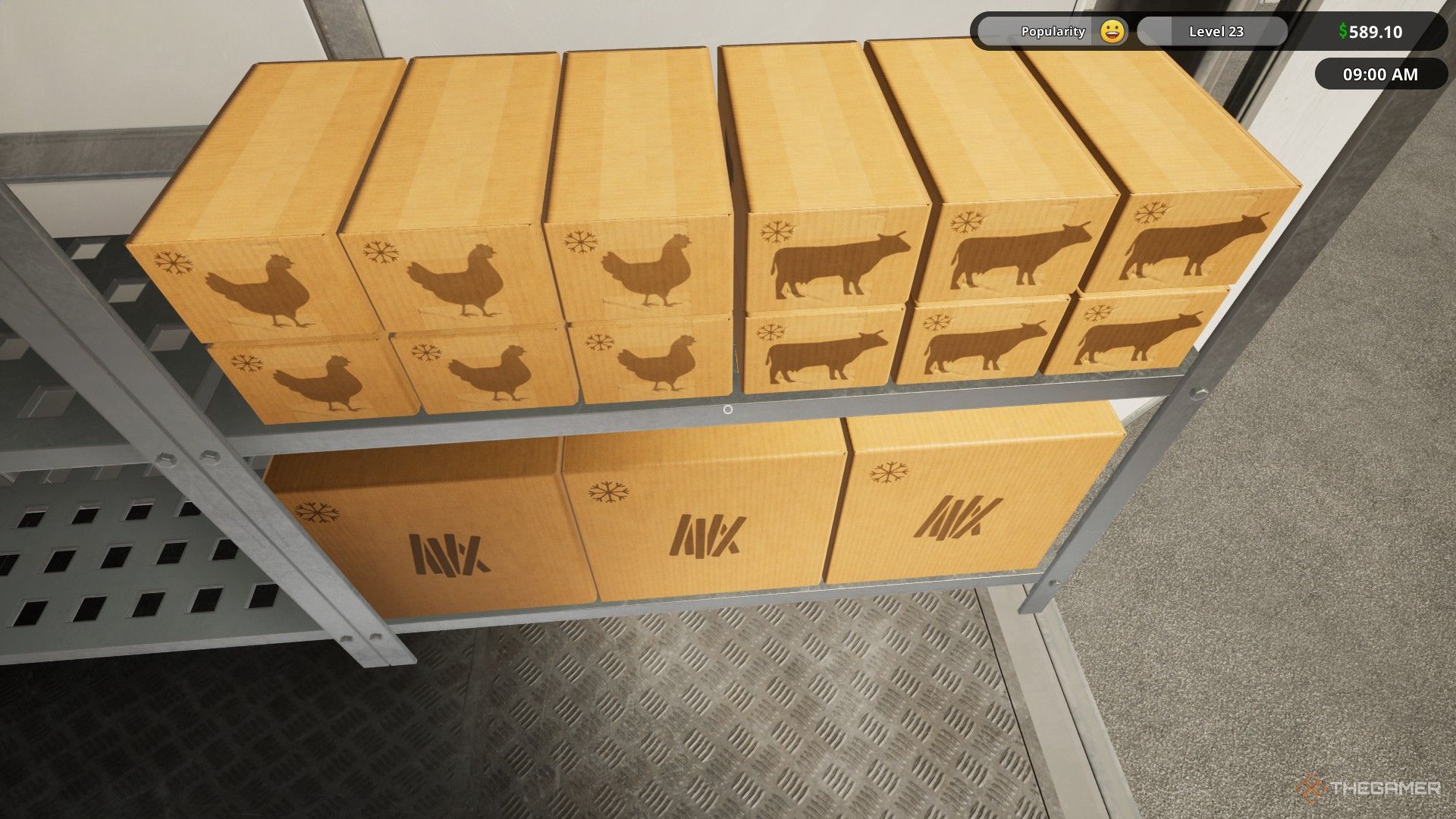
    The image shows several packages with a snowflake icon in Fast Food Simulator.

    You can easily identify items that belong in cold storage thanks to the snowflake icon on their packaging. All ingredients and patty containers must be refrigerated to avoid spoilage. Leaving items outside the fridge will result in expired ingredients disappearing.

  • Mastering Drive-Thru Service in Fast Food Simulator

    Mastering Drive-Thru Service in Fast Food Simulator

    Fast Food Simulator invites you and your friends to run a fast food eatery together. There’s plenty to keep you busy in the kitchen, and as orders grow in complexity, the excitement really ramps up. You’ll need to stay focused and agile to make your restaurant thrive.

    Once you reach level 15, you’ll gain access to the Drive-Thru, allowing you to start taking customer orders from their vehicles. Initially, handling these drive-thru orders can be tricky, as the game doesn’t provide much guidance.

    How to Handle Drive-Thru Orders

    Completing drive-thru orders requires a different strategy compared to regular orders since there’s no server to assist, and you can’t simply pass a tray to customers. Fortunately, upon unlocking the Drive-Thru, you’ll also gain access to various items, including paper bags.

    You’ll need to purchase these paper bags from the Market app using the computer in your kitchen and wait for delivery. Once the delivery truck arrives, take the bags out of their packaging and position them near the Drive-Thru window.

    After organizing the paper bags, start a new day and anticipate incoming orders. First, accept the Drive-Thru orders using the system by the window. Once accepted, the customer’s vehicle will arrive to pick up their order.

    Prepare the items, and when you’re ready, grab a paper bag from the stack and place it on the counter. Fill it with the necessary food items for the order. Once everything is packed, you can hand the bag directly to the customer.

    You don’t have to individually package each item. Simply place all items listed on the receipt into one paper bag, and hand that bag over to complete the order.

    Additional Tip

    The drive-thru receipt isn’t particularly useful, so you don’t need to include it with the food items. You can either leave the receipts on the counter where they’ll disappear by the next day or toss them in the trash bin located behind the drive-thru counter.

  • Essential Tips for Mastering Fast Food Simulator as a Beginner

    Essential Tips for Mastering Fast Food Simulator as a Beginner

    Fast Food Simulator places you in the role of a fast-food restaurant manager, requiring you to handle everything from taking orders to cooking and serving food. As you progress through the game, you can unlock new ingredients and hire staff to make your tasks easier.

    The game can quickly become hectic if you don’t make the right choices, so it’s crucial to have a strategy before jumping in. Here are some beginner tips that will help you get started and make your restaurant experience more enjoyable.

    You Have All the Time You Need to Prepare

    Before you open for business, time is on your side. The clock remains at 9 AM, allowing you to get ready without any rush. Take this opportunity to order ingredients, organize them, and complete any time-consuming tasks that would be tough to manage once customers arrive.

    A smart strategy is to cook a good number of beef patties in advance, as they take a while to prepare and require constant attention to avoid burning or undercooking. Having enough patties ready before opening will help you fulfill orders in seconds.

    Tip: If you finish the day with extra cooked patties, it’s better to toss them rather than risk losing a customer by serving late.

    Don’t Hesitate to Order More Than You Need

    Before opening, feel free to order as much food as your budget allows. Ensure you have not only what you need for the day, but also anything unlocked in the market.

    Any excess ingredients can be stored on shelves. Perishable items like vegetables and patties can be kept in the fridge or cold storage. Remember, once you unlock an ingredient, order it right away; you’ll start receiving requests for it the very next day, whether you have it or not.

    Tip: If a last-minute order comes in for something you don’t have, you can still buy it through the Market app, but it’s always better to prep ahead of time to save crucial seconds during the rush.

    Hire Staff as Soon as Possible

    You can hire a server and a busser for a nominal cost. The server picks up dishes and brings them to customers, while the busser handles payments and keeps tables clean. For just around $60 for both workers for the day, their assistance becomes vital as your restaurant grows and orders become more complex. This allows you to concentrate on cooking without the distraction of serving tables.

    Note: Don’t forget to place the receipt and food on a tray before marking the dish as complete; your server will automatically serve it to the correct table.

    Keep an Eye on the Screens

    There are screens positioned around the cooking stations, and it’s essential to check them regularly. As you advance and the orders get more intricate, it’s easy to overlook ingredients.

    By frequently glancing at the screens, you’ll remember what each order entails and which table it belongs to. This habit is especially helpful when you’re managing multiple orders at once.

    Prepare a Few Simple Orders Before the Day Starts

    As you get used to the game, it’s wise to have a couple of simple orders ready before opening for the day. You’ll begin noticing common requests from customers, and having those on hand will lessen your workload.

    At higher difficulty levels, managing customer orders can be quite a challenge, so having basic items ready will allow you to focus on fulfilling other requests, ensuring satisfied customers.

    Tip: Prepped orders don’t have to be just burgers; preparing drinks in advance can also help you keep up with demand.

    Don’t Overextend Yourself

    In the kitchen, take your time and avoid rushing. For instance, when cooking beef patties, limit yourself to six at a time to prevent burning. Cooking more than the cooking tray can hold will lead to overcooked patties.

    If you’re busy with several orders, don’t hesitate to cancel new requests. Cancelling isn’t as impactful as serving the wrong item and will help you maintain focus.

    Clean the Kitchen Before Closing

    Before you wrap up for the day, it’s vital to clean the kitchen. Make sure all ingredients and uncooked patties are placed in the fridge. Likewise, any trays your busser has collected should be organized under the counter.

    These simple steps help prevent food waste, saving you money. Leaving items out overnight means losing them by morning, and that includes condiments like ketchup and mayo, which should also be refrigerated after use.

    Don’t Dwell on Mistakes

    In the fast-paced environment of the game, it’s easy to feel overwhelmed, especially with increased difficulty. Stay calm and don’t let a single wrong order derail your progress. Customers might still accept slightly imperfect patties, so focus on the next order instead.

    You can refer to the receipt on trays to confirm details before marking an order complete. Additionally, a label system can help you keep track of which burger belongs to which order. Make it a habit to double-check to avoid confusion.

    By following these tips, you can efficiently manage your fast-food restaurant and keep your customers happy!