الوسم: Essential

  • Essential Tips & Tricks for Completing & Solving Pragmata

    Essential Tips & Tricks for Completing & Solving Pragmata

    Pragmata stands out as one of Capcom’s most original games in years. While it introduces many fresh ideas, it also carries familiar elements inspired by survival horror games like Resident Evil. The game looks to draw from that genre but with its own unique style and storytelling.

    The gunplay feels faster, the story is more emotionally driven, and the setting offers one of the most compelling sci-fi stories we’ve seen recently in video games. Its originality introduces new mechanics that can be a bit complex at first, so here are some helpful tips as you begin your journey on the Moon.

    ### Take Your Time To Explore

    Pragmata isn’t a lengthy game, and its areas across the lunar base aren’t large. When you reach a new section, don’t worry about sticking to the main path. Feel free to stray and look for collectibles and hidden encounters.

    Be sure to complete every Red challenge room you find, but keep in mind these require special keys to access.

    Using Diana’s scan feature often and upgrading it early is also a good idea. With upgrades, all items and their locations will appear automatically on your HUD, making item collection easier. Since collecting everything is necessary for the best ending, it’s smart to start early.

    ### Never Fight Without Hacking

    Hugh will find many weapons during the game, most of which are quite powerful. It might be tempting to use them without relying on Diana’s hacking skills, but that would be a mistake.

    The game treats Hugh’s combat abilities and Diana’s hacking as equally important. During fights, a good tactic is to hack first, then get close and start shooting to weaken enemies quickly.

    As you progress, both your weapons and hacking abilities will improve. By the end of the game, you might be able to eliminate basic foes using only hacks, but this requires upgrading everything thoroughly.

    ### Watch Your Surroundings

    Combat arenas can be tight and chaotic, with enemies attacking from multiple directions. Fortunately, Hugh’s spacesuit is equipped with thrusters, allowing him to zip around the environment.

    While standing still and shooting might seem like the easy option, it’s better to stay aware of your surroundings. Enemies can come from anywhere, and being struck from behind will momentarily stun you, leaving you vulnerable from all sides.

    You will unlock a slow-motion dodge, which activates when you perfectly avoid an attack—an essential skill for tougher battles and boss fights.

    ### Go Back To The Shelter Whenever You Can

    The Shelter is a central hub where you can buy upgrades and spend time with Diana. It might be tempting to only visit when you need to upgrade, but it’s beneficial to return frequently whenever fast travel points are available.

    Visiting the Shelter isn’t just for upgrades; it also offers chances to have meaningful interactions with Diana. They often chat about their lives, beliefs, or even have playful moments like water pistol fights, creating some of the game’s most memorable and heartfelt scenes.

    ### Upgrade, Upgrade, Upgrade

    The Shelter provides access to every upgrade path in Pragmata. You can buy new weapons, mods, hacking skills, and improve Hugh’s suit and main weapon. Upgrades cost different currencies, and certain nodes are needed for specific enhancements like hacking, weapons, or suit improvements.

    Persistent upgrading throughout your playthrough is crucial. Experiment with various weapons and hacking mods rather than sticking to just one style. Different combinations can be much more effective and fun, especially as the game’s difficulty increases.

    ### Experiment With Everything You Come Across

    The game offers countless loadout possibilities. You’ll likely develop your favorite weapon and hacking combo, but don’t hesitate to try new ones.

    Some weapons work better against different enemies, and you might discover a powerful hacking setup that significantly speeds up combat and boosts damage. Crafting a specialized hacking loadout can make fights more efficient, especially with modifiers that reduce enemy health or increase hack damage.

    Trying different loadouts repeatedly is key to enjoying multiple playthroughs. Embrace experimentation to find what works best for your play style.

    ### Don’t Be Afraid To Revisit Older Areas

    Thanks to many fast travel points and clear indicators of explored areas, returning to previous locations is simple. The game highlights what you’ve explored and what remains to be discovered.

    More than just collecting items, revisiting areas often leads to new conversations and character moments between Hugh and Diana. They might chat about their lives, make observations on the environment, or engage in playful banter that you wouldn’t encounter during your initial visit.

    ### The End Credits Are Only The Beginning

    Once you finish the game, a new opportunity called “Unknown Signal” appears. It’s worth pursuing this new content to unlock even more about the story and gameplay. Even if it feels like the game’s over, exploring this additional path can reveal hidden chambers and new challenges, offering a deeper experience.

  • Essential Survival Tips for Back to the Dawn: Completing and Solving

    Essential Survival Tips for Back to the Dawn: Completing and Solving

    Take Care Of Both Your Physical And Mental Health

    In Back To The Dawn, prison life can be tough on both your body and mind. It’s important to keep yourself in good health. If your Body or Mind levels drop below 30, it becomes very hard to keep playing and your chances of winning decrease.

    The biggest problem is hunger. If your Hunger meter is high, you’ll lose about five points of Body and two of Mind every hour. The two meals each day aren’t enough to keep your satiety up. You can buy cookies from Billy, the Deputy Captain, which cost some money but help prevent starvation. Other ways to find food include:

    • The snack vending machine during recreation time.
    • Searching trash cans and cupboards.
    • Pulling weeds and picking flowers. Some flowers are edible, and you might find a jewel scarab that you can eat.
    • Befriending other inmates and trading with them.
    • Asking someone to share food at lunch.

    Important Tip

    Your bed only comes with a sheet, no pillow or blanket. Sleeping without these can harm your health significantly. Try to buy pillows and blankets from Billy as soon as possible.

    Befriend As Many Inmates As You Can

    It might seem slow, but it’s crucial to spend time befriending other inmates early on. Once you’re friends, you can learn about their stories, trade items, and build trust. Some quests require specific items, which can only be obtained by trading during interactions with inmates. Building rapport might even unlock new items or help with escape plans.

    Befriending an Inmate

    Helpful Hint

    If you activate the Charisma skill called Affinity, you’ll spend only one focus point to befriend inmates instead of two, making it easier to make connections.

    Rewind Time With Memory Recall

    If you make a mistake or forget to complete a quest, don’t worry. As long as you’re playing in either New Eden Mode or Central District Mode, you can go back to an earlier auto save. Memory Recall acts like a time machine, allowing you to fix errors by returning to one of your last six auto saves.

    To use it, open the pause menu, select Memory Recall, and pick the save point you want to go back to. You can also overwrite, delete saves, or create up to ten manual saves separate from auto saves.

    Note

    If you choose Skidroad Mode, the Memory Recall feature won’t be available, so pick your difficulty carefully.

    Stay Out Of Fights Early On

    At the start, you’ll have the option to fight other inmates through quests, yard fights, or prison boxing matches. However, since your attributes, skills, and specialties are not yet developed, other inmates will be much stronger, and engaging in fights early can hurt your relationships and health.

    Tip

    Losing a fight can send you to the infirmary, where you can access the pharmacy and speak with the prison doctor, Beth. It can sometimes be a strategic way to recover and gather resources.

    Search Everything

    No matter where you are, there are places to scavenge for useful items. Search trash cans, shelves, boxes, and other containers — you might find food, weapons, tools, or crafting materials that could help your escape.

    Searching Containers

    When you have free time, make sure to explore every shelf or box. Items found from searches can be very valuable, especially for your escape plans. Keep in mind, searches take stamina and will advance time by a few minutes each attempt.

    Pro Tip

    Some skills and specialties, like Iron Throne, Reflex, Focus Up, and Affinity, give you bonuses to stamina and focus recovery, helping you search more often.

    Level Up Your Attributes And Skills

    Every activity in prison, from working out and pulling weeds to painting or listening in on conversations, earns experience points for your four main attributes: Strength, Agility, Intelligence, and Charisma. As you gain experience, you can unlock special skills within each attribute or fill skill points that improve your abilities.

    Upgrading Attributes and Skills

    Upgrading attributes and skills is essential for surviving longer in prison and increasing your chances of escaping successfully.

    Become The Best Prison Employee

    The first few jobs are required for main story progress, but afterwards, they are optional. Choosing the right jobs helps you earn more money, gain Good Conduct Credits, and open access to different areas of the prison. More access means more potential escape routes.

    Performing well in your job not only improves your reputation but also grants experience toward your attributes and skills, helping you unlock even more opportunities for escape and progression.

    Prison Laundry

    Manage Your Stamina And Focus Points Wisely

    Your daily stamina and focus are limited. Many actions, like working out, crafting, or befriending inmates, consume stamina or focus points. Starting each day with 120 stamina and five focus points, you need to manage these resources carefully.

    Resting to Regain Stamina

    Stamina can be restored by resting, sleeping, taking showers, eating certain meals, or using items like snacks. Focus points are mainly for befriending inmates and fights, but can also be used for re-rolling failed attribute checks or influencing your fate in some modes.

    • Rest for 10 stamina every 30 minutes of game time.
    • Sleep or take a shower to recover stamina.
    • Eat meals or use stamina-restoring items when needed.
    • Special skills can boost stamina and focus recovery rates.
  • Essential Tips for Completing and Solving in Wuchang: Fallen Feathers

    Essential Tips for Completing and Solving in Wuchang: Fallen Feathers

    Stay Aggressive During Battles

    Boss fights are a big part of Wuchang: Fallen Feathers, and there are many ways to approach each one. But one consistent tip is to stay mostly aggressive throughout the fights.

    Every enemy has a gauge that fills up when you deal damage. When it’s full, they become vulnerable to a powerful attack called Obliterate. Use this to your advantage by attacking, then unleashing Obliterate, and following up with more hits while they recover to maximize damage.

    Get Sword Counter and Clash Skills Early

    The combat system focuses heavily on dodging, but some enemies are easier to defeat by parrying. Many bosses really require you to master parrying, but you don’t start with this skill right away.

    Make sure to unlock the “Sword Counter” skill in the Longsword skill tree in the Impetus Repository as soon as possible. It adds more options to your defense, especially against bosses. Also, pick up skills that give your attacks the Clash effect, which lets you trade blows with less damage to yourself.

    Skill tree showing Sword Counter

    Use All Your Healing Items

    Between shrines, the game throws many tough encounters, and healing supplies are limited. However, you will find lots of secondary healing items while exploring.

    Items like Steamed Bunny Buns, Health Pills, Raven Pills, and Special Pills should be used to recover health when fighting weaker enemies. Save your more powerful Manna Vases for the harder fights. Use the weaker items first, so your stronger healing options are saved for when they’re truly needed.

    Healing items like pills and buns

    Collect Health and Stamina Upgrades

    Your enemies can hit very hard, and managing stamina is key in a dodge-heavy combat style. To survive longer, focus on upgrading your Vitality and Endurance skills at the Impetus Repository.

    Some weapon skill trees provide more of these upgrades, so if you feel your health or stamina is lacking, consider investing in different weapon trees that boost these stats. For example, the Dual Blades tree emphasizes Endurance upgrades, making it worth trying different options.

    Character upgrading health and stamina

    Always Watch for Traps

    Ambushes are common in this game, and Wuchang loves placing sneaky traps. If you see an item lying on the ground in a small clearing, be cautious—there might be danger hidden there.

    You’ll find enemies hiding behind corners, hanging from ceilings, mines buried under snow, and even underground trees. Always pay attention and keep your health full to avoid getting caught off guard or taking unnecessary damage.

    Sneaky trap

    Don’t Fear Your Inner Demon

    It might seem scary when the game warns you about rising Madness and your Inner Demon nearly coming out. But having a high Madness level isn’t entirely bad.

    High Madness boosts your attack power and can make some skills more effective or add extra effects. For example, if your Madness level is over 90%, your Longsword’s Blink Kick restores stamina, and other one-handed sword skills can deal more Skybound Might damage.

    Keep in mind, though, that Madness also has negatives, like losing more Red Mercury upon death and taking more damage overall. It’s a balancing act, but a useful one if managed carefully.

    Stats screen showing Madness levels

    Monitor Your Red Mercury

    In Wuchang, leveling up requires turning Red Mercury into Red Mercury Essence, which you then spend on upgrades. This process is a little complicated, and it’s sometimes hard to tell how much you have enough for an upgrade.

    A helpful hint is that a red circle next to your Red Mercury count will glow gold when you have enough to turn it into an Essence. Keep an eye on this indicator and head to a shrine or be cautious when exploring once it lights up.

    Red Mercury indicator

  • Key Tips for Completing Every Biome in Peak

    Key Tips for Completing Every Biome in Peak

    Every level in Peak features a distinct biome, each posing its own set of survival challenges. In the Tropical biome, the main threats you face are ticks and bees. However, as you progress, you’ll encounter dangers like starvation, injuries, poison, and extreme weather conditions such as fire and frostbite.

    Mastering survival in each biome is crucial if you aim to escape the island and achieve all the available milestones. If you’re struggling to make it past the Tropics, this guide will provide the insights you need to navigate the levels successfully.

    Surviving The Shore

    You begin your journey on The Shore, directly at the crash site of the plane. Inside the wreckage, you’ll find a compass, a bugle, a lantern, and Bing Bong—the airline’s mascot. At the outset, these items are not particularly useful, so it’s advisable to leave them be unless you’re aiming for specific achievements.

    The Shore is the most manageable of the five biomes, presenting minimal dangers. Your main threats come from jellyfish and poison urchins, which inflict poison status when touched. Additionally, the jellyfish can cause you to slip and fall.

    Steering clear of these risks is fairly straightforward, but be cautious; stepping on a jellyfish from a height could lead to a fatal fall. Also, note that bridges can collapse if overloaded or if you linger too long on them.

    As you start your adventure, take a moment to collect coconuts and cook them over a fire. Eating them will recharge your energy and give you a stamina boost.

    Other than these few hazards, navigating The Shore is relatively simple, and you should have no trouble locating your way to the first campfire.

    Surviving The Tropics

    While this is the second level, it can be one of the most challenging. The dangers here are numerous, and they can vary as the island changes every 24 hours.

    In addition to scavenging food from luggage, learn to identify safe foods. Poisonous foods made their first appearance in the first biome, but you’ll now encounter more dangerous options to avoid.

    Avoid these foods:

    • Green Crispberries (toxic)
    • Yellow Crispberries (toxic)
    • Green Kingberries (toxic)
    • Pink Berrynanas (toxic)
    • Scorchberries (heat damage)

    After familiarizing yourself with safe foods, focus on navigating the terrain and avoiding hazards. Most importantly, remember: do not climb during rain. It slows you down and drains your energy much faster. If the rain begins, wait it out before scaling any surfaces.

    Vines are invaluable here, allowing you to climb with less stamina and reach heights you couldn’t otherwise attempt.

    If you’re finding it hard to navigate the Tropics, consider starting on Tenderfoot difficulty, which removes time limits and helps you avoid the creeping fog. Once you feel more confident, switch to normal difficulty.

    As you climb, watch for these hazards:

    Hazards Effect Prevention
    Spiked Roots Poison Avoid or move quickly over them.
    Sploding Bush Knocks you back on contact Avoid or use a thrown object to set it off safely.
    Gassy Bush Releases poisonous gas Similar strategy as the Sploding Bush.
    Tick Attaches and poisons over time Remove it promptly or have a teammate assist.
    Beehive Bees will attack Dislodge it safely, or run if necessary.

    Surviving The Alpine

    After the Tropics, you’ll enter The Alpine, where everything is blanketed in snow and ice. Here, rainstorms are replaced by blizzards that can freeze you and throw you off the mountains.

    The main threat in this area is frostbite from the cold and the dark blue ice rocks. Watch out for geysers that can erupt unexpectedly. While they can keep you warm, being too close can launch you into the air.

    You may also encounter Flashpods that create blinding flashes when disturbed, obstructing your view temporarily. These are usually found in mountain caverns.

    To survive the cold, seek shelter under overhangs during snowfalls, and look for a Heat Pack in the luggage. This item offers temporary warmth.

    As you climb, timing is key; try to ascend during clear periods to avoid getting caught midway in a storm. Old pitons can aid your climbing, but they aren’t very reliable, so avoid lingering on them. Better options include using a rope cannon or shelf fungus.

    Look for the Capybara hot spring in The Alpine. These adorable creatures have two Yellow Winterberries that can replenish energy and eliminate feelings of cold. If you bring a bugle, you can also achieve the Animal Serenading Badge here.

    Surviving The Caldera

    In the Caldera, the ground consists of lava. Unlike the rainstorms of the Tropical biome and blizzards of The Alpine, the lava level changes periodically. Falling into the lava will lead to certain death, so be cautious and wait for it to go down.

    Once it’s safe, jump from rock to rock or dash across the hot ground between pillars to minimize heat damage. You can also utilize chains connecting some pillars, similar to vines in The Tropics.

    If you suffer from too much heat damage, consume a sports drink or energy drink to alleviate the effects.

    Beyond finding food in luggage, the only food source here consists of eggs from nests. You can throw the eggs down to crack them open and then cook them on heated rocks for a substantial energy boost.

    Surviving The Kiln

    The Kiln is the most challenging biome. Here, you’ll climb straight to the volcano’s summit, so preparation is imperative.

    You won’t have to worry about rising lava, but do avoid falling. You’ll initially find accessible rocks, but climbing becomes trickier as you ascend, often placing you in tight spots.

    Essential items for this journey include:

    • Multiple chain launchers
    • Rope cannons
    • Anti-rope or Anti-rope cannons
    • Energy-boosting sports drinks
    • Food for sustenance

    There’s little natural food within the Kiln, so come equipped with at least one food item; the suitcases here are unreliable.

    To survive, manage your stamina effectively and keep moving upward. You can climb hot rocks, but it’s imperative to act quickly to prevent heat damage. Take breaks in cooler areas to recover your stamina.

    It’s a long climb, so reserve your climbing aids for when absolutely necessary to avoid running out before reaching the top.

  • Beginner’s Guide: Completing Tips for Solving Parcel Simulator

    Beginner’s Guide: Completing Tips for Solving Parcel Simulator

    Parcel Simulator Overview

    Parcel Simulator immerses you in the fast-paced world of package inspection and logistics, where timing is crucial and errors can be costly. Your tasks involve sorting packages, verifying labels, scanning serial numbers, and juggling deadlines, all while aiming to grow your warehouse and boost profits. For newcomers, the initial experience can be quite daunting.

    Below, you’ll find effective strategies to enhance your efficiency and increase your earnings. Whether you’re fine-tuning your workspace or just getting acclimated, these beginner tips will help you optimize every package processed.

    Collect Trash Bags for Extra Cash

    Similar to collecting waste in Schedule 1, gathering trash bags is an effortless way to earn money in Parcel Simulator. Keep an eye out for full black trash bags located outside near the loading area. Just grab a bag and toss it into the green dumpster for quick cash rewards.

    In the early stages, view these stray trash bags as easy opportunities for extra income. Funds can be tight initially, so every bit counts towards tablet upgrades or shipping licenses. Also, since trash bags respawn daily, it’s beneficial to step outside before your shift to gather any new ones.

    Purchase the Industrial Scale and Weight Class License Early

    Once you get the hang of the game, access your tablet by pressing T, and acquire the Industrial Scale. This tool accurately weighs parcels, helping you avoid automatic rejections. Following that, improve your earnings potential by obtaining the Weight Class License.

    Without this license, even parcels that are properly weighed will yield lower payouts.

    Set up the scale next to your inspection table for a more organized workspace. Weigh each parcel, match it to its class (A–E), and stamp or pile accordingly. This setup allows for more efficient processing of batches of eight parcels, leading to higher profits.

    Submit Parcels in Batches of Eight

    Grouping your submissions into batches of eight can significantly enhance your efficiency, and it’s simpler than it sounds. As parcels arrive, don’t rush to label and submit them right away. Instead, set aside boxes until you have a full batch of eight, be they approved or denied, and then submit them all at once to unlock the batch bonus.

    To submit in batches:

    1. As each parcel arrives, place it on the inspection table and tag it correctly.
    2. Set it aside in a “batch pile” until you reach eight.
    3. Once you have a full batch, put them in the submission chute and press the submit button to process them all at once.
    4. Watch your credits accumulate much faster compared to single submissions.

    Upgrade to Warehouse Tier Two Quickly

    Like in other simulation games, upgrading to Warehouse Tier Two in Parcel Simulator unlocks Conveyor Deliveries. This feature allows you to install conveyors to automatically unload parcels from trucks, saving you time after every delivery.

    Once installed, purchase the weight scanner, serial number scanner, and sticker scanner from the in-game shop. These scanners automate the processes of weighing, validating serial numbers, and confirming approvals.

    Complete Contract Objectives for Bonus Cash

    Contracts are special orders that become available once you upgrade your warehouse. You can check them at any time by accessing your tablet with T, navigating to the Contracts tab, and reviewing your active tasks. Often, these tasks involve delivering specific types of parcels, like sending out a specific number of rail parcels.

    You don’t need to examine these packages closely. Just pick them, ensure they meet the criteria (rail, air, country), and drop them in the designated area. Be sure to refresh your contracts regularly on your tablet, as new orders come in periodically, helping you stay on track with valuable goals.

    Parcel weights are classified from A to E: A is 0–5 kg, B is 0–10 kg, C is 0–15 kg, D is 0–20 kg, and E is 0–30 kg. If a parcel exceeds its class, it fails inspection. Always weigh before approval to avoid penalties.

    Optimize Your Workspace

    Optimizing your workspace saves time and boosts efficiency. Start by positioning your inspection table close to the delivery gate to minimize walking distances. Place your industrial scale within easy reach on one side of the table, allowing you to weigh parcels quickly after checking labels.

    As you progress, utilize pallets to organize batches according to contract requirements or destination countries. This small adjustment ensures you don’t accidentally submit a mixed batch.

    Be Aware of Pre-Inspected Parcels

    Once you access the weight, serial number, and sticker scanners, packages will start arriving that are already stamped and weighed. These parcels are ready for submission without additional inspection from you. When you spot a green sticker that matches your daily cargo type, you can quickly toss it into your batch pile.

    Later on, these parcels will automatically pass through the automated scanners, ensuring a steady revenue stream for you.

    Continue Working After 5 PM

    In Parcel Simulator, delivery trucks stop arriving after 5 PM, but your work doesn’t have to come to a halt. After unloading everything during the day, take the opportunity to conduct inspections and complete contracts. To begin inspecting, press E while pointing at any parcel on your desk or conveyor.

    Regularly check your Tablet by pressing T. This feature will help you manage cargo types, track country flags, access the shop and licenses, review daily tasks, and monitor billing.

    With no new packages arriving, it’s the perfect time to consider flagged parcels or complex boxes without time pressure. Use this downtime to catch up on contract goals, rectify any missed details, and clear your queue before the morning rush begins.

  • Beginner Tips for Completing Peak: Solving Your Way to Success

    Beginner Tips for Completing Peak: Solving Your Way to Success

    Stranded on an enigmatic island with just your friends, your instincts, and a swiftly depleting stamina meter, Peak doesn’t hold back. This co-op survival climber plunges you into nature right away, with one clear objective: reach the mountain’s peak and escape. However, navigating this adventure is fraught with challenges, including dangerous wildlife, crumbling bridges, and some suspect berries. Getting to the top is far from easy.

    Whether you’re tackling the climb solo or teaming up in a four-player group, success depends on strategy, collaboration, and plenty of snacks. If you’re a newcomer, we’ve gathered some valuable beginner pointers to help you conquer the summit and hopefully avoid any poisoning mishaps.

    Watch Out for Sea Urchins and Jellyfish

    Sea urchins and jellyfish are among the first threats you’ll face, and they can cause major trouble. Touching a sea urchin will poison you, and while antidotes can be found in luggage, it’s best to steer clear of them altogether. Jellyfish won’t poison you, but stepping on one will cause you to slip, which can lead to a painful fall during your climb.

    If you do get poisoned, stay calm. Look for a safe ledge to rest on, as moving around will only make things worse.

    Hunger is an ongoing risk in Peak. When your hunger gauge runs low, your stamina takes a hit, leaving you unable to progress. Always ensure you have some extra food in your inventory.

    One useful trick: climb palm trees and knock down coconuts, then throw them to break them open. Each coconut provides two food items, making them a great early-game option to keep your stamina up.

    Note that coconut halves don’t stack in your inventory, so make some space before you go collecting.

    Manage Your Stamina Carefully

    Your stamina is vital when climbing. Jumping and even moving around quickly drain it, and running out at the wrong moment could mean a fall or a halt in your ascent. Try to choose routes with lots of ledges where you can rest and regain stamina frequently. Be particularly cautious in steep areas, and never underestimate your stamina.

    Keep energy drinks handy for quick stamina boosts in urgent situations. Having one or two can be life-saving during unexpected climbs.

    Help Your Friends Up the Mountain

    Co-op play in Peak is where the game really shines, particularly when it comes to supporting your teammates. By right-clicking with your mouse, you can offer a hand to pull your friend up if they’re low on stamina or struggling to reach a ledge. This simple action can keep your group moving and help avoid disastrous falls.

    Don’t Eat the Green Berries

    Not every berry is safe to consume. Green berries may look tempting, but they’re unripe and toxic. Eating them will have the same poisonous effects as touching a sea urchin. Stick to red, yellow, or purple berries, which are safe and can help restore your stamina.

    Use Rope Aids Wisely

    Rope aids can be lifesavers in challenging climbing situations. While scavenging, you’ll occasionally come across these, which can assist when you’re stuck with no visible path. However, don’t use them recklessly; save rope aids for critical moments as they’re rare and precious, making your climb smoother.

    Loot Every Luggage You See

    Luggage is scattered throughout the island, each containing useful survival gear. From energy drinks to antidotes and rope aids, make sure you open every piece you find. If you’re playing with others, press the middle mouse button to ping luggage so your teammates can gear up too. The more you loot, the better your survival chances.

    Be Careful on Bridges

    Bridges can be enticing shortcuts, but don’t place your trust in them completely. Some bridges in Peak are fragile and may collapse if you linger too long. Cross them quickly and avoid wasting time. A fall from a collapsing bridge can mean significant backtracking or even a fatal drop.

    If a bridge begins to creak or sway, that’s your signal to move. Get across quickly without looking back.

    Don’t Overpack Your Backpack

    At the beginning of Peak, you’ll find a backpack, your primary means of carrying food, tools, and other survival necessities. It’s tempting to grab everything in sight, but keep in mind: the heavier your pack, the less stamina you’ll have.

    Focus on the essentials like food, antidotes, rope aids, and energy drinks. If it doesn’t directly contribute to your survival or progress, leave it behind. Traveling light will help ensure you don’t run out of energy halfway up a cliff.

  • iOS 26 Update Preparation: Essential Steps Before Installing

    As the tech world buzzes with excitement over the upcoming iOS 26 update, it’s vital for users to ensure their devices are primed for the new features and enhancements. Here’s a comprehensive guide to help you prepare for this significant software upgrade.

    Understanding the iOS 26 Features

    Before diving into preparations, it’s essential to know what iOS 26 will bring. Anticipated features include:

    • Enhanced Performance: Optimizations in speed and efficiency.
    • Advanced Privacy Controls: Improved settings for user data protection.
    • New Widgets and Customization Options: A richer home screen experience.
    • Feature Additions to Core Apps: Expansions for Mail, Messages, and more.
    • Improved AR Capabilities: More immersive augmented reality experiences.

    Steps to Prepare for the Update

    Preparing your device ahead of the installation can prevent setbacks and ensure a smooth transition. Here are the necessary steps to take:

    Backup Your Data

    Having a backup is crucial when updating your iOS. Here are some tips on how to do it:

    1. iCloud Backup:

      • Go to Settings > [your name] > iCloud > iCloud Backup.
      • Tap Back Up Now.
      • Ensure you have enough iCloud storage for the backup.

    2. iTunes/Finder Backup:

      • Connect your iPhone to your computer.
      • Open iTunes (or Finder on macOS Catalina and later).
      • Select your device and choose Back Up Now.

    3. Verify the Backup: Ensure the backup process has been completed successfully by checking the backup settings.

    Free Up Space

    iOS updates can be bulky, so it’s a good idea to ensure your device has enough storage. To manage space:

    • Check Storage:

      • Go to Settings > General > iPhone Storage.
      • Review and delete unnecessary apps, photos, or files.

    • Offload Unused Apps:

      • Enable this feature in Settings > General > iPhone Storage > Enable Offload Unused Apps. This removes non-essential apps but keeps their data.

    Update Your Apps

    Outdated applications can lead to performance issues after an iOS update. Here’s how to keep your apps current:

    • Update All Apps:

      • Open the App Store and navigate to the Updates tab.
      • Tap Update All to ensure all installed apps are compatible with iOS 26.

    Ensure Device Compatibility

    Before proceeding with the update, it’s important to confirm that your device can run iOS 26. The following models are likely eligible:

    • iPhone XS and later models
    • iPhone SE (2nd generation onwards)

    Double-check your model under Settings > General > About.

    Check Your Internet Connection

    A stable internet connection is essential for a smooth downloading experience. Here are some ways to ensure it’s optimal:

    • Wi-Fi Connection: Use a stable Wi-Fi network for faster download speeds.
    • Data Usage: If using cellular, ensure you have unlimited data or a high-data cap.

    Prepare for Potential Issues

    It’s wise to anticipate some hiccups during the installation. Here’s how to be ready:

    • Battery Life: Ensure your device is charged to at least 50% or, ideally, connected to a charger during the update process.
    • Plan for Downtime: The update can take time to download and install—consider doing it during quieter hours.

    Follow the Update Instructions

    When iOS 26 is available, you’ll want to follow these final steps for a successful installation:

    1. Go to Settings.
    2. Tap on General > Software Update.
    3. If the update is available, tap Download and Install.
    4. Follow the on-screen instructions.

    By following these essential steps, you can prepare your device effectively for the iOS 26 update. With a smooth installation process in mind, you’ll be ready to explore all the new features this update has to offer.

  • Essential Low-Competition Keywords Strategies

    Essential Low-Competition Keywords Strategies

    Finding low-competition keywords is vital for anyone looking to improve their website’s visibility and rank higher in search engine results. Effective keyword strategies can help target niche audiences, attract relevant traffic, and ultimately drive conversions. This article explores essential strategies for identifying and utilizing low-competition keywords effectively.

    Understanding Low-Competition Keywords

    What Are Low-Competition Keywords?

    Low-competition keywords are search terms that have fewer websites competing for the top spots in search engine results pages (SERPs). Targeting these keywords can enhance your chances of ranking higher, even with a relatively new website.

    Why They Matter

    • Higher Ranking Potential: Easier to appear on the first page of search results.
    • Targeted Traffic: Attract users who are specifically looking for what you offer.
    • Cost-Effective: Less competition often means lower costs for paid advertising campaigns.

    Researching Low-Competition Keywords

    Utilizing Keyword Research Tools

    To identify low-competition keywords, start by leveraging various keyword research tools. Some popular options include:

    • Google Keyword Planner: Offers data on search volume and competition levels.
    • Ubersuggest: Helps discover keyword ideas and provides competitiveness metrics.
    • SEMrush: Analyzes keyword difficulty and offers insights into competitors.

    Analyzing SERP Competition

    Before targeting a keyword, analyze the first page of Google results:

    • Domain Authority: Check the authority of the pages currently ranking for your target keyword. Tools like Moz or Ahrefs can help.
    • Content Quality: Evaluate the quality of content. If it’s thin or outdated, you may have an edge.
    • Backlink Profile: Examine the backlinks of ranking pages. If they have few quality backlinks, it can be easier to outrank them.

    Targeting Long-Tail Keywords

    The Power of Long-Tail Keywords

    Long-tail keywords are queries that consist of three or more words. They are typically less competitive and more specific.

    Benefits of Using Long-Tail Keywords

    • Higher Conversion Rates: Users searching specific phrases are usually further along in the buying cycle.
    • Lower Costs in Paid Ads: They often require a smaller budget for PPC campaigns.

    Examples of Long-Tail Keywords

    • Instead of "shoes," target "best running shoes for flat feet."
    • Instead of "coffee," try "organic coffee subscription for home brewing."

    Building Content Around Low-Competition Keywords

    Creating High-Quality Content

    Once you’ve identified low-competition keywords, create content that answers the questions and needs of your target audience.

    • Informative Blog Posts: Write detailed articles that provide value based on the keywords.
    • How-To Guides: Produce step-by-step guides that help users solve specific problems.
    • Listicles: Create list-based articles that aggregate helpful resources or products.

    Optimize On-Page SEO

    Make the most of your low-competition keywords by incorporating them into key areas of your content.

    • Title Tags: Include the primary keyword in the title.
    • Headers (H1, H2, H3): Use keywords in headers to enhance content structure.
    • Meta Descriptions: Incorporate keywords naturally to improve click-through rates.
    • Alt Text for Images: Use keywords in alt text to improve image search rankings.

    Analyzing and Adapting Your Strategy

    Monitor Performance

    After your content is live, track its performance using analytics tools to determine effectiveness:

    • Google Analytics: Monitor traffic patterns, engagement rates, and conversion data.
    • SEMrush or Ahrefs: Keep track of keyword rankings and search visibility.

    Adjust Your Approach

    As data comes in, be prepared to iterate your strategy.

    • Update Content: Refresh and optimize existing articles to align with evolving keyword trends.
    • Expand Keyword Targeting: As you gain traction, consider exploring related low-competition keywords.

    By implementing these strategies for low-competition keywords, you can significantly boost your website’s visibility and draw a more targeted audience. Focus on creating high-quality, relevant content, and continuously monitor your performance for the best results.

  • Ecobee Smart Thermostat Essential Now Available After CES 2025

    Ecobee Smart Thermostat Essential Now Available After CES 2025

    the Ecobee Smart Thermostat Essential on a green wall
    Ecobee

    After gaining attention at CES 2025, the Ecobee Smart Thermostat Essential is now available for purchase. Priced lower than both the Enhanced and Premium models, the Essential provides an economical way to upgrade your home with smart features, including compatibility with Apple HomeKit and vacation scheduling options.

    The Smart Thermostat Essential is designed for user-friendliness, featuring a large, colorful touchscreen display for quick access to frequently used functions. Its standout feature is its ability to learn and adapt, gradually optimizing settings for your home’s specific needs. For instance, it can gauge how long it takes to heat or cool your space, enabling it to create a routine that keeps you comfortable no matter the outdoor temperature. Additionally, when paired with Ecobee Smart Sensors, the thermostat can monitor occupancy and modify settings accordingly.

    According to the manufacturer, using the Essential could lead to savings of up to 23% on annual heating and cooling bills. Depending on your home’s size, this $130 device could effectively pay for itself in as little as six months. Smart thermostats are often a worthwhile investment, especially when they include valuable energy-saving features like those found in the Essential.

    “We believe that everyone deserves a smarter home,” commented Greg Fyke, President and CEO of Ecobee. “We’re excited to introduce the Smart Thermostat Essential to our lineup, making it easier than ever for customers to save money while enjoying comfort without compromise.”

    A person walking towards the Ecobee Essential
    Ecobee

    In addition to local controls, the Essential can be managed remotely through Apple Home or the Ecobee mobile app.

    Setting up the thermostat is similar to other smart models, and if your system doesn’t have a C-wire, you can still install the Essential with a Power Extender Kit priced at $25. Despite being the most affordable option in Ecobee’s lineup, its rounded design and minimalist interface lend it a premium look, complementing the array of advanced features it has to offer.

    The Ecobee Smart Thermostat Essential is now available at major retailers and on the official Ecobee website. For those exploring alternatives, check out a roundup of other smart thermostats in a similar price range.

  • 50% of Americans Say Christmas Tree is a Holiday Must-Have

    50% of Americans Say Christmas Tree is a Holiday Must-Have

    The Heart of the Holiday Season: Essential Traditions and Customs

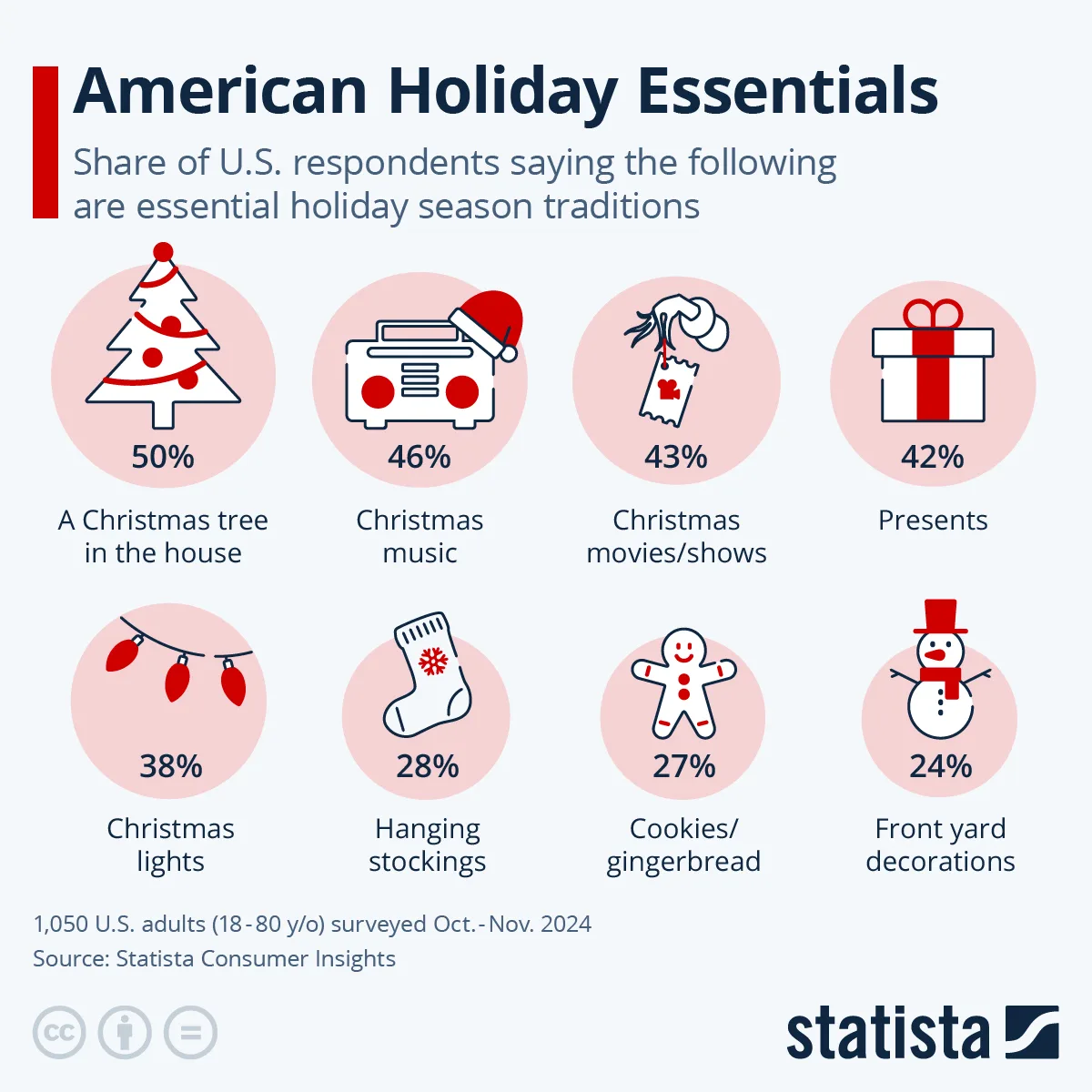
    The holiday season is a time of gathering, celebration, and reflection, deeply embedded in various customs and traditions that vary from family to family. Despite the myriad ways in which people observe this joyful time, several elements are universally recognized as quintessential to a merry Christmas. According to recent insights from Statista, there are key practices and items that Americans particularly cherish during the festive season.

    The Importance of the Christmas Tree

    A Symbol of Joy and Celebration

    At the forefront of holiday essentials is the Christmas tree, a tradition that transcends mere decoration. For 50 percent of Americans surveyed, having a Christmas tree in the home is indispensable for proper holiday festivities. This iconic symbol serves not just as a beautiful centerpiece but also represents the spirit of giving and togetherness.

    Decorating Traditions

    The act of decorating the Christmas tree has evolved into a cherished family ritual. From twinkling lights to handmade ornaments, every decoration carries its own story and significance, reflecting personal and family history. It’s a time when families come together to create memories, singing carols and sharing laughter as they adorn the tree.

    The Role of Holiday Music and Movies

    Merry Melodies and Festive Tunes

    No holiday celebration is complete without the joyous sounds that fill the air. According to the data, 46 percent of Americans consider holiday music essential to their festivities. Classic tunes, from traditional carols to modern hits, play in the background, enhancing the festive mood and creating an atmosphere of warmth and joy.

    Iconic Films that Define the Season

    Similarly, holiday films are a pivotal part of many families’ traditions, with 43 percent of Americans highlighting their importance. Whether it’s the nostalgic charm of “Home Alone” or the romantic twists in “Love Actually,” these movies continue to foster connections, telling stories that resonate with audiences year after year. The seasonal ritual of gathering around to watch these films adds another layer of togetherness.

    The Value of Family and Community Gatherings

    Cherishing Time Together

    While the commercial aspects of the holiday season often take center stage, survey results indicate that the true essence of Christmas lies in spending time with loved ones. A significant 63 percent of respondents expressed that their greatest anticipation is to connect and share moments with family and friends. This pursuit of interpersonal connections highlights the importance of community over consumerism during this festive time.

    The Joy of Giving

    In alignment with the focus on relationships, the act of gift-giving emerges as another cherished tradition. Interestingly, 49 percent of Americans look forward to giving presents, while only 28 percent express excitement about receiving them. This trend showcases a selfless spirit and the desire to spread joy among family and friends—a sentiment that reinforces the season’s true meaning.

    Conclusion

    The holiday season is an intricate tapestry woven together by diverse customs and traditions. While decorations, music, and films play a significant role, the overarching theme remains one of connection and community. As families gather to celebrate, these essential elements foster an environment where cherished memories are made and the spirit of Christmas truly comes alive.

  • Naimal Khawar Advocates for Essential Family Planning Post-Marriage

    Naimal Khawar Advocates for Essential Family Planning Post-Marriage

    KARACHI – Pakistani actress Naimal Khawar emphasized the importance of family planning after marriage to ensure a fulfilling life.

    In a recent interview, the star of Verna shared that she has shifted her focus entirely to her family. She mentioned that marrying Hamza Ali Abbasi at a young age and welcoming their son Mustafa were not part of a predetermined plan, as she simply enjoys being around children.

    Naimal explained that her choice to prioritize family life has greatly influenced her sense of self, causing her to put her passion for painting on hold.

    Furthermore, she reiterated that planning ahead for family life is vital. Naimal and Hamza agreed that he would continue his career in the entertainment field while she would take on the household responsibilities.

    She expressed appreciation for Hamza’s support, noting that the dynamics between parents can significantly affect their children. “When kids witness their parents arguing, it leaves a lasting negative impression,” she remarked.

  • Ends Soon: iRobot Roomba Combo 2 Essential Just $280

    Ends Soon: iRobot Roomba Combo 2 Essential Just $280

    While Black Friday is behind us, fantastic deals are still available. We’ve been monitoring the markdowns that surfaced during the event, and we’ve found some incredible discounts on sought-after tech products, such as TVs, laptops, Bluetooth speakers, and robotic vacuums. Today, while scouring the latest robot vacuum deals, we stumbled upon an irresistible offer. Currently, you can snag the iRobot Roomba Combo 2 Essential directly from the manufacturer for just $280. Its regular price stands at $425, making this an exceptional opportunity. We haven’t seen prices this low for the iRobot Roomba Combo 2 Essential in quite some time, so act fast!

    Reasons to Consider the iRobot Roomba Combo 2 Essential

    iRobot

    While traditional upright vacuums and cordless handhelds are effective for manual cleaning, busy homeowners often struggle to find time for regular cleanup, especially with multiple floors involved. This is where robotic vacuums like the Roomba Combo 2 shine. Not only does this model offer double the suction capability compared to other Roomba variants, but its advanced navigation system also ensures efficient cleaning in organized rows while carefully avoiding obstacles like furniture and valuable keepsakes.

    Another standout feature of the Combo 2 is its AutoEmpty dock, which doubles as a charging station. Once the vacuum completes its cleaning session, it autonomously returns to the dock to empty its contents, which can hold up to 60 days’ worth of debris. Additionally, you can utilize the iRobot Home App to set personalized cleaning schedules for the Combo 2!

    We’re uncertain how long this discount will last, but missing out on a $145 savings on an excellent Roomba model would be a mistake. Be sure to check out our curated selection of the best vacuum deals for further savings on premium brands. We also have compilations of top offers for Roomba and Dyson products!