Tag: easy

  • Simple Method for Completing Pack-A-Punch in CoD Black Ops 7 Zombies

    Simple Method for Completing Pack-A-Punch in CoD Black Ops 7 Zombies

    Anyone who’s played a lot of zombies in the Call of Duty series knows how helpful Pack-A-Punches are. They instantly upgrade your weapon, making it much more powerful. That’s why they’re essential for lasting deep into Black Ops 7’s zombie mode.

    However, getting a Pack-A-Punch can be costly, as the first upgrade requires spending 5,000 essence from the Pack-A-Punch machine. But, there’s a way to upgrade your weapon for free without using your essence. Here’s a full guide on how to do it.

    Unlock and Equip Toxic Growth

    The Toxic Growth field upgrade is key to getting a free Pack-A-Punch.

    You need to reach level 29 to unlock it. After unlocking, make sure to add it to your loadout so you can use it when ready.

    Get the Fumigator

    On the Ashes of the Damned map, you’ll find various fumigators—small tanks with hoses attached. They can be found in multiple spots, like in the barn at Vandorn Farm near the power switch.

    Approach and pick one up to use it.

    Get the Free Pack-A-Punch

    With the Toxic Growth upgrade and a fumigator in hand, you’re prepared to upgrade your weapon for free.

    First, look for small green plants on the ground—these look like tiny green balls and are usually found in grassy areas around the farm.

    Use the fumigator to interact with these plants. After interacting, activate the Toxic Growth on them.

    This will cause the plant to grow quickly. When fully grown, the plant might sometimes spit out a Raw Aetherium Crystal. Gathering this crystal instantly grants your current weapon a Pack-A-Punch upgrade without spending any essence.

    Note that collecting the crystal involves a bit of luck, so you might need to try several times to get one.

    It’s best to start growing the plant at the beginning of a new round to avoid too many zombies attacking while you’re waiting.

  • Make Life Easy With Yardcare’s Premium Robot Lawn Mower X% Off

    Make Life Easy With Yardcare’s Premium Robot Lawn Mower X% Off

    Mowing the lawn is often regarded as one of the most dreaded household chores due to the significant time and effort involved. What if there was a way to automate this task and eliminate the usual hassle? As a trusted name in the industry with a wide range of popular models such as the V100, E400, and M800plus already in many homes, Yardcare introduces the N1600 Pro—a cutting-edge, intelligent lawn mower. If you’re serious about upgrading to robotic lawn care, the Yardcare N1600 Pro is an excellent choice.

    This high-quality mower offers exceptional value at $999.99, and with a current $200 discount, it’s available for just $799.99—a deal that’s hard to pass up. Act quickly, as this promotion runs from November 20 through December 1.

    ### Reasons to choose the Yardcare N1600 Pro robotic mower

    Is investing in a robot lawn mower worthwhile? For many households, the answer is a definite yes. The N1600 Pro doesn’t just mow; it transforms your entire lawn maintenance routine.

    Say goodbye to the days of digging trenches to lay wires. Instead, the N1600 Pro employs a sophisticated RTK satellite system and AI mapping technology to quickly learn your yard’s layout. With just a single guide along the edge using the app, it generates a highly accurate map. From there, you can designate multiple mowing zones—such as the front and backyard—and establish no-go areas to protect flower beds or play zones.

    Its performance is equally impressive. Unlike random bumping or haphazard paths, it follows a methodical U-shaped route suitable for lawns up to 1,600 square meters (approximately 0.4 acres). Powered by an efficient brushless motor, it handles slopes up to 20° with ease. A dedicated edge-cutting mode ensures a clean, tidy finish every time. Plus, its 3D vision camera can recognize over 300 common objects—ranging from garden hoses to pets—and navigate around them safely.

    Control is seamless thanks to the companion mobile app. You can schedule mowing sessions, adjust the cutting height (between 2-6 centimeters), monitor progress in real-time, and switch between sequential or spiral mowing patterns. The “Breakpoint Resume” feature makes sure it automatically returns to its charger when the battery runs low and continues where it left off once recharged. It also includes a rain sensor to prevent damage during storms and anti-theft tracking for added security.

    With these smart features, lawn care becomes effortless. You’ll never need to stress about mowing your yard again. For just $799.99 (after the $200 discount), this versatile robot is a superb investment for your family’s convenience and the beauty of your landscape. Don’t wait too long—this special price might disappear at any moment. Secure your Yardcare N1600 Pro today to enjoy a perfectly maintained lawn with minimal effort.

  • Still A Wait Before Easy Subscription Cancellations

    Still A Wait Before Easy Subscription Cancellations

    The Federal Trade Commission (FTC) has voted to implement a new rule designed to simplify the cancellation process for subscription services. However, the enforcement of this rule has been delayed until July 14. Originally, the regulation, known as the Negative Option Rule, was set to take effect on January 19, with specific provisions scheduled to begin on May 14. These provisions aim to ensure that companies provide an easy cancellation process comparable to their sign-up procedures.

    Numerous telecom companies have voiced their opposition to this ruling. The National Cable and Telecommunications Association has filed a lawsuit challenging the FTC’s authority, arguing that the agency has exceeded its legal boundaries. The FTC stated that the delay of 60 days is necessary because of the “complexities” involved in overhauling compliance processes. They acknowledged that the original timeframe did not adequately consider the challenges businesses would face in adhering to the new rules.

    Details of X Premium+ subscription seen on a phone.
    Nadeem Sarwar / Digital Trends

    Following the new guidelines, companies are required to be fully compliant by July 14, at which point the FTC will begin enforcing the rules. This could be a significant victory for consumers, yet the FTC has issued a cautionary note: “If any issues arise during enforcement, the Commission is willing to make adjustments to the Rule to address those concerns.”

    Many subscription services are infamous for their convoluted cancellation processes. Often, the option to cancel is buried deep within menus, and in some cases, customers must reach out to customer service directly—a process that can take over an hour, especially if disconnections occur. Instances such as gym memberships are particularly notorious, with some individuals even opting to close their bank accounts just to escape the persistent hassle. The FTC’s new ruling is aimed at streamlining this process to better serve consumers, and the changes are welcomed by many.


  • Easier To View Pictures In Your Google Photos Albums

    Easier To View Pictures In Your Google Photos Albums

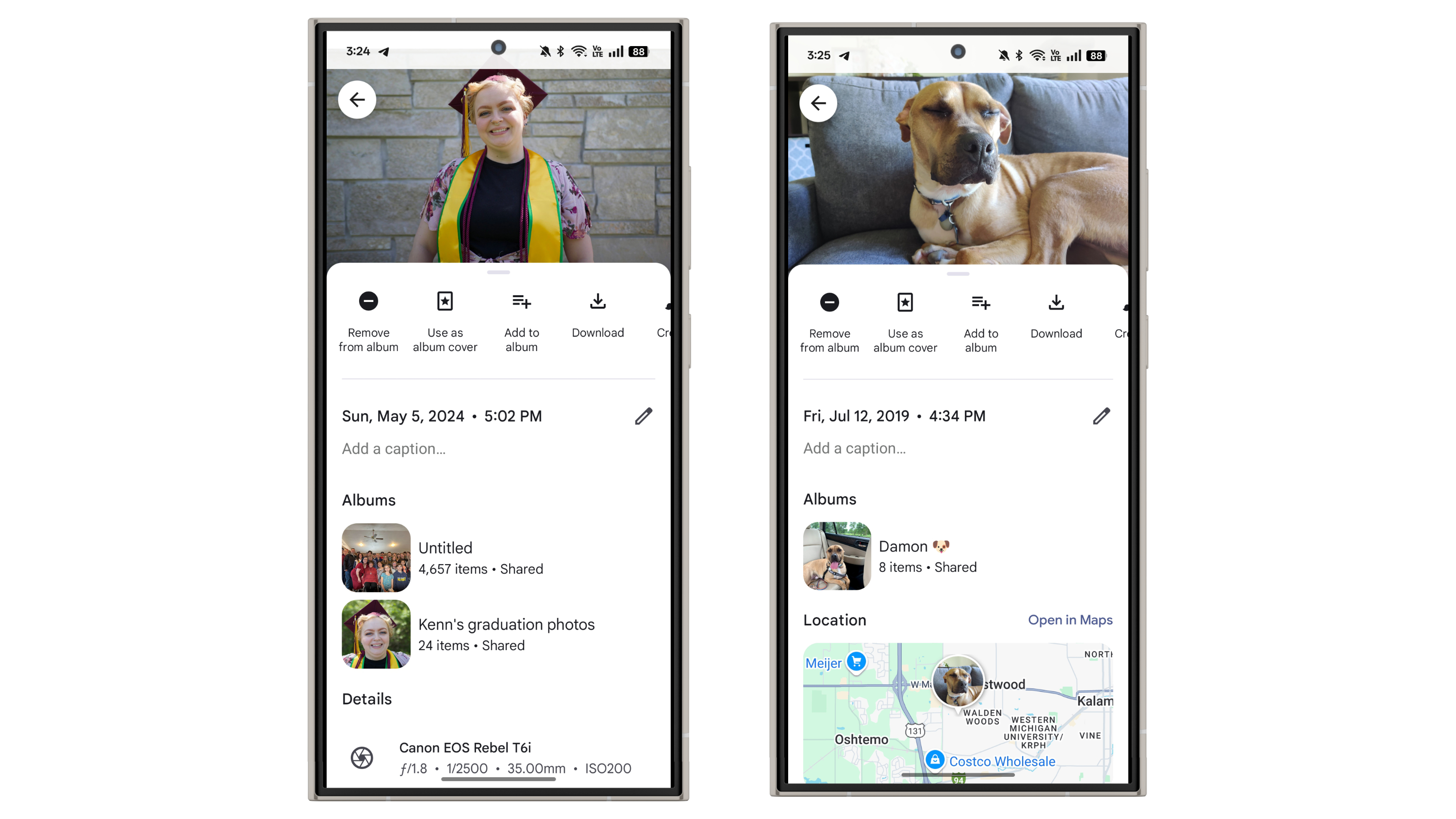
    Google Photos is one of those applications that frequently introduces new features. While the updates may not always revolutionize the experience, they are certainly welcome. The latest enhancement to Google Photos includes a brand-new “Albums” section that appears when you access a photo or video.

    To see this new feature while viewing a photo or video, simply swipe up to reveal the details. Just above the “Location” section, you’ll find the new “Albums” area, which shows the album to which the file belongs. It will display the album’s name along with the total number of items it contains. You can also tap on the album to navigate directly to it.

    This update was first noticed by 9to5Google, and I can confirm that it’s active for me as well. Currently, it seems to be exclusive to the Android app and isn’t yet available on iOS.

    New Albums section in file details in Google Photos.
    Joe Maring / Digital Trends

    Though this is a relatively minor addition, it’s a feature I genuinely appreciate. I often struggle with organizing and maintaining my albums in Google Photos—partly due to forgetting which photos I’ve already included. Having a clear indication of whether a photo or video is part of an album is a great enhancement, and it might just motivate me to improve my album organization skills.

    If it feels like we’ve discussed Google Photos frequently this month, that’s because it has been a busy time for the app. Earlier this month, Google introduced a 2024 year-in-review feature, similar to Spotify Wrapped. The app also recently added a Quick Edit feature, allowing for easy edits right before sharing images.

  • Easily Track Election Results on Your iPhone Here’s How

    Easily Track Election Results on Your iPhone Here’s How

    It’s Election Day in the United States, and Apple is simplifying the process for users to access live election results. The Apple News app has introduced a Live Activity feature that will showcase real-time results on your device as they come in throughout the evening. If your iPhone has Dynamic Island functionality, you’ll be able to see these updates directly on the island and the lock screen.

    This Live Activity feature will keep you updated on election outcomes without the need to manually refresh the Apple News app. Results for the presidential race, as well as Senate and House elections, will be timely displayed.

    The Election Day Live Activity tracker is also accessible on iPads and Apple Watches, including the latest iPad mini (2024) and Apple Watch Series 10.

    To activate the Election Day Live Activity tracker, follow these simple steps:

    • Open the Apple News app.
    • Tap the icon next to Follow the election live.
    • Confirm your selection by tapping OK in the pop-up prompt.
    Apple News Live Activity for Election 2024.
    Bryan M. Wolfe / Digital Trends

    Apple’s Live Activities feature provides real-time updates from apps directly on the iPhone’s Lock Screen and Dynamic Island where applicable. This functionality allows users to stay informed about sports scores, delivery statuses, or rideshare timings without having to constantly unlock their phones or open various apps. It aims to keep you engaged with vital information while minimizing distractions and enhancing your overall iPhone usage experience.

    Today’s federal election will decide whether former President Donald Trump or Vice President Kamala Harris will take on the role of the 47th president of the United States. In addition, all 34 U.S. Senate seats and all 435 House of Representatives seats are also up for grabs.