At WWDC 2026, Apple showcased how Apple Intelligence is integrating into the Home app. While the Siri AI updates drew most of the attention, these Home app enhancements could be the quiet improvements that simplify your daily routines. Here’s everything you need to know about the updates coming to the Home app with iOS 27.
Tired of Notification Overload?
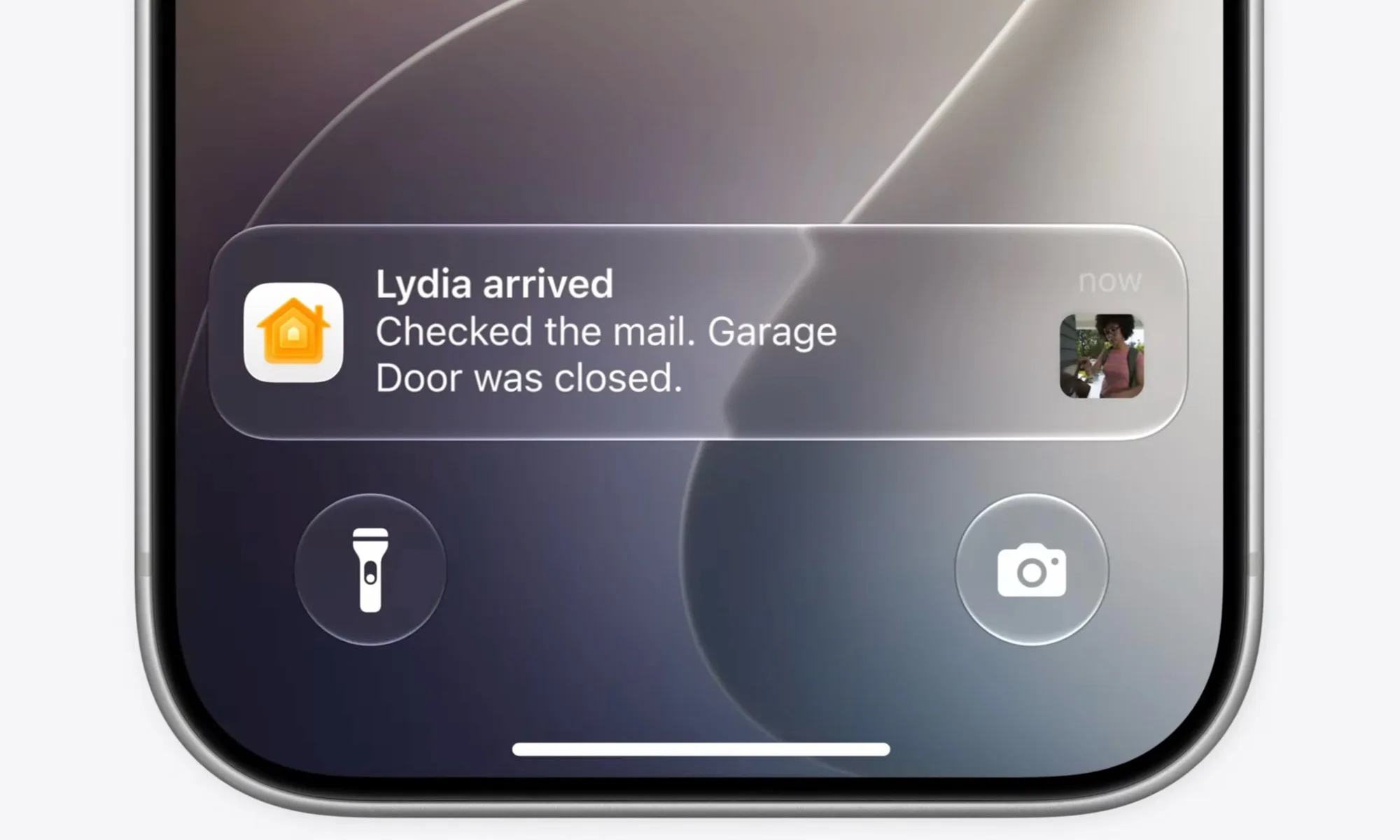
If you have numerous smart home devices, you know how quickly notifications can accumulate. They’re useful for staying informed, but they can also become overwhelming. Apple addresses this by leveraging Apple Intelligence to group related notifications into a single activity.
Instead of receiving multiple alerts, you’ll get one notification that updates in real-time as the activity progresses. This small tweak significantly declutters your Lock Screen, making it easier to stay focused.
Your Cameras Can Now Better Interpret Your Footage
This is one of the most exciting features. The Home app can now analyze recordings from compatible HomeKit cameras using Apple Intelligence and generate summaries of what occurred.
Because it understands the content of the videos, it can fetch relevant footage from your various cameras and compile them to give you a comprehensive view. This feature will be highly appreciated by users.
Additionally, you’ll be able to search through your camera recordings based on what was captured. Before you even start typing, relevant clips are prioritized at the top of the search results. If you’re trying to locate a specific event, like a package delivery, you can find it across multiple cameras within seconds.
And for supported cameras, you can view recordings in stunning 4K resolution. These enhancements promise to make managing and reviewing your home security footage more efficient and enjoyable.
Just like you’d expect from Super Smash Bros. creator Masahiro Sakurai, Kirby Air Riders is full of content. It offers endless fun with modes like City Trial, Air Ride, and Road Trip.
The main way to progress and unlock items is by completing various challenges. These challenges reward you with characters, Vehicles, and other items. There’s an easy trick to beat almost all of these challenges.
What Are Checklist Challenges?
If you’re familiar with Smash, you’ll find these challenges quite similar. As you play through Kirby Air Riders’ four main modes—Air Ride, City Trial, Top Ride, and Road Trip—you’ll complete objectives like using a character’s special move a set number of times or finishing a race under a certain time.
Challenges are listed on a checklist that you can view by pressing ZR. More challenges will appear as you complete others, revealing their conditions. Most challenges are quite straightforward, and Air Riders allows you to try them anytime. There are ways to tweak options to make completing these challenges much easier.
How To Make Challenges Much Easier
Before you start a race or event, you can change settings such as the number of players, CPU difficulty, laps, item frequency, and more by selecting Rules at the top of the screen. These changes don’t prevent you from completing challenges, so you should customize rules to suit the challenge you’re working on.
For example, if a challenge requires finishing a race without missing any perfect landings, set laps to one and make the CPU easier to focus on landings. To defeat three enemies by spitting stars, increase laps so you have more chances to do so without rushing. Adjusting the number of racers can also help make some challenges simpler.
You’ll need to change settings depending on what challenge you’re tackling. Since many challenges involve racing in a certain amount of time or completing tasks alongside racing, making the game easier can help finish multiple challenges at once. This strategy works well in modes where you can customize rules, except for Road Trip mode, which doesn’t support rule changes. However, challenges in Road Trip are usually easy enough if you play enough times.
While some challenges unlock license card pieces that are less useful, every completed challenge reveals the conditions for the next. Clearing as many challenges as possible quickly is the best way to progress through Kirby Air Riders’ challenges.
Sure! Here’s a rewritten and unique version of the content presented in American English:
—
The communities feature is viewed as WhatsApp’s strategy to compete with other messaging apps such as Signal and Telegram — Reuters
WhatsApp is in the process of creating a media hub for both its mobile and web applications, which will organize all types of files — including pictures, videos, GIFs, documents, and links shared in chats. This initiative aims to enhance the way users can browse and manage their content.
This new feature is set to be rolled out in an upcoming update.
The goal of the update is to introduce a specific section where members of group chats can effortlessly view all the media shared within those groups. Users will be able to find all media files in one central area, making it easy to access shared content without having to sift through various group chats.
Additionally, this feature will provide details about the size of media files, which will help users manage their device storage by identifying large files that may need to be removed.
The hub will be accessible both via the mobile app and the website. On mobile, users will only see the media files from group chats. In contrast, the web version will include media from both group and individual chats.
Users can find the new media hub through a dedicated entry point in the sidebar of the web client. Clicking it will grant them immediate access to all media files.
To improve user experience, the feature will include additional information for documents and links, such as the name of the contact who shared them and the date they were received or sent.
The WhatsApp media hub will also implement a filter-based search system, allowing users to sort content according to their preferences, whether they want to view the most recent files, the oldest ones, or largest files first.
Moreover, a multi-selection feature will enable users to select multiple media files simultaneously for actions like deleting, downloading, or forwarding.
This centralized approach aims to simplify access to shared media across WhatsApp, enabling users to stay organized while quickly finding everything from cherished family photos to important work documents.
Wave farewell to some of the challenges associated with smart homes. A variety of new user-friendly features are being introduced to Matter, making it simpler than ever to set up your smart home and navigate the more frustrating aspects of adding new devices. These enhancements are part of the 1.4.1 specification, which was announced today by the Connectivity Standards Alliance.
One of the standout new features is the Multi-Device Setup QR Code. Previously, users had to scan each smart bulb or device individually for setup, which can be quite tedious and often requires the device to be powered on for the scan. Given that QR codes are typically located at the bottom of devices, this process could be challenging.
With the new update, users can scan just one QR code to configure multiple devices at once—provided that manufacturers enable this functionality in their products.
Another enticing addition is the capability to set up devices via an NFC connection. Although this isn’t a brand-new concept—companies like Apple HomeKit and LIFX have implemented it—it has not been widely adopted across the industry. By integrating it into the Matter protocol, this feature can reach a broader array of devices.
The final notable improvement is the Enhanced Setup Flow (ESF). When using the Google Home app to set up a new device, users often face interruptions to accept the manufacturer’s terms and conditions in a separate app. With the ESF, you can now agree to those terms without leaving the Google Home app, streamlining the process.
The 1.4.1 update is the first minor release under Matter, and while the changes may be incremental, they effectively tackle some of the primary concerns users have expressed about the protocol. Any enhancements that simplify the management of a smart home are certainly beneficial.
In 2022, Google introduced a feature named Results About You, enabling users to request the removal of personal details from search results. Recently, the company has announced enhancements to this tool that simplify the process of erasing specific information or updating outdated entries.
“Our new hub streamlines the signup process, and with proactive monitoring, we’ll do the hard work for you – notifying you if new results appear,” the company stated. One of the most significant updates is the improved ability to request changes to personal information displayed in Google search results.
Nadeem Sarwar / Digital Trends
When you search for your name or business on Google, a variety of results will appear. If any of these contain sensitive information, you can request their removal simply by tapping the three-dot menu icon located in the upper-right corner of the search result box.
On mobile devices, tapping the menu button will direct you to a new page that provides additional details about how the information was indexed by Google. At the top, a “Remove result” button allows you to submit a data removal request.
Nadeem Sarwar / Digital Trends
On the following page, you can indicate the specific reason for wanting the search result removed. You might mention privacy concerns regarding sensitive information (like phone numbers, government ID details, financial data, passwords, or private logs) or provide a legal justification for the request.
At the bottom of the page, you’ll also find an option to refresh information, which allows you to request that outdated details be updated with the latest available data. Typically, it takes a few days for requests for removal or updates to be processed, and users will receive notifications at their registered email addresses.
Nadeem Sarwar / Digital Trends
According to Google, the search system will conduct a fresh web crawl and replace the requested search result with the most recent information. I submitted a request to update details about my journalism career in a search result, and my request was approved in under ten minutes.
The company also has specific protocols in place to remove not only professional information from search results but also content that pertains to urgent issues such as explicit or personal media, non-consensual content, exploitative material, and personally identifiable information.
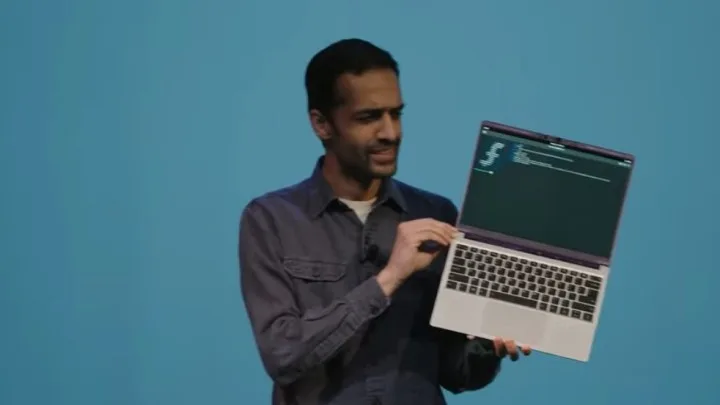
The idea of open-source, modular gadgets is thriving for Framework. Founder Nirav Patel shared the company’s steady yearly sales growth since it started, while introducing the new version of its highly customizable PC, the Framework Laptop 13, alongside advancements for the Framework Laptop 16, during a launch event held in San Francisco, California.
There has been considerable anticipation surrounding the new Framework Laptops since they haven’t been refreshed since 2022. Here’s what you need to know about the latest offerings from Framework.
Framework Laptop 13
In 2025, Framework introduced an updated version of the Laptop 13, now powered by the latest AMD Ryzen AI 300 series processors, showcasing features such as Zen 5 cores, Radeon Graphics, and a 50 TOPs NPU. Additionally, there's an option for the AMD Ryzen 9 processor, supporting up to 12 CPU cores and 16 GPU cores.
Framework
The revamped Framework Laptop 13 features a new thermal system equipped with a single heat pipe, support for Wi-Fi 7, and the ability to connect up to four external displays via the expansion cards. The design sees a new keyboard made with plastic innovation replacing the previous metal structure, having undergone extensive testing for performance.
On the software front, the Framework Laptop 13 runs Windows 11, boasting a dedicated Copilot key for AI capabilities, while also accommodating Linux as a customization choice. It's generally compatible with DIY Edition setups, allowing users to integrate specialized hardware and software into its framework.
This 13.5-inch laptop offers an optional 2.8K display with a 120Hz refresh rate and a 1080p webcam. The 61-watt-hour battery remains consistent with older models. Constructed from aluminum, the laptop's profile remains sleek and lightweight, measuring just 0.62 inches thick and weighing 2.86 pounds.
Furthermore, Framework has reintroduced a translucent bezel to this iteration of the Laptop 13, available in four distinct color choices, which complements the array of new translucent colors for USB-C expansion cards—this move is both stylish and functional.
Preorders for the Framework Laptop 13 are now open, with sales expected to launch in April in regions where Framework products are already distributed. The DIY Edition is priced at $899, while the prebuilt version will retail for $1,099, with the mainboard also sold separately. Additionally, the previous generation of the Framework Laptop 13 will see a price reduction to $749.
Framework Laptop 16
The Framework Laptop 16 has been on the market for over a year now. The brand has open-sourced its customizable input module system, fostering many innovative projects within the Framework community, including RGB LED matrices and e-ink displays. However, a challenge arose with the keyboard integration due to the thinness of the laptop, which conflicted with standard mechanical switches that require more space for connectivity. Patel explained that the community explored various approaches but couldn't establish a permanent solution.
Framework
For the launch event, Framework unveiled the One Key Module, a compact and self-contained mechanical and electrical switch that mimics the feel of a traditional mechanical keyboard but fits perfectly into the slim profile of the Framework Laptop 16. The company also highlighted that developers can create customized layouts and ergonomic designs with this module. A proof-of-concept has already been established on a Framework Laptop 16, with future collaborations planned with developers leveraging this solution.
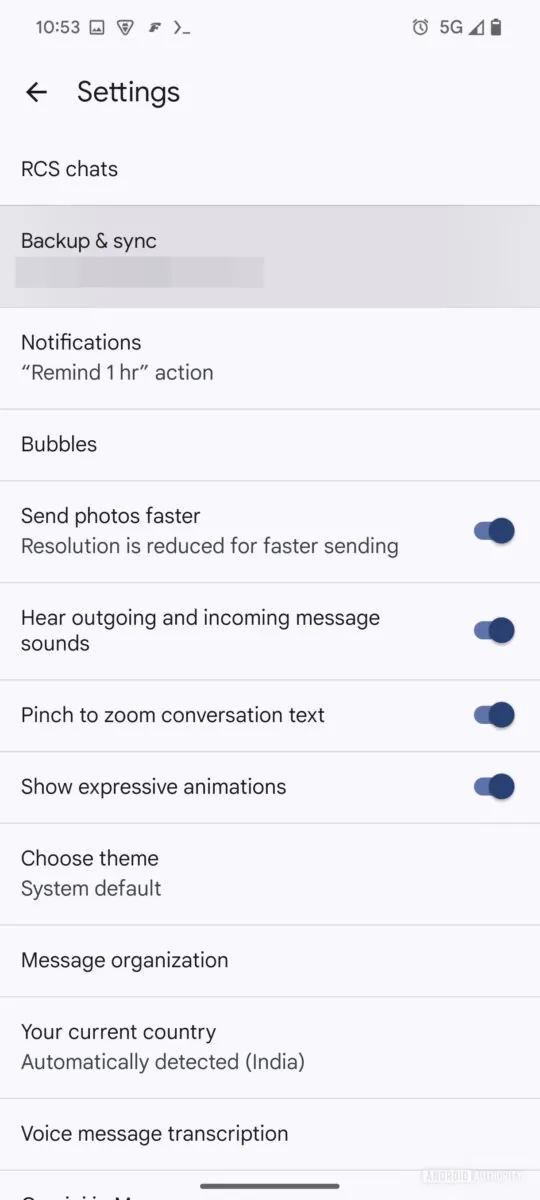
On Android devices, backing up and restoring Google Messages is performed via Google One found in the Settings app. Unfortunately, this function isn’t currently available directly from the Google Messages application, although that might change soon.
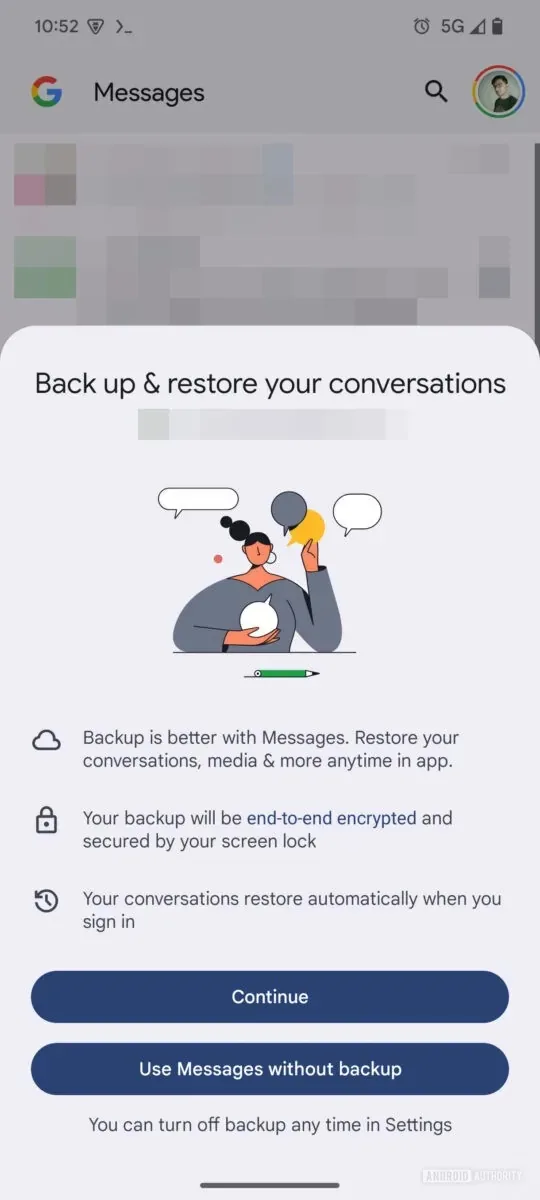
As reported by 9to5Google, a beta version of the Google Messages app (version 20241118_02_RC00) contains hints of a new backup and restore feature integrated directly into the app. Meanwhile, Android Authority has provided images of this feature, offering a first look at its functionality.
The screens for the new “Backup & Restore” section in Google Messages provide significant details, including:
“Backup is better with Messages. Restore your conversations, media & more anytime in the app.”
“Your backup will be end-to-end encrypted and protected by your screen lock.”
“Your conversations will automatically restore when you sign in.”
Additionally, the screenshots suggest that Google Messages will prompt users to enable the backup feature. If you opt not to activate it at that moment, you can still find the option later in the app’s settings under “Backup & Sync.”
Other details indicate that users will be able to back up and restore “conversations, media, and more” with the assurance of end-to-end encryption. It’s important to note, however, that the device’s screen lock must be enabled for encryption to function. Moreover, your messages will be restored automatically when you log into Messages, eliminating the need for manual restoration and enhancing convenience.
Finally, this new backup and restore capability is set to introduce additional flexibility that many users have been missing. For instance, there’s an option to sync only photos and videos over Wi-Fi. As explained by Android Authority: “This is a useful feature in line with other messaging platforms, enabling you to preserve your mobile data cap by syncing your text history over mobile data instead.”
The enhancements in Google Messages are expected to boost both user confidence and flexibility regarding the backup process. Presently, the Google One backup method has its limitations. However, specifics on the timing for a public release of this update remain unclear, and we anticipate more details soon.
Google Messages is continuously evolving; earlier this month, features were added to facilitate sending images via RCS, and in October, improved scam protection was introduced.