الوسم: DIY

  • How to Make Olive Oil in Romestead: Completing and Solving Secrets

    How to Make Olive Oil in Romestead: Completing and Solving Secrets

    Olives are abundant in Romestead, but what should you do with them? They don’t produce a lot of food, and donating olives to Ceres isn’t very effective for leveling her up because the reward isn’t worth the time. Instead, it’s better to turn your olives into olive oil, which can be sold to traders for a good profit.

    The process to make olive oil is somewhat complicated. First, you need to unlock the dolium through quests for the gods. Then, collect olives, crush them into paste, craft empty pots at the pottery workshop, and continue through additional steps. Here’s how it all works.

    ### Where to Find Olives
    Olives are everywhere in Romestead. You can find them on olive trees growing throughout the plains biome. These trees regrow quickly, making it easy to gather olives regularly.

    Early in the game, you can use the olives you gather to help level up Ceres, who accepts olives as donations. If you cut down an olive tree, you’ll get an olive seed that allows you to plant your own olive groves around your town.

    ### How to Make Olive Oil
    To make olive oil, you first need to turn olives into olive paste. Use a manual mill to crush the olives—you have to manually run into the spokes to turn it. On its own, olive paste doesn’t have much use.

    You can build the manual mill at the workbench, and it requires four stones to craft. Once you have it, you can grind your olives into paste.

    ### Pottery
    You’ll also need small pots, which are made at the pottery workshop. To unlock this workshop, complete the Sanguis Celeste quest for Vulcan by exploring a dungeon marked on your map to find the Crystallized Blood and offering it on the altar. After unlocking the workshop, you can build it using lumber, stone, pottery, and a citizen to work there. Inside, you can turn clay into small pots.

    A tip: be sure to light the kiln outside using lumber so that it can properly heat the pots.

    ### Olive Oil Dolium
    Once you have olive paste and small pots, your next step is to craft the olive oil dolium. This is a special container for storing the oil. Build it in your town and then combine the olive paste and small pots inside over time. The process will gradually turn into olive oil.

    When it’s ready, you can sell the olive oil at the trader for 50 quadrans. This is a good way to earn some extra money to buy resources.

  • Where To Get All Instruments for Completing and Solving Your Heartopia Music

    Where To Get All Instruments for Completing and Solving Your Heartopia Music

    Starting a new life in Heartopia involves enjoying your hobbies, hanging out with friends, and completing quests around town. As you build your relationships, you can chase your dreams! One popular goal is Music Production, which allows you to share your talent with the community.

    You won’t be able to start this right away. Here’s how to begin your musical journey and earn rewards by sharing CDs and the love of music with others. Here’s what you need to know to record and release your own music in Heartopia.

    How to Produce Music

    When you reach level 17, you can start producing music. Before that, at level 16, you won’t have access to this feature. To produce music, buy a phonograph from Ka Ching’s General Store and place it in your home. Then, interact with the record menu to start a session. When the timer runs out, you can begin playing music and record it onto a CD.

    Note: You need to play the music all at once, so it’s smart to practice beforehand, especially if you’re playing with friends.

    Once your recording is finished, burn a CD using a Music CD Publishing Permit. Other players can buy your CD and leave positive feedback, helping you build your reputation as a local musician.

    All Instruments and How to Get Them

    To make music, you’ll need various instruments, which you can purchase by talking to Annie in the center of town. She runs the Music Store and sells a variety of instruments along with music CDs from other players.

    Here’s a list of instruments Annie offers and their prices:

    Name Price
    Recorder 38,000g
    Bamboo Xiao 38,000g
    Lute 38,000g
    Conga 72,000g
    Cajon 72,000g
    Wooden Bass 38,000g
    Piano (Red) 195,000g
    Concertina 57,000g
    8-Note Xylophone with Stand 72,000g
    Mbira 57,000g
    Lyre 57,000g
    Bagpipe 38,000g
    Violin 57,000g
    Cello 94,500g

    Music Production Goals and Rewards

    Beyond just having fun playing music, you can work toward becoming a music producer. This involves playing different instruments and sharing your recordings with friends and neighbors. Achieving certain goals grants rewards and increases your Dream Progression.

    Here are some of the main goals and the rewards you earn:

    Dream Goal Rewards Dream Progression
    Own 1 instrument 30 points 30
    Play 1 Music CD 30 points 30
    Play the piano once 10 points 10
    Play the drum set once 10 points 10
    Play the recorder once 10 points 10
    Own 1 phonograph 30 points 30
    Play an instrument once 30 points 30
    Participate in another player’s recording session 50 points 50
    Record 1 piece of music 30 points 30
    Burn 1 Music CD 30 points 30
    Duplicate 1 Music CD 30 points 30
    Have 1 other member listen to your Music CD 30 points 30
    Have 10 members listen to your Music CD 50 points 50
    Have 30 members listen to your Music CD 80 points 80
    Have 60 members listen to your Music CD 110 points 110
    Have 90 members listen to your Music CD 150 points 150
    One member likes your Music CD 30 points 30
    Ten members like your Music CD 50 points 50
    Thirty members like your Music CD 80 points 80
    Sixty members like your Music CD 110 points 110
    Ninety members like your Music CD 150 points 150
    Release your Music CD publicly 30 points 30
    One member purchases your Music CD 30 points 30
    Ten members purchase your Music CD 50 points 50
    Thirty members purchase your Music CD 80 points 80
    Sixty members purchase your Music CD 110 points 110
    Ninety members purchase your Music CD 150 points 150

    More Instruments and How to Get Them

    To expand your collection, visit Annie at the town center. She will open the Music Store where you can buy additional instruments and music CDs from other players.

    Prices for some of the instruments include:

    • Recorder: 38,000g
    • Bamboo Xiao: 38,000g
    • Lute: 38,000g
    • Conga: 72,000g
    • Cajon: 72,000g
    • Wooden Bass: 38,000g
    • Piano (Red): 195,000g
    • Concertina: 57,000g
    • Xylophone with Stand: 72,000g
    • Mbira: 57,000g
    • Lyre: 57,000g
    • Bagpipe: 38,000g
    • Violin: 57,000g
    • Cello: 94,500g

    Goals and Rewards in Music Production

    Advancing through the levels of the Music Production Dream involves various milestones. For example, owning instruments, recording music, sharing with friends, and reaching certain milestones in likes and purchases. Earning these goals grants progression points and unlocks rewards such as different record covers, the ability to release albums, or earn special permits and instruments.

    Key milestones include producing a mini album at 500 progression points, a full album at 1,500, and becoming an Ace Producer at 3,500. Achieving the Golden Music CD at 6,500 points signifies an important step, with further levels unlocking even more exclusive rewards.

  • How To Remove a Ring Doorbell from a Door or Wall

    How To Remove a Ring Doorbell from a Door or Wall

    If you have a video doorbell installed at your home, it’s likely from the Ring brand, which is known for producing some of the best video doorbells on the market. Their lineup includes affordable options as well as high-end models that record continuously. At some point, you might need to remove it—whether to upgrade to a newer model or switch to a different brand altogether.

    Removing a Ring doorbell is straightforward and typically doesn’t require many tools. Most models come with a specialized screwdriver designed for easy removal. If you’ve misplaced this tool, don’t worry—there are alternative methods to take down your doorbell without it.

    Here’s a quick overview of how to remove your Ring doorbell:
    The process varies slightly depending on the specific model, but generally, it only takes a few minutes.

    What You Need:

    • Ring Video Doorbell
    • The screwdriver provided in the package (or a small flathead or Torx screwdriver as a substitute)

    How to Remove Your Ring Doorbell for Charging

    Many Ring models feature a faceplate secured by a security screw at the bottom. To remove it:

    1. Use the provided screwdriver to unscrew the security screw, usually located at the base of the device.
    2. After removing the screw, gently pull the bottom of the faceplate down and away from the mounting bracket.
    3. When the faceplate comes off, you’ll see the battery and a small silver lever. Press the lever to slide the battery out of its compartment.

    Note: Newer models might use a push-pin installation method, allowing you to pop the entire unit off without a screwdriver. In that case, you can use the included push-pin tool or even a small flathead screwdriver as an alternative.

    Removing the Doorbell Without the Special Tool

    If you’ve lost the tool that came with your doorbell, you have a couple of options:

    • Contact Ring’s customer support to request a replacement tool. Many users have successfully received replacements this way.
    • If you need to charge the battery immediately, attempt to carefully manipulate the security screw with a small flathead or a T15 Torx screwdriver—be cautious to avoid stripping the screw.

    Once you have access, you can follow the steps to remove the device itself from the mount, replicating the process described above.

    Permanently Removing Your Ring Video Doorbell

    If you’re relocating or replacing your doorbell permanently, removal is just as simple:

    1. Use the screwdriver to remove the faceplate.
    2. Unscrew the device from the wall or door frame. If your unit is wired, disconnect the wiring carefully—especially the wires connected to your chime.
    3. To prevent pests or leaks, fill the resulting holes with silicone sealant or filler.

    With these steps, you can easily take down your Ring doorbell for maintenance, charging, or replacement. Once removed, you’re ready to install a new model or start fresh.

  • How To Craft a Gas Mask: Completing and Solving the Process

    How To Craft a Gas Mask: Completing and Solving the Process

    Grounded 2’s park is full of dangers, and not all of them are creepy bugs. Besides bugs, you have to watch out for drowning, falling, hunger, and thirst, as well as the environment itself. When you’re at full size, an overflowing trash bin is just a little gross, but when you’re tiny like an ant, it can quickly cause suffocation.

    Luckily, you can craft a gas mask to stay safe in these nasty-smelling areas. It only requires a few common ingredients, a bit of luck, and fighting a very large and angry bug. Pretty straightforward.

    Unlocking the Gas Mask

    The gas mask is your only way to survive toxic zones, like near the trash bin or inside the toxic Ant Cave. To get it, you need to unlock the crafting recipe by reaching Brainpower level four. You do this by using the Resource Analyzer at any Ranger Outpost to scan materials you find around the park. Just find and scan everything, and you’ll level up quickly.

    Keep in mind, each Resource Analyzer has a limited number of scans before it needs to recharge. You can wait for it to be ready or visit other Ranger Outposts, moving between them until you hit level four.

    Crafting the Gas Mask

    Once you reach level four, the Gas Mask will unlock automatically. To craft it, you’ll need:

    • Weevil Nose
    • 4 Gnat Fuzz
    • 2 Crude Ropes
    • Stinkbug Part

    Weevil Nose

    Weevil Noses are dropped randomly when you kill weevils, which are common and harmless bugs throughout the park. To get the nose, it’s best to use your fists to kill them, as using a weapon might decrease your chances of getting the nose and instead give you raw meat. Weevils are easy to find and won’t attack you.

    Gnat Fuzz

    Gnat Fuzz drops from gnats, tiny bugs found in moist areas like near puddle oases. Gnats fly out of reach sometimes, making them tricky, but they usually drop fuzzy bits with just one or two hits. Sometimes, a gnat drops more than one fuzz, so you might only need to kill a few to gather what you need.

    Crude Rope

    You probably have already crafted crude rope for bandages before, but if not, just gather plant fibers by picking up small plant pieces or chopping down grass and their stumps. Crafting crude rope doesn’t need a workbench and can be done in your inventory. However, you’ll need a workbench to make the gas mask itself.

    Stinkbug Part

    The hardest part of the mask is getting a Stinkbug Part. Stinkbugs are found mainly in the Statue Ascent, Fire Pit, and on the dry bricks running vertically on the map’s left side. They attack with a gas that the mask is designed to protect against, so engaging one without a mask is dangerous. They become aggressive as soon as you approach, so bring a good weapon and plenty of healing items.

    It’s best to have a friend or a buggy to help fight a Stinkbug, as their gas causes damage over time. You can also bait them into attacking other insects like ladybugs or cockroaches, which won’t attack you and can distract the bug. Ladybugs and cockroaches are good allies—they have a lot of health and won’t attack you once the Stinkbug is defeated.

    Defeating the Stinkbug

    Stinkbugs are weak to stabbing weapons, especially if aimed at their face to stun them. Be ready to parry or dodge their jumping attacks, and retreat to heal repeatedly from the gas damage. Once you have all the parts, go to a workbench to craft your new gas mask.

    Gas Mask vs. Roach Helmet

    Another option is the Roach Helmet, which also offers gas resistance but has some key differences. It requires a Roach Head, a Roach Chunk, and a Stinkbug Gas Sack—these are tougher to find, but the helmet won’t degrade as long as you’re taking damage. It functions like any armor piece, breaking down when you take damage, and provides more protection than the gas mask.

    However, the major downside of the Roach Helmet is that you still take damage from gas—just less than without one. You can’t explore or fight stinkbugs safely with it, because gas damage still affects you. Also, damage from gas stops bandages from healing you, so you’ll need to carry more expensive healing supplies.

    Use the Roach Helmet sparingly—if your gas mask is almost broken and you’re in a gassy area, swapping to the helmet might give you enough time to escape.

  • How To Craft a Computation Brick in Abiotic Factor by Completing and Solving

    How To Craft a Computation Brick in Abiotic Factor by Completing and Solving

    Surviving After the Abiotic Factor Crisis

    With GATE in chaos following the incident at Abiotic Factor, you’ll need to survive using whatever tools you can find. You might make arrows out of pens and use parts of decks as weapons. Since you’re a new employee, you also have less access than others, making things harder.

    Most of the scientists are gone or missing, so you’ll have to build makeshift technology to escape the facility. A crucial part is taking the Security Bot CPU, but to get it, you’ll need to destroy Security Bots. These robots don’t like having their parts taken and can be dangerous to fight.

    How to Kill Security Bots

    To get a Security Bot CPU, you must destroy a Security Bot, but they can be very dangerous. In the early game, they can kill you in four or five hits even if you wear decent armor.

    Security Bots become active from 9 PM to 6 AM when the power goes out. During these hours, they patrol their assigned areas. When the power comes back in the morning, they go back to their stations and stay inactive.

    You can find Security Bots in the Office Sector and Manufacturing West. The easiest one to reach is in the Cafeteria of the Office Sector, just below the Security Station with Warren.

    Other easy locations include:

    • Level Three of the Office Sector, looping through areas near Alice Mayfield and the large Executive Office.
    • The office area past Reception, which they patrol in a circle near their station on the wall.

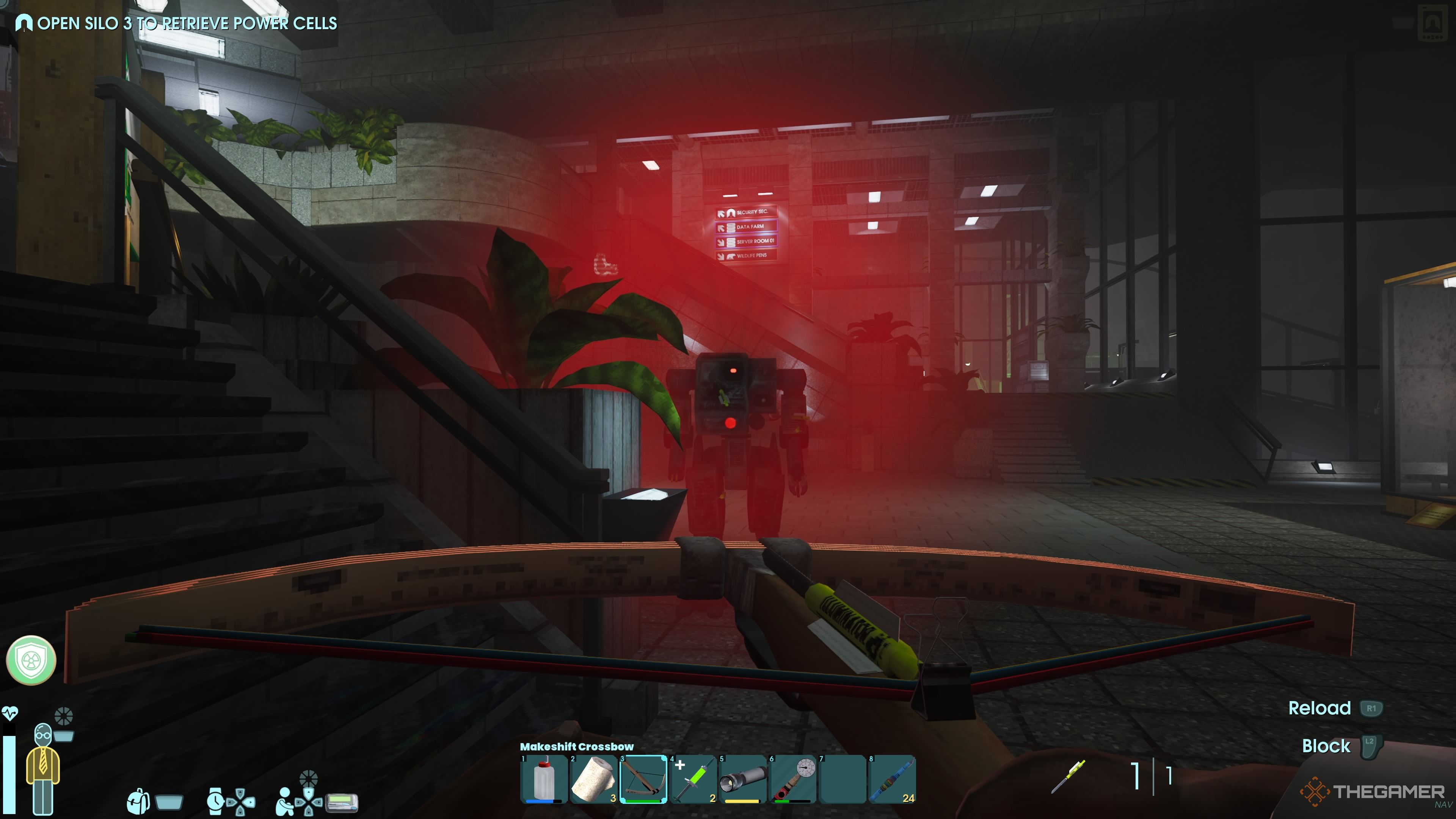
    Security Bots’ headlights turn red when they see you or enemies, and they have good sight from a distance. However, because they walk slowly, you can outrun them by hiding or preparing to fight.

    Security Bots have three types of attacks: a melee punch that stuns briefly, an electrical tackle that stuns and has short range, and a spin attack with high knockback that hits multiple enemies. They prefer to use the spin attack when they are surrounded.
    ![Player near Security Bot in Abiotic Factor](https://static1.thegamerimages.com/wordpress/wp-content/uploads/wm/2025/07/abiotic-factor_20250726223422.jpg)

    The easiest and safest way to kill them early is to set a Shock Trap in their path and then shoot them with a Makeshift Crossbow loaded with around 30 to 40 bolts, depending on your accuracy. Once they see you, walk backward so they step onto the Shock Trap and get stunned for a few seconds. Hit them with bolts while backing up and circle around near the trap to keep them stunned.

    Materials to Craft Items

    Item Materials Needed
    Shock Trap Energy Brick x1
    Stapler x1
    Coil x1
    Makeshift Crossbow Desk Leg x1
    Rubberband Ball x3
    Plastic Scrap x2
    Stapler x1
    Makeshift Crossbow Bolts Pens x1
    Metal Scrap x1

    Place a Shock Trap in its path before the bot wakes up, then fire your bolts while it is stunned. Keep repeating this process, reactivating the trap as needed, until the Security Bot is destroyed. Including damage from the trap, it should take about 25 to 30 bolts. Without the trap, closer to 40 bolts.

    Natural electrical hazards, like electrified water on Level Three, can also stun and damage Security Bots, making them easier to kill.

    After defeating a Security Bot, it will drop a few sodas. You can use a Kitchen Knife to butcher it like an alien, but the process takes longer.

    They always drop Robot Oil and one Security Bot CPU, a vital resource. Sometimes, they also drop Metal Scraps, Coils, Glass Scrap, and Tech Scrap. Setting up automated farms for Security Bots can help you gather large amounts of Metal Scraps without breaking many cabinets.

    What to Do With Security Bot CPUs

    Crafting menu showing components for a Computation Brick.

    The main use for Security Bot CPUs is to craft Computational Bricks. These are essential for creating several key items: the Controller, Infrared Emitter, and the LCD Screen, which are used to make the Keypad Hacker.

    Component Amount Needed Materials Required
    Controller 1 Computation Brick x1
    Keyboard x2
    Desk Phone x2
    Box Of Screws x1
    LCD Screen 1 Computation Brick x1
    Tech Scrap x3
    Glow Stick x1
    Box Of Screws x1
    Infrared Emitter 1 Circuit Board x1
    Computation Brick x1
    Glass Shards x2

    The Keypad Hacker is needed to progress in the game, unlock areas like Security Rooms, and access crucial items like the Power Cell. All recipes for its parts can be discovered by crafting the Computation Brick, and then unlocking advanced components at a workbench.

    To get all the recipes at once, it’s easiest to visit Alice Mayfield, a GATE researcher on Level Three, who can give you the full list of components and recipes.

    How to Find Alice Mayfield

    Player at the entrance to a computer room with Alice Mayfield.

    To reach Alice Mayfield, go left from Reception toward the Security Office, follow the path to the office, and use an Energy Brick to open the nearby shutters. This unlocks a shortcut back to Manufacturing West and a lift to Level Three.

    Ride the lift to a small research area with radiation warnings, then go to the portal at the end of the catwalk to reach Anteverse II. This area offers key resources like Anteverse Wheat and fights with Exor enemies for their Hearts, which can upgrade your workbench.

    Follow the path through Anteverse II to another portal leading back to Level Three. Cross the pipes, jump over electrified water, and head toward Silo Three.

    Remember to unlock the elevator across from where Alice is located; this will give you a shortcut back to the main entrance, making travel easier in the future.

    Alice Mayfield is in an unlocked room near the entrance of Silo Three. She will provide the recipe for the Keypad Hacker, all the parts needed, and some hints on how to use it effectively.

  • Can I Unlock My Phone Myself?

    Can I Unlock My Phone Myself?

    Unlocking your phone can provide you with greater flexibility when it comes to changing carriers or using local SIM cards while traveling. If you’re considering whether to unlock your device independently, it’s essential to understand the process and its implications. This article breaks down the necessary steps and options for unlocking your phone at home.

    Understanding Phone Locking

    When you purchase a smartphone from a carrier, it often comes “locked” to that specific network. This means:

    • Limited Carrier Options: You can only use the phone with the carrier it’s locked to.
    • Potential Fees: Carriers may charge fees for unlocking, especially if you haven’t fulfilled your contract.
    • Device Resale Value: An unlocked phone generally has a higher resale value as it appeals to a broader market.

    Types of Locks

    Phones may be locked in various ways:

    1. Network Lock: Tied to a specific carrier.
    2. Bootloader Lock: Limits installation of custom software or OS.
    3. SIM Lock: Restricts the use of other SIM cards within the same network.

    Self-Unlocking Your Phone

    Unlocking your phone on your own is possible, but it requires the right tools and knowledge. Here’s how to approach the task.

    Gather Necessary Information

    Before attempting to unlock your device, collect the following:

    • IMEI Number: This unique identifier can be found by dialing *#06# on your phone.
    • Carrier Information: Know your current carrier and its unlocking policies.
    • Device Model: Make sure you have correct information about your phone model.

    Unlocking Methods

    You have a few different methods to unlock your phone yourself. Here’s a breakdown of the most common options:

    1. Contact Your Carrier

    Most carriers provide the easiest way to unlock your phone.

    • Eligibility Check: You need to determine if your device is eligible for unlocking based on your contract or payment status.
    • Request an Unlock Code: If eligible, you can request an unlock code directly from the carrier.

    2. Online Unlocking Services

    If your carrier doesn’t provide quick assistance, consider third-party services:

    • Reputable Providers: Look for well-reviewed unlocking services online.
    • Step-by-Step Instructions: These services usually provide detailed directions to unlock your device.
    • Fees: Expect to pay a fee, which may vary depending on the phone manufacturer and model.

    3. Software Unlocking

    Certain devices allow unlocking through software:

    • Download Software: Find trusted software that specializes in unlocking mobile devices.
    • Follow Instructions: Be cautious; follow each step precisely to avoid bricking your phone.
    • Warranty Risks: Note that this may void your warranty or damage the device.

    Important Considerations

    Before you unlock your device, keep these points in mind:

    • Warranty Issues: Unlocking might void manufacturer warranties.
    • Compatibility: Ensure the unlocked phone is compatible with the new carrier’s network bands.
    • Local Laws: Be aware of regulations regarding phone unlocking in your region.

    Troubleshooting Common Issues

    After unlocking, you may encounter some problems. Here’s how to deal with them:

    Activation Problems

    • Check SIM Card: Ensure you’ve inserted a compatible SIM card from the new carrier.
    • Restart Device: Sometimes, a simple reboot can resolve activation issues.

    Network Connection Issues

    • APN Settings: Manually configure Access Point Names (APN) according to your new carrier’s specifications.
    • Contact New Carrier: Reach out for assistance if the network still doesn’t work.

    Performance Issues

    Occasionally, an unlocked phone may experience performance issues:

    • Factory Reset: Consider resetting the device to its factory settings if problems persist.
    • Update Software: Ensure the phone is up to date with the latest software.

    By understanding the unlocking process and exploring various options, you can unlock your phone successfully. Whether you decide to contact your carrier, use online services, or explore software solutions, following the right steps will lead to a more flexible and accommodating mobile experience.

  • What is the best DIY home security camera system?

    What is the best DIY home security camera system?

    In an age where home safety is a top priority, a DIY home security camera system can provide reliable monitoring without breaking the bank. With numerous options available, it’s important to identify which system is best suited for your needs. Below, we explore some of the top contenders, their features, and the factors to consider when choosing a system.

    Key Features to Consider

    When selecting a DIY home security camera system, consider the following key features:

    Video Quality

    • Resolution: Look for systems that offer at least 1080p resolution for clear and detailed images.
    • Night Vision: Ensure the cameras have infrared capabilities for night monitoring, allowing visibility even in low light conditions.

    Connectivity

    • Wi-Fi Enabled: Systems that connect to your home Wi-Fi allow for easier access to live feeds and stored videos.
    • App Integration: Choose cameras that come with mobile apps for remote viewing, notifications, and quick management.

    Storage Options

    • Cloud Storage: Many systems offer cloud storage plans, enabling you to save footage without worrying about local storage limitations.
    • Local Storage: Some users prefer systems with local storage options, such as SD cards or NVR (Network Video Recorders).

    Installation

    • Ease of Setup: Look for systems that offer straightforward installation instructions and minimal wiring.
    • Flexibility: Ensure the system allows you to add more cameras easily in the future.

    Top DIY Home Security Camera Systems

    Here are a few popular DIY security camera systems that have received positive reviews for their performance, usability, and features:

    1. Ring Stick Up Cam

    • Resolution: 1080p HD video
    • Features:

      • Battery and plug-in power options
      • Two-way audio for communication
      • Customizable motion zones
    • Storage: Cloud storage with subscription plans

    2. Arlo Pro 4

    • Resolution: 2K HDR video quality
    • Features:

      • Color night vision
      • Built-in spotlight and siren
      • Smart home compatibility (works with Amazon Alexa, Google Assistant)
    • Storage: Cloud and local storage options available

    3. Wyze Cam v3

    • Resolution: 1080p HD video
    • Features:

      • Color night vision
      • Waterproof design for outdoor use
      • Motion detection zones and alerts
    • Storage: Free cloud storage for 14 days; support for local recording with microSD

    Additional Considerations

    When deciding on the best DIY security camera system, here are more factors to think about:

    Pricing

    • Budget-Friendly Options: Consider systems that fit your financial plan without sacrificing essential features.
    • Subscription Costs: Be aware of ongoing costs for cloud storage or advanced features.

    Customer Support

    • Warranty: Look for systems that offer a warranty or satisfaction guarantee.
    • Technical Assistance: Choose brands that provide robust customer support options, including live chat, phone assistance, and online resources.

    User Reviews

    • Research Feedback: Read customer testimonials to gauge reliability and performance. Websites like Amazon, Best Buy, and specialized tech review sites can provide insight into user experiences.

    Final Thoughts

    With the right DIY security camera system, you can enhance your home’s safety efficiently and effectively. By thoroughly evaluating available options and focusing on essential features, you’ll be able to select a system that meets your unique needs and preferences.