Tag: display

  • Scientists Develop Dual-Function Pixel as Camera and Display

    Scientists Develop Dual-Function Pixel as Camera and Display

    Pixels are fundamental components of modern technology. They form the images displayed on TVs, smartphones, and computer screens, and are essential for digital cameras to capture photographs by sensing incoming light. Historically, a pixel could only serve one function—either producing light for display or detecting light for image capture, but not both simultaneously.

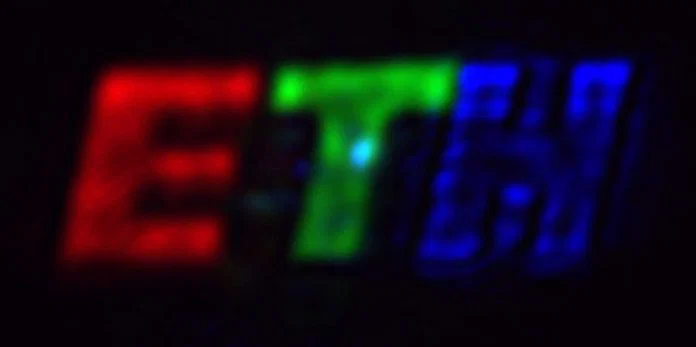
    Now, researchers at ETH Zurich have pioneered a groundbreaking type of pixel capable of performing both functions. This advancement could someday enable devices that function as both cameras and displays simultaneously. Instead of separate screen layers and camera sensors, future gadgets like smartphones, tablets, or wearable tech might integrate these capabilities into a single, unified layer.

    The innovative technology is rooted in the natural behavior of light, known as interference. Light waves travel in oscillating patterns, and when different waves intersect, their interaction depends on their alignment. If the peaks and troughs align, the waves reinforce each other; if out of sync, they diminish each other. This phenomenon creates colorful patterns we see in nature, such as soap bubbles and oil slicks.

    The ETH Zurich team mastered control over this interference with extraordinary precision. They crafted tiny, wave-shaped structures on each pixel’s surface, accurate to only a few nanometers—billionths of a meter. When light enters these specially designed pixels, it first transforms into a surface-bound wave, then reverts back to normal light. Thanks to the precise surface patterns, the researchers can dictate exactly how the light behaves as it exits.

    Unlike traditional pixels, these “Fourier pixels” can modulate not only the intensity of light but also other key properties. One of these is polarization—the direction in which a light wave vibrates—which is widely used in sunglasses, camera filters, and advanced communication systems. The new pixels can both generate and detect various polarization states.

    They can also manipulate the phase of light, determining the position within its repetitive cycle. Controlling phase enables the creation of unique light shapes, such as doughnut-shaped beams with a dark central hole, useful in scientific and technological applications. Furthermore, these pixels are compatible with multiple colors, allowing for the generation of full-color images.

    Interestingly, the same pixels can operate in reverse. Instead of shaping outgoing light, they can analyze incoming light by measuring its brightness, phase, and polarization. They achieve this by comparing reflected or transmitted light with a reference wave, then interpreting the interference pattern to extract the light’s properties. Due to their sophisticated design and the application of Fourier analysis—which transforms complex data into understandable components—they can perform these calculations internally, without needing external computers.

    The researchers see wide-ranging potential for this technology, including applications in display screens, digital imaging, fiber-optic communication, medical diagnostics, and scientific research instruments. Their next objective is to develop large arrays of these intelligent pixels. If successful, this could lead to compact devices capable of both capturing and displaying images in a single integrated system, opening new frontiers in consumer electronics and optical innovation.

  • Dubai to Light Up the Sky with 48 Fireworks Shows for New Year

    Dubai to Light Up the Sky with 48 Fireworks Shows for New Year

    Dubai is getting ready to dazzle the world once again as the new year approaches. The city plans to ignite the night sky with a spectacular display of fireworks. A total of 48 fireworks shows will light up 40 of Dubai’s most famous sites.

    From the iconic Burj Khalifa to the luxurious Palm Jumeirah, the celebrations promise a visual feast that will leave spectators in awe. The city has released a list of main spots where these grand displays will unfold, including:

    – Burj Khalifa
    – Dubai Frame
    – The World Islands
    – Dubai Festival City
    – Burj Al Arab
    – Palm Jumeirah
    – Dubai Creek Harbour
    – Global Village
    – Al Seef
    – Hatta
    – Bluewaters

    Beyond Dubai, fireworks will also brighten up Abu Dhabi, Sharjah, and Ras Al Khaimah, with over ten locations across these emirates participating in the festivities. Reports indicate that Dubai Mall will also stage a stunning light show to complement the fireworks at Burj Khalifa.

    Mohammed Al Abbar, a prominent Emirati businessman responsible for constructing the world’s tallest building and the Dubai Mall, is personally overseeing preparations for this year’s New Year’s Eve festivities.

  • Meta Ray-Ban Display Glasses Show Screen On Your Face Without Looking Dorky

    Meta Ray-Ban Display Glasses Show Screen On Your Face Without Looking Dorky

    Meta has officially unveiled its new AI-powered smart glasses with built-in display technology, called the Meta Ray-Ban Display. Priced starting at $799, the package includes the glasses and the Meta Neural Band worn on the wrist. These devices will be launched in the United States on September 30 through retailers such as Best Buy, LensCrafters, Sunglass Hut, Ray-Ban Stores, and Verizon outlets, with plans for international availability next year.

    The standout feature of these glasses is the integrated display embedded within the lens. This allows users to preview media captured by the camera, manage calls, view translated text, and interact with Meta AI—all without needing to reach for their phone. The entire experience operates independently on a vivid, high-resolution color panel situated on the right lens.

    This visual display aims to streamline routine tasks, making them faster and less disruptive to daily flow. Meta emphasizes that the display is optimized for quick, brief interactions rather than prolonged use.

    Additionally, the glasses facilitate seamless connectivity with messaging apps like WhatsApp, Messenger, and Instagram, as well as the user’s paired smartphone. They can provide real-time navigation with visual maps, display captions, and assist with language translation on the go.

    One of the major improvements is addressing a common inconvenience with smart glasses—voice commands and side taps. The Meta Ray-Ban Display tackles this by integrating the Meta Neural Band, a wearable device worn on the wrist. This band interprets muscle movements and gestures, allowing users to scroll, click, and even compose messages through subtle finger gestures, akin to the controls on devices like the Apple Watch or Galaxy Watch 8. Future updates promise the capability to write messages using delicate finger motions.

    The wristband is designed to detect muscle activity signals and translate them into commands. It boasts IPX7 water resistance, can operate for up to 18 hours on a single charge, and works with the glasses, which last about six hours per charge—extending up to 30 hours with the included foldable charging case.

  • Apple Watch Ultra 3 Might Boost Display Features Without Growing

    Apple Watch Ultra 3 Might Boost Display Features Without Growing

    Within the smartwatch world, there are essentially two main camps. One group favors compact, stylish designs, while the other prioritizes larger displays that can handle productivity tasks more effectively. Apple’s upcoming Ultra smartwatch, focused on enhanced performance and battery life, appears to be targeting the needs of the latter group.

    According to a recent report from MacRumors, which references a new display resolution found in the code of an unannounced Apple Watch, the next-generation Apple Watch Ultra will feature a larger screen without increasing the device’s overall size. The likely reason? Reduced bezels, which create more screen space within the same footprint.

    The report mentions a new display size of 422 by 514 pixels, surpassing the 410 by 502 pixels resolution of the Apple Watch Ultra 2. The probable explanation is that Apple has minimized the bezels, effectively fitting a bigger display into the same chassis rather than redesigning the entire device. This approach aligns with Apple’s history of incremental design changes, such as the slimmer Apple Watch Series 10 or the curved display introduced with the Series 7.

    Looking ahead, leaks and Bloomberg reports suggest that the Apple Watch Ultra 3 will bring several significant upgrades. Aside from the larger display, it is expected to feature a new OLED panel with broader viewing angles, a higher refresh rate, and increased brightness for better outdoor visibility.

    One of the most notable enhancements is likely to be satellite connectivity support. Apple has already integrated this feature into iPhones, making it logical to extend it to its rugged smartwatch, which caters to outdoor enthusiasts. This technology would enable users to send text messages via satellites when cellular and Wi-Fi connections are unavailable, a game-changer for adventurers and remote explorers.

    There’s also speculation about the addition of blood pressure monitoring, although it’s uncertain if this feature will be available at launch in fall 2025. Another critical update will be the inclusion of 5G capabilities, marking a leap from the 4G LTE support in the Ultra 2. The new model is expected to support 5G Redcap, a version of 5G designed for low-power devices, further boosting connectivity options and device functionality.

    Overall, despite maintaining a similar external appearance, the next Apple Watch Ultra is expected to be a substantial upgrade, delivering advanced features that will appeal to those demanding more from their smartwatch.

  • Apple’s HomeOS And Smart Home Display Delayed But It Makes Sense

    Apple’s HomeOS And Smart Home Display Delayed But It Makes Sense

    During its annual developers conference this year, Apple unveiled a range of significant updates across its software platforms. This included a fresh design language, a complete overhaul of iPadOS, and crucial enhancements to macOS features like Spotlight. However, one notable omission at WWDC 2025 was the much-anticipated homeOS.

    Many expected a grand introduction of Apple’s operating system focused on smart home technologies, especially with the launch of several new products on the horizon. The first device is rumored to resemble a smart display equipped with its own speaker setup, while the second could even incorporate a robotic arm. Now, it appears that the rollout of homeOS and associated smart home devices has been delayed until 2026.

    Despite this setback, keen observers caught glimpses of what the future might hold. Artificial Intelligence will play a significant role in these plans, enabling more meaningful and effective interactions with smart home devices. Picture this: a blend of apps, developers, AI, and voice controls.

    Current Developments

    Phil Nickinson / Digital Trends

    Initially, Apple planned to launch homeOS back in March, but delays related to AI features derailed those timelines. According to Bloomberg, the new operating system and its devices are heavily reliant on updates to Siri, meaning they can’t be launched until these enhancements are completed.

    Reportedly, the first of the two upcoming devices features a six-inch screen that can be mounted on a wall, along with several base accessories like a speaker. While this is not entirely new—companies like Amazon and Google have tried similar concepts—the integration with Apple’s ecosystem aims to distinguish it from the competition. Beyond simply managing smart home gadgets, the device is expected to support video calls and run applications such as Safari and Apple Music.

    A key aspect of this device is its expected reliance on advanced AI capabilities, where Apple currently lags behind competitors. “This technology was intended for a smart home hub, which has now also been postponed, preventing Apple from venturing into this new product category,” as noted by the publication.

    Google Assistant Smart Display
    John Velasco / Digital Trends

    With an eye on Spring 2026 for the launch of advanced Siri features and on-device AI functionalities, it’s still unclear precisely what will accompany homeOS. If Amazon’s recent Alexa+ is any indication, the forthcoming advancements will likely be substantial.

    Rationale Behind the Delay

    “This is a significant undertaking,” stated Apple’s senior VP of software engineering, Craig Federighi, in an interview with The Wall Street Journal last year regarding the future of Siri. A year later, his message remains consistent: “There’s no need to rush and deliver a flawed product just to be the first to market,” he emphasized.

    Apple is cautious about the potential pitfalls of AI, especially following episodes like the misinterpretation incident involving Apple Intelligence and the BBC. Moreover, Google’s AI continues to falter on basic tasks such as accurately displaying the date repeatedly.

    While Amazon reports that Alexa boasts hundreds of millions of users, its AI-enhanced Alexa+ has reached less than one percent of this audience. A Reuters report cites internal sources highlighting issues with slow responses and inaccuracies in the information provided by Alexa+.

    Siri on an iPad Pro
    Nadeem Sarwar / Digital Trends

    A recent piece in The New York Times reveals that many of Alexa+’s most anticipated features are either unavailable or still in development. These challenges, while serious, are not unmanageable. The pressing concern remains the capabilities of AI.

    AI’s conversational abilities pose risks; a troubling report from The New York Times illustrates how interactions with ChatGPT spiraled emotionally for users, resulting in tragic outcomes.

    It’s important to mention that ChatGPT has been included in the Apple Intelligence framework to enhance Siri’s ability to tackle complex queries. With updates in iOS 26 and other Apple platforms, Siri can now perform an even wider array of tasks.

    Envision an Apple smart home device running ChatGPT (with its known flaws) in your household, especially with children and elderly family members present. While it’s generally safe and accurate, there are scenarios where deeper interactions could lead to unforeseen consequences.

    Apple is likely unwilling to take the risk of deploying such technology in a device that will be used daily in homes. Aside from potential risks, poorly developed features would harm its appeal and invite criticism.

    The company has learned from past mistakes, even retracting one of its ambitious Siri-AI marketing campaigns due to technology shortcomings. However, with a set target for a 2026 release, it’s reasonable to expect that substantial advancements in Siri and AI features are underway.

    A Glimpse into the Future

    A person using the Amazon Echo Hub.
    Amazon

    So, why all the excitement about the next generation of Siri? Apple is fundamentally redesigning Siri’s architecture to make it act more like a chatbot, similar to Gemini, ChatGPT, or Claude.

    This change is as substantial as the transition from Google Assistant to Gemini. Siri’s current limitations in handling user interactions and smart home controls leave room for improvement, which could soon change, as hinted at during WWDC.

    The transformative aspect here is the new on-device AI framework from Apple. Developers will soon be able to create smarter, more user-friendly AI experiences integrated into their applications with minimal coding effort.

    Best of all, the computing required for this AI will happen on-device, ensuring that user privacy is upheld. In essence, apps utilizing Apple’s AI models will become more intuitive and responsive. This raises intriguing possibilities for Apple’s smart home display.

    According to Bloomberg, the anticipated device will work seamlessly with the iPhone, even allowing for Handoff features to transfer tasks effortlessly between screens. Overall, it’s clear that Apple aims to ensure that its software, AI, and app integrations are harmonized to prevent running into any issues at launch.

    Apple’s goal is to facilitate natural language conversations and allow users to handle tasks across various applications with intuitive voice commands. A few extra months in development could make a substantial difference.

  • Is Your Google Pixel Display Acting Up? There’s A Solution

    Is Your Google Pixel Display Acting Up? There’s A Solution

    With the release of its March update for Pixel devices, Google introduced several new features, including pulse detection and scam identification. However, this update has also resulted in some frustrating bugs that users are starting to report. Many individuals on Reddit have shared their experiences of screen brightness fluctuating dramatically while viewing fullscreen videos, a problem they claim began with this latest update.

    This issue appears to be widespread, affecting a variety of models from the Pixel 6 through to the Pixel 9 Pro and beyond.

    Users are experiencing the problem across multiple applications such as Netflix, YouTube, Disney Plus, Prime Video, and MX Player. While attempting to identify the root of the issue, many checked display settings like Adaptive Brightness, but this adjustment did not improve the situation.

    Google News on a Pixel 9 Pro.
    Christine Romero-Chan / Digital Trends

    Besides affecting videos, some users have noted that their phone’s wallpaper appears to be more subdued and lacks vibrancy compared to the rest of the display.

    Despite the glitch, a temporary workaround has emerged. Disabling the Smooth Display feature can stabilize brightness fluctuations; however, this also limits the display’s refresh rate to 60Hz on devices that otherwise support 120Hz. It’s not the most desirable fix, but it at least allows for a more pleasant video-watching experience without the risk of eye strain.

    Google has yet to acknowledge the problem publicly, but with a growing number of users voicing their concerns, a quick hotfix might be on the horizon. We’ve reached out to Google for further details and will update the article once we receive more information.

  • Displaying Melee Attack Range in Marvel Rivals: A Guide

    Displaying Melee Attack Range in Marvel Rivals: A Guide

    Marvel Rivals features an amazing and expanding cast of characters, each with unique abilities that stay true to their comic book roots.

    One of the primary distinctions among characters is whether they focus on ranged or melee attacks. Some characters can do both, while others specialize in one. For those who prefer melee characters, it can be challenging to determine when an opponent is within striking distance, sometimes resulting in missed attacks and unexpected defeats.

    How to Show Melee Attack Range


    Fortunately, Marvel Rivals provides numerous options within the settings that let you customize gameplay and manage screen displays. One helpful feature is the ability to indicate if an enemy is close enough for your attacks to connect.

    Locating the ‘Attack Range Hint’ Setting

    This setting isn’t easy to find right away since it’s not always visible. To access it, follow these steps:

    • Settings > Controller/Keyboard (depending on your platform) > Combat
    • Here, you need to pick a Hero from the menu located above the settings. It’s set to ‘All Heroes’ by default. Choose a character with melee attacks, such as Spider-Man, Wolverine, or Iron Fist.
    • After selecting a melee hero, scroll to the Hero options. Among the specific options for that character, look for ‘Attack Range Hint‘ and turn it on.

    How to Identify If an Enemy is Within Attack Range

    When this setting is turned on, enemies within the range of your melee attacks will be slightly highlighted in red. While this effect isn’t overly dramatic and could blend into the background during busy scenes, it remains noticeable in most situations.

    You can adjust the color of this highlighting effect by modifying the ‘Enemy Color’ in the Accessibility Settings. Some colors may clash with certain character designs, so if the default color isn’t working well for you, try experimenting with other options to find one that stands out better.

  • Samsung Unveils a Unique 4K Monitor

    Samsung Unveils a Unique 4K Monitor

    CES 2025
    CES 2025
    Explore our full coverage of CES here.
    Last updated just now

    In addition to its remarkable 500Hz OLED, Samsung is showcasing two other intriguing monitors at CES 2025. The star of the show is a 37-inch 4K display, a size I’ve yet to come across despite exploring a multitude of gaming monitors.

    This may not seem significant at first glance, but when you consider gaming monitors larger than 32 inches, its uniqueness becomes apparent. Most conventional 16:9 displays cap out at 32 inches. Beyond that, you typically find screens that jump to 40 or 42 inches—often TV panels that have been repurposed for gaming use, like my KTC G42P5.

    Samsung is offering a middle ground here. While larger models exist, most fall within the 21:9 aspect ratio. Now, gamers can find a viable option when a 32-inch display feels inadequate, but a full-size television is unnecessary.

    The Samsung Odyssey G7 at CES 2025.
    Luke Larsen / Digital Trends

    The second monitor from Samsung offers a somewhat different experience. The Odyssey G7 features a 21:9 aspect ratio and boasts an impressive 5K resolution. This model is akin to LG’s recently unveiled 5K2K display, albeit without an OLED panel.

    With a 5,120 x 2,160 resolution and a 40-inch size, the Odyssey G7 achieves a sharp pixel density of 139 pixels per inch. This is notably higher than the typical 100 pixels per inch that most monitors aim for. While it doesn’t quite match the pixel density of the Asus ROG PG27UCDM, it comes close.

    Beyond its exceptional pixel density, the Odyssey G7 features a rapid 180Hz refresh rate and a swift 1ms gray-to-gray response time, as per Samsung’s specifications. Additionally, it holds VESA’s DisplayHDR 600 certification and supports Samsung’s HDR10+ Gaming standard, which utilizes dynamic metadata for enhanced HDR gaming experiences.

    As is customary with Samsung’s announcements at CES, details surrounding pricing and availability remain undisclosed. The company has a history of releasing new monitors more slowly compared to more enthusiast-oriented brands such as MSI and Asus, so it’s likely that these models will debut sometime mid-year. But that’s merely speculation for now.

  • Apple’s Futuristic iPhone Display May Be Delayed

    Apple’s Futuristic iPhone Display May Be Delayed

    If you’re eager to own an iPhone that features a completely bezel-less display, you might have to adjust your expectations for the timeline. Recent reports indicate that the anticipated launch of Apple’s innovative OLED display designed to eliminate bezels has been pushed even further into the future than previously anticipated.

    According to a South Korean news source, The Elec, which first brought attention to the possibility of a bezel-free display for the iPhone, the release date is now uncertain as the necessary technology has yet to reach a sufficient level of maturity for production.

    The source did not entirely negate the existence of this sought-after iPhone display. Both Samsung and LG are reported to be actively developing potential designs. However, production on a large scale has not commenced, meaning that a true all-screen iPhone model might not materialize until 2025 or even beyond.

    The idea of a bezel-less iPhone has been a vision for many concept designers for nearly a decade. Recently in 2023, rumors surfaced from the South Korean supply chain suggesting that Apple has become genuinely intrigued by the idea, leading to projections for a launch between 2025 and 2026.

    Vivo Nex 3 bezel less display.
    Vivo Nex 3, a 2019 smartphone featuring a display with minimal bezels on two sides.Vivo

    In contrast to certain Chinese manufacturers who have attempted extreme curvature to achieve high screen-to-body ratios, Apple is rumored to prefer a design with flat edges and subtle curves akin to the Apple Watch Series 10. This choice aims to reduce optical distortions that may occur at the edges when viewed from various angles.

    Despite the excitement surrounding this potential advancement, manufacturers like Samsung are encountering significant technical hurdles with the zero-bezel display. One major challenge includes integrating not only the front-facing camera but also the Face ID sensors beneath the display area. Samsung is reportedly facing difficulties with the “transmittance” issue, which is the front camera’s capability to function effectively while hidden behind active pixels.

    Moreover, Apple has specifically requested the use of thin film encapsulation (TPE) – a protective coating preventing moisture from reaching the organic LEDs – along with optical clear adhesive (OCA) to ensure vibrant colors and eliminate chromatic distortions along the gently curved edges.

    Durability of these displays is also a concern that Apple must address before unveiling this technology to consumers. Until these challenges are resolved, it seems unlikely that Apple will make any drastic changes, regardless of how appealing the concept may be.

  • New VR Headset Matches Vision Pro Display, Weighs Like iPhone

    New VR Headset Matches Vision Pro Display, Weighs Like iPhone

    Pimax has just unveiled a lightweight PC VR headset that weighs under 200 grams and features stunning 4K microOLED displays for each eye, paired with pancake lenses. This means the Pimax Dream Air offers comparable display specifications to Apple’s Vision Pro but is lighter than an iPhone 16 Pro.

    The design of the Dream Air is reminiscent of the Vision Pro, suggesting that Pimax took cues from Apple’s aesthetic. The images reveal a sleek, curved headset equipped with a single rear strap that cradles the back of the head.

    A sideview of the Pimax Dream Air shows the facial interface and head strap design.
    A sideview of the Pimax Dream Air highlights the facial interface and head strap design. Pimax

    Pimax claims the strap automatically adjusts for a snug fit, and there’s auto lens spacing to align perfectly with your eyes. This feature is essential, as the Pimax Dream Air includes eye-tracking capabilities.

    The Pimax Dream Air's head strap automatically tightens for the perfect fit.
    The Pimax Dream Air’s head strap automatically adjusts for a perfect fit. Pimax

    This feature allows the Dream Air to be easily shared among users, unlike the Vision Pro, which necessitates a face scan for a proper fit before purchase.

    Pimax has built a reputation for developing high-end PC VR headsets that often come with heavy and cumbersome headsets that require a VR-ready PC. However, the Dream Air represents a shift in Pimax’s approach, potentially reshaping our expectations.

    Like the Pimax Crystal and the $800 Crystal Light, the Dream Air is expected to deliver top-notch performance when connected to a Windows PC with a robust graphics card. It connects with a 5-meter USB-C cable, necessitating a computer capable of supporting DisplayPort over USB.

    Boasting a resolution of 3840 × 3552 pixels per eye at 90Hz, the headset presents a challenge for older GPUs. Nonetheless, Pimax has incorporated foveated rendering and upscaling techniques to alleviate some of the performance demands. While detailed system specifications are not yet available, a powerful gaming PC will undoubtedly be essential.

    A render shows a closeup of the Pimax Dream Air facial interface.
    A render displays a detailed view of the Pimax Dream Air facial interface. Pimax

    The Pimax Dream Air is equipped with inside-out tracking, eliminating the need for external base stations. Additionally, Pimax has introduced new controllers devoid of rings, resembling the Touch Plus controllers that come with Meta’s budget-friendly Quest 3 and 3S. Users can also take advantage of hand-tracking, making it possible to use the headset without controllers for certain games.

    The Pimax Dream Air has impressive specifications.
    The Pimax Dream Air boasts remarkable specifications. Pimax

    Pimax has also introduced an optional Cobb compute puck, powered by a Qualcomm Snapdragon XR2 chip. It’s yet to be confirmed whether it will feature the original XR2 or the newer Snapdragon XR2 Gen 2 found in the Quest 3 and 3S. When connected to the Dream Air, users should be able to access certain functionalities without the need for a PC.

    This feature could be particularly beneficial while traveling, as it may allow for video playback or casual gaming and browsing. However, details regarding pricing and complete specifications for Cobb remain undisclosed.

    In summary, the Pimax Dream Air presents itself as a fascinating PC VR gaming headset packed with impressive features in a compact and remarkably lightweight design. The added potential for mobile usage with the Cobb accessory enhances its appeal, suggesting it may become one of the leading VR headsets on the market.

    Pimax has announced that the Dream Air will begin shipping in May 2025. With only five months before this timeline, the company must act swiftly to meet this commitment. Given Pimax’s history of product shipping delays, it wouldn’t be unexpected if the Dream Air’s release ends up being pushed back to later in the year.

    The Pimax Dream Air is currently available for preorder on Pimax’s official website, priced at an attractive $1,895 ($1,199 for the preorder and $697 due upon shipping). Additionally, purchasers have the option for a 14-day trial period after receiving the headset, allowing for a full refund if they are not satisfied.

  • TikTok Star Rajab Butt Arrested for Lion Cub and Gun Display

    TikTok Star Rajab Butt Arrested for Lion Cub and Gun Display

    Popular TikToker and family content creator Rajab Butt was taken into custody by Lahore Police for allegedly displaying firearms and illegally keeping a lion cub at his home.

    Working together with the Punjab Wildlife Department, police conducted a raid on Butt’s property in a private housing community after receiving complaints about his possession of a lion cub, which goes against wildlife protection laws.

    Reports indicate that the lion cub was a gift he received at his recently extravagant wedding, which drew significant backlash after videos featuring the exotic animal circulated on social media. Authorities have since taken the cub into custody, and plans are in place to relocate it to a wildlife rehabilitation center.

    Wildlife and Public Safety Violations

    Besides the wildlife-related charges, Butt is also facing legal repercussions for publicly displaying firearms, an act criticized for encouraging risky behavior. Police confirmed that images of the firearms displayed online were instrumental in prompting the raid.

    Legal Issues and Public Outcry

    Rajab Butt, known for his family vlogs and significant online following, is now embroiled in a controversy. Many critics have spoken out against his actions, stressing the responsibility public figures have in their conduct, especially considering the impact they have on a younger audience.

    This incident raises important issues regarding the illegal ownership of exotic animals and the portrayal of firearms in Pakistan. Authorities have emphasized their dedication to enforcing regulations that protect wildlife and promote public safety.

    Investigations are ongoing, and the legal proceedings will determine the consequences Butt may face.

  • What Is the Disadvantage of Curved Monitor?

    What Is the Disadvantage of Curved Monitor?

    Curved monitors have gained popularity in recent years, particularly among gamers and professionals looking to enhance their viewing experience. However, while they come with various benefits, it’s important to recognize the drawbacks they may present. This article delves into some of the key disadvantages of curved monitors, helping you make an informed decision about your next display.

    1. Limited Viewing Angles

    One of the primary disadvantages of curved monitors is their limited viewing angles compared to flat screens.

    What Does This Mean?

    • Color Distortion: When viewed from the side, colors may appear distorted, leading to an inaccurate representation of images.
    • Inconsistent Brightness: The brightness of the screen can vary significantly depending on the angle from which it is viewed.

    Situations Affected

    • Collaborative Work: When several people gather around to view the screen, they may not experience the same image quality.
    • Professional Use: For tasks that require color accuracy (like photo editing), this limitation can be a significant drawback.

    2. Price Tag

    Curved monitors often come at a higher price point compared to their flat counterparts.

    Justifying the Cost

    • Premium Features: While some models justify the cost with advanced features, not all users may find them necessary.
    • Budget Considerations: For users on a tight budget, investing in a curved monitor may not seem worth it, especially when flat monitors offer similar specifications at a lower price.

    3. Desk Space and Size Constraints

    The design of curved monitors usually requires more desk space than traditional flat displays.

    Space Requirements

    • Larger Footprints: Curved monitors tend to take up more space, which can be problematic for smaller desks.
    • Wall Mounting: If you prefer wall mounting, certain curved monitors may not fit well or may be difficult to position correctly.

    4. Glare and Reflection Issues

    Curved screens can sometimes magnify problems related to glare and reflections.

    Why This Happens

    • Curved Design: The shape of the monitor can reflect light in ways that flat screens do not, leading to distracting glares.
    • Placement Challenges: Positioning the monitor to minimize glare can be tricky and often requires strategic adjustments to your workspace.

    Practical Effects

    • Distraction: Reflections can make it hard to focus on the screen, especially in brightly lit environments.
    • Eye Strain: Prolonged exposure to glare can lead to eye fatigue, making lengthy periods of work uncomfortable.

    5. Potential for Distorted Images

    While curved monitors are designed for immersive viewing, they can create unintended distortions under certain conditions.

    What to Watch For

    • Image Warping: Peripheral images can appear warped or stretched, particularly in ultra-wide monitors.
    • Gaming Experiences: In some cases, gaming graphics might not render correctly, leading to an uneven gaming experience.

    Usage Scenarios

    • Non-Gaming Applications: When employed for regular office work or media consumption, these distortions can reduce the overall experience.
    • Software Compatibility: Some applications may not optimize well for curved displays, leading to inconsistency.

    6. Aesthetic Appeal

    The unique design of curved monitors may not appeal to everyone.

    Design Considerations

    • Personal Taste: Some users prefer the clean lines of flat monitors for a more traditional look.
    • Integration with Other Devices: A curved monitor might clash with other flat-screen devices in your setup, affecting overall aesthetics.

    Overall Impact

    • Workspace Cohesion: The choice of a monitor can affect the professional appearance of a workspace, especially in shared environments.

    In summary, while curved monitors can enhance immersion and provide a more engaging viewing experience, they come with several disadvantages. These include limited viewing angles, higher costs, space requirements, potential glare issues, image distortion, and aesthetic concerns. Considering these factors will help you decide if a curved monitor is the right choice for your specific needs.

  • LG Unveils Fastest OLED Monitor Priced at $800

    LG Unveils Fastest OLED Monitor Priced at $800

    LG's UltraGear GX7 OLED gaming monitor on its stand.
    LG

    LG is set to release its swiftest OLED gaming monitor yet. The new UltraGear GX7 boasts a 1440p resolution with a WOLED panel designed by LG Display, achieving an incredible 480Hz refresh rate that positions it among the elite gaming monitors available.

    Similar specifications have appeared before, notably with the Sony InZone M10S and the Asus ROG Swift PG27AQDP, both featuring the same 1440p panel and 480Hz refresh rate. However, the UltraGear GX7 distinguishes itself with a price point of $1,000, which is $100 less than Sony’s offering.

    Additionally, LG has integrated a DisplayPort 2.1 connection to enhance compatibility with next-gen graphics cards expected to debut in early 2025. This aligns with the anticipated release of Nvidia’s RTX 50-series and AMD’s RDNA 4 GPUs, making the DisplayPort 2.1 feature a noteworthy inclusion.

    As of now, only Sony has included DisplayPort 2.1 in its 1440p, 480Hz OLED model, the PG27AQDP, which also retails at $1,000. Given the favorable pricing compared to Sony and the superior DisplayPort standard over Asus, LG may present the top version of this panel to date. While Acer is also working on a version of this panel, it has yet to officially launch one.

    Although LG previously introduced a 480Hz OLED with its unique UltraGear Dual Mode OLED, this marks its first high-refresh-rate 1440p model. Observations of other monitors featuring this panel indicate that OLED technology effectively utilizes the high refresh rate, surpassing competitors like the Alienware 500Hz gaming monitor in motion clarity.

    Currently, LG has made the available for pre-order until December 22. Additionally, LG is offering a holiday promotion where eligible UltraGear monitor purchases, including the new GX7, will come with a free $200 prepaid MasterCard. This promotion effectively reduces the cost to below $800 for the next month, offering a more attractive deal compared to both Asus and Sony.

  • What is better 27-inch or 32 inch monitor?

    What is better 27-inch or 32 inch monitor?

    When it comes to choosing a monitor, size is one of the most critical factors to consider. Both 27-inch and 32-inch monitors have their proponents, and both sizes offer distinct advantages and disadvantages. Understanding these differences can help you make an informed decision about which monitor best fits your needs.

    The Appeal of 27-Inch Monitors

    Optimal Pixel Density

    • Higher Pixel Density: A 27-inch monitor typically has a higher pixel density compared to a 32-inch monitor of the same resolution. This means sharper images and clearer text, which is especially important for graphic design and detailed work.
    • Ideal for Close Viewing: Given the smaller screen size, a 27-inch monitor is often better suited for desk setups. Sitting closer to the screen can enhance the viewing experience without noticeable pixilation.

    Space Efficiency

    • Desk Space: If your workspace is limited, a 27-inch monitor takes up less physical space. It can fit better into cramped work environments.
    • Multi-Monitor Setup: For those looking to set up multiple monitors side by side, a 27-inch model provides an easier fit alongside another screen.

    Cost-Effective

    • Affordability: Generally, 27-inch monitors are more budget-friendly. This can make a significant difference for individuals or businesses looking to outfit several stations without breaking the bank.

    The Advantages of 32-Inch Monitors

    Immersive Experience

    • Wider Field of View: A larger screen size offers a more immersive experience, making it ideal for gaming, watching movies, or multitasking with several windows open simultaneously.
    • Enhanced Detail Visibility: In tasks like video editing or design work, the extra screen real estate can help in visualizing details better, allowing for more comfortable editing.

    Improved Viewing Distance

    • Comfortable Viewing Distance: While a 27-inch screen is suitable for close viewing, a 32-inch monitor is designed to be viewed from a slightly farther distance, which can be easier on the eyes during prolonged use.
    • Less Strain on Eyes: The larger display may reduce the need to squint or adjust your seating position, leading to a more comfortable long-term viewing experience.

    Better for Media Consumption

    • Streamlining Entertainment: If you plan to use your monitor for gaming or media consumption, the 32-inch screen can elevate the experience with its larger display area.
    • Split-Screen Capabilities: The larger space allows for easier multitasking. You can comfortably split the screen to view multiple applications without feeling cramped.

    Key Considerations When Choosing Between Them

    Resolution

    • Check the Resolution: Both 27-inch and 32-inch monitors typically come in resolutions like 1080p, 1440p, or 4K. A higher resolution can help maintain image clarity, especially on larger displays.

    Use Case

    • Professional Work: If your primary tasks involve graphic design, photo editing, or text-heavy work, a 27-inch monitor may offer the clarity you need.
    • Gaming and Entertainment: Opt for a 32-inch screen if you’re focused on immersive gaming or watching movies, where larger visuals can enhance the experience.

    Adjustability and Ergonomics

    • Adjustability Features: Look for monitors that offer height, tilt, and swivel adjustments. This can contribute significantly to comfort, especially for longer use.
    • Consider Eye Comfort Technologies: Features like blue light filters and flicker-free technology can make a significant difference in reducing eye strain, regardless of the monitor size.

    Personal Preference

    • Your Viewing Environment: Consider the layout of your workspace, the distance between your eyes and the monitor, and your personal comfort level with screen size.
    • Aesthetic Appeal: Sometimes, the choice may also boil down to personal preference in design and how the monitor fits visually into your workspace.

    Choosing between a 27-inch and a 32-inch monitor ultimately depends on your personal needs, preferences, and use cases. Assessing factors like pixel density, immersion level, and the physical space available will help you find the best fit for your work or entertainment setup.

  • Apple’s Smart Home Display Promises Great Convenience

    Apple’s Smart Home Display Promises Great Convenience

    In recent weeks, there has been a surge of speculation regarding Apple’s plans to create a smart display intended for home management. Reports suggest that the tech giant is working on two distinct models, one of which could incorporate a robotic arm and draw inspiration from the design of a classic Mac.

    Recently, Bloomberg divulged intriguing information about the entry-level model’s appearance and functionality. This device is expected to feature a 6-inch display with a somewhat square shape, complemented by various sensors, including a horizontally mounted FaceTime camera.

    The incorporated sensors will be capable of detecting an individual’s presence and proximity, adapting the display’s content accordingly. Additionally, the standalone smart display will be able to gauge the number of people in its vicinity, according to the report.

    This device will operate on a novel OS dubbed homeOS. In addition to standard functions like video calling and smart home control, it will support essential Apple apps such as Notes, Safari, and Calendar. Furthermore, the design team at Apple is reportedly considering a user interface that resembles iOS widgets.

    An Amazon Echo Show 8 sits on a wooden desk.
    Apple’s smart display will serve as more than just a home control hub. Nick Mokey / Digital Trends

    Music will also be a central feature of this new device, with the capability to control audio throughout the home using HomePod speakers, as per the details shared by Bloomberg. The touch interface will borrow elements from the Standby Mode of the iPhone and watchOS.

    Moreover, this forthcoming device will emphasize intercom functionalities and blend in video communications similar to those available on smart home cameras. Users in various parts of the house will have the ability to conduct FaceTime calls for communication.

    Homeowners will also have the option to check security footage from their connected cameras. Apple’s HomeKit will be the driving force behind its market strategy, and homeOS will introduce a revamped control center.

    Despite its tablet-like appearance, Apple reportedly envisions it as a wall-mounted display. Currently under development with the codename J490, this device could make its debut in the first half of 2025.

    Facebook Portal smart display.
    Apple’s new device is set to integrate FaceTime into an intercom system. John Velasco / Digital Trends

    Interestingly, this device is expected to significantly enhance Siri’s functionality, focusing on voice-driven interactions. The integration of Apple Intelligence will be a crucial aspect, providing an improved Siri experience alongside deeper application integration.

    The smart display will also support Handoff, allowing users to seamlessly transfer tasks to different screens. Alongside native Apple applications like Safari, Mail, and FaceTime, several third-party apps will also offer similar support.

    Apple is developing various attachments and accessories for this device, such as wall mounts and speaker bases. In terms of pricing, the company is reportedly aiming to align it with products like Google’s Nest Hub Max and Amazon Echo Hub, which both retail within the $250 range.

  • Why are curved monitors so expensive?

    Why are curved monitors so expensive?

    Understanding the High Cost of Curved Monitors

    Curved monitors have surged in popularity over the last few years, attracting gamers, professionals, and general users alike. However, one noticeable aspect of these devices is their often high price tag. This article delves into the various factors that contribute to the elevated costs of curved monitors.

    Premium Display Technology

    Curved monitors utilize advanced display technologies that can significantly increase their value.

    • Screen Curvature: The ergonomic design offers a more immersive viewing experience by reducing eye strain and enhancing peripheral vision.
    • Higher Resolution Options: Many curved monitors boast higher resolution displays, such as 2K or 4K settings, which deliver sharper and more detailed images.
    • Improved Color Accuracy: These monitors often feature advanced panel technologies, such as VA or OLED, leading to richer colors and better contrast.

    Innovative Design and Engineering

    The design and manufacturing processes for curved monitors also play a significant role in their pricing.

    • Complex Manufacturing Process: The intricate process of bending the screen involves precise engineering to maintain quality and performance, which can drive up production costs.
    • Unique Aesthetic Appeal: The sleek, stylish design of curved monitors caters to modern aesthetics, which can also justify higher pricing.

    Enhanced Features and Specifications

    Incorporating additional features can significantly impact the cost of curved monitors.

    • Refresh Rate and Response Time: Many high-end versions offer faster refresh rates (e.g., 144Hz or more) and lower response times, making them ideal for gaming and professional use.
    • Built-in Technologies: Features like G-Sync or FreeSync for smoother gameplay, as well as HDR support for richer visuals, add to the overall value.
    • Adjustable Stands and Ergonomics: Some models come with advanced stands that allow for height and tilt adjustments, enhancing user comfort.

    Brand Reputation and Marketing

    The brand name can often influence the price of a monitor.

    • Prestige Brands: Established brands with a reputation for premium quality often charge more for their products.
    • Marketing and Target Audience: Many curved monitors are marketed towards gamers and professionals who are willing to invest more for enhanced experiences, allowing manufacturers to set higher prices.

    Market Demand and Trends

    The growing popularity of curved monitors is pushing prices higher.

    • Increasing Adoption: As more users recognize the benefits of curved screens, demand continues to rise, often resulting in higher prices.
    • Limited Competition: The presence of fewer manufacturers producing high-quality curved monitors can lead to reduced competition, allowing companies to maintain higher price points.

    Longevity and Quality

    Investing in a curved monitor can prove worthwhile over time.

    • Durability: Many curved monitors are designed to last longer, with higher quality components that make them more resistant to wear and tear.
    • Future-Proofing: With constant technological advancements, purchasing a high-quality curved monitor can save users from having to upgrade frequently, ultimately offering better long-term value.

    Factors to Consider When Purchasing

    When contemplating a curved monitor, several factors should be taken into account beyond just the price.

    • Intended Use: Determine if the monitor fits your specific needs, whether for gaming, professional work, or general use.
    • Budget: Assess what features are most important and find a model that balances cost with your requirements.
    • Warranty and Support: Evaluate the warranty options and customer support provided by the manufacturer, as these can add value to your purchase.

    Understanding the reasons behind the high cost of curved monitors can aid consumers in making informed decisions and foster a greater appreciation for the technology and engineering involved.

  • Why get a curved screen monitor?

    Why get a curved screen monitor?

    Curved screen monitors have become increasingly popular in recent years, attracting both gamers and professionals alike. If you’re considering an upgrade to your display, here are some compelling reasons to consider a curved monitor.

    Enhanced Immersion

    One of the most notable advantages of a curved monitor is its ability to enhance the immersive experience.

    Wider Field of View

    • Natural Viewing Angle: The curve of the monitor helps in delivering a wider field of view, allowing you to take in more of the screen without needing to move your head excessively.
    • Reduced Distortion: Curved screens minimize the distortion that can occur with flat displays, providing a more natural, enveloping experience, especially during gaming or movie watching.

    Greater Depth Perception

    • 3D Effect: The curvature creates a sense of depth that flat screens simply cannot replicate, making images appear more lifelike and engaging.
    • Improved Focus: With a curved design, your eyes naturally focus on the screen with ease, reducing strain during prolonged use.

    Increased Comfort

    Comfort is a vital factor when choosing a monitor, especially for those who spend long hours in front of a screen.

    Reduced Eye Strain

    • Consistent Distance: The curve helps maintain a consistent distance from your eyes to the screen, which can reduce eye fatigue during extended use.
    • Less Glare: Curved monitors can sometimes be more effective at minimizing reflections and glare, particularly if you have ambient lighting.

    Ergonomic Design

    • Posture Correction: With the screen wrapping around you, it encourages a more ergonomic seating position, which can prevent slouching and associated discomfort.
    • Less Neck Movement: There’s less need for side-to-side head movement, which can help conserve energy and improve comfort during lengthy viewing sessions.

    Improved Visuals

    Curved monitors often offer superior visual performance, elevating your viewing experience significantly.

    Enhanced Color Accuracy

    • Better Viewing Angles: Curved monitors can provide improved color accuracy at different angles, making them a great choice for graphic design and photo editing.
    • Vibrant Imagery: The curvature can enhance how colors appear by creating more depth, making images look richer and more vivid.

    Higher Refresh Rate Options

    • Smooth Gaming: Many curved monitors come with high refresh rates (144 Hz and above), making them ideal for fast-paced gaming.
    • Adaptive Sync Technologies: Features like FreeSync or G-Sync are often supported, which can eliminate screen tearing and stutter, providing a smoother gaming experience.

    Aesthetic Appeal

    Beyond functionality, the design of curved monitors often appeals to those looking to elevate their workspace.

    Modern Look

    • Sleek Design: Curved monitors tend to have a more contemporary aesthetic, enhancing the overall look of your desk setup.
    • Space Efficiency: Some models have a smaller footprint compared to traditional flat-screen monitors, helping you save desk space.

    Multi-Monitor Setup Compatibility

    • Seamless Integration: Curved monitors can work well in a multi-monitor setup, creating a more seamless and cohesive environment for multitasking.

    Gaming Experience

    For gamers, the difference between flat and curved monitors can be pronounced.

    Immersive Gameplay

    • Surround Vision: The curvature helps you become more immersed in the game world, as it surrounds your peripheral vision.
    • Responsive to Game Movement: In fast-moving games, a curved monitor enhances peripheral awareness, allowing you to react more effectively to in-game scenarios.

    Targeted Buying Options

    • Gaming-Specific Features: Many curved gaming monitors come equipped with features tailored for gamers such as customizable lighting and enhanced refresh rates—making them a more attractive choice for serious gamers.

    Deciding whether a curved monitor is right for you ultimately depends on several factors, including your preferences, usage, and budget. However, with the many advantages curved monitors offer, it’s clear they provide a unique and immersive viewing experience that enhances both work and play.