الوسم: Devices

  • Amazon Adds Alexa Plus to Fire TV Devices Free of Charge

    Amazon Adds Alexa Plus to Fire TV Devices Free of Charge

    If you own a Fire TV, Amazon has recently enhanced its AI capabilities significantly. Alexa+ is now being introduced at no additional cost to compatible Fire TV models across the United States. This includes the latest Fire TV Sticks, the Fire TV Cube, Amazon Ember TVs, and models from brands like Hisense and Panasonic.

    There’s no need for a subscription, app download, or Prime membership — these upgrades are applied automatically to eligible devices.

    What does this mean for your Fire TV?

    The most notable upgrade is in search functionality. Previously, Alexa primarily relied on specific titles and keywords. With Alexa+, it now understands conversational requests and follow-up questions. For example, you can ask for a top-rated thriller, then refine your search to newer releases or movies featuring a female lead — all without starting from scratch.

    Amazon reports that users interacting with Alexa+ on Fire TV are engaging in nearly twice as many conversations compared to the original Alexa. Additionally, they’re more frequently following up on movie recommendations — over 40% more often. Alexa+ can also transfer Prime Video playback between Fire TV devices using voice commands, answer questions about actors or shows, and provide information instantly without needing to pick up your phone.

    Your TV’s capabilities expand beyond just finding movies.

    The upgrade also enhances Fire TV’s smart home integration. You can ask Alexa+ to display a Ring camera feed, dim compatible lights, lock a connected door, check sports scores, set timers, or answer general questions—all while watching TV.

    It’s important to note that a Prime membership or an Alexa+ Standard subscription is required to unlock features such as Alexa Routines, specific Ring camera moments, and advanced Home Modes on Fire TV. However, the core upgrade itself is free, and for those already using voice search on Fire TV, the shift to natural conversation instead of rigid commands is likely the most meaningful change.

  • Scientists find tiny devices can lose energy remotely

    Scientists find tiny devices can lose energy remotely

    Scientists have found that tiny vibrating devices known as nanomechanical resonators can lose energy even when they never physically touch anything else. This unexpected discovery could help engineers improve sensors, communication tools, and emerging quantum technologies. The study was conducted by researchers at the Swiss Federal Institute of Technology Lausanne (EPFL) and published in Nature Physics.

    These nanomechanical resonators are incredibly small structures built onto computer chips. Despite their tiny size, they vibrate at astonishing speeds—ranging from thousands to billions of vibrations per second. Their high sensitivity makes them capable of detecting minuscule changes in mass, force, pressure, and temperature. They are commonly used in radio-frequency filters, timing devices, and advanced quantum physics experiments.

    In many applications, these resonators need to be placed very close to other materials to measure their movements or interface with electronic or optical systems. While it was known that physical contact could impair their performance, this new research reveals that just being in close proximity can also cause issues. The team discovered that when a resonator vibrates near certain insulating materials, it can gradually lose energy without any contact. This energy loss reduces what scientists call the “quality factor,” a measure of how long the device can keep vibrating before slowing down.

    The root of this hidden energy drain lies in tiny static electric charges embedded inside the resonator. As it vibrates, it creates a fluctuating electric field around it. If a nearby insulating material like silicon dioxide or silicon nitride has even minimal electrical losses, it absorbs some of this energy. Essentially, energy silently leaks from the resonator into the surrounding material, despite the two never touching. This phenomenon is related to noncontact friction, which has been observed in certain scientific instruments before.

    To understand this effect better, the researchers developed a mathematical model predicting that slower vibrations would lose more energy than faster ones. They tested this by fabricating small silicon nitride resonators suspended roughly 500 nanometers (that’s half a micrometer) above an insulator. Their measurements confirmed the predictions: vibrations with lower frequencies experienced greater energy loss.

    Further experiments involved more sophisticated resonators placed between tiny optical structures separated by gaps just a few hundred nanometers wide. As the gaps narrowed, device performance deteriorated significantly, with some quality factors dropping by up to tenfold.

    This breakthrough offers valuable insight for designing future nanoscale devices. It highlights a practical limit to how closely components can be positioned without degrading performance. Interestingly, the researchers suggest that this effect could also serve as a new tool. By analyzing the hidden energy loss, scientists might be able to study electrical properties of extremely thin materials or develop novel ways to connect mechanical devices with electronic systems.

    As nanotechnology advances, understanding these invisible energy losses becomes crucial. It will be fundamental for creating smaller, more sensitive, and more dependable devices for scientific research, medical applications, and the development of quantum technologies.

  • Your Smart Home Devices Might Be Part Of A Cybercrime Network

    Your Smart Home Devices Might Be Part Of A Cybercrime Network

    Smart home gadgets and devices are now a common feature in many contemporary households. Security cameras monitor front doors, streaming devices power up TVs, and connected appliances continuously share data over the internet. While many people are concerned about corporations gathering too much personal information, a rising cybersecurity threat indicates that consumers might face an even larger problem.

    Security experts are warning that some internet-connected devices may harbor hidden software backdoors or critical security vulnerabilities that could allow outside parties to access home networks. In certain cases, these devices can covertly transform a household’s internet connection into a tool for cybercriminals without the homeowner’s awareness.

    How compromised smart devices are being exploited

    Many of these compromised devices are connected to what are known as residential proxy networks. These services reroute internet traffic through actual household connections, making online activities appear as if they originate from an ordinary home rather than a data center, VPN, or suspicious network.

    While residential proxies serve legitimate purposes, such as testing websites or ads from different regions, problems arise when consumers unknowingly become part of these networks.

    According to a recent Wall Street Journal investigation, some digital picture frames and streaming media players appeared to contain software that automatically connected them to residential proxy services. Experts interviewed in the report believe certain manufacturers might be paid to embed this software before the devices reach consumers.

    Once connected, these devices can silently transmit internet traffic for third parties. Monitoring of several test units revealed activity linked to gambling sites, cryptocurrency platforms, adult content, and online account access attempts.

    Why this presents a concern for users

    Having strangers route traffic through your home internet creates significant privacy and security risks. Malicious actors using a household’s connection can make it look like the house itself is involved in illegal activity. Security experts associate these networks with fraud, ticket scalping, ad fraud, and unauthorized account usage.

    The risk escalates further when cybercriminals gain direct control over vulnerable devices. Evidence shows hackers repeatedly attempt to access internet-connected gadgets, sometimes turning them into parts of massive botnets used to orchestrate distributed denial-of-service attacks (DDoS). Industry estimates suggest tens of millions, possibly hundreds of millions, of devices worldwide could be at risk.

    Steps you can take to safeguard yourself

    Individuals can lower their risk by purchasing devices from trusted manufacturers, regularly updating device firmware, and steering clear of suspiciously cheap products from unknown brands. Experts also advise avoiding unverified apps and sideloaded software, as these can introduce malware into your smart devices. Placing smart home devices on a separate guest network can help contain potential damage if a device becomes compromised and prevent hackers from accessing your phones, laptops, or other sensitive gadgets on the same network.

  • Samsung SmartThings Will Connect With Ikea’s Matter Devices

    Samsung SmartThings Will Connect With Ikea’s Matter Devices

    If you’ve been integrating Ikea smart home devices with a Samsung setup, your experience is about to become much smoother. Samsung recently announced that its SmartThings platform now supports 25 Ikea Matter-over-Thread smart home products.

    Matter is an industry-wide smart home connectivity standard created to ensure devices from various brands work seamlessly together. In the past, connecting Ikea gadgets to SmartThings required both an Ikea smart hub and a SmartThings hub. That extra step is now eliminated.

    Which Ikea products are compatible with Samsung SmartThings? The list includes a variety of home automation essentials like smart bulbs, plugs, a scroll wheel remote, temperature and humidity sensors, air quality monitors, motion detectors, door sensors, and water leak sensors.

    A notable addition is the scroll wheel remote, allowing precise control of brightness and color temperature for connected lighting. Future updates will enable blind control through the remote, although currently, it only manages lighting. Samsung and Ikea conducted multiple testing phases before launching this integration to ensure stable connectivity, with a dedicated experience built directly into the SmartThings app.

    What can you do with Ikea devices on SmartThings? You can monitor doors with sensors as part of the SmartThings Family Care program, which helps keep tabs on seniors living alone. Air quality and temperature sensors contribute to sleep environment reports offering practical suggestions. You can also create routines that switch your air conditioning to dehumidify when humidity levels rise.

    However, Ikea’s Matter devices have faced ongoing issues since their initial release, such as disappearing from the network unexpectedly. While Matter was intended to reduce platform-specific setup requirements, Samsung had to develop customized solutions to ensure reliability. This raises valid questions about whether Matter truly delivers on its promise. Despite these challenges, this partnership offers an affordable way for users to build a smart home without breaking the bank.

  • Complete Guide to Zonai Devices: Solving in Hyrule Warriors: Age of Imprisonment

    Complete Guide to Zonai Devices: Solving in Hyrule Warriors: Age of Imprisonment

    Hyrule Warriors: Age of Imprisonment introduces a variety of new battle areas and regions for players to explore, while fighting off waves of enemies, delivering the classic musou gameplay that Koei Tecmo fans enjoy. Although the game emphasizes its story and lore, its combat system truly stands out, offering exciting and fast-paced action from beginning to end.

    The game features a unique Zonai Device system, which is inspired by the mechanics in Tears of the Kingdom. This system allows players to use ancient tools and gadgets to deal significant damage, apply status effects, and exploit enemy weaknesses. Zonai Devices are vital for success, but they can be easy to overlook if not used properly, which might cause trouble later on considering their powerful capabilities.

    Complete Guide to Zonai Devices

    There are nine different Zonai Devices in the game, each designed to help you identify enemy vulnerabilities, discover hidden Koroks, and more as you progress through the story. Managing these devices requires additional resources and planning, but their strength makes it worthwhile.

    Whether suppressing sludge, extinguishing fire enemies, or avoiding being frozen by certain foes, Zonai Devices facilitate easier combat and help you counter enemies efficiently. Using the right device at the right moment can make battles much more manageable and prevent frustrations by simply countering enemy attacks with specific tools to deal rapid damage.

    Every Zonai Device

    Zonai Device Description
    Balloon No energy needed. Enables quick travel along the battlefield by securing outposts.
    Cannon Uses 40 energy. Fires a barrage of shots ahead, causing heavy damage.
    Fan Uses 10 energy. Knocks enemies back and reflects incoming projectiles.
    Flame Emitter Uses 55 energy. Shoots flames, setting enemies on fire for high damage.
    Frost Emitter Uses 40 energy. Produces a freezing stream, temporarily immobilizing enemies.
    Hydrant Uses 45 energy. Sprays water to douse enemies or clean sludge.
    Rocket Uses 25 energy. Propels the user forward at high speed, bulldozing enemies.
    Shock Emitter Uses 65 energy. Discharges electricity to stun and halt enemy movement.
    Time Bomb Uses 25 energy. Tosses a timed explosive that causes significant damage in an area.

    How to Obtain Zonai Devices

    Characters will unlock certain Zonai Devices as the story advances. You can also acquire additional ones from Device Dispensers on the World Map. After collecting enough materials to fully charge a dispenser, you’ll receive a Zonai Device, which you can assign to a character. Each dispenser specializes in one type of device, so returning to the same dispenser can repeatedly give you specific gadgets, useful for outfitting your entire team with the needed tools — for example, equipping everyone with Flame Emitters to handle frost-based enemies efficiently.

    It’s essential to explore thoroughly, as some Device Dispensers are locked behind side-quests or battles. Clearing these areas ensures you’ll have access to all available Zonai Devices, which is helpful when facing elemental enemies that can be countered more easily with the right gadget.

    How to Equip Zonai Devices

    Once obtained, Devices are equipped by opening the character’s inventory and navigating to the Zonai Devices section. Select the desired device and assign it to a specific input, preferably the ZR button, to keep your face buttons free for unique skills. During battles, pressing ZR activates the device to clear enemies, remove sludges, or exploit elemental weaknesses. Note that these menus can be a bit clunky, but understanding how to quickly activate devices makes gameplay much smoother.

    How to Recharge Zonai Devices

    Devices consume batteries, which are limited resources. You can recharge them using Batteries, which are finite but can be replenished in several ways. At the start of each battle, you have three Batteries available to restore your device’s charge. Resting at camps or smashing boxes in the environment often yields Batteries. Over time, the Battery gauge refills gradually, providing some passive recharging. Completing side-quests and battles can increase your maximum Battery capacity, allowing longer use of devices. On higher difficulty levels, Batteries do not automatically refill at camps, so managing your Batteries becomes even more crucial.

    Using Zonai Devices strategically is key. They are potent tools that can turn the tide of a fight, particularly if you have a gadget that counters a specific boss or enemy element. Always pay attention to elemental strengths and weaknesses to maximize their effectiveness.

    Elemental Counters

    Zonai Device Element Counters
    Fan Wind Wind-based enemies or obstacles
    Flame Emitter Fire Ice enemies or environments
    Frost Emitter Ice Fire enemies or hot zones
    Hydrant Water Fire-based foes or areas with sludge
    Shock Emitter Lightning Water or metal enemies

    Strategic use of elements enhances combat efficiency, so selecting the right Zonai Device for the enemy’s elemental weakness helps maximize damage and control the battlefield. Additionally, using Devices like the Hydrant during exploration can aid in environmental puzzles, uncovering hidden Koroks and clearing areas blocked by sludge.


  • Gemini Is Coming To Google Smart Home Devices

    Gemini Is Coming To Google Smart Home Devices

    What’s the latest? Google has begun an early access rollout of Gemini for Home, its enhanced voice assistant that replaces the previous Google Assistant on compatible Nest speakers and displays. Currently available in the U.S. for those registered for early access, Google plans to expand its availability to other countries throughout 2026.

    Today, the company announced the commencement of the early access phase for Gemini for Home in the United States. Users can activate the assistant by saying “Hey Google” or engage in a more natural conversation with Gemini Live by saying “Hey Google, let’s chat.”

    While the traditional “Hey Google” command still works, the update introduces more sophisticated natural-language understanding and follow-up conversations, reducing the need to repeat the wake phrase. You can also initiate an ongoing dialogue or ask your Nest Hub to pull up specific information, such as “search my camera history to see what happened in the living room last night.”

    If you own a compatible Nest speaker, display, or other Google Home device, this update upgrades it from a basic assistant to a more intelligent conversational partner capable of understanding context, managing multi-step tasks, and seamlessly combining device control with daily assistance.

    Gemini-powered devices like Nest Cams and Doorbells now deliver more detailed notifications—such as “Dog steps out of the pen”—and allow you to search through video footage using natural language queries like “Did the package arrive today?” You can also execute complex routines with commands like “Lock the door, turn off the lights, and lower the thermostat.”

    Please note, while basic Gemini features will be accessible without extra steps, advanced capabilities such as live conversation mode (Gemini Live) require a Google Home Premium subscription. Additionally, users participating in early access cannot revert to the previous Google Assistant.

    Google has shared suggested prompts for exploring Gemini, including: “Hey Google, how many lights were on today?” “Show me the backyard camera feed between 9 p.m. and midnight,” “Let’s chat — help me plan a week-long road trip with kids,” and “What’s the quickest way to make a heart-healthy dinner tonight?”

    This upgrade marks a move from simple task-oriented helpers to more conversational, context-aware home assistants. Integrating Gemini into smart home devices enhances your living space by combining information, entertainment, and control. The new “Let’s chat” mode makes interactions more natural and less rigid, allowing for follow-up questions and refined requests without restarting commands. Furthermore, smart-home controls are now more precise, enabling commands like “turn off all lights except the living room” or “what happened at home today?” to produce meaningful summaries.

  • iOS 26 Cross-Platform Gaming: Sync Game Progress Across Devices

    The gaming landscape continues to evolve, and with the advent of iOS 26, cross-platform gaming has taken center stage. Apple’s latest operating system for its devices offers robust features that allow gamers multiple devices to enjoy their favorite games seamlessly. This article dives into how iOS 26 enhances cross-platform gaming, specifically focusing on the ability to sync game progress across different devices.

    Enhanced Cross-Platform Compatibility

    With iOS 26, Apple has made significant advancements in ensuring that games can be played across various platforms, including:

    • Mac and iPad Integration: PlayStation, Xbox, and other popular consoles are supported, allowing for an uninterrupted gaming experience.
    • Universal Game Libraries: Access to a unified collection of games that can be played on any Apple device without needing to repurchase.

    Key Features Supporting Cross-Platform Play

    1. Cloud Save Functionality

      iOS 26 introduces an efficient cloud save feature that allows you to store your game progress securely online. This means that whether you switch from your iPhone to your iPad, your game data remains intact.

    2. Real-Time Syncing

      The real-time syncing mechanism ensures that any changes made during gameplay—level up, achievements, or unlocked characters—are instantly updated across all devices.

    3. Apple Game Center Integration

      The Apple Game Center now offers enhanced features that make it easier for players to see friends’ game progress and invite them to join sessions across different platforms.

    Setting Up Cross-Platform Syncing

    Getting started with cross-platform syncing on iOS 26 is straightforward. Here are the steps to ensure seamless gameplay:

    Step-by-Step Guide

    1. Update Your Devices to iOS 26

      Ensure that all devices are updated to the latest version of iOS to take advantage of new features.

    2. Enable iCloud Syncing

      Go to Settings > [Your Name] > iCloud, and toggle on the game syncing feature for the desired apps.

    3. Link Your Accounts

      Many games require you to create an account or link with your social media accounts for syncing. Follow the in-game prompts to set this up.

    4. Check Game Settings

      Within each game, look for an option that specifies cross-platform or cloud saving settings. Activate it to ensure your progress is tracked.

    Optimizing Your Gaming Experience

    To get the most out of your cross-platform gaming experience, consider the following tips:

    • Stable Internet Connection: Ensure you have a reliable internet connection for smooth game progress syncing.
    • Storage Management: Regularly check your iCloud storage to avoid syncing issues related to storage limits.
    • Update Games Regularly: Keeping your games updated ensures you have the latest features, bug fixes, and synchronization capabilities.

    Popular Games Embracing Cross-Platform Play

    Several popular titles have adopted this feature, making them ideal for gamers looking to switch devices seamlessly:

    • Fortnite: Known for its multiplayer interface, it supports cross-play across all platforms.
    • Among Us: Easily switch between mobile and PC while maintaining your progress and friends list.
    • Genshin Impact: Allows players to switch between devices without losing game data.

    Community Engagement in Cross-Platform Gaming

    An essential aspect of modern gaming is community interaction. iOS 26 promotes a vibrant gaming community through:

    • Multiplayer Features: Play with friends on different devices, enhancing social aspects.
    • Leaderboards and Challenges: Compete across platforms with real-time updates.
    • Developer Support: Increased engagement with developers improves game experiences through regular updates and community feedback.

    The introduction of cross-platform gaming in iOS 26 marks a significant milestone in ensuring a unified gaming experience. By allowing synchronization of game progress across devices, Apple has set the stage for a more connected and engaging future in gaming.

  • Apple May Soon Resolve Wi-Fi Issues On All Your Devices

    Apple May Soon Resolve Wi-Fi Issues On All Your Devices


    Finding a reliable internet connection while traveling can be a major hassle, especially when trying to connect multiple devices. This issue has become common across hotels, lodges, and cafes—places where individuals often need to fill out a web form to gain access to Wi-Fi.

    Apple is set to simplify this Wi-Fi registration process. As reported by Bloomberg, the company is developing “a system that synchronizes captive Wi-Fi login details across iPhones, iPads, and Macs.”

    Why is this important?

    Many people today choose to work from coffee shops or libraries. Over the years, these venues have moved away from offering unlimited Wi-Fi to imposing restrictions, often requiring customers to provide their phone number or email for an OTP before accessing the internet.

    The complexity increases in hotels and hostels, where you often have to fill out extensive forms. The more upscale the accommodation, the more cumbersome the process, driven by lengthy customer registration forms required across all your devices.

    These Wi-Fi registration portals frequently experience connectivity issues, leading me to only register on my phone and rely on mobile data for the rest of my devices. While this solution works, it often results in higher mobile bills each month.

    How is Apple addressing the issue?

    With its upcoming feature, Apple will store user details after they complete a captive Wi-Fi form and synchronize this information across all devices. This is similar to how web browsers save personal information like names, addresses, and payment methods for future use.

    Although participation in this system is voluntary, it significantly streamlines the process. Instead of relying solely on web-based solutions, Apple integrates this convenience across its hardware. “This new feature allows you to input your information on one device and have it synced to your other products,” states the Bloomberg report.

    This feature is expected to be part of the upcoming iOS 19 update, which will be announced at Apple's WWDC event in June. The Wi-Fi detail synchronization tool is not only functional but also aligns with Apple's broader ecosystem strategy.

    Apple has crafted a robust cross-device syncing framework, evident in features like Universal Control, Handoff, and cross-device clipboard—all linked to a single account.

    In addition to syncing Wi-Fi forms, Apple is also said to be developing a desktop mode for iPhones and a more macOS-like interface for iPadOS.

  • Microsoft’s Upcoming Surface Devices: Smaller, Cheaper, Arm-Ready

    Microsoft’s Upcoming Surface Devices: Smaller, Cheaper, Arm-Ready

    As Microsoft gears up for its upcoming event on May 6, the tech giant seems poised to introduce a new range of Surface devices aimed at strengthening its presence in the Arm-powered PC sector. Reports from the German site WinFuture suggest that Microsoft is developing a new 12-inch Surface Pro and a compact 13-inch Surface Laptop, both utilizing Qualcomm’s Snapdragon X Plus technology.

    The anticipated 12-inch Surface Pro brings back a smaller size reminiscent of previous models like the Surface Pro 3, yet it incorporates modern Arm-based hardware. It will feature a PixelSense Flow LCD display and be powered by the Snapdragon X Plus X1P-42-100 chip, which includes eight custom Oryon CPU cores and an integrated Hexagon NPU capable of reaching up to 45 TOPS (trillion operations per second) of AI performance.

    The device is expected to come with 16GB of LPDDR5X RAM and will offer storage options of either 256GB or 512GB using UFS technology, which is faster and more economical than traditional NVMe SSDs. However, this choice means that the storage will no longer be user-replaceable.

    Battery life is projected to be impressive, offering up to 16 hours for local video playback. The device will include two USB 3.2 Type-C ports and will be available in Ocean Blue, Platinum Gray, and Violet, all accompanied by matching accessories.

    These new models reflect a strategic pivot for Microsoft, as they seem to be promoting a more accessible and energy-efficient Surface line, likely setting the stage for the next advancements in Windows on Arm expected in the upcoming major Windows release.

    The official announcement is anticipated during Microsoft’s event on May 6, where details regarding pricing, availability, and further specifications for these new Surface products may be revealed.

  • Dreo Unveils Smart Home Devices To Combat Summer Heat

    Dreo Unveils Smart Home Devices To Combat Summer Heat

    As summer approaches, Dreo is preparing for the heat by unveiling an array of innovative smart devices. Some products are currently available, while others are expected to hit the market in the upcoming months, all crafted to help you stay cool and enhance your indoor air quality.

    The Dreo Summer 2025 collection features fans, portable air conditioners, air purifiers, and humidifiers, many of which come equipped with practical smart functionalities to optimize performance and simplify control. Leading the lineup is the Dreo Portable Air Conditioner 319S, boasting a robust 10,000 BTU system that operates quietly and requires no drainage, providing an effective solution to keep your home cool. It’s compatible with both Google Assistant and Alexa, allowing for easy voice commands.

    Among the standout products is the Dreo Tower Fan 518S, which offers nine power settings and operates at a whisper-quiet 25dB. Additionally, the HEPA-equipped Dreo Air Purifier 505S and the Dreo Dehumidifier 711S, designed to accommodate large spaces up to 4,500 square feet, were also showcased.

    Here’s a complete list of the new offerings:

    • Dreo TurboPoly Fan 707 S — $170 (Launching in July)
    • Dreo TurboPoly Fan 508S — $120 (Available now)
    • Dreo TurboPoly Fan 512 — $90 (Releases in May)
    • Dreo Portable Air Conditioner 319S — $400 (Available now)
    • Dreo Tower Fan 518S — $100 (Releases in May)
    • Dreo Ceiling Fan 325S — $110 (Available now)
    • Dreo Humidifier 717S — $120 (Available now)
    • Dreo Air Purifier 505S — $100 (Available now)
    • Dreo Dehumidifier 711S — $299 (Releases in April)

    In addition to these devices, Dreo introduced the BaristaMaker Frother Air and the ChefMaker Combi Fryer, both designed to make your kitchen tasks more efficient. You can explore all of these products and more on the official Dreo website. Looking for additional ways to stay comfortable this summer? Consider our roundup of top smart home tips for the season, designed to help lower your energy bills while maintaining comfort.

  • Google Fixes USB Flaw That Exposed Over A Billion Androids

    Google Fixes USB Flaw That Exposed Over A Billion Androids

    In early February, Google released its latest Android Security Bulletin, which outlines various security vulnerabilities that have been addressed to enhance the platform’s protection. Typically, these vulnerabilities are disclosed once they have been resolved, although there are exceptions.

    This month’s bulletin highlighted a particularly critical kernel-level vulnerability, designated CVE-2024-53104, which was still being actively targeted at the time the bulletin was published. As noted in the release information, “There are indications that CVE-2024-53104 may be under limited, targeted exploitation.”

    The issue was initially brought to light by experts from Amnesty International, who characterized it as an “out-of-bound write in the USB Video Class (UVC) driver.” Since this is a kernel-level vulnerability, it poses a threat to over a billion Android devices, regardless of their brand.

    As a zero-day exploit, the details of this vulnerability are known primarily to the attackers, who may be able to continue exploiting it until security professionals identify it, collaborate with the platform’s team to develop a fix, and subsequently distribute that fix to affected devices. Additionally, two other vulnerabilities, CVE-2024-53197 and CVE-2024-50302, have also been patched at the kernel level but not yet at the operating system level by Google.

    ### The Swath of Impact

    The impact of this vulnerability stretches across the entire Android ecosystem, with USB interfaces serving as the attack vector. This entails exploits targeting the Linux kernel USB drivers, allowing unauthorized individuals to bypass Lock Screen protections and gain privileged access to the phone through a USB connection.

    In a notable case, a Cellebrite tool was purportedly utilized to unlock the phone of a Serbian student activist, gaining forbidden access to the device’s data. The Cellebrite UFED device was used by law enforcement on the student’s phone without their knowledge or consent.

    Amnesty highlights that the deployment of tools like Cellebrite, often misused to target journalists and activists, lacked legal authorization. The device involved was a Samsung Galaxy A32, and the Cellebrite equipment successfully circumvented its Lock Screen security to achieve root access.

    The report stresses, “Android vendors must urgently enhance security features to guard against threats from untrustworthy USB connections on locked devices.” This isn’t the first time Cellebrite has drawn attention for ethical issues related to surveillance.

    The company markets its forensic analysis tools to various law enforcement and federal agencies across the U.S. and beyond, enabling them to access devices for data extraction. In 2019, Cellebrite claimed it could unlock any Android or Apple device with its Universal Forensic Extraction Device, but this has raised significant concerns regarding privacy and ethical practices when authorities misuse technology for surveillance or harassment of whistleblowers, journalists, and activists.

    In response to these security challenges, Apple recently tightened security measures in the iOS 18.1 update, aimed at curbing unauthorized access to locked smartphones and safeguarding sensitive information from being compromised.

  • Google Assistant Car Mics May Soon Be Discontinued

    Google Assistant Car Mics May Soon Be Discontinued

    If you use Google Assistant with devices like the JBL Link Drive or the Anker Roav Bolt, you might want to pay attention: a recent code discovery in the Google app’s beta version suggests that the microphones could soon be disabled. The team at 9to5Google unearthed these code snippets during an APK teardown, hinting at the future of Google Assistant for automotive use.

    A specific string labeled “assistant_car_accessory_deprecation” states: “By the way, Google Assistant on your car accessory will be discontinued in coming weeks. To keep using Assistant, invoke queries either on your Mobile or via Android Auto.” These particular accessories were launched in 2019 to allow drivers of older vehicles to access Google Assistant, meaning even the earliest users have utilized them for just about six years.

    This development isn’t shocking given Google’s track record of discontinuing services, but there’s another factor at play. Android Auto has gained popularity over recent years and has emerged as a competitor to Apple CarPlay. Additionally, Google Assistant is poised for a significant shift, as many of its current capabilities will be integrated into the upcoming Gemini platform.

    A render of Android Auto running in a car.
    Google / Google

    It’s important to note that APK teardowns do not definitively predict the future; they showcase early-stage code, and the final outcome might differ from what’s initially discovered. While it seems highly likely that these devices will soon lose compatibility, Google has not yet specified a timeline for when this will take place. The company has also not updated its support documentation to indicate an end to service for either the Link Drive or the Roav Bolt.

    Nonetheless, Google encourages users to transition to Android Auto. The Assistant Driving Mode remains available, though it has become much simpler than it used to be. For a more comprehensive experience, Android Auto is recommended as the best alternative.

    In response to this situation, some users have proposed that these devices be configured to activate Gemini instead of the standard Assistant; however, uncertainty remains about the future of these accessories.

  • Google’s Gemini AI Now Controls Smart Home Devices

    Google’s Gemini AI Now Controls Smart Home Devices

    Nest

    After a successful Public Preview phase, Google is now launching its Google Home extension for the Gemini app to all users. This new feature enables control over various smart home devices directly through Gemini, allowing you to perform actions like switching on smart lights, checking your thermostat settings, or adjusting speaker volume.

    The Google Home extension will be available over the next few weeks. Once updated, any devices that are compatible and linked to your Google account will be operable via Gemini. If you attempt to use a command within the Gemini app that isn’t supported, your smartphone will automatically redirect you to the Google Home app to carry out that action (such as managing camera functions or accessing smart lock features).

    Gemini is compatible with a diverse range of devices, including smart lights, power switches, thermostats, curtains, speakers, TVs, and even appliances like washing machines, coffee makers, and vacuum cleaners. Google emphasizes that Gemini is focused on tasks intended for convenience, with most safety and security-related commands being unavailable.

    For instance, while Gemini can’t unlock a door, it is capable of launching the Google Home app to assist you in completing that action.

    To use these new features, simply connect your Google Home and Gemini apps. Supported devices linked to your Google Home account will respond to commands given through Gemini. Here are some examples of commands you can try:

    • "Set the dining room for a romantic date night."
    • "Adjust the AC for optimal sleeping conditions."
    • "Turn off the bedroom TV and lights."
    • "The sun is too bright in the living room," (to close the window coverings).
    • "Help me clean up the kitchen," (to start vacuuming).

    Keep an eye on your apps over the next few weeks to access this added functionality.

  • Fiio Launches Three Devices Including Huge Touchscreen Streamer

    Fiio Launches Three Devices Including Huge Touchscreen Streamer

    CES 2025
    Check out our comprehensive coverage of CES here.
    Updated just now

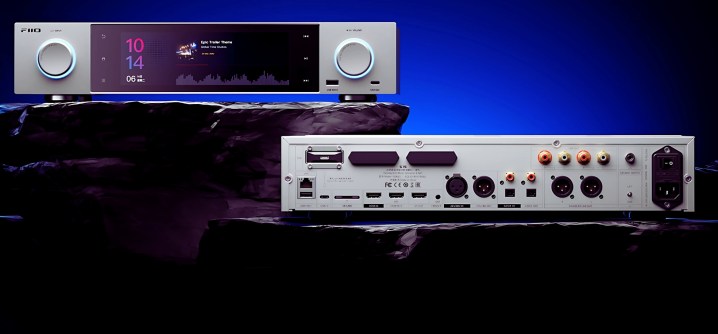
    At CES 2025, FiiO unveiled three exciting new audio products, ranging from an economical portable player to a robust headphone amplifier/DAC/streamer blend, along with their first full-size network music streamer featuring a striking 7.8-inch touchscreen. All models are set to launch in late January.

    FiiO S15, $1,000

    Fiio S15 full-size network music streamer.
    Fiio

    This marks FiiO's first full-size music streamer, making excellent use of the spacious layout with a large 7.8-inch touchscreen that nearly fills the front panel. It runs on FiiO OS, rooted in Android 12, allowing users to navigate and manage the streamer’s extensive settings.

    Powered by a Qualcomm Snapdragon 660 processor (4GB RAM/64GB ROM), this Roon Ready device features an AK4191+AK4499EX DAC configuration and includes an M.2 hard drive slot for expanded storage. FiiO claims it integrates their proprietary DAPS (digital audio purification system), engineered around a custom Android audio core and a low-jitter clock coprocessor, operating at both system and application levels to support appropriate PCM and DSD music sampling rates.

    Connectivity options are abundant, including:

    • Coaxial in: up to 192kHz/24bit
    • Coaxial out: up to 384kHz/24bit; DSD128 (D2P/DOP)
    • Optical in: up to 96kHz/24bit
    • Optical out: up to 192kHz/24bit
    • HDMI in: up to 192kHz/24bit
    • HDMI out: up to 192kHz/24bit
    • Bluetooth transmission: AAC/SBC/aptX/aptX HD/LDAC/LHDC
    • Bluetooth reception: SBC/AAC/aptX/aptX-LL/aptX-HD/aptX-Adaptive/LDAC

    Local playback supports up to 384kHz/32bit PCM and DSD256 (native), while the USB DAC can handle up to 768kHz/32bit PCM and DSD512 (native), with identical specs available in USB Audio mode.

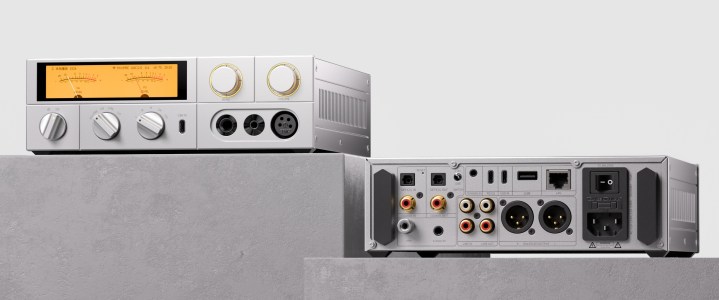
    FiiO K17, $900

    Fiio K17 headphone amp/streamer.
    Fiio

    The FiiO K17 serves as an advanced headphone amplifier, delivering 4000mW per channel with front-facing outputs to accommodate a variety of headphone connections. It also functions as a capable streaming device. The 3.93-inch touchscreen primarily displays visually appealing VU meters, but it also provides access to streaming, Bluetooth, and local USB playback features.

    Equipped with the same AKM flagship DAC chips (AK4191 + AK4499EX) as the S15, the K17 boasts multiple digital and analog inputs and outputs, including an RCA input for connection to a turntable. It comes with a remote control, along with the FiiO Connect app for customized settings and adjustable touchscreen displays. To create a complete audio system, simply pair it with powered speakers.

    Additional specifications include:

    • Global 31-band professional-grade high-precision lossless PEQ
    • Fully discrete AB-class transistor amplification circuit
    • Three ultra-low phase noise femtosecond oscillators
    • Fully balanced audio architecture
    • 35-watt low-noise, low-frequency linear power supply
    • 3.93-inch LCD touchscreen
    • Dual-band WiFi (2.4G/5G) and a 1000M Ethernet port

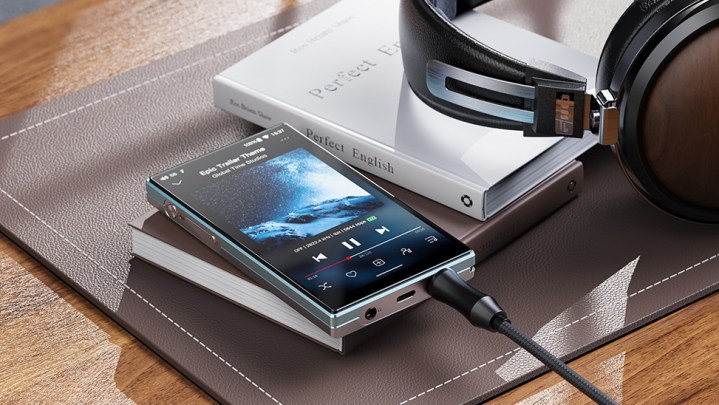
    FiiO JM21, $149

    Fiio JM21 Portable Music Player.
    Fiio

    Nostalgia for the iPod era has sparked interest in the FiiO JM21, which is available for $149. This Android 13 portable music player features a slim design of just 13mm and claims a battery life of up to 12 hours.

    Equipped with dual CS43198 DACs, 3GB of RAM, and 32GB of expandable storage (up to 2TB via MicroSD), it allows for far more music storage and playback than older iPod models. Additionally, it offers dual headphone outputs—3.5mm unbalanced and 4.4mm balanced.

    Full specifications have yet to be released, so details on Bluetooth support and native DSD file playback remain unclear; however, here’s what we know:

    • Qualcomm Snapdragon 680
    • Amp: SGM8262
    • Dimensions: 120.7 x 68 x 13mm
    • Display: 4.7-inch bezel-less screen (750×1334)
    • Operating system: Android 13
    • Wi-Fi: supports both 2.4GHz and 5GHz, with DLNA, AirPlay, and Wi-Fi song transfer functionalities
  • Which type of projector is best for home theater?

    Which type of projector is best for home theater?

    When setting up a home theater, choosing the right projector is crucial to achieving an immersive viewing experience. With various types of projectors available, it can be challenging to determine which one best fits your needs. This article breaks down the popular types of projectors, highlighting their features and benefits to help you make an informed decision.

    Types of Projectors

    1. LCD Projectors

    LCD (Liquid Crystal Display) projectors are known for their vibrant colors and sharp images. They utilize three separate LCD panels for red, green, and blue light, creating a full-color image.

    Advantages:

    • Excellent color reproduction
    • Good brightness levels, making them suitable for rooms with ambient light
    • Generally lighter and more portable than other types
    • Lower cost compared to some high-end options

    Disadvantages:

    • The black levels can be less deep compared to DLP projectors
    • May experience grid-like patterns known as the "screen door effect" at close viewing distances

    2. DLP Projectors

    DLP (Digital Light Processing) projectors use a digital micromirror device (DMD) chip and a color wheel to produce images. They are known for their sharpness and high contrast ratios.

    Advantages:

    • Superior motion handling, ideal for fast-paced movies or sports
    • Better black levels and contrast compared to LCD projectors
    • Typically more compact and lightweight
    • Improved reliability and longevity

    Disadvantages:

    • Color accuracy may be less vibrant than LCD models
    • Some models can experience the "rainbow effect," where a brief flash of secondary colors appears during fast movement

    3. LCoS Projectors

    LCoS (Liquid Crystal on Silicon) projectors blend the best qualities of DLP and LCD technologies. They are often considered high-end options, providing exceptional image quality.

    Advantages:

    • Outstanding color accuracy and detail
    • Excellent black levels and contrast ratios
    • Ideal for critical viewing and high-definition content

    Disadvantages:

    • Generally more expensive than DLP and LCD projectors
    • Larger and heavier, making them less portable
    • Can be less bright than other types, making them better suited for dark rooms

    Factors to Consider

    Screen Size and Distance

    The size of your screen and the distance from the projector to the screen will significantly influence your choice.

    • Throw Ratio: Consider the throw ratio of the projector, which helps determine how far back it needs to be placed to project a specific image size. Short-throw and ultra-short-throw projectors can be placed closer to the screen.

    Resolution

    Resolution is crucial for achieving sharp visuals. Common resolutions include:

    • 1080p (Full HD): Ideal for a high-quality viewing experience, supporting most Blu-ray discs and streaming services.
    • 4K (Ultra HD): Offers four times the resolution of 1080p, perfect for those wanting the best detail and clarity.

    Brightness

    Brightness is measured in lumens. A projector with higher lumens is better suited for rooms with ambient light:

    • Light Rooms: 2500 lumens or more
    • Dark Rooms: 1500-2500 lumens is usually sufficient

    Budget

    Home theater projectors are available in a range of prices. Setting a budget will help narrow down your options:

    • Entry-Level: $500 – $1000
    • Mid-Range: $1000 – $3000
    • High-End: $3000 and up

    Connectivity

    Ensure the projector has the necessary ports for connecting various devices such as Blu-ray players, gaming consoles, and streaming devices. HDMI is a standard, but consider additional options like USB and wireless connectivity for added convenience.

    Final Considerations

    Choosing the best projector for your home theater ultimately depends on your specific needs and preferences. Consider factors such as your room size, the darkness of the environment, and the types of content you plan to watch. By evaluating these aspects along with the features of various projector types, you can create an immersive home theater experience tailored to your tastes.

  • Guide to Transferring Save Data in Animal Crossing: Pocket Camp

    Guide to Transferring Save Data in Animal Crossing: Pocket Camp

    With the release of Animal Crossing: Pocket Camp Complete, you may be eager to avoid starting from the beginning if you’ve been enjoying the original game. Luckily, you can transfer your progress from the original Animal Crossing: Pocket Camp to the Complete edition.

    It’s important to note that you have a limited time to transfer your Pocket Camp data, so be sure not to delay, or you risk losing your progress permanently. Here’s a straightforward guide to help you move your beloved characters and hard work to the new version.

    How to Link Your Save Data to a Nintendo Account

    To begin transferring your game data, whether from the original Pocket Camp to the Complete edition or switching devices, you need to first link your game to a Nintendo account.

    1. Launch Pocket Camp (or Pocket Camp Complete if you are switching devices).
    2. Select either ‘Transfer Save Data’ or ‘Before Changing Device’. This action will direct you to a new screen where you can create or connect a Nintendo account. After that, you’ll be able to link your save data.

    How to Transfer Save Data from Original Pocket Camp

    Keep in mind that you can only transfer your data from Animal Crossing: Pocket Camp until June 1, 2025, at 11:00 PM PT / 7:00 AM BST.

    Once you’ve linked your old Pocket Camp data to a Nintendo account, proceed with the following steps:

    1. Open Pocket Camp Complete and select ‘Continue’ rather than ‘Start Fresh’.
    2. On the following page, choose ‘Transfer’ to restore your saved game data.

    Be cautious: once you’ve recovered your data in Pocket Camp Complete, if you delete the app, all saved data will be lost. You can, however, back it up for a device transition, which is addressed in the next section.

    How to Transfer Pocket Camp Complete Data to Another Device

    To transfer your Pocket Camp Complete data, follow these instructions:

    1. Start Pocket Camp Complete and select ‘Before Changing Device’ on the main screen. If you haven’t done so already, link your Nintendo account and then select ‘Store Data’.

    Note: Your saved data will remain stored for seven days. If you haven’t transferred to a new device by then, you’ll need to store the data again.

    1. On your new device, download and install Pocket Camp Complete. Choose ‘Continue’, which will prompt you to sign in with your Nintendo account to access your stored data.

    If for any reason the title screen doesn’t display this option, you can also access it by navigating to the ‘Misc.’ section from the menu and selecting ‘About Changing Devices’ to find the ‘Store Data’ option there.

    By following these steps, you can ensure that your progress in Animal Crossing: Pocket Camp Complete is seamlessly transferred, allowing you to pick up right where you left off!

  • Google Enhances Android Security Against Unknown Trackers

    Google Enhances Android Security Against Unknown Trackers

    Google is rolling out exciting new enhancements to the safety alert system in Android, designed to assist users in detecting unknown trackers that may be following them. These innovative features apply to all tags and tracking devices compatible with Google’s Find My Device service, which helps locate lost gadgets.

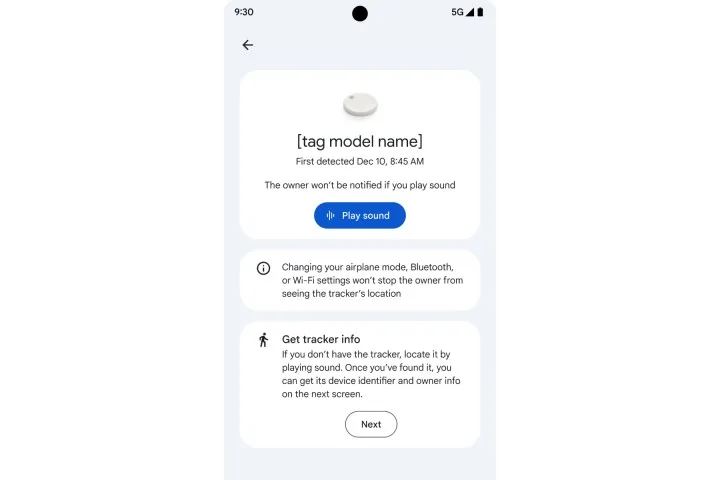
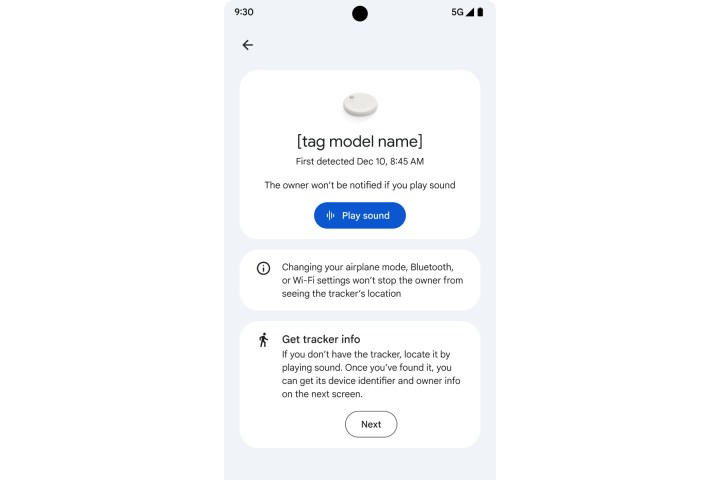
    The first feature, Find Nearby, allows users to identify any concealed trackers. For instance, if your Android device notifies you about an unknown tracker, you can utilize the Play Sound function to help locate it.

    Nevertheless, if the tracker is hidden beneath layers of material or if its speaker system has been sabotaged, it can be extremely challenging to find. In such cases, the Find Nearby feature will activate a map that directs you toward the hidden device.

    Android alert for unknown tracking device.
    Google

    “As you get closer to the tracker, the interface fills in visually, also providing a text description of the connection status,” the company elaborated on a support page. Once you approach the marked area, you can tap on the Play Sound feature and attempt to locate it using sound cues.

    To further enhance safety, Google gives users the option to temporarily pause their device’s location sharing within the Find My Device network. This location-sharing suspension lasts for 24 hours and can be activated by navigating to: I can’t find the tracker > Temporarily pause.

    Google assures that this action will “prevent the device’s location from being utilized by an unidentified tag for up to 24 hours.” The tracker alert system on Android also delivers vital information, such as the device identifier and the owner’s hidden email address, and, in certain instances, the last four digits of the owner’s phone number.

    Google’s support site provides a resource table that offers guidance on disabling trackers from various brands, including Chipolo, Motorola, and Apple, which can be accessed here.

    It is advisable that if you discover an unknown tracking device, you should move to a secure public location and notify law enforcement officials immediately. Additionally, taking screenshots and recording details of the tracking device that appears after the initial alert is highly recommended.

    The unknown tracker alert system operates autonomously on Google devices. However, if you have any suspicions, you can initiate a manual scan via the Settings app by choosing Safety & Emergency > Unknown tracker alerts > Scan now.

    In 2021, Apple launched a specialized app called Tracker Detect to assist Android phones in identifying hidden AirTags. Shortly thereafter, Google began developing an automated tracker detection system.