الوسم: Copilot

  • Pakistani Roads Shine Bright, Robots Get Flirty, Keyboards Slim Down

    Pakistani Roads Shine Bright, Robots Get Flirty, Keyboards Slim Down

    Pakistan’s V-SenseDrive Tackles Road Safety Using AI

    Created with Gemini

    Road accidents are a constant concern amidst Pakistan’s hectic traffic scene, but a new local initiative aims to make a difference. Developers have launched V-SenseDrive, the nation’s first driver behavior dataset designed with privacy in mind, and built entirely from data collected on Pakistani roads.

    Instead of invasive facial recordings, the dataset employs smartphone sensors such as accelerometers, gyroscopes, and GPS, combined with video footage of the road to categorize driving styles into normal, aggressive, and risky behaviors. It has been tested across various environments, from city streets to highways, reflecting the chaotic nature of Pakistani traffic.

    By organizing the data into raw, processed, and semantic layers, the project provides tools for developers and policymakers to train advanced driver-assistance systems (ADAS), enhance fleet safety, and develop insurance models that are specifically tailored to Pakistan’s driving habits.

    Advancing Toward a Skynet Future

    Source: REUTERSSource: REUTERS

    We’ve previously discussed augmented reality glasses, with Meta and Amazon rushing to develop their own versions, but Meta is taking it even further.

    In an interview with Meta’s CTO, Andrew Bosworth, journalist Alex Heath reported that Meta is delving deeper into robotics. This isn’t driven by competition but aims to develop software that other companies can license.

    Bosworth acknowledges that software remains the primary challenge in advancing robotics technology, and he hopes that Meta’s robotics team and their ‘Superintelligence Labs’ will find viable solutions.

    Initially, their focus is on enabling robots to animate a hand; progress will then extend to more complex movements. For now, humans can breathe a sigh of relief from the threat of total replacement—or even enslavement.

    Logitech Unveils a Solar-Powered Keyboard That Doesn’t Need Sunlight

    Created using GeminiCreated with Gemini

    After more than ten years of letting solar keyboards gather dust, Logitech has returned with the Signature Slim Solar Plus K980—a keyboard powered entirely by light, eliminating the need for USB cables or disposable batteries.

    Its solar panel absorbs sunlight or artificial office lighting (200 lux or brighter) to recharge a battery Logitech claims can last up to a decade.

    Once charged, the keyboard can operate for up to four months without any light. It features a full-size layout with all standard amenities, including media controls, customizable shortcuts, and even a mic mute button. The standout feature is the new AI Launch key.

    Out of the box, this button activates Copilot on Windows or Gemini on ChromeOS. Users can also reprogram it to launch ChatGPT, Perplexity, or any other AI tool to enhance productivity.

    Additional perks include Bluetooth pairing with up to three devices (or via Logitech’s Bolt dongle, sold separately), plus a sleek design available in graphite and a Mac-compatible off-white. The keyboard combines eco-friendly principles with cutting-edge AI integration—hopefully living up to these promises.

  • Microsoft Edge Canary New Tab Page Adds Copilot Instead Of MSN

    Microsoft Edge Canary New Tab Page Adds Copilot Instead Of MSN

    Microsoft is currently experimenting with a new Copilot-enabled interface in the Canary version of the Edge browser, which serves to replace the traditional MSN feed on the New Tab Page. This change aims to enhance the overall browsing experience, as reported by Windows Latest. Users can access this feature through experimental flags.

    If this new design is implemented in the stable release, Copilot will take the place of the standard MSN feed, becoming the first thing displayed when a new tab is opened. Users will be greeted with a clean interface that includes a message asking, "How can I assist you today?" alongside a compose box.

    The main feature of this interface allows users to toggle between a response generated by Copilot or a Bing search to address their inquiries. You’ll have the ability to open websites, draft content, or seek guidance on various subjects. The Edge browser will let users choose whether they want Copilot to manage responses entirely or rely on Bing.com for information.

    The Copilot button provides three distinct options:

    1. Default: For search and chat suggestions. For instance, if you look up “restaurants near me,” Bing will respond, but if you request a summary, Copilot will take charge.

    2. Chat: Currently, this option redirects users to Bing.com, although changes are expected as it becomes available to all users.

    3. Search and Navigate: This setting prioritizes web searching and does not include AI-generated responses.

    At the bottom of the page, you will find options such as "Write a first draft," "Learn something new," and "Get advice," which currently redirect users to Bing.com.

    To try this feature, you need to be using Edge Canary, as it may not yet be in the stable version. Simply type “edge://flags” in the address bar, press Enter, search for "NTP," enable the flags, and restart your browser.

    This initiative seems aimed at encouraging more users to engage with Copilot. While it does not include the Vision feature, which allows interaction with your screen, it’s important to note that this feature is available to everyday users without specialized hardware, unlike the new Recall feature.

  • New Moto Razr Features Perplexity And CoPilot In Moto AI

    New Moto Razr Features Perplexity And CoPilot In Moto AI

    Table of Contents

    1. Selection of AI Platforms
    2. New Features in Moto AI
    3. Availability of New Devices

    Each smartphone utilizes a distinct chipset, leading to varying capabilities for running intricate on-device LLM models. The Razr Ultra 2025 stands out as it incorporates the latest Qualcomm Snapdragon 8 Elite processor, which features a neural processing unit offering an impressive 80 TOPS of performance. Consequently, this is the only phone able to execute Meta’s Llama 3.2 model, enhancing Motorola’s latest Look and Talk functionality.


    New Features in Moto AI

    The newest enhancements allow users to engage with Moto AI without physically touching the screen or issuing voice commands. When using the Razr Ultra 2025 in either stand or tent mode, you can quickly access Moto AI features at a glance. Alternatively, for those who prefer traditional interaction, these functions can be activated by pressing and holding the dedicated AI button.

    The Razr 2025 series boasts a variety of upgraded Moto AI features. The Look and Talk function is exclusive to the Razr Ultra 2025, while all three devices have been upgraded with improved versions of the original Moto AI functionalities. These include "Catch Me Up," which summarizes notifications, "Remember This" for saving and recalling screenshots effortlessly, and "Pay Attention," allowing you to initiate voice recordings along with real-time transcription.

    Availability of New Devices

    All three devices represent the debut of new Moto AI 2.0 features, including "Next Move," which analyzes your screen content and suggests subsequent actions such as curating a music playlist, generating images with Image Studio, or storing essential information for easy access later.

    Pre-orders for the new Razr 2025 will commence on May 7, with prices starting at $699.99. The devices will officially hit the market on May 15.

  • Microsoft’s Copilot Vision AI Is Now Free for 9 Sites

    Microsoft’s Copilot Vision AI Is Now Free for 9 Sites

    After several months of previews and select releases, Microsoft’s Copilot Vision has officially launched for Edge users in the U.S. This exciting new AI feature is designed to observe your screen while you browse, allowing you to ask questions about your activities and receive relevant context-based answers. Currently, however, it is only compatible with nine specific websites.

    The list of these nine websites appears somewhat eclectic. While having Amazon is logical, the inclusion of Geoguessr is puzzling, considering the site’s primary purpose is to guess locations without assistance. The complete list of compatible sites includes:

    • Wikipedia
    • Tripadvisor
    • Williams Sonoma
    • Amazon
    • Target
    • Wayfair
    • Food & Wine
    • OpenTable
    • Geoguessr

    Mustafa Suleyman, Microsoft AI’s CEO, recently announced the launch on Bluesky and highlighted several of his favorite use cases.

    Copilot Vision is now available for free on Edge. It can literally see what you see on your screen (if you opt-in). It’s quite remarkable! It engages with you while browsing online, eliminating the need for extensive explanations, copy-pasting, or struggling to articulate your thoughts.

    — Mustafa Suleyman (@mustafasuleymanai.bsky.social)

    Typically, when querying Copilot, users need to manually enter paragraphs of context, which can be time-consuming and challenging, especially when inquiring about unfamiliar topics.

    With Copilot Vision, rather than attempting to articulate what you’re viewing or discussing, the AI can directly observe your screen.

    For instance, according to Suleyman, if you search for “breathable sheets” on Amazon, you could ask Copilot whether any of the results consist of suitable materials. It can identify the correct ones or provide examples of breathable fabrics to look up.

    On the Food & Wine website, Copilot can assist you while cooking by responding to your questions and narrating portions of recipes, as this interaction is primarily voice-driven. You can speak to the AI, and it responds in kind.

    The Copilot Vision page indicates that you can also type your inquiries and receive written answers.

    Microsoft is taking a cautious approach with this feature, likely to avoid another backlash similar to what occurred with Recall. The limited selection of compatible websites stems from potential copyright concerns, and the company emphasizes that this feature is opt-in. It does not record your screen, is only active when you turn it on, and deletes data after each session concludes.

    If you’re interested in exploring this new feature, you can set it up and watch a tutorial on the Microsoft website.

  • Google Gemini’s Top AI Features Now Available on Microsoft Copilot

    Google Gemini’s Top AI Features Now Available on Microsoft Copilot


    At a recent event, Microsoft showcased a significant update for its Copilot feature, introducing a total of nine exciting enhancements. Among these are tools like Actions, Memory, Vision, Pages, Shopping, and Copilot Search.

    As many of these features have already surfaced in competitor products like Google’s Gemini and OpenAI’s ChatGPT, it’s worth noting that two popular tools gaining traction among users have finally been incorporated into the Copilot ecosystem.

    Deep Research

    Deep Research has become the talk of the town. Both Gemini and ChatGPT offer this feature, and it was quite surprising that the basic Copilot setup was missing such a powerful function, especially considering Microsoft’s close partnership with OpenAI.

    Fortunately, this gap has now been filled. Deep Research is a valuable addition to the Copilot suite, providing users with detailed, well-structured reports instead of generic chatbot replies. This is what a Deep Research report resembles:

    This feature taps into credible sources, gathers relevant information, and constructs a thorough research document complete with citations, saving users countless hours of manual research efforts. I've been impressed by its application on Gemini, so I'm thrilled to see this feature arrive on Copilot.

    According to Microsoft, “Copilot can find, analyze, and consolidate information from online databases as well as extensive documents and images.” Additionally, there's no need for a Microsoft account to initiate a Deep Research query, and a subscription to Copilot Pro isn't required.

    Microsoft is offering five free Deep Research inquiries each month, while those with a subscription will enjoy unlimited access and priority processing. In late March, the Microsoft 365 Copilot platform also introduced an AI Researcher tool capable of a similar function, analyzing both online resources and local files.

    Podcasts

    AI podcasts first gained attention with Google's NotebookLM, and just a few weeks ago, this feature was introduced in Gemini. I had the chance to experiment with it and found it to be an exceptional tool for transforming mundane information into an engaging auditory experience.

    While Google refers to these as audio overviews, Microsoft designates them simply as podcasts. Though the core concept is aligned, Microsoft offers a couple of additional benefits.

    Unlike Google Gemini's podcasts that do not allow user interaction, Copilot enables users to engage in ongoing discussions. “While listening, you can continue to communicate with Copilot to gain more insights and extend the conversation,” as noted by Microsoft.

    Another standout feature is the ability of Copilot to convert your offline resources and suggested websites into podcasts. Additionally, a new feature named Copilot Search functions similarly to Google's AI search but utilizes Microsoft's Bing engine.

  • Microsoft Adds Copilot+ AI Tools for Intel and AMD PCs

    Microsoft Adds Copilot+ AI Tools for Intel and AMD PCs

    If you invested in a new AI-powered Copilot+ PC equipped with the latest Intel or AMD processor, and noticed the absence of certain features, your wait is finally over. Several of those Copilot+ enhancements are now becoming available for devices that utilize Intel and AMD processors.

    It’s been nearly a year since Microsoft unveiled the Copilot+ PC classification, designed to prioritize AI capabilities. Up until now, Qualcomm was the exclusive chip supplier for these devices.

    In late 2024, competing chip manufacturers entered the Copilot scene with the release of AMD’s Ryzen AI 300 series and Intel’s Core Ultra 200V series processors. However, many features remained inaccessible to those using Intel and AMD machines.

    That situation is finally changing today. Microsoft announces that Copilot tools such as Live Captions, Cocreator, Restyle Image, and Image Creator will now be available on Copilot+ hardware powered by Intel and AMD.

    What is changing?

    Starting with Live Caption, this functionality provides captions for videos, audio, and real-time interactions like meetings conducted in English. It can also translate text from over 40 different languages into English, as well as 27 languages into Chinese.

    In the future, a new feature called Voice Access will enable users to manage their PC using natural language commands. This feature is already rolling out to Copilot+ devices with Qualcomm chips, with support for AMD and Intel hardware anticipated soon.

    For creative tasks, the AI-powered Cocreator feature is now available in Paint across all device types. Microsoft claims it helps make artistic creation and image enhancement more intuitive and accessible. Users can blend text-based editing with freehand drawing, providing added flexibility.

    Through the Photos app, users of Intel and AMD machines will also gain access to the Restyle Image and Image Creator tools. The Image Creator function allows for generating images based on text descriptions, similar to how you would interact with ChatGPT to create Ghibli-inspired art. The Restyle tool, meanwhile, applies artistic effects to images in a preset manner.

    All of these AI features will be available on AMD and Intel-powered Copilot+ PCs with the March 2025 Windows update. It’s intriguing to consider why these capabilities were initially absent from Intel and AMD devices, even though they satisfied the minimum AI performance criteria.

    Unfortunately, this trend of missing features is not expected to end soon. Recently, Microsoft announced enhancements to the Windows Search experience, which will significantly simplify locating files, photos, and settings. Regrettably, this improvement will only be available for Snapdragon-based Copilot+ devices.

  • Copilot+ PC Exclusive Settings Previewed in Windows 11

    Copilot+ PC Exclusive Settings Previewed in Windows 11

    Microsoft is experimenting with an intriguing feature in the latest preview build of Windows 11 that enhances how users can interact with various applications through the Settings menu.

    This feature, labeled “Actions,” was initially concealed in the 26120.3576 build designed for the Dev Channel. After being discovered by tech enthusiasts, information about its functionality has been shared on multiple Windows forums. Currently, this feature supports apps like Photos and Paint, and when activated, it allows users to perform more advanced tasks within these applications.

    Actions Settings in Windows 11 preview build
    Windows Central

    To access these settings in the Windows 11 preview, go to Settings > Apps > Actions. Here, you’ll discover options for Photos, including features like Blur Background, Erase Objects, and Visual Search with Bing. In Paint, you can find the Remove Background option.

    These functionalities represent higher-level editing capabilities that are typically absent from standard Microsoft applications. It appears that the Actions settings are related to the Click To Do intelligent text actions feature, which Microsoft has referenced in the feature log for the Windows 11 preview.

    Windows Central has pointed out that Click To Do is meant exclusively for Copilot PCs, suggesting that the Actions feature may be similarly tied to future AI-enabled PCs. This Click To Do feature parallels the Actions settings but can be activated by highlighting text and right-clicking to show a drop-down menu on AMD and Intel-powered systems.

    Microsoft plans to unveil several Copilot+ features, commencing in May, which will include the significant Recall feature, as well as To Do and AI enhancements in Windows Search during the summer. Additional “proactive” Copilot functionalities are expected later in the year, as noted by the publication.

    While the Actions settings are not guaranteed to be rolled out as part of the public version, if they are, they could seamlessly incorporate some AI features akin to Click To Do within the operating system. Note that all these enhancements will necessitate Copilot+ PCs equipped with a Neural Processing Unit (NPU) capable of processing at least 40 TOPS.

    Although the current Windows 11 preview showcases only two applications, there’s significant potential for the integration of third-party apps into the Actions Settings, offering even more dynamic functionalities.

  • Copilot May Soon Use More Microsoft AI Models, Less ChatGPT

    Copilot May Soon Use More Microsoft AI Models, Less ChatGPT


    Microsoft has emerged as one of the original supporters of OpenAI, frequently promoting products like Copilot by emphasizing their access to the latest ChatGPT models. Now, the tech giant appears to be shifting toward enhancing its own AI models within its software suite while also creating alternatives to OpenAI’s reasoning models within the "GPT-o" framework.

    According to The Information, staff in Microsoft’s AI division have recently finished training a new series of AI models currently under development, dubbed “MAI.” The internal team is optimistic that these models will perform at levels comparable to leading AI frameworks developed by companies like OpenAI and Anthropic.

    Under the guidance of its AI head, Mustafa Suleyman, Microsoft is implementing this plan to reduce dependency on OpenAI and establish its own AI framework for Copilot applications. This move isn’t entirely unexpected.

    Developing Its Own AI Stack

    In the final week of February, Microsoft released new compact language models called Phi-4-multimodal and Phi-4-mini. These models feature multi-modal capabilities, allowing them to process text, speech, and visual inputs, similar to OpenAI's ChatGPT and Google's Gemini.

    Surface Laptop in front of a Copilot+ sign.
    Luke Larsen / Digital Trends

    These AI models are currently accessible to developers via Microsoft’s Azure AI Foundry and third-party platforms such as HuggingFace and NVIDIA API Catalog. Benchmarks provided by Microsoft indicate that the Phi-4 model outperforms Google’s most recent Gemini 2.0 series on several testing criteria.

    The company stated, “It is one of the few accessible models capable of effective speech summarization, achieving performance levels comparable to the GPT-4o model,” and anticipates launching its MAI models commercially through its Azure service.

    Competition and Willingness to Collaborate

    In addition to developing proprietary AI models for Copilot, Microsoft is also exploring partnerships with third-party technologies like DeepSeek, xAI, and Meta. DeepSeek has recently gained attention for offering top performance benchmarks at notably lower development costs. The company has been embraced by various organizations and has claimed a theoretical cost-to-profit ratio exceeding 500% on a daily basis.

    Today, we are advancing our AI ambitions with the release of DeepSeek R1 7B & 14B distilled models for Copilot+ PCs via Azure AI Foundry. This marks a significant step in our journey to establish Windows as the premier platform for AI, seamlessly integrating cloud intelligence. pic.twitter.com/QaUYrlMIt6

    — Pavan Davuluri (@pavandavuluri) March 3, 2025

    While paving the way with its own AI models to replace OpenAI’s GPT underpinning for Copilot, Microsoft is reportedly working on its own reasoning AI models as well. Such efforts would put Microsoft in competition not only with OpenAI's products like GPT-o1 but also with emerging contenders such as DeepSeek, which offer reasoning functions.

    This push for in-house reasoning model development has reportedly been accelerated due to tense interactions between Microsoft and OpenAI teams regarding technology sharing. As outlined by The Information, tensions have arisen over OpenAI’s perceived lack of transparency concerning the operations of its AI models, including GPT-o1.

    Reasoning models are considered the next essential step in AI development, providing a deeper understanding of queries, enhanced logical deduction, and improved problem-solving skills. Microsoft claims that its Phi-4 model exhibits notable strengths in linguistic, mathematical, and scientific reasoning.

  • Apple Lags in Siri, Microsoft Introduces Copilot for Mac

    Apple Lags in Siri, Microsoft Introduces Copilot for Mac

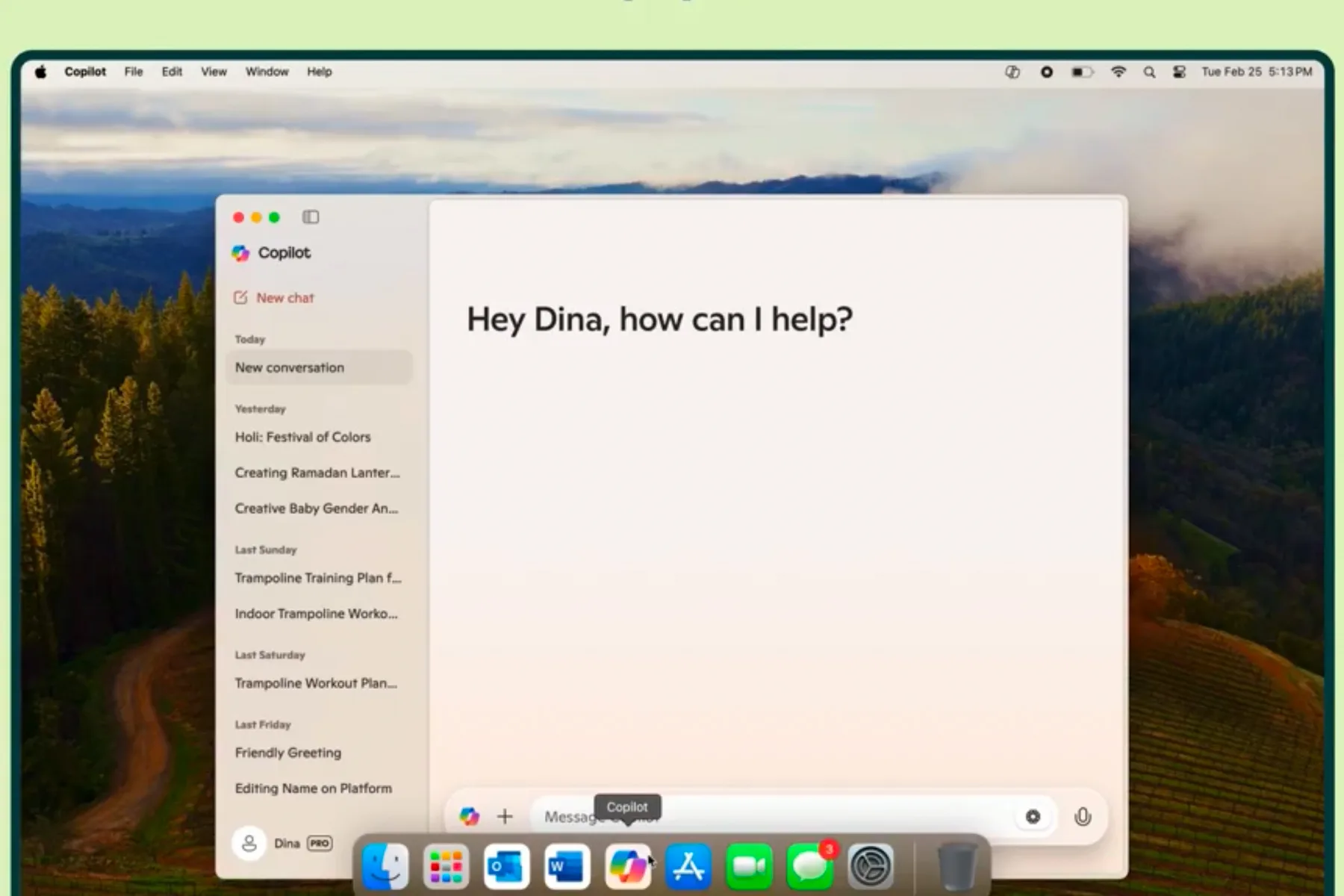
    Microsoft has officially introduced a dedicated Copilot application for Mac users today. Currently, it’s exclusively accessible to those in the United States and the United Kingdom, but it comes packed with innovative features, including the new Think Deeper mode.

    To utilize the app, your Mac must be running macOS 14 or a newer version. The app is compatible with any Mac that has an M1 chip or a more recent Apple processor.

    In terms of functionality, the Copilot app supports a quick launch keyboard shortcut—Option + Space—allowing users to easily access the AI assistant. This version for macOS is designed for multi-modal input, enabling it to understand text commands as well as voice and image inputs.

    Additionally, the app features Copilot Daily, which delivers personalized audio briefings that cover highlights from daily news sources, weather updates, and other relevant content. This service is reminiscent of Samsung’s Now Brief feature found on their Galaxy S25 series devices.

    Copilot for macOS also offers capabilities like text-to-image generation, writing assistance, language translation, and image editing, among others. According to its App Store description, “Copilot merges the power of AI with the creative potential of advanced OpenAI models in one convenient location.”

    It’s quite intriguing that Microsoft is utilizing OpenAI technology on an Apple platform, given their competitive relationship. Notably, OpenAI’s GPT framework serves as a key link between the two tech companies. Microsoft has made significant investments in OpenAI and working together has allowed Copilot to take advantage of OpenAI’s advancements. Recently, Microsoft also deployed OpenAI’s latest AI model, GPT-4.5, in its Azure AI Foundry.

    As the Copilot app becomes available in the App Store, users are already raving about the ease of accessing the assistant with the option + space feature for their daily tasks. While the app is not yet released globally, Microsoft’s Yusuf Mehdi has indicated that efforts are underway to broaden the app’s reach.

    Meanwhile, Apple continues to integrate ChatGPT’s functionalities with Siri and its AI platforms across devices. However, progress on enhancing Siri’s generative AI capabilities has reportedly faced delays. On the flip side, other tech giants, like Google, have upgraded their assistant to a more advanced version named Gemini.

    Time will reveal if Copilot serves merely as an interim AI solution for Mac users. For now, excitement surrounds the initial launch, with further expansion plans on the horizon.

  • Microsoft Revives Menu Key Due To Copilot Backlash

    Microsoft Revives Menu Key Due To Copilot Backlash

    The keyboard and trackpad on the new Surface Laptop.
    Luke Larsen / Digital Trends

    After facing criticism for eliminating the Menu key, Microsoft appears to be considering its return—at least in part—in upcoming updates for Windows keyboards. This revival may help restore some of the lost capabilities of the key, as highlighted by PhantomOfEarth on X (formerly Twitter).

    Microsoft may enable users to remap the Copilot key to function like the Menu key, essentially reinstating its original purpose. In October, the company introduced limited capabilities to customize the Copilot key, but these options were restricted to MSIX-packaged and signed applications. It seems Microsoft is now looking to broaden these functionalities, granting users greater control over what the key can perform.

    Having one of the top laptops doesn’t guarantee extensive app compatibility for the Copilot key. The Menu key gained popularity because it proved useful in situations where a mouse was unavailable—it mirrored the options provided by a right-click. This crucial key has been a notable feature on Surface devices.

    As of now, Microsoft has not made an official statement regarding the timeline or certainty of enabling this new flexibility for Windows users. This insight comes from a prominent leaker, but Microsoft may ultimately decide to scrap these changes entirely. It remains to be seen if the company will follow through, potentially rolling out this feature before the year’s end, making it easier to access the options previously offered by the Menu key. Perhaps, as time goes on, Microsoft will continue to enhance its offerings.


  • Microsoft Edge Copilot Lets You Share AI Chats Easily

    Microsoft Edge Copilot Lets You Share AI Chats Easily

    New share link features for Copilot in Edge
    @Leopeva64

    Microsoft has introduced a new sharing feature for Copilot in Edge, allowing users to easily share conversations they have with the AI by generating a shareable link, as reported by MSPowerUser. This update is now live and also makes the “Think Deeper” functionality available to all users, which enhances the AI’s responses with more profound reasoning.

    This enhancement brings Copilot on Edge more in line with its web and mobile counterparts, providing a uniform experience across platforms. For example, users can interact with the AI on copilot.microsoft.com without needing to register, similar to how ChatGPT operates in web mode. However, it’s worth noting that while the web version allows chatting with the AI, it currently lacks the ability to share these conversations—something we hope to see implemented soon.

    Additionally, Microsoft continues to roll out new features, making the “Think Deeper” tool accessible to all users, not just those subscribed to Copilot Pro. Mustafa Suleyman, CEO of Microsoft AI, shared on X that this feature would be freely available and referred to it as truly magical.

    So, what exactly does the “Think Deeper” feature offer? It enhances the AI’s capacity to “think before it responds,” providing more advanced reasoning capabilities for various tasks, including career guidance, problem-solving, coding, and complex mathematical challenges. As a result, while it may take a bit longer—roughly around 30 seconds—for the AI to generate responses, it’s more informative and helpful. The feature, which utilizes OpenAI’s o1 model, is a significant advantage for users, especially since it comes at no cost.

    This isn’t the only upgrade Microsoft has implemented recently. The tech giant also updated the design of Copilot for Windows 10 and 11, including new functionalities like Copilot Voice and Copilot Vision. It will be interesting to see what other features may soon be available to the user base.