Tag: control

  • Lutron Makes Controlling Your Smart Home Easier Without Phone

    Lutron Makes Controlling Your Smart Home Easier Without Phone

    If you’re tired of managing multiple remotes and apps just to turn down the lights or change a song, I have good news. Lutron has added a new shortcut to its Caseta smart home lineup, allowing you to control your lights, shades, and Sonos playback using only your voice.

    For those unfamiliar, Caseta is Lutron’s DIY smart lighting system. It operates through a small hub that communicates with switches, dimmers, and plugs via radio signals instead of Wi-Fi, making it simple to manage the entire setup. Although the company has collaborated with Sonos for a while, voice control was the missing piece until now. That’s now been addressed.

    What does this update actually change?

    Just say “Hey Sonos,” and your Caseta lights, shades, and music will respond—no need to open an app or reach for a switch.

    This fills a notable gap: these two systems have been linked for years, but voice control wasn’t part of the mix until recently. In addition to basic commands, the partnership enables you to create combined presets that adjust lighting, window shades, and music all at once.

    You can even set your system to respond automatically when you leave or arrive, using the app. To do this, connect your devices through the Lutron app, open the Integrations menu, and activate “Sonos Voice Control.”

    Is there a catch?

    The main limitation is that voice commands only work through Sonos speakers equipped with a built-in microphone. Older models without microphones won’t support voice commands. That said, every device in the Caseta line—switches, dimmers, and plugs—supports voice control.

    For those starting from scratch, Lutron’s starter kits are budget-friendly. The basic Smart Switch Kit is priced at $94.95, while the Smart Dimmer and Lamp Dimming Plug kits each cost $99.95. The paddle-style Diva Dimmer Kit is priced at $119.95. All include the Smart Hub necessary for voice control functionality.

  • Sources: Proposed Hormuz Deal Could Grant Iran Control of Incoming Traffic

    Sources: Proposed Hormuz Deal Could Grant Iran Control of Incoming Traffic

    Vessels can be seen navigating the Strait of Hormuz from Musandam, Oman, on August 3, 2026. — Reuters

    – Gaining control over this strait would be a significant concession to Iran.
    – President Trump claims discussions with Iran are progressing smoothly.
    – Regional sources caution against assuming a deal is close at hand.

    A senior Iranian source and two regional officials informed Reuters on Wednesday that a proposed agreement between Iran and Oman would grant Tehran authority over ships entering the Gulf via the Strait of Hormuz. This marks one of the most substantial concessions made to Iran to date.

    Despite what appears to be a move towards accommodating Iranian demands, the sources dismissed claims by Donald Trump that a deal to reopen the strait was imminent, clarifying that key details remain unsettled.

    “The concession has already been made regarding some level of control over Hormuz,” one regional official stated.

    The other regional source indicated that specifics on how “control” would be defined are still under discussion, with Gulf negotiators pushing for regional oversight of ship inspections and insisting that any fees be voluntary.

    The Iranian senior official mentioned that the draft agreement on the table envisions Iran holding control over ships heading into the Gulf through the strait. A major point of contention is the extent of Iran’s authority over vessels traveling in the opposite direction.

    There has been no immediate response from U.S. officials regarding these revelations about the potential agreement.

    U.S. representatives have repeatedly stated they would never accept any arrangement that allows Iran dominance over the world’s crucial energy trade route.

    However, in recent days, Trump and high-ranking officials in his administration have suggested a deal is near, aiming to end the conflict he initiated in February, which polls indicate most Americans oppose.

    Oil prices increased slightly Wednesday following news that Yemen’s Iran-backed Houthi movement claimed responsibility for firing on a Saudi-flagged tanker in the Red Sea, amid ongoing disruptions to global energy supplies caused by attacks in the region.

    Despite the uptick, global crude prices remain near their lowest levels since early July, having sharply declined over the past two days after Trump announced a halt to upcoming attacks on Iran, citing new negotiations that could bring an end to the conflict.

    While direct negotiations between Tehran and Washington have not resumed, Iran has been in talks with Oman, which controls the opposite side of the strait. Iran rejected an earlier Omani proposal last week, deeming it too limited in its influence.

    Trump stated in an interview with Fox News overnight that negotiations were “progressing well” and that significant talks took place Tuesday.

    He added, “The Strait of Hormuz will be open very soon. If they back out again, they’ll face severe consequences.”

    Over the weekend, Trump explained the decision to halt plans for large-scale strikes on Iran by citing ongoing negotiations, a pattern he’s repeated multiple times during the ongoing conflict.

    The Iranian official downplayed the notion of an imminent agreement, noting that Foreign Minister Abbas Araqchi was currently on holiday.

    “Talks are ongoing, but it’s premature to say a deal with Oman is finalized,” they said.

    Another Iranian source warned that “the devil is in the details,” noting that “a single tweet from Trump could cause everything to fall apart.”

    If Iran secures control over access to the strait, it would signify a major shift favoring Tehran, effectively altering the regional power balance. Prior to the war, the strait was open to all ships without fees.

    Trump, who initially proclaimed “Operation Epic Fury” would force Iran into unconditional surrender, is now under pressure to exit a conflict that most U.S. voters oppose by a two-to-one margin.

    Iran is reportedly demanding between 5% and 7% in cargo fees from ships passing through the strait, while Oman is proposing lower fees around 3%. The U.S. opposes any fees.

    A voluntary fee system, at least in name, might serve as a compromise, although threats of Iranian attacks could deter shippers from risking transit without paying.

    Despite months of U.S. military operations—including a two-week bombing campaign in July—Iran maintains control over the strait. U.S. military officials admitted in July that supplies of certain munitions were running low, and Reuters reported Tuesday that the Army had used nearly all its long-range precision missiles.

    Periodic U.S. escalation responses have prompted stronger retaliations from Iran and its proxies, such as the Houthis in Yemen and the petro-chemical chokepoint at the Red Sea.

    On Wednesday, the Houthis announced they had again targeted a Saudi tanker in the Red Sea, enforcing what they describe as a blockade on Saudi oil shipments through the key route bypassing the Strait of Hormuz.

    Additionally, on Tuesday, an attack near Yemen sank an Indian-flagged vessel; all 14 crew members, including 13 Indians, were rescued. Yemeni government factions opposed to the Houthis accused them of orchestrating that attack.

  • Amazon Echo Hub Now Your Smart Home Control Center

    Amazon Echo Hub Now Your Smart Home Control Center

    Smart homes aim to simplify daily living, but they often result in juggling multiple apps just to adjust lighting, monitor visitors, or troubleshoot temperature issues.

    Amazon’s Echo Hub was designed to address these frustrations by serving as a dedicated touchscreen hub for your connected devices—integrating lighting, security cameras, locks, thermostats, alarms, and routines into a single interface. Recently, Amazon introduced a major update to the device, featuring a redesigned interface that emulates the ultimate smart home dashboard many users have envisioned. This free software upgrade, available to current Echo Hub owners, enhances usability without altering the hardware, potentially transforming its day-to-day functionality.

    The most noticeable change lies in the new, customizable interface. Recognizing that each smart home is unique, the update allows users to tailor their dashboard—grouping devices by room or purpose. Whether you want quick access to cameras and locks or prefer to control lighting, music, and temperature, the layout can now be personalized. Additionally, device controls have become more granular, enabling precise adjustments for brightness, color, and other settings directly from the display.

    The Echo Hub is evolving into a control panel that might rival your smartphone. It now supports live camera feeds, including viewing multiple streams simultaneously—an especially useful feature for households with multiple security cameras. Instead of switching between individual apps, you can monitor everything from one central display.

    The device also emphasizes automation, allowing users to arm security systems, activate routines, toggle between home and away modes, set lighting scenes, and manage connected devices with a single tap. For those heavily invested in Alexa automation, the Hub increasingly acts as a home command center rather than just a smart display. It also simplifies audio management, letting users control multiroom speaker groups effortlessly, streamlining music throughout the house.

    To further its appeal, the Echo Hub incorporates adaptive content—changing what appears on the 8-inch screen based on whether someone is nearby. This feature ensures the device fits naturally into your home environment, displaying photos or smart controls as needed. Its compatibility remains broad, supporting Zigbee, Thread, Bluetooth, Matter, Sidewalk, and Wi-Fi devices—all accessible without additional hubs or clutter.

    Priced at $179.99, the Echo Hub isn’t an impulse buy, but Amazon’s recent enhancements make it a compelling option for smart home enthusiasts seeking a centralized, user-friendly control station. Ultimately, it embodies the ideal of a smart home—saving you time and effort so you can focus on living comfortably.

  • How to Complete the Sentinel Control System Companion in Fallout 4

    How to Complete the Sentinel Control System Companion in Fallout 4

    One of the highlights of Fallout 4’s Creation Club content is the addition of new companions. Among these is a large set of Power Armor that doesn’t require a pilot. It simply roams the game world with you, attacking anyone who stands in your way. To unlock this powerful armor, you must complete the Malevolent Malfunction Quest.

    In this quest, you discover a Brotherhood of Steel traitor. Your task is to eliminate him and steal his AI-controlled Power Armor. Here’s a straightforward guide to completing the quest and adding this armor to your team.

    Follow the Distress Signal

    Start the quest by locating the Distress Signal Beacon on your radio. Follow the signal, which can sometimes be tricky because it doesn’t always appear at the right time. A good spot to find it is near Drumlin Diner, just southeast of Concord.

    When you find the signal, tune into it on your radio. You will hear a steady beep; the faster the beeps, the closer you are to your destination. The target location is slightly southeast of the diner, west of Lexington.

    Fight the Rogue Sentinel Power Armor

    Once you arrive at the source of the distress signal, you’ll encounter hostile Rogue Sentinel Power Armors. You need to defeat both of them to proceed.

    After defeating the enemies, loot their bodies and grab the Sentinel System Log. Check your Pip-Boy’s Miscellaneous items and play the log. It reveals that a person named Dawson reprogrammed the Power Armors to attack their allies before heading to the Schoelt Propane Station. This is your next destination.

    You can find the bodies of Dawson’s former allies, Vasquez and Maria, nearby. They each hold a Holo Tape you can read, although this isn’t required for the main quest.

    Meet Dawson at the Propane Station

    The Propane Station is located southwest of where you picked up the distress signal, close to the Federal Ration Stockpile and ArcJet Systems.

    When you arrive at the station, you’ll find Dawson. He won’t greet you kindly — he immediately opens fire. You must fight and kill him. Afterward, loot his body to find his footlocker key.

    Use the key to open his footlocker on the counter inside the remains of the building. Inside, you’ll find his Holotape. Play it to learn more about Dawson’s work with the Institute. The key piece of information is the passcode to his Sentinel Power Armor: “Capital Tripwire Echo.”

    Outside, locate the Sentinel near a truck and a large propane tank. Approach it and interact to ‘hack’ it, then choose ‘activate.’ This action transforms the Sentinel into your Power Armor companion, which can follow you and assist in combat. This marks the end of the quest.

  • How to Build Roads and Increase Control Through Completing in EU5

    How to Build Roads and Increase Control Through Completing in EU5

    In Europa Universalis 5, military conquest is just the starting point; the real challenge lies in keeping control over your vast empire. The Control mechanic measures how well you can manage your territories, affecting your ability to collect taxes, raise armies, and keep stability high.

    A higher Control value means a stronger economy and a more stable nation, while low Control can make distant regions prone to rebellion and underused. This guide explains the key factors that influence Control in EU5 and shares effective strategies—like building infrastructure such as roads and ports, and using Cabinet actions—to expand your influence across your empire.

    How to Improve Control

    Every location within your country has a Control statistic that changes based on various factors. This affects how much you can benefit from resources like taxes, levies, and population growth, making Control a crucial stat to prioritize. Basically, the more Control you have over a region, the more access you get to its resources.

    Each location has a maximum Control limit, determined by three main factors:

    • Proximity to your capital (which always has a max Control of 100%)
    • Integration status
    • Population Satisfaction

    The last two are easier to manage:

    • Integration: Locations can be Colonized, Conquered, Integrated, or made into a Core. Only Conquered locations suffer a control penalty, while Core locations are ideal for high Control. To turn an Integrated location into a Core, you need to convert its culture to your primary or accepted culture.
    • Population Satisfaction: The satisfaction level depends on which pops (groups of people) live there. Prioritize ensuring your largest pops are happy — they have the biggest impact on control.

    The most important factor is Proximity, which measures how easily you can access a location from your capital. On land, you improve proximity by building roads, and at sea, by increasing your maritime presence.

    Enhancing Proximity and Control

    There are actions you can take to boost Control in regions that have suffered during war or are hard to reach but valuable. Some Cabinet actions, like Increase Area Control (available after researching the Age of Absolutism), can help. During peacetime, stationing armies in a location provides a quick and temporary control boost.

    Building certain structures, such as Temples, increases the maximum Control a location can reach. Constructing these where possible will help you maximize control in your empire.

    How to Build Roads

    To construct roads, select a location and open its menu (zoom in enough so you’re not opening your whole nation’s interface). Then, go to the Infrastructure tab and click the Road builder button. This allows you to connect the chosen location to another, typically your capital, to improve proximity.

    Roads are expensive but very effective, especially if you focus on connecting your capital to your wealthiest and most developed regions first. This strategic investment ensures you get the best return on your control and economic benefits.

    How to Increase Maritime Presence

    Maritime presence is vital for controlling locations that border the sea. Like roads, increasing maritime presence reduces the control penalty for coastal regions.

    To boost this, you should:

    • Research advances like Trade Fleets in the Renaissance era
    • Build fishing villages and other maritime infrastructure
    • Assign your navy to patrol seazones during peace times

    This effort enhances control over coastal locations and improves your empire’s overall stability and influence.

  • US Capital Sues Trump Over Police Control, Deal Reached

    US Capital Sues Trump Over Police Control, Deal Reached

    The Justice Department reached an agreement Friday with Washington authorities regarding control over the city’s police department following President Donald Trump’s intervention to place it under federal oversight to address violent crime. The pact was finalized during a federal court hearing after the District’s attorney general sued the Trump administration, accusing it of conducting a “hostile takeover” of the city’s police force.

    Trump had put Washington’s Metropolitan Police Department (MPD) under federal control earlier in the week and ordered 800 National Guard troops onto the streets. Shortly after, his attorney general, Pam Bondi, issued a directive to appoint Terry Cole, head of the Drug Enforcement Administration (DEA), as an “emergency” police commissioner.

    In response, Brian Schwalb, Washington’s attorney general, filed a lawsuit asserting federal law does not authorize such a bold usurpation of the district’s authority. During Friday’s court session, Judge Ana Reyes urged both sides to come to a resolution. They agreed that Cole would not assume direct command but rather issue directives through the mayor’s office. Reyes emphasized that Cole wouldn’t be directing officers directly but would act through the mayor.

    Following the hearing, Schwalb expressed satisfaction, stating, “I believe the control and command of our MPD has been clarified today and it’s legally established that the department is under the authority of the mayor’s appointee, the police chief.” He added, “We don’t need a federal takeover to handle our daily operations.”

    Washington’s relationship with the federal government is unique among U.S. states. Since the Home Rule Act of the mid-1970s, residents have elected their mayor and city council, although Congress retains significant control over the budget. Critics, mainly Republicans, accuse the city of being overwhelmed by crime, homelessness, and mismanagement.

    Despite these claims, recent police data indicate a notable decline in violent crime between 2023 and 2024, following a pandemic-driven spike. Mayor Bowser highlighted that violent crime was at its lowest in three decades earlier this week. Trump has also targeted homelessness, proposing to clear encampments and move those living in public spaces far from the capital.

    Washington ranks 15th among major U.S. cities in homeless population, according to data from last year. Trump’s recent social media posts describe the city as “under siege from thugs and killers,” claiming it suffers from higher crime levels than many violent countries in the world. However, local residents dispute those assertions.

    Larry Janezich, age 81, told AFP: “That’s totally false and just a media spin to justify an unwarranted federal intervention.”

  • Oblivion Remastered: Completing Weather Control Solutions

    Oblivion Remastered: How to Change the Weather

    In "Oblivion Remastered," altering the weather can enhance your gaming experience. Here’s a simple guide on how to do it.

    Accessing the Console

    First, you’ll need to open the console. You can do this by pressing the tilde key (~), usually located below the Escape key on your keyboard. This will bring up a command line where you can input weather-related commands.

    Changing the Weather

    Once the console is open, you can use specific commands to switch the weather:

    • Sunny: Type fw 20C8E for clear skies.
    • Rainy: Use fw 20C8F to create a rainstorm.
    • Foggy: Enter fw 20C90 for a foggy atmosphere.
    • Snowy: For snow, input fw 20C92.

    These commands make it easy to create the perfect setting for your adventures.

    Tips for Enjoying the Weather

    • Experiment: Try out different weather conditions to see how they affect gameplay and visuals.
    • Roleplaying: Use weather changes to enhance your storytelling or roleplaying elements, making your experience even richer.

    With these simple steps, you can easily control the weather in "Oblivion Remastered," adding a new layer to your adventures!

  • 69% of Americans Oppose Forceful Claim on Greenland

    69% of Americans Oppose Forceful Claim on Greenland

    U.S. Delegation’s Visit to Greenland: Mixed Reactions and Political Implications

    Overview of the Visit

    A recent planned trip by a U.S. delegation to Greenland has stirred controversy and led to significant backlash from Greenlandic leaders. The delegation, headed by U.S. Second Lady Usha Vance, included national security advisor Mike Waltz and energy secretary Chris Wright. The group intended to celebrate what was described as a "long history of mutual respect and cooperation" between the United States and Greenland. Their agenda involved visiting a U.S. military base and engaging in local cultural activities, such as a dogsled race.

    Greenlandic Leaders Respond

    Despite the friendly motives conveyed by U.S. officials, the reception in Greenland was far from warm. The outgoing Prime Minister of Greenland, Mute Egede, characterized the U.S. visit as "highly aggressive" and a "provocation." He expressed concerns regarding the presence of national security advisor Waltz, questioning his role in a visit that he perceived as an assertion of power over Greenland. Egede’s remarks highlight the sensitivity surrounding Greenland’s autonomy and its relationship with Denmark, which holds sovereignty over the territory.

    Context of Tensions

    The tensions surrounding the U.S. delegation cannot be overlooked, particularly in light of former President Donald Trump’s previous remarks regarding Greenland. In his first address to Congress, Trump reiterated his interest in acquiring Greenland, framing it as a matter of "national security and even international security." His declarations included a direct appeal to the "incredible people of Greenland," promising them safety, wealth, and autonomy in determining their future.

    Trump’s threats to "get" Greenland "one way or the other" raised alarms, especially considering the implications of such statements on international relations and sovereignty issues. As Prime Minister Mette Frederiksen of Denmark noted, the visit cannot be viewed in isolation from the concerning rhetoric surrounding Greenland’s status.

    Public Sentiment in the United States

    Despite the provocative nature of the situation, recent polling data reveals that American public opinion is largely opposed to the notion of wielding military force to take control of Greenland. A YouGov survey conducted on behalf of The Economist found that 69% of U.S. adults disapprove of the idea, with only 11% in support. This dismay is not limited to the general population; even among Republicans, 57% expressed opposition to the military acquisition of Greenland.

    The Role of NATO and International Relations

    The geopolitical implications of forcibly acquiring Greenland are significant. Denmark, a NATO member, presents a formidable barrier against any attempts at forcible control. An assault on Danish sovereignty would not only disrupt the regional balance but could also incite a broader international crisis. The commitment of NATO allies to collective defense means that any military action against Denmark (and by extension, Greenland) would be met with unified resistance.

    Greenland’s Autonomy and Future

    Greenland’s political landscape is unique; as an autonomous territory, it possesses its own government and a distinct cultural identity separate from Denmark. The aspirations of Greenlanders to define their own political future underscore the importance of recognizing their autonomy in international discussions. The rhetoric from U.S. leaders suggesting takeover or control has historically been met with fierce resistance from both local leaders and the broader Greenlandic population.

    The relationship between the U.S. and Greenland, underpinned by military alliances and shared strategic interests, necessitates careful navigation to avoid misunderstandings and foster goodwill. The recent visit by U.S. officials, despite its intentions, paints a complex picture of diplomatic relations infused with both historical ties and contemporary challenges.

    Conclusion

    This blog entry serves to unpack the intricacies of U.S.-Greenland relations amidst rising tensions and varying perceptions of sovereignty and autonomy. With strong public sentiment against military intervention and a landscape of diplomatic sensitivities, the path forward will require dialogue rooted in respect and acknowledgment of Greenland’s self-determination.

  • Completing Character Control in Roblox: Ghoul Re Solving Guide

    Completing Character Control in Roblox: Ghoul Re Solving Guide

    Ghoul Re is a thrilling, rogue-like game on Roblox, taking place in a gritty world inspired by Tokyo Ghoul. Your goal is to survive the perilous environment, choosing to embody either a Ghoul or a CCG Investigator, each boasting distinctive skills and weapons. The game features exciting combat scenarios, tactical challenges, and engaging role-playing aspects, making it crucial for players to master the controls.

    Getting a firm grip on the controls of Ghoul Re will greatly improve your gaming experience. Whether you are battling foes, consuming NPCs to gain power, or tactically navigating missions, familiarity with each keybind is essential. This comprehensive control guide will outline all the necessary commands, ensuring you’re equipped to take charge.

    Ghoul Re Controls

    Mastering the controls in Ghoul Re enables you to respond quickly during battles, effectively wield your Kagune or Quinque, and handle interactions fluidly.

    The controls are categorized into overworld actions and combat actions, both vital for successful gameplay. Becoming familiar with these controls will allow you to deliver precise attacks, evade enemy strikes promptly, and utilize interactive elements in the game world.

    Unfortunately, you cannot modify the controls in the game settings to tailor them to your liking. Thus, learning all the keybindings quickly is essential if you want to excel in battle, fully leveraging your abilities.

    Overworld Controls

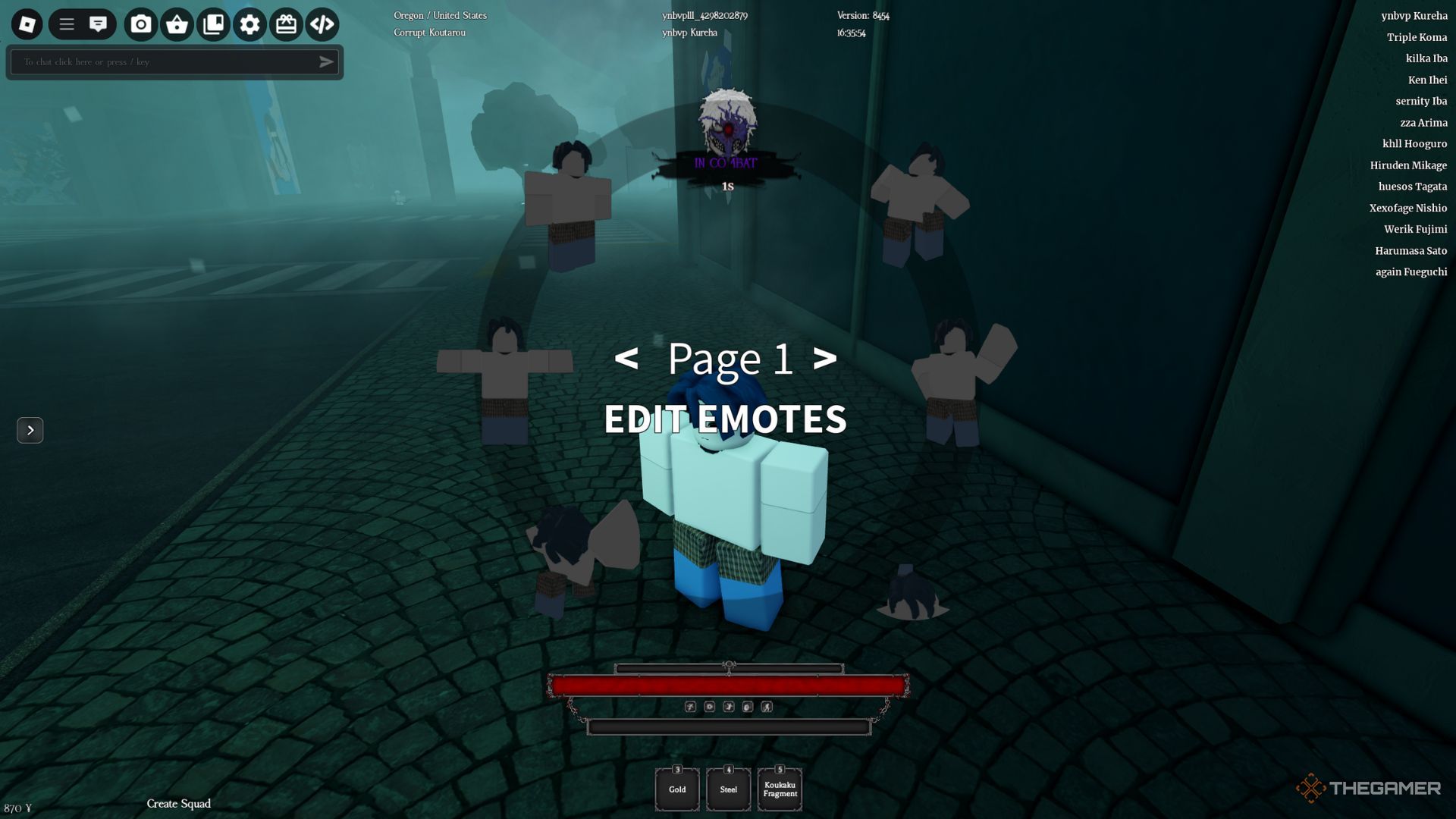
    The player character is using an Emote Wheel on the street in Ghoul Re.

    Hotkeys

    Action

    Notes

    W

    Move Forward

    W + W

    Run

    A

    Move Left

    C

    Move Backward

    D

    Move Right

    Space

    Jump

    M

    Open Menu

    Access quests and player information.

    V

    Carry

    Use on a downed player.

    E

    Interact

    Face an object to interact with it

    E

    Equip/Unequip Weapon

    Q

    Dash

    M2 (While Dashing)

    Cancel Dash

    Ctrl + B / Ctrl + M2

    Devour

    P

    Highlight Location Points

    Available for Ghouls only.

    Left Alt

    Shift-Lock

    L

    Equip Mask

    For Ghouls only.

    >

    Location Icons

    T

    Emote Wheel

    Combat Controls

    The player character is using a dash on the street near a tree in Ghoul Re.

    Hotkeys

    Action

    Left Click

    Attack

    M1 + Ctrl

    Uppercut

    M2

    Feint

    Ctrl + E

    Activate Kagune

    Ctrl/Tab + 1-2

    Switch Kagune Stance

    Space + M2

    Air Critical Attack

    R

    Critical Attack

    Z/X/C

    Activate Kagune/Quinque Skills

  • Flic Buttons Simplify Smart Home Control

    The Flic Smart Button placed on a table.
    Jon Bitner / Digital Trends

    One of the key challenges with today’s smart home technology is its reliance on digital interfaces. From smart lights to robot vacuums, many interactions depend on using a smartphone, which can be inconvenient for other household members or guests. This is where Flic steps in, providing a range of physical buttons and dials that allow everyone to control their favorite smart devices without needing a screen.

    I’ve been putting the Flic Smart Buttons and Flic Twist through their paces, and while they do have limitations, they can add a fun element to most smart homes. This is particularly true for users of Alexa or HomeKit, as both platforms are compatible with these innovative smart buttons.

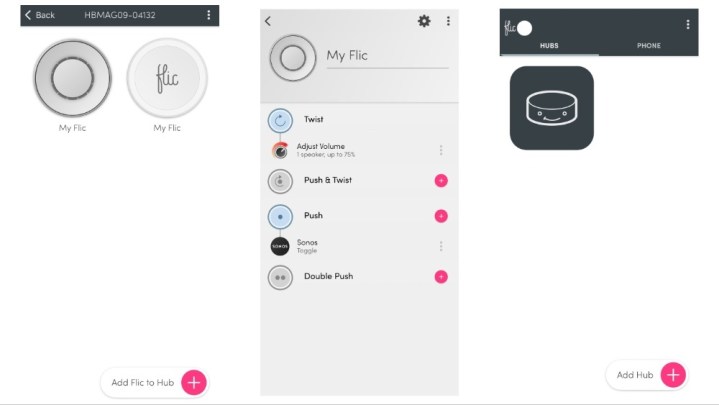
    The Flic app simplifies setup

    Screenshots from the Flic app showing various features.
    Jon Bitner / Digital Trends

    Setting up my Flic system was a surprisingly straightforward process. Even with multiple products, I managed to get everything up and running, including my first automation, in just a few minutes. My setup consisted of a Flic Twist, Smart Buttons, and a Flic Hub.

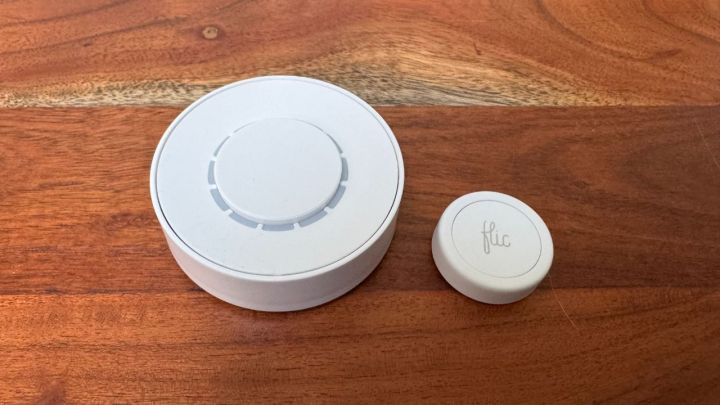
    The Flic Twist functions as a dial that can be pressed or rotated, allowing you to adjust features like volume on your smart speaker or the brightness of your lights. The Smart Buttons serve as standard push buttons, enabling you to program them for three different actions (press, double press, or hold). The Flic Hub acts as the central control unit for everything, and it is necessary for the Flic Twist. The Smart Buttons can sync either to the Hub or directly to your smartphone.

    Once my devices were linked, configuring actions was incredibly easy. The Flic app allows you to create actions without needing to access additional applications. For instance, I set up my Flic Twist to manage my Sonos speaker without ever touching the Sonos app. In a matter of seconds, I could play, pause, and adjust the volume — a remarkable advantage over other controllers that often require cumbersome third-party apps for setup.

    Your experience may vary depending on what devices you’re intending to connect to the Flic system, but I found it a hassle-free process without the typical headaches associated with smart home setups.

    Missing essential features

    The Flic Twist and Smart Buttons displayed on a wooden tabletop.
    Jon Bitner / Digital Trends

    The primary limitation of the Flic system is its overall functionality. While the company has made significant progress over the years by supporting platforms like Alexa and Matter, it is still lacking compatibility with major brands like Google Home. Additionally, certain functionalities are limited to specific Flic devices, and the Flic Twist does not support all products and capabilities. For a comprehensive list of compatible devices and actions, see the Flic Applications list.

    Another significant drawback is that each Twist or Button can only be programmed for a limited number of controls simultaneously. For example, with my Twist, I set it so that twisting adjusts the speaker volume and pressing the button toggles the music. There are still “Double Push” and “Push & Twist” actions available, which enables a total of four programmable actions for the $80 device.

    This stands in contrast to competitors like the Linxura Smart Controller, which supports up to 52 devices through a built-in display and doesn’t require a hub. Linxura’s compatibility with Google Home is particularly useful for my current setup, as it allows for extensive automation of multiple gadgets with a single device.

    Although programming the Flic may be simpler than the Linxura and I personally find the design of the Flic Twist more appealing, it falls short in terms of overall versatility.

    Physical buttons for your smart home

    Your experience with Flic will largely depend on your specific smart home ecosystem. If you utilize compatible products like Sonos, HomeKit, or Alexa, you’ll discover numerous ways to seamlessly integrate the Twist and Smart Buttons into your daily routine. The setup process only takes a few moments, and the companion app is user-friendly.

    Incorporating physical buttons and dials into your smart home can enhance convenience, and their usefulness becomes apparent when used effectively. While the limitation of programming only a handful of actions might be disappointing, if you want to provide your family with an uncomplicated way to access frequently used functions, investing in a Flic product could be beneficial. The company continues to add new features and compatibility options, and with Matter support, Flic is likely to remain relevant for the long haul.

  • Smart Puck Controls Your Entire Smart Home

    Smart Puck Controls Your Entire Smart Home

    Jon Bitner / Linxura

    My home is filled with smart gadgets, and I primarily control them through my smartphone. This reliance on a mobile device works well most of the time, as it’s always within reach—whether I need to turn on my smart lights, adjust my air purifier, or change the thermostat, I can usually handle these tasks with a few taps. However, having a physical button to execute these actions would be much more convenient. Instead of navigating through apps, having a simple remote would make things quicker and easier, similar to how one operates a television.

    This is the idea behind the Linxura Smart Controller. This disc-shaped device allows you to perform numerous actions with just the press of a button. After connecting it to your smart devices, you can essentially ditch the companion apps. A simple tap or double-tap on its outer ring can activate a wide array of products. I’ve been trying it out at home, and while I find it to be an entertaining addition, it does have some shortcomings. However, if you’re looking for a physical remote for your smart home, this gadget is certainly worth considering.

    Straightforward but Time-Consuming Setup

    Three screens of the Linxura mobile app.
    Linxura

    Linking smart devices with the Linxura Smart Controller is simple. Its e-ink display is sharp and clear, while the outer ring rotates and clicks, offering diverse ways to adjust your settings. You can connect it to your other smart devices using a process similar to setting up automations. For instance, after linking it to my Google Home account, I was able to create a program that lets me tap the outer ring to turn the lights on and double-tap to turn them off. The intuitive Linxura mobile app guides you through most of the steps, making it user-friendly for those unfamiliar with automations or routines.

    This controller can map four devices to its four buttons, and the rotating ring allows you to navigate through 13 screens—providing ample space to assign your most frequently used actions.

    While the setup is clear-cut, it can be incredibly time-consuming. Not only do you have to connect Linxura with each app, but you must also program every single action. This process can be quite lengthy and demands a fair bit of patience. Once configured, the e-ink screen displays icons and text that indicate what each button does, making it easy for other household members to understand which button to press.

    Linxura has expanded its functionality since its launch in 2023, now supporting platforms like Google Home, Alexa, Yale, IFTTT, August, Philips Hue, and SmartThings. While there are some limitations in terms of functionality within these apps, all of the essential features are available. The compatibility with Google Home is particularly impressive, though the range of actions for some devices may not be as extensive as those found in their dedicated apps, meaning you might only be able to perform basic tasks like turning devices on or off.

    A Good Fit for Many Smart Homes

    A person holding the Linxura.
    Jon Bitner / Digital Trends

    Despite its few limitations, the Linxura Smart Controller could be a valuable addition to most smart homes. As long as you don’t need complex routines at the touch of a button, you’ll find it helpful. The convenience of having a physical button that allows anyone in the household to easily adjust the lights, stop a robot vacuum, or change the thermostat is undeniably beneficial.

    I have noticed some lag in its performance, with certain actions taking a few seconds to register. For instance, switching on my lights can sometimes take nearly three seconds after pressing the button, and some users have reported even longer delays for other commands. While this isn’t a deal-breaker, it would certainly be preferable if communication between the Linxura and its connected devices were a bit more responsive.

    Overall, I’ve found the Linxura to be a useful addition to my home setup. Its design may feel a bit bulky, but its buttons and spinning dial are enjoyable to use. Priced at $100, it is on the expensive side, but anyone looking for a fresh way to control their smart devices might find it to be an exciting addition to their home.

  • Claude By Anthropic Can Now Control Computers Like Humans

    Claude By Anthropic Can Now Control Computers Like Humans

    the Claude computer control logo
    Anthropic

    On Tuesday, Anthropic unveiled substantial upgrades to its already robust Claude 3.5 Sonnet, improving its performance even further. Alongside this update, the startup introduced a lighter version, Claude 3.5 Haiku. The new Sonnet iteration features a public beta option that allows the AI to exert basic control over the computer it operates on.

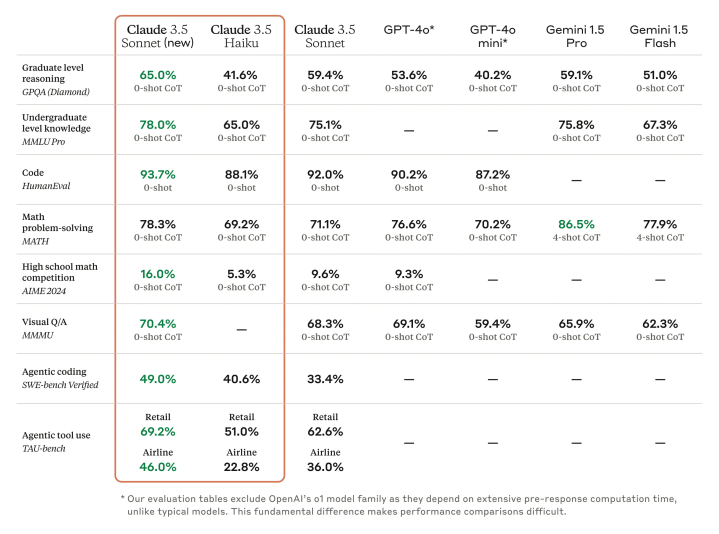
    Claude 3.5 Sonnet has established itself as a top contender for coding tasks, and the latest version reveals noteworthy enhancements across various metrics, consistently outperforming both Gemini 1.5 and GPT-4o on a range of industry tests. Although Gemini 1.5 Pro managed to surpass 3.5 Sonnet in a single evaluation, this was limited to the MATH benchmark.

    The new 3.5 Haiku is quite impressive in its own right, despite its smaller size. Scheduled for release later this month, 3.5 Haiku outperforms Claude 3.0 Opus, which was the largest model from the previous generation. This model is also particularly adept in coding tasks, achieving a score of 40.6% on the SWE-bench Verified — outshining both GPT-4o and the first iteration of 3.5 Sonnet.

    new Claude 3.5 sonnet performance chart
    Anthropic

    The upgraded Claude 3.5 Sonnet can now interact with desktop applications using the “Computer Use” API. This enables the AI to generate essential keystrokes, mouse clicks, and movements, mimicking human interaction. Anthropic emphasizes that this system is still quite experimental and may have errors. The public beta release aims to gather feedback from developers to accelerate improvements in the API’s functionality.

    “Our aim was to train Claude to understand what’s visible on a screen and effectively use the software tools to complete tasks,” stated Anthropic in a blog post. “When a developer directs Claude to utilize a software application and provides appropriate access, Claude assesses the screenshots displayed to the user, determining how much to move the cursor both vertically and horizontally to click the correct area.”

    Essentially, it operates as an AI agent capable of automating various software tasks, ranging from generating and evaluating marketing leads to analyzing medical data trends or simply navigating websites to fill out forms. You can consider this a more sophisticated evolution of existing Robotic Process Automation systems.

    Companies such as Asana, Canva, Cognition, DoorDash, Replit, and The Browser Company are among the initial users of this new capability. For instance, Replit is looking to utilize Computer Control to “develop a crucial feature for evaluating applications as they are created for the Replit Agent product,” according to the announcement.

    There’s no need to worry about the AI seizing control autonomously; Anthropic insists that human oversight remains crucial. “Users maintain control by providing precise prompts that guide Claude’s actions, such as ‘utilize data from my computer and online to complete this form,’” an Anthropic representative explained to TechCrunch. “Individuals dictate and restrict access as necessary. Claude translates user prompts into computer commands (e.g., cursor movement, clicking, typing) to fulfill those specific tasks.”

    However, Anthropic acknowledges that the Computer Control feature could be exploited for actions like generating spam, spreading misinformation, or engaging in fraudulent activities. In response, they have implemented new classifiers designed to detect when the API is used and assess whether that usage could cause harm.