Tag: Console

  • Ultimate Nanally Build, Arcs, Console, Modules, and Team for Solving in NTE

    Ultimate Nanally Build, Arcs, Console, Modules, and Team for Solving in NTE

    With the worldwide launch of Neverness To Everness, players can choose between two different banner types for gacha pulls. One banner remains available permanently, while the other features limited characters that rotate every three weeks. The first limited character introduced is Nanally.

    You encounter Nanally early in the story. She has a very cheerful personality. Besides her role in the story, her skills also have some unique features. For instance, activating her skill allows her to walk freely on walls. To use her effectively in combat, you’ll need to properly build her with specific arcs and console items.

    Nanally Overview and Esper Ability Priority

    Nanally is an S-class Anima character who mainly functions as the team’s main damage dealer. She is great at inflicting follow-up damage and remains on the battlefield for most fights. When paired well with certain teammates, she can quickly reduce enemy health bars.

    Before diving into her gameplay, it’s important to understand her kit, which is quite straightforward:

    Ability Name Type Description
    Colucci Secret Skill Basic Attack Deals significant damage using her charged basic attack.
    Colucci Howling Technique Skill Attacks enemies in an area-of-effect (AoE), then grants her the Ichi-daime’s Authority effect, increasing Crit DMG and enabling wall walking.
    Colucci Ultimate Technique Ultimate Deals massive damage to enemies and summons Underboss, who then performs follow-up attacks while present.
    More Than Passionate Bonus Skill Boosts Vita Pistils in the Blossom reaction from five to ten.
    Fair Duel Bonus Skill Triggers additional follow-up attacks when allies deal Esper cycle damage while Nanally is in the Ichi-daime’s state. Can happen every two seconds.

    When switching to Nanally, it’s usually best to start with her skill and ultimate to apply effects, then follow up with basic attacks to maximize damage. Using her while she’s under the Blossom Esper cycle yields the highest output.

    Skill upgrade order:

    1. Basic Attack
    2. Ultimate
    3. Skill
    4. Support Skill

    Best Arcs for Nanally

    Nanally can equip all Plasma arcs, but her signature arc, Ready-Ready, stands out as the best choice. It grants Crit Rate on secondary stats, along with Attack, Crit Damage, and extra damage against bosses.

    Other arcs include:

    • Fluff To Fortitude: Great for stacking Attack and damage bonuses, especially when facing large groups.
    • Oraora!: Increases basic attack damage as more attacks are performed, up to ten times.
    • Us.: Provides a decent Attack and damage boost, suitable for various situations.

    Best Cartridge and Module Setup for Nanally

    Although the console system might seem complex initially, it’s well-designed compared to many gacha games. For Nanally, the optimal cartridge is Fireflies and the Forest, complemented by the module setup shown above. This combination allows her to trigger set effects efficiently.

    Your primary stat on the cartridge should be Anima Damage Bonus, with sub-stats prioritized as follows:

    1. Crit Rate and Crit Damage
    2. Attack Percent
    3. Damage Percent
    4. Cycle Intensity

    For early progress, another viable option is Shadow Creed, which boosts ATK and Crit Damage temporarily.

    Note: If farming for Nanally’s cartridge using Character Pixels, aim for Fireflies and the Forest as your top choice.

    Best Teams for Nanally

    Due to limited character options, Nanally’s maximum potential isn’t fully realized yet. The strongest current team includes Jiuyuan as a sub-DPS, with Esper Zero and Hathor as Esper cycle triggers. This setup enables triggering Blossom, Remora, and Charge cycles effectively.

    Use Charge with Hathor as much as possible since her ultimate is crucial. Alternatively, pairing Nanally with Sakiri and Esper Zero relies on the Hexed cycle for more follow-up damage, but this team isn’t fully optimized.

    Recommended fill-in: Adler is an excellent choice in the flex slot, providing shields that help sustain your team.

    For free-to-play teams, pairing Esper Zero for the Blossom cycle and Haniel for Attack boosts works well. Additionally, Daffodill can be used for the Nova trigger, especially if aiming to maximize Haniel’s potential. Future updates will likely introduce better options.

    Nanally Awakening Priority

    When unlocking Nanally’s awakening nodes, follow this order for optimal growth:

    Priority Name Effect Description
    1 Because We’re Family Extends Ichi-daime’s Authority duration to 15 seconds (20 seconds outside combat).
    2 Not a Troublemaker Doubles Underboss damage.
    3 Second Member Increases Underboss duration by 3 seconds.
    4 Followers Everywhere Each follow-up attack increases Nanally’s ATK by 2%, up to 20%.
    5 Gang Formation Grants Nanally 2.5 Ultimate Energy per follow-up attack every second.
    6 Call Me the Boss Nanally can perform an extra follow-up attack every second in Ichi-daime’s state.

    Final note: If you plan to invest in her awakening, prioritize these nodes to maximize her combat efficiency and overall damage output.

  • HumanitZ: Console Command Guide to Completing and Solving

    HumanitZ: Console Command Guide

    This guide covers all the essential console commands in HumanitZ to help you manage and customize your gameplay effectively.

    Basic Commands

    • help
      Displays a list of available commands and their functions.

    • save [filename]
      Saves your current game state to the specified file name.

    • load [filename]
      Loads a saved game from the specified file.

    • quit
      Exits the game immediately.

    Player Commands

    • setHealth [value]
      Adjusts your health points to the specified value.

    • addMoney [amount]
      Increases your in-game currency by the specified amount.

    • setSpeed [value]
      Changes your movement speed to the given value.

    • spawn [entity] [quantity]
      Creates a specified number of entities (such as enemies or items).

    World Manipulation

    • alterTime [hours]
      Sets the in-game time to the specified hour.

    • toggleWeather [weatherType]
      Changes the weather condition (e.g., rain, clear, snow).

    • teleport [x] [y] [z]
      Moves your character to the specified coordinates.

    • changeZone [zoneName]
      Transports you to a different zone or area within the game.

    UI and Experience

    • toggleHUD
      Enables or disables the heads-up display.

    • giveXP [amount]
      Adds experience points to your character.

    • unlockAll
      Unlocks all skills, items, or areas.

    Debug and Testing Commands

    • enableDebug
      Activates debugging mode for testing purposes.

    • spawnTestEntity [entityType]
      Creates a test entity to assist with debugging.

    • resetAchievements
      Resets all achievements to their initial state.

    Additional Tips

    • To use these commands, open the console command window usually by pressing the tilde (~) key during gameplay.

    • Some commands may require administrator or specific game permissions.

    • Be cautious using commands that modify game data, as they can sometimes cause unexpected behavior or crashes.

    This guide should help you enhance your HumanitZ experience by giving you control over your gameplay environment. Use these commands responsibly to explore new aspects of the game.

  • Classic Forgotten Console RTS Returns With Steam Remaster

    Classic Forgotten Console RTS Returns With Steam Remaster

    Team Buddies, a PlayStation-exclusive real-time strategy title from 25 years ago, has just been listed on Steam for a complete remaster. This cult favorite appears to have made a triumphant comeback with online multiplayer, enhanced graphics, and all the chaotic enjoyment you recall.

    Unlike many traditional RTS games from its time, Team Buddies offers a unique twist. While you may think of titles like Command & Conquer or Starcraft, this couch co-op game focuses on stacking crates, which is definitely unconventional. However, don’t let the quirky premise fool you; there’s plenty of depth to explore.

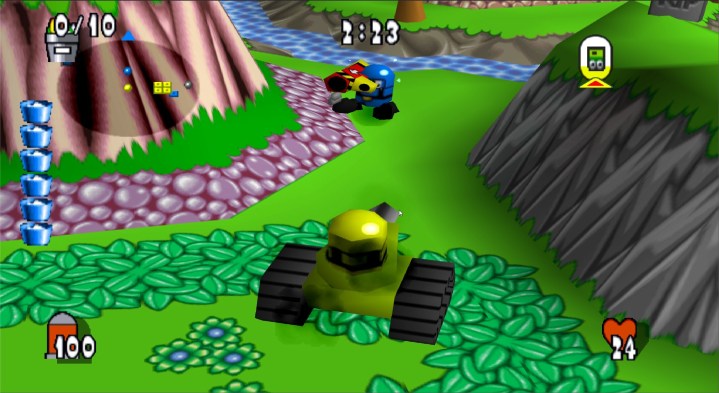
    Each level begins with a group of warriors. Individually, they may not pose much of a threat, but as you stack and combine crates, you can create an assortment of weapons, spawn additional troops, or even construct a tank. The method of crate combination—whether stacking vertically, forming a flat square, or building a cube of eight—produces varied and inventive outcomes each time.

    A tank from Team Buddies moving through a chokepoint.
    Steam

    Players will have the option to select either classic or remastered visuals, depending on personal preference. Just a heads-up: the game’s original graphics may feel quite dated, reminiscent of early 3D Bomberman titles. Therefore, you might prefer the updated graphics for a more modern experience unless you’re specifically looking to relive that nostalgia.

    The new Reborn Mode offers an online-only gameplay experience featuring expansive maps, a wider array of weapons, and “even more frenetic action.” Additionally, this remaster boasts achievements and trophies, as well as enhancements to enemy AI.

    While this revamped version of Team Buddies currently lacks a specific release date beyond “coming soon” or an estimated price, its announcement is certainly unexpected. It’s also refreshing to see a remaster of a lesser-known title rather than yet another remake of a Nintendo classic.

  • How to Change the Language on Your PS5: A Step-by-Step Guide

    How to Change the Language on Your PS5: A Step-by-Step Guide

    There are numerous reasons you might wish to alter the language on your PlayStation 5. Whether you’re in a bilingual home or you’ve bought the console from someone whose preferred language is different, changing the language is a straightforward process that will get you back to gaming in no time.

    Steps to Change the Language on Your PS5

    To change the language setting on your PS5, just follow these steps:

    Step 1: Click on the Settings icon, which can be found at the top right corner of the home screen.

    Step 2: From the menu, select System.

    Step 3: Choose Language from the options presented.

    Step 4: Select Console Language and pick the preferred language you want your PS5 to display.


  • Best Look Yet At The Nintendo Switch 2 Emerges

    Best Look Yet At The Nintendo Switch 2 Emerges

    For quite some time, the Nintendo Switch 2 has sparked considerable buzz among fans eager for the latest updates. Various leaks have surfaced, each met with varying degrees of credibility. Over this past weekend, two significant leaks caught attention: one from Reddit and the other from accessory maker Dbrand.

    Reddit user u/NextHandheld shared a post titled “I’ve come from the future,” claiming to possess details about the finalized version of the Nintendo Switch 2 and its accompanying dock. They promised to provide proof on Christmas Day, but subreddit moderators required verification, warning of account deletion if no evidence was presented. Thankfully, it seems u/NextHandheld met the requirements, as the moderators deemed the proof credible enough to allow the post to remain up.

    The second leak originated from Dbrand’s accessory listings, which appears to have been somewhat intentional. You can view the announcement on X below.

    We will not be answering any questions at this time. pic.twitter.com/kBQcbB2PfV

    — dbrand (@dbrand) December 12, 2024

    Dbrand informed Insider Gaming that the device showcased inside their case is indeed the Nintendo Switch 2. The brand, recognized for its cheeky approach, also provided a link to their product page. The page features a spinning animation of the console, which closely resembles prior leaks regarding the Switch 2’s design.

    In addition, another Reddit thread by u/stardew92 included images that align with the latest leak, showcasing a design that matches the curved aesthetic noted in other purported Switch 2 leaks.

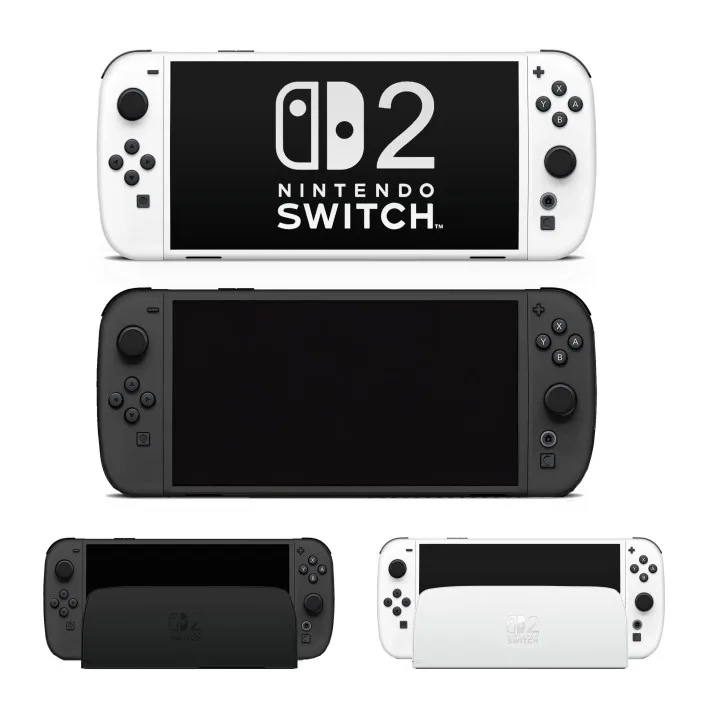
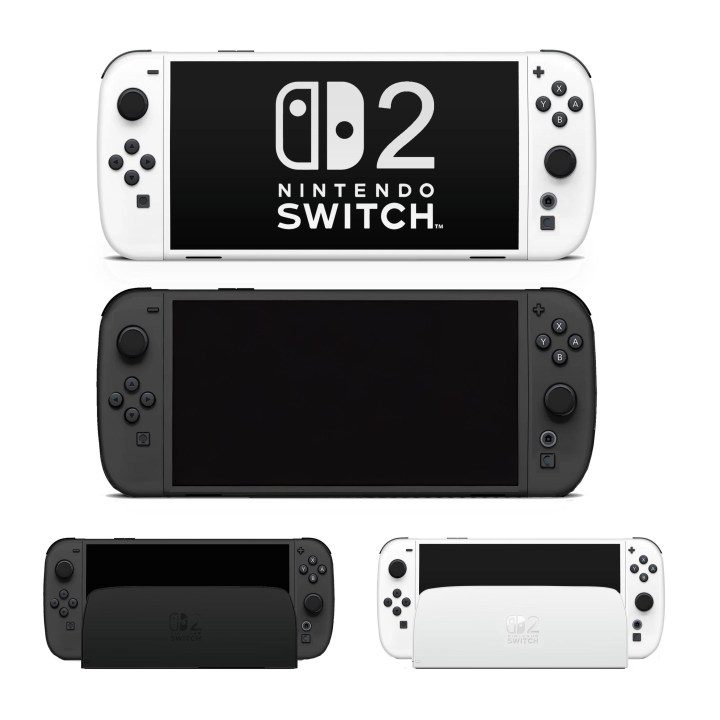
    A look at the Nintendo Switch 2.
    Reddit

    Referring back to the initial Reddit post by u/NextHandheld, they addressed several inquiries. While moderators have confirmed the validity of the evidence, it’s advisable to maintain a skeptical perspective—however, the details shared so far are the most compelling we’ve encountered yet.

    The reported features of the Nintendo Switch 2 include a curved dock and Joy-Cons, while retaining the basic structure of the original dock. It reportedly has two USB-A ports on the side, along with USB-C, HDMI, and Ethernet connections inside. An additional button marked “C” beside the Home button has sparked speculation among users, with guesses ranging from camera controls to a Cast function that could let the Switch 2 function similarly to a Wii U gamepad.

    As for when we might get an official announcement, u/NextHandheld mentioned that they’ve heard a Nintendo meeting is set for January, but this information remains unconfirmed.

    As always with early leaks, approach the information with caution—however, the evidence presented thus far appears substantial, so it’s perfectly fine to feel a spark of excitement.

  • PC vs. Consoles: 6 Reasons Why PC Gaming is Better

    Whether you are in the school years or you are an adult, gaming is something that is made for everyone. But, it can be a little confusing to figure out the best way to enjoy gaming.

    The PC vs Console debate will never end because there are big fans on both sides. While there are clear advantages and disadvantages to playing games with either, you might find PC gaming to be more enjoyable than console.

    To give you an idea of what PC gaming holds, here are some reasons why PC gaming is better.

    Customization Power

    With a PC, you have the power to build your dream gaming machine, just like creating a customized budget for your private student loan debt.

    Unlike consoles, which come pre-made, PCs offer incredible customization options. You can choose the best components that fit your budget and gaming preferences. It’s like having your own personalized gaming setup.

    Amazing Graphics

    Do you want to be blown away by stunning graphics while gaming? PCs have the upper hand here. 

    They have more powerful hardware, which means they can handle high-resolution textures, advanced visual effects, and breathtaking details. It’s like playing in a world of eye-popping beauty Consoles can’t quite match the visual power of PCs. 

    To be on the safe side, you might want to invest in some gaming glasses to avoid straining your eyes.

    Play All Time Favorites

    Have you ever wanted to play an old game you loved but realized it’s not compatible with your current console? That’s not a problem with PCs. 

    Most PC games are backward compatible, which means you can enjoy your favorite classics without any issues. You can easily access all of the classic games and play them with even more computing power. That means you can easily find that game you loved to play as a kid after school and relive some old memories. 

    Games, Games, Games

    Just like you wouldn’t want to miss out on any fun high school events, you wouldn’t want to miss out on amazing games. The PC gaming library is massive and diverse, with countless titles available on platforms like Steam and Epic Games Store. 

    Whether you’re into action, RPG, strategy, or indie games, there’s always something new and exciting to play on the PC.

    Think Long Term

    Think about your long-term goals, just like you would when choosing the best gaming platform. PCs have a significant advantage here too. Unlike consoles that come with fixed hardware, PCs are upgradeable.

    When new and more powerful components hit the market, you can easily upgrade your PC and keep up with the latest gaming trends. It’s like having a gaming setup that grows with you, and you can trust Evatech for top-quality gaming desktop PCs in Australia to meet your gaming needs.

    Get Mods and Community Support

    Have you ever played a game and wished you could change something about it? Well, with PCs, you can. 

    The gaming community is incredibly active, and there are tons of mods and user-created content available for many games. These mods can enhance your gaming experience, introduce new features, and even fix bugs. It’s like having a team of friends to improve your gaming adventures!

  • Is the Switch OLED Better Than the Switch?

    Discover if the new Switch OLED truly outshines its predecessor. Uncover the key differences and decide which one is worth your gaming journey.


    If you buy something using links in this article, Digital Phablet may earn a commission. This helps us in supporting journalism.


    Verdict: Is Nintendo Switch OLED Than The Switch?

    Nintendo Switch OLED

    Clearly, the Switch OLED is much better than the original Switch.

    Switch OLED is undoubtedly a significant improvement over the original Switch. With its enhanced display, improved performance, and enhanced features, it offers a more immersive and enjoyable gaming experience.

    However, whether it is better than the original Switch ultimately depends on your personal preferences and priorities. If you prioritize visual quality and enjoy playing games with stunning graphics, the OLED version might be worth the upgrade.

    However, if you primarily play in handheld mode and are satisfied with your current gaming experience, the upgrade might not be necessary.

    Introducing the Switch OLED: A Game-Changer for Nintendo Fans

    Nintendo has always been at the forefront of innovation in the gaming industry, and its latest offering, the Switch OLED, is no exception. With its sleek design and enhanced features, the Switch OLED promises to revolutionize the gaming experience for Nintendo fans.

    The most noticeable upgrade in the Switch OLED is its display. The new model boasts a vibrant 7-inch OLED screen, a significant improvement over the original Switch’s LCD. OLED technology offers deeper blacks, richer colors, and improved contrast, resulting in a more immersive visual experience.

    Whether you’re exploring the vast landscapes of Hyrule in “The Legend of Zelda: Breath of the Wild” or battling it out in “Super Smash Bros. Ultimate,” the Switch OLED’s enhanced display will undoubtedly make your gaming sessions more enjoyable.

    Improved Performance and Enhanced Features: Why the Switch OLED Takes Gaming to the Next Level

    In addition to its stunning display, the Switch OLED also offers improved performance and enhanced features that take gaming to the next level. The new model comes with 64GB of internal storage, double the capacity of the original Switch, allowing gamers to store more games and downloadable content. This is particularly beneficial for those who prefer digital copies of games or frequently download updates and expansions.

    Furthermore, the Switch OLED boasts an upgraded audio system, providing a more immersive sound experience. Whether you’re listening to the epic soundtrack of “The Legend of Zelda: Breath of the Wild” or the catchy tunes of “Animal Crossing: New Horizons,” the enhanced audio quality will transport you deeper into the gaming world.

    Another notable feature of the Switch OLED is its improved kickstand. The original Switch’s kickstand was flimsy and prone to breaking, often resulting in an unstable gaming experience. However, the new model features a wider and more robust kickstand, providing better stability and allowing gamers to enjoy their favorite titles in a tabletop mode without any worries.

    Making the Switch: Should You Upgrade to the OLED Version? A Comparative Analysis

    Now that we’ve explored the impressive features of the Switch OLED, the question arises: should you upgrade to the OLED version if you already own a Switch? The answer depends on your personal preferences and priorities.

    If you value a more immersive visual experience and enjoy playing games with stunning graphics, the OLED display alone might be worth the upgrade. The enhanced colors, deeper blacks, and improved contrast will undoubtedly enhance your gaming sessions and make the worlds of your favorite games come to life.

    However, if you primarily play your Switch in handheld mode and don’t mind the slightly inferior display of the original model, the upgrade might not be necessary. The improved performance and enhanced features of the Switch OLED, while impressive, might not justify the cost if you’re satisfied with your current gaming experience.

  • PlayStation Portable 2023: Price, Release Date, Games

    Sony PlayStation Portable 2023 is a handheld device that allows gamers to remotely play PS5 games via Wi-Fi.

    With an 8-inch HD screen, adaptive triggers, and haptic feedback, Project Q aims to provide a Sony-made option for playing the latest PlayStation games on the go.

    In the ever-evolving world of gaming, Sony is set to introduce a new handheld device called “Project Q.” Designed specifically for Remote Play of PS5 games, this device aims to provide gamers with the ability to enjoy their favorite PlayStation titles on the go.

    playstation portable with PS5

    Price

    While Sony has yet to reveal the exact price of Project Q, industry experts speculate that it will likely fall within a competitive range.

    Considering the device’s features and capabilities, it is expected to be priced higher than traditional handheld gaming consoles but lower than flagship smartphones.

    Sony aims to strike a balance between affordability and providing a premium gaming experience, making Project Q an enticing option for PlayStation enthusiasts.

    Release Date

    • To be released November 2023.

    Sony has confirmed that Project Q will be launched later this year. However, an exact release date has not been disclosed yet.

    As the anticipation builds, gamers eagerly await further announcements from Sony regarding the availability of this handheld device.

    With its imminent release, Project Q is poised to revolutionize the way gamers enjoy PlayStation games remotely.

    Game List

    Project Q is designed as a companion device rather than a standalone gaming platform. To play games on the device, they must be installed on a PS5 console.

    This means that Project Q users will have access to the extensive library of PS5 games, including highly anticipated titles and exclusive releases. Sony’s commitment to delivering a seamless gaming experience extends to Project Q, ensuring that players can enjoy their favorite PlayStation games wherever they are.

    Future Possibilities: Cloud Gaming

    While Project Q is primarily focused on Remote Play via Wi-Fi, there are speculations that Sony may introduce cloud gaming capabilities to the device in the future. This would allow gamers to stream games directly to Project Q without the need for a PS5 console.

    While no official confirmation has been made, the addition of cloud gaming would further enhance the device’s versatility and expand its potential user base.

    Sony’s Remote Play and Compatibility

    Sony’s Remote Play feature, which allows gamers to stream and play PlayStation games on various devices, currently supports cellular connections, albeit with a stronger emphasis on Wi-Fi connectivity.

    sony psp 2023

    Project Q is expected to leverage this existing infrastructure, providing a seamless and reliable gaming experience for users. Additionally, Remote Play is already available on a wide range of devices, including iPhone, Android, Windows, Mac, and even the recently announced Steam Deck via the Chiaki app.

    Ending Note

    Sony’s PlayStation Q represents an exciting development in the world of handheld gaming. With its focus on Remote Play of PS5 games, this device offers gamers the opportunity to enjoy their favorite PlayStation titles on the go.

    Boasting an 8-inch HD screen, impressive graphics capabilities, and features borrowed from the DualSense controller, Project Q aims to provide a Sony-made option for playing the latest PlayStation games.

    As the release date approaches, gamers eagerly await further details on pricing, game compatibility, and potential future enhancements. With Project Q, Sony is set to redefine the handheld gaming experience and cater to the ever-growing demand for portable gaming solutions.

    Will there be a new PSP in 2023?

    Yes, it is launching in mid-November 2023, Sony just announced.

    Is there a new portable PlayStation coming out?

    According to industry insider Tom Henderson, the release date for a new portable PlayStation codenamed Project Q, is expected to be in mid-late November 2023.

    How much will PlayStation Q cost?

    The official price of the PlayStation Q has not been announced yet. There are assumptions, but no confirmation from Sony.
  • Top 10 Best Gaming Glasses to Buy in [year]

    Gaming Glasses are getting very common in [year] as it helps you sleep better, reduce eye strain, and protects your eyes from the blue light.

    (more…)
  • Gamesir VX2 AimBox Review – Use Mouse and Keyboard with PS5 and Xbox!

    The Gamesir VX2 AimBox is an easy-to-set-up kit that works brilliantly for those who love gaming with a keyboard and mouse.

    (more…)
  • Steam Deck Will Run Windows 11 at Launch!

    According to a Steam Deck designer, Valve is working with AMD to ensure that the Steam Deck will also support Windows 11 and dual-booting between SteamOS and Windows 10.

    (more…)
  • All You Need to Know About Steam Deck

    Announced on July 15, 2021, Steam Deck is a powerful handheld gaming computer like a Switch console. However, it is not just a gaming console; it is a portable PC.

    (more…)
  • KFC Gaming Console Launched With A Chicken Heater!

    KFC is something that everyone knew when it comes to fried children. On the other hand, Cooler Master is familiar with designing gaming peripherals and cooling fans for gaming PCs.

    (more…)
  • Is Microsoft Buying Sega? After Acquiring Bethesda

    Is Microsoft buying Sega? Rumors are known to be developed easily these days after the acquisition of Bethesda’s parent company by Microsoft at the start of this week. A few people on the internet thought that Sega, the former console producer, is the next.

    (more…)
  • Xbox Series S Price and Release Date Revealed by Microsoft

    Xbox Series S Price is finally revealed by Microsoft through the latest leak. Finally, Microsoft’s affordable next-generation Xbox is here!

    (more…)
  • 10 Reasons Why You Should Buy Xbox Series X Console in 2022

    Microsoft has launched the latest Xbox Series X console during the Game Awards 2019 showing its one of a kind Xbox after Xbox One X.

    (more…)
  • PlayStation 4 becomes the second best selling console in history

    Sony can boast of having placed three PlayStation in the top 3 of the best selling home consoles in history! The PlayStation 4 has even exceeded the original PlayStation, but it is still quite far from the Playstation 2.

    (more…)