الوسم: Computing

  • How To Implement Energy-Efficient Computing

    How To Implement Energy-Efficient Computing

    In today’s digital landscape, energy-efficient computing is essential for reducing both operational costs and environmental impact. By focusing on reducing energy consumption in computing systems, organizations can contribute to sustainability while enhancing performance. Below, we explore practical approaches to implementing energy-efficient computing.

    Understanding Energy-Efficient Computing

    Energy-efficient computing encompasses strategies and technologies designed to minimize power consumption without compromising performance. This approach can be applied at various levels, from data centers and cloud computing to individual devices.

    Key Benefits of Energy-Efficient Computing

      • Cost Reduction: Lower energy bills contribute to significant savings.
      • Environmental Impact: Reduced energy consumption leads to a smaller carbon footprint.
      • Improved Performance: Efficient systems often operate at higher speeds while consuming less power.
      • Regulatory Compliance: Adhering to energy efficiency standards can help meet legal requirements.

    Strategies for Energy-Efficient Computing

    Implementing energy-efficient computing involves several strategies across different areas of technology and operations.

    1. Optimize Hardware Usage

    Choosing Energy-Efficient Components:

      • Processors: Select multi-core processors with low-power capabilities.
      • Storage Solutions: Utilize solid-state drives (SSDs) that offer better performance per watt than traditional hard disk drives (HDDs).
      • Power Supplies: Invest in high-efficiency power supply units (PSUs) that reduce waste.

    Virtualization:

      • Consolidate servers through virtualization to decrease the number of physical machines needed.
      • Implement server load balancing to optimize resource utilization.

    2. Improve Software Efficiency

    Code Optimization:

      • Write efficient algorithms to reduce computational demands.
      • Eliminate unnecessary background processes that consume resources.

    Energy-Aware Applications:

      • Develop applications that monitor and adjust their energy usage based on workload.
      • Integrate battery-aware features in mobile applications to prolong device life.

    3. Enhance Data Center Efficiency

    Cooling Systems:

      • Implement hot and cold aisle containment systems to optimize air flow and reduce cooling costs.
      • Use energy-efficient cooling technologies like evaporative cooling or liquid cooling systems.

    Renewable Energy Sources:

      • Consider investing in solar panels or wind turbines to power data centers sustainably.
      • Partner with green energy companies to source renewable energy.

    4. Adopt Smart Energy Management Practices

    Monitoring and Analysis:

      • Use energy management software to track and analyze energy consumption in real-time.
      • Set benchmarks and performance goals for energy usage.

    Automation and Scheduling:

      • Implement automated power management systems that can power down idle devices.
      • Schedule high-demand tasks during off-peak energy hours to take advantage of lower rates.

    Employee Engagement and Culture

    Creating a culture of energy efficiency within an organization is crucial for long-term success.

    Training and Awareness Programs

      • Educate employees about the significance of energy efficiency.
      • Encourage practices such as turning off devices after work hours and using energy-saving settings on computers.

    Incentive Programs

      • Offer rewards for departments that achieve notable energy reductions.
      • Foster competition among teams to promote energy-conscious behavior.

    Monitoring and Continuous Improvement

    The journey toward energy-efficient computing is ongoing. Regular evaluation and adaptation are necessary to maintain efficiency.

    Performance Metrics

      • Track energy consumption metrics regularly.
      • Monitor the overall performance impact of energy-saving measures to ensure they meet operational requirements.

    Feedback Loops

      • Gather feedback from employees regarding energy-related practices and tools.
      • Adjust strategies based on data analysis and employee input.

    By implementing these strategies and fostering an energy-efficient mindset in both technology and culture, organizations can significantly reduce their energy consumption while reaping the rewards of improved performance and sustainability.

  • Is It a Good Idea to Get a Touch Screen Laptop?

    Is It a Good Idea to Get a Touch Screen Laptop?

    As technology continues to advance, the debate between traditional laptops and touch screen devices heats up. A touch screen laptop combines the features of a standard laptop with the interactive capabilities of a tablet, providing users with a diverse range of options. But is it the right choice for you? Let’s explore the advantages and drawbacks to help you make an informed decision.

    Advantages of Touch Screen Laptops

    Enhanced Interactivity

    • Direct Control: A touch screen allows you to directly interact with your content. This can lead to a more engaging experience when navigating software or browsing the web.
    • Intuitive Navigation: Swiping and tapping can feel more natural than using a trackpad or mouse, making it easier for many users to adapt, especially those familiar with smartphones and tablets.

    Flexibility in Usage

    • Multiple Modes: Many touch screen laptops come with 2-in-1 functionality, allowing you to switch between laptop and tablet modes. This versatility can cater to various activities, such as reading, gaming, or drawing.
    • Note-taking Capabilities: For students or professionals, the ability to use a stylus on a touch screen can enhance note-taking and sketching, improving overall productivity.

    Visual Appeal

    • Vivid Displays: Touch screen laptops often feature high-resolution displays that offer vibrant colors and sharp images, making media consumption a joy.
    • Sleek Design: Many touch screen models have contemporary designs that can be more visually appealing and modern compared to traditional laptops.

    Disadvantages of Touch Screen Laptops

    Price Considerations

    • Higher Costs: Generally, touch screen laptops come at a premium compared to their non-touch counterparts. This price increase may not be justified for users who don’t require the additional features.
    • Maintenance and Repairs: Touch screens can be more prone to damage, leading to potentially higher repair costs.

    Battery Life Concerns

    • Higher Power Consumption: The additional hardware required for touch screens may lead to increased battery consumption. If portability is a priority, this could be a significant factor to consider.
    • Shorter Lifespan for Components: Touch screens may have a different lifecycle than traditional screens, which might affect the longevity of the device.

    Key Factors to Consider When Choosing a Touch Screen Laptop

    Use Cases

    • Gaming: Touch screen laptops may not be ideal for high-end gaming where precision and speed are essential.
    • Graphic Design: If your work involves graphic design or digital art, a touch screen feature can significantly enhance your creative process.

    Type of Operating System

    • Windows vs. Chrome OS: Windows offers more features that benefit touch screen users, while Chrome OS tends to prioritize simplicity, which may affect how touch interactions are implemented.

    User Preferences

    • Comfort Level: Evaluate how comfortable you are using touch screens. If you’re accustomed to traditional navigation methods, transitioning might take some time.
    • Multitasking Needs: If you frequently switch between applications, a touch screen can streamline your workflow.

    Recommendations for Specific Users

    • Students: If you take notes by hand, consider a touch screen laptop with a stylus. It can be a practical tool for class sessions.
    • Business Professionals: For presentations and meetings, touch screen laptops can facilitate more engaging interactions.
    • Casual Users: If you primarily use your laptop for browsing and streaming, the touch screen may offer added convenience without the drawbacks.

    Navigating the decision to buy a touch screen laptop can be challenging, given the varied needs of users. Weighing the pros and cons against your personal and professional requirements is key to finding a suitable device tailored to your preferences.

  • Is it worth getting an i7 in a laptop?

    Is it worth getting an i7 in a laptop?

    When shopping for a new laptop, one of the key considerations is the processor. Intel’s Core i7 is often seen as a premium choice. But is it worth the investment? This article will explore the merits of an i7 processor in a laptop, weighing the advantages and disadvantages to help you make an informed decision.

    Understanding the i7 Processor

    What Is an i7 Processor?

    The Intel Core i7 series is designed for high-performance computing. It generally offers:

    • Higher Clock Speeds: This results in faster processing capabilities.
    • More Cores and Threads: i7 CPUs typically include four to eight cores, which allows better multitasking.
    • Advanced Features: Technologies like Turbo Boost and Hyper-Threading enhance performance in demanding applications.

    Variants of the i7

    The i7 lineup includes different generations and models, such as:

    • i7-1165G7: A quad-core processor commonly found in ultrabooks.
    • i7-11700H: An octa-core variant aimed at gaming laptops and workstations.
    • i7-12800H: One of the latest additions, offering improved efficiency and performance.

    Advantages of Choosing an i7 Laptop

    Superior Performance

    An i7 processor offers significant performance benefits, especially in these areas:

    • Gaming: Smooth gameplay with higher frame rates on graphically demanding games.
    • Content Creation: Faster rendering times for video and graphics editing, making it ideal for professionals.
    • Multitasking: Ability to run multiple applications simultaneously without lag.

    Future-Proofing

    Investing in an i7 laptop can extend usability, accommodating future software requirements:

    • Longer Lifespan: Handles new programs and updates that may demand better specs.
    • Enhanced Resale Value: Premium processors often retain value better in the second-hand market.

    Thermal Efficiency

    Newer i7 processors often come with improved thermal management features, which can lead to:

    • Lower Heat Generation: Less thermal throttling during intensive tasks.
    • Quiet Operation: Fans may run at lower speeds due to improved efficiency, making for quieter user experience.

    Disadvantages of Choosing an i7 Laptop

    Cost Considerations

    One of the most significant drawbacks of an i7 laptop is the price. Specifications may include:

    • Higher Initial Investment: Typically more expensive than i5 or i3 counterparts.
    • Potentially Questionable Cost-Effectiveness: For lighter users, the benefits may not justify the extra expense.

    Battery Life

    While performance is a prime consideration, i7 processors can impact battery longevity:

    • Increased Power Consumption: Can lead to decreased battery life in portable devices.
    • More Frequent Charging Needed: May be impractical for those who work on the go.

    Overkill for Some Users

    For many individuals, an i7 may simply be excessive:

    • Basic Tasks: Web browsing, document editing, and streaming can be efficiently handled by lower-tier processors.
    • Budget Constraints: If your primary usage is non-demanding, an i5 or even an i3 could meet your needs at a lower price point.

    Who Should Consider an i7 Laptop?

    Professionals and Creatives

    Individuals engaged in demanding work should consider an i7 processor because:

    • Content Creation: Ideal for video editing, 3D rendering, and complex graphic design.
    • Data Analysis: Handles large datasets and analytics software without lag.

    Gamers

    For gaming enthusiasts, investing in an i7 may be worthwhile due to:

    • Enhanced Graphics: Supports better graphics cards for an immersive gaming experience.
    • Future-proof Gaming: More capable of running future games that may demand higher specifications.

    Power Users

    If you routinely multitask and run resource-intensive applications:

    • Virtual Machines: Ideal for those who run multiple operating systems or environments simultaneously.
    • Software Development: Facilitates compilation of large codebases and running complex simulations.

    Conclusion

    Choosing an i7 processor in a laptop is a significant investment that comes with numerous advantages, particularly for professionals, gamers, and power users. However, it’s essential to evaluate your specific needs and usage scenarios to determine whether the added performance justifies the cost. With a clear understanding of its pros and cons, you can choose a laptop that best suits your requirements.

  • Is a desktop PC cheaper than a laptop?

    Is a desktop PC cheaper than a laptop?

    When considering a new computer, one of the primary questions is often whether to choose a desktop PC or a laptop. While both options have their advantages and disadvantages, one significant factor that often influences the decision is cost. In this article, we will explore whether a desktop PC is indeed cheaper than a laptop, taking into account various factors.

    Cost Breakdown: Desktop vs. Laptop

    Initial Purchase Price

    • Desktops:

      • Typically, desktop PCs offer a lower initial purchase price compared to laptops with similar specifications.
      • The components of desktops, such as monitors, keyboards, and mice, are generally more affordable to produce than the compact components found in laptops.

    • Laptops:

      • Laptops often carry a premium price tag due to their portability and the engineering required to fit components into a smaller frame.
      • Entry-level laptops can be found at a lower price point, but they usually come with limitations in performance and features.

    Performance vs. Cost

    • Hardware Specifications:

      • Desktops can be easily customized and upgraded, allowing users to build a machine tailored to their needs without breaking the bank.
      • Options for budget-friendly components are more extensive in the desktop market.

    • Gaming and Performance PCs:

      • For gamers or users requiring high performance, desktops can be built with more powerful graphics cards and processors for less money than a comparable laptop.

    Long-Term Considerations

    Maintenance and Upgradability

    • Desktops:

      • Easier to upgrade; users can often replace or add components like RAM, storage, or graphics cards without replacing the entire system.
      • Repairs can often be more straightforward and less costly, thanks to the modular nature of desktops.

    • Laptops:

      • Upgrading a laptop is more challenging, with many models having soldered components and limited space.
      • Repairs can be more expensive, given the specialized parts and labor required.

    Lifespan and Devaluation

    • Declining Value:

      • Laptops tend to depreciate faster than desktops due to the rapid pace of technological advancement.
      • Desktops might have a longer usable life due to their upgrade potential, which can lessen the overall cost over time.

    Cost of Accessories and Add-Ons

    Necessary Equipment

    • Desktops:

      • Generally require additional purchases like monitors, keyboards, and mice, which can add to the initial setup cost.
      • However, these components can last longer, diminishing the need for frequent replacements.

    • Laptops:

      • Integrated features mean fewer additional accessories are needed initially.
      • Portability may come with a trade-off, as accessories (like protective cases) may incur extra costs.

    Power and Efficiency

    • Energy Consumption:

      • Desktops typically consume more power because they usually house more powerful components.
      • Laptops, designed for energy efficiency, tend to have longer battery lives which can lower electricity costs in the long run.

    Summary of Costs

    • Initial Costs:

      • Desktops are usually less expensive initially for equivalent performance.

    • Upgrade and Maintenance Costs:

      • Desktops are more economical in the long run due to upgradability.

    • Longevity:

      • Desktops have a longer lifespan, minimizing replacement frequency.

    • Accessories:

      • Desktops incur higher initial accessory costs but may last longer.

    In assessing whether a desktop PC is cheaper than a laptop, consider your specific needs, preferences, and potential future requirements. Depending on how you plan to use your computer, a desktop may provide better value, especially if performance and upgradeability are priorities.

  • What are desktop computers good for?

    Desktop computers have long been a staple in both professional and personal settings. Despite the increasing popularity of laptops and tablets, desktops remain relevant due to their unique advantages. Let’s delve into what makes desktop computers a great choice in various scenarios.

    Key Advantages of Desktop Computers

    Performance and Power

    One of the most significant advantages of desktop computers is their superior performance capabilities.

    • Robust Components: Desktops typically house larger, more powerful hardware compared to laptops.
    • Cooling Efficiency: With better ventilation and larger cooling systems, desktops can run intensive applications without overheating.
    • Upgradability: Users can easily replace or upgrade components like RAM, graphics cards, and storage options.

    Cost-Effectiveness

    Desktop computers often provide better performance for the price compared to their portable counterparts.

    • More Bang for Your Buck: You often get more powerful hardware for a similar price than you would in a laptop.
    • Longevity: Due to their construction and upgradability, desktops can last longer and offer extended usability over time.

    Ideal Uses for Desktop Computers

    Gaming

    Gaming is one of the prime areas where desktops shine.

    • High-Quality Graphics: Capable of hosting powerful graphics cards, desktops deliver stunning visuals for a more immersive experience.
    • Custom Builds: Gaming enthusiasts can tailor every aspect of their system to meet specific needs.

    Content Creation

    Whether it’s video editing, graphic design, or music production, desktops excel at handling resource-intensive tasks.

    • Multi-Monitor Setups: Desktops can easily accommodate multiple monitors, enhancing productivity and workflow.
    • Powerful Software: Desktops can run demanding software applications that require significant processing power and memory.

    Business and Office Work

    The traditional office environment often still relies heavily on desktops for various reasons.

    • Ergonomics: Desktops can be set up at eye level, making for a more comfortable working position while reducing the risk of strain.
    • Peripheral Support: Easy connectivity for various peripherals like printers, scanners, and external drives.

    Education

    For students, desktops provide a stable environment for studying and completing assignments.

    • Research and Writing Tools: The larger screens and keyboards facilitate reading and writing tasks.
    • Affordable Learning Stations: Many educational institutions maintain desktop computer labs for students, offering more cost-effective computing options.

    Recreational Use

    Desktops are not just for work; they can also enhance leisure activities.

    Multimedia Consumption

    From streaming movies to listening to music, desktops offer an exceptional media experience.

    • Larger Screens and Better Sound: Ideal for watching videos or listening to music with higher quality than most portable devices.
    • Home Theater Setups: With the right components, desktops can serve as powerful multimedia centers.

    Casual Gaming

    Casual gamers also find desktops to be a more enjoyable option.

    • Game Selection: Many classic and indie games run better on desktops.
    • Comfort of Play: Larger screens and ergonomic setups contribute to longer and more comfortable gaming sessions.

    Collaboration and Networking

    In team environments, desktops facilitate better collaboration.

    • Shared Workspaces: Multi-user setups encourage teamwork and brainstorming without distractions.
    • Network Reliability: Typically more reliable on wired connections, which can be crucial for business operations.

    Desktop computers remain a versatile option suited for various needs, from high-performance gaming to educational purposes. Their combination of power, affordability, and adaptability means they will continue to hold an essential place in the tech landscape for years to come.

  • Is it better to have a desktop or laptop?

    Is it better to have a desktop or laptop?

    When deciding between a desktop or a laptop, it’s essential to evaluate personal needs, preferences, and specific use cases. Both types of computers have unique advantages and disadvantages that cater to different scenarios. Let’s break down the key differences to help you make an informed choice.

    Advantages of Desktops

    Desktops have long been a popular choice for both home and office settings. Here are some compelling reasons to consider a desktop:

    Performance

    • Higher power: Desktops typically come with more powerful hardware components, allowing for better performance, especially in gaming, video editing, or graphic design.
    • Upgradeability: Many desktops can be easily upgraded with additional RAM, storage, or better graphics cards, extending their lifespan and performance.

    Cost Efficiency

    • More value for money: Desktops generally offer more power for less money compared to laptops. You can often find more capable components within a similar price bracket.
    • Cost of repairs: Repairs can be simpler and less expensive due to easier access to parts.

    Ergonomics

    • Comfortable setup: A desktop can be set up with larger monitors, a comfortable keyboard, and other ergonomic accessories, creating a more enjoyable user experience.
    • Multiple displays: Many desktops support multiple monitors, enhancing productivity for tasks such as coding or multitasking.

    Advantages of Laptops

    Laptops offer a unique set of benefits, particularly for those who value mobility. Here are the main advantages:

    Portability

    • Take it anywhere: Laptops are designed for on-the-go use. You can easily carry them to work, school, or a café.
    • Built-in battery: Without a need for constant power supply, you can work anywhere without worrying about finding an outlet.

    Convenience

    • Integrated components: Laptops come with built-in webcams, microphones, and speakers, making them ideal for video calls and remote meetings without requiring additional accessories.
    • Compact design: They take up less space and can easily fit into bags, making room management much easier.

    Energy Efficiency

    • Lower power consumption: Laptops are generally more energy-efficient than desktops, resulting in lower electricity bills, especially for long hours of use.

    Considerations Before Choosing

    Before making a decision, consider the following factors:

    Usage Scenarios

    • Gaming: If gaming is a priority, a desktop might be the better option due to higher specs and upgrade potential.
    • Travel: If you frequently travel or move locations, a laptop’s portability becomes invaluable.

    Budget

    • Initial cost vs long-term investment: Think about what you can afford now and what you may need down the line. A budget-friendly desktop might serve your needs, while a laptop with lower specs could become obsolete faster.

    Personal Preferences

    • Work environment: Do you prefer a designated workspace or need flexibility in where you work?
    • Screen size: Laptops may limit your screen size and resolution options compared to multiple monitor setups with desktops.

    Future Needs

    • Technological advancements: Consider how quickly technology evolves and whether you want the ability to upgrade easily in the future.

    Final Thoughts

    Both desktops and laptops have their distinct benefits, and the ideal choice largely depends on individual preferences and needs. Evaluating your specific use cases, budget, and workflow can help you determine which type of computer will ultimately serve you best.

  • Tesla And Elon Musk Sued Over AI Image Use At Cybercab Event

    Tesla And Elon Musk Sued Over AI Image Use At Cybercab Event

    Tesla’s recent presentation titled "We, Robot" has hit a legal snag, with Alcon Entertainment, the production company behind Blade Runner 2049, filing a lawsuit against the electric car manufacturer and its CEO, Elon Musk, for alleged copyright violations.

    During the high-profile event on October 10, Tesla debuted its new Cybercab and Robovan and introduced the latest version of its Optimus humanoid robot. The presentations were held at Warner Bros. Discovery Studios in Hollywood, where images presented during the event are claimed by Alcon to have been created using generative AI and incorporated still images from the vintage sci-fi film.

    In its lawsuit, Alcon contends that just hours before the presentation began, Tesla and Warner Bros. Discovery requested permission to use "an iconic still image" from Blade Runner 2049. However, Alcon swiftly denied this request. In explaining its decision within the lawsuit, Alcon argued that any brand considering working with Tesla must weigh Musk’s often unpredictable behavior, which the company described as "massively amplified, highly politicized, capricious and arbitrary." The company voiced concerns about associating Blade Runner 2049 with Musk or Tesla, fearing potential reputational damage.

    Following the rejection, Alcon alleges that Tesla fed content from Blade Runner 2049 into an AI image generator, resulting in a still image that was displayed on screen for ten seconds during the "We, Robot" live stream. Musk even referenced the movie during the event, expressing his aspiration for a "fun, exciting" future, in stark contrast to the dystopian themes found in many sci-fi narratives.

    Alcon’s lawsuit also pointed out the ironic nature of Musk’s reference to Blade Runner 2049, as the film includes a “strikingly designed, artificially intelligent, fully autonomous car.” At this point, Tesla and Musk have not publicly addressed the allegations made by Alcon, and it remains unclear what damages the production company is seeking.

  • Google Flights Simplifies Finding Best-Priced Airfare

    Google Flights Simplifies Finding Best-Priced Airfare

    Until now, Google Flights has favored a blend of pricing and ease of booking, often leading you to overlook cheaper airfare options. This approach might result in spending more than necessary on your travels.

    In the coming weeks, Google will roll out an update to its flight search tool that aims to highlight the most affordable airfare options available for your trip. However, choosing these economical flights might come with a trade-off in terms of convenience.

    As noted by Google in a recent blog post about the update, “For instance, there may be a booking site offering a lower rate than the airline itself. You might also find savings by returning to a different airport within the same city, such as departing from New York’s LaGuardia and returning to JFK.”

    The update introduces a new “Cheapest” tab on the Google Flights search page. Meanwhile, the most convenient options, according to the tool, will be displayed in the adjacent “Best” tab.

    It’s important to note that some of the options listed under the “Cheapest” tab may require longer layovers, self-transfers, or purchasing different legs of your journey through various airlines or booking platforms. However, as Google emphasizes, “For those instances when saving money is a priority over convenience, the new tab provides a simple way to discover the lowest fares available,” allowing you to make an informed choice that suits your needs.

    Since its launch in 2011, Google has been steadily enhancing its Flights tool. In a recent addition, the platform suggests optimal times for booking flights at lower prices. Additionally, Google Flights includes a price tracking feature that alerts you automatically when a fare for your desired route decreases significantly.

  • Tesla Unveils Its Cybercab Robotaxi

    Tesla Unveils Its Cybercab Robotaxi

    The head of Tesla, Elon Musk, has recently revealed a prototype of the highly anticipated robotaxi.

    The unveiling took place at a special event on Thursday evening at Warner Bros Studios in Burbank, California. Dubbed the “Cybercab,” this futuristic vehicle features no steering wheel or pedals. Instead of traditional charging methods, it utilizes inductive charging, allowing for a plug-free experience. Check out the driverless Cybercab in action below:

    Robotaxi is premium point-to-point electric transport, accessible to everyone pic.twitter.com/oLykwaaTHm

    — Tesla (@Tesla) October 11, 2024

    Musk indicated that Tesla aims to begin production of the Cybercab in 2026, although he acknowledged that he tends to be “a bit optimistic” regarding timelines.

    During the event, the company also introduced a larger autonomous vehicle capable of transporting both passengers and goods:

    Tesla's autonomous bus.
    Tesla

    The event is ongoing if you’d like to tune in:

    https://www.youtube.com/watch?v=Ym7CFDyHpKA

    Earlier this year, Tesla’s app integrated a new ridesharing feature designed for the robotaxi service. Musk previously mentioned that Tesla owners could recover their vehicle costs by offering it for autonomous rideshare when not in use.

    While Tesla already manufactures vehicles equipped with advanced autonomous features, a driver must always be present and in control. However, their experience in self-driving technology is a strong advantage as they prepare to launch a comprehensive robotaxi service. Nevertheless, regulatory authorities will first need to ensure the vehicle operates safely.

    The competition will be tough, with companies like Waymo, owned by Alphabet, and Cruise, backed by GM, which have been developing autonomous vehicle technology for years. Waymo has been successfully using its autonomous cars for paid rides in various cities for some time, albeit under strict regulations. On the other hand, Cruise faced setbacks due to multiple incidents during testing, leading to a temporary halt in its operations last year, although it is cautiously re-entering the market now.

  • Apple’s New Submerged Movie For Vision Pro Isn’t For Baths

    Apple’s New Submerged Movie For Vision Pro Isn’t For Baths

    Apple has unveiled its first scripted film shot using Apple Immersive Video, crafted specifically for the Vision Pro headset.

    Titled Submerged, this innovative film is directed by Academy Award-winner Edward Berger and aims to immerse viewers directly into the heart of the action.

    The film takes viewers on an intense journey aboard a WWII-era submarine, highlighting the crew’s struggle during a harrowing attack. With a 180-degree field of view, audiences can explore their environment and track the action from various angles. The film’s fluid action and watery chaos suggest it may not be suitable for a viewing session in the bathtub.

    According to Apple executive Tor Myhren, “With Submerged … we’re thrilled to launch the next wave of narrative filmmaking. The Vision Pro immerses you within the story—right alongside the submarine’s crew. This level of engagement was previously unattainable, and we are eager to see how it could inspire filmmakers to innovate in visual storytelling.”

    Berger, known for directing the Oscar-winning film All Quiet on the Western Front, has described Apple Immersive Video as “a fantastic new medium that broadens the possibilities of storytelling,” asserting that the technology developed by Apple is poised to transform the future of film production.

    The filming of Submerged occurred over three weeks in cities including Prague, Brussels, and Malta. A behind-the-scenes glimpse is available, showcasing the production process. The film was created using a sizable 23-ton submarine set constructed from authentic steel and brass, designed to resemble WWII submarines, with actors also undergoing freediving training in preparation.

    Apple is gearing up to release additional exclusive content tailored for the Vision Pro, including an immersive short film capturing the 2024 NBA All-Star Weekend and a series called Concert for One, designed to bring fans closer to their favorite artists than ever.

  • How to Cancel Spotify Premium on Any Device: A Step-by-Step Guide

    How to Cancel Spotify Premium on Any Device: A Step-by-Step Guide

    Bryan M. Wolfe / Digital Trends

    If you’re thinking about canceling your Spotify Premium subscription, whether to switch to another streaming service or cut down on expenses, the process is quite simple. However, there are a few important things to keep in mind to ensure it goes smoothly.

    This guide will provide you with detailed instructions on how to cancel your Spotify Premium account via desktop, mobile devices, or tablets, including canceling subscriptions made through the App Store. Additionally, we will explain what happens to your account and your subscription after cancellation, as well as how to reactivate Premium if you decide to return later.

    With so many music streaming options available today, consider reading this guide thoroughly before canceling your Spotify Premium membership — it might help you save money or avoid inconvenience in the future.

    Difficulty

    Easy


    Duration

    5 minutes

    What You Need

    • Spotify Premium account

    • Desktop computer

    • iPhone or iPad

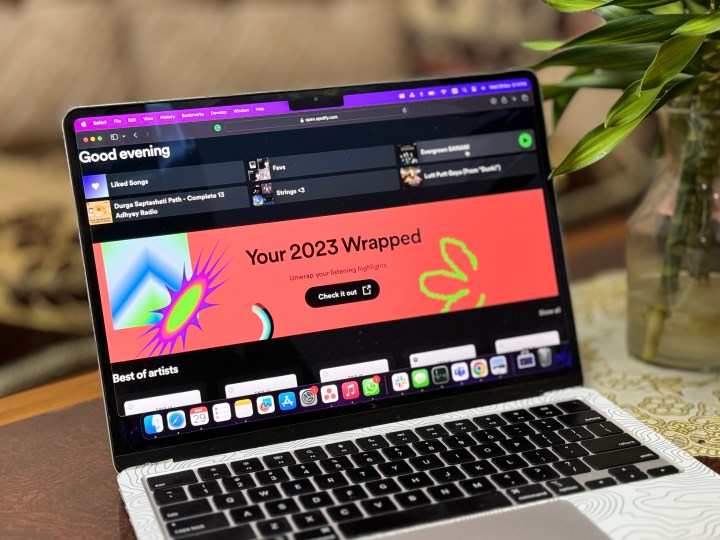
    Spotify Wrapped 2023 on a laptop.
    Prakhar Khanna / Digital Trends

    How to Cancel Spotify Premium

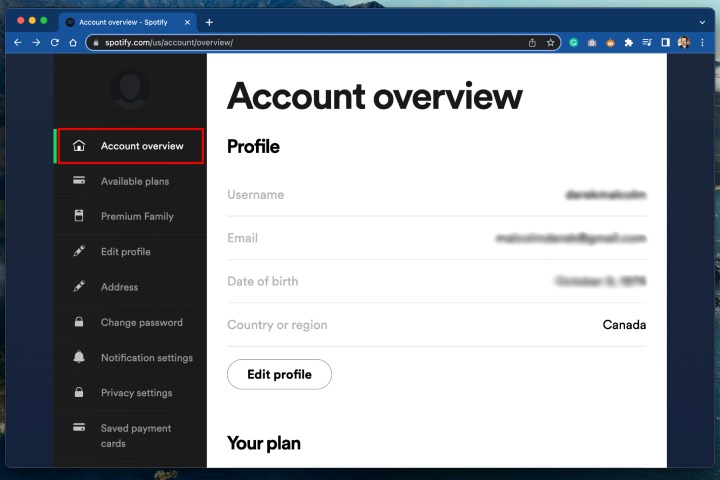
    Step 1: Begin by opening your preferred web browser and navigating to spotify.com/account. This link will take you directly to the Account Overview section of Spotify’s website.

    If you use the Spotify desktop app, you can access your Account settings from the drop-down menu, which will also open in your browser. Note that this process cannot be completed through the mobile app.

    How to cancel Spotify Premium – Account overview page.
    Derek Malcolm / Digital Trends

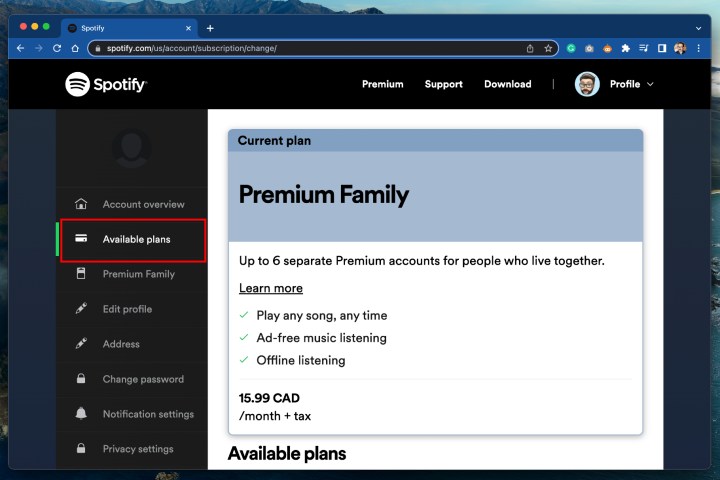
    Step 2: Once on your Account overview screen, choose Available plans from the sidebar on the left. A box will appear listing your current membership and other available subscription options.

    How to cancel Spotify Premium – Available plans.
    Derek Malcolm / Digital Trends

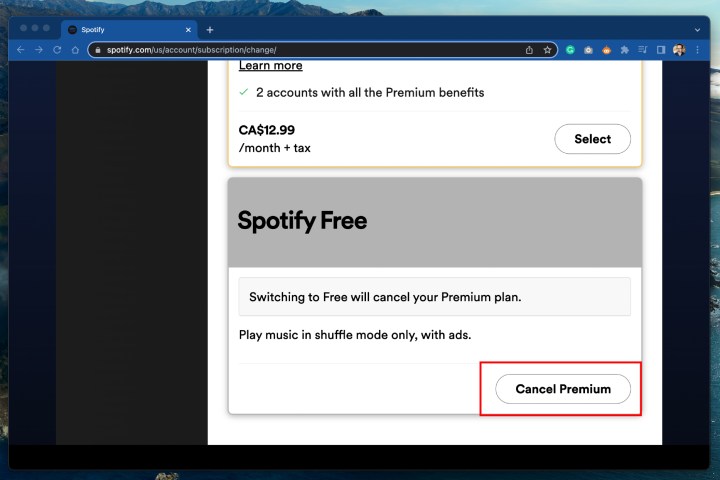
    Step 3: Scroll to the bottom of the options and look for the Spotify Free option, which is located at the very end. Click the large Cancel Premium button positioned below it.

    How to cancel Spotify Premium – Spotify Free.
    Derek Malcolm / Digital Trends

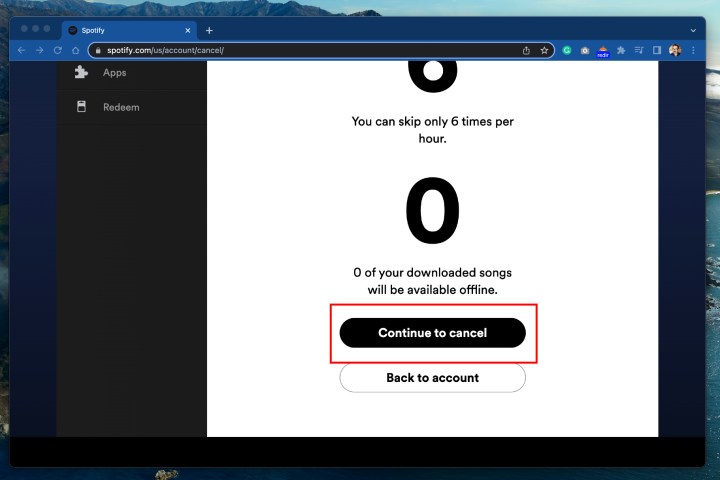
    Step 4: The last step is to confirm your cancellation by clicking Continue to cancel and following the prompts. Remember that your membership will not end immediately; you can continue using it until the end of your billing cycle.

    How to cancel Spotify Premium – continue to cancel.
    Derek Malcolm / Digital Trends

    Step 5: Note: Canceling your Spotify account through an Android device follows a similar process as on desktop — it is done via a web browser on the device.

    Spotify on iPhone.
    Bryan M. Wolfe / Digital Trends

    Canceling Spotify Premium on an iPhone or iPad

    If you initially signed up for Spotify on your iPhone or iPad, it’s likely you opted for Apple to manage your billing through the App Store for convenience. This makes the cancellation process slightly different when using an iPhone or iPad.

    Step 1: Begin by opening the Settings app on your device and tap your name at the top to access your Apple ID.

    Step 2: From there, choose Subscriptions.

    Step 3: A list of your subscriptions will be displayed. Find Spotify, then tap the Cancel Subscription button. This will terminate your Premium membership renewal.

    After cancellation, you will still be able to use Premium until your next payment date. For instance, if you decide to cancel on September 3 and your membership is set to renew on October 2, you’ll retain access until then, since you’ve already paid for that month.

    Keep in mind that Spotify does not offer refunds, even if you cancel before the next billing date and don’t intend to use the service during that period. You can also choose to delete your Spotify account if that’s your goal.

    How to Reactivate a Spotify Premium Account

    If you change your mind and wish to return to Spotify, reactivating your account is even easier than canceling it. Just visit Spotify’s account page where your previous plan should be listed along with a Renew option. Click on Renew, and you’re all set!

    You can also renew your Spotify Premium subscription through the App Store or Google Play Store.

    How Much Does Spotify Premium Cost?

    Currently, an individual Spotify Premium subscription is priced at $12 per month. If you’re new to Premium, Spotify offers a one-month free trial.

    If you enjoy the service and want to share it, a Premium Duo account is available for $17 per month, covering two users. For larger households, a Premium Family plan costs $20 per month and can accommodate up to six users.

    Students can take advantage of the Premium Student plan, offering a discounted rate of only $6 per month, which includes access to both Spotify Premium and Hulu. Additionally, an Audiobook Access subscription (excluding music) is available for $10 per month.

  • Win This Gigabyte Gaming Laptop Valued At $1,300

    Win This Gigabyte Gaming Laptop Valued At $1,300

    GIGABYTE 16\
    Chris Hagan / Digital Trends

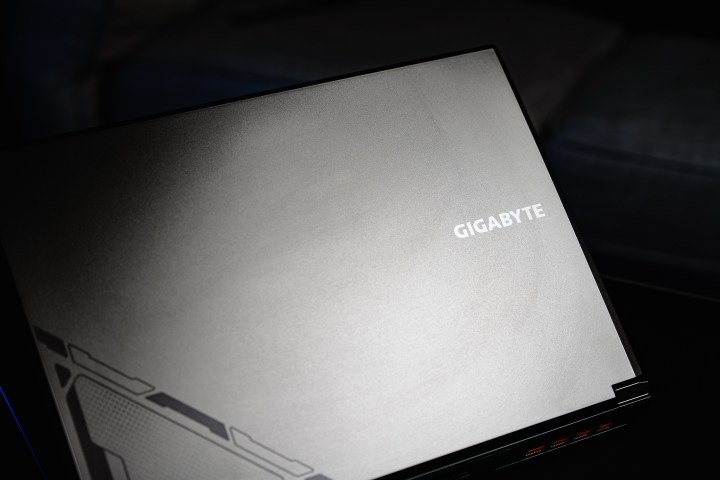
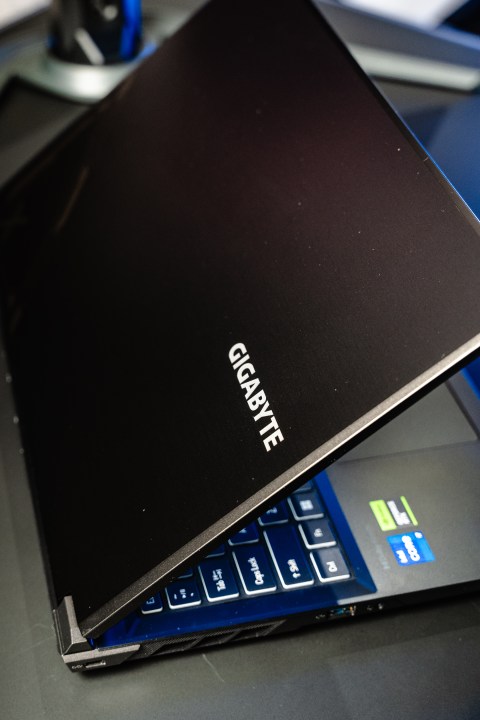
    I recall a time when gaming laptops, and laptops in general, struggled to match even the most basic desktop computers in terms of power and performance. Now, while I’m not claiming to be ancient—just in my middle age—it’s incredible to see how far we’ve come. Nowadays, there are laptops with impressive capabilities that allow gaming virtually anywhere, and this doesn’t even touch on the capabilities of modern portable gaming devices. One standout model is the Gigabyte G6X 9KG gaming laptop, which features a GeForce RTX 4060 and supports full ray tracing alongside Nvidia DLSS. It delivers robust performance, effortlessly running Black Myth: Wukong on a portable machine. That’s definitely something to be amazed by.

    GIGABYTE 16\
    Chris Hagan / Digital Trends

    The most exciting aspect? It won’t break the bank. The Gigabyte G6X 9KG is priced at just $1,300, and it packs a punch with 32GB of RAM and a 1TB SSD. What’s even better is that it allows for user upgrades, making it a versatile and customizable option. Today could be your lucky day! You have a chance to snag this powerhouse directly from Gigabyte. To enter, simply follow the steps outlined. For further details on this gaming laptop, see below.

    Discover the Gigabyte 16-inch G6X 9KG gaming laptop

    GIGABYTE 16\
    Chris Hagan / Digital Trends

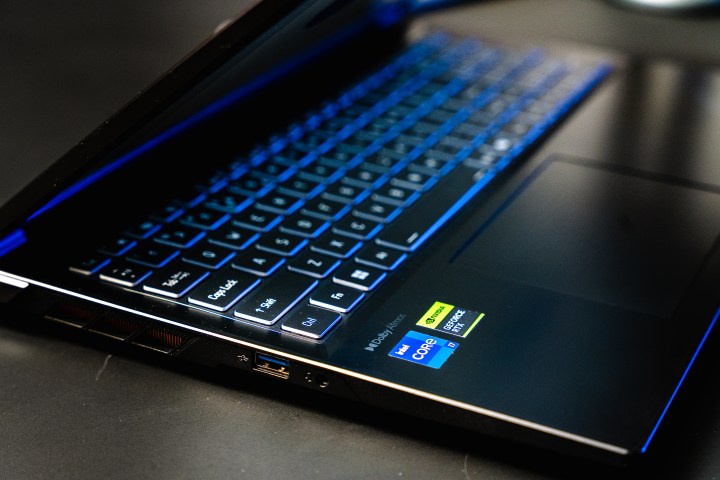
    If you’re like me, you prefer a clear and concise breakdown of a laptop’s specifications. So here it is!

    Gigabyte G6X 9KG gaming laptop specifications:

    • Display: 16-inch WUXGA full-HD (1920 x 1080) with a 165Hz refresh rate
    • Screen Aspect Ratio: 16:10
    • CPU: 13th Gen Intel Core i7-13650HX 14-core processor up to 4.9GHz
    • RAM: 32GB DDR5 at 4800mHz
    • Storage: 1TB Gen4 M.2 SSD
    • GPU: NVIDIA GeForce RTX 4060 with 8GB GDDR6 VRAM
    • Connectivity: Intel WiFi 6E, Bluetooth v5.2

    Additional Features:

    • 4-sided slim bezels with a 90% screen-to-body ratio
    • Dolby Atmos audio technology
    • Integrated microphone for calls and streaming
    • Two 2-watt speakers for immersive sound
    • USB 3.2 Gen2 Type-C with Power Delivery support
    • Fully illuminated keyboard

    If you’re interested in diving deeper into the details of this impressive laptop or seeking more information, follow the link below.

    Learn More

    Enter for your chance to win the Gigabyte gaming laptop

    Follow the steps below to enter for a chance to win this impressive gaming laptop from Gigabyte:

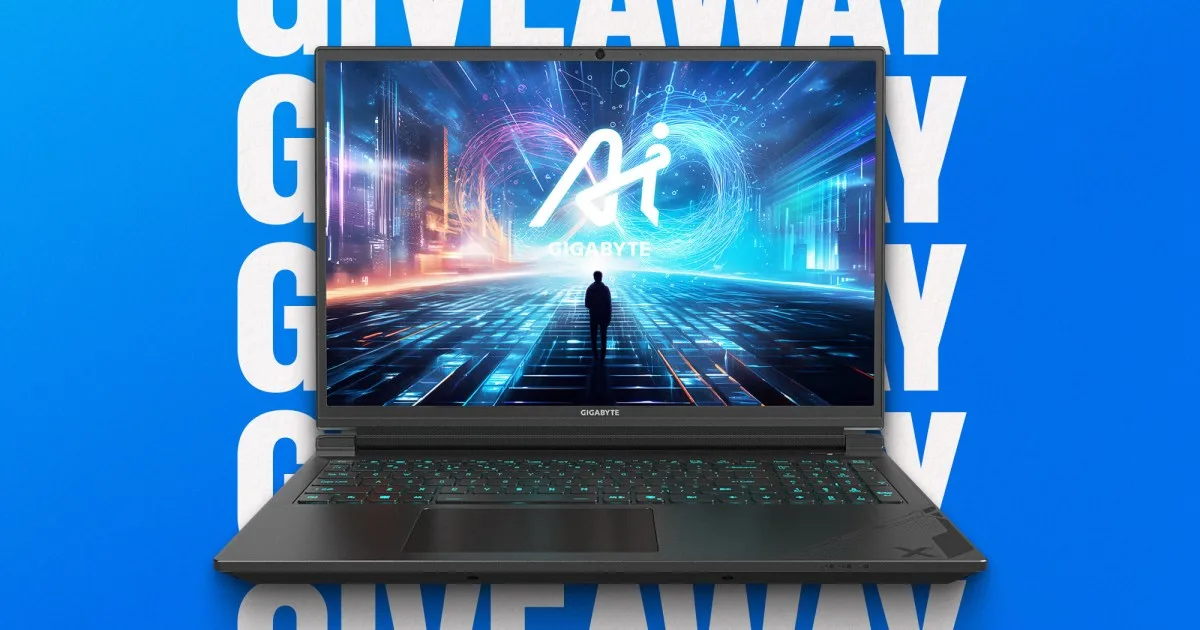
    Gigabyte 16″ Gaming Laptop Giveaway

  • Starlink Service Reaches New Customer Milestone

    Starlink Service Reaches New Customer Milestone

    Starlink satellites being deployed by SpaceX.
    Starlink satellites being deployed by SpaceX. SpaceX / SpaceX

    SpaceX has announced that its Starlink internet service, which beams internet directly from space, has reached 4 million users around the globe.

    In a statement shared on X (formerly Twitter), the company noted, “Starlink is connecting more than 4 million people with high-speed internet across over 100 countries and territories.”

    Under Elon Musk’s leadership, this ambitious internet initiative is experiencing rapid growth, having gained 1 million new users just in the last four months. The service started onboarding users in October 2020 and reached its first million subscribers by December 2022.

    Starlink has evolved significantly since SpaceX launched its first 60 satellites into low-Earth orbit back in 2019. The satellite network now boasts approximately 6,300 satellites and continues to expand its service to offer faster, more dependable, and broader coverage.

    In addition to catering to residential customers, Starlink is attracting a growing number of business clients, including airlines and cruise companies. Just recently, Air France announced plans to begin implementing Starlink’s high-speed internet service on its aircraft starting next summer. This initiative aims to provide ultra-fast internet connectivity to passengers throughout their flights.

    As Air France stated, “Passengers will be able to easily stay connected with friends and family, keep up with live news, play online games, and enjoy streaming movies and series.” This service will be accessible via smartphones, tablets, and laptops, with each passenger able to connect multiple devices at once.

    However, the Starlink project has not been without its challenges. Astronomers have voiced concerns regarding the satellite constellations, as the bright trails left behind by the satellites hinder their observations of the cosmos. Moreover, electromagnetic interference from the newer satellites has caused disruptions to ground-based radio telescopes, affecting the work of scientists in the field, as reported by the BBC.