الوسم: Companion

  • Who To Choose for Sybille’s Home Protector in GreedFall 2: Solving the Companion Quest

    Who To Choose for Sybille’s Home Protector in GreedFall 2: Solving the Companion Quest

    After talking to Sybille, you learn she has been targeted by assassins. The main question is, who can now protect her from these threats in GreedFall: The Dying World? Sybille recommends visiting her uncle, as family is usually the first place to turn to for help during tough times.

    However, the situation is more complicated than it appears. Every favor you do seems to lead to another, and there’s some dark intrigue involving the royal family. Here’s what you need to know about hiring a bodyguard for Sybille and completing her companion quest, “Home Protection.”

    Home Protection Quest Walkthrough

    Begin the quest by talking to Sybille later in the game. She will ask you to accompany her to Vespe Palace. Inside, you’ll walk through the main hall to the reception area and then into the Throne Room. Talk to the prince and let Sybille explain her concerns.

    The prince agrees to help, but only if you assist him first. Someone is plotting against him, and he suspects it involves one of his mistresses. Your task is to find out who is involved and stop them. Only then will he provide official protection.

    Ask all the questions you can to gather information. Then, leave the throne room, go through the reception area, and turn right into the interior courtyard. There, you’ll meet Volusa, one of the prince’s mistresses. Talk to her, but she won’t reveal much.

    Leave the courtyard and go straight into the East Wing. Find the first door on the left, which leads to a bedroom with a chest and some coins on the table. Keep going further down the hall to another bedroom. This room belongs to the mistress, and her diary is on the desk. Read it to discover that Volusa fears for her life and believes there’s a secret room in the study. The best time to find it is after midnight.

    Continue searching in her room, then return to the reception and wait until midnight. Head to the Throne Room and examine the vases with your tracking ability. The vase to the left of the throne opens a hidden room.

    Inside, you’ll find a suspicious letter on the desk that involves a scandal linking the prince, Sybille, and her parents. Now, you must talk to the prince and decide what to do.

    Options include:

    • Denouncing Volusa (which reduces your reputation with Sybille by 2)
    • Not denouncing her (which boosts your reputation with Sybille by 2)
    • Returning the secret document to the prince (ensuring he becomes Sybille’s protector)
    • Telling him you’ll look for it, with the choice to pass it to the d’Orsay family, affecting your reputation with different factions

    Next, leave the palace and head to the d’Orsay Family residence. Speak with Mister d’Argenton about providing protection for Sybille. As you mention the compromising document, you’ll have more choices:

    • Give him the document to proceed with the quest
    • Allow Sybille to decide herself (which increases your reputation with her and lets you continue)

    It’s recommended to let Sybille make her own decision, since she values having control over her situation.

    Finally, visit Sybille’s parents. Talk to them and choose whether to support their arguments or support Sybille. Supporting her keeps her favor, and after a tough discussion, the quest concludes. You will earn 1,000 experience points and a +2 reputation boost with Sybille.

  • How to Complete the Sentinel Control System Companion in Fallout 4

    How to Complete the Sentinel Control System Companion in Fallout 4

    One of the highlights of Fallout 4’s Creation Club content is the addition of new companions. Among these is a large set of Power Armor that doesn’t require a pilot. It simply roams the game world with you, attacking anyone who stands in your way. To unlock this powerful armor, you must complete the Malevolent Malfunction Quest.

    In this quest, you discover a Brotherhood of Steel traitor. Your task is to eliminate him and steal his AI-controlled Power Armor. Here’s a straightforward guide to completing the quest and adding this armor to your team.

    Follow the Distress Signal

    Start the quest by locating the Distress Signal Beacon on your radio. Follow the signal, which can sometimes be tricky because it doesn’t always appear at the right time. A good spot to find it is near Drumlin Diner, just southeast of Concord.

    When you find the signal, tune into it on your radio. You will hear a steady beep; the faster the beeps, the closer you are to your destination. The target location is slightly southeast of the diner, west of Lexington.

    Fight the Rogue Sentinel Power Armor

    Once you arrive at the source of the distress signal, you’ll encounter hostile Rogue Sentinel Power Armors. You need to defeat both of them to proceed.

    After defeating the enemies, loot their bodies and grab the Sentinel System Log. Check your Pip-Boy’s Miscellaneous items and play the log. It reveals that a person named Dawson reprogrammed the Power Armors to attack their allies before heading to the Schoelt Propane Station. This is your next destination.

    You can find the bodies of Dawson’s former allies, Vasquez and Maria, nearby. They each hold a Holo Tape you can read, although this isn’t required for the main quest.

    Meet Dawson at the Propane Station

    The Propane Station is located southwest of where you picked up the distress signal, close to the Federal Ration Stockpile and ArcJet Systems.

    When you arrive at the station, you’ll find Dawson. He won’t greet you kindly — he immediately opens fire. You must fight and kill him. Afterward, loot his body to find his footlocker key.

    Use the key to open his footlocker on the counter inside the remains of the building. Inside, you’ll find his Holotape. Play it to learn more about Dawson’s work with the Institute. The key piece of information is the passcode to his Sentinel Power Armor: “Capital Tripwire Echo.”

    Outside, locate the Sentinel near a truck and a large propane tank. Approach it and interact to ‘hack’ it, then choose ‘activate.’ This action transforms the Sentinel into your Power Armor companion, which can follow you and assist in combat. This marks the end of the quest.

  • Completing Garrus: New Mass Effect Bundle at BioWare Store

    Completing Garrus: New Mass Effect Bundle at BioWare Store

    If you ask a devoted Mass Effect fan their favorite romanceable companion, many will likely say Tali. If you ask others, Garrus’ name will also come up often. Both are adored in the Mass Effect community, and their fans are very loyal. Therefore, it’s not surprising that Garrus is getting new merchandise in the BioWare store.

    The Mass Effect Garrus Companion Bundle is available for pre-order now, but it comes with a high price tag of €82.72. Fans will receive a small Garrus statue, a necklace, and even a love letter from the turian.

    The Next Mass Effect Companion To Get An Official Bundle Is Garrus

    Orders will be shipped in September this year, but you can place your order now if you think a message from Garrus is worth the price. The message is inside the box containing the bundle, instead of on a scroll like previous Dragon Age bundles.

    By the way, BioWare, could you restock the companion bundle for everyone’s favorite romanceable character, Alistair Theirin?

    Currently, only Tali has her own bundle, which includes similar items but is out of stock, which isn’t surprising.

    In other Mass Effect news, an Amazon TV show is being produced, likely retelling the original trilogy. A new game in the series is also in development, but after significant layoffs at BioWare, it’s unclear how many original developers will work on Mass Effect 5. Regardless, the release is still a few years away.

    Mass Effect

    Released
    November 20, 2007

    ESRB
    M for Mature 17+ due to Blood, Language, Partial Nudity, Sexual Themes, Violence

    Engine
    Unreal Engine 3

    Cross-Platform Play
    Doesn’t have cross-play between PC and consoles

    Cross Save
    Yes

    • Xbox store
    • Steam logo
  • Rotel’s New Headphone DAC/Amp Is A Sleek Desktop Buddy

    Rotel’s New Headphone DAC/Amp Is A Sleek Desktop Buddy

    If you’re in the market for high-quality wired headphones or in-ear monitors (IEMs), investing in a headphone amplifier is a wise choice. One notable option is the newly released Rotel DX-3. It marks the company’s inaugural headphone amplifier and integrates top-notch amplification technology with advanced digital-to-analog conversion capabilities. Set to hit the shelves in Europe and the U.K. in March, it will be available in both black and silver. The expected launch in the U.S. will follow shortly after, with a price tag of $1,499.

    Rotel DX-3 front panel.
    Rotel

    What stands out about the DX-3 is its compact design. Measuring 8.5 inches in width, 3 inches in height, and 9.75 inches in depth, it’s slightly larger than the Wiim Ultra network music streamer, making it an ideal fit for desktop setups. Its aluminum exterior houses a vibrant color display, dual headphone outputs (4.4mm balanced and 6.35mm unbalanced), a three-position gain switch, a source selection button, and an oversized diamond-textured volume knob.

    Internally, the DX-3 boasts impressive components. The digital-to-analog conversion is managed by the ESS Sabre ES9028PRO chip, an 8-channel DAC providing four dedicated channels for each side (left and right).

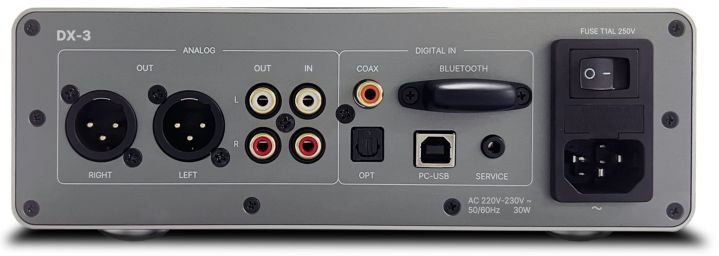
    Rotel DX-3 rear panel.
    Rotel

    This DAC can handle an impressive array of formats, supporting PCM up to 32-bit/384kHz and native DSD up to DSD256. Digital audio can be input via optical, PC-USB, coaxial, or through Bluetooth, with compatibility for AAC, aptX, and aptX-HD codecs.

    If you’d like to access the analog amplification path, the DX-3 offers dedicated stereo RCA outputs.

    According to Rotel, the amplification leverages a “custom-built, ultra-low noise toroidal transformer featuring high-current drivers and quality capacitors.” The power control utilizes an audiophile-grade NJW1195A fully differential analog controller to ensure precise adjustments down to 0.5dB. The three-step gain option allows users to tailor the output to their headphones’ specific impedance and sensitivity.

    Rotel DX-3 remote control.
    Rotel

    Moreover, the DX-3 can serve as a standalone DAC or preamp, with options for unbalanced RCA or XLR balanced analog outputs. It also comes with an aluminum remote control, enabling you to adjust settings from a distance.

    While the DX-3 lacks networking features like Ethernet or Wi-Fi, Roon users can still stream their favorite content through the PC-USB input, which is recognized as a Roon endpoint.

  • All Companion Skills in Hello Kitty Island Adventure

    All Companion Skills in Hello Kitty Island Adventure

    In Hello Kitty Island Adventure, you can make friends with a variety of characters. As your friendship levels up, you’ll be able to ask these characters to accompany you on your adventures. Who wouldn’t enjoy having a beloved Sanrio character by their side?

    As companions, these characters can enhance your gameplay in many ways, such as increasing your movement speed or helping you gather more items of a specific type. This guide provides you with all the essential information about companions and their unique abilities in Hello Kitty Island Adventure.

    What Are Companions?

    To make a character your companion, you need to unlock their first ability. After that, just talk to them and ask if they want to join you. If they’re engaged in a quest, they can’t tag along, but if they’re free, they’ll join you on your adventures.

    You can only have one companion at a time until you complete the Together Forever quest. After that, you can travel with two companions.

    Below, you’ll find the full list of companions along with the levels at which you can invite them to join you.

    Kiki and Lala will always work as a duo; you can invite both of them at the same time.

    What Are Abilities?

    Abilities represent passive skills that enhance specific actions across the map. For instance, My Melody has an ability that improves your chances of receiving extra items when you give gifts. Initially, every companion will have one ability, which is what allows them to become your companion.

    Many characters also possess a second ability that activates when your friendship levels increase further. You won’t have to make a choice between abilities; they will operate together.

    All Abilities in Hello Kitty Island Adventure

    Best Friend Abilities

    Player standing by the collection box in Hello Kitty Island Adventure.

    To become best friends with a character, you’ll need to achieve maximum friendship with them. This amount varies per character, marking the final step for all. Once you reach this best friend status, the character can collect items for you.

    Any materials they gather will be placed into the Collection Box that you unlocked through the Terra Nul quest. While this isn’t strictly an ability, characters may decline to collect materials if they are occupied.

    How to Call Friends

    Player summoning a companion in Hello Kitty Island Adventure.

    If you don’t want to search for a character, there’s a simple solution! Open the menu and select ‘Call Friend.’ This will show you a list of all the characters you’ve met. Available characters will be shown in color, while those that are busy will appear grayed out.

    Selecting an available character will suddenly bring them to you as a companion. They will rush over and replace your current companion (unless you’ve completed the Together Forever quest), allowing you to benefit from their abilities.

  • Top Companion Builds You Should Try in Baldur’s Gate 3

    Top Companion Builds You Should Try in Baldur’s Gate 3

    Contents

    If you’re not planning on attempting a risky solo adventure in Baldur’s Gate 3, you’ll definitely want to bring a full team of companions along for your journeys through Faerun. This will likely lead to plenty of combat, and it’s vital that your companions are effective, which means ensuring their class builds are well thought out (or, at least, functional).

    We’ve put together thorough build guides for each companion in the game. All you need to do is scroll down, find the companion you’re focusing on, and check out their guide! With our assistance, you can navigate the game smoothly.

    • Complete Companion Build Guides


      Just click on the name of the companion whose build guide you want to view!

  • Tracking Companion Approval Status in Dragon Age: The Veilguard

    Tracking Companion Approval Status in Dragon Age: The Veilguard

    For many players, the bond with companions is as significant as the combat or main storyline in BioWare’s games. In Dragon Age: The Veilguard, you have the choice of seven companions for your party. You can also engage in romantic relationships with any of them, and your approval ratings and relationship status play a crucial role in how you advance with each character.

    Your relationship level not only determines your romantic options with a companion but also influences the gear they can use and their effectiveness in battles. Therefore, it’s important to enhance your relationship as much and as fast as possible.

    How to Check Relationship Level and Status

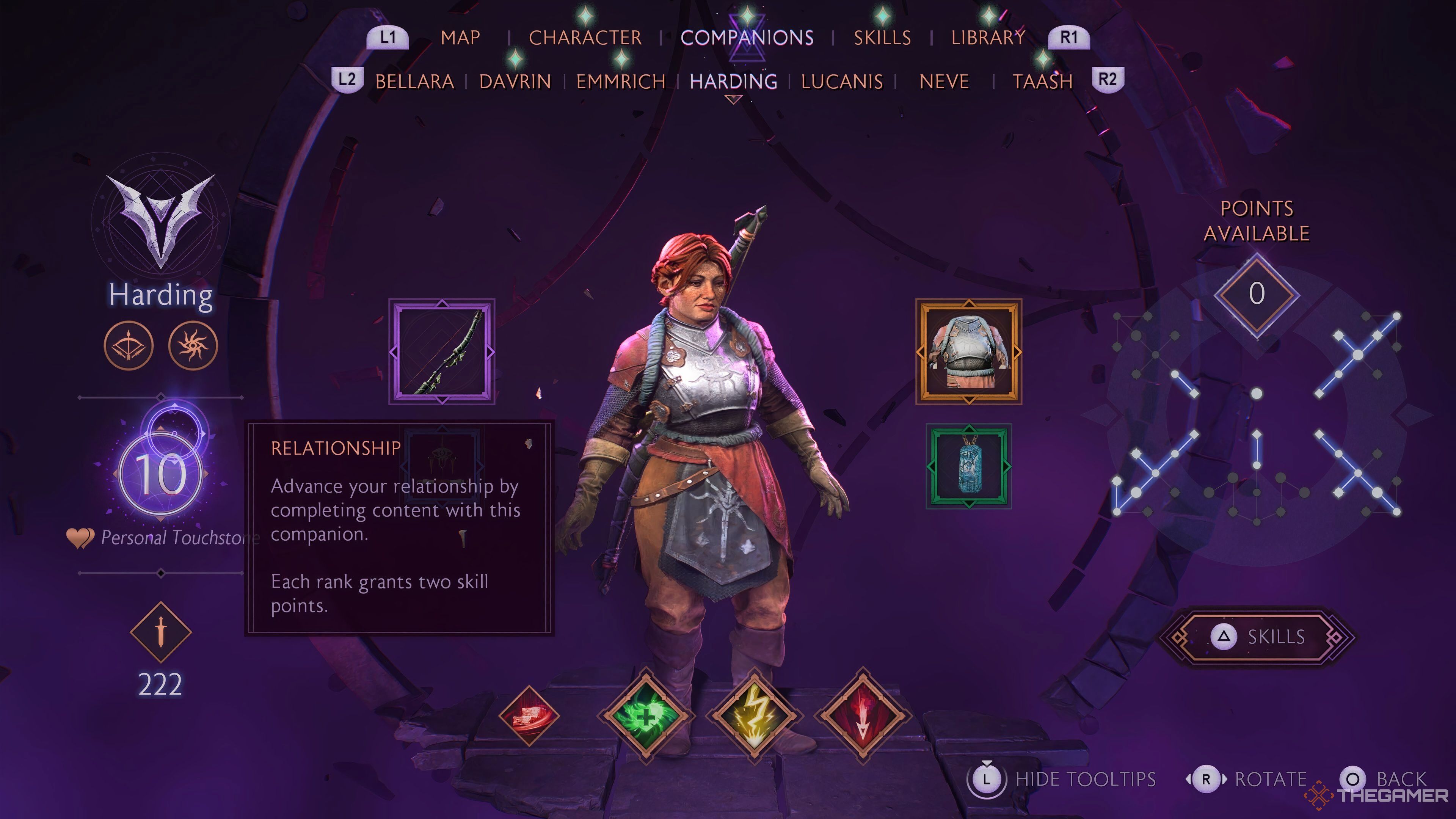
    To see your relationship status, go to the map screen and navigate to the Companions tab. From there, you can select any companion to view your relationship level with them.

    On the left side of the companion’s screen, you will see a number within a circle. This represents your relationship level, and the surrounding circle indicates your progress towards the next level.

    To make progress and fill in that circle, complete side quests for the character, engage positively in team conversations, and include them in your party during quests.

    What Is the Maximum Relationship Level?

    Harding's companion screen in Dragon Age: The Veilguard showing max relationship level of 10.

    You can achieve a maximum relationship level of ten with any companion.

    Reaching level ten requires significant effort, so if you want to maximize a character’s relationship, it’s best to keep them in your party as much as possible.

    While all characters follow the same 1-10 level progression, the names given to each level differ based on the companion’s backstory.

    Understanding the Hero of The Veilguard

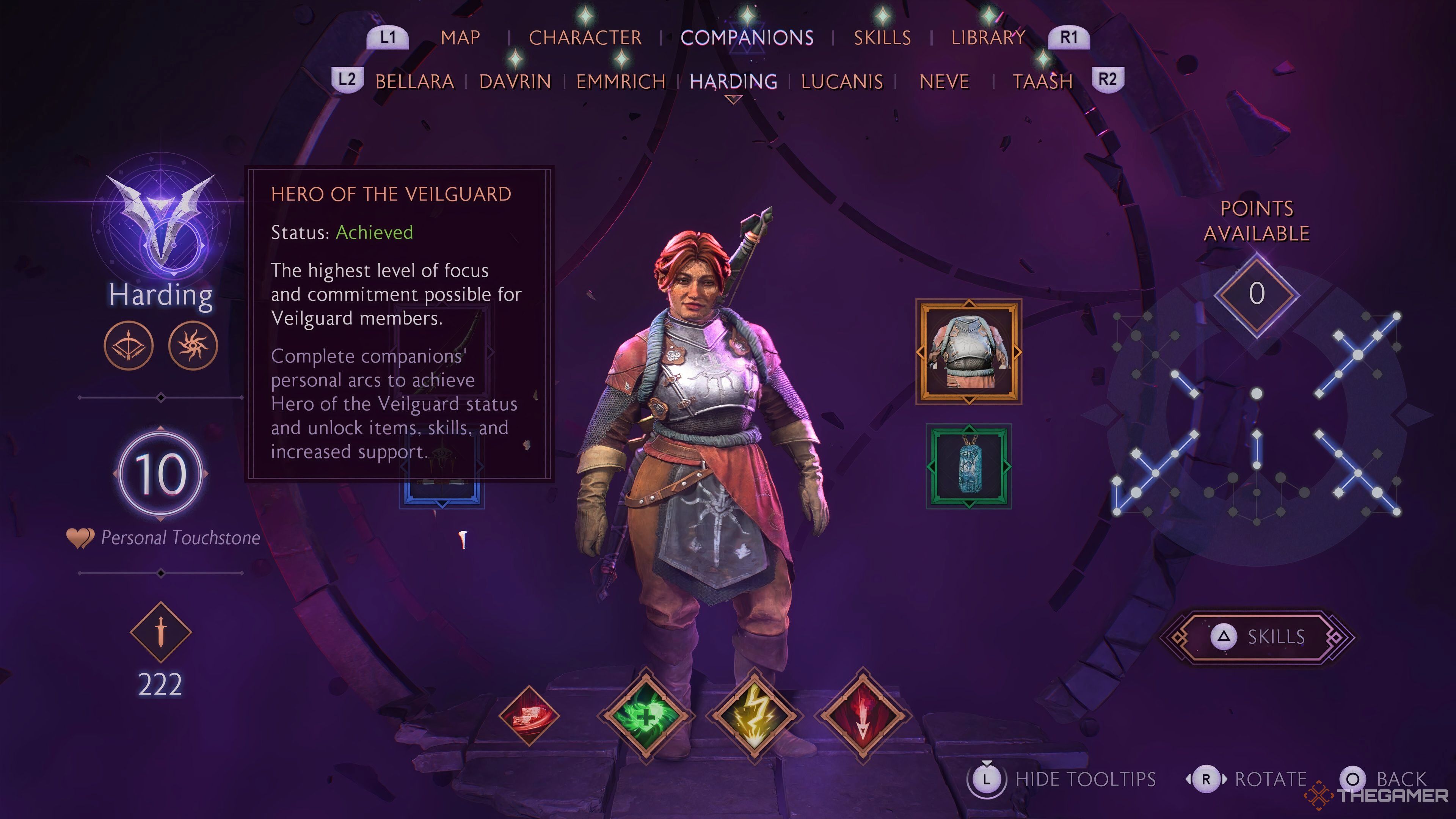
    Hero of the Veilguard status in Dragon Age: The Veilguard.

    Before reaching the maximum relationship level, there is an additional tier known as the “Hero of The Veilguard.” Described as “the Highest Level of focus and commitment possible for Veilguard members,” this status appears on the companion screen.

    This status is essential at the game’s conclusion; it impacts the crucial decisions you make, unlocks legendary equipment for that character, and grants access to new abilities.

    To achieve the Hero of The Veilguard status, you must complete the character’s personal side quests. Once obtained, a small icon will be displayed next to the companion when you select your party prior to a quest.