الوسم: communication

  • Scientists Develop Method to Generate Strong Linked Signals Without Extreme Cooling

    Scientists Develop Method to Generate Strong Linked Signals Without Extreme Cooling

    Quantum technology has the potential to significantly enhance the security of communications and improve the sensitivity of sensors. However, a major challenge has been that many quantum systems require extremely low temperatures and bulky, costly cooling equipment to operate effectively.

    Researchers at MIT have developed a compact magnetic device capable of generating strongly correlated microwave signals at room temperature. This breakthrough could make quantum-inspired secure communications, radar, and sensing more affordable and accessible outside of laboratory settings.

    The device operates using microwaves, which are the electromagnetic signals commonly used in wireless communication and radar systems. It’s well known how to produce pairs of microwave signals that are closely linked in their properties. Such entangled signals are valuable because information encoded in one can be recovered using its partner. Traditionally, creating these pairs involves superconducting circuits with Josephson junctions, which must be cooled to near absolute zero, necessitating large, energy-intensive cooling systems.

    The MIT team circumvented this issue by utilizing magnetism. Their device features a thin magnetic film housed inside a metal cavity that traps microwave energy. When microwave signals enter, they interact with magnetic excitations called magnons—tiny quanta of magnetic energy. Through precise control of this interaction, the system produces hybrid waves combining magnons and microwave photons. This setup can split a single incoming microwave signal into two strongly linked signals with different frequencies.

    While each individual signal appears random, their relationship remains tightly synchronized. The different frequencies allow the signals to be separated and used independently. The researchers demonstrated secure communication by embedding a small image into one microwave signal and successfully retrieving it using its correlated partner. Without access to this partner signal, an outside eavesdropper would find it difficult to decode the message because the individual signals seem random.

    This technology shows promise for creating more interference-resistant communication systems. If the main signal becomes degraded by noise or unwanted signals, its correlated partner can help the receiver recover the original information. Additionally, it could advance highly sensitive radar and sensing applications where detecting faint signals is crucial. Another exciting prospect is quantum simulation, which replicates complex particle interactions that are challenging for traditional computers. Such simulations could aid in discovering new materials and medicines.

    Importantly, avoiding the need for extreme cooling could reduce costs and facilitate scaling these systems. The team notes that their current setup functions in a classical, quantum-inspired regime rather than full-fledged room-temperature quantum communication. Still, this platform lays the groundwork for future technologies that might harness genuine quantum effects.

    Moving forward, the researchers plan to create more scalable versions of the device and explore various applications. If successful, this approach could bring advanced microwave communication and sensing technologies out of specialized labs and into everyday use, making these powerful tools more practical and widespread.

  • How Location-Sharing Apps Are Reshaping Modern Relationships

    How Location-Sharing Apps Are Reshaping Modern Relationships

    Apps that allow users to share their live locations have become a common aspect of daily life for millions. Whether it’s verifying if a partner made it home safely, checking on when a friend will arrive, or tracking family members during travel, location sharing now plays a vital role in social communication and relationship management.

    According to researchers at the University of Illinois Urbana-Champaign, these apps might also be quietly transforming how people interact with each other. Their study, published in the Journal of Social and Personal Relationships, examined why individuals use location-sharing tools and how these apps influence their connections.

    Lead researcher Professor Brian Ogolsky began exploring the topic after a class discussion with students about relationship development. He observed that students were highly engaged with stories about location sharing, yet there was little scientific research on the subject.

    The researchers conducted online surveys with participants from the U.S. and the UK. On average, individuals shared their locations with nearly four people, although some reported sharing with more than 80 contacts. Popular apps included Apple’s Find My, Google Maps, Life360, Snapchat, and WhatsApp.

    Most users shared their location with romantic partners, but many also shared with friends, parents, siblings, children, roommates, and other family members. The main motivations for sharing were safety, convenience, casual fun, and maintaining relationships.

    Safety was a top priority for families, with parents monitoring their children’s whereabouts and loved ones seeking peace of mind. However, Ogolsky noted that feeling safe doesn’t always mean a practical safety measure—just knowing someone’s location doesn’t guarantee they can be helped during an emergency.

    Practical use was especially common among romantic partners and close friends, facilitating daily coordination, such as timing dinner, arranging transportation, or checking if someone was still at work.

    For some, sharing location was simply entertaining or convenient, with certain friend groups sharing their locations regularly and then rarely thinking about it afterward.

    Interestingly, location sharing is increasingly influencing trust and communication dynamics. Some view it as an act of transparency and honesty, while others feel pressured by loved ones to keep their location visible constantly.

    Researchers suggest this shift might gradually alter traditional communication patterns. Instead of making phone calls or sending texts to find out where someone is or if they’re available, people might prefer just checking an app—reducing direct contact and social negotiation.

    The study also highlights privacy issues. Younger generations, accustomed to digital surveillance, may be less concerned about sharing personal location data. Nonetheless, concerns exist regarding potential misuse, especially in unhealthy relationships, and legal implications such as sharing location data in criminal investigations or court proceedings.

    Despite these concerns, many continue to rely on location-sharing apps because of the convenience they offer—making life simpler, quicker, and more organized. The researchers believe this ease of use partly explains why location sharing has become deeply embedded in modern relationships.

  • How to Use WhatsApp Web: A Complete Guide

    How to Use WhatsApp Web: A Complete Guide

    WhatsApp, owned by Meta, is widely recognized as a phone-centric messaging platform, but its web version has become increasingly practical. If you spend most of your workday at a desk, typing on a full keyboard is far easier than tapping away on your phone. This is where WhatsApp Web comes into play.

    With WhatsApp Web, you can access your chats directly from a laptop or desktop browser, providing a wider view of conversations and a more comfortable environment for typing, sharing files, and managing group chats. It’s especially useful when your phone is charging across the room, tucked away in a bag, or when you prefer not to switch devices repeatedly.

    The browser version of WhatsApp has also seen feature enhancements. It now supports video messages, time-limited voice messages, message editing, and more. While earlier versions required your phone to stay connected to the internet for the web version to work, multi-device support allows WhatsApp Web to function even if your phone goes offline temporarily. However, initial setup still requires your phone.

    One important thing to note is that WhatsApp accounts are linked to phone numbers rather than usernames or passwords. Therefore, you can’t simply sign in to WhatsApp Web like a typical website. Instead, you’ll need to link your browser to your account through the WhatsApp app on your iPhone or Android device, usually by scanning a QR code or entering your phone number.

    The setup process is quick, and once you’re connected, the web interface resembles the mobile app closely. You can send messages, share media, browse past chats, and adjust privacy settings without having to learn a new layout. Here’s how to get started.

    How to Log in to WhatsApp Web from an iPhone

    Getting started with WhatsApp Web on an iPhone is straightforward. Visit the WhatsApp Web page in any browser like Safari or Chrome and scan the QR code displayed on your computer screen using the WhatsApp app on your iPhone. Once linked, WhatsApp Web will stay active until you log out from either device.

    1. On your PC, open your preferred browser and go to https://web.whatsapp.com.
    2. Launch WhatsApp on your iPhone.
    3. Tap Settings in the bottom right, then select Linked Devices.
    4. Tap Link a Device and authenticate if prompted via Face ID or Touch ID. The camera will activate.
    5. Hold your iPhone up to scan the QR code on your computer screen. The web page should refresh and log you into WhatsApp Web.

    How to Log in to WhatsApp Web from an Android Phone

    The process with Android devices is similarly simple:

    1. Open WhatsApp on your Android phone.
    2. Tap the three dots in the upper right corner of the chat list and select Linked Devices.
    3. Tap Link a Device, authenticating if needed. The camera will turn on.
    4. Scan the QR code on your computer screen.
    5. Once scanned, the webpage refreshes and logs you into your WhatsApp account.

    Logging in without a QR Code Using Your Phone Number

    Aside from scanning QR codes, you can also log into WhatsApp Web by manually entering your phone number. Here’s how:

    1. On the WhatsApp Web login page, choose Log in with phone number.
    2. Enter your phone number and press Next.
    3. You’ll receive an eight-digit code on WhatsApp that you’ll need to input on the web page.
    4. Alternatively, on your phone, go to Settings > Linked Devices, select Link a Device, and choose Link with Phone Number.
    5. Enter the eight-digit code when prompted, and the web session will be activated.

    Protecting Your WhatsApp Web Session

    After logging in, WhatsApp Web remains connected until you explicitly log out. To maintain privacy, you can enable an app lock feature:

    • Open WhatsApp Web and go to Settings (gear icon).
    • Select Privacy, then App Lock.
    • Enable the feature and set a password.
    • You can choose how long before the session automatically locks, or manually lock it anytime from the menu.

    Remember, this password only applies to your current browser session; it doesn’t sync across devices and must be re-established if you sign out and log back in later.

    Features of WhatsApp Web

    Once connected, WhatsApp Web provides an experience similar to the mobile app:

    • View and select chats from the list on the left.
    • Access your message history and send new messages by typing in the chat window.
    • Attach media files, documents, or voice recordings using the attachment icon.
    • Use menu options to start new chats, create groups, update your profile, or adjust notification settings.
    • View contact statuses and updates posted by your contacts.

    Using WhatsApp Web allows for seamless communication, making it easier to stay connected while working on your computer. It combines the convenience of the mobile app with the comfort and efficiency of a desktop environment.

  • How to Find the Communication Device in Adorned Wreckage in Arc Raiders

    How to Find the Communication Device in Adorned Wreckage in Arc Raiders

    When you arrive at Speranza in Arc Raiders, you’ll encounter many traders who constantly offer quests for the Topside. These quests are your main motivation to keep raiding, besides aiming for better gear. Shani is one of the primary quest-givers during this process. She will have a series of tasks related to a specific issue.

    For example, the “With A Trace” quest is a follow-up to the “Reduced To Rubble” quest. It takes place in the Blue Gate area. During this quest, you need to reach certain locations and find specific objects to complete it.

    ### What to Do in Barren Clearing

    To start the first part of the “With A Trace” quest, go to the Barren Clearing in the Blue Gate map. This area is on the western side, southwest of the large Village area. You’ll need to zoom in on your map to see it clearly. Once there, you’ll see a huge, ruined Arc machine in the middle of the clearing.

    Move toward this machine and then head southwest to find a separate part of it. On this detached piece, look for a circular, glowing section that stands out more than the rest. Get close to this glowing part to interact with it and complete the first stage of the quest.

    ### What to Do in Adorned Wreckage

    For the second and last part of the quest, go to the Adorned Wreckage area, located south of Barren Clearing and just below Trapper’s Glade. When you arrive, your task is to inspect a communication device. The device is located at the top of the tallest structure on the broken machine, which is easy to spot.

    From this high point, move north to the detached section of the wreckage. You will see a yellow communication device at the bottom of this part. Interact with it, and this will complete your quest. Then, return to Shani in the hideout to claim your rewards. She will give you a Looting Mk. 2 augment and a Medium Shield as a reward.

  • ChatGPT Tells Parents If Teens Feel Sharp Emotional Distress

    ChatGPT Tells Parents If Teens Feel Sharp Emotional Distress

    In recent months, there have been numerous reports of problematic interactions with AI chatbots, some of which have led to tragic consequences, including loss of life, medical trauma, and mental health crises. Experts warn that young users may be especially susceptible, particularly during times of emotional vulnerability. The creators of ChatGPT have announced plans to notify parents when such concerning behavior is detected.

    ### What’s Changing?

    Recently, OpenAI disclosed its intention to develop parental controls that will allow guardians to monitor how their children engage with ChatGPT and intervene if necessary. They are also working on a warning system designed to alert parents if their children, aged 13 and older, appear to be experiencing significant emotional distress during interactions with the AI.

    When parents link their ChatGPT accounts with those of their children through a simple email invitation, they will be notified if the system detects signs of acute emotional distress. This feature aims to provide a safeguard, especially for teenagers navigating complex feelings and experiences.

    With account linking, parents will gain control over the AI features their children can access, such as the conversation history memory, and can enable “age-appropriate” responses to better suit young users’ needs.

    ### Looking Ahead

    OpenAI has laid out a 120-day plan to implement several new features intended to ensure safer and more productive conversations for young users engaging with AI tools daily. The company plans to make technical adjustments so that the AI models respond appropriately, especially when dealing with sensitive topics.

    The organization also intends to direct particularly delicate conversations—like those indicating severe distress—toward a more reasoned, advanced response mode, such as GPT-5-thinking, enabling the AI to provide more supportive and helpful responses regardless of the initial interaction.

    The protocols for linking accounts and activating parental controls are scheduled to launch within the next month. These safety measures are critical, especially in light of recent investigations revealing disturbing uses of AI chatbots, including instances where systems engaged in inappropriate conversations with minors, even aiding in harmful plans.

    This step forward in AI safety underscores the importance of protecting vulnerable users as these technologies become an integral part of daily life.

  • How Is Bitchat App Different From Signal?

    How Is Bitchat App Different From Signal?

    In the ever-evolving world of messaging apps, users continuously seek secure, user-friendly platforms. The Bitchat app and Signal both claim to prioritize security and user experience, but they come with different features and functionalities. This article explores the primary differences between these two messaging apps.

    Overview of Bitchat and Signal

    What is Bitchat?

    Bitchat is a relatively new messaging application that focuses on social interactions and robust privacy. It combines standard messaging features with a unique twist, aiming to cater to specific user needs.

    What is Signal?

    Signal is a well-established messaging platform known for its strong encryption and commitment to privacy. Developed by the Signal Foundation, it’s used by individuals and organizations worldwide for secure communications.

    Key Features

    Security and Privacy

    • Encryption:

      • Signal: End-to-end encryption is standard for all messages and calls, ensuring that only the sender and receiver can read the content.
      • Bitchat: Also offers end-to-end encryption, but its implementation is tailored more towards casual social interactions, making it less rigid than Signal.

    • Data Collection:

      • Signal: Collects minimal data, focusing on user privacy. Users’ phone numbers are the only data that Signal retains.
      • Bitchat: While it aims to minimize data collection, it might gather more metadata compared to Signal, which could be a concern for privacy-focused users.

    User Interface

    • Design:

      • Signal: Features a straightforward and functional design, which prioritizes usability over aesthetics.
      • Bitchat: Offers a more vibrant and customizable interface, appealing to younger users and those who enjoy a more engaging user experience.

    • User Experience:

      • Signal: Prioritizes reliability and straightforward messaging without distractions.
      • Bitchat: Incorporates elements like stickers, challenges, and games, making chatting more interactive.

    Additional Functionalities

    • Group Chats:

      • Signal: Allows group chats but with limited interactive features.
      • Bitchat: Supports dynamic group activities, enabling users to engage more actively within chat groups.

    • Media Sharing:

      • Signal: Allows sharing of pictures, videos, and documents, with a strong emphasis on maintaining quality and security.
      • Bitchat: Also supports media sharing but includes fun features such as filters and effects to enhance shared content.

    Target Audience

    Signal’s Audience

    • Primarily used by professionals, journalists, and individuals emphasizing privacy.
    • Gaining popularity among those familiar with cybersecurity and encryption.

    Bitchat’s Audience

    • Targets young users and social friends looking for an interactive, fun communication platform.
    • Appeals to users who appreciate unique features and playful interactions.

    Platforms and Accessibility

    Availability

    • Signal: Available on iOS, Android, and desktop versions, ensuring comprehensive accessibility.
    • Bitchat: Primarily a mobile app, currently focusing on Android and iOS, with plans for future desktop support.

    Ease of Setup

    • Signal: Requires phone verification and is relatively easy to set up, though the features may seem minimal for some.
    • Bitchat: Offers a more user-friendly setup process, with prompts that guide users through personalization and feature exploration.

    Communication Options

    Text and Multimedia Messages

    • Signal: Primarily focused on text and secure multimedia messaging.
    • Bitchat: Incorporates various modes of communication, including voice notes and animated stickers, making messages more dynamic.

    Voice and Video Calls

    • Signal: Provides high-quality voice and video calls with robust encryption.
    • Bitchat: Also supports these features but may not match the same level of security and quality as Signal.

    Conclusion

    The choice between Bitchat and Signal ultimately depends on individual preferences and needs. Signal excels in privacy and security, catering to users who prioritize confidentiality and minimal data collection. In contrast, Bitchat offers a lively and interactive platform for those seeking a more engaging social experience. Understanding these differences can guide users in selecting the messaging app that best fits their communication style and security needs.

  • Is Bitchat App Better Than WhatsApp?

    Is Bitchat App Better Than WhatsApp?

    In the crowded landscape of messaging apps, two contenders often arise in discussions: Bitchat and WhatsApp. Each of these applications has its strengths and weaknesses. This article delves into the features, security, and user experience of both platforms to help you evaluate which might be better suited for your needs.

    Overview of Bitchat and WhatsApp

    What is Bitchat?

    Bitchat is a relatively new player in the messaging app space, designed to offer enhanced privacy features while providing a user-friendly interface. It emphasizes decentralized communication, allowing users more control over their data.

    What is WhatsApp?

    WhatsApp, owned by Meta Platforms (formerly Facebook), is one of the most widely used messaging applications globally. Known for its simple design and extensive functionalities, WhatsApp offers various features that have made it a staple in the world of instant messaging.

    Key Features Comparison

    User Interface

    • Bitchat:

      • Modern, intuitive design
      • Customizable themes and layouts
      • Focus on community-building with group features

    • WhatsApp:

      • Familiar interface for most users
      • Clean and straightforward navigation
      • Integrated voice and video calling

    Messaging Features

    • Bitchat:

      • Text, voice, and video messaging
      • Supports anonymous chatting
      • Features decentralized channels

    • WhatsApp:

      • Text, voice, and video messaging
      • Voice note feature
      • Rich media sharing (photos, documents, etc.)

    Privacy and Security

    • Bitchat:

      • End-to-end encryption on all messages
      • In-built tools for managing your digital footprint
      • No data collection policies to enhance user privacy

    • WhatsApp:

      • End-to-end encryption on chats and calls
      • Collects user data for personalization and ads
      • Reports of privacy concerns due to ownership by Meta Platforms

    Performance and Reliability

    Speed and Connectivity

    • Bitchat:

      • Generally fast, particularly in decentralized networks
      • May experience some lag in less-popular regions

    • WhatsApp:

      • Highly reliable and consistent connectivity
      • Works on low-speed internet connections

    App Availability

    • Bitchat:

      • Available on Android and iOS
      • Browser-based version is still developing

    • WhatsApp:

      • Widely available on multiple platforms
      • Web version is fully functional and easily accessible

    Community and Support

    User Base

    • Bitchat:

      • Growing community with a niche focus
      • Ideal for users who prioritize privacy and control

    • WhatsApp:

      • Over 2 billion active users
      • Extensive communities, making it easier to connect with others

    Customer Support

    • Bitchat:

      • Community-driven support forums
      • Limited official customer service options

    • WhatsApp:

      • Comprehensive FAQ and resources
      • Dedicated support team for user queries

    Customization and Personalization

    Themes and Styles

    • Bitchat:

      • Greater emphasis on customization options
      • Users can choose themes, layouts, and notification styles

    • WhatsApp:

      • Limited customization
      • Basic theme options available

    Notifications and Alerts

    • Bitchat:

      • Fully customizable notifications
      • Users can set specific alerts for groups and contacts

    • WhatsApp:

      • Standard notification settings available
      • Less flexibility compared to Bitchat

    Conclusion

    Choosing between Bitchat and WhatsApp depends largely on user preference and needs. While Bitchat excels in privacy and customization, WhatsApp remains a reliable and widely-used option with extensive features and a massive user base. Evaluate what matters most to you in a messaging app to make the best choice for your communication needs.

  • What is Bitchat App and How Does It Work?

    What is Bitchat App and How Does It Work?

    What is Bitchat App?

    Bitchat is a messaging application that has gained popularity for its user-friendly interface and robust features. Targeting individuals who prioritize privacy and flexible communication, Bitchat allows users to connect with friends, family, and colleagues in various effective ways. Features like encrypted chats, group messaging, and multimedia sharing make it stand out in the crowded messaging app landscape.

    Key Features of Bitchat

    Bitchat offers a variety of features that cater to the needs of modern users. Here are some notable aspects:

    • End-to-End Encryption: Ensures that only the sender and receiver can read messages.
    • Multimedia Sharing: Users can send photos, videos, and voice notes easily.
    • Group Chats: Communicate with multiple people simultaneously by creating group conversations.
    • User-Friendly Interface: The design is intuitive, making it accessible for users of all ages.
    • Customizable Notifications: Personalize alert settings for different chats.

    How Does Bitchat Work?

    Understanding how Bitchat functions can help users maximize their experience. Here’s a breakdown of its functionalities.

    Getting Started with Bitchat

    1. Download and Install:

      • Available on major platforms like iOS and Android.
      • Download from the App Store or Google Play Store.

    2. Set Up Your Account:

      • Create an account using your phone number or email.
      • Verify your account through a confirmation code.

    3. Create a Profile:

      • Set a username and profile picture.
      • Customize your status for friends to see.

    Navigating the Interface

    • Chat Screen: A list of conversations is displayed, allowing you to pick where you left off.
    • Search Bar: Quickly find contacts or messages.
    • Menu Options: Access settings, account management, and help easily.

    Messaging Features

    • Sending Text Messages:

      • Compose messages to individuals or groups.
      • Use emojis, stickers, or GIFs to enhance conversations.

    • Voice and Video Calls:

      • Make high-quality voice and video calls directly within the app.
      • Group calling available for multiple participants.

    • Broadcast Messages:

      • Send messages to multiple contacts without creating a group.
      • Efficient for announcements or updates.

    Security Measures

    Bitchat takes user security seriously. Implementing various protective measures ensures user data remains private.

    Privacy Features

    • Data Encryption: Ensures messages are scrambled and unreadable by third parties.
    • Self-Destructing Messages: Set messages to disappear after being read.
    • Account Recovery: Options to recover your account securely if you forget your credentials.

    Reporting and Blocking

    Users can block or report any suspicious accounts, maintaining a safe environment for all.

    Community Engagement

    Bitchat fosters community interaction through:

    • Public Groups: Join discussions on various topics.
    • Event Scheduling: Organize and plan events with friends using integrated features.

    Feedback and Updates

    Users can easily provide feedback which the developers use to enhance functionality and adapt to changing user needs.

    By focusing on privacy, user experience, and comprehensive features, Bitchat continues to carve a niche in the competitive messaging app market, making it a go-to choice for many users looking for an efficient and secure way to communicate.

  • WhatsApp Is Finally Here on iPad Just What I’ve Been Waiting For

    WhatsApp Is Finally Here on iPad Just What I’ve Been Waiting For

    iPad users who enjoy WhatsApp can now celebrate, as the messaging app, which boasts over two billion users globally, is finally available on Apple’s beloved tablet. You can download the WhatsApp app directly from the App Store for your iPad right now.

    For a long time, iPad owners—regardless of whether they had the latest models—had to rely on the WhatsApp Web version, which often proved inconvenient for chatting with friends. However, Meta, the parent company of WhatsApp, has now launched a dedicated app.

    This exciting announcement was made via the official WhatsApp social media channels, less than a day after they hinted at something coming soon.

    The new app allows you to read and respond to messages, interact with communities and channels, update your status, and even make video calls—features that weren’t accessible through the web version. Essentially, it provides the complete experience you would expect from the standalone application.

    Finally Here

    WhatsApp on iPad app in Slide Over mode
    John McCann / Digital Trends

    Given how frequently iPads are used for travel—I’ve seen countless individuals using them on my trips for both work and leisure—it’s surprising that it took Meta this long to release an official version of WhatsApp.

    That said, the good news is that the iPad version of WhatsApp lives up to my expectations. Installation was a breeze, and connecting it to my existing WhatsApp account was easy. You can link it with both iPhones and Android devices, so you have flexibility. Plus, its compatibility with iPad’s multitasking features, including Split View and Slide Over, enhances the user experience, allowing me to switch between apps effortlessly while keeping WhatsApp within reach.

    After using the app for just a few hours, it’s clear that the dedicated WhatsApp version significantly upgrades my experience while using my iPad Air (5th Gen) as my primary work device away from the office.

    Now, what’s the status on a dedicated Instagram app for iPad, Meta? Fingers crossed that it’s in the works!

    How to Install the WhatsApp App on Your iPad

    Getting started with WhatsApp on your iPad is easy. Just follow these steps:

    1. Download WhatsApp on your iPad from the App Store.
    2. Open the WhatsApp app.
    3. On your phone, navigate to ‘Linked Devices’ in the settings menu and scan the QR code displayed on your iPad.
    4. Start using WhatsApp on your iPad!

    Make sure your iPad is running iOS 15.1 or newer for the app to function. With the upcoming launch of iOS 19 and iPadOS 19 on the horizon at WWDC 2025, many iPads will be compatible with this app.

  • WhatsApp Will Soon Help You Avoid Missing Important Texts

    WhatsApp Will Soon Help You Avoid Missing Important Texts

    Recently, WhatsApp rolled out an updated feature that encourages users to check for status story updates from their contacts. In a new enhancement, the platform has now integrated reminders for messages as well.

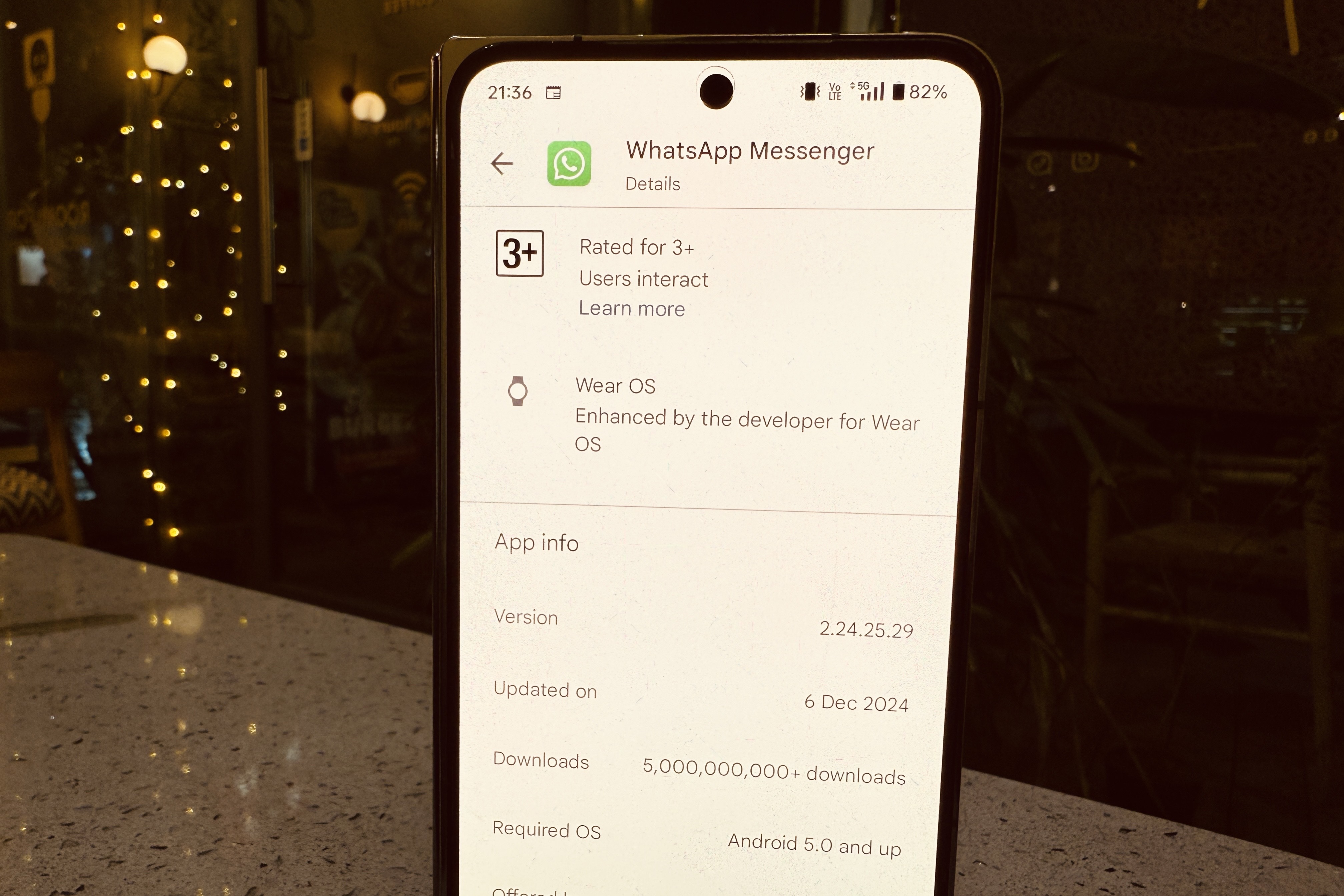
    Currently undergoing testing with the v2.24.25.29 build on Android, this feature was initially identified by the update tracker WABetaInfo. Our team at DigitalTrends has verified that it is available in the latest beta version through the Google Play Store.

    Users can toggle this feature on in the Notifications settings, allowing the app to send occasional nudges regarding “messages or status updates” that haven’t been viewed for some time. The specific frequency of these alerts—whether they are displayed as in-app reminders or stand-alone notifications—remains unclear.

    Furthermore, the app doesn’t clarify how these notifications are prioritized, especially whether they focus on contacts with whom users frequently interact. However, according to WABetaInfo, this functionality appears to rely on an algorithm based on user engagement patterns.

    “If a user reinstalls the application, WhatsApp will need to reassess these interactions since none of this data is retained in backups or stored on their servers,” the report states. The primary aim is to ensure that users don’t overlook important messages from friends and family.

    Latest beta build of WhatsApp on the Play Store.
    The Reminders feature is now available with the latest beta update on the Play Store. Nadeem Sarwar / Digital Trends

    While this new feature may not seem revolutionary, it holds significant potential, especially in regions where businesses—from banks to telecom services and grocery delivery giants—rely heavily on WhatsApp for critical communications and alerts.

    Numerous small businesses and marketplaces also utilize WhatsApp for customer outreach, including digital payment integrations. As a result, the influx of messages from various services can quickly overshadow personal messages, making this Reminders feature a beneficial addition.

    The concept is reminiscent of the “nudge” system found in Gmail, which first appeared in 2018 and was later adopted in Google’s Messages app. In that framework, users receive alerts about texts that need follow-up or reminders about birthdays.

    As of now, there’s no indication of when this Reminders feature will be made available to WhatsApp users through the stable release. With nearly three billion users globally, according to estimates from Statista, WhatsApp serves as a vital communication tool in both personal and business contexts, particularly in areas like Asia and Latin America. Providing users with the chance to catch up on potentially missed messages is certainly a positive advancement.

  • How do burner phones work?

    How do burner phones work?

    Burner phones have gained popularity for their anonymity and convenience in various situations. Whether used for privacy reasons or temporary communication, understanding the mechanics behind these devices helps users grasp their advantages and limitations.

    What is a Burner Phone?

    A burner phone is a prepaid mobile device often used for short-term communication. Unlike regular phones tied to a specific carrier or contract, burner phones allow users to purchase and use them without long-term commitments or personal information requirements.

    Characteristics of Burner Phones

    • Prepaid Usage: Users buy them with prepaid minutes or data plans, making them ideal for temporary use.
    • No Contracts: There’s no need for a long-term contract, so users can dispose of or stop using the phone any time.
    • Limited Features: They typically offer basic features compared to smartphones, focusing on calls and text messages.
    • Anonymity: Users can maintain a level of privacy, as burner phones often don’t require extensive personal information for activation.

    How Burner Phones Operate

    Burner phones function similarly to standard mobile devices, but several key factors distinguish them.

    Activation Process

    1. Purchase: Users can buy burner phones at retail stores or online, often without providing any personal identification.
    2. SIM Card Installation: After purchasing, the user inserts a prepaid SIM card that connects to a mobile network.
    3. Top-Up Options: Users must add credit to the SIM card, usually available through various retailers or online platforms.

    Communication Mechanism

    • Voice Calls and Texts: Users can make calls and send texts just like regular phones, relying on the cellular networks of service providers.
    • Limited Internet Access: Some burner phones offer limited data services, but many models focus primarily on voice and text functionalities.

    Reasons to Use Burner Phones

    The use of burner phones varies based on individual needs. Here are some common scenarios:

    Privacy Protection

    • Avoiding Tracking: Individuals concerned about surveillance or tracking may opt for burner phones to keep their communication private.
    • Anonymous Communication: Burner phones allow users to engage in conversations without revealing their identity.

    Temporary Solutions

    • Travel Needs: Travelers often use burner phones to avoid international roaming charges while staying connected.
    • Short-Term Projects: Professionals may use these phones for specific campaigns or contracts, separating work and personal life.

    Safety and Security

    • Protection from Harassment: Individuals in sensitive situations might use a burner phone to evade persistent contacts or harassment.
    • Emergency Situations: Having a backup phone can be helpful during emergencies when a primary device may fail or be lost.

    Limitations of Burner Phones

    While burner phones offer distinct advantages, they also come with certain drawbacks.

    Limited Functionality

    • Basic Features: Users may find that burner phones lack the advanced capabilities of modern smartphones.
    • No App Support: Most burner phones do not support popular applications or services, limiting their usability.

    Short Lifespan

    • Credit Expiration: Prepaid minutes or data can expire quickly, rendering the phone useless if not actively topped up.
    • Physical Durability: Many burner phones are designed for temporary use, often lacking the durability of flagship models.

    Legal Considerations

    Using a burner phone can raise legal questions, especially regarding compliance with laws:

    Lawful Usage

    • Legitimate Reasons: Communication for legal activities is permissible, while using them for illicit purposes can lead to serious consequences.
    • Potential Monitoring: Law enforcement may monitor burner phone activity, especially in crimes or investigations.

    Best Practices

    • Avoid Illegal Activities: Use burner phones responsibly to avoid legal repercussions.
    • Dispose of Correctly: Properly dispose of burned devices to prevent recovery of sensitive information.

    In understanding how burner phones work, users can navigate their benefits and restrictions effectively, making informed choices for their communication needs.

  • Exciting Update About Microsoft Teams

    Exciting Update About Microsoft Teams

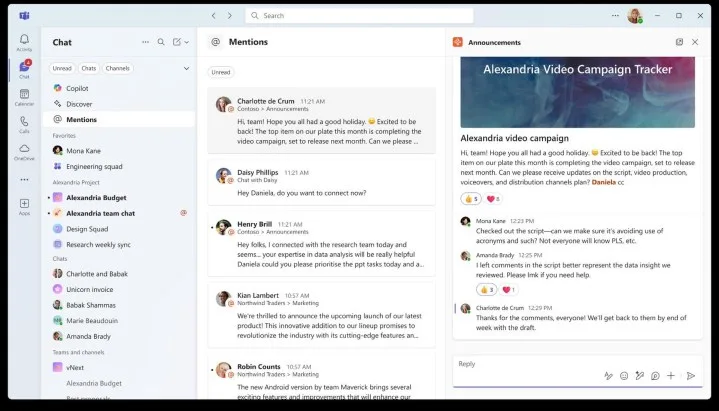
    Microsoft is set to implement several updates to its Teams app soon, as reported by The Verge. One major enhancement includes a unified view for chats and channels that will enter public preview next month. Additionally, threaded conversations are expected to be introduced in 2025.

    Currently, the Teams app separates your one-on-one and group chats into one section and your channels into another. Although the channels are just a quick click away from the chats tab, this extra step can impede efficient communication.

    When users are unable to keep track of all new posts in a single location, it becomes challenging to manage various communication channels, leading to potential oversights. The new combined view will allow users to see both chats and channels collaboratively, enabling them to organize their communications according to their preferences.

    Merged chats and channels view on Teams.
    The Verge

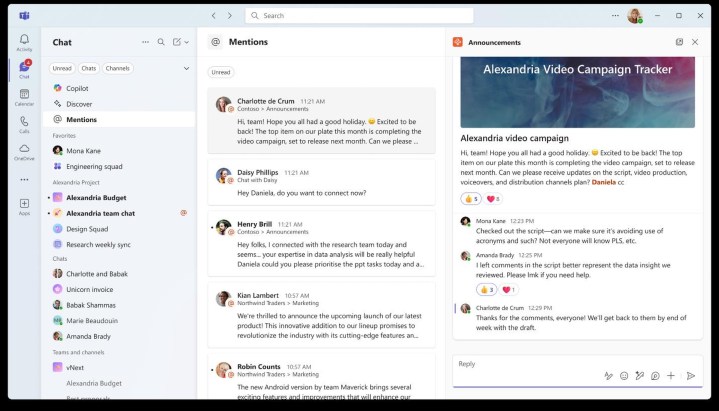
    A new Favorites section at the top will allow users to pin their most frequently accessed chats and channels, and they can also thematically group their chats and channels. The interface will retain distinctive icons: circle icons for chats and square icons for channels, ensuring each is easily identifiable.

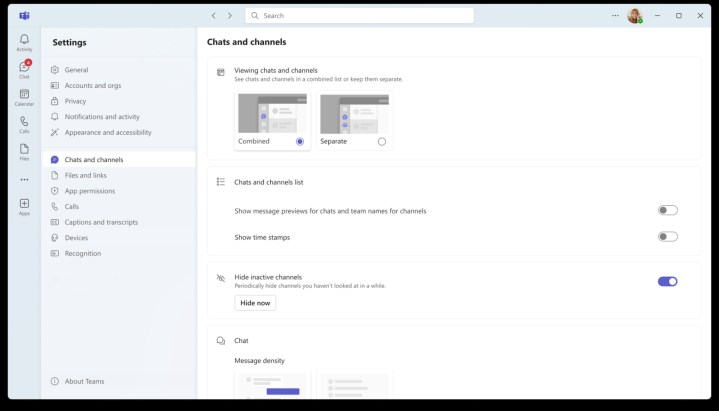
    Additional features are on the horizon, including enhanced message previews and the ability to manage time stamps. A view for @mentions will help users swiftly address priority messages without overlooking anything important.

    Screenshot illustrating new features on Teams app.
    The Verge

    These updates are expected to roll out for both desktop and mobile versions, so be sure to update in November to experience the new features. While threaded conversations may take some time to arrive, their eventual introduction promises to streamline chats, keeping the main feed clear with only the initial message visible and allowing users to click to reveal replies.

    Although Microsoft Teams often receives criticism compared to other messaging apps like Slack, these improvements appear to be a positive move toward enhancing user experience.