Tag: co-op

  • How Does Co-op Mode Work in Where Winds Meet: Completing and Solving

    How Does Co-op Mode Work in Where Winds Meet: Completing and Solving

    Traveling alone across the land in Where Winds Meet can be challenging, but it doesn’t have to be for long. You can meet new friends on your journey and invite them to join you, which benefits everyone. Getting started takes just a few moments, and soon you’ll be ready to explore together.

    We’ll guide you through everything you need to know about making friends, matching up with others, and working together to complete quests and tasks. Once you start playing in co-op mode, it’s hard to go back to playing solo for long stretches. Here’s how you can invite your friends to join you in Where Winds Meet.

    ### How Does Multiplayer Work in Where Winds Meet?

    There are various ways to join multiplayer modes. The easiest is to hop into the online map, although some quests and features may be limited in this mode. Alternatively, you can invite players to your world on the solo map, allowing you to play together in a traditional cooperative way.

    ### How To Add Friends

    You can add friends through the social menu, either by searching for their username or user ID number. In the social menu, select the friends tab and then choose the option to add a new friend. You can search for people you know, or you can send friend requests to players you meet on the multiplayer online map.

    ### How To Switch Between Solo and Multiplayer

    At the top of your screen, you’ll see an icon that shows either a lone warrior or a group. Clicking this icon allows you to switch between the solo and online maps. In the solo map, other player characters won’t appear unless you invite them, but the multiplayer online map is full of players like you.

    Switching modes is as simple as toggling the icon. Keep in mind that changing maps will teleport you to the nearest safe spot you’ve unlocked. If you want to fast travel, make sure to unlock nearby boundary stones first.

    Some features, such as wild horses and certain quests, are not available in online mode but can be resumed in solo or co-op play.

    ### How To Use Co-Op Matchmaking

    In the same menu where you switch to the online map, you’ll find the option to start co-op through solo matchmaking. Here, you can create a room for up to five players, and you will travel together across the solo map as a team.

    As your co-op team advances, you’ll earn adventure slips that can be traded for new items in the shop.

    ### How To Assist Other Players

    If other players are stuck on a boss or puzzle, they can send a help request via an assistance signpost. This allows you to connect with them and work together to complete objectives. Accepting help doesn’t happen automatically—you’ll need to wait for their approval before proceeding. Use the matchmaking menu to team up and overcome tough obstacles.

    ### Does Where Winds Meet Have Voice Chat?

    Yes. You can talk with other players using voice chat, especially when visiting guild bases. Open the chat menu, then navigate to the Windtail Lounge. There, you can join voice chat rooms to communicate with others. You can leave these menus anytime, and microphone settings can be adjusted in the options menu.

  • Top Co-Op Teams in Borderlands 4 for Completing and Solving

    Top Co-Op Teams in Borderlands 4 for Completing and Solving

    Building a strong Vault Hunter is tough, but assembling a team of skilled characters can make it easier. In Borderlands 4, some pairings work perfectly together, while others just get the job done. We’ll discuss which duos and teams create the best cooperative experience, whether you’re just starting or a seasoned player.

    Each character has unique abilities. Depending on who you choose, you’ll want teammates who can support or complement your strengths. Here’s a breakdown of the Vault Hunter lineup and the best partnerships for duo and team play.

    ### A Coven of Witches

    Imagine an entire team of Siren characters using The Fourth Seal skill tree. Each Siren can summon up to four clones, creating an army of 20 units — four clones plus the original four Sirens. While not practical for every situation, it’s impressive to see. Each clone can have a different elemental alignment, allowing you to unleash a storm of elements on enemies. Whether you swarm opponents with Specters or send out Reapers, it’s highly satisfying to see a large militia attacking.

    Beyond clone summoning, Vex can also cast Eldritch Blast and fly around as a vampire-like figure, or you can assemble a team of Trouble Tigers, giant elemental predators that mark enemies and make battles easier. Mixing elemental types and abilities adds variety and excitement. Just keep communication clear for the best results, and you can even color-code your team to match elemental powers.

    ### The Siren and The Exo-Soldier

    Vex and Rafa are a great pair, working together to maximize their strengths. Vex can focus on marking enemies and summoning her companion, while Rafa excels at melee combat and melee-based marking with his Arc-Knives. Rafa approaches enemies directly, drawing fire, while Vex stays back and uses her ranged attacks. When paired, they effectively limit enemies’ options and deal continuous damage.

    Swapping elemental powers—like Shock or Corrosive—between Trouble and Rafa enhances their synergy. Vex’s Clone and Familiar support helps her partner, providing extra firepower and coverage. Together, they can quickly take out bosses or clear the campaign, with Vex’s clones providing support for Rafa’s melee attacks. Alternatively, Rafa can heal himself with melee strikes while Vex drains enemies’ health, creating a powerful duo that’s tough to beat.

    ### The Gravitar and The Exo-Soldier

    Harlowe and Rafa make a supporting team, especially effective because Harlowe can buff allies with her Flux Generator to increase damage. Both can link attacks to control enemies and deal continuous damage, enabling battlefield dominance without risking their own lives.

    Using grenades, both characters can control crowds over a wide area. Although more technical, this combo rewards players who enjoy a strategic approach. For maximum effectiveness, gear them with Maliwan weapons, which are great for elemental synergy.

    ### The Viking and The Siren

    Amon the Viking and Vex create a flexible and powerful duo. Amon can switch between Cryo and Incendiary damage, offering versatile attack options. Vex thrives on Kinetic damage but can swap her element and abilities using Trouble, her Companion.

    Amon’s ability to attack from afar or up close makes him a durable tank, taking hits and drawing fire, while Vex heals herself through lifesteal and supports from a distance. Their combined skills allow them to handle various situations with ease, especially when Vex supports Amon with her clones and summoning powers.

    ### One of Each

    A fun choice is to assemble a team of all four different Vault Hunters. This mix offers a lot of versatility: Harlowe supports with her Flux Generator, Rafa and Amon balance melee and ranged attacks, and Vex provides support and firepower from afar. They can handle different elemental powers, and with good coordination, each character gets their moment to shine.

    While communication is important, this diverse team can cover many roles and adapt to different challenges. Using a variety of weapon types, especially assault rifles, enhances their firepower, making the team even more effective.

    Creating strong partnerships and balanced teams can significantly improve your experience in Borderlands 4. Whether you prefer dedicated support, heavy hitters, or a mix of characters, the right combinations will help you face any challenge.

  • Can You Play Cross-Platform and Completing in Helldivers 2?

    Can You Play Cross-Platform and Completing in Helldivers 2?

    To combat the massive waves of aliens and robots in Helldivers 2, it’s best to play with others. Entering a mission with friends makes the tasks easier and quicker, allowing you to level up faster. The game has also removed barriers that previously prevented cross-platform play, so you can team up with players on different systems like Xbox without trouble.

    While the cross-play feature is a big plus, setting it up can be confusing since the game doesn’t provide clear instructions. If you want to be effective at managing your team and democracy, playing in a squad is essential.

    Can You Play Cross-Platform in Helldivers 2?
    Yes, Helldivers 2 supports cross-play. When you get into matchmaking, there’s a good chance you’ll be paired with players on platforms different from yours. It’s designed to happen automatically, so you just need to join a match.

    However, adding friends on other platforms can be tricky because the system isn’t very straightforward. The good news is, once you’ve added someone on a different device, you only need to do it once.

    If you’re inviting players who are on the same system as you, you won’t need to follow these steps because they should already be in your friends list.

    How To Add Friends
    Once you’re in the game, go to the Social Tab by pressing ‘O’ on your keyboard or the right stick (R3 on PS5 and RS on Xbox) on your controller. In this menu, select the option that generates a Friend Code. Share this code with the person you want to add.

    They can then input your Friend Code in the search bar at the top of their social menu. If entered correctly, you’ll receive a friend request.

    If the system isn’t working properly, try toggling the cross-play option on and off in the gameplay settings menu.

    Once your friends appear on your list, you can send them invites to join a party or join theirs if they have one ready.

    Does Helldivers 2 Have Cross-Progression?
    No, Helldivers 2 does not support cross-progression. If you switch to a different platform, you’ll need to start your progress from scratch.

    This can be frustrating if you want to switch systems and keep playing without losing your progress. While the game supports cross-play, each account is tied to one system’s saves and data.

    Right now, the developers haven’t announced any plans to add cross-progression in future updates. If maintaining your progress across devices is important, choose your preferred platform before spending many hours in the game.

    Tips For Playing Multiplayer
    Success in multiplayer depends heavily on coordination. The weapons, Stratagems, and armor you and your teammates bring will often determine the outcome of each mission.

    Pick Weapons That Complement Each Other
    Don’t all choose the same loadout. For example, one player might use the AR-23P Liberator for consistent damage against medium armor, while another brings a shotgun or SMG to deal with hordes up close. Assign roles so your team covers a variety of threats effectively.

    Remember to upgrade your weapons regularly to maximize their impact as you level up.

    Coordinate Your Stratagems
    In multiplayer, overlapping Stratagems waste valuable slots. Divide responsibilities: one teammate might handle heavy weapons like the Stewart or Heavy Machine Gun, another provides support gear such as a jump pack or ammo resupply, and someone else deploys turrets or calls in orbital strikes.

    Always communicate before deploying Stratagems to avoid redundancy, like multiple orbital assaults at once.

    Balance Armor Across The Squad
    Not everyone needs to wear heavy armor. For tougher difficulties, a mix works best. Have a few teammates in heavy armor to absorb damage, while others wear lighter gear for agility and completing objectives. This balance helps your team move faster and accomplish more efficiently.

  • Cyberattacks Shock UK Retailers: M&S Hits £700M Loss in Days

    Cyberattacks Shock UK Retailers: M&S Hits £700M Loss in Days

    Sure! Here’s a rewritten version of the content in American English, maintaining its essence while making it unique and plagiarism-free:

    A contactless payment card reader at an M&S Food Hall in London, UK on April 30, 2025. Reuters

    LONDON: Several major retailers in the UK have faced significant setbacks due to recent cyberattacks, with Marks & Spencer (M&S) suffering a loss of £700 million in market value within a week and still unable to fulfill online orders.

    Entering their second week of disrupted online orders, M&S experienced a major cyber incident last week, while the Co-op Group disclosed that hackers had compromised customer data.

    Since the hacking incident was disclosed, M&S has seen a £700 million ($930 million) drop in its stock market valuation. The recent troubles faced by the Co-op and Harrods, a London department store, prompted the UK’s National Cyber Security Centre (NCSC) to label these incidents a “wake-up call.”

    In recent years, British companies, public institutions, and organizations have been under a barrage of cyberattacks that have cost them millions and often led to months of operational disruptions.

    M&S, a well-established name in British retail for 141 years, halted clothing and home goods orders via its website and app starting April 25, following issues with contactless payment and click-and-collect services over the Easter bank holiday weekend.

    The Co-op initially announced a cyberattack on Wednesday but revealed on Friday that sensitive information related to many current and former members—such as names, contact information, and dates of birth—had been compromised.

    Ciaran Martin, the former CEO of the NCSC, told Reuters that currently, there’s no indication that the attacks on M&S, the Co-op, and Harrods are interconnected, suggesting that the latter two incidents might have been uncovered due to increased alertness following M&S’s breach.

    “If this can happen to M&S, it could happen to anyone,” he remarked, emphasizing that recovery from such a significant attack often takes a considerable amount of time.

    On Friday, M&S CEO Stuart Machin issued another apology to customers but did not provide a timeline for restoring online ordering.

    “We are working tirelessly to manage the current cyber incident and aim to return to normal operations for you as swiftly as possible,” he communicated in an email to M&S customers.

    With M&S operating approximately 1,000 stores in the UK and generating about one-third of its clothing and home sales online, analysts predict a temporary decline in profits is unavoidable.

    While M&S has refrained from disclosing the financial impact, it continues to grow as they miss sales opportunities for new seasonal collections amid a record-breaking hot May in the UK.

    Last year, commuters faced nearly three months of account lockouts following a cyberattack on London’s transport authority, TfL. Another assault on a blood testing processing company in London also disrupted services for over three months.

    Some food items have been affected in specific M&S locations, and broader disruptions appear to be impacting the company, which has removed job postings from its website.

    M&S shares closed down by 1%, bringing their losses since Easter to about 9%.

    ‘Increasingly Sophisticated’ Attacks

    Helen Dickinson, CEO of the British Retail Consortium, noted that cyberattacks are becoming “more advanced,” compelling retailers to invest hundreds of millions annually in cybersecurity measures.

    “All retailers are constantly updating their systems to ensure maximum security,” she added.

    According to technology site BleepingComputer, a ransomware attack believed to have been executed by a hacking group called “Scattered Spider” targeted M&S’s servers.

    The NCSC is collaborating with the affected retailers, while the Metropolitan Police’s Cyber Crime Unit and the National Crime Agency (NCA) are probing the M&S incident.

    “These incidents should serve as a wake-up call for all organizations,” stated NCSC head Richard Horne.

    Labour MP Matt Western, who chairs Parliament’s Joint Committee on the National Security Strategy, expressed that the government needs to take stronger measures to prevent large-scale cyberattacks.

    “As the government wraps up its consultation on strategies to combat ransomware, I hope its response addresses these threats with the seriousness they warrant.”

    Let me know if you need any further adjustments!

  • Team Up with Friends: Co-Op Play in Ravenswatch

    Team Up with Friends: Co-Op Play in Ravenswatch

    Quick Links

    Ravenswatch shares several features with games like Hades, but it distinguishes itself by allowing solo play or online teaming with up to three other players.

    Playing alone can be enjoyable, but teaming up with friends enhances the experience. You’ll have the advantage of distributing enemy attacks since not every foe will be targeting you. Plus, exploring more of the map in each chapter becomes easier with additional players. However, setting up multiplayer—whether with friends or in public games—can be a bit tricky and requires navigating through several options in Ravenswatch’s menus.

    How To Invite Friends

    To get your friends into your Ravenswatch lobby, open the game’s menu, which resembles a book. You’ll notice three plus icons under your character on the left page.

    Click on one of these icons, and a list of your friends will appear. Simply choose a friend to send an invitation to join your game, then wait for them to accept.

    Note: The menu only shows friends who are online and currently playing Ravenswatch.

    Alternatively, you can share your lobby code found at the bottom of the right page on the same screen. This code is a six-digit number.

    How To Join Friends

    If you want to enter a friend’s lobby using their code, go to the multiplayer menu and type their code into the designated box. This action will connect you to their lobby, where you can wait for them to kick off the game.

    You can also wait for your friend to invite you if you prefer not to use the code.

    The lobby code is particularly helpful when you want to join a game hosted by someone you know but aren’t friends with on the gaming platform.

    How To Play Public Multiplayer

    Another way to join multiplayer sessions in Ravenswatch is by entering a public lobby. This process is straightforward. Simply press triangle/Y or select the respective menu option to launch a search for public lobbies.

    Make sure to choose your desired difficulty level before starting the search, as this will affect your potential matches.

    Enjoy your adventures in Ravenswatch, whether you go solo or with friends!

  • How to Play Co-Op in Lego Horizon Adventures: A Complete Guide

    How to Play Co-Op in Lego Horizon Adventures: A Complete Guide


    Sony Interactive Entertainment

    Lego games have always been a great choice for cooperative play, thanks to their inviting design and engaging gameplay. Lego Horizon Adventures takes this to a new level by reimagining robotic dinosaurs as Lego creations. This game embraces its cooperative roots, making it a wonderful experience for both friends and family, with support for cross-platform play. Here’s how you can enjoy it with your preferred gaming buddy.

    Difficulty

    Easy


    Duration

    5 minutes

    What You Need

    • One or two copies of Lego Horizon Adventures

    • Two PlayStation 5 or Nintendo Switch controllers

    • Completion of the prologue

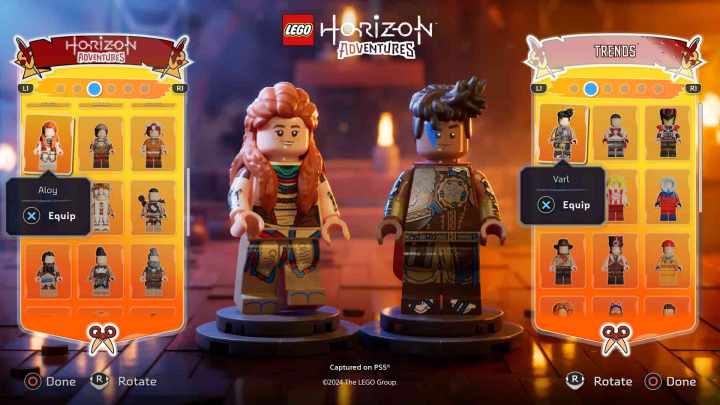
    Aloy and Varl customizing their outfits in Lego Horizon Adventures.

    Sony Interactive Entertainment

    How to Play Local Co-Op

    Local co-op is an excellent way to dive into Lego Horizon Adventures alongside your gaming partner, allowing for a seamless drop-in/drop-out experience whenever you choose. All it requires are two controllers for the PlayStation 5 or Nintendo Switch.

    Step 1: Launch Lego Horizon Adventures on your console.

    Step 2: Make sure to complete the prologue section.

    Step 3: When prompted at the bottom right of the screen, hit the Options button on the second controller to join the game.

    How to Play Online Co-Op

    With the release on both PS5 and Switch, Lego Horizon Adventures also includes online co-op that supports full cross-platform play. Here’s how to get connected online:

    Step 1: First, complete the prologue chapter.

    Step 2: Open the menu by pressing the Options button.

    Step 3: Invite your friends from your friends list to join your game.

    The co-op experience in Lego Horizon Adventures features a drop-in/drop-out style, meaning play doesn’t have to pause for someone to join or leave the session. Keep in mind that co-op supports a maximum of two players at a time, whether playing locally or online.