Tag: Chaos

  • What’s Known About the Gunfire at the White House Correspondents’ Dinner

    A glamorous Saturday night in a Washington ballroom intended to celebrate the White House Correspondents’ Association turned chaotic after gunfire erupted. President Donald Trump was seated on stage at his first appearance at the event as president when loud bangs interrupted the festivities, prompting alarm among attendees.

    Footage from AFPTV, other news organizations, and AFP reporters on-site revealed a scene in disarray. Following the gunfire, urgent shouts of “Stay down!” and “Get down!” echoed across the room as numerous guests, including journalists, government officials, and members of Trump’s cabinet, quickly took cover.

    Amidst the turmoil, Trump was swiftly surrounded by Secret Service agents armed and ready, who hurried him off the stage and through a rear curtain as the crowd crouched in shock. The musical performance abruptly halted, and the attendees, dressed in evening gowns and tuxedos, quieted as agents moved through the room, securing the area of the Washington Hilton— the same hotel where President Ronald Reagan narrowly escaped an assassination attempt over four decades ago.

    As reports of gunfire spread, Mehmet Oz, who oversees the Centers for Medicare and Medicaid Services under Trump, was seen being evacuated by security personnel. Also among those hurried out was Health and Human Services Secretary Robert F. Kennedy Jr., whose uncle, President John F. Kennedy, was assassinated in Dallas in 1963.

    Law enforcement quickly detained a person of interest after the incident, with authorities confirming that both the President and First Lady Melania Trump are safe. An official statement from the Secret Service indicated they are investigating the shooting near the main security checkpoint for the event, with one individual in custody. It remains uncertain whether the suspect fired the shots or if security responded with gunfire.

    By around 8:40 p.m. (0040 GMT), police were seen rushing through the streets surrounding the Hilton, clearing traffic and lifting barriers as a helicopter orbited overhead. A motorcade later departed the hotel heading toward the White House.

    Inside the evacuated ballroom, witnesses recounted hearing the chaos and seeing the Secret Service deploy to protect the president. Alexandra Ingersoll, a journalist for One America News, described crouching under a table, uncertain if the situation was under control. Guests disbursed into the Hilton lobby, where they embraced, made calls, and texted loved ones while officials issued further statements.

    Later, the Secret Service confirmed they are investigating a shooting incident near the main security screening point for the event. They assured the public that everyone in their protection, including the president, remains safe, and that one individual has been taken into custody. The details about whether anyone was wounded or if gunfire was exchanged were not immediately available.

  • How to Complete the Chaos Garden Puzzle in Crimson Desert

    How to Complete the Chaos Garden Puzzle in Crimson Desert

    Crimson Desert features many puzzles that you need to solve to improve your character’s weapons and skills. Some are hidden in the open world, and others are located on floating islands in the sky.

    One of the early Abyss puzzles you’ll come across is after finishing the Spire of Insight. It’s called the “Chaos Forest.” Here’s how to solve it and what rewards you get.

    Chaos Forest Puzzle Solution

    When you reach the Chaos Forest, head straight to the large stone door in front of you and use the Nature’s Grasp ability to lift it open. Walk onto the main island, but watch your step — thorn bushes are everywhere. If you have the Flame Strike ability, use it on the thorn bushes to the right and around the big water pool to burn them away.

    If you don’t have Flame Strike, you can use your Blinding Flash ability. Hold down the Left Bumper and Right Bumper, then release the Left Bumper to send a beam of sunlight at the thorns. After a few moments, the thorns will catch fire and burn away.

    Once the thorns are gone, look down to the lower platform on your right. There, you’ll find an Abyss Core on fire. Use Axiom Force to grab it, then carefully carry it to the nearby pool of water. Dunk it in to cool it down, then place it into the slot you revealed when the thorns were burned away. Use Force Palm to slot it in and restore power.

    After that, jump across the gap to the other side. Once across, turn left into the side room and burn away the two sets of thorns again. Head toward the area where the large bunch of thorns once was, and find another section you can lift with Nature’s Grasp. Lift the barrier open to find a second Abyss Core. Place this in the slot inside the small room. Then, grab one of the column pieces lying on the ground.

    Pick up a column piece and carry it over to the door you entered through. Lift the door using Nature’s Grasp again, and place the column under where the door would fall. This setup keeps the power connection from the room to the switch outside intact. It only takes one upright column to ensure the door stays open enough for the connection to work.

    Head back to the switch and hit it with Force Palm to activate the puzzle and finish the Chaos Forest. Afterward, climb up to the platform above to grab an Abyss Artifact near the altar. You can continue exploring by heading right from this spot toward the triangular gate. There, you’ll find a podium you can activate with Axiom Force to create platforms that lead to the next main Abyss puzzle.

  • How to Earn Chaos Points in YapYap by Completing and Solving

    How to Earn Chaos Points in YapYap by Completing and Solving

    YapYap is a chaotic multiplayer game where you and your friends cause destruction in rival castles with your wands. You can smash anything you see, fight monsters, and complete a race against time to finish your mission. The goal is to cause as much chaos as possible before the clock runs out and you find the extraction tower.

    At the start of each three-night run, you’ll see a quota in the top-right corner of your screen. Once you’ve met this goal, you can choose to rest and move on or keep playing to earn extra rewards. Your quota depends on how much damage you’ve done to the castle, and completing your contract objectives can help you reach your quota faster. You can view your contract in your base area near the wand tree, and while exploring castles, you can pick up additional contracts to guide your destruction efforts.

    For more chaos, you can buy the Grotesque Wand from the vendor outside your home base once you’ve completed a few quotas. This wand offers three new spells: Piss-Yuk, Achoo!, and Fish-Yuk. The best one for racking up chaos points is Piss-Yuk. Use it on paintings, furniture, or pottery—they won’t break, but you’ll quickly rack up chaos points. Some contracts may specifically ask you to use Piss-Yuk on certain items or monsters, as it causes slime to expand and explode.

    In addition to the wand of chaos, fire is your best friend. You don’t need to buy a Wand of Fire because you can just grab large candles and torches around the castle and hold them to anything that looks flammable, even if it seems unlikely to burn. Buying a torch from the vendor isn’t necessary since there are plenty around you. Burning books can also help fulfill your contracts, as many objectives include setting things on fire.

    The Aero spell is a quick way to cause destruction. When you start the game, you’ll be given a basic wand capable of causing significant area damage. The Aero spell can be cast three times before recharging, and it violently blows away everything in its target zone. Use it on breakable objects or bookcases for massive destruction in a single cast, earning you lots of chaos points quickly. This spell is perfect for breaking lots of items fast and boosting your chaos tally.

  • How to Defeat All for One Chaos in My Hero Academia: All’s Justice

    How to Defeat All for One Chaos in My Hero Academia: All’s Justice

    The final chapter of My Hero Academia: All’s Justice is called “We Are Here,” and this is where you’ll face the game’s ultimate boss, All For One Chaos. As the name suggests, you play as most of Class 1-A, giving Deku some breathing room to recover and finish off All For One once and for all.

    This battle isn’t just tough; it’s a long, stamina-testing marathon. You’ll need to get through eight rounds, defeating All For One Chaos each time. The first seven rounds involve teams of two or three Class 1-A characters working together, while the last round puts you back in Deku’s shoes to fight an even stronger version of All For One.

    Here are the team lineups for each round:

    • Round 1: Hanta Sero, Mashirao Ojiro, Rikido Sato
    • Round 2: Denki Kaminari, Momo Yaoyorozu, Minoru Mineta
    • Round 3: Shoto Todoroki and Endeavour
    • Round 4: Kyoka Jiro and Present Mic
    • Round 5: Tsuyu Asui, Mezo Shoji, Koji Koda
    • Round 6: Mina Ashido and Eijiro Kirishima
    • Round 7: Tenya Iida, Yuga Aoyama, Toru Hagakure
    • Round 8: Deku faces off against a powered-up All For One

    If any team gets defeated during the fight, you’ll have to restart the entire chapter. That means mastering the fight’s mechanics, dodging the overpowered moves of All For One Chaos, and using each character’s strengths effectively. Let’s look at some of his moves and how to counter them.


    All For One Chaos’ Moves and How to Counter Them

    Thorn Projectiles:
    At the start of the fight, he fires a barrage of dark thorns. He lifts both arms to trigger this attack. While dodging with perfect timing is possible, it’s easier to block and absorb the damage, then retaliate.

    Laser Turrets:
    He deploys turrets on the ground that blast massive laser beams. These can deal heavy damage if they hit you, so your best strategy is to jump over them and approach him while he’s firing. This often leaves him vulnerable, making it a good opportunity to attack.

    Ground Sweep:
    This attack involves dark arms sweeping along the ground to crush you. The safest way to avoid it is to jump over the arms, requiring quick reflexes. Later in the fight, he may create a large energy field with the arms stampeding in it, which is easier to dodge as you can simply avoid the area, leaving him exposed.

    Orb Projectiles:
    He summons red and black orbs that hover briefly before transforming into spikes and damaging anyone nearby. The best move is to dodge or jump dash after the flashes. Later, he can send these orbs flying at you, so keep an eye on them and watch for timing cues.

    Underground Thorn:
    He sends a thorny spike through the ground toward you. As soon as you see the ground move, dodge sideways or run away to avoid the spike. After some rounds, he can create a large field with falling thorns, which is easier to avoid since he stays still while attacking.

    Melee Swipes:
    While he doesn’t punch often, he may close in and swipe with his dark wings, especially if you attack him too much. Dodging or evading when he’s preparing to strike is best, as he often teleports away after these attacks, giving little opportunity to hit him.

    Explosion:
    This is his big revenge move, charging up energy to unleash a huge explosion. After taking a hit, you can sometimes run or dodge to reduce damage, but it’s nearly unavoidable if you’re close. During Deku’s last phase, he can create a variant that almost kills you instantly, so be prepared to use your Plus Ultra to heal when needed.

    Minefield:
    Later in the fight, he places a field of thorny orbs that deal critical damage if you run into them. Stay back, use ranged attacks, and avoid getting too close to clear the minefield.


    Tips and Tricks

    Depleting All For One’s armor and stunning him is key; sometimes rushing in to break his armor can be worthwhile. When his armor is down, attack aggressively and rotate teammates to maximize combo potential, ending with a powerful Plus Ultra attack before he recovers.

    Most of his attacks are less effective from behind, so try to stick to his back whenever possible, avoiding front-facing moves. Use projectiles from a distance to maintain room and keep him off balance.

    During Deku’s final phase, save up Plus Ultra for healing, as any attack here can restore a large chunk of his health. Remember, if you can activate an emergency dodge at the right moment, you can avoid some of his most devastating attacks.

    Summary:
    Success hinges on pattern recognition, quick reflexes, and efficient use of your characters’ quirks and counterattacks. Staying behind him, dodging at the right moments, and managing your Plus Ultra wisely are your best bets to overcome All For One Chaos. Be prepared to restart and refine your strategy, and consider updates or patches in the future that might make the fight more manageable.

  • Completing All South Park Born in Chaos Rewards in Fortnite: Chapter 7, Season 1

    Completing All South Park Born in Chaos Rewards in Fortnite: Chapter 7, Season 1

    South Park has now appeared in Fortnite, along with the free Born in Chaos Pass. This pass is available at no cost, so you don’t need to spend V-Bucks. By completing various quests, you can earn 13 rewards, including themed items from South Park.

    For detailed information on which items you can unlock, how to earn Cred and Memberberries, and the steps to complete each quest, you’re in the right place. Here’s everything you need to know.

    Updated January 26, 2026: This article now includes the latest quests.


    How Long Does the Born in Chaos Pass Last?

    The Born in Chaos Pass is available from today, January 9, until February 5, 2026. After this period, you won’t be able to complete the quests or earn rewards. Make sure to finish all quests and claim your rewards before time runs out.


    All Born in Chaos Rewards

    The pass offers a variety of rewards such as emotes, sprays, banners, and more. Here’s what you can earn:

    Reward Cred Required
    Rest Well, Kenny Emoticon Emote 1,000 Cred
    Level Up (Season Level Increase) 2,000 Cred
    South Park Banner Icon 3,000 Cred
    Backpack of Cred Back Bling 4,000 Cred
    Level Up (Season Level Increase) 5,000 Cred
    Awesom-o Attack Spray Emote 6,000 Cred
    Born in Chaos Loading Screen 7,000 Cred
    Level Up (Season Level Increase) 8,000 Cred
    Towelie! Emoticon Emote 9,000 Cred
    Cheesy Poofs Rocketship Emote 10,000 Cred
    Awesom-o Spray Emote 11,000 Cred
    Terrance and Phillip Pickaxe 12,000 Cred

    How to Earn Cred

    Cred is earned by completing the quests in the Born in Chaos Pass. Completing these quests will unlock the rewards listed above.


    How to Unlock the Imaginationland Airship Glider

    To unlock the Imaginationland Airship Glider, you need to collect all six Memberberries by completing specific quests. The event will be broken into six parts, each adding new quests over the next five weeks.

    How to Get Memberberries:
    Each week, new quests will be added, and one of these will reward a Memberberry once four quests are completed. It’s likely that each week’s Memberberry quest will be the same, requiring completing four of that week’s new quests.


    All Born in Chaos Quests and How to Complete Them

    The quests are divided into parts, each with multiple objectives. Here’s a breakdown of the first set:

    Part 1 – Friendly Faces Everywhere:

    • Complete four batch quests to earn a Memberberry.
    • Ride five different rides or eliminate players at Cartmanland.
    • Hit 100 opponents with SMGs.
    • Be knocked down and then eliminate a player.
    • Defeat a boss.
    • Use portable toilets (Flushers) in three different matches.
    • Deal 200 damage to opponents within ten seconds of swimming.

    Part 2 – Sweet!

    • Complete four part 2 quests to unlock a Memberberry.
    • Spray or emote near Cartman’s statue.
    • Eliminate five with assault rifles.
    • Complete two matches without using ziplines or ascenders.
    • Emote on the stage at Cartmanland.
    • Maintain vehicle speed below 40 for 30 seconds.
    • Use the Stick of Truth.

    Part 3 – You Know I Learned Something Today:

    • Complete four part 3 quests to unlock a Memberberry.
    • Search containers or destroy objects at Classified Canyon.
    • Spray or emote near Cartman’s statue.
    • Eliminate five with assault rifles.
    • Complete two matches without ziplines or ascenders.
    • Restore health or shields.
    • Deal damage to bosses.

    More quests will be released weekly, and this guide will be updated with new objectives as they are added.

    Part 4 – Looks Like You’re About To Get Pwned
    Complete four quests from the previous list to earn a Memberberry, like jumping from Sunset Falls, damaging opponents in water, or eliminating opponents while in water.

    Part 5 – Mph Mmmph Mhh Mmph
    Complete four “Pwned” quests to unlock more incentives, such as visiting specific locations or performing specific actions like turning left in a vehicle or destroying objects in certain areas.


    Additional Notes

    More quests will be introduced over the coming weeks, with new objectives added each week. Keep an eye out for updates, and complete all quests before the deadline to maximize your rewards.


    Bonus: South Park Items in Fortnite Store

    South Park-themed items are available in the Fortnite store now, including skins, Back Blings, and a Towelie Sidekick. Be sure to check it out for the latest skins and accessories from South Park.

  • IndiGo Crisis Highlights Risks in India’s Aviation Industry

    IndiGo Crisis Highlights Risks in India’s Aviation Industry

    A series of flight cancellations by India’s largest airline, IndiGo, has triggered chaos over the past week, stranding tens of thousands of travelers and exposing vulnerabilities in the country’s aviation sector—dominated by a near-duopoly. For years, IndiGo, holding approximately 65% of the domestic market, helped many Indians fulfill their aspirations of flying, a goal President Narendra Modi has championed, once stating that even those “in slippers” should have the chance to fly. Known for its promise of affordable fares and punctual service, IndiGo became emblematic of India’s booming aviation industry.

    However, recent events have shattered that image. The airline canceled a minimum of 2,000 flights last week, citing a pilot shortage caused by poor planning regarding new regulations that restrict pilot working hours. This led to disrupted vacation plans, canceled weddings, and images flooding social media of luggage piled up at airports—scenes unlike anything seen before in India’s aviation history.

    The crisis hits at a sensitive time for India’s aviation sector. Competition remains fierce, with Air India, which commands about 27% of the market, having been state-owned until 2022. That airline has long struggled with an aging fleet and subpar service, and has come under increased scrutiny following a tragic crash in June that resulted in 260 fatalities.

    While IndiGo expects to restore normal operations soon, authorities and industry observers are raising concerns. The dependence on a single dominant carrier raises questions about systemic risks and whether a collapse of IndiGo or Air India could cause widespread disruption. The government responded quickly by relaxing rules around pilot fatigue management to alleviate the cancellations. IndiGo issued public apologies but has not yet disclosed the financial impacts of the turmoil.

    “IndiGo’s growth has reached a point where operational setbacks pose systemic risks,” said Harsh Vardhan, chairman of Starair Consulting. “If either IndiGo or Air India encounter serious trouble, chaos could ensue in Indian aviation—there’s a need to cut jet fuel taxes and foster more competition.”

    India’s aviation market isn’t a pure duopoly—other nations like Australia and Canada have similar arrangements, and even China features three state-owned airlines alongside private operators. Still, with IndiGo and Air India controlling about 92% of the market—including Air India Express—the landscape resembles a duopoly, creating pronounced vulnerabilities. On many routes connecting smaller towns, IndiGo enjoys a monopoly status.

    Expert G.R. Gopinath, founder of the defunct low-cost airline Air Deccan, emphasized that sustainable growth isn’t possible with duopolies or monopolies in any sector. Despite government efforts to expand airports and streamline operations, several airlines such as Kingfisher, Jet Airways, and Go First have gone bankrupt due to high taxes, intense competition, and supply chain challenges.

    IndiGo did not respond to requests for comment. Nonetheless, it stated on Sunday that it plans to operate over 1,650 flights and is confident that stability will return by Wednesday.

    India’s push to develop its aviation industry is central to Prime Minister Modi’s broader ambitions. Data from the International Air Transport Association shows that in 2024, about 174 million passengers traveled across or within India—an increase of 10% from the previous year. Founded in 2006 by Rakesh Gangwal and Rahul Bhatia, IndiGo has grown swiftly, now operating more than 400 Airbus A320 aircraft and serving nearly 380,000 passengers daily through over 2,000 flights. Current CEO Pieter Elbers, formerly of KLM Royal Dutch Airlines, leads the airline.

    An industry insider describes this period as possibly the lowest in IndiGo’s history, with disruptions damaging its reputation—once built on punctuality, with an on-time rate of 91.4% in July, now plummeting to just under 4%. The fallout resembles Southwest Airlines’ significant holiday season disruption in 2022, which led to nearly 17,000 canceled flights and cost the U.S. carrier over $400 million. IndiGo faces both immediate financial impacts, such as customer refunds already reaching $68 million, and long-term damage to its brand image.

  • Actor Quits Uzak Şehir Over Palestinian Flag Outrage: His Statement

    Actor Quits Uzak Şehir Over Palestinian Flag Outrage: His Statement

    DIGITAL PHABLET – A controversial scene in Uzak Şehir sparks outrage and actor resignation.

    The popular Kanal D show Uzak Şehir has made headlines again, but this time not for its storyline—rather, for a scene featuring the colors of the Palestinian flag that ignited widespread debate.

    A scene from the latest episode quickly went viral after depicting Sadakat throwing Alya’s clothes on the ground. Observers noticed that the clothing was red, green, white, and black, which are the colors of the Palestinian flag. Many viewers claimed the show disrespected the flag, sparking a surge of reactions across social media platforms.

    Uzak Şehir Instagram profile

    As tensions escalated, audiences rallied with hashtags and demanded accountability from the show’s producers. One actor portraying “Fadıl,” Mehmet Yaşa, announced he would leave the series in protest as outrage intensified.

    Yaşa stated, “Palestine is our red line,” in a video shared widely on social media. “In Palestine, mothers and children are being killed. I see this as wrong, and my mother would never forgive me if I stayed silent.”

    “Yes, I know all doors will close in my face, but God closes one door only to open another,” he declared. “From now on, I am done with Uzak Şehir.”

    The heartfelt message quickly gained traction online, with some praising Yaşa’s courageous stand and others questioning whether the scene had been misinterpreted.

    One thing is certain: Uzak Şehir has once again demonstrated its ability to evoke feelings and spark conversations that extend beyond the screen.

  • Aşk ve Gözyaşı Halted: Hande Erçel & Barış Arduç Face Script Chaos

    Aşk ve Gözyaşı Halted: Hande Erçel & Barış Arduç Face Script Chaos


    Digital Phablet – Aşk Ve Gözyaşı production pauses due to unforeseen scripting issues involving Hande Erçel and Barış Arduç.

    Also Read
    Barış Arduç and Tuba Büyüküstün were emotional at Dehşet Bey film premiere
    Barış Arduç and Tuba Büyüküstün emotionally attended the Dehşet Bey film premiere

    There is a notable issue with the production of the popular TV series Aşk Ve Gözyaşı, featuring Barış Arduç and Hande Erçel. Its upcoming episode was scheduled for this week but has been postponed due to ongoing script complications.

    Sources indicate that the show is in a phase of restructuring after a change in the creative team. Director Çağatay Tosun has now officially taken the reins, infusing new energy and creative insights into the project. However, the delay in finalizing the script might also delay the sixth episode, depending on how swiftly the writers can complete their revisions.

    Aşk Ve Gözyaşı Instagram Profile

    There are reports that the issues began when writer Dilara Pamuk exited after the third episode. Since her departure, other writers have stepped in to complete the latest scripts. Industry insiders suggest that this change has caused inconsistencies in storylines and character dialogues, leading producers to halt filming until a clear direction is established.

    Fans of Aşk Ve Gözyaşı have taken to social media, expressing frustration and offering support to the cast and crew. Many have praised the chemistry between Erçel and Arduç and hope that this hiatus might lead to an even better continuation of the story.


    Nevertheless, despite facing creative hurdles, Aşk Ve Gözyaşı remains a highly discussed series this season, owing to its talented cast and loyal viewers.

    Furthermore, updates suggest upcoming episodes will undergo notable changes. Some characters might exit the series, while new ones could be introduced to boost viewer engagement. Industry insiders claim these modifications are intended to “revamp the emotional storyline” and enhance its appeal as the season progresses.

    Filming is expected to resume shortly under Tosun’s direction, with reports indicating that both Erçel and Arduç are committed and preparing their lines for the next phase of production.

  • Gmail Simplifies Order Updates and Manages Chaos

    Gmail Simplifies Order Updates and Manages Chaos

    In recent years, Google has rolled out a variety of updates to Gmail that simplify managing events, logistics, and travel tasks by automatically extracting relevant information from your emails. Now, the platform is introducing two new features designed to help you effortlessly keep track of recent purchases and stay informed about special deals and ongoing promotions.

    Effortless Order Tracking

    Keeping tabs on your online orders can often feel chaotic. Between order confirmations, shipping notifications, and promotional emails, your inbox can quickly become cluttered. To address this, Gmail now offers a new layout that consolidates all purchase and delivery updates into a single, organized view, making it easier to locate and monitor your orders.

    This streamlined view provides a clear snapshot of upcoming package deliveries, grouping related emails together. Orders scheduled to arrive within the next 24 hours are highlighted at the top, while a more comprehensive list can be accessed within the Purchases section available through a side panel.

    This new display will coexist with existing summary cards, which appear at the top of emails to give quick snapshots of package statuses. The updated design is now available on both mobile and desktop versions of Gmail, accessible globally.

    A Fresh Approach to Finding Deals

    I receive numerous emails daily about special offers and discounts from brands I’ve done business with, along with marketing messages from various sources. This influx of deal emails can be both useful and overwhelming. On one hand, it’s easy to miss out on great sales; on the other, your inbox can become cluttered with promotional clutter.

    To help manage this, Gmail is adding a new “most relevant” sorting option to the Promotions tab. Additionally, it will feature a “nudge” system that alerts you to upcoming deals and discounts scheduled in the coming days.

    The goal is to make it easier for you to see updates from the brands and senders that matter most to you, including those you interact with frequently. If you prefer, you can still switch back to the traditional “most recent” sorting method. This new feature will initially be available on the mobile app in the upcoming weeks, giving users a more tailored and streamlined promotional email experience.

  • Al Shami Norway Concert Fights: Fan Jumps On Stage Amid Chaos

    Al Shami Norway Concert Fights: Fan Jumps On Stage Amid Chaos

    Digital Phablet – Fan chaos erupts at Al Shami Norway concert, shocking the audience.

    Even though things suddenly turned chaotic, Al Shami remained composed and professional. Once the situation settled, he smiled, greeted his friends, and took photos with them. A highlight was when a young girl stepped onto the stage and embraced the singer in front of everyone, eliciting cheers and applause. Fans have praised Al Shami’s calm demeanor and kindness, especially after the incident went viral on social media.

    This concert is one of many that have already sold out across Europe and the Arab world. His growing fanbase demonstrates how deeply his music resonates with people. Fans describe his songs as exhilarating and heartfelt, helping him stand out in the contemporary Arab pop scene.

    Al Shami is also preparing for a new role on television while on tour. He announced that he will be serving as a judge on The Voice Kids, a position he finds both enjoyable and challenging. “I love children and discovering new talent,” he shared. “It brings me joy. However, I also recognize the responsibility that comes with representing the music industry and the show’s reputation.”

    He expressed a desire to honor the show’s legacy and the distinguished judges who have come before him. This new opportunity marks a significant step in his career, blending his passion for music with his aspiration to mentor emerging artists. As his performances and projects continue to succeed, Al Shami’s fame expands both on stage and in films.

  • Spotify’s New Controls Bring Order to Your Music Library

    Spotify’s New Controls Bring Order to Your Music Library

    Spotify is introducing a series of new filtering options and playlist management tools designed to make organizing your music library simpler and more intuitive. These updates aim to reduce the frustration of sifting through a large playlist to find the perfect tracks that match your current mood or activity. For years, users have expressed the desire for more detailed control over music discovery and playback, and recent adjustments are aimed at fulfilling those needs.

    What’s new for users?

    Spotify is launching a feature called Smart Filters that dynamically organize your tracks based on your preferences. These filters are categorized into three main groups, each containing multiple options, including activities, moods, and genres. For example, you can filter playlists by settings like party, relaxed, romantic, or R&B, with over half a dozen selections within each category.

    To access these filters, go to your Library page, tap on the filter icon located in the top-left corner, and make your selection. The feature is gradually rolling out to premium users and will soon be available on mobile devices in the U.S., U.K., Australia, Canada, Ireland, New Zealand, and South Africa.

    Additionally, Spotify is introducing more precise playback controls. One useful feature allows you to hide specific tracks from a playlist, so they will automatically be skipped during future listens. This makes it easier to customize playlists without permanently deleting songs you might want to revisit later.

    Premium subscribers will also get a new Snooze option, which temporarily prevents certain tracks from appearing in your recommendations for up to 30 days. Spotify will monitor your listening habits, and when you visit the Discover Weekly page, choosing a genre button will generate a personalized playlist of 30 tracks based on your taste.

    Furthermore, Spotify is enhancing playlist management capabilities. You can now add, organize, and edit your playback sequence directly, as well as customize your playlists’ names and cover art. Based on tracks you’ve liked, the platform will also suggest creating entire playlists centered around specific genres.

    These updates aim to give users more meaningful control over their listening experience, making the journey through your music collection more tailored and enjoyable.

  • Threads’ New Tools Calm Commentary Chaos And Enhance Discovery

    Threads’ New Tools Calm Commentary Chaos And Enhance Discovery

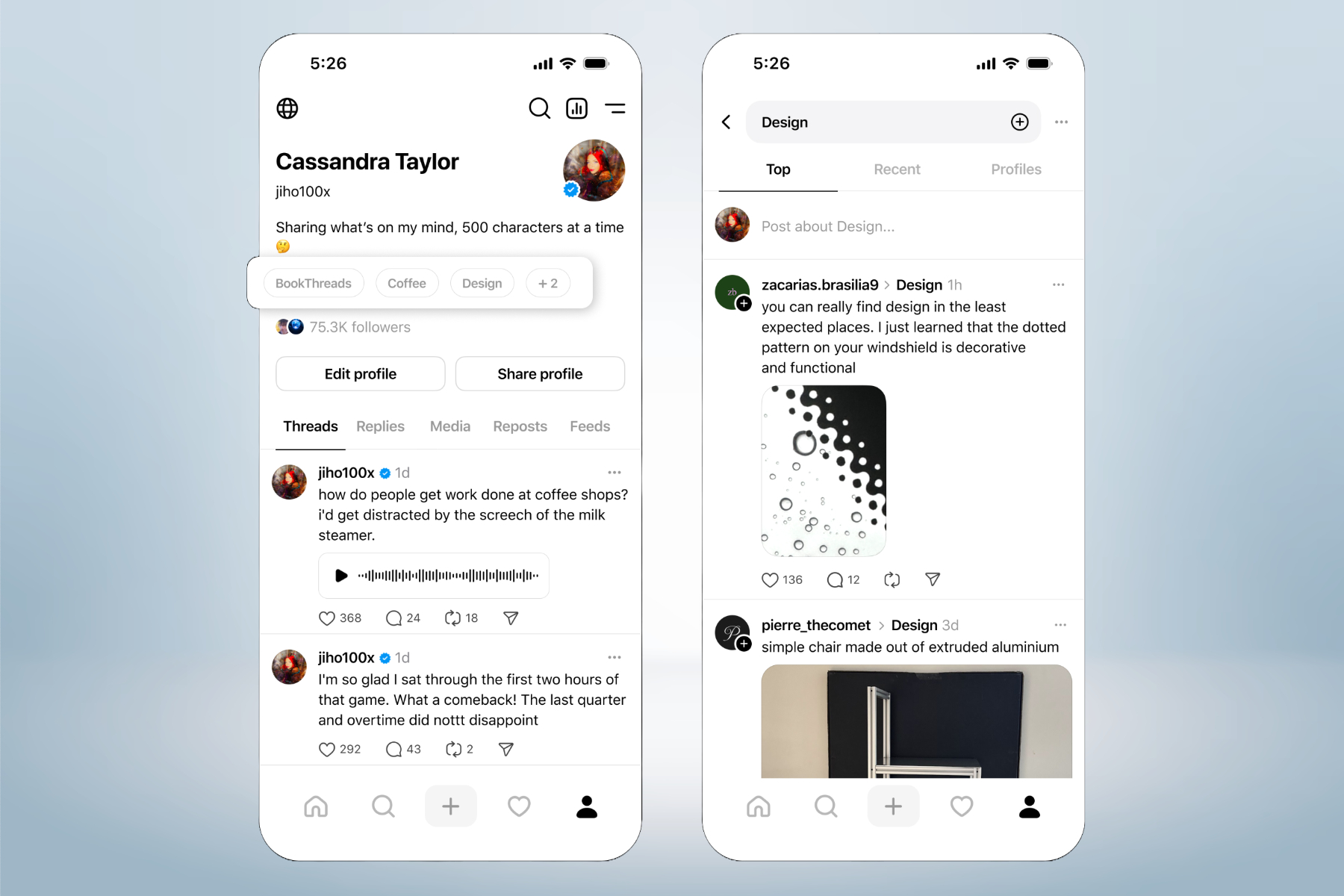
    Meta is enhancing its Threads platform, which competes with X, by introducing new features that allow users to increase the visibility of their profiles and content through topics. This update also provides users with greater control over post interactions. A key addition is the inclusion of profile topics.

    With this update, users can now add up to ten topics in their social bios, facilitating easier discovery of accounts that share similar interests. Notably, clicking on a topic in someone else’s bio will direct you to their related posts.

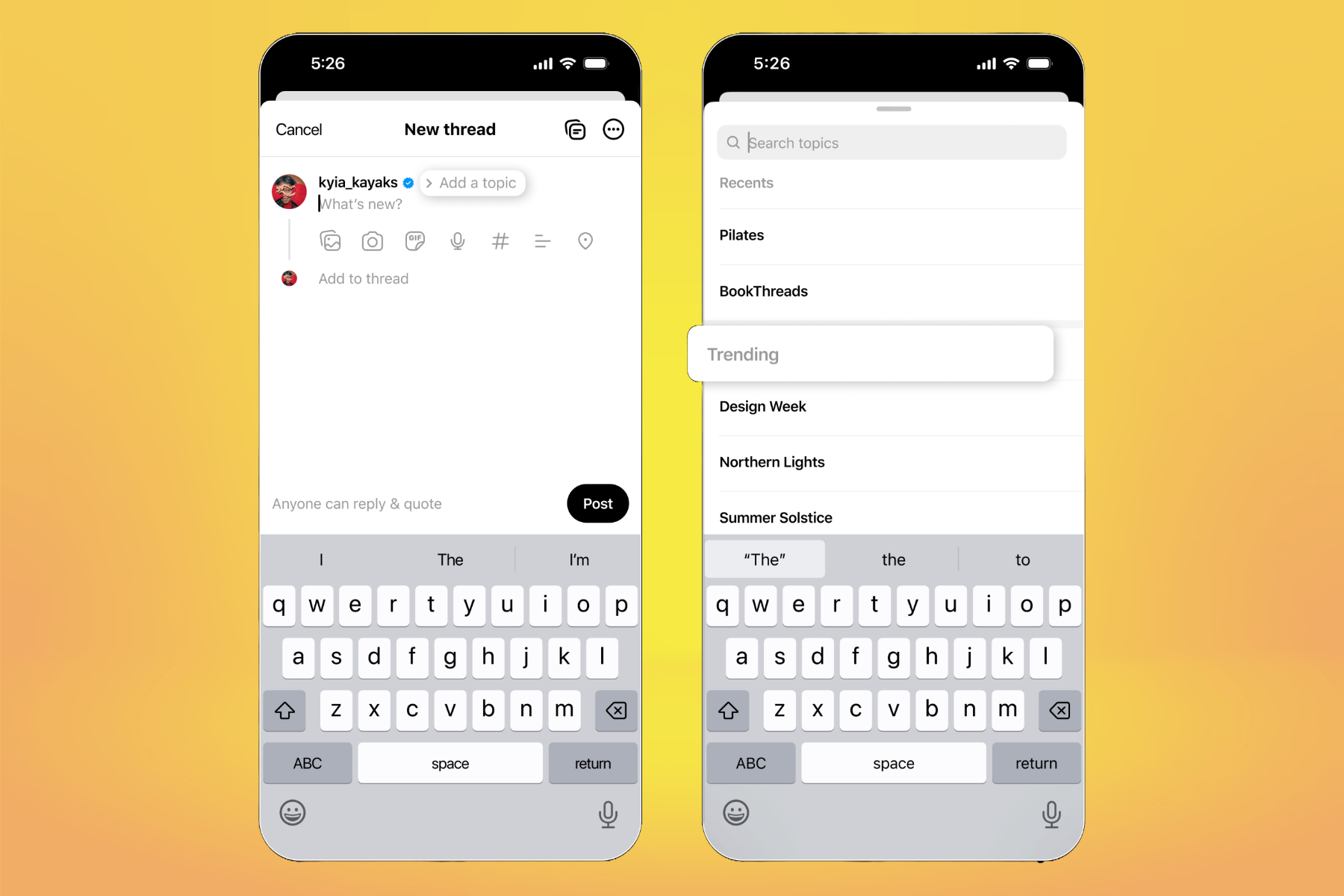
    This feature is supported by a new system that enables users to tag topics in their posts. “While composing posts, you’ll receive prompts to include trending topics or ones connected to your previous content, making it easier for your audience to find your posts,” Meta stated in a blog announcement.

    Adding topics to Threads bio.
    Meta

    According to internal data, Meta reports that posts featuring topic tags tend to attract more views. Furthermore, users now have options to control who is able to reply to or quote-share their posts.

    Threads has introduced four interaction settings for posts: anyone can respond, only followers can engage, just followed profiles, and accounts that were mentioned. Additionally, users can customize their default feed view for when they open the app.

    Adding topics to Threads post.
    Meta

    In an effort to enhance the video playback experience, Meta has revamped the video player on Threads. The updated player now includes pause/play functionality, along with rewind and fast-forward buttons.

    Additionally, an interactive progress bar at the bottom allows users to navigate through the video content easily. A significant new feature implemented this week is the introduction of community notes on Threads, paralleling similar features on Instagram and Facebook.

    Post interaction tool on Threads.
    Meta

    Meta has recently announced the conclusion of its third-party fact-checking initiative, transitioning to a community-sourced system that allows users to flag potentially misleading content. Contributors will collectively determine whether a post is problematic.

    If a consensus is reached, a public note—limited to 500 characters—will be appended to the relevant post, providing additional context through a associated link. Testing of community notes began on March 18 in the U.S., with support for six languages.

    Importantly, adding a community note to a post will not result in any penalties for the post or the user who published it. “We anticipate that Community Notes will be less biased than the previous third-party fact-checking program, and will be capable of operating on a larger scale once fully deployed,” the company stated.

  • Instagram Could Soon Get Even More Chaotic With Community Chats

    Instagram Could Soon Get Even More Chaotic With Community Chats

    Meta aims to transform its social media platforms into a central hub for various types of content along with conversations. A potential advancement towards this vision is the introduction of Community Chats on Instagram, which could enable group discussions similar to those found in Telegram and Discord.

    Developer and coder Alessandro Paluzzi has revealed design elements of this forthcoming feature, offering a glimpse into its functionality. These chat groups will accommodate up to 250 participants at once, allowing users to connect and converse within their community.

    However, these chat environments won’t be unregulated. Community Chats will empower creators to appoint moderators who will oversee the discussions. These moderators will have the authority to delete messages that breach community guidelines and can also remove participants if necessary.

    In addition, Instagram plans to monitor ongoing community discussions to ensure compliance with its content policies. Yet, it’s still uncertain how the platform might enforce its rules against not just individual members, but also entire chat groups.

    Description of upcoming Instagram Community Chats feature.
    @Alex193A / DigitalTrends

    Once a community chat is set up, creators will have the option to restrict access, permitting only selected users to join. Additionally, similar to broadcast channels, users will be able to promote their Community Chats on their profile pages.

    Why this could go either way

    Currently, Instagram’s only community-centric feature is the broadcast channel system. This tool is primarily aimed at creators and influencers, enabling them to share updates through text, videos, and images.

    To enhance engagement, interactive features such as polls or questions are also included. Creators can invite other users to collaborate on live updates within the broadcast channel, and exclusive channels can be created for subscribers, although broadcast channels are confined to Professional accounts.

    Details of Instagram Community chat feature.
    @RelevantUpdates / Digital Trends

    While members can react to polls or questions, they are not able to share their own posts in broadcast channels. This is where Community Chats would come into play, allowing followers to express their thoughts just as they would in other chat platforms like Telegram or Discord.

    The major hurdle will be moderation. Meta has already faced criticism for relaxing its content moderation policies, particularly around sensitive topics such as LGBTQ discussions. This change has drawn scrutiny from experts concerned about a decline in community standards.

    Implementing effective moderation will be challenging and will require diligent oversight from community members to maintain control over the chat environment. Another concern is the potential for problematic discussions to thrive in invite-only community chats.

    Meta has previously drawn fire for allowing harmful material that incites violence and other negative rhetoric to circulate on its platforms, including Facebook and Instagram. It remains to be seen whether Instagram will successfully manage Community Chats to avoid similar pitfalls.

  • Mastering Perfect Chaos: Sonic X vs. Shadow Generations Tips

    Mastering Perfect Chaos: Sonic X vs. Shadow Generations Tips

    Quick Links

    Perfect Chaos is the second boss featured in Sonic’s segment of Sonic X Shadow Generations. Originating from Sonic Adventure, Perfect Chaos embodies the essence of the Dreamcast era in Sonic gaming.

    In this guide, you’ll find out how to unlock and defeat the Perfect Chaos boss.

    How To Unlock The Perfect Chaos Boss Fight

    To access the fight with Perfect Chaos, you first need to complete the initial area of Sonic Generations and defeat the first boss. After that, you’ll gain entry to the second area, which consists of three stages drawn from the Dreamcast era of the Sonic series.

    You must successfully complete both Act 1 and Act 2 for each of the three stages. Once you’ve done that, a boss gate will appear. To open it, you need to collect three boss keys.

    Boss keys can be obtained by successfully finishing a Challenge Act in each stage, which becomes available after the boss gate shows up.

    Once you have gathered all three keys, head back to the gate, and it will open up for your battle against Perfect Chaos.

    How To Beat Perfect Chaos

    The battle with Perfect Chaos is fairly straightforward and resembles a typical stage. To win, simply navigate through the area and attack when prompted. You will need to hit Perfect Chaos four times to win.

    There aren’t specific attack patterns to dodge since Perfect Chaos primarily targets the environment. Your biggest risk comes from the surroundings, so be cautious—miscalculated jumps may lead you into the water below.

    During the initial phase of the fight, continue moving forward while avoiding obstacles. Once you reach the end, approach Perfect Chaos head-on. Sonic will climb the creature and deliver an attack once he reaches the top.

    In the second phase, continue the same strategy. However, this time you’ll encounter more challenges as the environment is more fragmented. Perfect Chaos will also be actively destroying parts of the stage, so stay alert. Use the springs towards the end to launch yourself into Perfect Chaos, and execute a homing attack to deal damage.

    Tip:

    Switching between 2D and 3D platforming may occur, so be prepared to adapt quickly to avoid falling off edges.

    In the third segment, run directly toward Perfect Chaos while dodging debris and whirlpools of water obstructing your path. At the end of this area, you’ll need to scale Perfect Chaos once again to land another hit.

    The final part is trickier but mainly requires good platforming skills. Jump between floating debris until you reach the right attacking range. Look for spots like springs and grapples that can help you avoid falling if Perfect Chaos destroys the platform you’re on. Once you’re near the end of this segment, land your fourth and final hit to defeat Perfect Chaos.