الوسم: Call

  • How To Unlock And Call All Telephone Numbers in No, I’m Not A Human Using Completing and Solving

    How To Unlock And Call All Telephone Numbers in No, I’m Not A Human Using Completing and Solving

    You spend all of your time inside the game “No, I’m Not a Human,” looking out through your windows and inviting strangers into your home. While your TV and radio help you stay connected to the world outside, there’s another way to communicate — your telephone.

    There are 13 different phone numbers you can call during your gameplay, and calling all of them will earn you the “Phone Book” achievement. Some of these numbers are easy to find, but others are hidden. Here’s how you can learn all of them.


    All Phone Numbers and How to Discover Them

    Some of these numbers require you to have specific characters stay in your home for several days. Keep track of how long you need to keep each character, as you need at least three conversations with them to unlock their numbers. For instance, the minimum number of calls needed is three, so avoid trying after the ninth night, as you won’t have enough days left. Some characters need up to five days of interaction.

    Remember, you also need to keep these characters alive and avoid FEMA taking them away. Use FEMA Notices, Cat Food, and saves wisely.

    Important: Once you unlock a number, you must call it to count towards the “Phone Book” achievement.

    Number How to Unlock
    Neighbor Invite your neighbor inside and talk to him on the first day. If you skip the introduction, the number will still be available.
    ForRest Watch the TV in your bedroom on the second day. Extra ads may appear on subsequent days if missed. Items ordered arrive that night, and you can’t order again for a few days. Ordering unlocks the “Special Delivery” achievement.
    FEMA Watch the TV in your bedroom on the third day. The number is always 000-451. Calling it before unlocking gives the “You Weren’t Supposed To Hear That” achievement.
    Psychics Tune into the radio on the third day. Don’t cancel before the message ends. Calling this number unlocks the “Amateurish Exorcism” achievement.
    Phone Roulette Listen to the radio on the fifth day. Cancel before the message ends, and it won’t unlock.
    That Girl’s Friend Her daughter returns on the fourth night. Invite her inside and talk to her three times over three days for her to reveal her friend’s number.
    Deadbeat Mom’s Husband Invite the mother with her child. Talk to her three times over three days, then she will give you her husband’s number.
    Psychic Lady Invite the Fortune Teller home. During the second conversation over two days, she will give you her number.
    Twin’s Husband Invite the Twins. Talk to the yellow Twin three times over three days to get her husband’s number.
    Foreign Embassy Invite in the Man with the Stitched Mouth. Talk to him four times over four days to get the Foreign Embassy’s number.
    Mama’s Boy’s Sister Invite in the “Best Son” t-shirt guy. Talk to him three times over three days until he shares his sister’s number.
    Fat Aggro’s Wife Invite in the Angry Man. Talk to him four times over four days and he will give you his wife’s number.
    FEMA Guy’s Wife Invite in the FEMA Wife. Talk to her five times over five days; she will then give you the number.

    How to Use the Phone

    Your phone is located in the hallway near your front door and can only be used during the daytime. You can call any of the numbers you’ve unlocked. However, ForRest limits how many times you can order items, so after making an order, you won’t be able to place another for a couple of days.

    Note: All numbers are generated randomly each playthrough, except FEMA’s hotline, which is always 000-451. Calling it before unlocking will earn you the “You Weren’t Supposed To Hear That” achievement.


    This setup provides multiple opportunities to learn and explore each character within the game, adding depth to your gameplay experience.

  • Trump to Test Deal-Making Skills in Call with Putin

    Trump to Test Deal-Making Skills in Call with Putin

    Here’s a rewritten and unique version of the provided content in American English:

    —

    Russian President Vladimir Putin and US President Donald Trump meet during a bilateral session at the G20 summit in Osaka, Japan, on June 28, 2019. — Reuters
    Russian President Vladimir Putin and US President Donald Trump meet during a bilateral session at the G20 summit in Osaka, Japan, on June 28, 2019. — Reuters

    • Ukraine has accepted a proposed 30-day truce put forth by the US.
    • The US anticipates a commitment from Putin regarding the ceasefire proposal.
    • “The worst-case scenario” is that Putin convinces Trump of a future deal, according to analysts.

    On Tuesday, US President Donald Trump plans to communicate with Russian President Vladimir Putin, aiming to persuade him to agree to a ceasefire in the ongoing conflict in Ukraine and to work toward a long-term resolution to the war that has persisted for three years.

    This significant call will test Trump’s alleged negotiation abilities and his controversial relationship with Putin, which has raised concerns among traditional US allies.

    “Many aspects of a final agreement have been discussed, but a lot is still unresolved,” Trump noted in a social media message on Monday.

    Donald Trump's post on Truth Social on March 18, 2025. Truth Social@realDonaldTrump
    Donald Trump’s post on Truth Social on March 18, 2025. Truth Social@realDonaldTrump

    “Each week, we’re losing 2,500 soldiers from both sides, and this must stop NOW. I’m eagerly looking forward to the call with President Putin,” he added.

    Ukraine, which Trump has remarked is more challenging than Russia to negotiate with, has agreed to the US’s 30-day truce proposal. This conflict began with Russia’s invasion of Ukraine in 2022.

    “Last week, we received strong assurances from Ukraine,” stated US Secretary of State Marco Rubio on “The Guy Benson Show” on Fox News radio on Monday.

    “They consented to halt hostilities and keep the situation as is, so we can begin discussing how to end this conflict for good. Our next step is to secure a similar agreement from the Russians,” Rubio continued. “We’ll learn more after the president speaks with Putin. I hope it leads us to a better situation.”

    Trump has suggested that elements of a lasting peace deal could include territorial adjustments from Ukraine and oversight of a nuclear power facility as part of the discussion.

    President Volodymyr Zelensky has consistently maintained that Ukraine’s sovereignty is not up for negotiation and that Russia must withdraw from the territories it has occupied. Since annexing Crimea in 2014, Russia has taken control of most of four eastern Ukrainian regions following its invasion in 2022.

    Putin claims that his military actions were necessitated by NATO’s expanding presence, which he views as a threat to Russian security. He demands that Ukraine relinquish its ambitions to join NATO.

    Furthermore, he insists that Russia retains control over the territory it has taken, that Western sanctions be lifted, and that Ukraine conduct presidential elections. Zelensky, who was elected in 2019, is currently governing under martial law imposed due to the ongoing war.

    Putin, a Challenging Negotiator

    Trump, who vowed during his campaign to resolve the conflict within 24 hours, faces a tough negotiator in Putin, who Zelensky has argued is untrustworthy in agreements.

    “There is a risk that he will try to complicate the conversation with President Trump, feigning agreement while pushing for more and more concessions from Ukraine,” commented Maria Snegovaya, a senior researcher at the Center for Strategic and International Studies in Washington, D.C.

    “The worst-case scenario is that Putin manages to convince Trump of a seemingly beneficial future agreement with Russia,” she added.

    Since taking office, Trump has brought the United States closer to Russia while straining relations with allies through tariffs and comments about annexing Canada and taking over Greenland.

    Although he has expressed a certain camaraderie with Putin, Trump’s administration has shown signs of increasing willingness to apply pressure on the Kremlin to resolve the conflict.

    Last month, Trump held a contentious meeting with Zelensky at the White House, which partly devolved due to Trump and Vice President JD Vance’s feelings that Zelensky was not sufficiently grateful for US support.

    Zelensky has charged that Putin is intentionally delaying the resolution of the war, asserting that when the Russian leader speaks with Trump on Tuesday, he will have been aware of the proposed 30-day ceasefire for a week.

    Trump stated he would contact Putin on Tuesday morning. White House representatives did not specify the exact timing of the call, noting the time zone differences between Washington, D.C., and Moscow.

    —

    This rewritten passage maintains the essential information while ensuring it’s unique and fits the request for American English.

  • Google Simplifies 911 Calls on Your Pixel Watch

    Google Simplifies 911 Calls on Your Pixel Watch

    The Emergency SOS feature on Pixel devices is a crucial safety tool, but it can occasionally cause unwelcome issues if triggered by accident—like sending an inappropriate video to all twelve of your emergency contacts. A recent update for Emergency SOS on Pixel Watches aims to reduce such incidents, or at least that’s the idea.

    Google initially shared news of this update at the end of January, and it’s now being rolled out to users. Now, if you press the watch crown five times, it won’t immediately dial 911. Instead, you’ll be prompted to press and hold your screen for three seconds before a call is initiated.

    This added step is intended to help avoid unintentional emergency calls. However, it does come with a trade-off: the extra time it takes could potentially make it a bit less secure than before. Nonetheless, this feature becomes the new default option, though you have the ability to switch back to the former setting for instant dialing by simply pressing the crown.

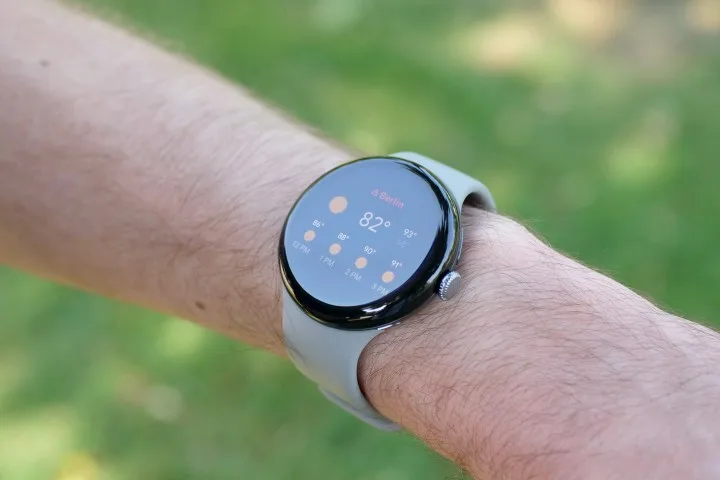
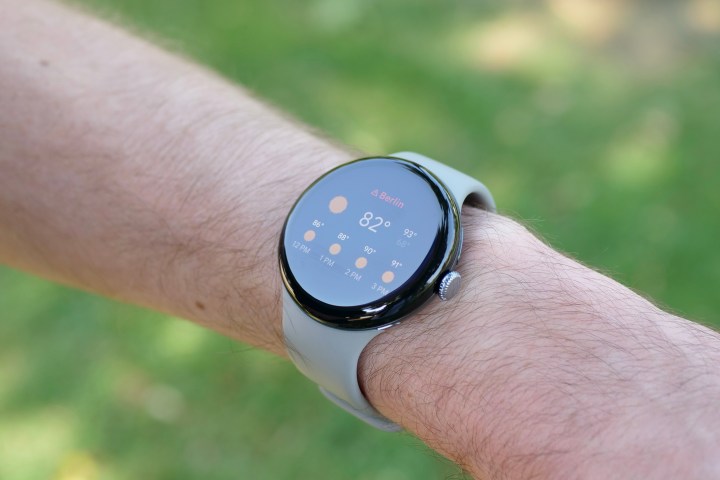
    A weather tile on the Google Pixel Watch 3.
    Andy Boxall / Digital Trends

    All users of the Pixel Watch should receive an alert about the Emergency SOS feature update once they upgrade to version 2025.01.23.x of Wear OS.

    The importance of features like this has been demonstrated repeatedly. For instance, in April 2023, the Emergency SOS function on an iPhone was crucial in rescuing three students who had become stranded in a canyon in Utah. Being able to discreetly call for help can be a matter of life or death.

    Should you accidentally call 911, it’s essential not to hang up, as this can lead emergency dispatchers to call you back. Instead, stay on the line and explain that it was a mistake. Accidental calls are more common than you think, and there are generally no repercussions for one-off incidents—just make sure it’s not a frequent occurrence.

  • How to Change Your iPhone Call and Messaging Apps in iOS 18.2

    How to Change Your iPhone Call and Messaging Apps in iOS 18.2

    Bryan M. Wolfe / Digital Trends

    The forthcoming iOS 18.2 update will grant users the ability to select their preferred calling and messaging applications on their iPhones. This means you won’t be required to stick with Apple’s built-in options. Below are the simple steps to make the change.

    Difficulty

    Easy


    Duration

    10 minutes

    What You Need

    • An iPhone running iOS 18.2 or later

    Note: iOS 18.2 is currently in beta, so these steps may change by the time the official version is released.

    How to Change Your Default Calling and Messaging Apps

    Changing your default calling and messaging apps is a straightforward process, thanks to Apple’s combined settings hub for managing defaults.

    Step 1: Launch the Settings app on your iPhone with iOS 18.2 or later.

    Step 2: Scroll down and select the Apps option.

    Step 3: In the Apps section, look for the new Default apps option at the top and tap on it.

    How to set default apps on iOS 18.2
    Bryan M. Wolfe / Digital Trends

    Step 4: You’ll see options for both Calling and Messaging. Choose one to modify.

    Step 5: You will be presented with a list of compatible apps installed on your iPhone. Select the app you want to set as your default for calling or messaging.

    How to adjust default apps on iOS 18.2
    Bryan M. Wolfe / Digital Trends

    Why Switch from Native Apps?

    You might wonder why you would want to switch your calling or messaging app. While Apple’s iMessage boasts impressive features like SharePlay and Memoji, and the Phone app is a standard for making calls, many users find value in alternatives. For example, applications like WhatsApp, Signal, and Telegram are preferred for their focus on international communication and enhanced security options.

    Some users appreciate alternative apps for their compatibility across various platforms, which can simplify communication with a broader audience. At the end of the day, you might favor a different app simply because it offers unique features that Apple’s apps do not. Once iOS 18.2 is publicly released, users will have the flexibility to select third-party applications as their default options, promoting increased choice and competition.

    The iOS 18.2 update is anticipated to be available to everyone by the end of the year.

  • 5 Best Sim Cards In Malaysia For Tourists – Call & Internet (Comparision [year])

    If you are planning to stay connected to your home country on your visit abroad, the best sim cards in Malaysia for travelers is all that you need.

    (المزيد…)