الوسم: businesses

  • Launching a Hobby Meetup in The Sims 4: Businesses & Hobbies Guide

    Launching a Hobby Meetup in The Sims 4: Businesses & Hobbies Guide

    The Sims 4: Businesses & Hobbies enhances gameplay by incorporating various skills and activities from the series’ history, enriching the in-game experience and storytelling. Whether your goal is to start a business or explore your Sim’s hobbies, there are plenty of activities to keep your Sims engaged, even during longer lifespans.

    One engaging feature is hobby meetups, perfect for meeting other Sims, trying new activities, or revisiting old interests. No matter if your Sims enjoy pottery or stargazing in Nordhaven, there are many options to choose from.

    How to Attend Hobby Meetups

    Hobby meetups take place in Nordhaven, a vibrant new area in The Sims 4: Businesses & Hobbies. To join, you need to visit either Gammelvik or Iverstad neighborhoods at designated times on specific days, with meetups kicking off automatically as scheduled.

    Traveling to any location within these neighborhoods allows access to the meetups. Keep an eye out for public plazas where gatherings are held, usually found near wooden kiosks selling snacks and beverages.

    Tip: If you’re not in the area already and decide to visit Nordhaven for a meetup, consider stopping by one of the new small business venues in the vicinity. Not only can you attend the meetup, but this gives you an opportunity to explore the neighborhood too.

    Attending the Meetup

    Joining a hobby meetup doesn’t require any special qualifications; anyone can participate, regardless of their experience with the hobby. Meetups are organized around a sign that’s a permanent fixture in the neighborhood plazas, typically located close to the market kiosks. You can recognize these meetups by watching for groups of Sims with skill items, like pottery wheels or kilns. The sign will light up when a meeting is in progress, and you can hover over it to see details.

    To join a meetup, you can interact with any available items, socialize with other attendees, or use the sign directly.

    Tip: If you find it tricky to locate an ongoing meetup, look out for groups of Sims gathered together. Hover over them to see their names; if someone is part of a meetup, it will show “Meetup Attendee.”

    How to Walk to Hobby Meetups

    You can also use the sign to quickly reach the meetup. If it’s happening, select the sign and choose the “Check Current Meetup” option to see what’s going on. At the bottom of the pop-up, you’ll find the “Walk to Meetup” option. Select this, and your Sim will head to the right spot, ready to start engaging with the hobby or mingling with other attendees.

    Note: This method will only work if the meetup has already started.

    What are Hobby Meetups?

    Hobby meetups serve as a gathering for Sims in Nordhaven and beyond, focusing on improving their skills. With a total of seven different meetups available, each focusing on unique skills and activities, they are free to join and follow a set schedule.

    They’re similar to festivals but specifically aim to enhance skills, similar to events like the Spice Festival in San Myshuno or the Celebration of Life in Crow’s Crossing. Events vary daily, with different hobbies showcased on different days.

    Tip: Hobby meetups are a great opportunity to save on skill-related items. Some meetups even provide chances for your Sims to create items to sell, adding an extra layer of profitability.

    Available Hobby Meetups and Their Schedules

    Nordhaven offers a wide array of hobby meetups, including:

    Meetup Description Time Day
    Creative Co-Work Engage in woodworking and other crafts with fellow creatives. 8 AM – 1 PM Iverstad: Saturday
    Gammelvik: Sunday
    Galactic Gambits Star gazing and chess at this late-night event. 8 PM – 1 AM Iverstad: Wednesday
    Gammelvik: Monday
    Munch & Mingle Enjoy food and drinks with friends and neighbors. 11 AM – 4 PM Iverstad: Thursday
    Gammelvik: Wednesday
    Pottery & Pals Get hands-on with pottery using available wheels and kilns. 5 PM – 10 PM Iverstad: Tuesday
    Gammelvik: Thursday
    Spotlight Stars Perform at the biweekly open mic for singers and comedians. 6 PM – 11 PM Iverstad: Sunday
    Gammelvik: Friday
    Sweat & Socialize Start your day with fitness and socializing. 6 AM – 11 AM Iverstad: Thursday
    Gammelvik: Tuesday
    Writers & Readers Join a writer’s group or book club with fellow literary lovers. Iverstad: 12 PM – 5 PM
    Gammelvik: 2 PM – 7 PM
    Iverstad: Monday
    Gammelvik: Saturday

    Hobby meetups give your Sims a chance to thrive in a community atmosphere!

    Note: If you have additional downloadable content, some meetups may offer extra activities. For instance, Sims with the Nifty Knitting pack may see individuals knitting at a Creative Co-Work meetup.

    Using the Hobby Meetup Sign

    Both Iverstad and Gammelvik feature a hobby meetup sign. Selecting this sign provides a menu of interactions to check on upcoming activities, view all hobby meetups, and adjust your notification preferences.

    Tip: If a meetup is currently in progress, the sign will illuminate, allowing you to access the “Check Current Meetup” option, which reveals the ongoing session’s details. Hovering over the sign will also provide updates on the current meetup.

    Adjusting Meetup Notifications

    In Nordhaven, you must opt in or out of meetup notifications. To modify your notification settings, find the meetup sign, interact with it, and select "Meetup Notifications." From this submenu, you can enable or disable notifications for specific meetups or all at once.

    All notifications are disabled by default, so you’ll need to enable them individually or select all to receive reminders.

    Once enabled, notifications will appear on the notification wall at the top right corner of your screen when meetups are about to start, applicable to both neighborhoods. Make sure to be in the appropriate location to attend!

  • AI PCs Inspire Swift Business Upgrades For Tailored Employee Experiences

    AI PCs Inspire Swift Business Upgrades For Tailored Employee Experiences

    By 2025, artificial intelligence is becoming a common term among the public, yet for businesses, it’s an integral part of everyday operations and a crucial element for growth. An IDC white paper, commissioned by AMD, highlights that AI-enabled PCs are sparking a significant upgrade cycle in the PC market, as businesses shift toward machines equipped with neural processing units (NPUs) for local AI task execution.

    This paper draws from a survey conducted in November 2024, targeting IT decision-makers. It involved 670 participants from sizable companies with at least 500 employees globally, including a notable number from large enterprises — 195 respondents held managerial positions in organizations with over 5,000 employees. The survey encompassed a diverse range of industries, such as manufacturing, finance, and telecommunications.

    A significant 73% of businesses surveyed report that the introduction of AI PCs in recent years has substantially influenced their strategies, accelerating the urgency for hardware upgrades. Notably, 58% of these organizations still utilize Windows 10, which further emphasizes their need for timely upgrades given that Windows 10 is nearing the end of its lifecycle, increasing security vulnerabilities. Nevertheless, 60% of those relying on Windows 10 intend to transition to AI PCs running Windows 11 with Copilot+ support.

    Data on the various uses of AI in an enterprise setting.
    IDC / AMD

    The surveyed businesses are already leveraging AI in various facets of their operations; an impressive 95% currently use or are testing AI technologies in the cloud. AI applications span numerous sectors, including manufacturing (predictive maintenance), retail (AI-driven suggestions), finance (fraud detection), and healthcare (AI-assisted diagnostics). Employees employ AI for various tasks, such as summarizing documents, creating content, and automating processes.

    Get your weekly breakdown of tech in PC gaming


    Check your inbox!

    The advantages of AI for businesses are substantial, and decision-makers are fully conscious of this fact. Personalization of user experiences (77%), improved data privacy (75%), and enhanced security (74%) rank as the leading benefits in a corporate context.

    Organizations also look forward to AI enhancing employee experiences, with 82% of respondents expecting a positive influence on their workforce. They believe AI will reduce repetitive tasks (as indicated by 83% of participants), enable employees to concentrate on more significant priorities (79%), and boost productivity (76%).

    However, executives are also aware of the challenges that come with adopting AI. Issues such as data privacy concerns (36%), security vulnerabilities (26%), high expenses (31%), and regulatory compliance (25%) are among the primary hurdles organizations face. Using AI PCs can help mitigate these risks by processing data locally rather than relying on cloud solutions.

    AMD is a pivotal player in the advancement of AI PCs. The company collaborates with OEMs like Dell, HP, and Lenovo to directly integrate AI into their systems, while also focusing on software optimization to ensure popular AI applications perform well on AMD platforms.

    This survey underscores that AI PCs are here to remain, with businesses ready to adopt this new technology. As Windows 10 approaches its end-of-life phase in October, the uptake of AI PCs is likely to increase significantly in the coming year.

  • Opening a Bakery in The Sims 4: Exploring Business Ventures

    Opening a Bakery in The Sims 4: Exploring Business Ventures

    Bakeries have taken a flavorful leap with the Get to Work expansion in The Sims 4: Businesses & Hobbies. This update brings new baking options, enticing drinks, and a variety of customers, making your bakery more prosperous than ever before!

    While you can certainly thrive with just the items from Businesses & Hobbies, there are additional packs that complement your bakery adventures. Equip yourself with tools from Get to Work or Home Chef Hustle to elevate your baking game.

    How to Start a Bakery

    Although the Businesses & Hobbies expansion includes preset businesses, opening a bakery isn’t necessarily straightforward. You’ll need to be a bit inventive to utilize Business Activities to establish a bakery when you Register a Small Business.

    You can select activities such as Bake, Browse and Buy Items, Eat, Make Treats, and an optional fifth activity of your choice. Incorporating a coffee option is smart if you have a coffee bar, while promoting Friendly interactions can enhance customer experiences.

    If you have Get Together, consider starting with the Cafe preset, which encourages coffee drinking, dining, and reading. This setup allows you to offer baked goods for customers to enjoy on spot as they relax.

    Key Items for Your Bakery

    A bakery, like any food establishment, requires essential items to function properly. You’ll need to bake all those delicious goods! While you can transfer items from your Sim’s home to any Small Business venue, it’s best to prepare everything on-site to ensure freshness.

    Here are the must-have items for your bakery:

    • Ovens: Essential for talented bakers to create delectable sweets consistently.
    • Refrigerators: For gathering ingredients.
    • Sinks: Necessary for washing hands and cleaning up after selling pastries.
    • Sales Cases: To showcase your daily offerings.

    Beyond the basics, let your creativity shine! Many players build cozy bakeries with tables and chairs for customers, bookshelves for entertainment, and even stages for live performances.

    Expanding Your Bakery with Other Packs

    As previously mentioned, various other expansion packs enhance your bakery. With Businesses & Hobbies, you gain access to an array of candies and confections, including the fun Kate & Berry Sweet Treats Fabricator 3000, which creates mouthwatering candies.

    For packs that complement this one, Get to Work offers neat gadgets like the Cupcake Machine, café setups, and retail management options. If you’re looking for a farm-to-table experience, Cottage Living expands your options significantly.

    Smaller food-themed packs like Dine Out focus on traditional restaurants, while Home Chef Hustle and Cool Kitchen bring food stands and essential kitchen items into the mix.

    Tips for Running a Successful Bakery

    Hire Skilled Staff

    Just like in real bakeries, your success in The Sims 4: Businesses & Hobbies depends on hiring talented staff. Set their tasks around food preparation, bringing in Sims with high culinary skills. These skilled chefs will create baked goods that tourists are eager to buy.

    The regular Cooking skill offers a broad range of baked goods, while mastering Gourmet Cooking allows access to fancy treats, enhancing your menu. If you’re using Get to Work, Sims can also learn the specialized Baking skill, which can elevate the quality and price of your offerings.

    Showcase Your Finest Goods and Price Fairly

    Setting prices based on the quality of food and freshness is vital. Remember, the skills your culinary specialists bring can enhance the quality of dishes, thus allowing you to charge more for high-end items. To attract customers, make sure your display cases can easily be seen. Use the Stock Surface option to keep your baked goods visible, ensuring customers know what’s on offer.

    If you have a seating area, create a welcoming space for guests to enjoy their treats. Offering both indoor and outdoor seating can make your bakery a delightful place to visit.

    Don’t forget to maintain cleanliness and keep your bakery stocked; assign tasks to employees to tidy up during slower periods.

    With these tips and tricks, you’ll be on your way to running a thriving bakery in The Sims 4!

  • Hiring and Managing Sims 4 Employees: A Guide to Profits & Fun

    Hiring and Managing Sims 4 Employees: A Guide to Profits & Fun

    Managing a small business in The Sims 4: Businesses & Hobbies involves a lot of responsibilities, so why not lighten the load by hiring some employees? By bringing others onto your team, your Sim can focus on what really needs their attention.

    As the owner, you can hire several employees—anyone your Sim knows in the game. You have the option to bring family and friends on board for a more personal touch or to hire new faces for a professional atmosphere. The choice is entirely yours when starting a new business.

    Hiring and Managing Employees

    To get started with managing employees, navigate to the Owned Businesses tab, which is where you’ll open and close the business each day. Here, you’ll find various employee management options.

    Choosing Employees Based on Skills

    The first step in managing your employees is to hire them. Use the Manage Employees button to access an overview of potential hires, allowing you to bring on any Sim that your character knows. If your Sim is new to the neighborhood, they might need to mingle a bit before building a suitable team. While there’s no perfect candidate, selecting employees that match the requirements of your business is essential for success.

    When hiring, consider each Sim’s relevant skills that can boost your business. For instance, check their cooking or artistic skills for a café or a gallery. This way, you can ensure that you’re making the best hires for your specific needs.

    If you find that you need more qualified Sims, don’t hesitate to interact with new customers who visit your business. You never know when a hidden gem might walk through the door.

    Setting Uniforms and Pay

    After you’ve brought some employees on board, it’s time to choose their uniforms. You can select from a variety of predefined outfits suited for different business types or create custom uniforms in CAS if you have a specific look in mind.

    Once your team is set up, you can adjust their salaries through the Manage Employees menu. Everyone starts at a base rate, but it’s wise to offer higher pay if you want to keep your staff happy. Remember, satisfied employees can significantly contribute to your bottom line, while dissatisfaction over low pay may lead to high turnover. Regular check-ins on employee morale will help you avoid losing valuable team members.

    Delegating Tasks to Employees

    One of the perks of being a business owner is the ability to delegate tasks to your employees, allowing you to focus on strategic decisions. Assigning tasks that match each employee’s skill set can make a noticeable difference in the quality of service. For instance, artistic employees should be assigned creative tasks while charmers excel at customer interactions.

    It’s essential to align your employees’ tasks with your business activities. If your establishment offers food and drinks, make sure tasks related to food preparation are assigned accordingly. Each employee can handle up to five different tasks, giving you flexibility as your team grows.

    Keep in mind customer needs when delegating. Adjust assignments as necessary to meet demand—there’s no shame in reorganizing roles if you notice a shortfall in service.

    Through the tasks menu, you can explore various categories, including Food and Drink, Art and Music, Social interactions, and more, to find the right fit for your staff. By maintaining a keen awareness of your establishment’s needs and your employees’ strengths, you can cultivate a thriving business in The Sims 4!

  • How to Create and Run a Small Business in The Sims 4: A Guide to Businesses and Hobbies

    How to Create and Run a Small Business in The Sims 4: A Guide to Businesses and Hobbies

    The The Sims 4: Businesses and Hobbies Expansion Pack gives players the opportunity to establish and manage a highly customizable small business. Whether you envision a cozy cat cafe, a chic candy shop, or a trendy tattoo parlor, the options are nearly limitless for your new venture.

    Difficulty

    Easy


    Duration

    10 minutes

    What You Need

    • 750 Simoleons

    Players have long awaited unique business choices and the ability to master the tattooing skill. This pack even introduced pottery, perfect if that's the type of enterprise you wish to pursue. Before you dive into profits, however, it's crucial to understand how to establish and effectively manage your small business in The Sims 4: Businesses and Hobbies.

    How to Create a Small Business

    The initial stage of launching your business idea is, of course, to create it, which can effortlessly be done after you design a new Sim and begin your game.

    Step 1: Click on the cash register icon in Live Mode located at the bottom right corner of your screen. Depending on your available packs, several options may appear, but you should select the Small Business tab. Choose the Register Small Business option, costing 750 Simoleons.

    EA

    Step 2: Now, you can customize your business details. Enter the name, description, and select an icon that best represents your venture.

    Creating small business in The Sims 4: Businesses and Hobbies.
    EA

    Step 3: On the left side, you can select specific Business Activities. You'll choose from five options, or you can opt for a preset if you prefer not to select. Remember, these activities are for your customers, not employees; for instance, customers in a café should drink coffee instead of making drinks themselves.

    Business activities in The Sims 4: Businesses and Hobbies.
    EA

    Step 4: On the right, you can select whether your business should occupy a different lot or share the same lot as your residence. Yes, you can live right above your business now!

    If you opt for this feature, ensure you designate areas within your home as Residential, Public, or Employee in Build Mode. This prevents customers from wandering into your personal space.

    Sectioning off rooms in The Sims 4: Businesses and Hobbies.
    EA

    Step 5: Finally, you'll decide if you want to implement any entrance fees and what your price modifier will be. You can always adjust this later after your business is set up.

    Choosing target customers is optional but can be beneficial if you want your business to attract a specific crowd, such as a particular age group or Sims with certain skills.

    Customer criteria in The Sims 4: Businesses and Hobbies.
    EA

    Step 6: Once your business is created, be sure to manage your employee tasks before opening. Hit the Manage Employee Tasks button in the Small Business menu to assign duties to each employee.

    Managing employee tasks in The Sims 4: Businesses and Hobbies.
    EA

    Step 7: You also have the ability to Manage Employees, allowing you to hire new workers and determine their wages. Keep in mind that your Sim can only hire those they know, so if you lack connections, it’s time for some socializing.

    Hiring employees in The Sims 4: Businesses and Hobbies.
    EA

    Step 8: After setting up your small business, you can unlock your doors (which costs 75 Simoleons) and watch the customers flood in. While it may not be strictly necessary, having a Kiosk handy is wise. It allows Sims to pay any entrance fees and serves as a point for altering prices or opening your shop.

    Entrance kiosk in The Sims 4: Businesses and Hobbies.
    EA

    How to Successfully Run a Small Business

    Step 1: The first essential step for managing a thriving business in The Sims 4: Businesses and Hobbies is to unlock Small Business Perks. You’ll need Perk Points, which are obtainable through several activities:

    • Selling products
    • Employees completing their tasks
    • Interacting with customers via Small Business interactions

    While we’ll elaborate on these later, be sure to spend your Perk Points as you accrue them. With enough Business Renown, you can unlock various perks that enhance your operation, from implementing a tip jar to investing in SimoCoin, or even engaging in dubious activities like falsifying payments.

    Small business perks in The Sims 4: Businesses and Hobbies.
    EA

    Step 2: Offering products and services is the most straightforward way to enhance your business's renown. If these items are linked to a skill, such as making candy or pottery, the higher your skill level, the more you can charge for your creations. Keep honing your skills as you progress.

    Be mindful not to overcharge your customers to avoid feelings of being scammed. Conversely, avoid pricing everything too low. Offering occasional sales is a good strategy, and when you have high-quality products, consider increasing your price modifier.

    Step 3: Ensure your employees are fulfilling their roles adequately. A balanced approach is to have each staff member manage specific tasks, such as cleaning or serving customers. Remember, fair wages are crucial; underpaying will lead to dissatisfaction, while overpaying can eat into your profits.

    Employee tasks in The Sims 4: Businesses and Hobbies.
    EA

    Step 4: While engaging with customers, you will have various options. If it’s a first-time visitor, welcome them warmly to your establishment.

    After the introduction, you can provide them with small business advice or share a light rumor about your business. If a customer becomes unruly, don't hesitate to ask them to leave. Building relationships through conversation can significantly enhance your renown, so be proactive!

    Small business interactions in The Sims 4: Businesses and Hobbies.
    EA

    Step 5: Keeping your business reviews positive can be achieved through various subtle strategies. Ensure your retail displays are well-stocked to maintain a professional appearance. Additionally, invest in attractive decor and ambient music to create a pleasant atmosphere.

    Providing a variety of activities for your customers will also make for a more enjoyable experience. Explore different game packs or mods — particularly on PC — that enhance the gameplay experience, allowing for unique business combinations like a cat café or a university commons!

  • Mastering Kintsugi: Repair Pottery in The Sims 4’s Hobbies!

    Mastering Kintsugi: Repair Pottery in The Sims 4’s Hobbies!

    The Sims 4: Businesses & Hobbies has introduced a pottery skill that lets your Sims create various pottery items, allowing them to dive deep into this enjoyable pastime. You can either buy a potter’s wheel and kiln for your home or opt to use the facilities at Terra-Potta for a fee.

    As is often the case with pottery, sometimes things go wrong, and items can break. Fortunately, there’s a unique and elegant way to fix shattered pottery using Kintsugi. Here’s how it works.

    What Is Kintsugi?

    Kintsugi is the Japanese practice of repairing damaged pottery in a way that enhances its flaws. This technique involves mending pots with powdered gold, silver, or platinum, and in The Sims 4, gold is the material used.

    This method allows pieces to be reassembled in a way that produces unique designs on the pottery, focusing on celebrating its imperfections rather than concealing them.

    How To Mend Broken Pottery With Kintsugi

    A Sim mending pottery at a pottery wheel.

    When you’re just starting out, your pottery might occasionally break while in the kiln, resulting in a pile of shattered pieces. If this happens, don’t worry. Just store the broken pieces in your inventory until you reach pottery skill level 7. This level unlocks the ability to fix ceramics.

    To repair them, simply click on the broken pieces and choose repair ceramic. Your Sim will need a potter’s wheel nearby to complete the repairs.

    The item will keep the glaze pattern it had before breaking.

    Can You Deliberately Break And Repair Pottery?

    If you want to create a broken look without actual bad luck, your Sim can simply click on any pottery item and select break ceramic. Your Sim will then use a hammer to smash the item into shards.

    Once that’s done, you can select repair ceramic and create a stunning mended Kintsugi piece.

  • How To Run A Class And Lecture In The Sims 4: Mastering Businesses And Hobbies

    How To Run A Class And Lecture In The Sims 4: Mastering Businesses And Hobbies


    A standout feature of The Sims 4 Businesses and Hobbies Expansion Pack is the capability to conduct lectures and classes. While giving lectures helps Sims enhance their skills, teaching classes can be a lucrative opportunity if you run a small business.

    Difficulty

    Moderate


    Duration

    5 minutes

    What You Need

    • The appropriate skill level

    • A small business

    Leading a class or lecture has its challenges, and certain requirements must be fulfilled before you can impart skills to other Sims. While the latest burglar update has brought some excitement, the Expansion Pack significantly enhances the learning experience for various hobbies. Let's delve into how to effectively conduct a lecture and a class in The Sims 4 Businesses and Hobbies.

    How to conduct a lecture in The Sims 4 Businesses and Hobbies

    It's important to remember that lectures do not require you to own a small business—this requirement is only for classes. Lectures are free and, while they don’t generate direct income, they are an excellent way to impart your skills to other Sims.

    Step 1: Acquire the Sharing is Caring Hobby Whiteboard for 630 Simoleons, available in the Small Business section of Buy Mode.

    EA

    Step 2: After placing the whiteboard, you'll see a grey square indicating the space in front where objects must be positioned if your lecture involves them. For instance, if you are teaching pottery and the wheel is outside that square, it won’t work.

    Here's a list of skills that require specific objects to be present for your lectures:

    • Acting: 3 mirrors or microphones
    • Baking: 1 fridge, 3 ovens, 3 counters
    • Bowling: 1 bowling lane
    • Charisma: 3 mirrors
    • Comedy: 3 microphones
    • Cooking: 1 fridge, 3 counters
    • Cross-stitch: 1 cross-stitch kit
    • Dancing: 1 stereo or dance floor
    • DJ Mixing: 3 DJ booths
    • Fabrication: 3 fabricators or candle-making stations
    • Fishing: 1 pond suitable for fishing
    • Fitness: 3 workout machines/objects
    • Flower Arranging: 3 flower arranging tables
    • Gardening: 3 plants
    • Gemology: 3 gemology tables
    • Gourmet Cooking: 1 fridge, 3 counters
    • Guitar: 3 guitars
    • Handiness: 3 woodworking benches
    • Herbalism: 3 stoves/grills
    • Knitting: 3 yarn baskets
    • Logic: 3 chess tables, microscopes, telescopes, or children's science tables
    • Media Production: 3 mix master music stations
    • Medium: 3 séance tables
    • Mischief: 3 computers
    • Mixology: 3 bars
    • Nectar Making: 3 nectar makers
    • Painting: 3 easels or digital sketchpads
    • Piano: 3 pianos
    • Pipe Organ: 3 pipe organs
    • Pottery: 3 pottery wheels
    • Programming: 3 computers
    • Research & Debate: 3 debate podiums or research archive machines
    • Robotics: 3 robotics workstations
    • Rocket Science: 1 unfinished rocketship
    • Singing: 3 microphones
    • Tattooing: 3 tattoo tables or digital sketchpads
    • Video Gaming: 3 computers, video game consoles, or arcade machines
    • Violin: 3 violins
    • Wellness: 3 massage tables/chairs, meditation stools, or yoga mats
    • Writing: 3 computers

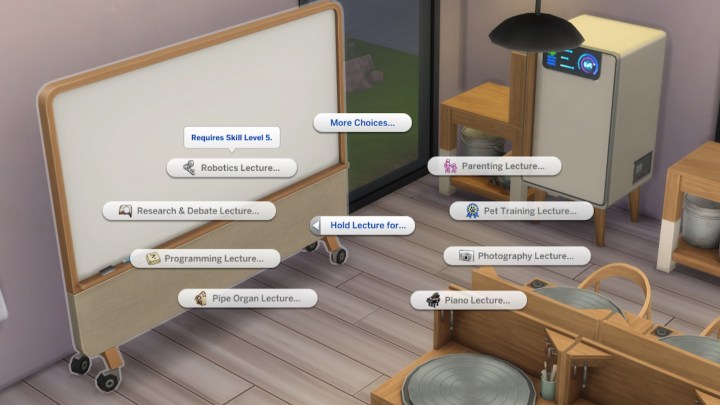
    Step 3: Once you have the necessary objects arranged for your lecture, make sure your Sim is at the right skill level for teaching. Each lecture will need your Sim to be at skill level three or five. You can check the required skill level when you interact with the whiteboard.

    Whiteboard lecture options in The Sims 4 Businesses and Hobbies.
    EA

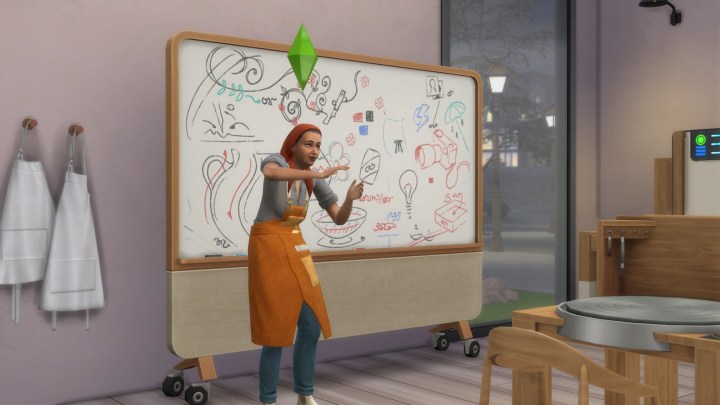
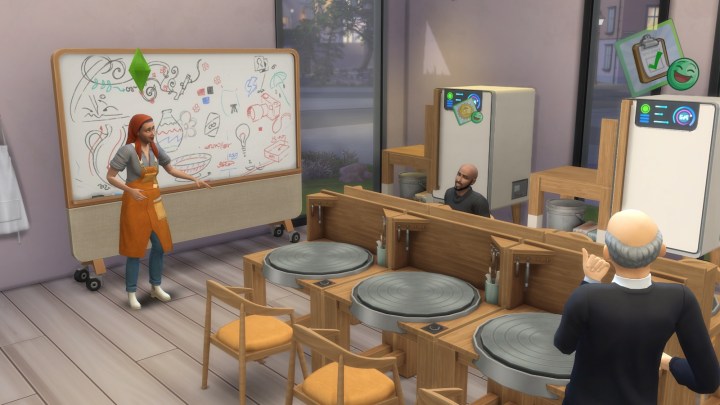
    Step 4: You're now ready to kick off your lecture. Other Sims can approach the whiteboard to join, and as they participate, their respective skill levels will increase.

    If you operate a small business, you can easily have your employees deliver lectures by assigning them the lecture task.

    Giving a lecture in The Sims 4 Businesses and Hobbies.
    EA

    How to conduct a class in The Sims 4 Businesses and Hobbies

    Before we begin, remember that you can only run classes if you own a small business. This must be done on your business lot when your shop is open and customers are present.

    Step 1: Purchase the Sharing is Caring Hobby Whiteboard for 630 Simoleons in the Small Business section of Buy Mode.

    Hosting a class in The Sims 4 Businesses and Hobbies.
    EA

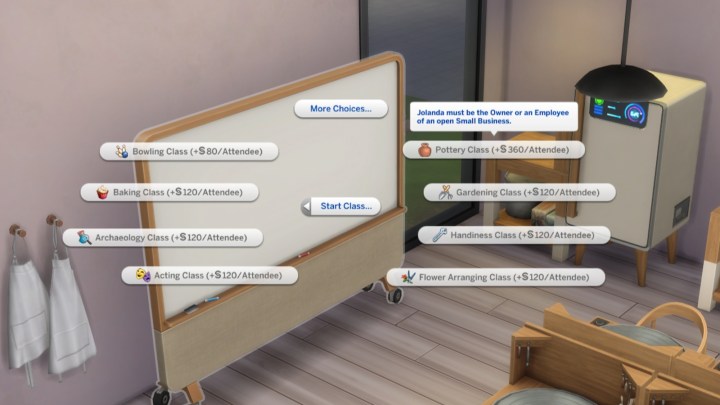
    Step 2: After placing the whiteboard, interact with it to explore various class options. Depending on your skill level, you can set a higher fee per student. Initially, you may charge 120 Simoleons per attendee, but as you reach maximum skill, this can increase to about 360 Simoleons.

    Keep in mind that teaching some classes requires having specific objects close by. The whiteboard's marked area will indicate where these items need to be located. Refer back to the previous section for the complete list of required items for each skill.

    Whiteboard class options in The Sims 4 Businesses and Hobbies.
    EA

    Step 3: You can only commence your class when your shop is open. Select the whiteboard and initiate your class. Customers will enter, and some may show interest in joining your session.

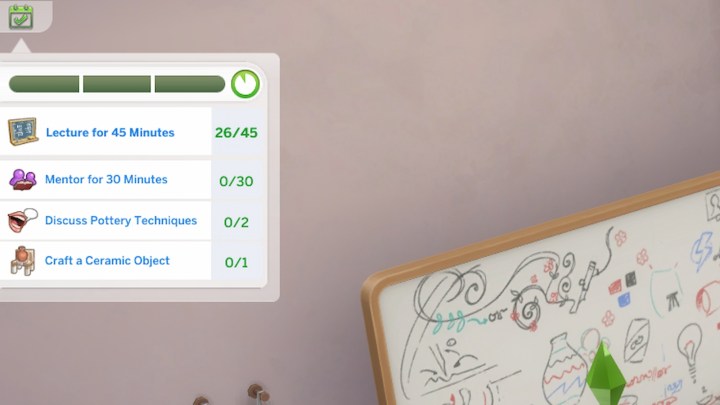
    During the class, a timed event will start, during which you will engage in different activities. You'll mainly want to lecture for 45 minutes, but you can also mentor students or discuss skills. Completing these tasks will enhance the effectiveness and appeal of your classes to the customers.

    Whiteboard class event in The Sims 4 Businesses and Hobbies.
    EA


  • The Advantages of ChatGPT Ads for Users and Businesses

    As the digital landscape evolves, businesses continually seek innovative avenues to connect with their audiences. Among the most promising developments is the emergence of ChatGPT-based advertising. This unique approach leverages artificial intelligence to create personalized and engaging ad experiences. Both users and businesses stand to gain from this evolving trend.

    Benefits for Users

    Personalized Interactions

    One of the most significant advantages of ChatGPT ads is the level of personalization they offer. Unlike traditional ads that often deliver a one-size-fits-all approach, ChatGPT can analyze user behavior and preferences to tailor messages accordingly. This results in:

    • Relevance: Ads that resonate more closely with individual interests.
    • Engagement: Higher interaction rates due to content that is relevant to the user.

    Enhanced User Experience

    ChatGPT ads enhance the overall user experience in several ways:

    • Conversational Format: Users engage with ads more naturally through dialogue, making the experience interactive.
    • Immediate Assistance: Users can receive answers to questions instantly, eliminating the frustration of searching for information.

    Reduced Ad Fatigue

    By providing highly relevant content, ChatGPT ads can help mitigate the annoyance often associated with excessive or irrelevant advertising. This can lead to:

    • Better Retention: Users are more likely to remember well-crafted, personalized ad content.
    • Positive Perception: A more favorable view of brands that respect users’ time and preferences.

    Advantages for Businesses

    Cost Efficiency

    Implementing ChatGPT ads can lead to more efficient advertising spend. Businesses can benefit from:

    • Targeted Campaigns: Precision targeting minimizes wasted impressions, ensuring that budget allocations focus on likely converters.
    • Dynamic Adjustments: Real-time analytics allow businesses to tweak their campaigns, optimizing performance without unnecessary expenses.

    Improved Conversion Rates

    The interactive nature of ChatGPT ads can significantly enhance conversion rates by:

    • Guiding Users: Users receive tailored recommendations and can easily navigate towards purchase decisions.
    • Building Trust: Personalized interactions foster a stronger connection between brands and potential customers, leading to higher conversion likelihoods.

    Valuable Insights

    Utilizing ChatGPT for advertising provides businesses with an array of data-driven insights:

    • User Preferences: Detailed analytics reveal what users respond to, helping refine audience targeting.
    • Performance Metrics: Businesses can track engagement and conversion rates in real time, allowing for agile marketing strategies.

    Streamlining Brand Messaging

    Consistent Communication

    ChatGPT ads can help maintain uniformity in brand messaging across various channels. This consistency is crucial for users as it reinforces:

    • Brand Recognition: Users can easily identify and relate to brands that present a coherent message.
    • Trustworthiness: A unified brand voice builds reliability and encourages loyalty.

    Enhanced Storytelling

    Storytelling has become an essential part of effective advertising. ChatGPT enables businesses to tell their brand story more compellingly through:

    • Interactive Narratives: Users can engage in a narrative rather than passively consume information.
    • Emotional Connection: Personalized stories resonate, creating deeper connections with users.

    Conclusion

    As businesses and users continue to navigate an increasingly digital world, the advantages offered by ChatGPT-based advertising stand out. The benefits of personalized interaction, improved user experiences, cost efficiency, and valuable insights create a win-win scenario for all parties involved. Embracing this innovative approach could redefine the future of advertising, where communication transcends traditional boundaries.

  • Why ChatGPT Ads Are a Game-Changer for Businesses

    Why ChatGPT Ads Are a Game-Changer for Businesses

    In today’s fast-paced digital landscape, businesses are constantly seeking innovative ways to engage customers and enhance brand visibility. One of the most promising developments in this realm is the emergence of ChatGPT ads. These ads harness the power of artificial intelligence to transform the way brands communicate with their audiences.

    The Rise of Conversational Advertising

    Understanding Conversational Ads

    Conversational ads are a relatively new advertising format that focuses on engaging consumers in dialogue. Unlike traditional ads, which often push information toward the viewer, conversational ads invite interaction and facilitate a two-way exchange. ChatGPT ads represent a significant advancement in this space, leveraging advanced language models to create personalized, interactive experiences.

    The Benefits of Conversational Ads

    • Increased Engagement: By encouraging conversation, these ads captivate users and keep them invested in the dialogue.
    • Personalization at Scale: ChatGPT can tailor its responses based on user inputs, making the interaction feel more individualized.
    • Enhanced Customer Insights: Businesses can gather valuable data from user interactions to inform future marketing strategies.

    How ChatGPT Ads Work

    The Technology Behind ChatGPT Ads

    Using vast amounts of pre-existing data, ChatGPT creates human-like conversations. The technology applies natural language processing (NLP) to understand user queries and generate relevant responses. This allows brands to automate interactions while maintaining a personal touch.

    Implementation Strategies

    To effectively implement ChatGPT ads, businesses should consider the following strategies:

    • Define Clear Objectives: Understand what you want to achieve with your ads—whether it’s lead generation, brand awareness, or customer support.
    • Choose the Right Platforms: Identify where your target audience spends their time online and deploy ChatGPT ads on those platforms.
    • Craft Engaging Scenarios: Design conversations that speak to the audience’s needs and interests, making them more likely to engage.

    Advantages of Using ChatGPT Ads

    Cost-Effectiveness

    • Reduced Labor Costs: Automating customer interactions can significantly decrease the necessity for live customer support representatives.
    • Higher ROI: The efficiency of conversational ads can lead to an increase in conversions and lower acquisition costs.

    24/7 Availability

    With ChatGPT ads, businesses can maintain a constant presence. Customers can interact and seek information at any time, enhancing customer satisfaction and ensuring that no leads are missed outside of regular business hours.

    Improved Customer Relationships

    Conversational ads foster stronger connections between brands and customers. By engaging in genuine dialogue, businesses can build trust and loyalty. Key benefits include:

    • Fostering Trust: Quick, responsive communication helps establish a reliable brand reputation.
    • Encouraging Feedback: By inviting dialogue, customers feel valued, which can lead to constructive feedback and enhancements.

    Potential Challenges and Solutions

    Possible Drawbacks

    While the advantages are numerous, it’s essential to be aware of potential challenges:

    • Data Privacy Concerns: With increased interactions, data collection becomes crucial and can raise privacy concerns among users.
    • Miscommunication Risks: AI may misinterpret user intent, leading to frustrating interactions.

    Effectively Managing Challenges

    To mitigate these concerns, businesses can:

    • Implement Transparency: Clearly communicate data usage policies to users to build trust.
    • Test and Optimize: Regularly analyze conversation data to identify and address miscommunication trends.

    The emergence of ChatGPT ads represents a significant shift in how businesses can interact with their clients. By utilizing this innovative technology, companies can effectively enhance customer engagement, drive sales, and ultimately gain a competitive edge in the market.

  • Global Fraud Index: 4 Pillars Driving Fraud Across 103 Countries

    Global Fraud Index: 4 Pillars Driving Fraud Across 103 Countries

    Understanding the Forces Driving Fraud: A Deep Dive into Sumsub’s Global Fraud Index

    Fraud remains an ever-present challenge worldwide, continuously evolving with technological advancements and changing economic landscapes. In this context, Sumsub’s Global Fraud Index offers pivotal insights into the various forces that drive fraud across 103 countries. By examining the unique factors endemic to each nation, the index sheds light on why some regions are prone to fraud while others maintain robust defenses.

    The Structure of the Global Fraud Index

    The Global Fraud Index is meticulously structured around four foundational pillars that encompass various aspects of national resilience against fraud:

    Fraud Activity

    This pillar examines the prevalence and types of fraudulent activities surviving in different regions. By analyzing historical data and current trends, the index identifies which nations are hotspots for fraud, shedding light on both online and offline fraudulent schemes.

    Resource Accessibility

    This factor evaluates the availability and quality of resources that can combat fraud, such as cybersecurity frameworks and fraud detection technologies. Nations with limited access to advanced tools may find themselves more susceptible to fraud due to inadequate protective measures.

    Government Intervention

    Government policies and regulatory frameworks play a critical role in combating fraud. The Global Fraud Index assesses how active governments are in implementing anti-fraud measures, creating legislation, and providing resources for fraud prevention.

    Economic Health

    The economic stability of a country is an essential element influencing its vulnerability to fraud. The index considers the overall economic health, including factors like income disparity, poverty thresholds, and job security. Countries with weaker economies often face higher fraud rates as desperate individuals may resort to criminal activities.

    Key Insights from the Global Fraud Index

    The detailed analysis within the index reveals striking disparities in global resilience against fraud. Here are some of the significant findings:

    Vulnerable Emerging Economies

    Emerging markets such as Brazil, India, and Indonesia have been identified as among the ten countries least protected against digital fraud. These nations often lack robust cybersecurity practices and sufficient regulatory frameworks, leading to an environment ripe for fraudulent activities.

    Advanced Preparedness in the United States

    The United States ranks highly for its readiness to utilize artificial intelligence in fraud detection and prevention. The integration of AI tools into business practices enhances the ability to identify patterns indicative of fraud, thus effectively mitigating potential threats.

    Excellence in Nordic Countries

    Nordic countries stand out for their innovative e-government services, which streamline identity verification processes and enhance national fraud prevention strategies. Citizens in these regions benefit from sophisticated systems that enable them to navigate the digital landscape securely.

    EMEA Region’s Accessibility to Services

    The Europe, Middle East, and Africa (EMEA) region offers rapid access to Know Your Customer (KYC) and Anti-Money Laundering (AML) services. The swift availability of these critical services equips businesses and individuals with the means to verify identities and flag suspicious activities promptly.

    The Importance of Collaboration and Awareness

    Andrew Sever, CEO and co-founder of Sumsub, emphasizes the need for collective action in fighting fraud. He recognizes that addressing the root causes of fraud requires collaboration between businesses, governments, and regulatory bodies. By uniting efforts and raising awareness of fraud’s underlying factors, stakeholders can work together to diminish the risks associated with digital exclusion.

    The Path Forward: Advanced Solutions for An Inclusive Financial Ecosystem

    To combat the challenges posed by fraud, Sumsub advocates for innovative solutions such as Non-Document verification. These advanced methodologies are designed to create a more inclusive financial ecosystem, ensuring that individuals are not unfairly excluded from digital services due to their lack of traditional identification documents. By implementing such solutions, businesses can enhance security while providing equitable access to all consumers.

    Final Thoughts

    Exploring Sumsub’s Global Fraud Index allows individuals and organizations to grasp the intricacies of fraud and make informed decisions that bolster resilience against it. The index transforms complex data into actionable insights, proving invaluable for navigating the intricate landscape of fraud prevention in a rapidly evolving digital world.