الوسم: bug

  • Pixel Users Beware: Google Assistant Bug Can Disable Alarms

    Pixel Users Beware: Google Assistant Bug Can Disable Alarms

    Users are experiencing significant disruptions due to a glitch with Google Assistant that’s affecting Do Not Disturb profiles. This issue has led many to miss alarms, appointments, and various notifications. The problem was first highlighted on Reddit earlier today by u/Rawalanche, who noticed it began after recent updates introducing new Do Not Disturb modes for Pixel devices.

    The report indicated that any customized Do Not Disturb profile—like ones permitting calls from specific contacts or apps—will only function if activated through the device’s Settings or the notification menu. Attempting to enable these profiles using Google Assistant fails to activate them and results in the phone being silenced entirely.

    Numerous users have confirmed that this bug affects their devices as well, suggesting it stems from the latest software update. It’s likely that Google will need to roll out a fix to resolve this issue. Meanwhile, users can mitigate the problem by manually turning on their Do Not Disturb settings instead of relying on voice commands.

    According to u/Rawalanche, this glitch poses a serious risk, particularly for those who need to receive phone calls from specific individuals—such as someone caring for a relative in poor health who relies on being notified of important communications.

    The recent Modes update launched in March, and reactions have been mixed—many users are unhappy with the removal of the one-tap Do Not Disturb setting. Currently, the only method for quickly enabling Do Not Disturb with a single tap is by utilizing third-party applications.

    As Google transitions from Google Assistant to the more advanced Gemini AI across its ecosystem, some integrations—like on LG TVs—are being phased out. However, this shift is not inherently negative; Gemini brings enhanced capabilities and performance for daily tasks, improving overall user experience.
  • Apple Maps Bug Shows Airport Baggage Claims When Zoomed Out

    Apple Maps Bug Shows Airport Baggage Claims When Zoomed Out

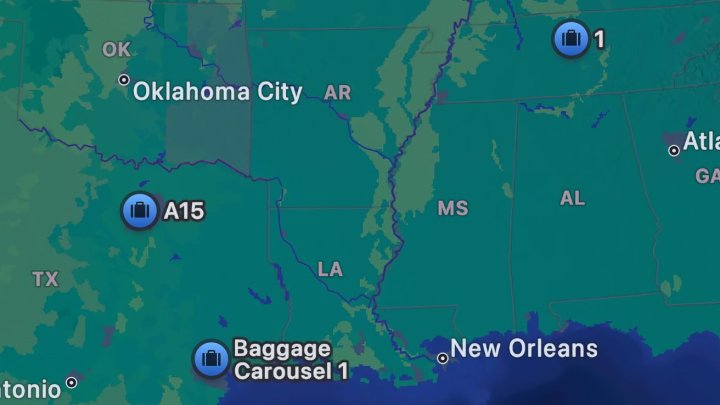
    Some Apple Maps users are experiencing a peculiar glitch: baggage claim carousels are appearing when the map is viewed from a distance. This issue began to surface on Sunday, prompting users to seek assistance on Reddit regarding how to turn off the baggage carousel markers. While this feature can be beneficial for first-time navigators in unfamiliar airports, it’s less practical when you’re just heading out for coffee.

    The cause of this glitch seems inconsistent; some users see it while others do not. During my own testing, I could not locate any baggage claim icons on my Apple devices. Those who are affected report that the icons become visible when the map is zoomed out to the point where only state abbreviations and capital cities are visible. Notably, not every airport is represented—only a few randomly scattered ones show up.

    Apple Maps baggage claim glitch
    u/Plane_Ad_9526 / Reddit

    One Reddit user posted a map displaying multiple baggage claims across the United States and one in Europe, while another shared a map with just a single baggage claim. Interestingly, specific carousel identifiers, like A15 and Baggage Carousel 1, appear more frequently than others.

    Apple has yet to comment on this issue, though it isn’t particularly alarming from a usability standpoint. Since the glitch likely stems from server complications, it should be resolved without needing a software update.

    In the broader context, this is a minor bug that shouldn’t lead to long-term effects. However, Apple Maps faces more scrutiny compared to Google Maps because of its tumultuous initial launch. Even after more than a decade, users still often regard Apple Maps as a secondary option.

  • Spotify Fixes Ad Bug Affecting Premium Users

    Spotify Fixes Ad Bug Affecting Premium Users

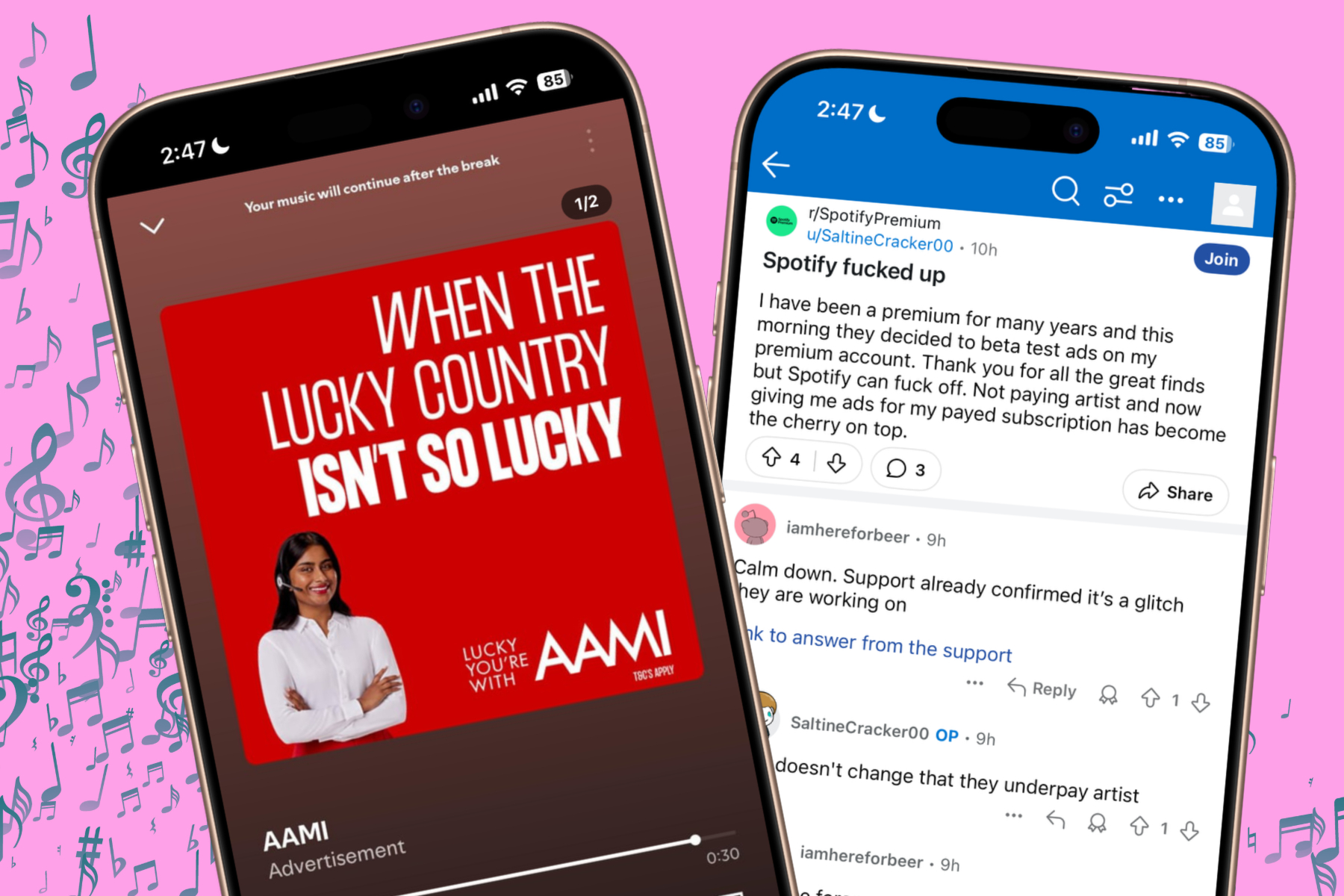
    Many Spotify subscribers are facing an unusual issue where they are encountering unskippable ads, despite having a Premium membership. Users have voiced their frustrations on the Spotify community forum, Reddit, and X, noting that ads are interrupting their listening experiences.

    Spotify’s support team has acknowledged the problem and stated that their engineering department is actively investigating it. In a post on the forum, they advised affected users to try logging out and back into their accounts multiple times to restore normal functionality.

    Additionally, Spotify has suggested that users clear the app’s cache on their devices and restart the application. Some have even been advised to uninstall and then reinstall the app, although it remains unclear if this solution will be effective.

    Hi there. We’re sorry to hear about this. Could you try clearing your app’s cache, following these steps: https://t.co/6FR9xeIUou? Let us know how it goes. We’ll keep an eye out for your updates.

    — SpotifyCares (@SpotifyCares) March 6, 2025

    Despite these suggested fixes, numerous users have reported that the problem persists. It appears that subscribers on various plans—including standalone, Duo, and Family—are all experiencing the ad interruptions.

    One user lamented, “I’m dealing with the same problem today. I’ve checked all the settings and logged in and out multiple times. It’s driving me crazy. They better resolve this soon.”

    Spotify displaying ads to Premium users
    Reddit / Digital Trends

    Another user added, “I just started experiencing this issue an hour or two ago. I’ve tried logging in and out, used different devices, and double-checked my payment status.”

    Some listeners are reporting being inundated with consecutive ads with no breaks. One user on Reddit expressed their frustration, saying, “I just encountered three ads in a row. If ads are going to interrupt my experience with a subscription, I’ll switch to Apple Music.”

    Complaints about Spotify showing ads to Premium users.
    Reddit / Digital Trends

    Reports indicate that this ad issue is not confined to the mobile app; users are also finding similar problems with the web player and streaming on smart home devices. Social media posts have highlighted additional issues, such as malfunctioning song skipping and shuffle features.

    As of now, Spotify has not provided a detailed explanation of what caused this disruption in their internal systems. Moreover, none of the suggested solutions seem to work universally for all users experiencing these issues.

    In other news, Spotify is set to roll out its hi-fi streaming tier later this year and has started offering AI-generated audiobooks on its platform. Meanwhile, competitors like YouTube have introduced a Premium Lite subscription in the U.S. this week, which excludes access to YouTube Music Premium and features such as background play.


  • Catch Bugs with the Afternoon Shine Outfit in Infinity Nikki!

    Catch Bugs with the Afternoon Shine Outfit in Infinity Nikki!

    Quick Links

    In Infinity Nikki, you’ll discover a variety of stylish outfits and charming creatures throughout Miraland. The game allows you to create stunning clothing and accessories, each with unique stats and abilities for Nikki to utilize. This category includes special ability outfits such as the fishing outfit, animal care outfit, and the bug-catching outfit.

    This guide will help you create the bug-catching outfit and use it to collect materials across Miraland, accompanied by Nikki and Momo. The possibilities for crafting are endless, with the world at your fingertips. Here’s everything you need to know to start bug-catching with Nikki!

    How to Create the Bug-Catching Outfit

    To receive the sketch for the Afternoon Shine outfit, you must first witness Nonoy crash into the roof of Florawish’s main clothing store. You’ll need to locate a Foodie Bee to fix the damage, which requires the Bug-Catching outfit.

    After unlocking the sketch using two Whimstars, you can begin assembling your new outfit.

    Materials Needed to Craft the Afternoon Shine Outfit

    Creating the Bug-Catching outfit requires you to collect the necessary materials. Each garment consists of different components, so we’ve compiled all the materials needed for you to craft the entire outfit in one go.

    You must craft every piece of the outfit before using the ability it offers.

    Material Name

    Amount

    Location

    Daisy

    6

    Florawish


    Breezy Meadow


    Stoneville


    Abandoned District


    Wishing Woods


    Memorial Mountains

    Starlit Plum

    1

    Florawish


    Breezy Meadow

    Floof Yarn

    1

    Florawish


    Breezy Meadow


    Stoneville


    Abandoned District

    Thread of Purity

    148

    Quest Rewards

    Outfit Stats

    Each outfit piece has unique stats across five categories. Together, they contribute to an overall style score that can assist you in planning your outfits more effectively.

    Even though all pieces are required to use the ability outfit, you can still use parts of it for style challenges.

    Outfit Piece Name

    Wardrobe Category

    Elegant

    Fresh

    Sweet

    Sexy

    Cool

    Clear Vision

    Hairstyle

    36 (D)

    33 (D)

    362 (S)

    45 (D)

    184 (B)

    Siesta Tunes

    Tops

    48 (D)

    30 (D)

    285 (A)

    46 (D)

    141 (C)

    Sunny Agenda

    Bottoms

    52 (D)

    32 (C)

    351 (S)

    61 (D)

    178 (B)

    Little Luck

    Socks

    19 (D)

    17 (D)

    116 (A)

    11 (D)

    57 (C)

    Springtime Steps

    Shoes

    25 (D)

    20 (D)

    172 (A)

    30 (D)

    84 (C)

    Nostalgic Breeze

    Hair Accessories

    14 (D)

    10 (D)

    86 (A)

    15 (D)

    41 (C)

    Golden Daylight

    Backpieces

    11 (D)

    13 (D)

    83 (A)

    15 (D)

    42 (C)

    Field Posy

    Chest Accessories

    14 (D)

    15 (D)

    84 (A)

    10 (D)

    42 (C)

    Total Outfit Score

    219

    779

    203

    240

    1,524

    How to Use the Bug-Catching Ability Outfit

    To utilize this outfit, equip it first. After assigning a hotkey for it, you can easily switch to the special ability whenever you want, and then activate the ability to use your net to catch anything in your vicinity.

    If you press and hold the ability button, you’ll start sneaking up to the bug you want to catch. This is crucial for approaching shy creatures like Sockos that may flee when scared. However, others, like Foodie Bees, are less likely to be disturbed.

    After you catch a bug, you can store it for future crafting! Make sure to keep an eye on your inventory.

  • Valve Fixes Team Fortress 2 Bug After 17 Years

    Valve Fixes Team Fortress 2 Bug After 17 Years

    The Scout shocked standing above a table, with the Heavy and Soldier standing behind him.
    Valve

    While it may not represent a major performance improvement, Valve introduced an intriguing update to Team Fortress 2 recently: the Scout is now sporting the right pants.

    In the patch notes from the recent update released on Thursday, there’s a noteworthy entry stating, “Fixed BLU Scout using the incorrect team color pants.” At first glance, this might not seem significant, but this issue has persisted for the Scout on the BLU team for an astonishing 17 years.

    One user on X, previously known as Twitter, pointed out the change, expressing their surprise: “They altered a character design after 17 years! What!”

    When examining the original pants worn by the BLU Scout, it’s easy to see that they were a similar brown shade to what the RED Scout wears. While it didn’t entirely shatter immersion, it did appear somewhat inaccurate. The new pants are now a grayer tone, coordinating better with his bright blue shirt.

    Interestingly, this change has sparked diverse opinions among the long-time fans of Team Fortress 2. Although the pants seem more accurate now, many of the cosmetic items released over the years for this free-to-play first-person shooter fail to blend with the new design, as noted by several users on platforms like Reddit.

    YouTuber Shounic, who focuses on Team Fortress 2 content, highlighted the pants’ color discrepancy in a video that aired two years ago. He thoroughly examined every instance where the pants appeared gray or brown, revealing that Valve often mismatched colors even in non-game materials like comics and promotional videos. Shounic shared a follow-up video today discussing the alteration, emphasizing that the pants are currently only available on the default texture and possibly one or two other cosmetics. This leads to mismatches with outfits that still feature the older brown pants, creating a dissonant appearance. He dubbed this moment “the strangest day in TF2 history.”