الوسم: Base

  • How to Migrate and Complete Character and Base in Conan Exiles Enhanced

    How to Migrate and Complete Character and Base in Conan Exiles Enhanced

    Since the release of Conan Exiles Enhanced, players with characters and homes on the old version will want to migrate their accounts to the new version without losing any progress. The game engine has been completely replaced, which means some issues may arise during migration. Before launching the updated game, players should be aware of these changes to ensure a smooth transition.

    If you’re new to the game, there’s nothing to worry about. But existing players need to take some steps to prepare for the update.

    How to Migrate Your Character to Conan Exiles Enhanced

    Starting May 4, 2026, the game servers were upgraded to Unreal Engine 5, and all Steam players’ characters were permanently moved to the new system.

    What can players expect from the improved Conan Exiles? According to Funcom, there are notable upgrades in graphics that returning players will notice right away:

    • Surface and terrain: The Exiled Lands and Isle of Siptah maps have been redesigned with better textures and ground details.
    • Shadows: Shadows are now clearer and more precise.
    • Dynamic lighting: Night and day cycles look more realistic thanks to improved lighting effects.

    Beyond visual improvements, the game has become significantly smaller in size — no more needing 120GB of storage for just one game! The new version also includes:

    • Multiple character creation options
    • A better user interface
    • Improved storage and crafting systems
    • Support for Steam Deck
    • A merging of the Exiled Lands and Isle of Siptah worlds into one seamless experience

    Players who were on Epic Games or playing through the Windows Store will stay on the legacy version, with no option to migrate to official servers, access updates, or use the Bazaar marketplace.

    How to Migrate Your Character from Exiled Lands

    This method is simple, as your entire character, including your home base and progress, will transfer. The Server Transfer Tool moves everything — levels, inventory, items, followers, and progress.

    However, if you played on the Isle of Siptah, the process is a bit different because the two worlds have been combined.

    How to Migrate Your Character from Isle of Siptah

    Since the two maps are now merged, bases built on the Isle of Siptah can’t be transferred automatically. To make sure you don’t lose important items, Funcom recommends these steps:

    1. Take down your entire base.
    2. Store all materials and items in your followers’ inventories.
    3. Return to the Isle and update your game.
    4. Collect your belongings from inventories to rebuild your base on the new world.

    It’s unfortunate for Isle of Siptah players who have spent hours perfecting their bases, but rebuilding is necessary for the new version of Conan Exiles. This is the cost of experiencing the enhanced game.

  • UK halts Chagos Islands surrender plan amid US resistance

    UK halts Chagos Islands surrender plan amid US resistance

    The UK government announced on Saturday that it has paused its plan to transfer sovereignty of the Chagos Islands—home to the US-UK Diego Garcia military base—which has been heavily criticized by former President Donald Trump. The upcoming legislation intended to transfer control of the islands to Mauritius, a move requiring approval from the U.S., will not be on the next parliamentary agenda, according to The Times.

    Prime Minister Keir Starmer’s office stated that London plans to continue negotiations to secure Washington’s formal approval. Trump previously labeled the deal a “big mistake” in February, after calling it the best possible outcome for Starmer. Under this agreement, Britain would hold control of Diego Garcia’s strategic military base through a 99-year lease, ensuring U.S. military operations can continue uninterrupted.

    A UK spokesperson emphasized that maintaining the base’s operational security remains a key priority. “We believe this agreement is the best way to safeguard the base’s long-term future, but we will only proceed if the U.S. supports it. We are actively engaging with both the U.S. and Mauritius,” they stated.

    Historically, Britain forcibly displaced approximately 2,000 indigenous Chagossians during the late ‘60s and early ‘70s to establish the military presence on Diego Garcia. Toby Noskwith, spokesperson for Indigenous Chagossian People—a campaign group—said that early on, high-level officials in the Trump administration, possibly even Trump himself, expressed reservations about the deal.

    “We’re surprised it has come to this point,” Noskwith remarked. “This issue has primarily been viewed as a diplomatic matter between states, but in the process, the Chagossians—especially elders and survivors—have been absent from discussions.” He called for questions to be asked about the significant money spent on negotiations that eventually collapsed, as well as the legality of a plan that denied the Chagossians their right to self-determination. Noskwith also urged Starmer to help ensure a respectful and dignified resettlement for the island’s original inhabitants.

    Recently, the close alliance between Washington and London has been strained, especially as Starmer has been hesitant to involve himself in the U.S.-Israeli conflict with Iran and initially refused to allow the use of British bases for attacks at the conflict’s outset. Although U.S. forces have since been permitted to conduct defensive strikes, Trump has repeatedly criticized Starmer, saying he falls short of Winston Churchill and has damaged the so-called “special relationship” between Britain and the U.S.

  • Building a Base in Hytale: Complete Guide to Completing and Solving

    Building a Base in Hytale: Complete Guide to Completing and Solving

    Part of playing a survival game like Hytale is in Exploration mode, which focuses on exploring the world. To survive overnight while monsters are out, you need a safe place to hide, a spot to store your extra items temporarily, and somewhere to keep your crafting tables safe.

    Building a base in Hytale takes some planning. While there’s no one right way to do it, there are a few tips to keep in mind when deciding where and when to settle.

    These tips are for creating a base in Exploration mode, assuming you’ll be unlocking materials and recipes as you go. If you’re in Creative mode with everything unlocked from the start, you have endless options and can build anything you imagine.

    ## Use What You Can At First
    When starting a new world in Exploration mode, you only have your character’s clothes. Luckily, you can find easy-to-access resources around the overworld like sticks and loose stones that don’t require tools to gather.

    Use these raw materials to make Crude Tools as soon as possible. A Crude Hatchet and Crude Pickaxe will make gathering wood and stone much faster. They can be crafted from your inventory menu’s Pocket Crafting option. Once you have better tools, gathering stronger materials for building becomes easier.

    Your first base doesn’t need to be pretty. It just needs to keep monsters out and give you a safe place to store things. If night is coming and you’re not ready to fight, quickly throw together a simple structure from any available raw materials. An ugly but functional shelter is better than risking the night with no protection.

    ## Gather and Build With Available Resources
    Before you craft a Furniture Workbench to make beds, you’ll need to wait out the night. Waiting in an impromptu shelter made of dirt and wood is safer than dying and losing everything when monsters attack after dark.

    If you’re near a cave entrance, block the lower part to keep monsters underground, seal off the main entrance, but leave a small opening to watch the sunrise safely. In a forest, chop down thick-trunked trees, carve out sections, and use that wood to build a simple wall or shelter. It might not be pretty, but it’ll keep you safe until morning.

    ## Map Using Basic Resources, Then Improve
    If your base location is ideal, but resources are limited, don’t worry. You’ll gather plenty of materials during your adventures—stone, wood, ores—so focus on establishing a sturdy structure first. You can always decorate or upgrade later.

    It’s better to build a simple but solid shelter now and improve it later rather than delaying your first night or risking monsters and weather. Remember, demolishing sections with your pickaxe lets you recover materials and change your layout as you go.

    ## Build Using What’s Already There
    If you come across abandoned structures, ruins, or villages, these can be turned into your home base. Exploring the world thoroughly can reveal great spots with useful loot and potential to expand or modify existing buildings.

    If you stumble upon an empty house, place your bed inside to set that as your spawn point. Even if your house isn’t finished yet, sleeping in the bed sets your respawn location. When night falls, sleep in your bed to skip the dangerous hours, so you can get a fresh start in the morning.

    ## Find Ways To Add Visual Interest
    Once you have a builder’s workbench and resources, make your base visually appealing rather than just functional. Rotate blocks to break up patterns, use colored wood or wool for accents, or blend materials in different areas to create unique looks. Inside, you can mix wood and stone materials to give your space character and style.

    Adding decorative items like lights, pottery, seasonal decor, colored wool, or painted walls can make your base feel more like home, even if it’s still a work in progress.

    ## Pick a Good Location for Your Main Base
    Choosing a strategic spot to settle allows for easier resource collection and safer exploration. Being near an underground mine entrance gives quick access to valuable minerals, while choosing a location close to natural food sources ensures you stay fed during long adventures.

    Explore different areas before settling down—consider proximity to biomes, caves, and natural spawn points for animals. Make sure the location suits your preferred play style and has enough space for expansion if needed.

    ## Take Over Existing Structures
    If building from the ground up doesn’t appeal to you, look for pre-made structures like houses, ruins, or villages. These can be moved into or used as bases, saving you time. Many of these structures are generated naturally and can serve as a starting point.

    If you find an empty house early on, place your bed inside to gain ownership and set your respawn point there. Using existing structures helps you avoid early construction work and can give you a head start in establishing your home.

    ## Find Ways To Make Your Base Visually Interesting
    Even after building your initial shelter, you can add personal touches. Rotate block orientations to create different patterns. Use contrasting materials or colors for accents. Inside, mix textures and styles to make each space stand out.

    Decorate with lights, plants, furniture, and other ornaments to give your base personality. Experiment with different designs and materials to create a space that looks good and feels like home.

    ## Leave Space Outside for Farming
    Food is essential for survival, especially if you’re engaging in combat, exploring caves, or fighting other players. Plan for farming outside your main base by leaving space for crop plots, animal pens, or both.

    Plant berry bushes, till soil for crops, and set up fences to keep out wild animals and monsters. Access to fresh food helps keep your character healthy and well-fed on long journeys.

    ## Expand or Move When Needed
    Once your initial base is established, you might find it’s not big enough, especially if friends join or you discover new resources. Building additional rooms or expanding your current base is straightforward—just add new sections if space allows.

    If you want to switch to a different biome or find a better spot, you can pack up what’s important and rebuild elsewhere. Sleeping in a bed in your new location resets your spawn point, making moving a smooth process.

  • Top Base Layout in StarRupture: Perfect for Completing and Solving

    Top Base Layout in StarRupture: Perfect for Completing and Solving

    Building your base in StarRupture can be very rewarding, especially when everything runs smoothly. The secret is to keep crafting, complete contracts, and ensure drones are continuously transporting resources along the rails. At the beginning, your production is limited, and you won’t have many items to send via the Orbital Cargo Launcher. But as you progress, your base will grow to include various machines performing different tasks.

    Here’s a guide to help you set up your first base and stay efficient in StarRupture.

    Complete Base Building Guide

    Start by constructing the essential sections unlocked early:

    • A Base Core to protect your structures during a rupture.
    • Orbital Cargo Launchers (OCL) for sending items to corporations and completing contracts.
    • Ore Excavators for automated mining.
    • Smelters to turn ore into bars or blocks.
    • Solar Generators to supply power.
    • A Habitat to stay in during a rupture wave.

    If you experience power issues, verify that you have enough solar generators connected to your main base with platforms. As you develop, add more machinery connected by rails and storage units to hold excess materials.

    When you first build, don’t worry about making everything look perfect; focus on connecting everything correctly. You can remove and rebuild any part of your base, and materials will be refunded upon deconstruction. Typically, your initial base will be close to the launch site, where you’ll find titanium and wolfram ore deposits. Use Ore Excavators to gather those resources and build at least two Smelters nearby. Connect the excavators via rails to produce titanium and wolfram bars, which are then sent through rails to the OCL.

    Managing resources and contracts

    Your initial objectives involve simple materials. Completing early contracts unlocks more advanced machines and blueprints, which you’ll find in abandoned station ruins in blue loot boxes. Once you obtain blueprints, unlock the corresponding items on the Recipe Station so you can craft them in the right machine.

    Maintaining your base

    It’s best to group similar machines together to streamline production. Setting production lines in a logical order helps keep things simple, especially as your base expands. Ore Excavators will keep mining as long as there’s somewhere to deposit the ore. When you’ve unlocked Storage Depots with the level 3 Clever Robotics contract, connect them to your excavators to store excess ore. Larger storage units will become available as you level up, allowing you to switch out storage solutions as needed.

    Any stored ore can be sent to Smelters or used directly for crafting. Using multiple Storage Depots at different stages helps ensure you always have materials ready. You can also unlock a Building Drone by completing the level 4 Clever Robotics contract, further easing your base management.

    Since there are five corporations offering contracts, you won’t be able to complete all of them at once. A good strategy is to build four OCLs and focus on fulfilling two contracts at a time, with each covering two corporations, to speed up progress on higher-demand items.

    Designing your base as you grow

    The beauty of StarRupture’s building system is the ability to redesign your base anytime. You can deconstruct and rebuild parts, moving machinery and rails to accommodate new equipment. Some machines will need repositioning or reconnecting to produce more complex items, so expect to do regular redesigns as you level up.

    Distant Ore Excavators and bases can be linked via supported rails, offering flexibility. It’s recommended to build your Habitat with multiple levels—up to three. The first level should contain your stations and a few personal storage units. The second level is for large storage containers to hold surplus items, unused LEMs, or excess food and materials. The third floor can be used for sightseeing, with windows providing views of your production lines and the scenery during rupture waves.

    Defending your base

    Beyond maintaining production, defending your base is crucial. Rupture waves can cause damage, and if your base isn’t protected, bugs can attack your machines. These bugs will cover machines with a blue substance that stops them from working. To fix this, eliminate the bugs, look out for large growths on machines, destroy them, and then approach the Base Core to remove the remaining blue goo.

    Keep your base organized by grouping similar machinery, building in lines, and planning redesigns as you unlock new items and features. This approach helps ensure your base remains efficient and resilient against threats.

  • Complete All Base and Max Plort Values in Slime Rancher 2

    Complete All Base and Max Plort Values in Slime Rancher 2

    Selling Plorts is the main way to earn money in Slime Rancher 2. The most profitable time to sell is right after midnight, when prices change each day. Keep a close watch on which Plorts are trending to get the best prices before selling large amounts.

    Pink Plorts are the most common, so they tend to be worth the least. It seems that the value of a Plort drops as you sell more of that type. For example, if Cotton Plorts are high-priced in the morning and you sell many, their price probably decreases the next day. To maximize your profits, it’s best to rotate which Plorts you sell and manage your stock carefully.

    Below is a list of all Plorts you can sell along with their base prices to help you plan your sales:

    All Plorts and Their Prices

    Plort Name Base Price Max Price Origin Slime
    Pink Plort Pink Plort 7 Newbucks 13 Newbucks Pink Slime
    Cotton Plort Cotton Plort 15 Newbucks 18 Newbucks Cotton Slime
    Phosphor Plort Phosphor Plort 15 Newbucks 22 Newbucks Phosphor Slime
    Tabby Plort Tabby Plort 15 Newbucks 21 Newbucks Tabby Slime
    Rock Plort Rock Plort 15 Newbucks 41 Newbucks Rock Slime
    Angler Plort Angler Plort 18 Newbucks 41 Newbucks Angler Slime
    Honey Plort Honey Plort 18 Newbucks 29 Newbucks Honey Slime
    Batty Plort Batty Plort 18 Newbucks 26 Newbucks Batty Slime
    Boom Plort Boom Plort 20 Newbucks 32 Newbucks Boom Slime
    Hunter Plort Hunter Plort 20 Newbucks 60 Newbucks Hunter Slime
    Crystal Plort Crystal Plort 20 Newbucks 47 Newbucks Crystal Slime
    Dervish Plort Dervish Plort 27 Newbucks 50 Newbucks Dervish Slime
    Tangle Plort Tangle Plort 27 Newbucks 50 Newbucks Tangle Slime
    Ringtail Plort Ringtail Plort 22 Newbucks 34 Newbucks Ringtail Slime
    Saber Plort Saber Plort 24 Newbucks 50 Newbucks Saber Slime
    Yolky Plort Yolky Plort 28 Newbucks 53 Newbucks Yolky Slime
    Gold Plort Gold Plort 200 Newbucks 659 Newbucks Gold Slime
    Hyper Plort Hyper Plort 30 Newbucks 50 Newbucks Hyper Slime
    Shadow Plort Shadow Plort 32 Newbucks 50 Newbucks Shadow Slime
    Prisma Plort Prisma Plort 32 Newbucks 50 Newbucks Distorted Slime
    Sloomber Plort Sloomber Plort 29 Newbucks 50 Newbucks Sloomber Slime
    Tangle Plort Tangle Plort 27 Newbucks 50 Newbucks Tangle Slime
    Twin Plort Twin Plort 29 Newbucks 50 Newbucks Twin Slime
    Sloomber Plort Sloomber Plort 29 Newbucks 50 Newbucks Sloomber Slime
    Hyper Plort Hyper Plort 30 Newbucks 50 Newbucks Hyper Slime
    Shadow Plort Shadow Plort 32 Newbucks 50 Newbucks Shadow Slime
    Prisma Plort Prisma Plort 32 Newbucks 50 Newbucks Distorted Slime
    Dervish Plort Dervish Plort 27 Newbucks 50 Newbucks Dervish Slime
    Tangle Plort Tangle Plort 27 Newbucks 50 Newbucks Tangle Slime
    Ringtail Plort Ringtail Plort 22 Newbucks 34 Newbucks Ringtail Slime
    Saber Plort Saber Plort 24 Newbucks 50 Newbucks Saber Slime
    Yolky Plort Yolky Plort 28 Newbucks 53 Newbucks Yolky Slime
    Gold Plort Gold Plort 200 Newbucks 659 Newbucks Gold Slime
    Hyper Plort Hyper Plort 30 Newbucks 50 Newbucks Hyper Slime
    Shadow Plort Shadow Plort 32 Newbucks 50 Newbucks Shadow Slime

    Use this guide to plan when and what to sell, so you make the most profit in Slime Rancher 2.

  • Completing Base Building and Relocation in Dune: Awakening

    Completing Base Building and Relocation in Dune: Awakening

    In Dune: Awakening, one of the key decisions you’ll face is selecting a spot for your base. Once you’ve chosen a location, you’ll need to think about how to actually construct it, which can be quite a challenge, especially if you’re new to base-building games.

    The tutorial introduces you to a small base using four foundation tiles, but what comes next? This guide offers helpful tips for building your base and will also explain how to relocate it if your original choice no longer suits your needs.

    Choose a Relatively Flat Area for Construction

    You can place foundation tiles on rocky ground to create a flat surface, but it’s wise to select a spot that has some existing flat area. This choice will ease navigation and make expanding your base less complicated.

    If you find that your base is too small, don’t worry—relocating is possible. Just make sure your new location has ample space for a larger base.

    Position Your Base Close to Resources

    A player standing near plant fiber bushes in Dune Awakening.

    While it might seem appealing to be isolated from other players, it can leave you far from essential resources and scavenger camps. Water can be scarce early on, especially if you rely solely on Dew Flowers.

    We recommend setting up your first base in an area rich in resources. For example, if you find a spacious area near a cluster of Dew Flowers, consider placing your Sub-Fief Console there.

    Design Your Base Layout

    A player planning their base in Dune Awakening.

    In Dune: Awakening, you’ll have the opportunity to plan your base layout, which is a great feature. When you enter build mode, a simple click allows you to place an item blueprint. You can switch between different blueprints during this process as well.

    To actually construct an item, just hold down on the blueprint. This feature is particularly useful for testing layouts or optimizing space in your base.

    Ensure Accessibility to Your Base

    Driving a sandbike into a garage in Dune Awakening.

    After enhancing your base, you might step outside only to find you’re close to an impassable edge. Climbing a rock face might work temporarily, but it can become tedious.

    When designing your base, we recommend allocating space for a clear entry and exit. If you find yourself traversing around the base just to reach a certain spot, consider repositioning the entrance.

    Maintain Power for Your Base

    A player standing at the generator in Dune Awakening.

    Power is crucial in Dune: Awakening, so ensuring your base runs smoothly is essential. You’ll need the Fuel-Powered Generator and Fuel Cells to generate power for crafting stations and other functions.

    Fuel Cells can be easily found if you frequently explore. Remember to keep these stocked in your generator to maintain power for your crafting stations and to provide shields for your base.

    Control Access to Your Base

    You can choose to play solo or with others in Dune: Awakening. Whether it’s just a friend or a larger group, consider adjusting your base permissions via the Sub-Fief Console.

    This console allows you to specify who can enter your base. If you want to grant someone access but restrict their use of your items, you can manage permissions on a case-by-case basis.

    Don’t Overlook Storage Containers

    A player looking at a storage container in Dune Awakening.

    Your tutorial will guide you through using a storage container, which is a common feature in survival games. However, in Dune: Awakening, you’ll be able to craft items using what you’ve stored.

    We advise keeping valuable items in your storage. This way, if you die while exploring, your gear won’t be lost. If you need to craft something shortly after, you can use items from your storage container.

    You can further manage your storage by assigning containers and crafting stations to different circuits. This is particularly useful if you have multiple copies of the same station, as it allows each to focus on specific tasks.

    Moving Your Base

    A player looking at the option to abandon their base in Dune Awakening.

    If your current base location isn’t ideal, or if you’ve found a better spot, you can move your base, though it requires some effort. First, create the Solido Replicator, located in the first row of the Construction Research tab.

    Once you’ve crafted the replicator (using 20 Salvaged Metal), point it at your base to save its blueprint. After that, you’ll need to abandon your current base from the map by clicking on the Sub-Fief Console icon and selecting ‘Abandon Base.’

    Before you abandon the base (but after scanning it), you can destroy it to recoup some materials. This strategy prevents others from claiming it first.

    Now, you can find a new location and build your base with the saved blueprint. Using the Solido Replicator, you can create a new Sub-Fief Console. You will need the necessary resources on hand for construction, but the planning work is already complete.

  • Upgrade Guide for EA Sports FC 25: 90 Ratings Base Icons

    Upgrade Guide for EA Sports FC 25: 90 Ratings Base Icons

    Quick Links

    One of the significant squad-building challenges (SBC) in EA Sports FC 25 is the beloved Ultimate Team mode, which allows players with enough time, coins, or extra cards to earn an Icon card. These Icon cards represent legendary players from past eras who left their mark on the game. They feature unique cards in FC 25, boasting exceptional overall stats and PlayStyles while linking seamlessly with other players.

    This SBC awards a maximum-rated 90 Icon card to those who finish it. Although it can be expensive to complete from scratch, players may land an Icon card that elevates their team’s competitiveness.

    This is a limited-time SBC, expiring on November 30, 2024. If another 90-rated Icon SBC is released, it might come with different requirements.

    How to Complete the Max. 90 Rated Base Icon Upgrade SBC


    To finish this SBC, players need to complete four individual squads, each with slightly different requirements. For those familiar with previous Hero Upgrade and Icon Upgrade SBCs, you’ll notice the requirements have been increased due to the higher-rated cards available.

    Squad Requirements

    Approx. Price

    Best 11 Cards To Complete

    • 85-rated Squad
    • One (1) Team of the Week Card
    • 52,000 coins (Consoles)
    • 55,000 coins (PC)
    • Two 87-rated cards
    • One 86-rated TOTW card
    • Four 84-rated cards
    • Four 83-rated cards
    • 86-rated Squad
    • One (1) Team of the Week Card
    • 77,000 coins (Consoles)
    • 82,000 coins (PC)
    • Two 88-rated cards
    • One 87-rated card
    • One 86-rated TOTW card
    • One 86-rated card
    • Three 84-rated cards
    • Three 83-rated cards
    • 104,000 coins (Consoles)
    • 110,000 coins (PC)
    • One 89-rated card
    • Three 88-rated cards
    • Two 87-rated cards
    • Three 84-rated cards
    • Two 83-rated cards
    • 150,000 coins (Consoles)
    • 155,000 coins (PC)
    • Six 89-rated cards
    • Five 84-rated cards

    While completing each squad might seem costly, you can lower expenses by using cards that are already in your club or by opening packs in hopes of acquiring high-rated cards. Otherwise, the only option is to purchase cards from the Transfer Market.

    If you were to build these squads from scratch, the total cost would be approximately 385,000 coins for console players and around 401,000 coins for PC users.

    The Best 90 or Lower Rated Base Icon Cards in EA Sports FC 25

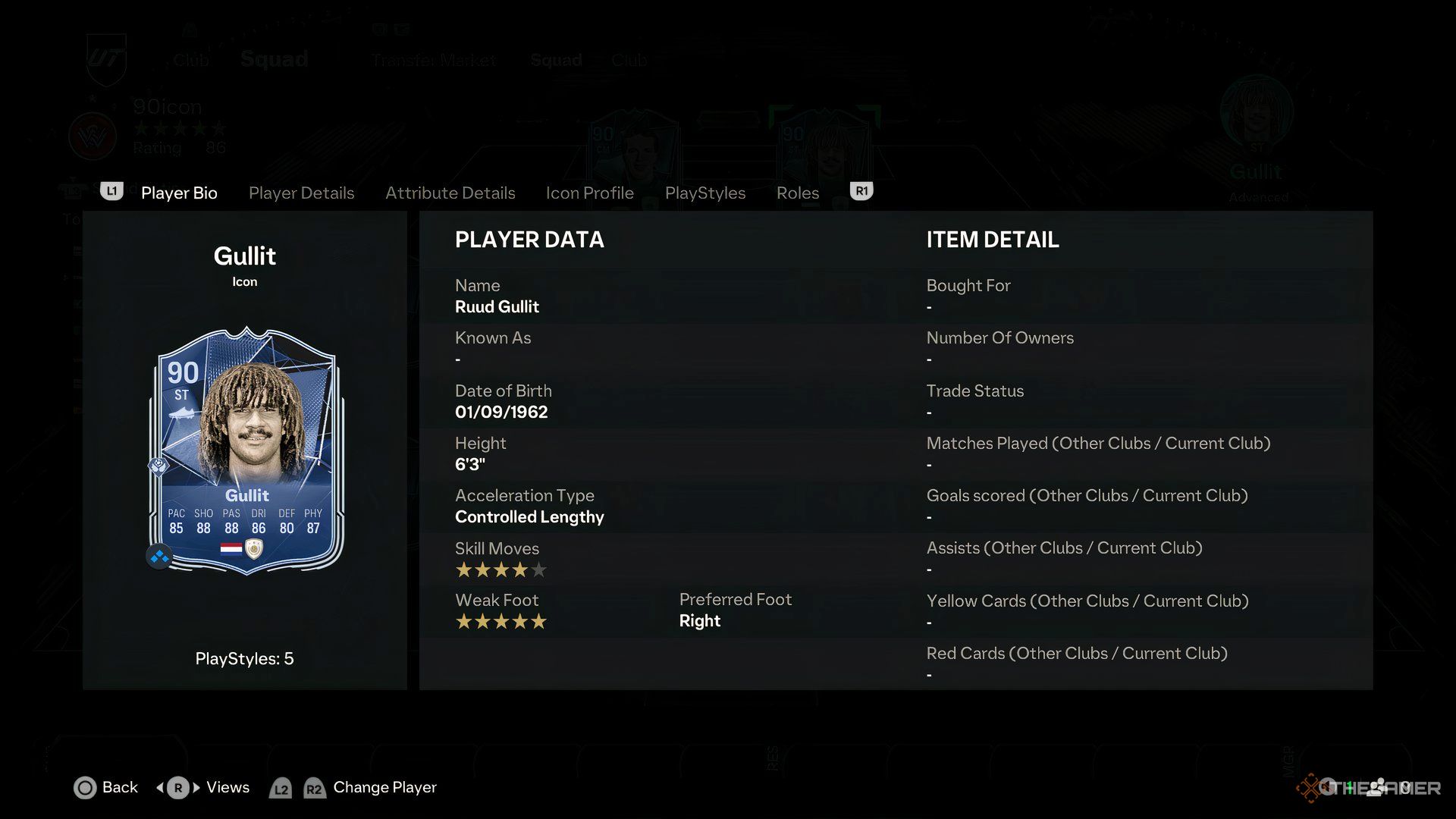
    The Gullit Icon card in EA Sports FC 25.

    With the updated maximum rating for the Base Icon Upgrade SBC, there are some new cards included in the potential offerings, and these can be worth millions in coins. The following are some of the most valuable cards you might obtain from this SBC, known for their impact and effectiveness in gameplay.

    There are a total of 86 Icon cards with a maximum rating of 90 in FC 25, providing a vast selection of potential rewards. Below are some of the top cards you could pull, based on both their market value and playability.

    Icon and Rating

    Description

    Ruud Gullit (90)

    Gullit has always been a standout card in the EA FC lineup, offering versatility with no real weaknesses. He can play as a CAM, CM, or ST, also featuring the Aerial+ PlayStyle for easy headers.

    Jairzinho (90)

    Jairzinho is the top Brazilian Icon in this SBC, excelling in attack with five-star skill moves, impressive speed, shooting, and dribbling stats. Coupled with a Rapid+ PlayStyle, he poses a significant challenge for defenders.

    Lothar Matthaus (90)

    Like Gullit, Matthaus is a well-rounded midfielder but excels in defense and speed. His Power Shot+ PlayStyle is very effective, and he can play multiple roles, including CM, CDM, and CB.

    Gareth Bale (88)

    A new addition, Bale is one of the fastest Icon cards, known for his powerful left foot. While not as versatile as Jairzinho, he shares a Rapid+ PlayStyle and solid offensive abilities, making him a fantastic winger or striker.

    Roberto Carlos (90)

    Roberto Carlos stands out as an elite wingback, featuring exceptional speed, strength, passing, and crossing capabilities. His Dead Ball+ PlayStyle enhances his free-kick effectiveness.

    These five Icons are among the best, but there are several other commendable choices, including Patrick Viera, Samuel Eto’o, Didier Drogba, Rio Ferdinand, Franck Ribery, and George Best. It’s also possible to receive lower-rated cards, such as those rated 86 or 87, which may offer less value compared to the cost of the SBC.

    Out of the total 86 icons, only 12 icons are valued above the cost of the SBC. This means that the chances of an exceptional pull stand at 14 percent. However, if you use existing cards from your club instead of purchasing, your odds of getting a valuable card significantly improve.

    So, when you finish the SBC and trigger the walkout animation, look out for icons from nations like Cameroon, France, Ivory Coast, and Northern Ireland. Conversely, if you see England, Mexico, Croatia, or Argentina, you may end up with a less valuable Icon than anticipated.