The many hidden secrets scattered throughout The Dark Pictures Anthology: Directive 8020 are truly remarkable. Supermassive Games thoughtfully leaves clues for players to discover, allowing you to piece together the story on your own.
One of these secrets is called The Simms Recordings. There are ten videos made by Pari Simms during her four years working as a Sleep Technician on the Cassiopeia. These recordings can be found in various places in Directive 8020, and they hint that Simms suspected something was wrong.
All Simms Recording Locations
You first meet Pari Simms early in the game. She works as a Sleep Tech on the Cassiopeia and is killed relatively early—one of the few deaths that can’t be avoided no matter your choices. Her impact, however, remains throughout the game in many subtle ways.
She appears ten times across hidden videos called The Simms Recordings. To find them, look for screens embedded in the walls of the ship that you can interact with, similar to other secrets in the game.
The recordings begin with a Corinth logo, then show videos Simms records for her mother back on Earth. These videos show her talking about her days awake while the rest of the crew sleeps during their four-year journey to Tau Ceti F.
Examples of Recordings and Their Locations
Green Tea: Located in the Crew Quarters during Episode 2, “Best Laid Plans,” on a wall in Simms’ room, between her work desk and the door to the main area. This video shows Simms messaging her mother, mentioning a two-hour transmission delay.
Patches: Also in Episode 2, on the wall in the Ship’s “Shape” area. It discusses encrypted updates being sent from Earth to the ship.
Red Alert: Found early in Episode 2, during the scene where you control Young. It’s on the wall near the control panel when attempting to restore power.
Sweet Dreams: In the same episode, in the Crew Quarters hallway, upstairs to the left of the staircase. The video reveals that the return trip’s stasis fluid differs from what was used outbound.
Slingshot: During Episode 3, “The Sample,” in the Gear Up section of the ship, inside the Tool Shed. It’s located on the left side as you enter, near a device that opens locked doors.
Special Permission: Also in Episode 3, near the Mess Hall, down the stairs toward the large ship sign. This recording shows Simms discovering that Williams has a secret line to the Oracle.
Hostile Fire: Early during Episode 5, “Mr. Williams,” in the “Radio Silence” scene. It’s on the wall in the area where you try to reroute power to the elevator.
Field Agent: Found in Episode 6, “Hostile Takeover,” during a detour in the Geoscience Lab. Inside, override the door lock and find the video on the wall inside the room.
Rabbit Hole: In Episode 8, “Come True,” during the scene where you evade an impostor Eisele. It’s on the wall in the Locker Room, just as you’re rerouting power to escape.
At Peace: Also in Episode 8, in the passenger area called “The Way Back,” near where Simms’ connection to Carter and her mother influences her decision to stop investigating. The video is just ahead of the door you must pass through to leave the scene.
Additional Tips
Finding all ten recordings earns the “Dear Mum…” trophy.
Many of these recordings can be found by carefully exploring the environment and interacting with designated screens.
Some secrets are well-hidden, requiring thorough exploration, especially toward the later stages of the game.
This collection of recordings offers crucial insights into Simms’ suspicions and the larger story unfolding onboard the Cassiopeia.
Sure! Here’s a rewritten, unique, human-like version of the content in American English, with any mention of videos or editors removed:
The simplest way to enhance your experience with top PS5 games is by pairing them with a quality headset. While many gamers can’t afford a full surround sound system, a good headset provides a richer audio experience without the need for a room filled with speakers.
Most high-quality PS5 accessories are wireless, so naturally, you’ll want your headset to be wireless as well. However, there’s one caveat: the PS5 doesn’t support standard Bluetooth headphones natively. If your headphones don’t come with an official PlayStation USB dongle or another supported wireless adapter, you’ll need a USB-A or USB-C Bluetooth audio transmitter to connect them directly to your console.
When it comes to connecting Bluetooth headphones to your PS5, it’s important to note that most headsets use Bluetooth, but pairing can sometimes be tricky. If you’re experiencing difficulty, here’s how to do it quickly and easily.
Once you’ve inserted your Bluetooth transmitter into the PS5, generally no additional setup on the console is required. The PS5 should recognize the transmitter as a USB audio device. If you don’t hear sound after pairing, check the settings under Sound > Audio Output to ensure the transmitter is selected.
To pair your Bluetooth headphones with your PS5, follow these steps:
Step 1: Turn on your headphones and put them into pairing mode, following the manufacturer’s instructions.
Step 2: On your Bluetooth transmitter, press and hold the pairing button until the LED indicator starts flashing, then wait a moment.
Step 3: The transmitter should automatically detect your headphones and establish a connection. Once connected, you’re good to go and can start gaming with your headphones.
If the connection doesn’t happen on the first try, turn your headphones off and repeat the process. Ensure both devices are charged, and that you’re pairing within the ideal window to avoid timing issues.
If you’d prefer to connect Bluetooth headphones without a transmitter, there’s an alternative workaround involving your TV. Many modern televisions support Bluetooth, allowing you to pair your wireless headphones directly to the TV instead. Then, your PS5 audio can be routed to the headphones via the TV.
Here’s how to do it:
Step 1: Access the TV’s settings menu and locate the Bluetooth options. Ensure Bluetooth pairing is enabled.
Step 2: Put your Bluetooth headphones into pairing mode.
Step 3: Find your headphones in the list of available Bluetooth devices on the TV and pair them.
Please keep in mind that using your TV’s Bluetooth can introduce audio delay, and microphone support may be limited compared to direct headset connections.
FAQs
Can you connect a Bluetooth headset directly to the PS5?
Sadly, the PS5 doesn’t natively support Bluetooth headphones. The best way to connect a standard Bluetooth headset is through a compatible USB-A or USB-C Bluetooth adapter plugged into your console.
Why doesn’t the PS5 support Bluetooth audio natively?
Sony has stated that Bluetooth audio on the PS5 isn’t supported due to latency issues and bandwidth limitations. This can lead to noticeable delays and connection challenges during gameplay.
Can I connect AirPods to my PS5?
Direct connection isn’t possible because the PS5 doesn’t support standard Bluetooth audio. However, with a compatible Bluetooth adapter, you can connect AirPods and other Bluetooth headphones. Keep in mind that some adapters support only audio, while others might provide limited microphone functionality.
By following these steps and tips, you can enhance your gaming audio and enjoy your PS5 experience to the fullest.
“Life Is Strange: Reunion” takes place at Caledon University, where many people are passionate and outspoken. Several of them share their thoughts through podcasts. Loretta hosts the popular Abraxcast show, but other characters also have their own podcasts.
Throughout the game, you’ll notice many podcast flyers. When you examine these flyers, you get the opportunity to listen to an episode. Collecting and listening to all of them will earn you the Podcast Overload achievement or trophy. To make this easier, here are the locations where all the podcast episodes can be found.
Podcast Location 1 — Abraxcast One
In the scene “Scene: Time Dojo,” just before meeting Moses, you’ll pass by a wall filled with information about the Moon. Afterward, turn left through the opening. On the bulletin board there, you’ll find flyers for Loretta’s podcast.
Podcast Location 2 — Moses Interview
While heading to meet Moses for the first time, you’ll pass a bulletin board with a flyer for his interview. It’s located near the path you take after passing the scene “Scene: Scene: Time Dojo.”
Scene: Class Act
During the outside photography class, as Max, move towards the benches in front of you. On the right bench, you’ll see a flyer for an interview with Moses on Loretta’s podcast.
Podcast Location 3 — Vox Populi One
In the scene “Scene: Open Mic Night,” after saving Amanda’s stand-up routine, talk to Lucas about his novel. When you finish your chat, turn around and find some business cards on a small table nearby. Picking one up allows you to listen to his Vox Populi podcast.
Scene: Academia Now
In the “Scene: All Available Evidence,” go upstairs in Moses’ office. There, you’ll find a small coffee table with another flyer for Lucas’ Vox Populi podcast.
Podcast Location 4 — Drugstore Makeup Interview
During the “Scene: Chloe’s Decision,” the flyer is in the same spot as the one in the Times in Turtle scene. It’s on the bulletin board in the entrance foyer of the Snapping Turtle, where Chloe’s band interview is promoted.
Scene: Times in Turtle
While playing as Max and Chloe, during the scene where Chloe enters the bar, head towards the front door. Inside the foyer, on the bulletin board, you can find a flyer for a Maxcast episode.
Scene: Chloe’s Decision
You’ll find the same flyer placement as the Times in Turtle scene—the bulletin board at the entrance of the Snapping Turtle, featuring an interview with Chloe’s band.
Podcast Location 9 — Abraxcast Three
Again in the “Scene: Scene: Mabon,” as a drugged-up Max returning to the house, pass by a picnic table outside. On it, there’s a flyer for the final episode of Abraxcast.
Scene: All Available Evidence
Within Moses’ office, upstairs in the scene “All Available Evidence,” locate a small coffee table with yet another flyer for Lucas’ Vox Populi podcast.
Podcast Location 10 — Vox Populi Two
During the scene “Scene: Memoria,” outdoor on the deck of the Snapping Turtle, head to the dock. There, on the green chair, is the last podcast flyer—marking the final episode of Abraxcast.
Collecting all these flyers and listening to each associated episode will complete your podcast collection in the game.
Remember the days when you could just turn on your TV, set the volume once, and everything was crystal clear? However, as screens have become slimmer and more minimalist, the audio experience has taken a hit—transforming watching TV into an unpredictable rollercoaster ride of sound.
Dialogue often comes through so quietly and muffled that subtitles become a necessity just to keep up. Meanwhile, sudden explosions and soundtrack crescendos can practically shake the furniture, making the overall experience more jarring than relaxing. It’s frustrating, and it turns what should be a simple, enjoyable activity into a constant game of adjusting the volume—up, down, then up again—to find a comfortable balance.
When this becomes a regular issue, many people consider investing in a soundbar or surround sound system to enhance their audio. But before spending extra money, it’s worthwhile to check your TV’s settings and placement. Small adjustments to how your TV is positioned or configured can make a significant difference in your sound quality.
With insights from Michael Price, a TV and Home AV specialist at Panasonic, here are some practical tips and tricks that may help you achieve better audio performance without additional equipment or hefty expenses.
### 1. Correct TV Placement Matters
Where you position your TV in the room can greatly affect how it sounds, especially depending on its built-in speakers. Many modern TVs feature speakers that fire from the back or downward, rather than forward. If you mount a TV with rear-firing speakers flush against a wall, sound can become muffled, echoey, or distant because the audio reflects back into the wall. The same applies if your TV’s downward-firing speakers are blocked by furniture or placed on a flat surface.
To optimize sound, position your TV so that rear-firing speakers are a good distance from the wall—leaving space behind it. If your speakers face forward, make sure they’re unobstructed and angled toward your seating area for the best sound projection.
### 2. Ensure Your TV Isn’t in Store or Demo Mode
Some TVs, especially those purchased in retail stores, may default to “Store Mode,” which emphasizes brightness and volume to attract buyers. This setting can produce overly loud, bass-heavy sound that isn’t ideal for everyday viewing. Check your TV’s settings to verify it’s in “Home” or “User” mode, then adjust the sound settings for more natural audio.
### 3. Use Your TV’s Spatial Sound Settings
Higher-end models often come equipped with AI-driven sound calibration features that adapt to your room. For example, Panasonic’s Space Tune function can send test signals to your remote’s microphone, measure the room’s acoustics, and automatically adjust the speaker output and settings accordingly. To benefit from this, sit in your usual viewing spot, ensure the room is quiet, and hold the remote at ear level while the calibration runs.
### 4. Check for a Sound Wizard or Auto-Setup
Many newer TVs come with built-in sound optimization features or “wizards” that guide you through customizing audio profiles. LG’s Personalized Sound Wizard, for instance, offers preset profiles for different listening preferences, like Vocal Enhancement or Spatial Sound. These prompts help you find a sound profile that fits your taste without manually fiddling with individual settings.
### 5. Start with Basic Sound Modes
If advanced features aren’t available, begin with your TV’s standard or “Normal” mode, often labeled as “Standard,” “Auto,” or “Straight Through.” This mode typically disables unnecessary processing, delivering the most natural sound. From there, you can fine-tune using the equalizer to suit your preferences.
### 6. Adjust Bass on Wall-Mounted TVs
If your TV is mounted on the wall, tweaking the bass can make a noticeable difference. Deep bass adds excitement but can also cause distortion, especially if your TV is close to or pressed against a wall. Moderating bass levels helps reduce unwanted rumbles and prevents audio from sounding muddy or distorted.
### 7. Brighten Up Dialogue with Treble
If speech sounds muffled, increase the treble and lower the bass slightly. Turning up the treble emphasizes higher frequencies where voices reside, making dialogue clearer. Turning off surround sound effects or audio enhancements that add rumbling can also help voices stand out more prominently.
### 8. Perfect Your Room’s Acoustics
In open-concept spaces with lots of hard surfaces—like tile floors, glass windows, and sleek countertops—sound reflection can cause echoes and reverberations. To improve clarity, incorporate soft furnishings such as curtains, cushions, or rugs to absorb excess sound. Switching to a “Music” or “Voice” mode on your TV can also help reduce harsh reflections and echo.
### 9. Make Use of Dolby Atmos
Even if your TV lacks multiple built-in speakers, a high-quality decoder and digital tuner enable playback of immersive audio formats like Dolby Atmos, available on services such as Netflix, Disney+, and Apple TV+. Ensure your subscription plan supports Atmos (for example, Netflix’s Premium Plan), and confirm that your TV or sound system can process these signals for a richer, more enveloping sound experience.
### 10. Keep Your Firmware Up to Date
Manufacturers periodically release firmware updates that can improve performance, including audio quality. Check your TV’s settings regularly for updates — a simple download and install might enhance dialogue clarity and overall sound without any extra cost.
If nothing seems to improve the audio experience, investing in a good soundbar or surround sound system may be the next step. Remember, the quality of your speakers makes a significant difference. Thinner TVs often have smaller speakers that can’t produce the full range of sound, especially bass. Larger speakers with more room to vibrate tend to deliver richer, more dynamic audio.
In the end, understanding and adjusting your TV’s placement and settings can go a long way toward enjoying better sound—sometimes even more than upgrading your hardware.
In October 2024, Apple rolled out the iOS 18.1 update alongside a firmware update for the AirPods Pro 2. This update introduced new hearing health features to the popular earbuds, offering users innovative tools to monitor and enhance their hearing.
One notable feature is the Hearing Aid function, designed specifically to assist adults with mild to moderate hearing loss. It provides a personalized, clinical-grade enhancement to audio clarity during music and calls, all easily adjustable from an Apple device connected to the AirPods Pro 2.
Perhaps even more intriguing—and likely more beneficial for a broader range of users—is the Hearing Test feature. This tool performs a straightforward hearing assessment to evaluate your hearing ability, identify any losses, and generate a personalized audiogram with recommended next steps. The test takes only a few minutes to complete, and here’s how you can do it:
How to Perform the AirPods Pro 2 Hearing Test
First, find a quiet environment since background noise can skew the results. Make sure your AirPods Pro 2 are fully charged, and verify your iPhone or iPad is running iOS or iPadOS 18.1 or later (the latest firmware is 18.6, with iOS 26 expected soon).
Follow these simple steps:
Place your earbuds in your ears and ensure they are connected to your device.
Open the Settings app on your iPhone or iPad. Alternatively, you can access the Hearing Test from the Health app.
Tap on the name of your AirPods Pro 2 at the top of the screen.
Select “Take a Hearing Test,” then tap “Get Started.”
Answer the questions that appear, which may include confirming you’re over 18. This information is solely for tailoring the test and is not shared with Apple. Tap “Next” after answering.
Confirm that you’re in a quiet room; the app will prompt you if noise levels are too high. If necessary, move to a quieter spot.
Carefully place each earbud in the correct ear and press “Next.”
Adjust the position and depth of each earbud until the fit feels secure. Tap “Next.”
The system will then test the fit by playing music. Tap “Next” once a good fit is confirmed, or adjust if needed.
A message will inform you that Do Not Disturb mode is active during the test. Confirm by tapping “Next.”
Follow the on-screen prompts to read and acknowledge information about the test.
When ready, tap “Start Test.” You will then listen for beeps in each ear, starting with the left. Tap the circle each time you hear a beep.
The test lasts around five minutes. Once complete, your results—the audiogram—will be displayed, and are saved in your Health app.
The results indicate the degree of hearing loss based on decibels hearing level (dBHL):
Less than 25 dBHL suggests minimal or no hearing loss.
26–40 dBHL indicates mild hearing loss, where normal speech can be heard from about three feet away.
41–60 dBHL reflects moderate loss, requiring a raised voice to hear speech.
61–80 dBHL signifies severe loss, with only shouted words audible.
Using the Media Assist Feature
Based on your hearing test, you might receive a recommendation to enable Media Assist. This feature adjusts sound output to improve clarity for music, videos, and calls. To set it up:
Open Settings and select your AirPods.
Tap “Hearing Health” and then “Hearing Assistance.”
Choose “Adjustments” and turn on “Media Assist.”
You can also enable “Adjust Music and Video” to enhance media playback based on your hearing profile.
Setting Up the Hearing Aid Function
If your test results suggest it, you can activate the Hearing Aid feature to use your AirPods Pro 2 as a hearing device. While initially launched in select countries, this feature is now more widely available. Check Apple’s support pages to see if it’s available in your region.
To activate:
Tap “Set Up Hearing Aid” in the settings.
Follow the prompts to get started and turn on the feature.
If needed, fine-tune settings by navigating to Settings > AirPods > Hearing Assistance, and selecting “Adjustments” to customize your experience.
Apple’s addition of hearing health capabilities to the AirPods Pro 2 represents a significant step. Hearing aids are often costly, but with these features, you can potentially improve your hearing clarity without extra expense. While other tech companies have developed dedicated hearing devices, this is one of the first instances where mainstream earbuds have been transformed into FDA-cleared over-the-counter hearing aids through software updates.
For the latest details and updates regarding these features, visit Apple’s official support resources.
The latest offering from Meze Audio, the premium open-back wired headphones, showcases brand new, custom-designed planar magnetic drivers. This technology has long been favored by audiophiles for its exceptional clarity and minimal distortion. However, it’s the striking design of the $2,000 Meze Poet that may truly captivate potential buyers.
Typically, planar headphones are known for their bulky designs that prioritize function over aesthetics. The Meze Poet breaks this mold with its exquisite copper-toned, intricately patterned steel grilles, magnesium earcup frames, a titanium alloy structure, and a luxuriously soft suede leather headband.
Meze Audio
The copper design elements are elegantly carried through to the height adjustment rods and the detachable, hand-braided copper cable.
The ear cushions are designed for easy replacement, using a magnetic attachment that allows for hassle-free swapping once they wear out over time.
In the development of the Poet, Meze partnered again with Rinaro Isodynamics, an expert in electro-acoustics from Ukraine. Each earcup is equipped with an MZ6 Isodynamic Hybrid Array driver, a sophisticated hybrid magnet arrangement paired with an ultra-light planar diaphragm weighing merely 0.06 grams. This driver is akin to the one found in Meze’s flagship $4,000 Elite Tungsten headphones.
Meze Audio
The specifications of these drivers are certainly impressive:
Frequency range: 4 Hz – 96 kHz
Sensitivity: 101 dB SPL/mW at 1 kHz
Maximum SPL: >130 dB SPL
Total harmonic distortion (THD): <0.05%
With an impedance of just 55 ohms, the Poet is user-friendly and can easily be driven from a standard 3.5mm jack on a typical laptop.
Meze Audio
In poetic terms, Meze describes the sound profile of the Poet as “a sonic journey characterized by lush, airy vocals and crisp bass precision, achieving a harmony between rich low-end depth and delicate high-frequency clarity.” The headphones are said to naturally enhance tonality with subtle sparkles for a vibrant yet effortless listening experience.
The price tag of $2,000 is a considerable investment for most consumers. However, Meze Audio softens the financial impact with the inclusion of a robust PC-ABS hard case for storage. Additionally, a separate synthetic leather pouch is provided for housing the cables.
The included cable features 3.5mm mono jacks at the earcup connections, along with a standard unbalanced 6.3mm (1/4-inch) source connector. Meze also offers various optional accessory cables that allow for 2.5 or 4.4mm balanced connections if desired.
For those seeking a budget-friendly entry into the open-back audiophile market, the Meze Audio 105 AER is worth considering. While they may not feature high-end planar drivers, they nonetheless deliver impressive sound quality and aesthetic appeal.
Back in 2021, Spotify announced plans to introduce a new tier of its music streaming service featuring high-fidelity audio. Now, four years later, enthusiasts are still waiting for this audio upgrade, but it may finally be on the horizon.
As reported by Bloomberg, Spotify is set to launch a “super fan” subscription add-on that will provide enhanced audio quality and additional features. Highlights of this new offering may include AI-powered remixing tools and exclusive access to concert ticket sales.
However, it’s important to remain cautious, as we’ve heard similar announcements regarding Spotify HiFi in the past, with expectations also surfacing in 2024.
When can users expect the new service? Currently, Bloomberg suggests it could be available “later this year,” with plans to market it under the Spotify Pro label. Pricing and specific release timelines are still being finalized as Spotify negotiates licensing agreements with record labels.
According to the report, Spotify is considering a $6 add-on for various subscription packages in the U.S. market, though prices may fluctuate in different regions, particularly in countries with lower subscription rates.
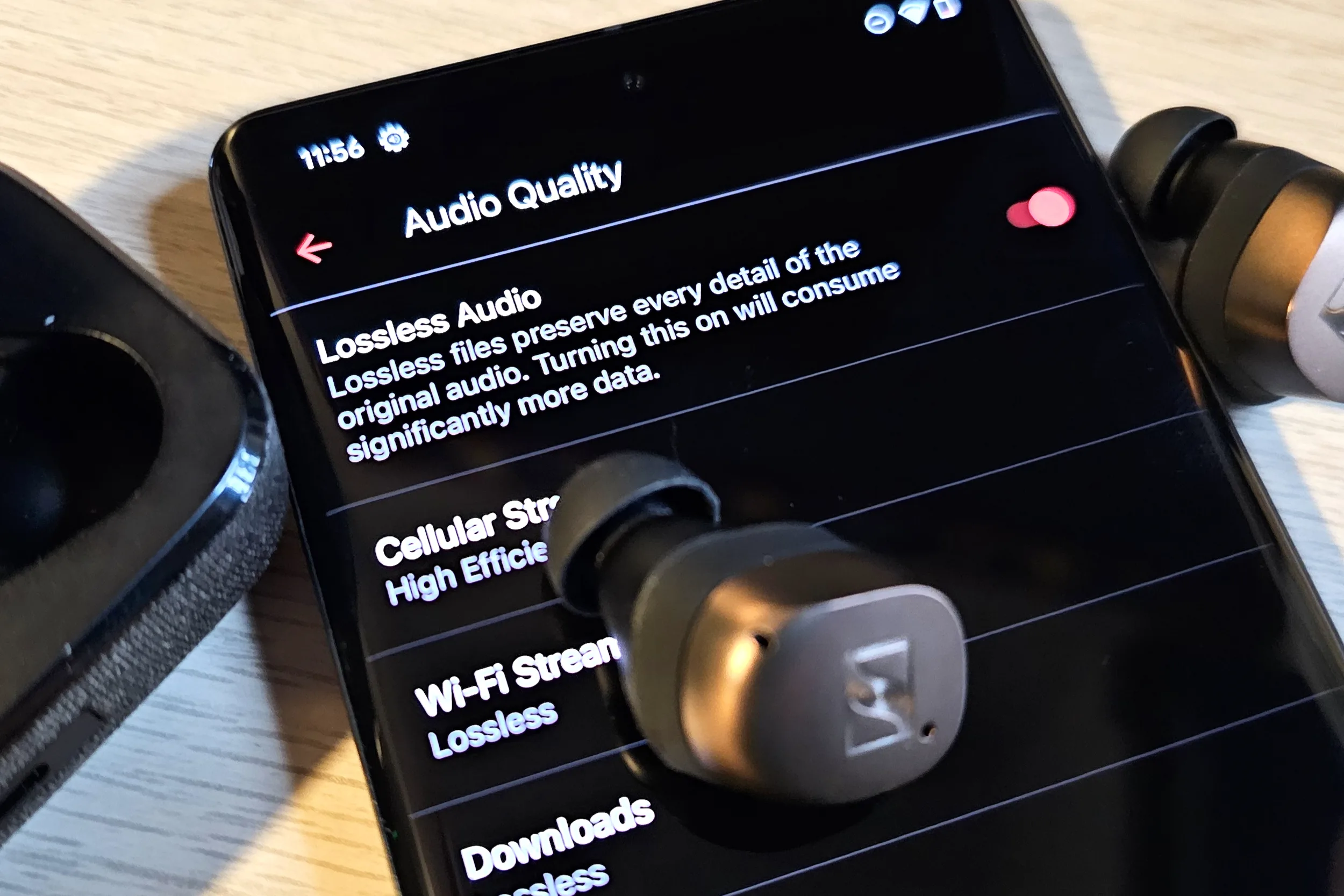
Apple does not impose extra fees for lossless streaming on Apple Music. Simon Cohen / Digital Trends
As Spotify continues to develop its high-resolution music streaming system, competitors like Amazon, Apple, and Tidal are enhancing their offerings in the audiophile market with their own premium audio services.
Currently, Spotify’s highest audio bitrate is capped at 320 kbps. The company has promised “CD-quality, lossless audio” with the new tier, but has yet to provide detailed technical specifications.
Spotify
To give context, Tidal’s “Low” tier offers up to 320 kbps, while its “Max” tier, which uses the HiRes FLAC codec, reaches up to 24-bit, 192 kHz. In comparison, Apple Music provides a range from 16-bit/44.1 kHz (deemed CD Quality) to 24-bit/192 kHz with its “lossless” upgrade, and notably, Apple does not charge extra for this streaming option.
Audio quality options available on Amazon Music. Derek Malcolm / Digital Trends
Amazon Music’s Unlimited tier provides a sample rate of 44.1 kHz with a peak bitrate of 850 kbps, while Ultra-HD tracks reach a 24-bit depth (from 44.1 kHz to 192 kHz) with an average bitrate of 3,730 kbps.
The potential benefits of the $6 Spotify Pro add-on might also include priority access to ticket sales and preferred seating options for concerts. Additionally, Spotify already features a curated feed highlighting live events in users’ areas.
Spotify’s current pricing starts at $5.99 per month for students and $11.99 for individual accounts, with family plans up to $19.99. However, persuading music lovers to pay nearly 50% more for access to high-resolution audio could pose a challenge for the company, especially given the competitive pricing of other services.
If you use Google Assistant with devices like the JBL Link Drive or the Anker Roav Bolt, you might want to pay attention: a recent code discovery in the Google app’s beta version suggests that the microphones could soon be disabled. The team at 9to5Google unearthed these code snippets during an APK teardown, hinting at the future of Google Assistant for automotive use.
A specific string labeled “assistant_car_accessory_deprecation” states: “By the way, Google Assistant on your car accessory will be discontinued in coming weeks. To keep using Assistant, invoke queries either on your Mobile or via Android Auto.” These particular accessories were launched in 2019 to allow drivers of older vehicles to access Google Assistant, meaning even the earliest users have utilized them for just about six years.
This development isn’t shocking given Google’s track record of discontinuing services, but there’s another factor at play. Android Auto has gained popularity over recent years and has emerged as a competitor to Apple CarPlay. Additionally, Google Assistant is poised for a significant shift, as many of its current capabilities will be integrated into the upcoming Gemini platform.
Google / Google
It’s important to note that APK teardowns do not definitively predict the future; they showcase early-stage code, and the final outcome might differ from what’s initially discovered. While it seems highly likely that these devices will soon lose compatibility, Google has not yet specified a timeline for when this will take place. The company has also not updated its support documentation to indicate an end to service for either the Link Drive or the Roav Bolt.
Nonetheless, Google encourages users to transition to Android Auto. The Assistant Driving Mode remains available, though it has become much simpler than it used to be. For a more comprehensive experience, Android Auto is recommended as the best alternative.
In response to this situation, some users have proposed that these devices be configured to activate Gemini instead of the standard Assistant; however, uncertainty remains about the future of these accessories.
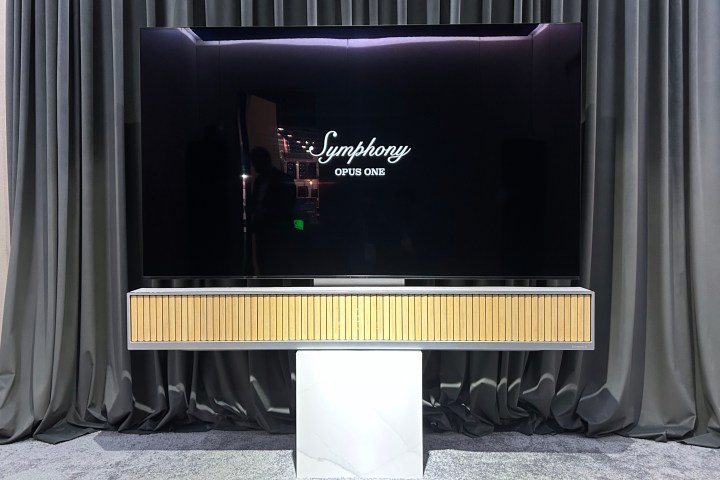
One of the highlights of CES is the opportunity to experience products that are still many months or even years away from market release. At CES 2025, I had the privilege of previewing Dynaudio’s inaugural soundbar, the Symphony Opus One. While it’s not available for purchase yet, Dynaudio anticipates a price tag of about $20,000 once it hits the market — likely in late 2025 or early 2026.
That’s a substantial investment, but, similar to other renowned audio products emerging from Denmark, you’re paying for both extraordinary design and exceptional sound quality.
Simon Cohen / Digital Trends
The massive 73-inch-wide, 1,500-watt soundbar resembles an air register from a luxury yacht, with its sleek aluminum frame, fabric panels, and a striking array of 72 moving wooden fins on its front. These fins evoke memories of the iconic vertical wooden slats used by the esteemed Danish design firm Bang & Olufsen in models like the Beolab 8, Beolab 28, and Beosound Theatre.
Each fin is meticulously carved from Japanese oak. Unlike those from B&O, which are said to assist in directing sound, Dynaudio’s fins serve primarily an aesthetic purpose.
Simon Cohen / Digital Trends
Instead of masking the Opus One’s 24 drivers with a traditional fabric grille, Dynaudio incorporated louvered fins that remain closed when the soundbar is off but rotate 45 degrees into an open position during use. Initially, the soundbar will offer two main fin designs and a selection of fabric color options.
Simon Cohen / Digital Trends
The Opus One comes with an aluminum remote control shaped like a baton, which feels substantial in hand—almost like wielding a lightsaber hilt. It features a large volume dial that offers a satisfying resistance reminiscent of high-end audio equipment. If you have a tendency to keep the remote close during viewing, you’ll find it hard to set this one down.
The marble pedestal displayed alongside the soundbar isn’t bundled with the Opus One but will be offered as an optional accessory.
Currently, the Symphony Opus One is undergoing platform adjustments, as Dynaudio is still finalizing its input options and the integration of music streaming services. However, the brand is confident enough in its acoustical performance to showcase the soundbar at CES.
During the demonstration, we experienced a segment of Lady Gaga’s Close To You alongside an intense scene from Mission: Impossible – Fallout, where Tom Cruise takes control of a helicopter and battles to maintain control.
The sound was powerful and precise, providing excellent musical fidelity and crystal-clear dialogue with ample cinematic bass. While a dedicated subwoofer is essential for a truly ground-shaking experience, the Symphony Opus One excels at immersing you in its captivating audio, complete with reflective height channels and surround sound.
Simon Cohen / Digital Trends
One remarkable feature showcased was Dynaudio’s “deep dive” mode, which directs sound towards the listener’s position, creating the illusion of a small circle of 5.1-channel speakers positioned just a few feet away. This effect was particularly striking during a presentation of Lavern’s Hold Me.
The deep dive mode utilizes beamforming techniques from the soundbar’s array of tweeters and mid-bass drivers, along with a standard head-related transfer function (HRTF) profile, which calculates how sounds are perceived by each ear based on head positioning.
Typically, HRTF applications are reserved for headphone use, providing a simulated surround sound experience from stereo audio. For a more in-depth understanding of this technology, we have an extensive article on binaural rendering and its workings.
Simon Cohen / Digital Trends
The application of HRTF in a speaker—especially one with the advanced surround sound capabilities of the Symphony Opus One—is rare yet not entirely unparalleled. Technology from Audioscenic, like the Amphi Hi-D, also delivers a comparable effect through products such as the Razer Leviathan V2 Pro and Dell Plus 32 4K QD-OLED monitor. Notably, these systems are designed for near-field audio, functioning over distances of mere inches, while the Opus One achieves this effect from a distance of 8-10 feet.
The remarkable precision of the sound targeting was equally noteworthy. I was seated in the middle of a three-seat configuration, with another row behind me. As the demo progressed, the Opus One selectively directed the deep dive sound to specified seats, offering an extraordinary experience to the chosen listener while still allowing those not in focus to hear the audio, albeit with less intensity. Calibration was achieved through the remote control, and the spokesperson indicated that these “zones” can be saved for future use.
Simon Cohen / Digital Trends
At present, deep dive seems more like a showcase feature—offering no immediate practical application since only one listening position can be prioritized at a time. Dynaudio is still exploring various user scenarios. Personally, I was too engrossed in the extraordinary minute-long sample to consider whether I would prefer this approach for an entire movie experience, as it was indeed mesmerizing to experience.
Dynaudio states that the Symphony Opus One’s impressive width allows for the remarkable sound targeting capability in the deep dive mode. Still, I wouldn’t be surprised to see a narrower, more affordable version focused on a single, central deep-dive listening spot.
While it’s difficult to justify the Symphony Opus One’s steep price based solely on what I experienced at CES, let’s set aside the cost for now. It is invigorating to witness a new contender entering the soundbar market—especially one with a prestigious audio heritage like Dynaudio—and even more thrilling to see this company pushing innovative boundaries with features like deep dive.
The ultimate determination of whether this product warrants the investment will come in time, but it’s my hope that we find out sooner rather than later.
As January rolls around, it's time for CES 2025 to kick off. Samsung made a splash by unveiling its lineup for the year, featuring advanced Neo QLED and OLED TVs, audio devices, and other offerings, all set to showcase cutting-edge AI capabilities. While pricing and availability details are still pending, here’s a closer look at what Samsung has in store.
Vision AI Features
Before diving into the specific television models in Samsung's 2025 collection, it's essential to grasp the company's artificial intelligence focus this year, which will influence their upcoming tech.
This year's initiative is branded "Vision AI." In addition to enhancements to existing AI Upscaling, Auto HDR Remastering, and Adaptive Sound Pro features, Samsung has introduced a new Color Booster Pro function, which utilizes AI to deliver even richer and more vibrant colors.
But Vision AI is not just about enhancing visuals. Samsung has added several new AI-powered features, including:
Click to Search: This feature can identify actors in shows, the location settings, and even apparel worn by characters, all through a dedicated AI button on the Samsung SolarCell remote.
Live Translate: Using AI, this feature translates closed captions on live broadcasts into seven different languages.
AI-based Voice Removal with Audio Subtitles: Samsung’s 2025 TVs will analyze subtitles, separate voices, and adjust reading speed for a smooth viewing experience.
Samsung Food: This unique feature identifies food items in the content being watched and provides relevant recipes. It's linked to Samsung's smart refrigerators, which can scan and recognize food, issuing alerts before items expire and helping users acquire missing ingredients.
Samsung AI Home Security: This turns your TV into a smart security hub that connects with your security cameras and uses microphones to detect unusual sounds, sending alerts regardless if you're home or away.
Generative Wallpaper: This feature creates personalized wallpapers for your TV using AI.
“Samsung envisions TVs as interactive partners, not just devices for passive viewing,” noted SW Yong, president and head of Samsung’s visual display division. “With Vision AI, we’re transforming screens into intelligent companions that blend entertainment and lifestyle solutions for a seamless user experience.”
2025 Samsung Neo QLED 8K Lineup
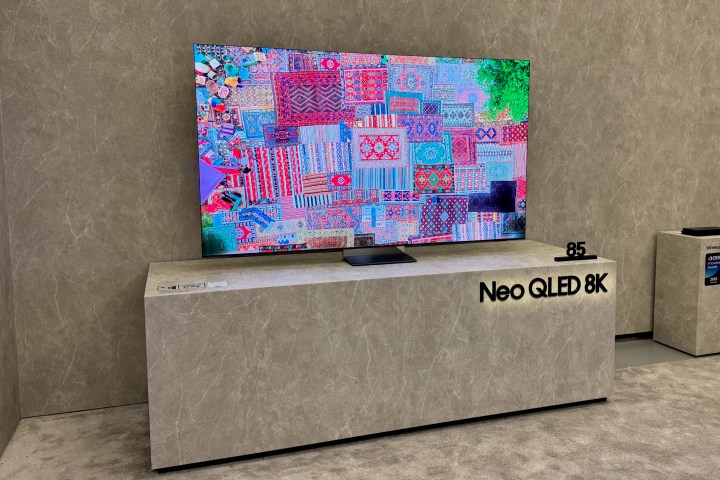
The 85-inch Samsung Neo QLED 8K TV at CES 2025.John Higgins / Digital Trends
While 8K TVs may not yet be the first choice for all consumers compared to their 4K counterparts, they continue to represent some of the highest levels of technology available. Samsung's 2025 Neo QLED 8K offerings maintain this tradition.
Samsung has introduced two new models, the QN990F and QN900F, building off the impressive features of last year's models while skipping the previously popular QN800D and QN900D from 2024. These new entries carry over the AI processors from last year's lineup, implementing some key improvements.
One major enhancement across both models is the inclusion of Samsung’s innovative Glare-Free technology, initially launched with the S95D 4K QD-OLED model. This function excels in bright environments by effectively reducing glare from both ambient and direct light, offering a more comfortable viewing experience. Notably, the 2025 iteration is even brighter and will also be introduced in an updated 4K QLED model.
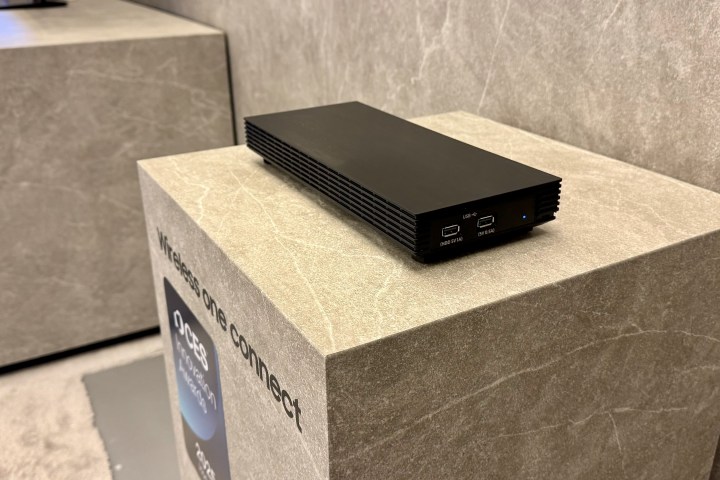
The flagship QN990F will be available in sizes ranging from 65 to 89 inches and is the first Samsung model to incorporate the Wireless One Connect Box, allowing for a cable-free setup. This box uses Wi-Fi 7 and advanced technology to wirelessly transmit 8K content at 120Hz from up to 10 meters away, traversing obstacles like furniture.
Similar to its predecessor, this setup minimizes tangled wiring connecting your devices to the TV, giving users the freedom to place the box anywhere in the room.
The Samsung Wireless One Connect Box at CES 2025.John Higgins / Digital Trends
The QN990F also features Samsung’s 8K Upscaling technology, which enhances lower-resolution content to near 8K quality, preserving detail and clarity. It includes Color Boost Pro, analyzing each frame for optimized color, paired with AI enhancements. Its audio capabilities include a 6.2.4-channel system with 90 watts and Dolby Atmos support, in addition to 4K gaming at 240Hz VRR capability.
The QN900F, available in sizes of 65, 75, and 85 inches, lacks the Wireless One Connect feature but still utilizes the wired version. It shares many enhancements seen in its counterpart, including 8K upscaling and HDR remastering, coupled with a robust 70-watt, 4.2.2-channel Dolby Atmos sound system and a fresh metal frame design.
2025 Samsung Neo QLED 4K Lineup
The 115-inch Samsung Neo QLED 4K TV showcased at CES 2025.John Higgins / Digital Trends
Next, we shift focus to the 4K QLED models. Samsung has rolled out three options for 2025: the QN90F, QN80F, and the new entry-level QN70F, aimed at offering an upgrade from the previous Q70D. Each of these models will include the AI features such as Click to Search, Samsung Food, and Live Translate.
The premium QN90F is offered in sizes from 43 to 98 inches, with a new colossal 115-inch option designed for those with ample space and budget. This model benefits from a feature called Supersize Picture Enhancer, which optimizes image quality for larger displays to eliminate blurriness.
Additionally, the QN90F incorporates the upgraded Glare-Free technology and boasts the latest NQ4 AI processor, which empowers its enhanced AI 4K Upscaling and overall picture quality. It also includes a 60-watt, 4.2.2-channel Dolby Atmos sound system.
The QN80F, available in sizes of 50 to 100 inches, showcases strong specs, although it remains unclear if it received the NQ4 AI Gen3 processor upgrade. It features a 30-watt, 4.0-channel Dolby Atmos-based sound system.
Lastly, the newcomer QN70F, offered in 55 to 85-inch models, comes equipped with a NQ4 AI Gen2 processor and a refreshed design, as well as a 20-watt, 2-channel sound system.
2025 Samsung OLED Lineup
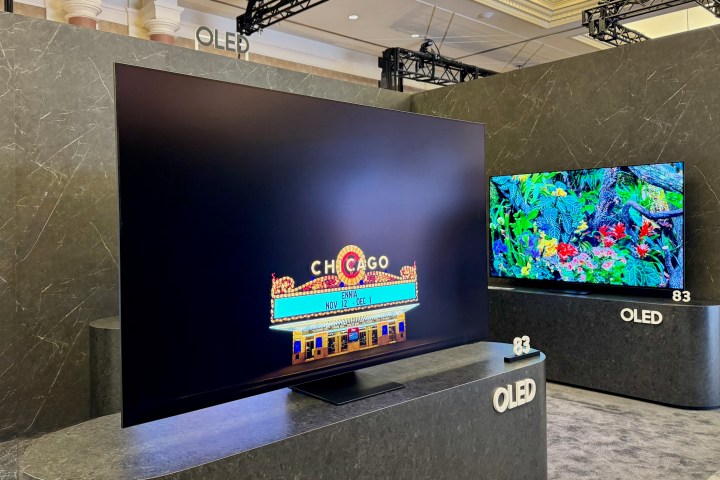
The 83-inch Samsung S95F OLED at CES 2025.John Higgins / Digital Trends
Samsung is introducing three new OLED models for 2025: the flagship S95F, along with the S90F and the S85F. All these models will benefit from the enhancements tied to Vision AI.
The S95F, representing the successor to the earlier successful S95D with unique anti-glare technology, stands out as the brightest OLED to date. Enhanced with the latest NQ4 AI Gen4 processor, it promises improvements in contrast, brightness, and depth of color. It will be available in sizes ranging from 55 to 83 inches and is designed to support Dolby Atmos with a 70-watt sound system.
Details regarding the other OLED models are still limited, but the S90F will feature the same NQ4 AI Gen3 processor, supporting sizes from 42 to 83 inches with a 40-watt 2.1-channel Dolby Atmos sound system.
The S85F will come in sizes of 55, 65, 75, and 83 inches, equipped with a 20-watt 2-channel sound system.
Samsung The Frame Pro and Art Store
John Higgins / Digital Trends
Enhancing its popular lineup of Frame Art TVs, Samsung unveiled the Frame Pro, which features a Neo QLED panel, and utilizes the NQ4 Gen3 processor. It also benefits from the Wireless One Connect Box, enabling more flexible installations. The launch also marks an expansion of the Samsung Art Store, which now hosts over 3,000 artworks through partnerships with prominent institutions like MoMA. The Frame TVs hold Pantone’s ArtfulColor validation for color accuracy, while the Frame Pro supports a refreshing 144Hz refresh rate, catering to both film lovers and gamers alike.
2025 Samsung Audio Lineup
John Higgins / Digital Trends
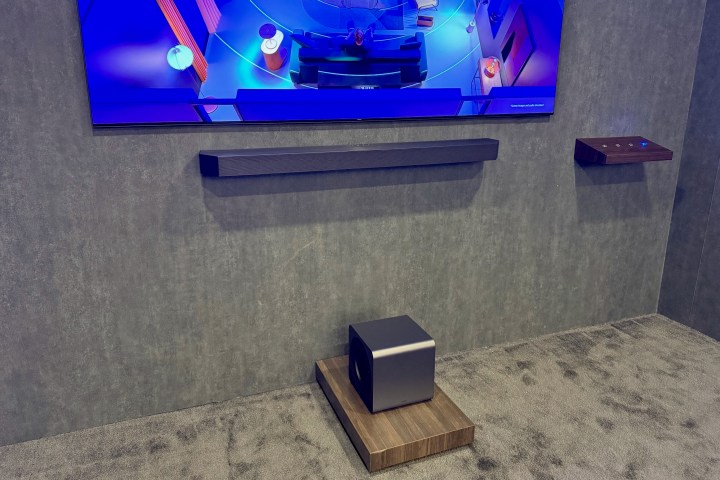
Beyond TVs, Samsung has unveiled several new soundbar models this year. The HW-Q990F stands out as the flagship, a powerful 11.1.4-channel system that comes with a compact subwoofer half the size of its predecessor, the HW-Q990D.
The HW-QS700F offers versatility as it can be mounted on a wall or placed on furniture. Similar to the HW-Q990F, it features Q-Symphony Pro, which enables collaboration with select Samsung TVs for a captivating audio experience. It analyzes audio through the TV’s AI processor for enhanced surround sound, and includes Active Voice Amplifier Pro for better dialogue clarity.
Additionally, Samsung will integrate Q-Symphony Pro into two new budget-friendly soundbars, the HW-B750F and HW-B650F.
As streaming services and high-definition content become the standard, the need for a quality audio experience has never been more crucial. If you’re looking to enhance your home theater setup, investing in a wireless speaker for your TV can make a significant difference. With so many options available, it can be challenging to determine which wireless speaker is the best fit for your needs. This article delves into some prominent choices and essential factors to consider.
Factors to Consider When Choosing a Wireless Speaker
When selecting a wireless speaker for your TV, you should consider several key factors to ensure you make the best decision.
Sound Quality
Clarity: Look for speakers with clear dialogue and balanced sound across various frequencies.
Bass Response: Good bass can enhance action sequences and music, making the experience more immersive.
Audio Modes: Some speakers offer specific modes for movies, music, or news, which can optimize your listening experience based on the content you’re watching.
Connectivity Options
Bluetooth & Wi-Fi: Ensure the speaker supports both Bluetooth and Wi-Fi for versatile connection options.
HDMI ARC: Speakers with HDMI ARC support simplify the connection process and allow for better sound quality.
Optical Input: A good option for older TVs lacking HDMI ARC.
Design and Size
Space Consideration: Choose a size that fits well within your setup without being obtrusive.
Style: Aesthetics matter; find a design that complements your home décor.
Features
Smart Features: Built-in voice assistants like Alexa or Google Assistant can enhance usability.
Multi-Room Audio: Some models can connect to other speakers in different rooms for a synchronized sound experience.
Remote Control/Apps: Consider how you’ll control your speaker, whether through a remote, app, or voice commands.
Top Wireless Speakers for TV
Here are some leading wireless speakers that stand out for TV use:
Sonos Beam
Features:
Compact design fits neatly under most TVs.
High-quality sound with a built-in subwoofer.
Supports Amazon Alexa and Google Assistant.
Connectivity:
HDMI ARC, optical input, and Wi-Fi capabilities.
Bose Soundbar 700
Features:
Exceptional sound quality with advanced audio processing.
Sleek and modern design.
Supports voice control and has customizable sound modes.
Connectivity:
HDMI ARC, Bluetooth, and optical inputs.
JBL Bar 5.1
Features:
5.1 surround sound experience for an immersive audio escape.
Removable battery-powered speakers for flexibility.
Built-in JBL SoundShift for seamless switching between devices.
Connectivity:
HDMI ARC and Bluetooth, accommodating easy setups.
Yamaha YAS-209
Features:
Great for both music and TV sound.
Built-in Alexa voice control for hands-free operation.
Subwoofer included for an enhanced bass experience.
Connectivity:
HDMI ARC, optical input, and Bluetooth streaming.
Benefits of Wireless Speakers for TV
Choosing a wireless speaker offers several advantages, making them a practical choice for elevating your viewing experience.
Eliminates Clutter: Wireless speakers reduce the need for messy cables and wires.
Flexibility: You can position speakers wherever you prefer, improving the acoustics in your room.
Easy Setup: Most wireless speakers boast plug-and-play features, making the installation process simple.
Versatile Use: Many wireless speakers are not just for TV but can also be used for music and gaming.
Investing in a good wireless speaker for your TV can transform your home entertainment experience. By considering factors like sound quality, connectivity, and specific features, you can find a speaker that perfectly suits your needs.
In the realm of audio technology, surround sound systems have revolutionized the way we experience sound in movies, video games, and music. Among these systems, 7.1 surround sound stands out as a popular option for those seeking an immersive audio experience. But how good is it? Let’s dive into the details, exploring the advantages and features of 7.1 surround sound.
Understanding 7.1 Surround Sound
What is 7.1 Surround Sound?
7.1 surround sound is an audio configuration that includes a total of eight channels:
Front Left
Front Center
Front Right
Surround Left
Surround Right
Rear Left (or Surround Back Left)
Rear Right (or Surround Back Right)
Subwoofer (Low-Frequency Effects)
This configuration enhances the listening experience by providing a more detailed and realistic soundscape.
Key Components
For an optimal 7.1 surround sound experience, you’ll need the following components:
AV Receiver: This acts as the central hub for processing and distributing audio signals to speakers.
Speaker System: A complete set of speakers to accurately reproduce sound from different angles and directions.
Subwoofer: Essential for deep bass sounds, adding a layer of richness to the audio.
Advantages of 7.1 Surround Sound
Immersive Experience
One of the primary benefits of 7.1 surround sound is its ability to create an immersive audio environment. The added rear speakers provide a more three-dimensional sound field, making it feel as though you’re truly inside the action.
Enhanced Directionality: Sounds can appear to come from behind you, adding depth and realism.
Improved Soundstage: The speaker configuration allows for more nuanced sound imaging, enabling listeners to pinpoint audio sources accurately.
Compatibility with Content
With the rise of high-definition audio and visual content, many films, games, and streaming platforms are designed to take advantage of multi-channel sound setups, including 7.1 surround sound.
Movies: Many modern films are mixed to take advantage of surround sound, placing sounds in their intended spatial locations.
Video Games: Gaming experiences are greatly enhanced, with ambient sounds, directional cues, and background music all positioned to create a virtual environment.
Better Bass Response
The inclusion of a dedicated subwoofer in a 7.1 setup greatly improves low-frequency performance:
Bass Effects: Sounds such as explosions or musical basslines come through with more impact.
Greater Control: The subwoofer can handle low-frequency sounds more effectively without overwhelming the other speakers.
Considerations When Setting Up 7.1 Surround Sound
Room Size and Layout
The effectiveness of a 7.1 surround sound system can be influenced significantly by your room’s size and shape:
Optimal Dimensions: Larger rooms can enhance the audio experience due to greater separation and distance between speakers.
Speaker Placement: Correct placement of speakers is vital for achieving the best sound quality. Typically, they’ll be placed at ear level and evenly spaced around the listener.
Equipment Quality
The quality of your equipment plays a critical role in the surround sound experience:
Speaker Quality: Invest in high-quality speakers, as the clarity and detail of sound can vary widely between brands and models.
Cabling and Connections: Use high-quality cables to avoid signal loss. HDMI cables are often the best choice for maintaining audio quality.
Cost Considerations
Setting up a 7.1 surround sound system can be an investment:
Initial Setup: Costs can add up with receiver, speakers, and additional wiring.
Ongoing Upgrades: Audio technology evolves rapidly, so consider future-proofing your setup as well.
Conclusion
7.1 surround sound is a fantastic option for anyone looking to elevate their audio experience. With the right setup, it offers a rich, immersive sound environment that can make movies and games come alive. Whether you’re a movie enthusiast or a gaming aficionado, investing in a 7.1 surround sound system can significantly enhance your enjoyment of auditory experiences.
Selecting the appropriate receiver for your speakers is essential for achieving optimal sound quality in your audio setup. With numerous options available, it’s important to understand the key factors that influence compatibility and performance. This article will guide you through the process of choosing the right receiver for your speakers to enhance your listening experience.
Understanding Receiver Basics
Before diving into compatibility and specifications, it’s crucial to understand what a receiver does. A receiver serves as the hub of your audio system, combining the functions of a preamp, power amplifier, and radio tuner into one device. Here are some of its core functions:
Audio Processing: Converts digital audio signals into analog for output through speakers.
Routing: Directs audio and video signals from various sources (like a Blu-ray player, gaming console, or streaming device) to the appropriate output.
Amplification: Powers the speakers, providing sound at sufficient volume levels.
Key Factors to Consider
When selecting a receiver, there are several important parameters to consider:
1. Power Rating
The power rating of a receiver is vital for compatibility with your speakers. It’s typically measured in watts per channel and indicates how much power the receiver can deliver to each speaker.
Impedance Matching: Ensure that the receiver’s power output matches the impedance (measured in ohms) of your speakers. Most home speakers are rated at 4, 6, or 8 ohms.
Volume Needs: Higher wattage can usually drive speakers to higher volumes without distortion, especially important for larger rooms or outdoor use.
2. Number of Channels
Receivers come in various channel configurations, which determine how many speakers can be connected:
Stereo Receivers: Ideal for two-channel audio setups, suitable for music listening.
Surround Sound Receivers (5.1, 7.1, etc.): Support multi-channel audio for home theater setups, allowing for immersive sound from multiple directions.
3. Features and Connectivity
Modern receivers come packed with features that can enhance your audio-visual experience. Consider the following:
HDMI Inputs/Outputs: Essential for connecting to modern TVs and devices; make sure your receiver has sufficient HDMI ports.
Wireless Connectivity: Look for features like Bluetooth, Wi-Fi, or built-in streaming services, which allow for easy connection to your devices.
Zone Control: If you want to have different audio setups in various rooms, opt for a receiver that supports multi-zone audio.
4. Audio Formats Supported
Different receivers support various audio formats that can affect sound quality:
Surround Sound Formats: Ensure the receiver supports formats like Dolby Atmos or DTS:X if you plan on a multi-channel system.
High-Resolution Audio: Look for codecs like FLAC or ALAC for lossless audio streaming if you’re an audiophile.
Compatibility with Speakers
Once you’ve established your requirements, it’s time to ensure your receiver is compatible with your speakers. Here are some steps to help with that:
1. Matching Power and Impedance
Check Speaker Impedance: Most receivers list what impedance they can drive.
Power Compatibility: Look for the recommended power range for your speakers while considering the receiver’s output.
2. Consider Speaker Placement
The layout of your room can influence your choice in receiver:
Home Theater Setup: If you are designing a surround sound system, choose a receiver that can accommodate additional channels.
Compact Spaces: If space is limited, a stereo receiver may suffice for your needs.
3. Future Upgradability
It’s also wise to consider future expansions:
Growth Potential: Think about whether you might add more speakers or higher-end audio equipment later on.
Modular Options: Some receivers allow you to add amplification or additional channels later, which can be a cost-effective strategy.
Research and Reviews
Before making your final decision, take time to research:
Model Reviews: Read user reviews and expert opinions on the specific models you are considering.
Comparisons: Use comparison websites to see how different receivers stack up against each other based on the features that matter to you.
Summary of considerations:
Power Rating: Match wattage and impedance.
Channel Count: Choose according to your setup needs.
Connectivity and Features: Ensure it has the necessary inputs for your devices.
Supported Audio Formats: Check compatibility with your desired sound formats.
Room Layout Considerations: Adapt to your specific space for optimal performance.
Future-proofing: Look for options that allow for speaker upgrades.
Choosing the right receiver for your speakers means considering not just what works today, but what will work for you in the long run. With this guide, you’re better equipped to make an informed decision that elevates your audio experience.
Audio Magic Eraser is an innovative feature designed for Android devices that enhances video audio quality by removing unwanted background sounds. By leveraging cutting-edge AI technology, this tool can detect and suppress distracting noises—like wind, conversation, or other sudden sounds—resulting in a clearer, more focused listening experience.
Difficulty
Moderate
Duration
10 minutes
What You Need
A compatible Google Pixel phone
This feature is currently limited to the Google Pixel 8 and Google Pixel 9 series smartphones. If you don’t own a Pixel device, Samsung might be introducing a similar feature in some of its upcoming models. Whether capturing a precious memory or recording an outdoor event, this feature ensures that your audio is maintained with clarity.
What is Audio Magic Eraser?
Audio Magic Eraser is seamlessly integrated into the Google Photos app for straightforward use. This function intelligently assesses videos, recognizing various audio elements such as dialogue, music, and ambient noise. Users can choose to diminish or remove distracting sounds—like noise from the wind or background chatter—while enhancing important sounds, like voices. This results in a significant improvement in audio clarity, streamlining the audio enhancement process without the need for complex software or specialist knowledge.
Pixel 8 (left) and Pixel 9 Ajay Kumar / Digital Trends
Which phones support Audio Magic Eraser?
Currently, Audio Magic Eraser is primarily available on the Pixel 8. While there are indications that it may extend to other devices, like the Galaxy S25, here’s a list of the smartphones that currently have this feature:
Google Pixel 8
Google Pixel 8 Pro
Google Pixel 8a
Google Pixel 9
Google Pixel 9 Pro
Google Pixel 9 Pro Fold
How to Use Audio Magic Eraser
Follow these steps to utilize the Audio Magic Eraser feature:
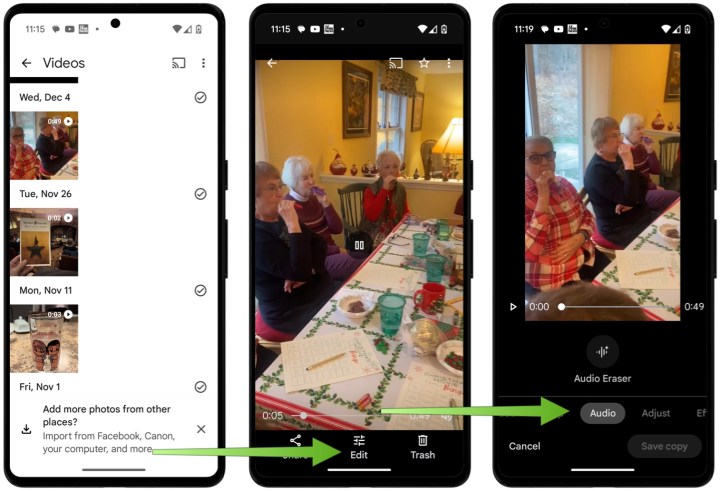
Step 1: Launch Google Photos and select the desired video you wish to modify.
Step 2: Tap on the Edit button located at the bottom of the interface.
Step 3: Navigate through the editing options horizontally until you find the Audio section. Click on it.
Bryan M. Wolfe / Digital Trends
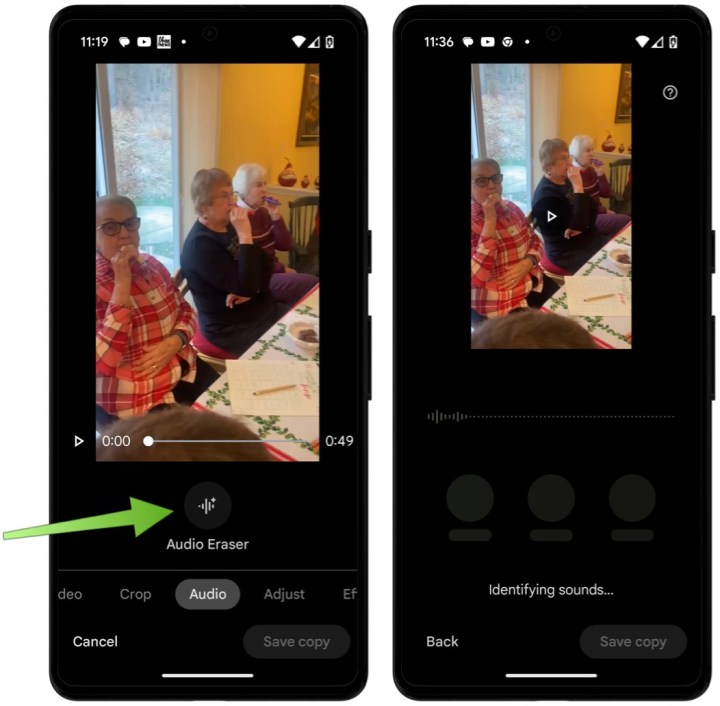
Step 4: Choose the Audio Eraser button. The device will then analyze the audio from your video, which may take a few minutes depending on video length.
Bryan M. Wolfe / Digital Trends
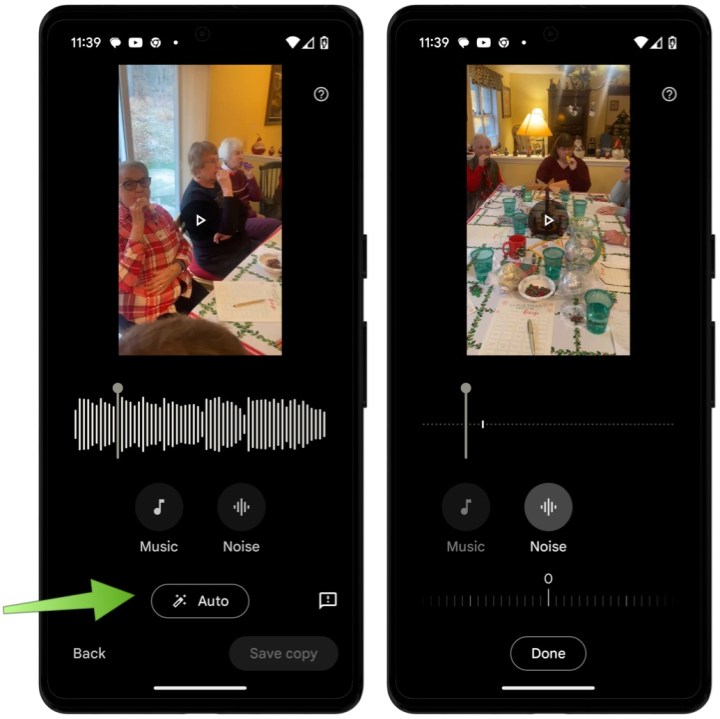
Step 5: Here, you can adjust the audio using either the Auto or Manual setting.
Selecting the Auto option allows Google's AI to handle background noise removal automatically. For more precise control, you can choose either the Music or Noise buttons to make gradual adjustments as preferred. You can also listen to real-time changes by pressing the Play button above the video.
Bryan M. Wolfe / Digital Trends
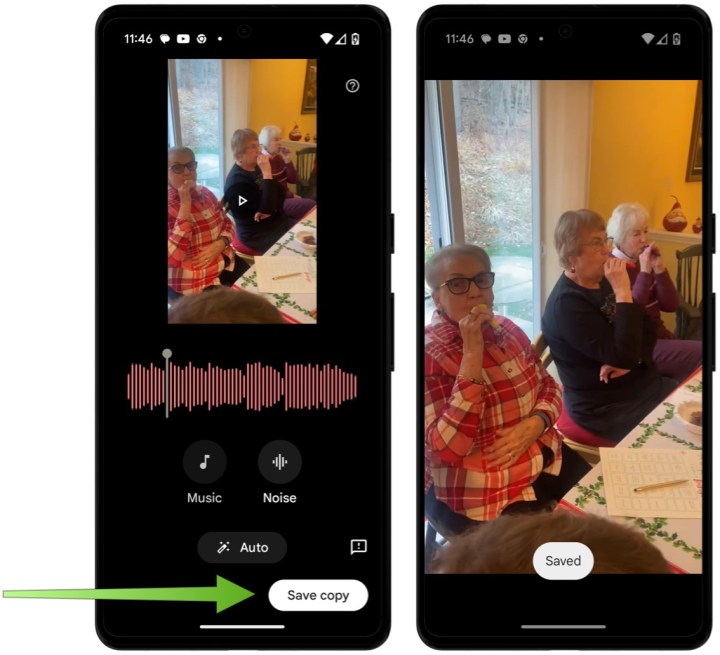
Step 6: Finally, tap on Save copy to save your changes.
Bryan M. Wolfe / Digital Trends
An Important Consideration
The performance of the Audio Magic Eraser largely hinges on the initial quality of the video and the variety of sounds it captures. It performs most effectively when there is a clear contrast between the sounds you wish to retain and those you wish to filter out.
It is wise to experiment with different settings and to preview various adjustments before finalizing, as the changes may be subtle.
This feature is still evolving, and Google is expected to enhance its effectiveness and features over time.
Creating a home theater system can elevate your movie-watching experiences, making it feel like you are in a cinema from the comfort of your own home. However, determining how much to invest in a home theater can be challenging due to the wide array of options available. This article will explore the factors that influence spending on home theater systems, breaking down potential costs to help you make an informed decision.
Factors Influencing Your Budget
Several key elements will impact how much you should plan to spend on your home theater setup:
1. Quality of Components
Audio Equipment: Speakers, receivers, and soundbars vary significantly in price. High-end, immersive sound systems can cost thousands, while budget options are available for a few hundred dollars.
Visual Display: The price of televisions and projectors can differ widely. A 4K OLED TV offers stunning visuals but usually comes at a premium compared to standard LED screens.
2. Room Configuration
Size of the Space: Larger rooms may necessitate higher-quality components to fill the space with sound and visuals effectively. This could lead to additional costs for larger, more powerful equipment.
Acoustic Treatment: Investing in soundproofing or acoustic panels for a better listening environment can also add to your expenditure.
3. Installation Needs
DIY vs. Professional Setup: If you’re handy, you might save on installation costs. However, professional installation can enhance your system’s performance and aesthetics, particularly if complex wiring and setup are involved.
Budget Breakdown
To aid in your decision-making, here’s a ballpark estimate of what you might spend on different components:
LG has appointed will.i.am as its newest “Experiential Architect,” and the Black Eyed Peas frontman is set to unveil a new line of Xboom products at CES 2025. This revamped collection will feature wireless earbuds and Bluetooth speakers, now branded as “xboom by will.i.am.”
According to LG, their collaboration with will.i.am aims to redefine the xboom brand by infusing it with a cultural edge and an urban vibe, ultimately offering consumers a fresh audio experience.
This new auditory journey will include features designed by will.i.am, such as “rich bass accompanied by a balanced, warm tone.” LG indicates there will be two distinct listening modes: one that energizes with powerful bass and another that offers a more calming and harmonious sound.
LG Electronics
The design will also feature user-friendly straps and dynamic lighting that syncs with the music. However, a standout element is will.i.am’s integration of his innovative Raidio.fyi (stylized as RAiDiO.FYI), an AI-driven interactive audio platform included in his FYI AI messaging app. Through Raidio.fyi, users can interact with an AI music curator to generate real-time playlists, and they can pause or ask questions at any moment, such as, “Who is the artist currently playing?” or even practical inquiries like, “What’s the weather like in LA?”
LG Electronics
Will.i.am has a rich history in the tech industry, although not every venture has been successful.
In 2012, he launched an unconventional and costly iPhone case called foto.sosho, which combined a slide-out QWERTY keyboard with a 14-megapixel camera. Two years later, just before the release of the Apple Watch, he introduced the i.amPULS, a wrist-worn computer that faced significant backlash, with one critic dubbing it the worst product they’d ever reviewed.
On a brighter note, audio products appear to be a more suitable domain for him. In 2018, will.i.am’s company I.am+ acquired the early wireless earbud innovation firm Earin, leading to the launch of the I.am+ Buttons, which Digital Trends’ Andy Boxall praised as some of the most comfortable earbuds available.
Next year will reveal whether xboom by will.i.am can maintain this positive trajectory.
LG has previously released several Xboom audio products, including the Xboom XL7 party speaker, Xboom 360 portable speaker, and the Xboom ThinQ WK9 smart display.
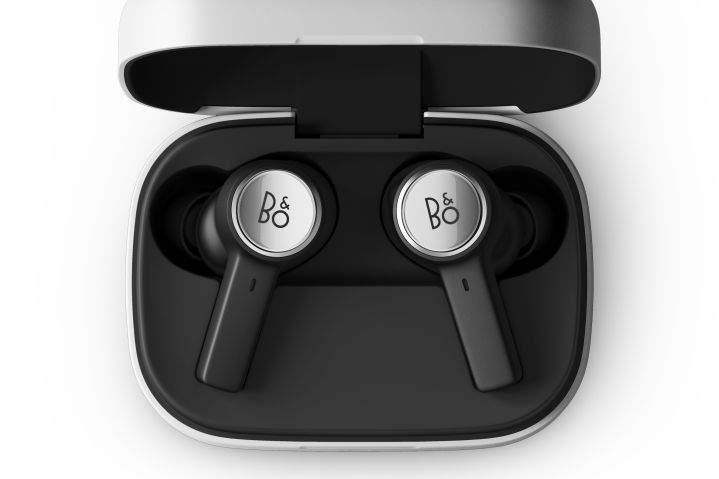
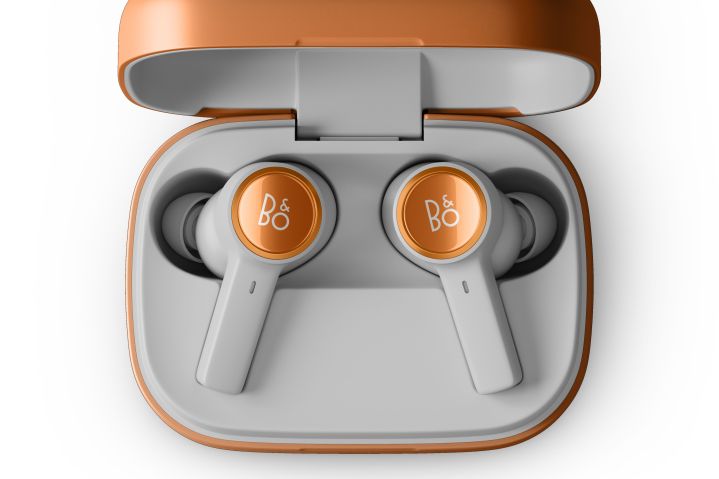
Bang & Olufsen (B&O) has unveiled its newest wireless earbuds, the Beoplay Eleven. Although their appearance is mostly similar to that of the previous model, the Beoplay EX, B&O claims that these earbuds feature a notable increase in noise cancellation performance at lower frequencies. Additionally, they have been optimally designed to fit a variety of ear shapes and sizes, boasting what the company refers to as “the finest ANC technology in an earbud to date.”
The retail price for the Beoplay Eleven is set at $499. The Natural Aluminium color option is available starting today, while the Copper Tone variant is expected to launch on December 17.
Bang & Olufsen
B&O has also enhanced the transparency mode and made improvements to the microphone opening, resulting in better call quality and reduced wind noise.
In terms of specifications, the Beoplay Eleven closely mirrors the Beoplay EX. They offer an IP57 rating for dust and water protection, meaning they are effectively water-resistant. The earbuds promise a battery life of up to 6 hours with active noise cancellation enabled (20 hours total with the charging case), or 8 hours without it (28 hours with the case).
The charging case supports both wired and Qi wireless charging, and a quick-charge feature allows for 1.75 hours of playback after just 20 minutes of charging.
Bang & Olufsen
The Beoplay Eleven retains the 9.2mm Neodymium-magnet dynamic drivers and offers the same Bluetooth codec support, including aptX Adaptive, AAC, and SBC. Notably, Bluetooth Multipoint connectivity enables users to pair two devices simultaneously.
Interestingly, B&O mentions that the design of the earbuds allows for battery replacement through a service, aligning with European sustainability goals that require replaceable batteries starting February 2027. However, specific details on how the replacements will be carried out have not been disclosed.
If you’ve been interested in acquiring B&O wireless earbuds but were deterred by the steep price, now might be an opportune moment to consider the older Beoplay EX, which is currently available for just $280—its lowest price to date. Given the minimal differences with the Beoplay Eleven, this purchase could offer excellent value.