Tag: Apps

  • Sleep Apps Can Worsen Insomnia Symptoms

    Sleep Apps Can Worsen Insomnia Symptoms

    Recent years have seen a rise in the use of sleep-tracking apps, with many individuals turning to these tools to better understand their sleep patterns. These apps, often connected to smartwatches or smartphones, claim to measure sleep duration, how quickly one falls asleep, and the overall quality or restfulness of sleep.

    As health and wellness become more prominent, sleep monitoring has gained popularity. People hope that tracking their sleep can lead to feeling more energized and improving overall well-being. However, a recent study conducted by researchers in Norway questions the effectiveness of these apps, indicating they may not always be beneficial—and in some cases, could even worsen sleep, especially for those already dealing with insomnia.

    The study was published in Frontiers in Psychology and explores critical issues about how we incorporate technology into our health routines. Led by scientists from the University of Bergen, including Håkon Lundekvam Berge and Karl Erik Lundekvam, the research aimed to understand how users perceive their sleep when using these apps and whether they help or hinder sleep quality.

    Surveys involving 1,002 adults from Norway revealed widespread usage: nearly 46% of participants had used or were currently using sleep-tracking apps. Women and individuals under 50 were more likely to use these tools than men and older adults. Many users found some benefits; approximately 15% believed the apps helped improve their sleep, and nearly half appreciated gaining insights into their sleep patterns. Such awareness might encourage healthier habits, like going to bed earlier or reducing screen time before sleep.

    Nonetheless, the study identified notable drawbacks. About 17% of users reported increased worry about their sleep because of the data they received. A small portion—around 2.3%—even said their sleep quality worsened overall. The effects appeared more pronounced among younger adults, who were more engaged with technology and more attentive to sleep data.

    Particularly concerning is the impact on individuals with existing sleep issues. Those with insomnia symptoms found that detailed sleep data could amplify anxiety and stress, making it harder to fall asleep. This aligns with the concept of “orthosomnia,” a condition where individuals become overly fixated on achieving perfect sleep scores, which ironically worsens their sleep quality by causing increased worry and tension.

    The accuracy of sleep apps remains uncertain. Many estimate sleep stages based on movement or heart rate, but these methods don’t always match the precision of clinical sleep studies. As a result, the information provided to users may not perfectly reflect actual sleep quality.

    The study also notes limitations, such as reliance on self-reported data, which can be biased or inaccurate, and the fact that participants volunteered, potentially skewing the results toward those already interested in sleep issues.

    Despite these considerations, the findings suggest that sleep apps can offer benefits for some but are not universally suitable—particularly for those prone to anxiety about their sleep. The researchers recommend not becoming overly dependent on these digital tools. Instead, paying attention to how you feel during the day and adopting simple sleep habits—like maintaining a consistent bedtime, going to bed when sleepy, and reducing screen time before sleep—may be more effective.

    Ultimately, while sleep apps can be useful, they are not a cure-all. For individuals with sleep challenges, especially insomnia, these tools may cause more harm than good. Maintaining healthy routines and focusing on overall lifestyle habits tend to yield better results than obsessing over sleep scores.

    For further reading on sleep health, explore articles about foods that promote better sleep, the potential cognitive benefits of a keto diet for sleep loss, and natural methods to enhance sleep quality.

  • India drops plan to preload cybersecurity app after public backlash

    India drops plan to preload cybersecurity app after public backlash

    India’s government reversed a rare policy decision on Wednesday, withdrawing a mandate that required smartphone manufacturers to preinstall a government-backed cybersecurity app on all new devices. The move came after significant backlash from politicians, privacy advocates, and international tech firms over concerns about potential surveillance.

    Initially, Prime Minister Narendra Modi’s administration had privately instructed companies like Apple, Samsung, and Xiaomi on November 28 to include the app, called Sanchar Saathi, which cannot be removed, on new phones within 90 days, as first reported by Reuters.

    The government clarified in a statement that mandatory pre-installation would no longer be enforced for device makers. This reversal followed protests from opposition parties and editorial voices criticizing the policy, with privacy advocates raising alarm. Notably, major manufacturers such as Apple and Samsung had indicated they would not comply with the directive.

    Earlier, government officials defended the initiative, claiming the app was designed solely to help track stolen phones and prevent misuse. The government stated that the app is secure and aims to protect citizens from cyber threats. They also noted that the app’s growing popularity—evidenced by a 13% increase in daily downloads to 78,000 on Monday according to Sensor Tower—was a factor in reconsidering the policy.

    This policy reversal underscores ongoing tensions around digital privacy in India, reminiscent of a similar government order in Russia that mandated the pre-installation of a state-backed messenger app, MAX, on all mobile devices. Previously, Modi’s government also faced criticism for a COVID-19 contact tracing app, which was eventually softened due to privacy protests.

    Lawmakers and privacy groups emphasized the need for clarity about the legal basis for such mandates, warnings about potential backdoors compromising user data, and the importance of safeguarding individual privacy rights. The government’s retreat from this mandate signals a recognition of the potential political and diplomatic fallout from enforced app installations, especially amid ongoing debates about digital rights and security.

  • Top Tutoring Apps and Websites

    Top Tutoring Apps and Websites

    Whether you’re considering picking up a new language, need assistance with homework, working on a research paper, or preparing for upcoming SAT exams, a skilled tutor can support you in all these areas. Today’s online tutoring services are expanding beyond traditional office hours and library meetings, utilizing advancements like AI-driven study tools, mobile-friendly platforms, and broader global access to tutors. By 2025, students can connect with experts anytime and anywhere, thanks to these innovations.

    Modern learners expect more than just flexible scheduling—they want quick, targeted tutoring that produces tangible results. This demand has driven the creation of new platforms that combine on-demand assistance with real-time progress tracking.

    To help you find the best option, we’ve compiled a detailed list of top tutoring apps and websites. Our choices are based on practical factors such as subject diversity, lesson formats, mobile compatibility, as well as features like progress tracking, user support, and affordability.

    Preply is more than just a site for language lessons—it’s a global online learning community that fosters cultural exchange and personal connections between students and tutors. With over 100,000 tutors, more than 300,000 five-star reviews, and offerings in over 120 subjects, Preply has become one of the most effective tutoring platforms worldwide.

    After signing up, Preply’s AI helps match you with a tutor who motivates you, aligns with your goals, and fits your schedule. You can view introductory videos, read profiles and reviews, and communicate with potential tutors through chat. You can schedule a trial lesson to get acquainted, then choose to subscribe or switch tutors at no extra cost. Personalized lesson plans offer flexibility in lesson frequency.

    AI tools assist both students and tutors by providing smart feedback, lesson summaries, and customized exercises, making progress measurable between sessions. For tutors, AI highlights areas where students need more support, while learners gain confidence through clear insights and results.

    With real-time feedback from tutors, you receive the guidance needed to reach your goals. Prices vary by tutor, but signing up now can get you up to 50% off your first trial lesson.

    This pairing of Princeton Review and Tutor.com covers both test preparation and subject-based tutoring for all learning levels. Students from elementary through graduate school gain access to resources for exams like the SAT, ACT, and MCAT, with programs tailored to specific score goals and built around their target outcomes.

    For instance, the SAT 1400+ program starts at $1,849 and includes over 36 hours of live instruction, nine full-length practice tests, 24/7 on-demand support, and a score guarantee—either reaching 1400 or improving by 150 points. For those aiming even higher, the 1500+ package offers additional resources and personalized tutoring from top instructors, costing over $5,000 for 18 hours, or roughly $278 each if booked individually. More budget-friendly options such as the Essentials course (from $949) or self-paced plans starting at $299 are also available.

    Tutor.com specializes in instant help in over 250 subjects, without requiring test scores. Students pick a subject and are matched with a qualified tutor for one-on-one sessions, using digital tools like interactive whiteboards, direct messaging, and practice materials.

    Pricing involves a subscription model, starting at $39.99 per month for one hour of tutoring, with larger packages like three hours for $114.99. The platform also offers free, unlimited tutoring to military families, including active service members and their dependents through a dedicated program.

    Varsity Tutors covers a broad spectrum of subjects, including math, science, languages, business, and elementary topics like phonics and reading. It features instant tutoring services, and a mobile app for iOS and Android that provides 24/7 support with live chat, an interactive whiteboard, homework uploads, and progress tracking.

    In 2025, Varsity’s AI-driven matching system improves tutor pairing based on learning style, goals, and schedules, resulting in quicker onboarding and better compatibility. The platform also offers expanded live group classes in subjects ranging from algebra and AP Biology to creative writing and STEM topics, often at lower costs or free through their “StarCourse” series.

    Pricing generally ranges from $50 to $95 per hour, depending on subject and tutor experience, with ongoing packages and more affordable group options.

    Wyzant offers one of the most flexible pricing models, giving students full control over selecting tutors and setting rates. There are no subscriptions, commitments, or hidden fees—just individual browsing, booking, and payment for sessions.

    Tutors determine their hourly rates, typically between $25 and $80, with higher rates for specialized expertise. Payment is only made after a session, and if the first session doesn’t meet your expectations, it’s free under their Good Fit Guarantee.

    What sets Wyzant apart is its transparency: tutor profiles include credentials, reviews, response times, and availability. Many tutors upload introductory videos or sample lessons, helping students find the best match efficiently. The platform’s app for iOS and Android allows easy scheduling, messaging, and access to archived sessions and a vast library of completed lessons across many subjects.

    We selected the best tutoring apps by evaluating multiple factors. We prioritized platforms offering a wide range of subjects, highly rated and verified tutors, and transparent reviews. Usability, including flexible scheduling, around-the-clock support, instant match features, and innovative tech like interactive whiteboards and AI personalization, was also important. Pricing structures and overall suitability for diverse learners—whether parents, college students, or adult learners—were key considerations.

    To maximize your online tutoring experience, preparation is essential. Write down specific questions or topics you find challenging. This helps make sessions more focused and productive. During lessons, utilize interactive tools such as screen sharing and digital whiteboards to better understand complex problems, especially in subjects like math. Don’t hesitate to ask your tutor to visually walk you through solutions.

    Finally, end each session with a summary or ask for feedback. Your tutor can then highlight key takeaways and suggest areas for further review. This structured approach can significantly enhance your understanding and mastery of the material.

  • Google Is Protecting Your Android Phone From Unknown Apps

    Google Is Protecting Your Android Phone From Unknown Apps

    Malware-infected applications have long been a concern on Android devices, primarily due to the open nature of the platform. Unlike iOS, which restricts app installs to the official App Store, Android allows users to run apps from virtually any source on the internet, increasing the risk of malicious software.

    What’s New for Android?

    Google is now implementing a policy that requires all apps to be registered with verified developers before they can be installed on certified Android devices. This means that if you have a genuine Android phone from a reputable manufacturer, it most likely qualifies as a certified device. Certification indicates that Google has tested the device for security compliance and it comes equipped with protections like Google Play Protect, which scans for viruses and other threats.

    The key change involves developer verification. Google will now verify the identity of developers or businesses responsible for apps before they appear on your device. If a developer remains unverified, the app will be blocked from installation. This move is part of Google’s efforts to tighten control over app sources and reduce the distribution of harmful software.

    Why is this Important?

    Previously, developers could distribute apps without verification, creating an opportunity for malicious actors to exploit the system. They often uploaded malware-laden apps, containing anything from trackers to data theft tools. Now, with the new policies, Google will verify developer identities, making it easier to hold malicious developers accountable and ensuring that users are downloading apps from legitimate sources.

    What Does This Mean for Users?

    Starting in March next year, Google will begin verifying developers for apps listed on the Google Play Store. By September, the verification process will expand to several Asian markets, with plans to further extend in subsequent years. The goal is to prevent harmful apps from spreading through unofficial channels, ultimately providing a safer app ecosystem.

    Since implementing these identity checks, Google reports it has significantly reduced the number of malicious apps, which previously made up a tiny fraction of downloads from third-party sources. The verification process helps stop bad actors from hiding behind anonymity to distribute malware, conduct scams, or steal sensitive data.

    Additional Measures

    Google continues to leverage artificial intelligence to combat threats. Since 2017, they’ve used machine learning algorithms to identify malicious apps and are now deploying on-device AI to detect scams through calls and messages. The company also offers enhanced security features, like Advanced Protection, to safeguard devices against evolving threats.

    In essence, these changes are designed to make Android devices more secure by ensuring that only verified developers can distribute apps, thereby protecting users from the increasing threat of malicious software.

  • Google’s Gemini Live AI Is Going All In On Mobile Apps

    Google’s Gemini Live AI Is Going All In On Mobile Apps

    When Google rolled out Gemini Live, its AI avatar, it was a breakthrough moment. The ability for the AI to hold free-flowing conversations and understand the environment through your phone’s camera remains impressive. Now, it’s gearing up to integrate smoothly with the Android applications on your device.

    What’s Changing?

    During the launch of Pixel 10, Google announced that Gemini Live now supports direct interaction with apps like Calendar, Keep, and Tasks. For example, if you’re chatting with the AI and want to quickly jot down a note, you can simply tell it what to save. There’s no longer a need to open the Keep app or switch screens.

    While engaging with Gemini Live, you can give commands such as “save a note about picking up cabbage from the store,” or “schedule a meeting with John at 4 p.m. this Saturday,” and it will handle the task seamlessly in the background.

    The goal is to connect Gemini Live directly with various apps, much like its deep integration within Google services such as Docs, Gmail, and Search. With this update, you won’t have to tap, type, or switch apps—just speak your command, and it gets executed effortlessly.

    The Future Looks Bright

    Gemini already works with Google’s native apps as well as third-party platforms like WhatsApp through a system of connectors. The current focus is on expanding this effortless voice-first experience to more mobile apps with Gemini Live, enhancing the way users interact with their devices.

    In addition to Calendar, Keep, and Tasks, Google plans to bring Gemini Live into essential communication apps like Messages, Phone, and Clock. They’re also enhancing how Gemini integrates with Google Maps, enabling a broader range of support and assistance.

    To improve the user experience, Google is updating the underlying models to make Gemini Live conversations sound even more natural. Users will soon have the option to instruct it to speak more slowly or to match their note-taking pace, enhancing the overall interaction quality.

  • 7 Apps I Use Daily To Boost My Productivity

    7 Apps I Use Daily To Boost My Productivity

    To manage my time effectively, I've turned to several apps on my iPhone 16 Pro Max, which help me stay organized both at work and home. These apps vary in their functionality and focus, but all have proven useful to me. I believe they can benefit anyone aiming to improve their time management and enhance their leisure time.

    Let’s explore each app, highlighting how they play a vital role in boosting my weekly productivity:

    Todoist

    Todoist app for iPhone.
    Todoist

    One of the most established and effective apps available, Todoist revolutionizes task management. By allowing users to categorize responsibilities into projects and sub-projects, it streamlines your life and ensures you're addressing your priorities. Its recurring task feature automates reminders for routine activities, ensuring nothing is overlooked.

    Todoist aids me in tracking various aspects of my life—from crucial deadlines to home responsibilities. Its reminder system serves as a helpful nudge, motivating me through my daily activities. Additionally, the "Karma" system gamifies my task completion; ticking off completed tasks brings a rewarding sense of achievement, encouraging me to stay organized and productive.

    Notion

    Notion app for iPhone.
    Notion

    Notion functions as a versatile tool for individuals, teams, and businesses aiming to organize workflows. This all-in-one platform excels at note-taking, task management, and project planning. Users can customize pages by arranging blocks of text, images, databases, and more, suitable for anything from personal journals to managing extensive projects.

    The user-friendly interface and available templates make it simple to start, while interlinked pages enhance organization. Though its free plan offers ample tools for solo users, collaboration features such as real-time editing make it ideal for team projects. However, beginners might find its array of options overwhelming, and the mobile version can be limited compared to the desktop experience.

    Headspace

    Headspace app.
    Headspace

    I often deal with anxiety, feeling the pressures of daily life weighing on me. Sometimes it takes a gentle reminder from loved ones to pause and take a breath. That’s where Headspace comes into play. This app offers a variety of guided meditation sessions and breathing exercises designed to alleviate stress and enhance sleep quality.

    With features like personalized stress management programs, Headspace helps me begin and end my days intentionally. A 10-minute morning meditation sets a positive tone, while their calming sleep aids guide me into restful slumber, creating a fulfilling ritual in my nightly routine.

    Oura

    Oura app.
    Oura

    Despite owning several Apple Watches, I've found immense value in the Oura smart ring and its accompanying app. While it shares functionality with smartwatches, its unique design and health-focused features set it apart. The Oura Ring stands out with its advanced sleep tracking, offering detailed insights into sleep patterns and overall health metrics.

    Its unobtrusive design allows for continuous wear, and long battery life of up to a week means less fuss over charging. The ring's sleek appearance, combined with its health benefits, makes it a stylish and practical choice for wellness enthusiasts.

    Trakt

    Trakt app.
    Trakt

    My viewing habits have changed over the years, and I now enjoy binge-watching shows and movies with a keen focus on select titles. To manage my viewing schedule, I rely on the Trakt app, which keeps track of my viewing history, making it easy to decide what to watch next.

    Trakt enhances the viewing experience for film and TV lovers by integrating with platforms like Plex and various streaming services for automatic content logging. Its recommendations feature helps discover new titles based on your watching habits, while social interaction options allow users to share reviews and ratings with friends.

    The free version is quite capable, with an option to upgrade for an ad-free experience and additional tools. Trakt is ideal for those who frequently explore multiple streaming services and enjoy connecting over shared entertainment interests.

    Duolingo

    Duolingo app.
    Duolingo

    This summer, I'll be accompanying my daughter on a school trip to Germany, Austria, and Switzerland. To prepare, I've started using the popular Duolingo app to learn German. While I don’t expect to achieve fluency by June, I aim to handle basic conversations and understand common phrases.

    Duolingo's engaging approach to language learning makes it accessible for everyone. Featuring bite-sized lessons infused with gamification, the app encourages consistency and makes learning enjoyable. It covers a wide array of languages, allowing users to tailor their learning experiences. Although its free version is effective for most learners, a premium subscription for an ad-free experience and additional features is available.

    Apple News

    Apple News app.
    Apple

    Finally, there’s the Apple News app. While it might not fit the conventional definition of a productivity app, its features contribute positively to my daily routine. I enjoy tackling the puzzle games available on Apple News+, like crosswords and Sudoku, which keep my mind sharp. The recipe section also helps me plan meals—a crucial function for me as a single father!

    Moreover, the app remains a fantastic source to catch up on current events, sports, and various topics.

  • Google Firebase Studio Lets You Prototype Apps Quickly No Code

    Google Firebase Studio Lets You Prototype Apps Quickly No Code

    Google is revamping Firebase, its mobile and web application development platform, giving it a transformation that shifts it toward becoming a DIY AI app creator. Currently in its preview stage, this new feature is available for any individual user of Google.

    Similar to how chatbots like ChatGPT generate text and images based on your prompts, Firebase Studio seeks to create app prototypes from user input. For companies, this method is designed to accelerate the prototyping process significantly. However, the buzz surrounding “vibe coding” stems from its accessibility for those without a technical background, allowing them to develop personal applications as well.

    Among the noteworthy players in this space is Cursor AI, currently enjoying popularity with 360,000 paying subscribers and generating $200 million in revenue within a year. Prominent figures like Kevin Roose from The New York Times have taken to vibe coding to create apps that assist with tasks like organizing school lunches or determining if items will fit in a car trunk. With the new capabilities of Firebase Studio, Google appears eager to join this trend.

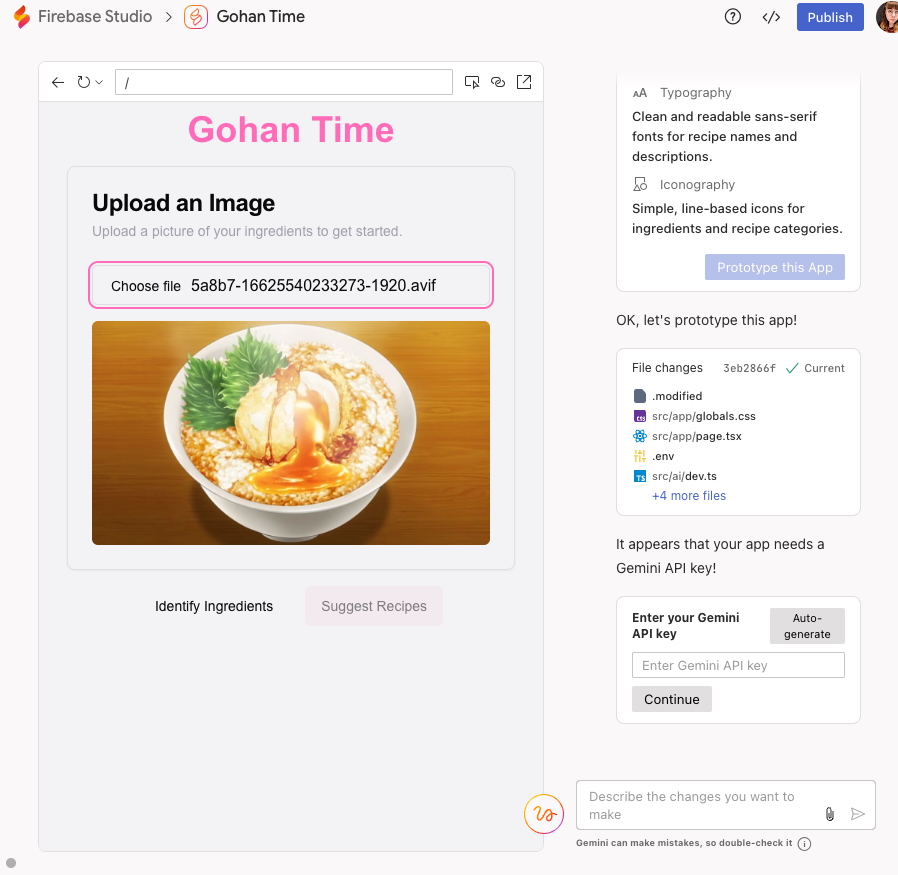
    Users can choose a template that closely aligns with their concept or start from scratch by simply typing out their vision. Firebase Studio will respond with a plan outlining the anticipated features, color scheme, layout, and the app’s name. Users have the option to adjust these elements and then click “prototype” to begin the building process.

    As someone not versed in app development, what followed seemed rather surreal — a cascade of code flowing down the screen while the AI model executed its tasks. When the process concluded, I was presented with a basic web app prototype. I opted for an app meant to convert images of anime food into recipes, and it was set up to upload an image right away.

    At this stage, Firebase Studio asked for a “Gemini API key,” so maintaining the vibe coding theme, I pressed the “Generate API key” button to test it out. It appeared to work, but when I uploaded my image and clicked “Identify ingredients,” the app encountered another problem.

    The AI offered to assist in resolving the issue — but honestly, I had already lost interest in this experiment. My impression of vibe coding is simply pushing buttons without a full grasp of their functions, which can be quite unexciting. However, if you’re interested in pursuing it, the process essentially involves repeatedly asking the AI for fixes, requesting changes, and testing the prototype until you achieve your desired outcome.

    Now, the question remains whether Google can successfully attract vibe coders or if Firebase will continue to primarily serve a professional audience.

  • Say Goodbye To Bad Apps With The New Play Store Update

    Say Goodbye To Bad Apps With The New Play Store Update

    The Google Play Store is home to approximately 3.3 million applications, but not all of them are up to par. Some apps may not be updated regularly, others could malfunction, and some might simply be subpar. Fortunately, an update to the Play Store is here to help users discover quality apps more easily.

    This update is currently being rolled out, with some users already experiencing its benefits. As you navigate the Play Store, you’ll notice alerts appearing just below the app details, offering a quick insight into the app’s performance. For instance, you may find warnings indicating that an app is frequently uninstalled or receives less engagement compared to its counterparts, as reported by Android Authority.

    The app quality warnings made their debut in version 44.7.24 of the Google Play Store. If you haven’t encountered these notifications yet, it may be helpful to ensure your app is fully updated. If everything checks out, your device might still be waiting for the feature to be rolled out. Patience is key.

    Warning from the Google Play Store regarding app quality.
    Credit: C. Scott Brown | Android Authority Android Authority

    While these warnings can assist you in avoiding unsatisfactory apps, they don’t automatically mean an app is flawed or problematic. For instance, a seasonal application might have minimal interaction aside from specific times of the year. Although it operates correctly, you could still see a warning regarding its low engagement.

    These alerts provide insight into an app at a glance, but they shouldn’t serve as a substitute for thorough evaluation. Be sure to take the time to analyze user feedback, download statistics, and other relevant information, especially when an app requires access to sensitive data.

  • TikTok And Other ByteDance Apps Go Dark In The US

    TikTok And Other ByteDance Apps Go Dark In The US

    TikTok has officially ceased operations in the United States. Following the Supreme Court’s upholding of legislation aimed at banning the popular platform, the app has voluntarily shut down its services in the country, along with several other applications owned by its parent company.

    Both Apple and Google have taken steps to remove TikTok from their respective app stores, resulting in no new downloads being permitted. Furthermore, existing users will no longer receive updates, including security patches and new features.

    Users who still have the app installed are greeted with a notification stating that TikTok is no longer accessible within the country. In-app purchases and subscription services have also been suspended.

    The message users receive outlines, “A law prohibiting TikTok has been enacted in the U.S. Unfortunately, this means that you are unable to use TikTok for now.” The message also references statements made by President-elect Donald Trump, who recently suggested he might consider a deadline extension for the company.

    TikTok access block message in the U.S.
    Nadeem Sarwar / Digital Trends

    Trump stated, “I think that would be an option we explore. A 90-day extension is something that will likely happen, as it’s appropriate.”

    However, TikTok is not the only app being affected by this ban. “Applications developed by ByteDance Ltd. and its subsidiaries—including TikTok, CapCut, Lemon8, and others—will no longer be available for download or updates on the App Store,” according to Apple.

    Here’s a complete list of apps impacted by the ban related to ByteDance:

    1. TikTok
    2. TikTok Studio
    3. TikTok Shop Seller Center
    4. CapCut
    5. Lemon8
    6. Hypic
    7. Lark – Team Collaboration
    8. Lark – Rooms Display
    9. Lark Rooms Controller
    10. Gauth: AI Study Companion
    11. MARVEL SNAP

    The duration of TikTok’s unavailability in the U.S. remains uncertain, and any potential relief once Trump assumes office is yet to be clarified. An extension of the ban seems probable, allowing TikTok additional time to reassess its operations in the U.S. and potentially sever ties with its China-based parent company.

    According to an internal memo shared with employees and obtained by The Verge, “President Trump has expressed his willingness to collaborate with us on a resolution to reinstate TikTok once he takes office.”

    As of 2025, TikTok boasted a user base of over 170 million in the U.S., including countless content creators and businesses that have invested heavily in advertising on the platform, both now facing uncertainty.

    This incident marks the first time a significant social media platform has entirely gone offline in the U.S. market. Previously, India banned TikTok in 2020 when the app was rapidly expanding and had around 200 million users. Some other nations also restrict devices owned by government agencies from installing the app.

  • Google Suggests Major Updates for Search and Android Apps

    Google Suggests Major Updates for Search and Android Apps

    The ongoing antitrust battle involving Google has led to a series of extensive policy proposals from the Department of Justice, including a suggested divestiture of the Chrome browser division. While the lawsuit primarily addresses issues related to Google’s Search monopoly, it also poses significant implications for Android and the broader browser landscape.

    In response, Google has presented its own set of “remedies” to counter the DOJ’s suggestions, asserting that its proposals exceed the parameters of the court’s focus.

    One of the key changes proposed by Google would grant partners, like Apple, the autonomy to select their preferred browser engines. Currently, Google invests billions into partnerships with major companies like Apple and Samsung, ensuring that Google Search is the default choice on their devices.

    For the sake of user flexibility, Apple permits iPhone users to change their default search engine. Last year, an Apple executive confirmed that with the rollout of iOS 17, users can set distinct search engines for normal and private browsing modes using the Safari browser.

    In addition, Google financially supports competitors of the Chrome browser to promote its search engine. For instance, Mozilla receives hundreds of millions of dollars from Google annually, which has been vital in sustaining the company.

    The recent proposal indicates that Google will establish separate search agreements for each platform, meaning distinct contracts for products like iPhones (iOS) and iPads (iPadOS), as well as for different browsing modes.

    Another noteworthy aspect of Google’s proposal concerns the ability of partners such as Apple to renew their search agreements every year, allowing them the chance to explore other options in the marketplace.

    “[There’s] the ability to change their default search provider at least every 12 months,” stated Lee-Anne Mulholland, Vice President of Regulatory Affairs at Google. This search arrangement is intricately linked to Android, and significant alterations might ensue if these terms are accepted.

    A significant change for Android

    Official Android mascot and splash screen on a phone.
    Denny Müller / Unsplash

    According to Google, their proposal would provide manufacturers with greater flexibility to preload multiple search engines and install Google applications independently of requiring Search or Chrome.

    This approach includes what can be described as conditional licensing, where a brand must incorporate one Google service to access additional ones. Currently, Google’s licensing agreements with Android manufacturers for Google Mobile Services (GMS) contain specific pre-installation requirements related to rival search engines.

    “Android partners would not need to license Google Search (or Chrome) to preload Google Play or any other Google apps on Android devices, which addresses the Court’s concerns regarding the options available to device manufacturers for preloading a competing search engine, even on an exclusive basis,” Google stated in its filing.

    Additionally, Google’s proposal emphasizes that it will not hinder partners from preloading competing search engines or browsers on their devices. This stipulation also extends to the realm of artificial intelligence. Device manufacturers will not be required to bundle the Gemini AI assistant to access essential Google products like Search, Google Play, or Chrome.

    Furthermore, should a manufacturer choose to include a generative AI product that competes with Gemini, Google will not impose exclusive distribution or licensing limitations. The overarching principle is that Google will not set the use of Search as a prerequisite for access to other products, such as Play services, on a device.

    It’s important to note that all proposed remedies would last for a period of three years, as opposed to the ten years sought by the plaintiffs in the case. “We do not make these proposals lightly,” Google remarked, stating that while these changes would entail costs for its partners, they still aim to address the court’s fundamental issues.

  • How to Change Your iPhone Call and Messaging Apps in iOS 18.2

    How to Change Your iPhone Call and Messaging Apps in iOS 18.2

    Bryan M. Wolfe / Digital Trends

    The forthcoming iOS 18.2 update will grant users the ability to select their preferred calling and messaging applications on their iPhones. This means you won’t be required to stick with Apple’s built-in options. Below are the simple steps to make the change.

    Difficulty

    Easy


    Duration

    10 minutes

    What You Need

    • An iPhone running iOS 18.2 or later

    Note: iOS 18.2 is currently in beta, so these steps may change by the time the official version is released.

    How to Change Your Default Calling and Messaging Apps

    Changing your default calling and messaging apps is a straightforward process, thanks to Apple’s combined settings hub for managing defaults.

    Step 1: Launch the Settings app on your iPhone with iOS 18.2 or later.

    Step 2: Scroll down and select the Apps option.

    Step 3: In the Apps section, look for the new Default apps option at the top and tap on it.

    How to set default apps on iOS 18.2
    Bryan M. Wolfe / Digital Trends

    Step 4: You’ll see options for both Calling and Messaging. Choose one to modify.

    Step 5: You will be presented with a list of compatible apps installed on your iPhone. Select the app you want to set as your default for calling or messaging.

    How to adjust default apps on iOS 18.2
    Bryan M. Wolfe / Digital Trends

    Why Switch from Native Apps?

    You might wonder why you would want to switch your calling or messaging app. While Apple’s iMessage boasts impressive features like SharePlay and Memoji, and the Phone app is a standard for making calls, many users find value in alternatives. For example, applications like WhatsApp, Signal, and Telegram are preferred for their focus on international communication and enhanced security options.

    Some users appreciate alternative apps for their compatibility across various platforms, which can simplify communication with a broader audience. At the end of the day, you might favor a different app simply because it offers unique features that Apple’s apps do not. Once iOS 18.2 is publicly released, users will have the flexibility to select third-party applications as their default options, promoting increased choice and competition.

    The iOS 18.2 update is anticipated to be available to everyone by the end of the year.

  • Top AI App Launches on Mac (Not ChatGPT)

    Top AI App Launches on Mac (Not ChatGPT)

    the Perplexity desktop application
    Perplexity

    On Thursday, Perplexity revealed the launch of a new native app designed for Mac, which allows users to access its innovative “answer engine” directly from their desktop without relying on a web browser.

    The Perplexity desktop app is currently available for download from the Apple App Store. It boasts several features that are exclusive to Mac users, including Pro Search, which offers a guided AI search for deeper insights, and options for text and voice prompts. The app also provides “cited sources” for each answer given.

    The application supports threaded conversations, enabling users to pose follow-up inquiries while the AI retains context from previous discussions. Additionally, it incorporates a library function that keeps track of past searches for future reference. Users can conveniently navigate the app using various keyboard shortcuts.

    While the desktop application is free to download, users must subscribe to Perplexity’s Pro plan, which costs $20 per month or $200 annually, in order to utilize the app. This subscription offers various benefits, including up to 600 “Pro Searches” each day, the option to select different AI models, and the ability to analyze uploaded files and images. The Perplexity web app remains free, allowing unlimited Quick Searches and up to five Pro Searches daily, which provide more comprehensive answers than Quick Searches.

    This announcement follows the rollout of two new features just a week prior: Internal Knowledge Search and Spaces. The Internal Knowledge Search allows the AI to sift through both web information and user-provided files to generate more accurate responses. Spaces introduces a collaborative area reminiscent of ChatGPT Canvas, where users can view responses to their inquiries outside of a chat format.

    The Perplexity Mac app marks the fourth evolution of the company’s AI technology, following the releases of its web app and apps for Android and iOS last year.

    However, Perplexity has faced numerous accusations regarding unethical practices, including unauthorized data scraping and copyright infringement. The organization is currently embroiled in a lawsuit initiated by News Corp, alleging that it unlawfully mined data from the Wall Street Journal and the New York Post in violation of copyright laws.

  • Most Used Android Apps in 2024

    Most Used Android Apps in 2024

    As we move further into 2024, the landscape of mobile apps continues to evolve with new and innovative applications gaining popularity. However, some apps have maintained their status as the most used and essential on Android devices, based on data from Statista.

    Social Media and Communication

    1. WhatsApp

    WhatsApp remains one of the most popular messaging apps worldwide. It offers end-to-end encryption, making it a secure option for communication. Features such as voice and video calls, group chats, and a user-friendly interface make it a go-to app for millions of users.

    2. Facebook

    Facebook continues to be a leading social media platform, allowing users to connect with friends and family, share updates, and join communities. Its integration with other apps like Messenger and Instagram enhances its usability and reach.

    3. Instagram

    Instagram is the preferred app for sharing photos and videos. With features like Stories, Reels, and IGTV, it caters to a wide range of content creators and consumers. The app’s continuous updates and new features keep it engaging and relevant.

    Entertainment

    4. YouTube

    YouTube is the top platform for video content, offering everything from music videos and vlogs to tutorials and live streams. Its algorithm recommends personalized content, making it easy for users to discover new videos based on their interests.

    5. Netflix

    Netflix remains a leader in the streaming industry, providing a vast library of movies, TV shows, and original content. The app’s user-friendly interface and personalized recommendations make it a favorite for binge-watchers.

    6. Spotify

    Spotify is the go-to app for music streaming, offering a massive library of songs, podcasts, and playlists. Its premium features include ad-free listening, offline playback, and high-quality audio, catering to music lovers worldwide.

    Productivity

    7. Google Drive

    Google Drive is essential for storing and sharing files in the cloud. Its integration with other Google services, such as Docs, Sheets, and Slides, makes it a versatile tool for both personal and professional use.

    8. Microsoft Office

    The Microsoft Office app combines Word, Excel, and PowerPoint into one application, providing powerful tools for productivity on the go. Its compatibility with desktop versions and cloud storage integration makes it indispensable for business and academic use.

    9. Zoom

    Zoom has solidified its place as a crucial app for video conferencing. It is widely used for virtual meetings, webinars, and online classes, offering features like screen sharing, breakout rooms, and recording capabilities.

    Shopping and Finance

    10. Amazon

    Amazon‘s app remains the leading platform for online shopping. With a vast selection of products, user reviews, and fast shipping options, it continues to dominate the e-commerce space.

    11. PayPal

    PayPal is a trusted app for online payments and money transfers. Its secure platform and ease of use make it a popular choice for both personal transactions and business payments.

    12. Google Pay

    Google Pay is a widely used app for contactless payments and financial transactions. It offers features like peer-to-peer transfers, bill payments, and rewards, making it a comprehensive financial tool.

    Health and Fitness

    13. MyFitnessPal

    MyFitnessPal helps users track their diet and exercise routines. Its extensive food database, integration with other fitness apps and devices, and personalized insights make it an essential app for health-conscious users.

    14. Fitbit

    The Fitbit app works with Fitbit devices to track physical activity, sleep patterns, and overall health. Its detailed analytics and community features help users stay motivated and reach their fitness goals.

    Utilities

    15. Google Maps

    Google Maps remains the top app for navigation and local discovery. It provides accurate directions, real-time traffic updates, and information on nearby businesses and attractions.

    16. Adobe Acrobat Reader

    Adobe Acrobat Reader is the go-to app for viewing, editing, and signing PDF documents. Its robust features and compatibility with various devices make it an essential tool for managing digital documents.

  • Apple Partners With Google to Bring Gemini-Powered AI to iPhones

    Apple Partners With Google to Bring Gemini-Powered AI to iPhones

    The key features surrounding the integration of Gemini-powered features into iPhones underline the implications and advancements of this groundbreaking partnership.

    Google’s Gemini AI joining forces with Apple’s iPhone ecosystem marks a major advancement in smartphone technology, particularly in AI. This partnership holds immense potential for redefining the capabilities of iPhones.

    Below are the key takeaways about Gemini-powered iPhone features from various sources:

    Partnership Talks

    Apple and Google are currently engaged in discussions to incorporate Google’s Gemini AI model into a forthcoming iPhone software update, potentially as part of iOS 18. This collaboration aims to introduce a new wave of cloud-based AI-powered features to the iPhone, including innovative functionalities like image creation and essay writing prompted by simple cues.

    Enhancing Siri

    The integration of Gemini holds the promise of significantly enhancing Siri, Apple’s renowned voice assistant. By maximizing Gemini’s capabilities, Siri stands to become more capable at responding to complex queries, addressing internal concerns over its performance compared to newer AI assistants.

    On-Device and Cloud-Based Features

    While Apple remains steadfast in developing on-device features that operate independently of internet connectivity, the partnership with Google opens doors to additional cloud-based generative AI features. This strategic move seeks to leverage Google’s infrastructure to enhance iPhone functionalities further.

    Regulatory Scrutiny

    The potential collaboration between Apple and Google, especially in light of their existing search agreement, will most likely attract regulatory scrutiny. Both tech giants are no strangers to scrutiny, given ongoing investigations into agreements that make Google the default search engine on Apple devices.

    Competitive Landscape

    Google’s Gemini AI, previously known as Bard, has already impacted both iOS and Android platforms. This move underscores Google’s commitment to making advanced conversational AI technology having Gemini boasting capabilities available to everyone.

    Market Impact

    Gemini’s integration into iPhones has significant implications for the AI industry. This partnership can reshape competitive dynamics within the AI and smartphone sectors, influencing market trends and consumer preferences.

    The ongoing discussions between Apple and Google to integrate Gemini AI features into the iPhone is indeed an incredible partnership that aims to integrate AI capabilities within Apple’s ecosystem. This collaboration promises AI-powered functionalities and enhancement in Siri’s performance.

  • Top 10 Best Weather Apps in [year] (Accurate Forecast)

    Top 10 Best Weather Apps in [year] (Accurate Forecast)

    Explore the top 10 best weather apps for 2024, providing accurate and reliable forecasts. Our detailed reviews cover features, design, performance, and privacy considerations.

    Weather, a pivotal aspect of our daily lives, necessitates a trustworthy app for precise forecasts. With an abundance of choices available, selecting the perfect one for your needs can be overwhelming. To simplify this process, we conducted thorough testing and reviews, evaluating the most popular weather apps based on their features, design, performance, and privacy. Here’s an in-depth look at our top 10 weather apps for 2024:

    1. The Weather Channel

    The Weather Channel is the most downloaded weather app, offering more than just forecasts. Beyond weather details, users can access news videos, articles, and alerts for severe weather. The app’s sleek, user-friendly interface delivers detailed, customizable information. However, note that the free version contains ads, which can be removed by subscribing to the premium version.

    2. AccuWeather

    Renowned for claiming the most accurate forecasts globally, AccuWeather boasts a simple and elegant design. It provides users with current conditions, hourly and daily forecasts, radar maps, and more. While the free version includes ads, opting for the ad-free or premium version unlocks additional features.

    3. WeatherBug

    Tailored for outdoor enthusiasts, WeatherBug taps into the world’s largest network of weather stations. The app’s vibrant design presents current conditions, hourly and daily forecasts, radar maps, and more. While the free version features ads, upgrading to the ad-free version ensures a smoother experience.

    4. Dark Sky

    Dark Sky emerges as a top weather app for iPhone users, featuring a beautiful and minimalist design. Integrating seamlessly with iOS and Apple Watch, it provides hyperlocal and accurate forecasts, notifying users about rain or snow onset and cessation. The app costs $3.99 to download and does not contain any ads or in-app purchases.

    5. Shadow Weather

    Shadow Weather caters to Android users with its dark and modern design, offering extensive customization options. The app provides current conditions, hourly and daily forecasts, radar maps, and more. Priced at $4.99, it does not contain ads or in-app purchases.

    6. Flowx

    Flowx is renowned for its interactive and detailed weather features, allowing users to swipe, zoom, and animate weather maps. The app offers current conditions, hourly and daily forecasts, radar maps, and more. While the app is free to download, it includes in-app purchases to unlock additional features and data.

    7. RadarScope

    RadarScope stands out as one of the best weather radar apps, offering access to high-resolution and real-time radar data. Designed for weather enthusiasts and professionals, it provides raw radar data without smoothing or interpretation. The app costs $9.99 to download, with in-app purchases for additional features and data.

    8. ClimaCell

    ClimaCell is known for hyperlocal and accurate forecasts, utilizing various weather data sources. The app features a clean and elegant design, offering current conditions, hourly and daily forecasts, radar maps, and more. It is free to download and does not include any ads or in-app purchases.

    9. AIR by Plume Labs

    AIR by Plume Labs specializes in displaying air quality data in real-time and forecasts. With a simple and colorful design, the app showcases the Air Quality Index (AQI), main pollutants, and health recommendations. The app is free to download and does not contain any ads or in-app purchases.

    10. CARROT Weather

    CARROT Weather adds a touch of humor to weather forecasts with witty and sarcastic comments. The app features a quirky and cartoonish design, providing current conditions, hourly and daily forecasts, radar maps, and more. Priced at $4.99, it includes in-app purchases for additional features and data.

    In conclusion, these are our meticulously curated top 10 best weather apps in 2024, selected based on thorough testing and reviews. We trust that you’ll find the perfect app to suit your unique needs and preferences, ensuring you enjoy the weather, whatever it may be!

  • Top 10 Best Apps and Tools AI For Interior Design [year]

    Artificial Intelligence (AI) has revolutionized various industries, and AI for interior design is no exception. With the help of AI apps and tools, designers can now create stunning spaces with ease and efficiency.

    In this article, we will explore the top 10 AI apps and tools for interior design, highlighting their features and benefits.

    1. Houzz

    Houzz

    Houzz is a popular AI app that allows users to browse millions of interior design photos and find inspiration for their own projects. With its augmented reality feature, users can even visualize how furniture and decor will look in their space before making a purchase.

    2. Planner 5D

    Planner 5D

    Planner 5D is an AI tool that enables users to create detailed floor plans and 3D models of their spaces. It offers a vast library of furniture and decor items, allowing users to experiment with different styles and layouts.

    3. Morpholio Board

    Morpholio Board

    Morpholio Board is an AI app that helps designers organize and present their ideas. It allows users to create digital mood boards by combining images, sketches, and notes. The app also offers collaboration features, making it easy for designers to work with clients and colleagues.

    4. ColorSnap

    ColorSnap

    ColorSnap, developed by Sherwin-Williams, is an AI tool that helps users choose the perfect paint colors for their spaces. By simply uploading a photo, the app can match the colors in the image to Sherwin-Williams’ extensive paint collection, making the selection process a breeze.

    5. HomeByMe

    HomeByMe

    HomeByMe is an AI tool that allows users to design and decorate their spaces in 3D. With its intuitive interface, users can easily drag and drop furniture, change wall colors, and experiment with different layouts. The app also offers a virtual reality feature, allowing users to experience their designs in a more immersive way.

    6. MagicPlan

    MagicPlan

    MagicPlan is an AI app that enables users to create accurate floor plans by simply taking photos of their space. The app uses augmented reality to measure distances and generate detailed floor plans, eliminating the need for manual measurements.

    7. Roomstyler 3D Home Planner

    Roomstyler 3D Home Planner

    Roomstyler 3D Home Planner is an AI tool that allows users to design and decorate their spaces in 3D. With its extensive library of furniture and decor items, users can easily visualize their ideas and experiment with different styles. The app also offers a community feature, allowing users to share their designs and get feedback from others.

    8. Homestyler

    Homestyler

    Homestyler is an AI app that offers a wide range of design features. Users can create 2D and 3D floor plans, experiment with different furniture arrangements, and even try out different paint colors. The app also offers a virtual reality feature, allowing users to walk through their designs and experience them in a more immersive way.

    9. ArtPlacer

    ArtPlacer

    ArtPlacer is an AI tool that helps users visualize how the artwork will look in their space. By simply uploading a photo, users can see how different pieces of art will look on their walls, helping them make informed decisions when purchasing artwork.

    10. SketchUp

    SketchUp

    SketchUp is an AI tool that allows users to create detailed 3D models of their spaces. With its intuitive interface, users can easily draw and modify their designs, adding furniture, textures, and lighting effects. The app also offers a vast library of pre-made models, making it easy for users to find inspiration and incorporate it into their designs.

    How AI Can Help In Interior Designers?

    In recent years, artificial intelligence (AI) has made significant strides in various industries, and interior design is no exception. With the help of AI apps and tools, designers can now streamline their creative process, enhance their productivity, and deliver exceptional results to their clients. In this article, we will explore the top 10 AI apps and tools that are revolutionizing the field of interior design.

    1. Virtual Reality (VR) Design Tools: VR technology has transformed the way designers conceptualize and present their ideas. With VR design tools, designers can create immersive 3D environments that allow clients to experience their vision before it becomes a reality. This not only saves time and resources but also ensures client satisfaction.
    2. Augmented Reality (AR) Apps: AR apps have become increasingly popular in the interior design industry. These apps enable designers to overlay virtual objects onto real-world spaces, giving clients a realistic preview of how different furniture pieces, colors, and textures will look in their homes. AR apps provide a convenient and interactive way for designers to collaborate with clients and make informed design decisions.
    3. AI-Powered Design Assistants: AI-powered design assistants are revolutionizing the way designers generate ideas and find inspiration. These tools analyze vast amounts of data, including design trends, color palettes, and furniture styles, to provide designers with personalized recommendations and suggestions. Designers can now save time and effort by relying on AI to curate design options that align with their clients’ preferences.
    4. Space Planning Software: Space planning is a crucial aspect of interior design, and AI-powered space planning software has made it easier than ever. These tools use algorithms to optimize room layouts, taking into account factors such as furniture placement, traffic flow, and functionality. Designers can now create efficient and aesthetically pleasing spaces with just a few clicks.
    5. Material Selection Tools: Choosing the right materials for a design project can be overwhelming, but AI-powered material selection tools simplify the process. These tools analyze various factors, such as durability, sustainability, and cost, to recommend the most suitable materials for a specific project. Designers can now make informed decisions and ensure that their designs are both visually appealing and practical.
    6. Lighting Design Apps: Lighting plays a crucial role in interior design, and AI-powered lighting design apps have revolutionized the way designers approach this aspect. These apps simulate different lighting scenarios, allowing designers to experiment with various fixtures, intensities, and colors. By visualizing the impact of different lighting options, designers can create ambiance and enhance the overall aesthetic of a space.
    7. Color Palette Generators: Selecting the right color palette is essential for creating a cohesive and visually pleasing design. AI-powered color palette generators analyze images, trends, and color theory to suggest harmonious color combinations. Designers can now explore a wide range of color options and create unique palettes that resonate with their client’s preferences.
    8. Furniture and Decor Recommenders: AI-powered furniture and decor recommenders have transformed the way designers source products for their projects. These tools analyze design styles, dimensions, and budgets to suggest furniture and decor pieces that align with the overall design concept. Designers can now save time and offer their clients a curated selection of products that meet their specific requirements.
    9. Project Management Software: AI-powered project management software has become an invaluable tool for interior designers. These tools streamline communication, scheduling, and budgeting, allowing designers to stay organized and deliver projects on time and within budget. With AI-powered project management software, designers can focus on their creative process while ensuring efficient project execution.
    10. 3D Rendering Software: 3D rendering software has been a game-changer for interior designers. These tools allow designers to create realistic visualizations of their designs, enabling clients to visualize the final result. With AI-powered 3D rendering software, designers can showcase their ideas in a compelling and immersive way, ultimately enhancing client satisfaction and project success.

    In conclusion, AI apps and tools have revolutionized the field of interior design, empowering designers to streamline their creative process, enhance productivity, and deliver exceptional results.

    From VR design tools to AI-powered project management software, these tools have transformed the way designers conceptualize, present, and execute their ideas. As AI continues to advance, the possibilities for innovation in interior design are endless.

  • 8 Best Android PDF Reader Apps To Use in [year]

    Some PDF applications are already available on PlayStore but they only support editing and reading of office documents by not focusing on the quality of e-books. We have collected 10 best android PDF reader applications for you to have good quality PDF reader options.

    (more…)