Tag: App

  • Apple Home App’s Smart New Features to Simplify Your Life

    Apple Home App’s Smart New Features to Simplify Your Life

    At WWDC 2026, Apple showcased how Apple Intelligence is integrating into the Home app. While the Siri AI updates drew most of the attention, these Home app enhancements could be the quiet improvements that simplify your daily routines. Here’s everything you need to know about the updates coming to the Home app with iOS 27.

    Tired of Notification Overload?

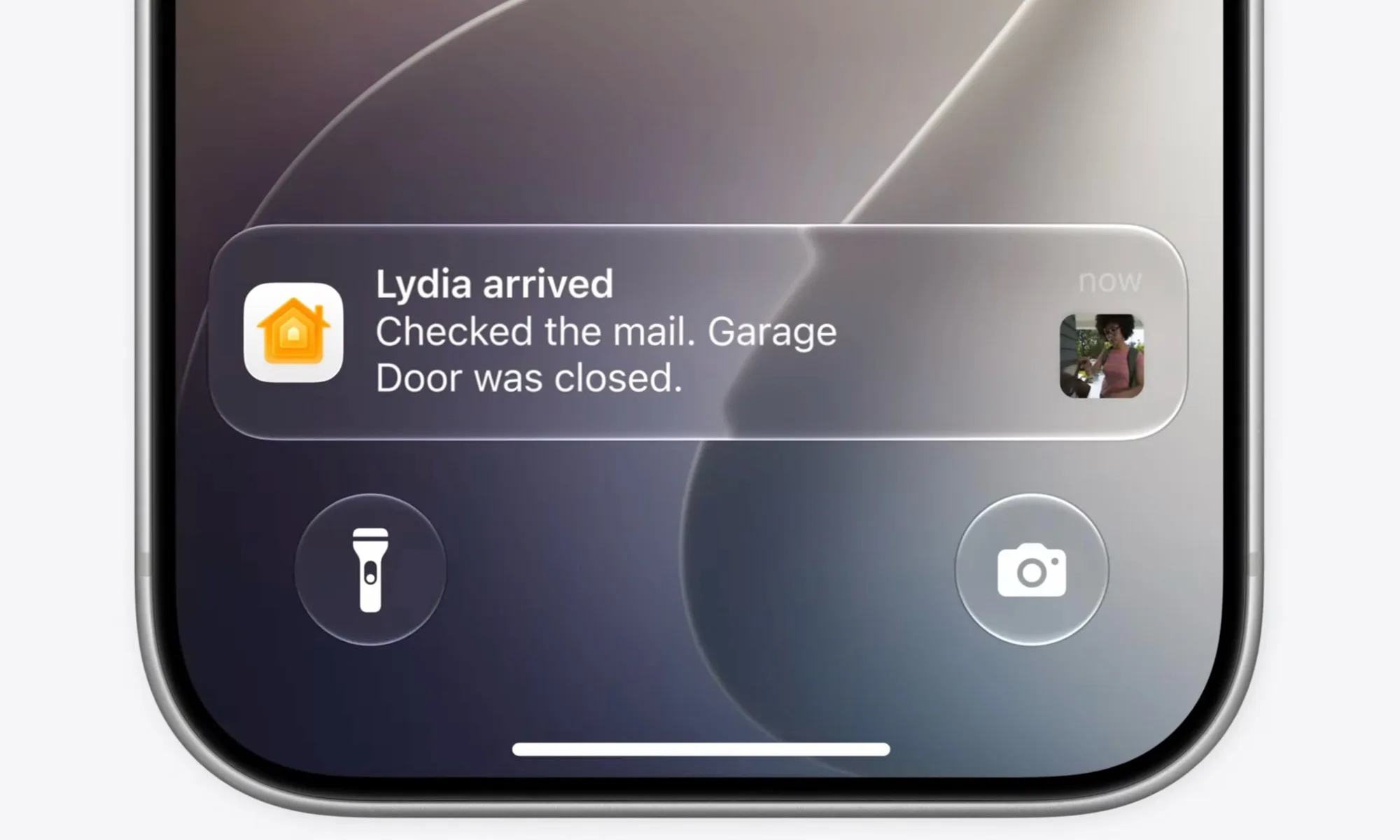
    If you have numerous smart home devices, you know how quickly notifications can accumulate. They’re useful for staying informed, but they can also become overwhelming. Apple addresses this by leveraging Apple Intelligence to group related notifications into a single activity.

    Instead of receiving multiple alerts, you’ll get one notification that updates in real-time as the activity progresses. This small tweak significantly declutters your Lock Screen, making it easier to stay focused.

    Your Cameras Can Now Better Interpret Your Footage

    This is one of the most exciting features. The Home app can now analyze recordings from compatible HomeKit cameras using Apple Intelligence and generate summaries of what occurred.

    Because it understands the content of the videos, it can fetch relevant footage from your various cameras and compile them to give you a comprehensive view. This feature will be highly appreciated by users.

    Additionally, you’ll be able to search through your camera recordings based on what was captured. Before you even start typing, relevant clips are prioritized at the top of the search results. If you’re trying to locate a specific event, like a package delivery, you can find it across multiple cameras within seconds.

    And for supported cameras, you can view recordings in stunning 4K resolution. These enhancements promise to make managing and reviewing your home security footage more efficient and enjoyable.

  • Try The Digital Trends App Bundle Free For A Week

    Try The Digital Trends App Bundle Free For A Week

    Recently, we partnered with Maple Media to bring you an exclusive collection of 17 must-have apps for your smartphone. These apps span a wide spectrum—from relaxing entertainment to essential productivity tools—allowing you to enhance your phone experience in countless ways. Usually, this bundle costs $9.99 a month—significantly cheaper than purchasing each app separately—but you can enjoy the first 7 days free of charge.

    For a complete rundown of the included apps, check out the full details linked above. With over 50 million downloads and more than 900,000 reviews collectively, these apps are already popular and highly trusted. So what makes this bundle so appealing? It’s the incredible variety and value. Instead of just map apps, you get a comprehensive mix across many categories, ensuring there’s something for everyone. Here’s a quick overview, along with some favorites in each category:

    • Document Tools: Apps like SwiftScan and Calendar All-In-One Planner help you manage documents and schedules with ease.
    • Weather: Stay informed with advanced weather radar and wind compass apps to know your local conditions in detail.
    • Photography: Edit your photos with vintage effects or craft beautiful collages on the go.
    • Games and Puzzles: From Sudoku to FreeCell, these apps elevate your mobile gaming experience.
    • Additional Picks: Apps like Fooducate for nutrition guidance and the Player FM podcast app add even more value, covering a broad range of interests.

    For all the specifics about what’s included, be sure to see the full list linked above. This collection—already downloaded by millions—offers an unmatched variety of apps at a fraction of the regular price, making it a fantastic deal for anyone wanting to maximize their device’s potential.

  • Time-bending Crystals, Group Streaks & Unstoppable Alarms

    Time-bending Crystals, Group Streaks & Unstoppable Alarms

    Time Crystals: From Science Fiction to Everyday Security


    Artwork by Affan Qasim, created with Gemini Pro

    Picture pulling out a 1000 Rupee bill and seeing its security stripe pulse like a heartbeat—shifting, shimmering, and repeating in ways counterfeiting can’t replicate. That’s the intriguing potential of time crystals, a form of matter physicists once believed was impossible.

    Researchers at the University of Colorado Boulder have now created the first visible time crystals. Made from twisted liquid crystals illuminated by light, these crystals ripple with vibrant tiger-stripe patterns that are sturdy, stable, and sometimes even visible with the naked eye.

    This isn’t sci-fi fuel for a time machine, but it could redefine how we safeguard currency, store data, or develop futuristic displays. Imagine screens that animate themselves, changing colors or patterns rhythmically, powered by the principles of time symmetry breaking.

    By layering different types of time crystals, it might be possible to produce holographic images that are extremely secure and constantly shifting or create bright, shimmering surfaces for wearable tech or architecture. From seemingly impossible physics to holograms on banknotes, time crystals show that even the wildest science can find practical applications right in your pocket.

    Snapchat Enhances Features: Unlimited Storage and Group Streaks

    Artwork by Syed Alihasan Agha, created using Gemini Pro
    Artwork by Syed Alihasan Agha, created with Gemini Pro

    Snapchat is changing the game again: the app renowned for disappearing messages now aims to keep your chats forever and encourage ongoing friendships.


    With “Infinite Retention,” you can pin conversations so they stay put instead of fading away, a bold move away from Snapchat’s original “disappear after viewing” approach.

    Meanwhile, “Group Streaks” turn your group chats into a friendly competition, where everyone contributes to maintaining a streak. Let one lazy friend slip up, and the whole record is lost. This feature gamifies chatting, making your group conversations more of a daily routine than a casual drop-in.

    “Good morning! It’s a sunny day. Solve for X.”

    Artwork created by Daniyal Khuhro using Gemini
    Artwork by Daniyal Khuhro, generated with Gemini

    Today, it seems like fresh innovation is scarce, replaced by rebrands of familiar concepts.

    Awake, the latest alarm app for iOS, demands that users complete a task or challenge before turning off the alarm, setting itself apart. It now includes features like weather updates, morning news, calendar reminders, and even social media block functions—all bundled into one package. Though useful, these features are nothing new.

    Most of these added features come with a hefty price tag—$19.99 annually or $6.49 monthly—highlighting that they’re selling convenience, not novelty, as usual.

  • Amazon App’s AI Eyes Will Scan and Shop for You

    Amazon App’s AI Eyes Will Scan and Shop for You

    Amazon aims to make your online shopping experience more seamless by allowing you to simply point your phone’s camera at any object and instantly find it available for purchase online. Additionally, the platform’s built-in artificial intelligence can provide detailed information about products, helping you make smarter buying choices before placing an order.

    ### What’s new in Amazon shopping?

    The latest addition to Amazon’s suite of shopping tools is called Lens Live. This feature builds upon the original Amazon Lens but incorporates advanced generative AI capabilities. These enhancements enable the system to more accurately recognize objects within your camera view and quickly match them to items listed on Amazon.

    When users activate Lens Live through the Amazon app, the camera instantly begins scanning whatever is in front of it, displaying top matching products in a swipeable carousel at the bottom of the screen. This setup allows for quick side-by-side comparisons and easy selection of the desired item.

    Amazon is gradually rolling out this feature to millions of users across the United States, starting with iOS device owners. To access it, you simply open the Amazon app, tap the camera icon located in the search bar, and launch the camera scanner view.

    ### How does it work?

    Lens Live’s enhanced object recognition technology automatically detects the outline of objects when you point the camera at something. Once identified, it scans the object against Amazon’s extensive inventory to find matching or similar items.

    As soon as the system finds a match, a product card appears at the bottom of your screen, presenting relevant details and images. If multiple options are available, you can browse through the list and select the one that best fits your needs. These cards also feature a “+” button, allowing you to quickly add items directly to your shopping cart.

    You can also interact with the system by asking the integrated AI shopping assistant to describe the product’s key features or clarify any questions you might have. This conversational aspect is powered by Amazon’s in-house Rufus AI language model and functions similarly to visual intelligence tools developed by Apple and Google, offering a screen-sharing interaction experience.

    Using Lens Live is straightforward: just open the Amazon app, tap the camera icon, and start scanning. This feature promises to make discovering and shopping for products more intuitive and efficient, right from your smartphone.

  • Mobile App Helps Prevent Suicide Among At-Risk People

    Mobile App Helps Prevent Suicide Among At-Risk People

    Over the past decade, researchers and healthcare institutions have introduced a variety of mobile applications designed to support individuals dealing with serious health challenges. These apps range from simple tools for tracking blood sugar levels and mental health to more advanced solutions that guide rehabilitation exercises and help manage pain after surgery. In recent years, especially amidst the pandemic, these digital tools have become an essential way to provide medical assistance conveniently.

    A recent breakthrough comes from Ohio State University’s Wexner Medical Center and College of Medicine, along with Yale School of Medicine. They developed an app called OTX-2022, which has notably reduced the likelihood of repeated suicide attempts in people recently discharged from medical facilities after a suicide attempt.

    The app offers a series of educational sessions, each lasting about 10-15 minutes, targeted at individuals considered to be at high risk, with an average age of around 28 years. After several weeks of testing among patients with past suicide attempts, researchers found that the rate of subsequent suicide attempts among digital therapy users was reduced by approximately 58%.

    This achievement is particularly significant for a group especially vulnerable to suicidal behaviors. The study’s findings, published in JAMA Network Open, highlight the importance of innovative approaches in suicide prevention. The team emphasized that reducing repeat attempts in this population could significantly impact overall mental health outcomes.

    Suicide rates in the United States have been increasing for over twenty years, making it one of the leading causes of death among those as young as 10 years old. Over a million people engage in nonfatal suicidal behavior each year, with nearly half requiring hospitalization.

    How was the app tested?

    The research involved a controlled clinical trial with 339 participants admitted to psychiatric hospitals for elevated suicide risk between 2022 and 2024. The primary benefit of the app was its ability to sustain reductions in suicidal thoughts over time. Since access to specialized therapy after hospital discharge can be difficult, OTX-2022 offers a promising alternative by providing continuous, structured support.

    As Craig Bryan, the primary author of the study and a professor at Ohio State’s Department of Psychiatry and Behavioral Health, explained, “While targeted suicide-specific therapy is highly effective, finding trained therapists after hospitalization can be challenging. OTX-2022 could serve as a practical solution to that gap.”

    Experts agree that the period immediately following hospital discharge is critical, requiring close supervision and intervention. The app aims to fill this vital need by offering guidance and immediate assistance to those at risk.

    Following participation, patients were assessed using the Clinical Global Impression (CGI) scale, which measures symptom severity and overall improvement. The results showed that users of the app experienced significantly greater clinical improvement, and importantly, there were no suicide deaths in the group that used the digital therapy—while one occurred in the control group.

    Given the persistent rise in suicide rates across the country, and the prevalence of nonfatal attempts, innovations like this app may become vital tools in prevention efforts. With the lack of sufficient resources currently available for at-risk populations, such digital solutions could represent a groundbreaking approach to saving lives and reducing the impact of mental health crises.
  • Hulu To Join Disney+ App Fully In 2026

    Hulu To Join Disney+ App Fully In 2026

    Hulu’s standalone app will soon be a thing of the past. Starting next year, Hulu will be fully integrated into Disney+, offering users a streamlined streaming experience through a single platform.

    This transition was revealed during Disney’s recent earnings call on Wednesday morning.

    Today, Disney announced a significant step in unifying its streaming services. CEO Bob Iger and CFO Hugh Johnston shared that by merging Hulu into Disney+, they aim to create a comprehensive entertainment package. This new platform will combine top-tier brands and popular franchises, providing a mix of general entertainment, family-friendly programming, news, and leading live sports content—all accessible through one app.

    Hulu will completely shift under the Disney+ banner sometime in 2026. Until then, viewers will still be able to purchase standalone subscriptions for Hulu or Disney+. After the merger, customers will carry the option to subscribe to either service separately if they choose.

    The integration process has been underway for several years. Notably, in June 2025, Disney acquired NBCUniversal’s one-third stake in Hulu for about $9 billion, making Disney the full owner of Hulu.

    Since spring 2024, Disney has been gradually incorporating Hulu content into Disney+. This strategy has included offering bundle plans that include both Disney+ and Hulu, making it easier for subscribers to access a broad range of programming.

    Additionally, starting this fall, Hulu will replace the Star section on Disney+ internationally. Iger described Hulu as now being a “global general entertainment brand,” emphasizing its expanded reach.

    Looking ahead, Disney plans to introduce improvements within the Disney+ app, including new features and a more personalized homepage, all culminating in the launch of the unified Disney+ and Hulu platform next year. Company executives believe that combining the two services will enhance the user experience, support growth in profitability, and reduce subscriber churn.

    The company also announced that ESPN’s standalone streaming service will debut on August 21, priced at $29.99 per month, marking another significant move in its direct-to-consumer offerings.

  • Should I Wait for Bitchat App Full Release?

    Should I Wait for Bitchat App Full Release?

    Should I Wait for Bitchat App Full Release?

    The digital landscape is rapidly evolving, and messaging apps are continuously striving to enhance user experience. One of the most talked-about apps currently is Bitchat, which claims to offer a unique twist on traditional messaging platforms. But the question remains: should you wait for its full release, or is it worth diving in now?

    What is Bitchat?

    Bitchat is a messaging app designed to facilitate deeper conversations and interactions. It aims to disrupt the conventional messaging format by incorporating innovative features that prioritize user engagement and creativity. Here are some of its core offerings:

    • Voice and Video Integration: Offers seamless voice and video calling features.
    • Creative Messaging: Allows users to send multimedia messages, including stickers and GIFs.
    • Privacy Features: Emphasizes user privacy with end-to-end encryption.

    Key Features of Bitchat

    As you consider whether to wait for the full release, it’s essential to understand what the app brings to the table.

    Unique Selling Points

    • Intuitive Interface: A user-friendly design that makes navigation simple and enjoyable.
    • Customizable Themes: Users can personalize their chat environment according to their style.
    • Group Chats with Unique Options: Different chat types, like discussion forums and community hubs.

    Security and Privacy

    • End-to-End Encryption: Ensures that only you and the recipient can read the messages.
    • Self-Destructing Messages: For users keen on privacy, messages that delete after a set time can be very appealing.

    Pros and Cons of Waiting for Full Release

    Before making your decision, consider the advantages and disadvantages of waiting versus jumping in now.

    Advantages of Waiting

    • More Stable Features: The full release is likely to offer a more refined user experience.
    • Bug Fixes: Waiting ensures you’re not dealing with early-stage glitches.
    • More Information: A complete release generally comes with extensive reviews and user feedback, which can guide your choice.

    Disadvantages of Waiting

    • Missed Early Adopter Perks: Many apps offer exclusive features, rewards, or discounts to early users.
    • Prolonged Access to New Features: If you wait, you may miss out on innovative features that are available in the beta version.
    • Staying Ahead of Trends: Engaging with the app early allows you to remain ahead in the fast-paced digital ecosystem.

    User Reviews and Feedback

    Since Bitchat is currently in beta, reviewing user feedback can help inform your decision. Here are some typical comments gathered from various forums and tech blogs:

    • Positive Feedback:

      • Users appreciate the intuitive interface and unique engagement options.
      • The security features are widely praised, especially among privacy-conscious individuals.

    • Constructive Criticism:

      • Some users report bugs and glitches, typical for beta versions.
      • Limited functionality compared to more established apps.

    Final Considerations

    Ultimately, deciding whether to wait for the full release of Bitchat depends on your individual needs and preferences. If you prioritize stability and thorough feedback, waiting might be the best choice. On the other hand, if you’re eager to explore new features and are comfortable with potential hiccups, joining the beta community can be rewarding.

    As you weigh your options, keep an eye on the app’s updates and the development team’s responsiveness. The world of messaging apps is competitive, and Bitchat’s promises may very well deliver a fresh experience once fully launched.

  • What Are the Best Alternatives to Bitchat App?

    What Are the Best Alternatives to Bitchat App?

    Bitchat is a popular messaging platform known for its anonymity and decentralized nature. However, users often seek alternatives that align with their needs for security, user experience, and functionality. Below, we explore some of the best alternatives to Bitchat, highlighting their unique features.

    Top Alternatives to Bitchat

    1. Signal

    Signal is lauded for its robust encryption and user privacy features. Here’s why it stands out:

    • End-to-End Encryption: Ensures that only the sender and recipient can read the messages.
    • Open-Source: The code is publicly available, allowing for community scrutiny.
    • Minimal Data Collection: Signal collects very little user data, prioritizing privacy.
    • Cross-Platform Availability: Works on both mobile and desktop platforms seamlessly.

    2. Telegram

    Telegram has gained immense popularity due to its versatile features:

    • Cloud-Based Storage: Users can access their messages from any device.
    • Secret Chats: Offers end-to-end encryption for select conversations.
    • Customizable: Users can create bots, channels, and customize their experience.
    • Large Group Capability: Supports groups with up to 200,000 members.

    3. WhatsApp

    WhatsApp remains a top choice for many, thanks to its widespread use and features:

    • User-Friendly Interface: Easy to navigate for all users.
    • Rich Media Sharing: Allows sharing of photos, videos, and documents.
    • Voice and Video Calls: Offers reliable calling features over the internet.
    • End-to-End Encryption: Provides a level of security that makes it difficult for third parties to access chats.

    4. Discord

    Originally geared towards gamers, Discord has evolved into a versatile communication platform:

    • Community Focused: Supports servers dedicated to various interests.
    • Voice Channels: Facilitates real-time voice communication.
    • Text and Video Options: Offers various communication methods, including text and video chats.
    • Integrations: Works with numerous apps and services for a richer experience.

    Key Features to Consider in Messaging Apps

    When evaluating alternatives to Bitchat, consider these essential features:

    Security and Privacy

    • Encryption Standards: End-to-end encryption is crucial for safeguarding communication.
    • Data Collection Practices: Look for apps that minimize the amount of data they collect.

    User Experience

    • Ease of Use: A straightforward interface can enhance user engagement.
    • Customization Options: Allows users to tailor their experience based on preferences.

    Functionality

    • Media Sharing: The ability to send photos, videos, and files is often vital.
    • Cross-Platform Support: An app that works seamlessly across devices enhances accessibility.

    Community and Networking Features

    • Group Functionality: Support for large groups can be a game-changer for community interaction.
    • Bots and Integrations: These features can add significant value by automating tasks or providing additional utilities.

    Popular Messaging Apps Comparison

    App End-to-End Encryption Cross-Platform Group Chat Size Customization
    Signal Yes Yes Limited No
    Telegram Yes (for secret chats) Yes Up to 200,000 Yes
    WhatsApp Yes Yes Up to 256 No
    Discord Yes Yes Unlimited Yes

    Conclusion

    Choosing the right messaging app depends on personal needs and preferences. By comparing security features, user experience, functionality, and community capabilities, users can find the best alternative to Bitchat that suits their communication style.

  • Is Bitchat App Worth Using?

    Is Bitchat App Worth Using?

    In today’s digital age, communication apps are a dime a dozen. One that has gained attention recently is Bitchat. But is it worth your time and space on your device? Let’s dive into its features, usability, and potential drawbacks.

    Overview of Bitchat

    Bitchat is a messaging app that cuts through the noise of traditional chat platforms by offering unique features designed to enhance user experience. It aims to blend convenience with a bit of fun, making conversations more engaging.

    Key Features

    • User-Friendly Interface: Bitchat boasts an intuitive design that most users find easy to navigate.
    • Customization Options: Users can personalize their chat windows and notifications, allowing for a tailored experience.
    • Voice and Video Messaging: Beyond text, Bitchat supports voice recordings and video calls, catering to various communication preferences.
    • Group Chats: Users can create groups easily, supporting collaborative discussions.

    Pros of Bitchat

    Using Bitchat comes with several advantages that might make it appealing to users:

    • Privacy Controls: The app emphasizes user privacy, offering end-to-end encryption on messages.
    • Cross-Platform Compatibility: Available on both Android and iOS, Bitchat syncs seamlessly across devices.
    • Engagement Features: Functions like polls, stickers, and location sharing can make conversations more vibrant.

    Additional Benefits

    • Low Data Usage: Bitchat is optimized to use minimal data, making it a good option for users with limited plans.
    • Integrated Social Media Sharing: Users can share content from other platforms directly within the app.

    Cons of Bitchat

    While Bitchat offers some attractive features, it’s essential to consider its downsides:

    • Limited User Base: As a newer app, the number of users may not be as extensive as more established platforms like WhatsApp or Telegram.
    • Occasional Bugs: Some users report glitches that can disrupt their experience, especially during video calls.
    • Less Mature Ecosystem: Compared to competitors, the app might lack some advanced features, such as extensive bot integrations or third-party app compatibility.

    Common Issues

    • Notification Delay: Some users have reported delays in receiving notifications or messages.
    • Learning Curve: New users may find it takes time to fully understand all the functionalities.

    User Experience

    What Users Are Saying

    Feedback around Bitchat has been mixed. Here’s a glimpse into user opinions:

    • Positive Remarks:

      • Many appreciate the focus on privacy and customization.
      • The app’s design is often praised for being sleek and modern.

    • Constructive Criticism:

      • Users have expressed a desire for improved stability and functionality.
      • Some long for more robust group features, such as enhanced file sharing.

    Is Bitchat Right for You?

    Choosing the right messaging app often comes down to personal preference. If privacy and customization are high on your list, Bitchat may be the right choice. However, if you require advanced options and a more robust user community, you might want to explore other platforms.

    Final Thoughts

    Bitchat certainly offers a fresh take on messaging. With its unique features, it can be a valuable addition to your communication toolkit, particularly if you prioritize privacy and ease of use. However, potential users should weigh the pros and cons based on their communication needs and preferences.

  • Can Bitchat App Replace My Regular Messaging?

    Can Bitchat App Replace My Regular Messaging?

    In today’s fast-paced digital world, staying connected is more important than ever. With a plethora of messaging applications available, Bitchat is emerging as a popular choice. But can it truly replace traditional messaging apps? Let’s dive deeper into what Bitchat has to offer and weigh its strengths and weaknesses.

    What is Bitchat?

    Bitchat is an innovative messaging application designed to facilitate easy and engaging communication between users. It combines features from social media, video calls, and traditional texting, creating a unique platform for modern communication.

    Key Features of Bitchat

    • Multimedia Messaging: Send photos, videos, and voice notes seamlessly.
    • Group Chats: Create and manage group conversations for family, friends, or work.
    • Video Conferencing: Integrated video calling allows for face-to-face interactions.
    • Customization Options: Personalize chats with themes, emojis, and stickers.
    • Privacy Controls: Enhanced security features, including end-to-end encryption, ensure user privacy.

    Advantages of Using Bitchat

    Switching to Bitchat can come with several benefits that may appeal to various users.

    User-Friendly Interface

    • Intuitive Design: The app’s layout is clean and easy to navigate, making it accessible for users of all ages.
    • Quick Access: Instant notifications and a straightforward messaging design allow for immediate communication.

    Enhanced Engagement Features

    • Interactive Tools: The app includes polls, quizzes, and games to inspire user engagement.
    • Expressive Communication: Vibrant stickers and GIF options enhance emotional expression compared to standard text messaging.

    Versatile Communication

    • Cross-Platform Functionality: Works seamlessly on various devices, including smartphones, tablets, and PCs.
    • Integration with Social Apps: Easily share content with other social media platforms.

    Potential Drawbacks of Bitchat

    While Bitchat offers numerous advantages, it’s essential to consider the challenges it may present.

    Privacy Concerns

    • Data Collection: Some users may have concerns around how their data is used or shared.
    • Dependence on Connectivity: Requires a stable internet connection, making it less reliable in areas with poor service.

    Limited Popularity

    • User Base: Depending on your circle, not all friends or family may be using Bitchat, which could limit its effectiveness as a messaging app.
    • Familiarity with Traditional Apps: Many users are comfortable with long-standing messaging platforms like WhatsApp or SMS, which may hinder the switch.

    Cost Implications

    • In-App Purchases: While the app might be free, some features could require payment.
    • Potential Advertisement: Users might find some advertisements intrusive unless they opt for a premium version.

    Is Bitchat Right for You?

    To determine if Bitchat is a suitable replacement for your regular messaging, consider the following factors:

    • Social Interaction Needs: If you enjoy interactive features and multimedia messages, Bitchat may enhance your communication experience.
    • Privacy Priorities: If data privacy is a significant concern for you, delve deeper into Bitchat’s policies.
    • Peer Preference: Assess whether your friends and family are open to using a new platform.

    Conclusion

    The decision to shift from regular messaging to Bitchat hinges on individual needs, preferences, and social dynamics. While it offers unique functionalities and interactive communication options, weighing its potential drawbacks against your requirements is essential for making an informed choice.

  • Is Bitchat App Good for Business Use?

    Is Bitchat App Good for Business Use?

    Is Bitchat App Good for Business Use?

    In an ever-evolving digital landscape, communication tools are critical for businesses looking to enhance their productivity and collaboration. One app that has gained attention is Bitchat. But the question remains: is Bitchat good for business use? Let’s dive into its features, advantages, and potential drawbacks.

    Key Features of Bitchat

    Bitchat offers a range of functionalities tailored for business environments:

    • Instant Messaging: Quick and efficient messaging between team members.
    • File Sharing: Seamless integration for sharing documents, images, and other files.
    • Group Chats: Create groups for departments or projects, keeping conversations organized.
    • Voice and Video Calls: Facilitate real-time discussions to improve clarity and team bonding.
    • Customization Options: Personalize the interface to suit company branding or individual preferences.

    Advantages of Using Bitchat

    Bitchat brings several benefits to the table that can enhance business operations:

    1. Enhanced Communication

    • Real-time Interaction: Enables instant messaging, which can reduce response times and improve workflow.
    • Reduced Email Clutter: Offers a more informal communication platform that can minimize reliance on email chains.

    2. Improved Collaboration

    • File Sharing: Easy file sharing helps teams collaborate on projects without switching platforms.
    • Group Functionality: The ability to create groups for specific projects enhances teamwork and focus.

    3. User-Friendly Interface

    • Intuitive Design: Its simple and easy-to-navigate interface encourages adoption among employees.
    • Accessibility: Available on multiple platforms, allowing team members to stay connected from anywhere.

    Potential Drawbacks of Bitchat

    While Bitchat has many advantages, there are some downsides to consider:

    1. Security Concerns

    • Data Privacy: The app may pose risks regarding data security and user privacy. It’s essential to evaluate its encryption protocols.
    • Compliance Issues: Depending on your business sector, compliance with regulations like GDPR may be a concern.

    2. Limited Integrations

    • Lack of Third-Party Tools: Compared to competitors, Bitchat might not integrate seamlessly with other software solutions your business relies on.
    • Customization Limitations: While it offers some customization, these may not be sufficient for businesses requiring highly tailored solutions.

    Best Use Cases for Bitchat

    Bitchat can excel in particular use cases, including:

    • Small to Medium-Sized Teams: It’s particularly beneficial for smaller teams that need straightforward communication solutions.
    • Project-Based Work: Teams working on specific projects may find its group chat feature useful for focused discussions.
    • Remote Work: The app is advantageous for remote teams needing real-time communication and collaboration tools.

    Conclusion

    When assessing whether Bitchat is the right fit for a business, consider your team’s specific needs, the size of your organization, and the importance of security and integrations. Ultimately, it can serve as an effective communication tool but requires careful consideration of its strengths and weaknesses.

  • Is Bitchat App More Private Than iMessage?

    Is Bitchat App More Private Than iMessage?

    In a world where digital privacy is becoming increasingly important, messaging apps are constantly evaluated for their security features. This article will delve into the privacy aspects of Bitchat and iMessage to understand which app stands out in safeguarding user data.

    Overview of Bitchat and iMessage

    Bitchat App

    Bitchat is a newer messaging platform that emphasizes user privacy and security. Here are some of its key features:

    • End-to-End Encryption: Bitchat employs robust encryption protocols to ensure that only the sender and receiver can read the messages.
    • No Data Storage: The app does not store user conversations on its servers, reducing the risk of data breaches.
    • Anonymous Registration: Users can create accounts with minimal personal information, enhancing anonymity.

    iMessage

    Apple’s iMessage is a popular messaging service known for its seamless integration with iOS devices. Its privacy features include:

    • End-to-End Encryption: Like Bitchat, iMessage also utilizes strong encryption to keep conversations secure.
    • Data Storage: iMessage retains some data on Apple’s servers for syncing purposes, which can be a potential vulnerability.
    • Apple ID Requirement: Users must create an Apple ID, which ties personal information to their messaging activity.

    Privacy Comparison

    Encryption Standards

    Both Bitchat and iMessage utilize end-to-end encryption, making it difficult for third parties to intercept messages. However, Bitchat is more stringent in its approach:

    • Default Encryption: Bitchat encrypts all messages by default, while iMessage users must ensure that their settings do not disable encryption features.
    • Third-Party Audits: Bitchat has undergone external audits to validate its security protocols, enhancing its credibility.

    Data Retention Policies

    Data retention is a critical factor when assessing privacy:

    • Bitchat: The app does not store chat histories, minimizing the possibility of data leaks. Once messages are delivered, they are deleted from Bitchat’s servers.
    • iMessage: While messages are encrypted, Apple keeps some data on its servers for a certain period, which could potentially be accessed through legal requests.

    User Anonymity

    User anonymity is an essential privacy concern:

    • Bitchat: Allows anonymous registration and does not require any personal information, making it a preferable choice for privacy-conscious individuals.
    • iMessage: Ties user data to an Apple ID, which might detract from anonymity and could be linked back to the user.

    Security Features

    Additional Security Measures

    Bitchat offers features aimed at enhancing user security:

    • Self-Destructing Messages: Users can send messages that automatically delete after a set time.
    • No Phone Number Required: Users can communicate without sharing their phone numbers, reducing exposure to unwanted contact.

    iMessage also has notable security features, though they differ in focus:

    • Two-Factor Authentication: iMessage users can enable two-factor authentication for added security on their Apple ID.
    • Message Filtering: iMessage can filter unknown senders, helping users avoid spam and phishing attempts.

    Stance on Data Requests

    How these apps handle government data requests also plays a vital role in privacy:

    • Bitchat: Due to its lack of stored data, Bitchat claims it cannot comply with government data requests, effectively making users’ messages inaccessible even to the company.
    • iMessage: Apple has a history of resisting overreaching data requests but can provide information if it is stored and if a warrant is issued.

    User Perception and Trust

    Reputation Among Users

    Trust in a messaging app often hinges on its reputation regarding privacy:

    • Bitchat: The app has gained traction among users who prioritize anonymity and privacy, although it is relatively new and may lack the polished track record of older apps.
    • iMessage: As a well-established player, iMessage has a strong user base, but its tie to the Apple ecosystem can cause concerns about broader data collection practices.

    Community Feedback

    User reviews and discussions are essential for gauging real-world privacy experiences:

    • Bitchat Users: Many users praise the app for its straightforward, privacy-focused approach, often highlighting its commitment to minimal data retention.
    • iMessage Users: While many appreciate the convenience and integration with other Apple services, concerns about data storage and the need for an Apple ID persist.

    Final Thoughts on Privacy

    Assessing the privacy of Bitchat and iMessage reveals that both platforms offer end-to-end encryption. However, Bitchat takes a more aggressive stance on user anonymity and data retention. iMessage, while secure, ties user data to an Apple ID and retains some information on its servers, potentially posing a higher risk for privacy-conscious users.

  • Should I Switch to Bitchat App From Telegram?

    Should I Switch to Bitchat App From Telegram?

    In the ever-evolving world of messaging apps, users are frequently on the lookout for alternatives that offer better features, enhanced security, or a more engaging experience. Bitchat and Telegram are two popular choices, each with its unique advantages and drawbacks. This article examines whether switching to Bitchat from Telegram is worth considering.

    Key Features of Telegram

    Before delving into the specifics of Bitchat, it’s crucial to understand what Telegram has to offer. Here are some core features:

    • Cloud-Based Storage: Telegram allows users to store chats and media in the cloud, making it easy to access your content from multiple devices.
    • Large Group Chats: You can create groups with up to 200,000 members, making it ideal for communities.
    • Secret Chats: For those who prioritize privacy, Telegram offers end-to-end encryption in its Secret Chats.
    • Bots and APIs: Telegram supports a variety of bots that can enhance functionality.
    • Customizable Interface: Users can personalize their chat interfaces with numerous themes and settings.

    Dive into Bitchat

    Bitchat is a newer contender in the messaging app arena, designed to meet modern communication needs. Let’s break down the standout features of Bitchat:

    Innovative Features

    • Decentralized Architecture: Unlike Telegram, Bitchat emphasizes privacy through decentralization. Your data is not stored on a central server.
    • Enhanced Privacy Controls: Bitchat focuses on empowering users with more granular privacy settings.
    • Unique Social Features: This app incorporates social networking aspects, allowing for better community engagement.
    • User-Centric Design: Bitchat aims to offer a more intuitive user experience with straightforward navigation.

    Performance and Usability

    • Faster Message Delivery: Bitchat has been reported to have a quicker response time, especially when sending large files.
    • Simple Interface: Many users find Bitchat’s design more straightforward and easier to navigate compared to Telegram.

    Comparing Security Features

    Both platforms have distinct approaches to security, which may influence your decision.

    Telegram’s Approach

    • Cloud-Based Encryption: While Telegram offers encryption, it’s worth noting that regular chats are not end-to-end encrypted.
    • Privacy Settings: Telegram has robust privacy settings, but they require some tinkering to make the most of them.

    Bitchat’s Security Emphasis

    • End-to-End Encryption: Bitchat’s architecture ensures that all messages are encrypted from sender to recipient, promising higher security.
    • User Control: Offers more tools for users to control their data and who sees their information.

    User Experience and Community

    Chat Features

    • Telegram:

      • Offers a rich set of multimedia options (stickers, GIFs, etc.).
      • Supports bots for various functionalities.

    • Bitchat:

      • Focuses on a more streamlined chatting experience.
      • Includes unique social features that encourage interaction and community building.

    Community Engagement

    • Telegram Groups: With its capability to host massive groups, it is well-suited for large communities and discussions.

    • Bitchat Communities: The app emphasizes smaller, more intimate groups and social interaction, appealing to users who prefer a close-knit atmosphere.

    Cost Considerations

    Both apps are free to download and use, but consider the long-term implications:

    • Telegram does not have advertising but uses a unique model to fund its operations.
    • Bitchat, being a newer app, might introduce paid features in the future.

    Making the Switch: Things to Consider

    If you’re contemplating a shift from Telegram to Bitchat, here are some factors to weigh:

    • Privacy Priorities: If enhanced privacy is your primary concern, Bitchat may be worth exploring.
    • Community Size: Users who thrive in large groups may prefer Telegram’s wide scalability.
    • User Interface: Test both apps to see which design you find more user-friendly.
    • Feature Suitability: Evaluate the functionalities you use most and how each app serves those needs.

    Switching to Bitchat from Telegram can be a worthwhile decision for those seeking better privacy, a more user-friendly interface, and engaging community features. However, the ultimate choice will depend on your personal preferences and communication needs.

  • How Do I Report Bugs in Bitchat App?

    How Do I Report Bugs in Bitchat App?

    Bitchat is a versatile messaging platform, but like any software, it may experience bugs. Reporting these issues is essential in ensuring that the app runs smoothly and enhances user experience. Here’s a comprehensive guide to help you effectively report bugs in the Bitchat app.

    Identifying the Bug

    Before you report a bug, it’s crucial to ensure that it’s a genuine issue. Here are steps to identify the bug:

    Check for Known Issues

    • Online Forums: Visit Bitchat’s official forums or community pages to see if the problem has already been reported.
    • Help Center: Browse through the Bitchat help center for any listed bugs or FAQs.

    Reproduce the Problem

    Make sure you can replicate the bug consistently. This can help developers understand the issue better.

    • Consistency: Does the bug occur every time you perform a specific action?
    • Variations: Try to see if different devices or operating systems exhibit the same problem.

    Documenting the Bug

    Once you’re confident you’ve identified a bug, it’s time to document it for reporting. Detailed information can significantly aid the developers.

    Necessary Information to Include

    • Description: Clearly explain what the bug is and what it affects within the app.
    • Steps to Reproduce: List the exact steps you took to encounter the bug. For example:

      • Open the Bitchat app.
      • Navigate to the settings menu.
      • Click on “Notifications.”

    • Device Information: Mention the device you’re using (e.g., iPhone 12, Samsung Galaxy S20).
    • App Version: Note the version of the Bitchat app you are using. This can usually be found in the app settings.

    Screenshots and Videos

    Visual aids can be incredibly helpful in illustrating the bug.

    • Screenshots: Capture images of error messages or unusual behavior.
    • Screen Recording: If applicable, record your screen while replicating the bug.

    Reporting the Bug

    With your documentation ready, it’s time to submit your bug report. Here’s how you can do this effectively.

    Submit via In-App Functionality

    • Locate the Feedback Option: Many apps, including Bitchat, have a built-in feedback feature.
    • Fill Out the Form: Provide all the necessary information as documented earlier.

    Use Official Channels

    If you prefer a direct approach, consider using the following channels:

    • Email: Send a detailed email to the support or technical team. Include all documentation.
    • Support Tickets: If Bitchat has a ticketing system, create a ticket with your bug details.

    Engage on Social Media

    Sometimes, public platforms can catch the attention of the developers faster.

    • Twitter: Post your issue tagging Bitchat’s official account.
    • Facebook Groups: Share your experience in user groups dedicated to Bitchat.

    Follow Up

    After reporting, it’s advisable to follow up on your submission.

    Regular Updates

    • Check for Responses: Regularly review your email or the reporting platform for updates.
    • Community Forums: Look for discussions about your issue in relevant forums.

    Provide Additional Information if Needed

    If developers request more information:

    • Be Prompt: Respond quickly with any additional details.
    • Stay Engaged: Continue to monitor for any new updates or solutions to your issue.

    By following these guidelines, you can effectively report bugs in the Bitchat app and contribute to its improvement. Your efforts make a difference in creating a better user experience for everyone.

  • Why Wonʼt Bitchat App Work in Background?

    Why Wonʼt Bitchat App Work in Background?

    The Bitchat app has gained popularity as a communication tool, but many users have encountered issues when trying to run it in the background. This article explores the reasons behind this issue and provides potential solutions.

    Understanding Background App Functionality

    What Does Background Operation Mean?

    Apps that operate in the background can perform tasks without being actively open on your screen. This functionality is essential for various features, such as:

    • Receiving notifications in real time
    • Syncing messages while you browse other apps
    • Allowing quick replies without switching back to the app

    Why Background Functionality Is Important for Bitchat

    For communication apps like Bitchat, background functioning ensures you don’t miss messages while multitasking. If the app fails to work seamlessly in the background, it can frustrate users and hinder communication.

    Common Reasons Bitchat App Fails in Background

    Device Settings Limitations

    Your device settings play a crucial role in whether apps can run in the background. Here are some common settings that might restrict Bitchat:

    • Battery Saver Mode: This setting is designed to conserve battery life but can limit background activity for apps.
    • App Permissions: If Bitchat doesn’t have the required permissions, it may struggle to function in the background. Check for:

      • Background data access
      • Notifications settings

    Network Connectivity Issues

    The Bitchat app relies heavily on internet connectivity. Interruptions can prevent the app from operating smoothly:

    • Weak Wi-Fi or Mobile Data Signal: Poor connectivity can disrupt background processes.
    • Data Saver Mode: If enabled, this feature can restrict data usage for specific apps, including Bitchat.

    App-Specific Restrictions

    Sometimes the app itself can limit background activity due to configuration:

    • Resource Management: The app may be designed to save system resources, limiting background tasks.
    • Updates: Older versions of the app may have bugs affecting background functionality. Keeping the app updated can resolve these issues.

    Troubleshooting Tips for Bitchat Background Issues

    Adjust Device Settings

    To enable Bitchat to function better in the background, consider modifying your device settings:

    1. Battery Settings: Disable battery saver mode or add Bitchat to the whitelist.
    2. Permissions: Ensure that Bitchat has permission to run in the background under the app settings.

    Check Network and Connectivity

    Ensuring a strong and stable internet connection can significantly improve performance:

    • Reconnect to Wi-Fi: Disconnect and then reconnect to your network.
    • Check Data Limit Settings: Make sure that you haven’t set limits on background data for Bitchat.

    Update the Bitchat App

    • Regular Updates: Check for updates in your app store. Developers frequently release updates to fix bugs and improve performance.

    When to Seek Further Assistance

    If you’ve tried all the above solutions, yet Bitchat still doesn’t work in the background, consider reaching out for help:

    • Support from Bitchat: Visit the official website or support forums for possible known issues.
    • Community Feedback: Engage with other users on forums to see if they have similar experiences and found solutions.

    By understanding the various factors that impact the background functionality of the Bitchat app, users can more effectively diagnose and resolve issues, ensuring smooth communication at all times.

  • How Do I Fix Bitchat App Battery Drain?

    How Do I Fix Bitchat App Battery Drain?

    Many users have reported experiencing significant battery drain when using the Bitchat app. This can be particularly frustrating, especially if you rely on the app for communication. Below are some practical strategies to help you mitigate battery usage.

    Understanding Battery Drain

    Before diving into solutions, it’s important to understand what causes battery drain in applications like Bitchat:

    • Background Activity: Apps that run in the background can significantly impact battery life.
    • Notifications: Frequent notifications can wake your device and consume battery power.
    • Location Services: Apps that require GPS or location services often use more battery.

    Tips to Reduce Battery Consumption on Bitchat

    1. Limit Background Activity

    You can restrict how Bitchat operates when you’re not actively using it:

    • Settings Adjustments:

      • Go to Settings on your device.
      • Navigate to Apps > Bitchat.
      • Toggle off options that allow background activity.

    • Close Unused Apps: Regularly close other applications running in the background to free up resources.

    2. Manage Notifications

    Frequent notifications not only distract you but also deplete your battery:

    • Turn Off Notifications:

      • Open Bitchat and go to Settings.
      • Select Notifications and choose to mute or limit notifications.

    • Do Not Disturb Mode: Utilize this mode on your device during times you don’t need instant notifications.

    3. Adjust Location Settings

    If Bitchat doesn’t require location services for your use, consider disabling them:

    • Disable Location Services:

      • Go to Settings > Location.
      • Set Bitchat to “Only while using the app” or “Off” if not needed.

    4. Optimize Battery Usage

    Most smartphones come with built-in battery optimization features:

    • Battery Saver Mode: Activate this feature in Settings, reducing background activity and notifications.
    • App Optimization: Some devices allow specific app optimization settings to control battery consumption.

    5. Update Application and OS

    Keeping apps and your operating system up to date can also improve efficiency:

    • Check for Updates:

      • Go to the App Store or Google Play Store, search for Bitchat, and install any available updates.
      • Similarly, update your device’s operating system through Settings > System > Software Update.

    6. Reduce Screen Brightness

    A bright screen can rapidly drain battery life, especially while using apps:

    • Adjust Display Settings:

      • Lower the brightness manually or use Adaptive Brightness features that adjust based on your surroundings.

    7. Disable Unnecessary Features

    Some app features may consume more battery than necessary:

    • Turn Off Features Like Video Calls: Use voice messages instead or disable the camera option if video isn’t essential.

    Monitor Battery Usage

    Keeping an eye on your battery usage helps identify which apps are the main culprits:

    • Check Battery Statistics:

      • Go to Settings > Battery to view which applications use the most battery.

    • Analyze Patterns: If Bitchat consistently ranks high on this list, it may be time to apply some adjustments.

    By implementing these strategies, you should notice a measurable improvement in your device’s battery life while using the Bitchat app.

  • Why Canʼt I See Other Bitchat App Users?

    Why Canʼt I See Other Bitchat App Users?

    Many users of the Bitchat app have experienced challenges when trying to locate or connect with others on the platform. Understanding the factors that contribute to this issue can help improve your experience and facilitate better communication. Here’s a deeper look into why you might not see other users in the Bitchat app.

    Privacy Settings and User Visibility

    Individual Privacy Controls

    Each user has the ability to set their privacy preferences, which can affect visibility. If a user has chosen to hide their profile or limit who can see them, you won’t be able to view them in your user list.

    • Profile Settings: Check individual settings to see if they are set to a private mode.
    • User Preferences: Some users might prefer limited interaction and choose to hide their profiles from strangers.

    Group Limitations

    In some cases, Bitchat users may only be visible within certain groups. If you haven’t joined specific groups, or if you’re not in the same chat rooms, the chances of seeing other users diminish.

    • Join Groups: Look for public groups and join them to increase your visibility.
    • Check Active Chat Rooms: Participate actively in ongoing chat rooms where users are present.

    Technical Issues

    App Glitches

    Sometimes, the inability to see other users stems from technical problems within the app itself. Glitches can occur for various reasons:

    • Server Issues: Temporary server downtime can limit functionalities including user visibility.
    • Software Bugs: Outdated versions of the app may contain bugs. Always ensure you have the latest version installed.

    Internet Connectivity

    Poor internet connection can also hinder the app’s performance.

    • Stable Connection: Ensure you’re on a stable Wi-Fi or mobile data connection.
    • App Update: Restart your device and check for app updates if performance is slow.

    Account Restrictions

    Age and Regional Restrictions

    Bitchat might have specific age or geographical requirements that can restrict who can see your profile or who you can see.

    • Age Verification: Check whether your age meets the requirements set by the app.
    • Geographic Limits: Some features may be limited based on your location.

    Account Status

    If your account is flagged for any reason, this could restrict your visibility to other users.

    • Community Guidelines: Familiarize yourself with the app’s guidelines and ensure you’re complying with them.
    • Account Suspension: If your account has been suspended or restricted, visibility will also be affected.

    User Engagement Levels

    Inactive Profiles

    If users aren’t engaged in the app or haven’t logged in for an extended period, they might not show up in your search results.

    • Regular Activity: Encourage friends to remain active, as inactive profiles might not appear.
    • Notifications: Turn on notifications to stay updated about user activities.

    Connection Suggestions

    The app may provide connection suggestions based on mutual contacts or interests. If you haven’t built connections or interacted with other users, finding them can be difficult.

    • Expand Your Network: Engage with other users through direct messages or comments.
    • Use Search Functionality: Utilize the search feature to manually find users by username.

    Understanding these factors will enhance your experience on the Bitchat app. By addressing privacy settings, managing technical issues, and ensuring account compliance, you can improve your interactions and visibility within the platform.