This article is part of our comprehensive coverage of Google I/O.
Updated less than 2 minutes ago
Welcome to our live coverage of Google I/O 2025! We’re providing real-time updates from the opening keynote at the Shoreline Amphitheater in Mountain View, California.
Google is anticipated to showcase a variety of products and services, with a significant emphasis on Gemini AI. Other noteworthy announcements may include Android 16, WearOS 6, and Android XR.
Google I/O 2025 Keynote Live Updates
Live Last updated May 20, 2025, 11:23 AM
Related
Top new movies available for streaming on platforms like Netflix, Hulu, Prime Video, and Max (HBO).
Recent leaks from the One UI 8 beta suggest that Samsung may be revamping its desktop mode. This redesign appears to align with enhancements in Android 16’s desktop functionality.
Samsung has integrated a desktop mode in its smartphones and tablets for quite some time, known as Samsung DeX (short for Desktop Experience). This feature allows users to connect their device to a monitor or TV, enabling a desktop-like experience. With a keyboard and mouse attached, users can access all apps and services on a larger screen.
Samsung’s tablets also support this mode, allowing you to utilize it either by connecting a keyboard or directly on the tablet itself.
According to a leak from DevOfIpos on X, early visuals from One UI 8 show some design features reminiscent of Android 16’s desktop mode. A noticeable aspect is the presence of a fixed taskbar at the bottom with centered apps and a similar app tray. The navigation buttons are situated on the toolbar, while Samsung DeX displays status icons on the right side of the taskbar, which contrasts with the top placement seen in Android 16’s design.
The layout of Samsung DeX draws parallels to Windows, complete with a search function right on the taskbar. The search capability appears to include information from apps, app content, and files stored on the device, although it doesn’t seem to extend to broader Google searches.
The quick settings panel also appears in a user-friendly format, making device management simpler. Additionally, the interface supports running multiple apps in separate windows, a hallmark of desktop modes, allowing users to switch less frequently between applications.
This information indicates Android’s increasing emphasis on desktop modes. Some improvements have already surfaced on the Pixel Tablet, but it seems that Android phones could soon provide a more robust desktop experience when linked to an external display, potentially influencing updates to Samsung DeX.
While Samsung DeX has been part of their ecosystem for years, the collaboration with Google allows Samsung to enhance its desktop functionalities where it can.
With Android 16 currently in development, more details are anticipated in the coming weeks during events such as Google I/O. Simultaneously, the rollout of One UI 8 may coincide with the launches of the Galaxy Z Fold 7 and Z Flip 7, expected in the summer of 2025.
Overall, this suggests that a superior desktop experience will be available to Android users this year, regardless of device.
Samsung is actively rolling out its substantial One UI 7 update to a wider range of devices. Concurrently, the company is also hard at work on the development of One UI 8, which will be based on the upcoming Android 16 release. Today brings new insights about the update, and the news is promising.
SmartPrix recently shared a collection of images that supposedly showcase an initial version of One UI 8, referred to as an “alpha” version. These images indicate that One UI 8 will mainly focus on improving optimization rather than introducing numerous new features, a logical direction following the extensive changes brought by the One UI 7 update, which is built atop Android 15.
In One UI 8, SmartPrix has identified two notable updates that may be included when it launches. First, the File Manager is expected to feature a “more appealing and organized layout.” Additionally, the Gallery will likely see “subtle enhancements.”
Moreover, Samsung plans to extend its Now Brief feature with One UI 8, making it available on a broader array of devices beyond just the Galaxy S25 series. Now Brief serves as a personalized content aggregator, delivering updates that are pertinent to your daily life by taking your schedule and activities into account.
Since the launch of One UI 7 on Galaxy S25 devices, users have encountered several issues, the latest of which has led to a temporary halt in the update’s rollout. One UI 7 introduced significant shifts, including separate panels for notifications and quick settings, reminiscent of iOS design. The app drawer now scrolls vertically, and the home screen has received a visual revamp with new icons and streamlined widgets. Notably, the “Now Bar” provides real-time updates from select apps directly on the lock screen.
The update further enhances the capabilities of Galaxy AI, introducing features like Writing Assist, Drawing Assist, and Call Transcripts. Other enhancements include Auto Highlight Clipping for streamlined video editing, improved health management tools, and optimized multitasking features for Samsung devices.
As for Android 16, Google is anticipated to announce its first official version at Google I/O 2025 next month. It is also expected that One UI 8 could be unveiled alongside the Galaxy Z Fold 7 and Galaxy Z Flip 7, potentially this coming summer.
One UI 8.0 early lookSmartPrix
More Related Content
OnePlus 13T design leaks and it’s got serious iPhone vibes
Samsung One UI 7 has finally begun to hit Galaxy Z Fold 6 and Flip 6 handsets
OnePlus 13 users can finally experience Android 16
Google has initiated the rollout of the second beta update for Android 16, available for compatible Pixel devices. While this build doesn’t introduce many new features for users, it does include some important framework changes aimed at improving the camera functionality in the near future.
The standout feature of this update is the introduction of a hybrid auto exposure system, courtesy of enhancements made to the Camera2 API. Previously, users only had basic controls for auto-mode when capturing photos and videos, and anyone seeking more advanced options was required to navigate through a complex Pro mode.
With the new hybrid system, users will have the flexibility to adjust ISO levels and exposure times, while the algorithm-based auto-exposure system manages the other variables. This refined level of control over exposure opens up new possibilities for capturing high dynamic range images, panoramic shots, and creative photography in challenging lighting environments.
While smartphone manufacturers often provide their unique take on automatic exposure adjustments, these implementations can vary in quality. The hybrid method allows for fine-tuning of essential aspects without overwhelming the user with the complexity found in professional modes.
Another exciting addition in Android 16 is the newfound capability to modify frame temperature and tint levels, enabled by a revamped color correction pipeline. This feature provides a welcome alternative to the sometimes unreliable automatic white balance adjustments.
Google
With advanced controls for tint and color adjustments, users can mitigate any disparities caused by external lighting and achieve the desired color palette in their videos. The update also brings in support for capturing motion photos, allowing for a more dynamic photo-taking experience.
Google has previously offered a similar motion photo capability across its Pixel lineup, linking it to features like Action Pan and Long Exposure. Additionally, Top Shot enables users to select the best frame from a video or sequence captured.
Nevertheless, this new feature is not quite the same as the Live Photo functionality found on iPhones and a few other models like the OnePlus 13. The integration of motion photo capabilities in Android 16 is set to standardize this experience.
For photography enthusiasts keen on capturing UltraHDR images, support for the HEIC format will be particularly beneficial, as it takes up less storage space without sacrificing quality. Google also mentions plans to integrate AVIF format support in the future.
Android 16 is expected to reach platform stability in the coming months, with a stable release planned sooner than previous versions. Currently, the beta testing phase is exclusively available for Google’s Pixel series of devices.
In discussions about positioning the Android operating system as a strong contender against ChromeOS, Google is developing a new capability for Android 16 that will allow users to customize keyboard shortcuts. The success of this feature hinges on how well the OS supports physical keyboards, and so far, the results have been promising. While Android includes several built-in shortcuts for navigating its interface, current options for remapping these shortcuts are limited and unofficial.
There are numerous apps available for download, but their scope is confined to the capabilities allowed by the Android Accessibility API. As it stands, the only reliable method for remapping keys requires root access. The encouraging news is that native keyboard customization may soon become a reality, as evidenced by code snippets unveiled in the Android 16 Beta 1 release.
Although Android Authority has discovered this code, they have yet to activate it. The proposed functionality would enable users to assign shortcuts to key combinations that aren’t already designated for other functions.
Joe Maring / Digital Trends
Unfortunately, Google has not released any statements regarding this code, leaving its public rollout uncertain. There’s a possibility that it might not be included at all; Google often incorporates features in its Android beta releases that are still in the early stages of development, and these features can be removed before the official launch.
Please enable Javascript to view this content
If the code signals a forthcoming feature, the most viable moment for its introduction would likely coincide with the official launch of Android 16. We anticipate that Android 16 will be released to the public in the second quarter of 2025, likely around June.
Google has released the first beta of Android 16, which is now available for developers and tech enthusiasts looking to explore new features on their compatible Pixel devices. While there aren’t many groundbreaking changes, the update includes live updates—a simplified version of Apple’s Live Activities system—support for the Advanced Professional Video (APV) codec, and the ability for apps to enable night mode in the camera.
The standout feature is what Google refers to as app adaptivity. This means that app windows can now be resized freely across all screen sizes and orientations.
This might seem minor, but given the wide variety of screen sizes and aspect ratios across different brands, providing a consistent user experience has been a significant challenge. The situation has been further complicated by varied form factors such as smartphones, tablets, foldable devices, and the use of larger screens in desktop environments, such as Samsung DeX.
Google
Previously, the compromise for this issue has often resulted in ugly letterboxing or stretched app interfaces that look poor on different devices. Some manufacturers, like Samsung and Oppo, created custom solutions to allow for resizing app windows, but no universal fix was available across the Android ecosystem.
Google has been attentive to these user frustrations for some time. Since the release of Android 12L, the company has ramped up efforts to enhance the large-screen experience within applications. With Android 16, we are seeing a significant step toward achieving a more user-friendly interface across various devices.
“Android 16 is eliminating the ability for apps to restrict screen orientation and resizability on larger screens,” the company states. This means that adaptive apps will define the future, and those that attempt to impose limits will not be exempt from this new framework.
In essence, regardless of the form factor or screen dimensions, apps will automatically adjust to fit the available display space. These adaptivity rules will be uniformly applied across Android and other compatible platforms that support native access, including:
Inner displays of large foldable devices
Tablets, with desktop windowing capabilities
Desktop environments, including Chromebooks
Google
The best part is that users will have control over how they prefer to see apps displayed on their device’s screen. Android 16 offers an opt-in feature that allows users to maintain an app’s default settings regarding aspect ratio adjustments.
Google acknowledges that developers may encounter issues like buttons being pushed off-screen, content overlapping, or camera viewfinders needing adjustments. Therefore, this transition will be gradual.
During the first part of this shift, set to roll out this year, developers will have the option to bypass these adaptivity rules for their applications. However, by 2026, these standards will become mandatory across the platform, with no option to opt-out.
Biometric security, which allows you to unlock your smartphone using your fingerprint or facial recognition, is a remarkable advancement in technology. However, most devices require you to wake up the screen beforehand. This is mainly because many fingerprint sensors use optical technology, which depends on light to function properly. With the upcoming Android 16, you’ll be able to unlock your Pixel 9 without even activating the screen, sparing your eyes from sudden brightness.
This functionality was highlighted in the Android 16 Developer Preview 2, as reported by 9to5Google. The evidence suggests that this feature is exclusive to the Google Pixel 9 series. While users can find a reference in the Settings search on the Pixel 8 Pro, the option to enable it is absent. This distinction is likely due to the Pixel 9’s upgraded ultrasonic fingerprint scanner, which operates without needing light.
If you’re part of the Android 16 DP2, you can activate this feature by navigating to Settings > Security & Privacy > Device Unlock > Face & Fingerprint Unlock > Fingerprint Unlock. However, keep in mind that if you’re not enrolled in the developer preview, you won’t be able to locate this setting.
Joe Maring / Digital Trends
For users with older Pixel models, activating the always-on display can provide a similar experience. As long as the display shows the time, the optical sensors remain operational. This can prevent the jarring experience of bright light in the early morning when attempting to check notifications. The new feature will be especially useful for those who prefer not to use the always-on display but still want to quickly access the fingerprint sensor.
While Android 16 DP2 introduced several other updates, most were relatively minor compared to this one. Although not essential for all users, the ability to unlock your device with your fingerprint without illuminating the screen is a notable enhancement for convenience.
Despite the recent release of Android 15, Google is already gearing up for Android 16, a move that comes earlier than usual. If you own a Pixel device from the last couple of years, you can access the first Developer Preview of Android 16 right now.
As is customary, Google’s beta versions of Android are first available to the Pixel lineup. However, at the announcement of Android 16 earlier today, it wasn’t clear which Pixel models would be eligible for the Developer Preview. Google has now clarified which devices can participate, revealing a few unexpected entries.
According to Google’s support documentation, the Pixel 6 and more recent models are set to receive Android 16. This update is particularly surprising as the Pixel 6 series was initially expected to receive guaranteed updates only up to Android 15, slated for October 2024. So, if you’re holding onto a Pixel 6, you can expect to keep it running for at least another year.
Here’s the complete list of Pixel devices eligible for the Android 16 Developer Preview 1:
Pixel 9 Pro Fold
Pixel 9 Pro XL
Pixel 9 Pro
Pixel 9
Pixel 8 Pro
Pixel 8
Pixel 8a
Pixel 7 Pro
Pixel 7
Pixel 7a
Pixel 6 Pro
Pixel 6
Pixel 6a
Pixel Tablet
Pixel Fold
This adds up to a total of 15 devices that can access this early beta version. Given that we didn’t anticipate any updates for the Pixel 6 series beyond Android 15, this comes as a delightful surprise.
Joe Maring / Digital Trends
What can users expect from Android 16? Currently, there don’t seem to be any groundbreaking features. However, one significant update includes a new API for the Android photo picker, which is designed to feel more integrated with the apps that utilize it. While many third-party applications have relied on their own photo pickers, this new API aims to enhance security and potentially encourage developers to adopt it. Additional new APIs are also incorporated for managing health records via Health Connect.
As for the early release schedule of Android 16, Google states that this approach will afford developers more time to prepare their applications for the upcoming Android version.
Keep in mind that this is a very preliminary developer beta for Android 16, and it is not advised to download it unless you’re actively developing an app. Even then, it’s wise to install it on a secondary device rather than your main phone.
In recent weeks, intriguing updates regarding the next significant version of Android have surfaced. Currently under development with the internal codename “Baklava,” Android 16 is set to introduce an exciting new feature called Priority modes for notifications.
If that sounds somewhat familiar, it’s because Apple has already rolled out various focus modes to achieve a similar effect, enhancing them with AI-driven priority notifications in iOS 18. It appears that Google aims to follow suit, potentially borrowing a successful trick from the iPhone experience.
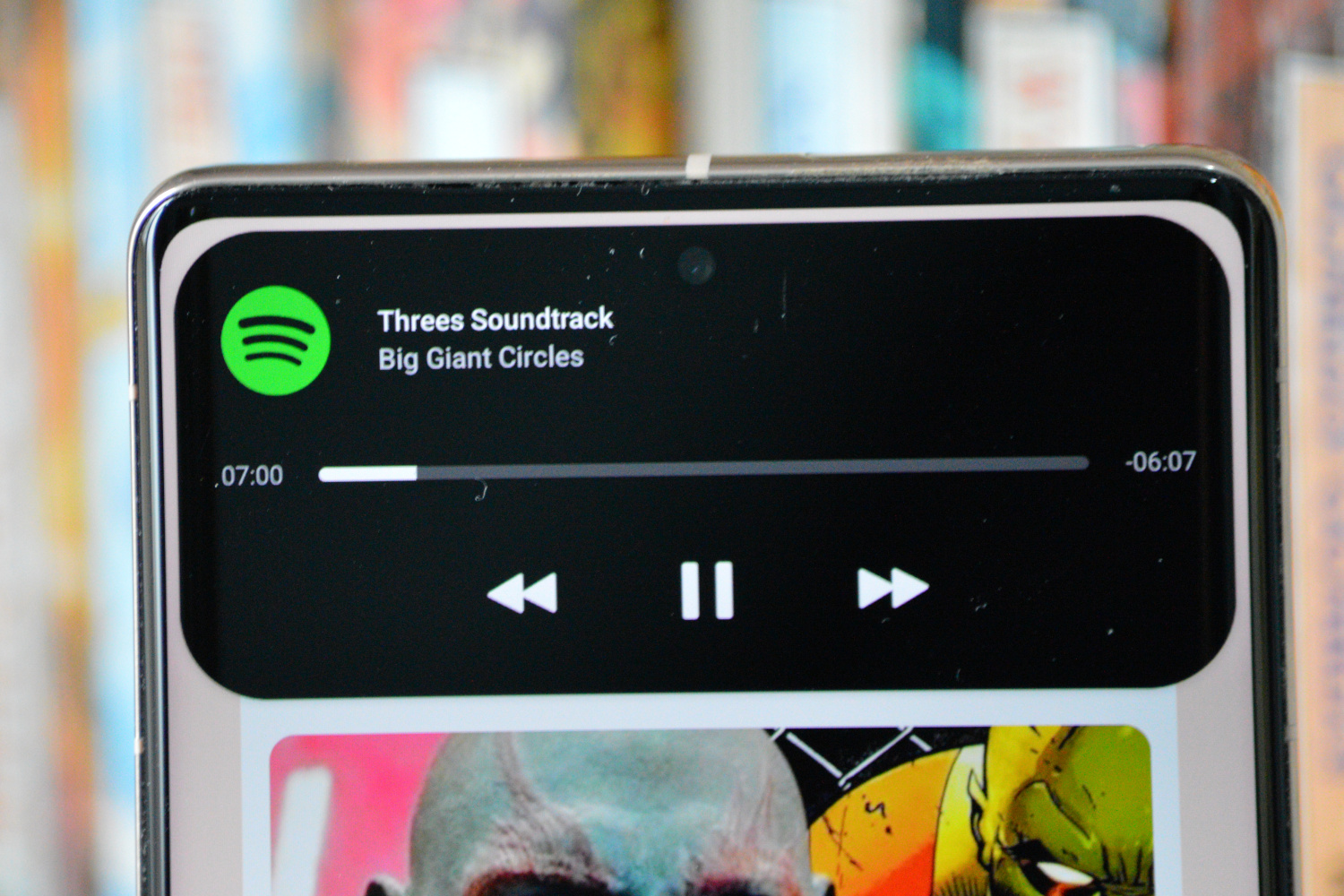
According to an article from Android Authority, Android 16 may also feature capabilities akin to Dynamic Island notifications. On iPhones, the pill-shaped Face ID cutout at the top serves as a versatile canvas for showing dynamic alerts from various applications.
Mishaal Rahman / Android Authority
This user-friendly, unobtrusive method of displaying application alerts allows users to keep tabs on activities without the need to switch between different apps. Some Android manufacturers, like Honor, have already implemented similar features inspired by Apple’s design, although support has varied across different applications.
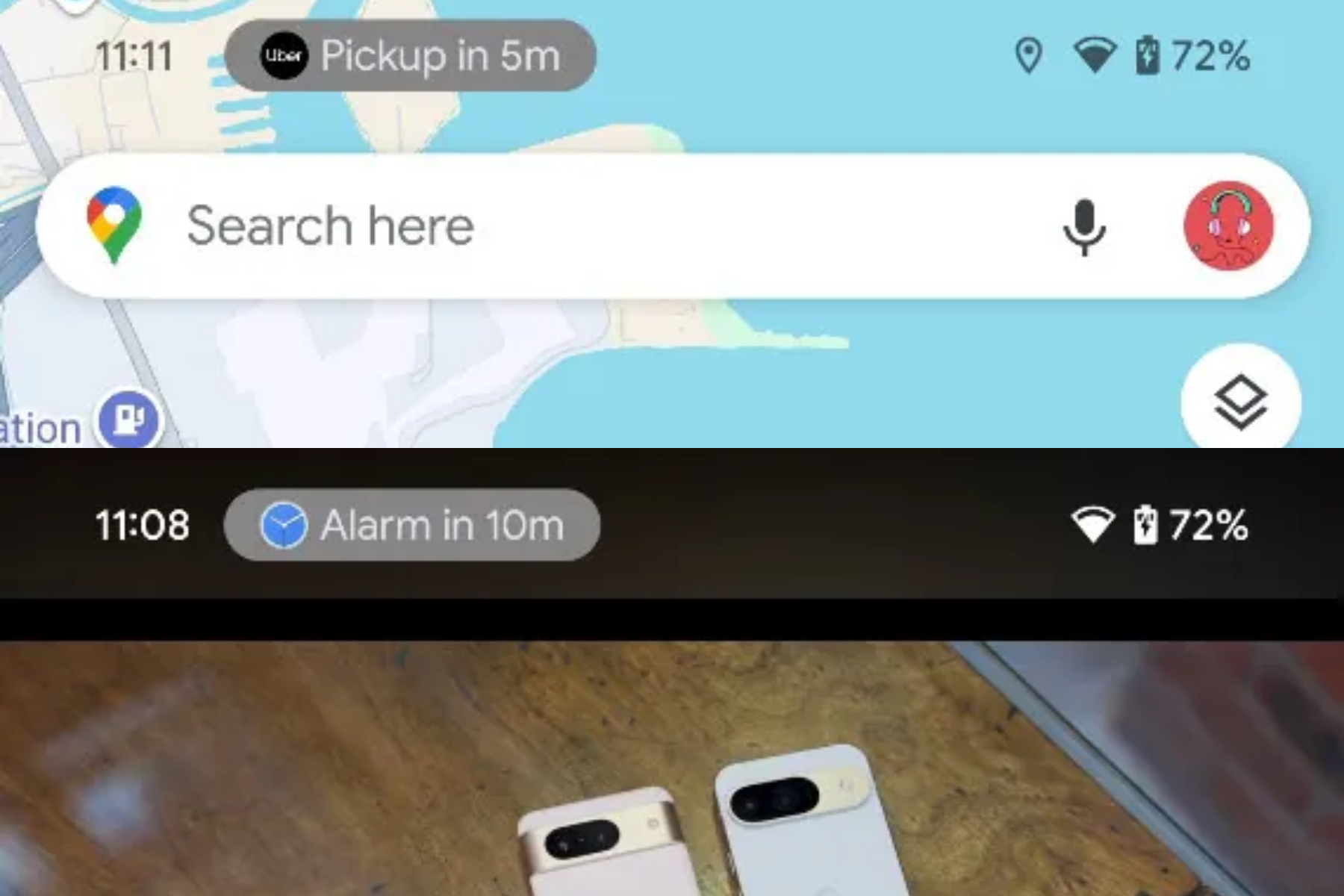
Android 16 could standardize this experience with a feature known as Rich Ongoing Notifications, which first appeared in the latest QPR build of Android 15. This feature aims to allow apps to utilize more vertical space in the status bar rather than simply displaying icons. According to reports, “The API will enable apps to create customizable chips with their own text and background colors in the status bar.”
An example of Dynamic Island-style alerts on Android.Mark Jansen / Digital Trends
It’s unclear if these app chips will be responsive, but given how Dynamic Island notifications function, it would be logical to expect Rich Ongoing Notifications to provide similar capabilities. Tapping on these notifications should ideally bring up a dialog for more information or even transition users to a full-screen view.
Google has already implemented a comparable status bar alert system for screen recording in Android 15, which serves various purposes such as music playback notifications, ride-sharing alerts, and navigation tips.
The actual implementation of Rich Ongoing Notifications will depend significantly on developer interest, distinguishing it from Dynamic Island notifications, which utilize the area surrounding the front camera cutout.
Instead, Google’s feature in Android 16 focuses on optimizing the status bar area at the top of the screen. However, it’s essential to remember that this is still early in the development process, and significant design and functional changes may occur before Android 16 officially launches.