الوسم: Alan Wake 2

  • Unveiling Rudolf Lane’s Fate in Alan Wake 2: Lake House DLC

    Unveiling Rudolf Lane’s Fate in Alan Wake 2: Lake House DLC

    Alan Wake 2: The Lake House DLC introduces several additional achievements and trophies for players to earn. Most of these can be unlocked through regular gameplay, but a few may require extra effort. One notable achievement is the ‘Shape of a Man’, which necessitates uncovering the fate of Rudolf Lane within this DLC.

    Here’s what you need to know about what happened to Rudolf Lane in the DLC.

    Alan Wake 2: The Lake House – Shape of a Man

    Like the Murderer and Victim achievements, getting this one also requires you to obtain the Security Clearance 03 Keycard. To find it, visit the Painting Production floor. It will be located in the Inventory Management room on the left side of that area.

    If you can’t access the room, make sure to turn on the switch in the Panel Control Room, which is right next to the Break Room on the same floor.

    Once you have the Security Clearance 03 Keycard, proceed to the Holding & Observation area. Go down the small staircase in the center of the room and stick to the right side. You will need to inspect a few items here:

    1. The document on the floor near the bloodstain.
    2. The documents on the desk.
    3. The tape recorder next to the documents on the same table.
    4. The document on a container just outside the area.

    After you’ve examined these, enter the room labeled Subject Observation on the right, which requires the Security Clearance 03 Keycard you found earlier.

    Make sure you stay in the room until the projector finishes playing the recording. When it’s complete, a Painted enemy will emerge from the back wall. To take this enemy down, you must use the Black Rock Launcher, as it can’t be damaged by regular weapons. Defeating it will unlock the ‘Shape of a Man’ achievement/trophy.

    If you encounter issues unlocking this achievement, try limiting your FPS to 30 if you’re on a PC. For console players, switching to Quality Mode in the Graphics Menu may also resolve the problem.

  • Mastering Black Rock: Defeating Every Enemy in Alan Wake 2’s DLC

    Mastering Black Rock: Defeating Every Enemy in Alan Wake 2’s DLC

    The “Less Carrot, More Stick” is a missable achievement/trophy found in the Alan Wake 2: The Lake House DLC. To unlock it, you need to obtain the Black Rock Launcher within the facility and use it to take down every enemy type featured in the DLC.

    Although it may sound straightforward, this task can be challenging due to the limited ammo for the Black Rock Launcher. Additionally, the launcher requires proper charging before firing, which adds to the difficulty of timing your shots accurately.

    Alan Wake 2: The Lake House – Less Carrot, More Stick Achievement/Trophy


    The first step is to get the Black Rock Launcher; you will naturally unlock it as you progress through the game, making it fairly easy to obtain. After acquiring it, head to the Research Archives.

    Keep in mind that finding enough ammo for the Black Rock Launcher can be quite difficult. If you’re running low, consider enabling Infinite Ammo in the ‘Options’ for a brief time.

    There are four types of enemies you need to defeat using the Black Rock Launcher to earn the trophy/achievement. These include:

    1. Painted: These enemies emerge from walls and can only be damaged with the Black Rock Launcher. There’s also an achievement for defeating one as it comes out of a wall, which you may want to attempt at the same time.
    2. Normal: This enemy, wearing a white coat, can be taken down with a single shot.
    3. Teleporter: These enemies move around frequently. It’s best to learn their paths before making your shot, especially if you’re running low on ammo.
    4. Brute: Look for enemies marked with a red spot on their chest. Although they may be tough, they’re manageable similar to normal enemies.

    Once you successfully eliminate all four enemy types with the Black Rock Launcher, you’ll unlock the ‘Less Carrot, More Stick‘ achievement/trophy.

  • Alan Wake 2 DLC Gives First Glimpse At Control 2

    Alan Wake 2 DLC Gives First Glimpse At Control 2

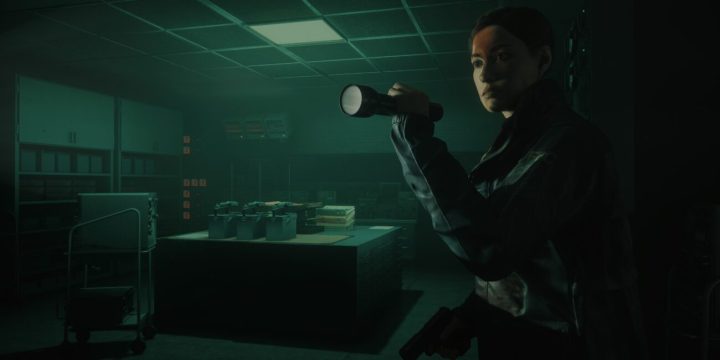
    Agent Estevez using a flashlight in an office setting.
    Remedy Entertainment

    Alan Wake 2 has unveiled its latest story expansion, The Lake House, adding to the eerie atmosphere of the Remedy Connected Universe. Notably, this expansion offers a sneak peek at the highly anticipated follow-up to 2019’s Control—and some details may easily go unnoticed.

    Remedy has cultivated an interconnected universe across its games, prominently featuring Control and Alan Wake 2. The original Control began hinting at Alan’s storyline before formally integrating him into the narrative through the AWE expansion. In turn, Alan Wake 2 includes substantial references to the Federal Bureau of Control (FBC) while enriching the lore surrounding its operations.

    Players anticipated further exploration of Control within The Lake House DLC, which released this week, but specifics regarding content were vague. The DLC follows Agent Estevez, introduced in Alan Wake 2 during a crisis at a nearby FBC facility. The Lake House unfolds the events that transpired there, revealing a story that is less than thrilling.

    To avoid spoilers, we won’t delve into too many specifics, but in one optional section, players encounter a character from Control, gaining insight into potential developments in Control 2 along with some intriguing footage to spark theories.

    Warning: Spoilers for The Lake House DLC are included in the following sections.

    When engaging with The Lake House, be sure to explore every level in the facility using the elevator. The optional Floor -4 is particularly easy to overlook while pursuing primary objectives, but checking it out activates the teaser. You’ll first come across a familiar light fixture in one of the offices. Engage with it three times, and you’ll be transported to the Oceanview Motel, which then leads you to a location resembling the Oldest House, a key setting from Control. Navigate the hallway to meet Dylan Faden, who played a significant role as an antagonist in the previous title.

    It’s evident that some time has elapsed; Dylan has allowed his hair to grow longer since the last game. During a brief exchange, we discover that four years have passed since the incidents in Control and that the FBC headquarters has remained eerily quiet. Additionally, there are hints that something mysterious is occurring outside. Following this interaction, the teaser showcases a collage of disjointed imagery—empty streets, Hiss entities floating in alleys, and a figure draped in a robe atop an inverted building.

    Remedy has confirmed that two new Control games are in development, with one expected to be a direct sequel. Alongside Control 2, there’s also the impending release of FBC: Firebreak, a cooperative PvE shooter set to debut next year.

  • How to Align Echoes in Alan Wake 2?

    How to Align Echoes in Alan Wake 2?

    Discover a variety of collectibles to acquire as you play through Alan Wake 2, whether you’re controlling Alan or Saga.

    To advance in the story, some of these items are essential. Our guide will show you how to properly align Echoes, allowing you to witness key moments unfold before your eyes.

    How to Align Echoes in Alan Wake 2

    To get your Echoes in Alan Wake 2 in sync, just pay attention to the position of the light and dark orbs. Once you’ve located them, move your character close to the dark orb and make sure it overlaps with the light orb. That should do the trick!

    What are Echoes in Alan Wake 2?

    During Alan’s chapters, you can come across echoes, which are special collectibles. These echoes are exclusive to chapters that have the Initiation tagline. When you activate an echo cutscene, you’ll have the opportunity to witness a monologue or conversation, often featuring Alex Casey. This adds a gritty neo-noir detective vibe to the game, showcasing how Alan’s writing impacts the world within the game.

    In addition, there are certain Echoes that are required. These Echoes provide extra ideas for themes and can completely transform the environment through the Writer’s Room board. A great illustration of this is the summoning ritual in the Subway.

    echos in alan wake 2

    How to Trigger Echo Cutscenes in Alan Wake 2

    As I mentioned before, in order to align the Alan Wake 2 Echoes, you need to position and move your character correctly. The objective is to overlap both the light and dark orbs, creating an amazing “eclipse” effect. Keep in mind that some orbs may be located in nearby places like balconies and rooftops. Therefore, you must search for these two orbs to find the perfect angle as you explore.

    Most of these tasks are quite easy, so you won’t have any difficulties. However, I did come across a troublesome bug right before the game was released, which caused a specific Echo to be unable to move. Fortunately, this issue has been resolved in time for the launch. Therefore, I can assure you that you won’t encounter this problem anymore.

    casey in alan wake 2 echo

    Lastly, when encountering a character named Tim Breaker, be sure to check out the maps in every room you come across. By interacting with these boards, you will uncover all the collectibles and points of interest on your map, including Echoes that are represented by an icon featuring multiple green circles.

    Here’s all the information you require on aligning Echoes in Alan Wake 2.

  • [FIX] Alan Wake 2 Startup Crash: Resolve the Issue on Epic Games Launcher

    [FIX] Alan Wake 2 Startup Crash: Resolve the Issue on Epic Games Launcher

    Alan Wake 2’s steep system requirements can be a challenge, but startup crashes can make things even more frustrating for players. I experienced this issue myself when I first tried to launch the game, but fortunately, I found a solution fairly quickly.

    How to fix Alan Wake 2 Startup Crash

    alan wake 2 start up crash
    1. After starting the game for the first time, and going through a few initial screens, I encountered an error message called Menu_Authentication_Failed_Epic.
    2. I tried various troubleshooting steps, such as updating my GPU drivers, verifying the game files, and restarting my PC, but unfortunately, none of them resolved the issue. However, when I reached out to the support team, they kindly informed me that in order to fix the problem of Alan Wake 2 crashing at startup, I should ensure that background applications like MSI Afterburner and Rivatuner Statistics are not running.
    3. Initially, I had my doubts as these background utilities never caused any problems for me. But once I deactivated them, my issue was resolved, and my game started up without any hiccups.
    4. I was relieved when my issue got resolved, but I couldn’t help but wonder if Alan Wake 2 would crash again if I decided to use MSI Afterburner and Rivatuner. To my surprise, the game has been running smoothly without any crashes, even with both of these utilities enabled.
    5. If you encounter a similar error message when starting up and your game keeps crashing, give disabling any background applications on your PC a shot.
  • How To Save Game In Alan Wake 2

    How To Save Game In Alan Wake 2

    To make sure you don’t lose your progress in Alan Wake 2, it’s important to know how to save your game.

    However, the game’s limited autosaves can be a bit of a pain since they only happen after cut scenes or completed chapters. This can make it difficult for players to take a break and pick up where they left off.

    Alan Wake 2 Save Game

    To save your game in Alan Wake 2, you have a couple of options. First off, there’s the handy auto-save feature that functions just like in any other modern game. It kicks in regularly, so you can quit the game without worrying about losing any important progress.

    Additionally, there are these cool spots called Break Rooms where you can manually save your game. So if you want to be extra cautious or just want to take a break, you can save your game at these points.

    With these two methods at your disposal, you can rest assured that your game progress in Alan Wake 2 will be safely preserved.

    Just remember, you’ll still need to begin from the latest auto-save point. That’s why it’s important to find a manual save point before you finish playing. Otherwise, you might have to replay the previous section before getting to a Break Room.

    Saving game at Break Rooms

    Rooms called Break or Save are places where you can take a breather in your game. In these rooms, you have the option to save your progress manually, as well as organize and switch between the inventory items of both Alan Wake and Saga Sanderson, each with their own unique storylines.

    Just so you know, you won’t be able to make a manual save point until you reach the second chapter of Alan Wake 2.

    Saga, your mission is to fix the fuse box at the Witch’s Hut in Cauldron Lake. Once you’ve successfully completed this task, the Witch’s Hut will magically transform into your very own Break Room in the game.

    Alan Wake 2 The Witchs Hut Save Point

    It’ll probably take you about an hour or so to finish the second chapter of Alan Wake 2. There are specific save points called Break Rooms that you can use to save your progress.

    The game really amps up the suspense by making you feel like you need to reach the next Save Room as soon as possible.

    Once you’ve turned the Witch’s Hut into your Save Room in Alan Wake 2, just interact with the blue thermos on the table to either quick-save or manually save in a new slot.

    Alan Wake 2 The Witchs Hut Blue Thermos

    You won’t find any shoe boxes in The Witch’s Hut Break Room to manage your inventory, but don’t worry, you’ll be able to access them in the next Save Rooms. The coolest thing about Break Rooms is that you can switch between Alan and Saga, who explore the Dark Place and Bright Falls respectively. Just look for the water puddles outside the Break Rooms and you’re good to go!