الوسم: advice

  • 8 Tips To Help Beginners Complete The Spell Brigade and Solve Challenges

    8 Tips To Help Beginners Complete The Spell Brigade and Solve Challenges

    The Spell Brigade doesn’t start with a big tutorial. In fact, there’s no tutorial at all. You’re thrown into a world where lots of creatures are trying to kill you, and your main job is to stay alive. This can be a little overwhelming if you’re new to the game.

    Fortunately, the game isn’t overly difficult. Once you get the hang of how to play, you’ll be defeating groups of enemies quickly. To help beginners get started, here are some useful tips.

    ### Complete as Many Objectives as You Can

    During a run, different objectives will appear on your screen. They’re all optional because the main goal is to survive until you face the final boss. Since pursuing objectives can put you in danger, you might think about skipping some. However, it’s best not to avoid any, unless it’s absolutely necessary.

    Completing objectives rewards you with upgrades called augmentations. Some of these are extremely helpful, especially the legendary ones, which can significantly change how you play. Don’t miss out on these rewards.

    ### Focus on Upgrading Individual Skills

    When you level up, you’re given a choice of three upgrades. These options include improvements like skill boosts, with some upgrades enhancing all your skills and others focusing on just one.

    It’s tempting to pick upgrades that boost every skill, but it’s better to concentrate on upgrading individual abilities. Each time you upgrade a specific skill, it levels up. Increased levels allow you to add infusions, which give your skills elemental damage like fire, acid, lightning, or ice—making your attacks much more powerful than general improvements.

    ### Target Creatures Holding Purple Balls

    Sometimes, during a run, you’ll see enemies holding large purple or blue balls. These balls contain experience points (XP) the enemies have collected from the battlefield. These XP should be yours, so the enemy is essentially stealing your experience.

    Killing such enemies causes them to drop all the XP they carry, which can help you level up faster. If you see an enemy with a small ball, it’s best to wait until it builds into a bigger ball before attacking. This way, you can collect a lot more XP at once.

    ### Carefully Choose Your Respawn Spot

    When you die, you can pick where to reappear by moving a large circle to your chosen location. It’s best to move as far away from enemies as possible. Also, note that you don’t just respawn normally—the game deals damage around your spawn point, which can kill nearby enemies as you come back.

    A smart strategy is to position yourself on top of a group of weaker enemies so you can eliminate them immediately. This doesn’t work on boss-level foes, but if there are some regular enemies nearby, landing on top of them can clear the area and give you a better start.

    ### Use the Refund Feature to Unlock Better Enchantments

    In the main menu, go to the enchantment tab to unlock passive boosts that make your runs easier, such as increasing your health or armor. At first, only the first column of enchantments is available. To unlock others, spend enough gold on an enchantment to master it. You can then unlock subsequent columns by following the same process.

    Once a column is unlocked, it remains so, even if you hit the “Refund” button to get your gold back. This means it’s worth investing in lower-tier enchantments early on to unlock stronger ones later, with the option to reset your investments if needed.

    ### Use Their Own Attacks Against Them

    Most enemies attack individual players, but some have area-of-effect (AOE) attacks, like those that explode. These attacks don’t just damage you—they can also harm their fellow monsters.

    A clever tactic is to lure their allies into the explosion area when possible. Doing this repeatedly can do a lot of damage to groups of enemies and is especially helpful against tougher foes.

    ### Guide Enemies Away from Objectives

    Some objectives are more complex, such as lighting torches or knocking balls into circles. These tasks can be made much harder by the presence of enemies.

    Because these objectives are timed, a good strategy is to lure enemies away from them. You can move away from the objective, draw the enemies after you, and then quickly return to complete the task once the area is cleared. This makes it easier to finish objectives without being constantly attacked.

    ### Movement Speed Is Critical

    When choosing upgrades, sometimes you can increase your movement speed. At the start, this might seem unnecessary since you’re already faster than the enemies. But as the game progresses, creatures can become faster and more numerous.

    Having a higher movement speed is crucial for keeping away from enemies. Moving quickly can make the difference between life and death, so whenever you get the chance, boosting your speed is a smart move. It helps you escape and stay safe longer during tough fights.

  • How to Get Feedback on Tack for Bruna in Crimson Desert by Completing and Solving

    How to Get Feedback on Tack for Bruna in Crimson Desert by Completing and Solving

    When you start playing Crimson Desert, you might think it’s just another game where you follow the main story and finish it. But as you play, you’ll see there’s much more to discover. There are many side quests and puzzles scattered across the large map, with Bruna’s Request being a great example. In this quest, you follow a trail left by her buyer to get some feedback from him.

    How to Find the Tack Buyer

    After completing Bruna’s request, she asks you to go to the stable to find the buyer. When you arrive, you won’t see anyone there. Instead, there’s a marked area where you need to interact with something to keep going. On the right side of the stable entrance, you’ll spot a small purple icon on the minimap. Follow this icon and you’ll find a note on a table that sends you to the royal trading post. At that spot, you’re searching for an NPC wearing a red hat near the main shop. When you approach and talk to him, he’ll ask you to look away.

    Sometimes, this NPC might not be at the royal trading post when you arrive. This could be a bug, which can usually be fixed by reloading the game or leaving the area and returning. After talking to the NPC, you need to look away so he isn’t in view. Stand in front of him, turn your camera elsewhere, and remain in that position for a little while. You’ll then receive a note directing you to the buyer’s final location. Sometimes, this step can be glitchy, and you may need to try a few times.

    How to Enter Lioncrest Manor

    The note indicates the buyer is inside Lioncrest Manor. You might be able to get into the area through a faction quest later, but if you don’t have access yet, there is a way to break in. On the left side of the main entrance, there’s a wooden window on the wall. Climb up to this window and choose to open it. Once inside, jump down the stairs to find the goblin buyer. Talk to him, then return to Bruna to complete the quest.

  • Tips and Tricks for Completing and Solving in Cinderia

    Tips and Tricks for Completing and Solving in Cinderia

    If you’re searching for a roguelite game with gameplay similar to Hades, Cinderia might be the one for you. It’s a slower-paced game by design, but once you gather enough upgrades, it can become just as chaotic as other games in the genre.

    The game introduces its mechanics gradually, which helps new players get a feel for it. However, some phrases don’t quite match up, and some mechanics are available from the start without clear explanations. Here are some tips to help you get started.

    Since Cinderia is in Early Access, details may change as updates are released.

    Choose Your Skills Carefully
    You start with a Dash, a regular attack string, and a ranged attack. These basics vary slightly depending on your character. You can have up to three Skills, but you only acquire them during each run. Once you select a Skill, it’s locked in for that run — you can’t change it mid-run. If you find new Skills after filling all three slots, those are automatically converted into upgrades for existing Skills. After you’ve picked at least one Skill, any other Skills you find can instead be turned into upgrades if you prefer not to lock in new ones right away.

    Unlock the Second Dash
    When you return to the Shelter for the first time, you can speak with Ella, the nun with the blue jewel above her. She unlocks the Soulfire Prayer, which offers permanent upgrades. The currency you earn during your runs isn’t lost if you don’t spend it immediately, so it’s worth saving up for specific upgrades. The most immediate and valuable upgrade is Haste, which gives you a second Dash. This extra Dash can be used right after the first or during its cooldown, greatly increasing your survival chances.

    Manage Your Erosion
    Erosion is a system that’s not clearly explained. You can see its value in the top-right corner when you pick up abilities. Erosion increases each time you acquire an ability; it can reach up to 100. When it hits or exceeds 100, the counter resets to zero and adds the overflow amount. Reaching 100 Erosion applies a random curse to you, which lasts the rest of your run. These curses are negative effects, such as reduced damage after getting hit or taking more damage when your health is low. There’s no way to reduce Erosion, only to remove curses through random opportunities that sometimes appear.

    Always Enter Mystery Rooms
    After defeating the initial area and its boss, most areas and revisits will feature Mystery Rooms. Even with the Research Topic unlocked, you’ll only know they’re mystery rooms without specifics. These rooms are almost always beneficial. Some provide opportunities like fishing to heal or gather resources, while others let you remove a Skill and replace it with a fully upgraded one. Learning where Mystery Rooms appear and what they offer can help you plan and make the most of these encounters.

    Position Your Skills for Stronger Effects
    Your three Skills are assigned to specific buttons and can be repositioned to suit your playstyle. Some accessories give additional effects; for example, the Ornate Bookmark reduces the cooldown of the Skill in the middle slot, turning your button layout into a strategic choice. In the options menu, you can also customize how Skills activate, making it easier to keep track of them as they change.

    Invest in the Forge
    During your first run, you may rescue a trapped man being attacked. After defeating enemies and freeing him, he returns to the Shelter. Once there, talk to him to set up a workshop—this requires gathering stones, which can be found during exploration or bought from shops. Building his workstation unlocks the ability to upgrade the Shelter, including critical features like the Kitchen, which provides buffs during runs. Upgrading the Shelter early is highly recommended.

    Unlock More Playable Characters
    The game features several playable characters beyond Rue, who’s your starting character. These additional characters, such as the Smith’s niece, become available after certain progress milestones. To switch characters, speak to them in the Shelter and select the ‘Swap’ option. While shared upgrades are common, each character has unique Skills and abilities that are acquired during runs. Sometimes it’s hard to tell when a new character has been unlocked, so keep an eye out.

    Be Careful with Your Accessories
    Accessories occupy dedicated slots and provide stat boosts as well as special effects. Their rarity determines their potency and effects increase as they become rarer. Accessories are not locked in; you can dismantle them at will and use the materials to upgrade or craft better gear. Upgrading accessories often involves using purple Equipment Crystals, which you get from dismantling. Always remember what you’re carrying so you don’t miss the chance to improve your equipment.

  • Things We Wish We Knew Before Completing Marathon

    Things We Wish We Knew Before Completing Marathon

    Marathon is an extraction shooter game created by Bungie, and it’s one of the most talked-about shooter games this year. After completing the tutorial, you can join various raids across different maps, where your main goal is to gather as many items as you can and successfully escape.

    However, if you get killed during a run, you will lose everything in your inventory permanently. That makes the game quite tough, but if you keep certain tips in mind and play carefully, your chances of making it out with your loot improve a lot.

    How to Fix the Servers Not Available Error

    Before starting your first run in Marathon, you might see an error message saying the servers aren’t available. Sometimes, this error includes the code “W: 8: 80090305.” Many think this is because servers are overwhelmed, but usually, the problem is on your end.

    The main cause is often your antivirus program, especially Kaspersky. To fix this, you should disable your antivirus software and then restart the game. Doing this can prevent the error from showing up again.

    How to Fix the Mouse Cursor Bug

    When you’re in the early part of the game, you might encounter a bug where you can’t see your mouse cursor or you can see it but can’t click on anything. This is a common PC problem caused by two things:

    • Overlays like Steam or Discord can interfere with the game’s anti-cheat system. To fix this, turn off all overlays.
    • Recording software like OBS can cause issues if it’s capturing your game screen. Disable these sources entirely to get rid of the cursor problem.

    Keep Plenty of Ammo and Healing Items

    Once you start playing, one of the most important things is to bring enough ammo and healing supplies. The game involves constant fighting against UESC robots and other players, making resources drain quickly.

    It’s recommended to begin a run with at least three shield rechargers, six heals, and two stacks of ammo per gun. If you’re using a basic loadout, you’ll need to find these items during the raid. Luckily, some free loadouts include equipment that helps you get more ammo.

    Tip: Remember that reloading weapons that use Volt Energy resets their energy to full. Only reload when your energy runs out to save resources.

    Always Pay Attention to Your Surroundings

    While playing Marathon, you’ll notice the game’s colorful environment can make it tough to see enemies from a distance. That’s where sound becomes crucial.

    Using headphones can give you vital audio cues—alerting you when an enemy is nearby or warning of trap sounds. Keep your sound on high and listen carefully to avoid surprises.

    Tip: Certain sounds can tell you what’s happening. For example, hearing music near an exfil point might mean someone is using it, so you can plan an ambush.

    Know Your Goal During a Run

    In the early days of Marathon, many players are still learning the game and may not be sure what to do. Use this time to get ahead, because as more players learn, matches will become more competitive and intense.

    Have a plan for each raid. Always carry an active contract—preferably a main one—and aim to complete it in a single run. Completing contracts boosts your experience with factions, which unlocks upgrades.

    Tip: If you have a priority contract available, focus on that first to gain the most benefits.

    Explore Every Area Fully

    One common mistake by new players is rushing through spaces without thorough exploration. Many high-tier containers are hidden around buildings, and neglecting them can mean missing out on valuable loot.

    Loot crates in Marathon aren’t always obvious, so it’s important to check every corner. Even if your inventory is full, you should pick up better gear when you find it to prepare for future runs.

    Don’t Underestimate PvE

    Early in the game, you might notice fewer players around. This is partly because players can’t join mid-match, similar to battle royales, and partly because many still underestimate the AI-controlled UESC robots.

    These robots can quickly drain your health, so be mindful of your noise levels and movements to avoid getting overwhelmed. UESC enemies can be deadly if you’re not careful.

    Learn What Each Loot Item Does

    As you progress and gain higher levels with different factions, you’ll need specific items for upgrades. There are also consumables and equipment that can influence battles.

    Hover over each loot item in crates to learn its function. While it might feel overwhelming at first, understanding what items do will help you identify useful gear more quickly later on. This knowledge makes looting and decision-making easier as you play more.

  • How to Solve Pink Eyes in High On Life 2

    How to Solve Pink Eyes in High On Life 2

    If you enjoy exploring in High On Life 2 rather than just moving through the main story, you’ll find plenty of side missions, hidden Easter eggs, and puzzles to solve. Some are straightforward, but others, like the puzzle near the nightclub in Pinkline Harbor, can be quite tricky.

    Completing this puzzle will reward you with a large number of Lugloxes and access to the nightclub, allowing you to eliminate the infestation there. You’ll also gather numerous collectible items during this process.

    How To Find And Enter The Night Club

    The nightclub is located in the Pinkline Harbor area once you start Larry Pinkstock’s bounty. It’s easy to spot because the “Liquid Nights” icon appears on the southern side of the map. However, you can’t enter the club right away; first, you need to help Bowie in James Stevenson’s bounty.

    Once you have Bowie’s ability, you can shoot the pink eye above the nightclub’s entrance to open the door. To do that, find another pink eye to the right when you enter the area and shoot it with Bowie’s power. Doing so will unlock a hidden door behind the wall. Inside, you’ll find your first Luglox.

    After collecting it, you can neutralize the infestation by slowing down the fan with Swizzy’s ability. Use his ability on the fan, then go through the tunnel. In the next room, you’ll need to use Swizzy’s ability again. In this area, you’ll discover another Luglox. Keep an eye out for it on the shelves or in the washrooms upstairs. When all Lugloxes are collected, the infestation marker on your map will turn green.

    How To Solve The Puzzle Near Night Club

    Besides the pink eye that opens the club’s entrance, there’s another pink eye to the right when you first enter the area. Using Bowie’s ability, shoot this eye to unlock a door behind the wall. Enter the room to find your first Luglox on the left.

    Next, to proceed, slow down the fan with Swizzy’s ability and pass through the tunnel. You’ll need to use Swizzy’s power again in the next room to reveal another Luglox nearby. Finish by bringing out Bowie again, shoot the pistons emerging from the right side near the barrier, and then shoot the pistons in the corner as well. Position the barrier so you can hit all three pistons simultaneously to disable the barrier and gain access.

    In the next area, you’ll find another set of pistons. Use Bowie’s ability to shoot through the pistons when they’re extended by placing the barrier in an optimal position, allowing your shots to hit all of them. Once the barrier is gone, you can enter the next room.

    Inside, shoot the pistons again with Bowie’s power by positioning the barrier to see all three. Afterward, the area opens up, revealing the next Luglox behind the wall. Use a nearby blob called Lugblob to reach higher and shoot additional pistons to free another Luglox below. Also, use the tunnel nearby for one more Luglox.

    Finally, bring Lugblob to the entrance of this new area and use it to jump through the hole, freeing the last blob. Place both blobs on their pedestals to unlock the final door, collect the last Luglox, and then return to the nightclub area.

  • 8 Beginner Tips for Completing and Solving in Lort

    8 Beginner Tips for Completing and Solving in Lort

    The core gameplay of Lort appears straightforward, but once you’re immersed, it can become more challenging, especially if you stumble upon camps that seem too tough to handle. You have a three-day, two-night window to gather as many buffs and weapons as possible before facing the boss. After defeating the boss, you can leave and progress to the next level. Here’s everything you need to know to stay organized and ensure you’re ready before leaving.

    Keep Moving
    Staying mobile is essential in Lort to survive and dodge incoming attacks. Since characters aren’t very fast even when sprinting, mastering jumps, rolls, and dodges is critical. Unlocking special shoes that increase your speed is highly recommended.
    Throughout each stage, you’ll find boost zones—small items that launch you into the air. Use these to reach distant points or escape enemies, especially at night. Each stage features unique boost objects:

    • Stage 1: Sunflowers
    • Stage 2: Lamp Posts
    • Stage 3: Geysers
    • Stage 4: Skull Tornadoes

    Jump onto these boosters and press the roll button (CTRL or controller equivalent) mid-air to extend your jump. You can steer your boost by rolling and using directional controls, allowing precise navigation.

    Prioritize Your Character’s Point of Interest (POI)
    Every camp and significant location on the map carries a floating icon that shows the main attribute it boosts. Focus on these to grow your character’s skills efficiently. While it’s okay to explore other POIs, prioritizing your own type accelerates your progress.
    The attribute colors are:

    • Red for Warriors (melee weapons)
    • Green for Rangers (ranged weapons)
    • Blue for Wizards (magic weapons)

    Visiting your own colored POIs grants a 25% boost to both your abilities and weapon damage, so aim to hit them all when possible, including shrines.

    Choose 3 Skull Shrines
    Skull shrines are scattered across the map. Activating them spawns enemies; defeating these enemies awards coins, and more skulls on a shrine mean tougher enemies and bigger rewards. It’s best to activate only three of these shrines initially, to avoid risking losing coins and resources early on. Focus on defeating enemies to maximize your earnings without going overboard during the early stages.

    Visit Larry’s Store
    Once you have some coins, go to Larry’s Store, run by a gnome. He offers various items that can enhance your strength and speed, but choose wisely—stick to items aligned with your character’s skills. Be cautious of the free items on the back shelf; they might seem tempting but could have hidden costs.

    Say No to Cheap Chests
    Chests that cost only 30 coins can appear enticing. However, they often contain low-value items not worth your coins. Save your coins for rare, larger chests or those offered at Larry’s Store. You can unlock free chests later using Rune Juice collected during gameplay by defeating enemies or grabbing swords off the ground. Jacked Up Powerup Chests cost 30 Rune Juice and are best purchased after stage completion, especially when you need specific weapons; watch out for swords sticking out of these chests, which you can grab for free loot.

    Save a Slot for Keys
    You’ll come across keys while racing around the map. Initially, it might seem best to use them right away on locked chests. However, once you’ve leveled up a bit and completed a few stages, it’s smarter to save these keys. Keep them in your inventory until later stages when tougher enemies appear. Use them to open high-quality, silver-locked chests to find better weapons and gear.

    Activate the Boss at the Last Second
    Don’t rush to finish a stage immediately. You have three days and two nights to farm coins, Rune Juice, free chests, and buffs from shrines and camps. Smash every barrel and box to maximize your loot before moving on.
    When the final one-minute warning hits, it’s advisable to head directly to the boss camp. Once there, activate it by gathering the needed ingredient. The boss will spawn along with minions that will follow you, trying to kill you.

    Post-Boss Ride
    After defeating the boss, don’t linger to fight additional enemies. Look for the bus or follow the icon at the top of your screen and leave quickly. Spending too much time buffing up or collecting loot after the boss could lead to unnecessary death—get out fast. The key is to defeat the boss and then sprint straight to the stage exit to move on to the next level.

  • ChatGPT Advice Led To 20th Century Psychosis In Man

    ChatGPT Advice Led To 20th Century Psychosis In Man

    Earlier this year, a heartwarming story emerged about a mother who turned to ChatGPT and discovered that her son was suffering from a rare neurological disorder. After more than a dozen medical professionals failed to identify the underlying issue, the AI chatbot provided crucial insights that led to the correct diagnosis and life-saving treatment for the boy.

    However, not every medical interaction with ChatGPT results in such positive outcomes. A recent case highlights how relying on AI for health advice can sometimes backfire. In this instance, a person received incorrect guidance from ChatGPT, which led to bromide poisoning—more formally known as bromism—a rare condition associated with neurological and psychiatric symptoms like hallucinations and psychosis.

    Trusting ChatGPT with Diagnoses from the Past

    A notable report published in the Annals of Internal Medicine details a case involving a 60-year-old who ended up hospitalized after consulting ChatGPT about their health. The patient suspected that a neighbor was secretly poisoning them, after which they began self-medicating by replacing their salt intake with sodium bromide.

    This individual had been experiencing excessive thirst and became increasingly paranoid, going as far as distilling their own water and severely restricting what they consumed. Eventually, their condition worsened, leading to emergency evaluations. Within the first day of hospitalization, they exhibited escalating paranoia, hallucinations, and agitation—symptoms severe enough to warrant involuntary psychiatric admission due to grave disability.

    The Risks of Relying Too Heavily on AI for Medical Advice

    This unusual case of ChatGPT leading someone into a dangerous situation underscores several critical warnings. Bromism, once common in the 19th and early 20th centuries, was used as a treatment for neurological and mental health conditions, including epilepsy. Its use became less frequent after the 1970s when regulations restricted the sale of bromide-containing medications due to their potential toxicity.

    The clinical history of bromide toxicity reveals that overconsumption causes nervous system issues, such as delusions, tremors, fatigue, and in severe cases, psychosis or even coma. Despite its decline, the misconception that bromide salts could be beneficial persisted in some medical practices, leading to dangerous outcomes if misused.

    How AI Fails Without Context

    In this particular case, the medical team did not have access to the patient’s ChatGPT conversations, but they found similar alarming misinformation in their diagnostic attempts. Researchers note that when they asked ChatGPT 3.5 what could replace chloride in a health context, it responded with bromide, failing to include any warning about its toxicity and not probing further into the user’s intent—something a trained healthcare professional would typically do.

    While there are instances where ChatGPT has directly assisted users with health-related inquiries, these depend heavily on the detail and accuracy of the information provided. Experts consistently emphasize the importance of exercising caution. AI systems lack the nuanced understanding and clinical expertise necessary to make reliable diagnoses, especially for rare or complex conditions.

    The Limitations of AI in Healthcare

    A recent study published in the Genes journal pointed out that even advanced versions like GPT-4.5 struggle with diagnosing rare disorders accurately. AI tools can be valuable supplemental resources but should never replace professional medical judgment. For genuine health concerns, consultation with qualified healthcare providers remains essential. Only trained professionals are equipped to thoroughly evaluate clinical features and interpret diagnostic results in a reliable and safe manner.

    In summary, while AI has made significant strides and can be a helpful tool when used responsibly, caution is vital. Its current capabilities are insufficient for autonomous medical decision-making, particularly concerning complex or uncommon health issues. Ultimately, the guidance and oversight of licensed medical practitioners are irreplaceable in ensuring safe and effective healthcare.

  • Completing Penelope’s Romance in Date Everything!

    Completing Penelope’s Romance in Date Everything!

    You might be surprised by who captures your heart, and the same goes for the unique items you encounter in Date Everything! Don’t let first impressions fool you; beneath her chaotic appearance and awkward demeanor, Penelope has plenty to offer—especially if you’re a little adventurous.

    Every morning, she kicks off her day with an inspirational quote and is on a quest to navigate the dating scene, but she can’t do it alone. Unlock all of Penelope’s story endings in Date Everything with your help.

    How to Meet Penelope

    Although Penelope is likely the first character you encounter, you may not realize it until later. She embodies your office supplies, particularly your large bulletin board. Engage with it, and you’ll be introduced to Penelope.

    How to Evolve Your Relationship with Penelope

    The love ending screen for Penelope in Date Everything.

    Likes Inspirational quotes, photography, pizza.
    Dislikes Being overlooked.

    Getting to know Penelope and building a connection with her is both fun and engaging, as you’ll assist her on multiple dates with other characters. She’s somewhat insecure and eager to find a suitable partner, leading her to explore dates with a variety of people, regardless of how different they may seem.

    You’ll witness her journey as she dates Kristof, Shelley, Chance, Skylar, and Sinclaire, offering her either valuable or questionable advice based on your preferences.

    Love Ending

    Penelope asking for help with her face red in Date Everything.

    Falling for Penelope might feel a bit unconventional since you can choose bold dialogue options right from your first meeting, such as “You’re too cute to be single.” Helping her with various dating scenarios, giving positive advice, and boosting her confidence will pave the way to love.

    Don’t miss the chance to showcase your worth during these dates with lines like “You should date me instead” and “I’d be excited about dating Penelope too.”

    Penelope having an uncomfortable date with Sinclaire in Date Everything.

    After a rough date with Skylar, Penelope returns the next day, eager yet anxious, this time with Sinclaire. To guide her toward a romantic conclusion, choose the line “Are you really going to date this guy instead of me?”. Flirt with her, express your feelings, and watch your love blossom.

    Friendship Ending

    If Penelope’s intensity feels overwhelming, you can suggest a friendship after she reveals her feelings.

    Hate Ending

    Penelope despises being ignored or mistreated. You can achieve this ending by making her feel unwanted during your initial interactions, mocking her quotes, and offering poor advice on her dates. She will likely end things with you after a few negative experiences.

    SPECS Reward

    five Empathy points.

    How to Realize Penelope

    The realization recipe menu for Penelope in Date Everything.

    To achieve the true ending with your beloved office supplies, you need your SPECS stats to appear like this:

    Category Point Amount
    Smarts 80
    Poise 20
    Empathy 70
    Charm 40
    Sass 40

    How to Get Every Penelope Collectible

    The screen of Penelope's collectibles in Date Everything, showing a magazine, a question mark, and a box of tacks.

    Collectible How to Acquire
    Collectible #1 You will automatically receive this magazine upon your first chat with Penelope.
    Collectible #2 This box of pictures involves interacting with other dateable characters.
    Collectible #3 To claim the last collectible, assist in clearing out Jerry’s office drawer with Celia’s help. Inform him you’ll drop his belongings when you see him.
  • Google AI Can Guide You On What To Do With Your Life

    Google AI Can Guide You On What To Do With Your Life

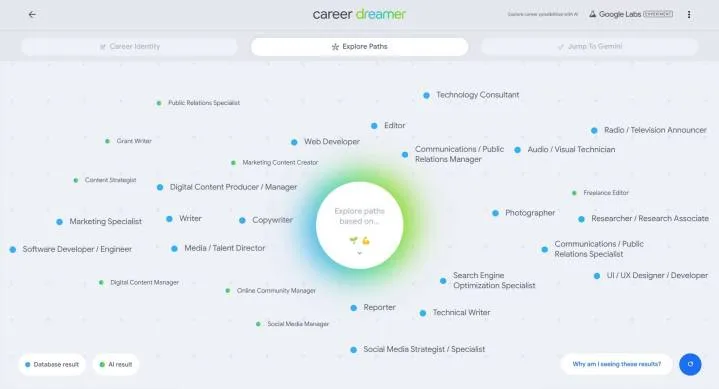
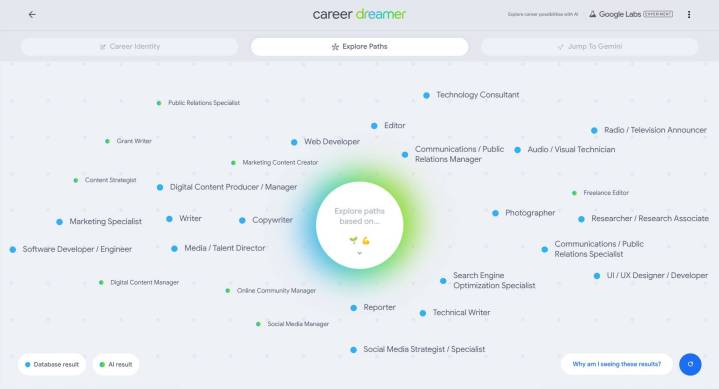
    Career Dreamer Results
    Andrew Tarantola / Google Labs

    Have a degree but unsure of your next steps? Google’s latest AI initiative can assist you. On Wednesday, the tech giant unveiled Career Dreamer, an AI tool designed to suggest careers that align with your background, education, skills, and interests.

    Grow with Google | Career Dreamer

    To get started, users create a Career Identity Statement (CIS), which can be added to their resumes or professional profiles. This involves sharing the title of their current or past job roles, like “freelance technology journalist” or “Senior Editor — AI,” along with the relevant industry. After this input, the AI generates a list of potential tasks related to those roles for users to choose from, such as “Research and analyze emerging technologies and trends” or “Interview industry experts and thought leaders.” The user is then asked to select at least three skills, like “research,” “self-motivation,” and “editing,” which activates Gemini to produce the CIS.

    In my experience, Career Dreamer formulated the following CIS:

    I am a technology journalist and content creator with a proven ability to convey complex technical information into engaging narratives for diverse audiences. Through interviews with industry leaders and careful research, I dissect emerging trends and technologies, crafting compelling multimedia content that educates and inspires. My adaptability, self-motivation, and time management skills enable me to excel in the fast-paced media environment.

    While it succinctly summarizes my work, it feels a bit generic and doesn’t quite capture my unique writing style. However, it serves as a good foundation for further refinements, particularly for those who are not professional writers.

    The system then displays a cloud of related career ideas, ranging from closely linked roles like Technical Writer and Copywriter to less obvious suggestions such as Software Engineer or Public Relations Specialist. Hovering over these suggestions reveals a window with the typical educational and experience requirements, along with a link to a detailed information page that includes the average salary and job responsibilities. It also highlights relevant Google certifications that could boost your chances of securing that role.

    Google stated, “We aim for Career Dreamer to assist a wide array of job seekers. Throughout its development, we consulted organizations that cater to various groups, including students embarking on their first careers, recent graduates joining the workforce, adult learners exploring new opportunities, and military members transitioning into civilian life. Whether you’re contemplating a career switch or just curious, give Career Dreamer a try.”

    This free tool is accessible on the Google Labs Experimental site. However, while Career Dreamer can guide you to careers that suit your skills and interests, it does not provide active job listings. You will still need to independently search for available positions on platforms like Career Builder or LinkedIn.

  • Is It a Good Idea to Get a Touch Screen Laptop?

    Is It a Good Idea to Get a Touch Screen Laptop?

    As technology continues to advance, the debate between traditional laptops and touch screen devices heats up. A touch screen laptop combines the features of a standard laptop with the interactive capabilities of a tablet, providing users with a diverse range of options. But is it the right choice for you? Let’s explore the advantages and drawbacks to help you make an informed decision.

    Advantages of Touch Screen Laptops

    Enhanced Interactivity

    • Direct Control: A touch screen allows you to directly interact with your content. This can lead to a more engaging experience when navigating software or browsing the web.
    • Intuitive Navigation: Swiping and tapping can feel more natural than using a trackpad or mouse, making it easier for many users to adapt, especially those familiar with smartphones and tablets.

    Flexibility in Usage

    • Multiple Modes: Many touch screen laptops come with 2-in-1 functionality, allowing you to switch between laptop and tablet modes. This versatility can cater to various activities, such as reading, gaming, or drawing.
    • Note-taking Capabilities: For students or professionals, the ability to use a stylus on a touch screen can enhance note-taking and sketching, improving overall productivity.

    Visual Appeal

    • Vivid Displays: Touch screen laptops often feature high-resolution displays that offer vibrant colors and sharp images, making media consumption a joy.
    • Sleek Design: Many touch screen models have contemporary designs that can be more visually appealing and modern compared to traditional laptops.

    Disadvantages of Touch Screen Laptops

    Price Considerations

    • Higher Costs: Generally, touch screen laptops come at a premium compared to their non-touch counterparts. This price increase may not be justified for users who don’t require the additional features.
    • Maintenance and Repairs: Touch screens can be more prone to damage, leading to potentially higher repair costs.

    Battery Life Concerns

    • Higher Power Consumption: The additional hardware required for touch screens may lead to increased battery consumption. If portability is a priority, this could be a significant factor to consider.
    • Shorter Lifespan for Components: Touch screens may have a different lifecycle than traditional screens, which might affect the longevity of the device.

    Key Factors to Consider When Choosing a Touch Screen Laptop

    Use Cases

    • Gaming: Touch screen laptops may not be ideal for high-end gaming where precision and speed are essential.
    • Graphic Design: If your work involves graphic design or digital art, a touch screen feature can significantly enhance your creative process.

    Type of Operating System

    • Windows vs. Chrome OS: Windows offers more features that benefit touch screen users, while Chrome OS tends to prioritize simplicity, which may affect how touch interactions are implemented.

    User Preferences

    • Comfort Level: Evaluate how comfortable you are using touch screens. If you’re accustomed to traditional navigation methods, transitioning might take some time.
    • Multitasking Needs: If you frequently switch between applications, a touch screen can streamline your workflow.

    Recommendations for Specific Users

    • Students: If you take notes by hand, consider a touch screen laptop with a stylus. It can be a practical tool for class sessions.
    • Business Professionals: For presentations and meetings, touch screen laptops can facilitate more engaging interactions.
    • Casual Users: If you primarily use your laptop for browsing and streaming, the touch screen may offer added convenience without the drawbacks.

    Navigating the decision to buy a touch screen laptop can be challenging, given the varied needs of users. Weighing the pros and cons against your personal and professional requirements is key to finding a suitable device tailored to your preferences.