الوسم: Adventures

  • All World Bosses Location Guide in Where Winds Meet for Completing and Solving

    All World Bosses Location Guide in Where Winds Meet for Completing and Solving

    “Where Winds Meet” offers a wide variety of gameplay options, including multiplayer social and cooperative modes, as well as single-player survival adventures. There’s content suited for every type of player. As you explore the colorful world, you’ll come across challenging bosses and dangerous enemies.

    World bosses are scattered throughout the map and vary in difficulty. These enemies are hidden and will attack when a player gets close enough. Some players might want to steer clear of these bosses, while others might be eager for the challenge. Whichever approach you choose, it’s helpful to know where these bosses spawn so you can plan your encounter.

    Qinghe World Bosses

    Beginning in the Qinghe area, players can test their skills against several world bosses.

    Note: Each boss can only be fought and defeated once in the game.

    Boss Location Notes
    Puppeteer – Sheng Wu Near Verdant Wilds Wayfarer, roughly midway between Bamboo Abode and Battlecrest Slope Starting point is near the Verdant Wilds.
    Puppeteer – Curtain Call On a small island north of Sundara Land and Floral Expanse Beyond Located on an island, requiring navigation across water.
    Sleeping Daoist Close to the Path of Karma boundary stone at Jadebrook Mountain Positioned near Jadebrook Mountain’s boundary area.
    Earth Fiend Deity Next to Moonveil Mountain, south from the Witherwilds and the lake Found along the road leading south from Witherwilds.
    Snake Doctor Underground west of Encircling Lake, in southern Qinghe Accessible in the underground caves beneath Moonveil Mountain.
    Yi Dao Touch the sword in Blissful Retreat area, near a destroyed building between two Cat Plays, then enter the Dreamscape Within the Blissful Retreat’s Dreamscape, after touching the sword.
    Coffin Keeper Lord North of Mercy Garden, at the top of the map in a specific area The fight triggers in a large clearing when entering from Mercy Garden.

    Kaifeng World Bosses

    Moving to the Kaifeng area, players will face tougher challenges, as enemies here are more powerful. Be sure to identify each boss’s attack pattern and learn its counters to defeat them efficiently and earn rewards.

    Boss Location Notes formation
    Wolf Maiden At the edge of Desperation Ridge, guarded by wolves Found at the boundary of the farmland area.
    Two Lions In Greentown, southeastern part, in a large clearing Fight begins upon entering a clearing in Greentown.
    Ghost Master In Mistveil Forest, near East Mistveil fast travel point Move across the bridge into Mistveil Forest to find the boss.
    Nameless General On the grounds of the Martial Temple Located within the Martial Temple, in the left section of buildings.
    Additional bosses feature similar location-specific encounters, emphasizing exploration and awareness of signposts left by other players to confirm you’re in the right spot.
  • Tips for Completing Adventures for Various D&D Party Sizes

    Tips for Completing Adventures for Various D&D Party Sizes

    When diving into a classic homebrew quest or an official Dungeons & Dragons module, you might find that modifications are necessary to cater to your group’s size or experience level. As a Dungeon Master, figuring out where to begin can be a challenge.

    Additionally, when adjusting an adventure, it’s crucial not to overdo it, which could lead to either an overly simplistic or excessively difficult experience. Below are some helpful strategies to help you rebalance your adventures.

    When to Modify an Adventure

    As a DM, you may be asking yourself, when is the right time to tweak an adventure? Many published modules provide recommended party sizes and levels right in their introductions.

    For instance, modules like Curse of Strahd suggest a party of three to five players who advance from levels one to ten.

    If you’re using a prewritten module, make adjustments whenever your party exceeds the suggested size or level. For a homebrew adventure, consider the following before making any changes:

    Adventure Features Details
    Roleplay vs. Combat?

    First, determine whether the adventure leans more towards roleplay or combat. If it focuses on roleplay, adjustments may not be necessary. Conversely, for combat-heavy modules, carefully evaluate all encounters to ensure balance.

    Party Composition

    Consider the classes within your party and how they will engage with the adventure. Some classes shine in specific scenarios—for example, clerics and paladins thrive in Curse of Strahd but struggle in scenarios like Tomb of Annihilation.

    Type of Players

    Lastly, think about whether your table is mainly composed of newcomers or seasoned players. You may wish to maintain a less challenging experience for newer players, while ramping up the challenge for more experienced groups.

    When it comes to balance, the focus should be primarily on combat encounters. While you can make adjustments to roleplay and traps, spend the bulk of your efforts on combat balance.

    How to Modify an Adventure for Party Size

    When adjusting either a prebuilt or homebrew adventure to accommodate party size, keep action economy in mind. This term refers to the number of actions, bonus actions, and reactions your party can perform in a single round of combat.

    Be sure to note which characters possess abilities like multiattack, as they can take multiple actions in one turn.

    For example, if a party consists of four characters, they could collectively manage up to 12 different types of actions in a single round, sometimes before the enemy even has a chance to react.

    This is especially crucial for boss encounters, where the party likely faces a solitary foe.

    Here are several ways to calibrate combat and overall adventure difficulty based on party size:

    Party Size How to Adjust
    Fewer Players Than Expected
    • Remove Legendary Resistances
    • Eliminate Legendary Actions
    • Exclude minor enemies from combat
    • Lower Spell Save DCs
    • Provide Health Potions to the party
    • Reduce Enemy AC
    More Players Than Expected
    • Add more Legendary Resistances
    • Introduce additional Legendary Actions
    • Include more minor enemies in combat
    • Increase Spell Save DCs
    • Add Anti-Heal mechanics
    • Raise Enemy AC

    These are just a few strategies to enhance or diminish the power of enemies based on party size. When your group exceeds the expected count, consider granting enemies extra abilities or actions.

    Conversely, for smaller groups, removing these advantages can create a more balanced action economy.

    How to Modify an Adventure for Party Level

    If your party’s combined level significantly surpasses the expected level for an adventure, you’ll need to take a different approach.

    As before, if the adventure involves mostly roleplay or exploration, adjustments might not be needed.

    Here are a few considerations for tailoring an adventure to your party’s level:

    Adventure Adjustments Details
    Challenge Rating

    When assessing combat encounters, swap out creatures of one challenge rating for another that fits the new level. This is the simplest way to ensure encounters are suitable for higher-level players.

    Available Spells

    Check which spells your party has access to. For instance, resurrection spells can complicate lower-level combat significantly. Ask players to submit their spell lists in advance so you can adjust any necessary encounters and equip enemies with tools like Counterspell.

    Class Features

    Finally, examine your party’s higher-level class features. Some can be excessively powerful against lower-level foes. For example, monks at level 13 can deflect various types of damage, which can be problematic for weaker enemies relying on ranged attacks.

    Ultimately, balancing encounters in 5e isn’t an exact science. Keep an eye on combat difficulty through challenge ratings, fine-tune roleplay encounters according to available spells, and modify NPCs based on action economy.

  • Customize Your Outfits in LEGO Horizon Adventures Effortlessly

    Customize Your Outfits in LEGO Horizon Adventures Effortlessly

    Starting off with Aloy’s signature outfit, you might find yourself hesitant to switch looks in Lego Horizon Adventures. Yet, considering you have three additional characters at your disposal, why not experiment with different styles or even design an outrageous outfit of your own?

    To tackle some of the Community Jobs in Mother’s Heart, it’s necessary to use various outfits, so take this chance to get creative while you’re at it. Ever fancied an outfit that’s part chicken and part hot dog? Go for it!

    How to Customize Outfits

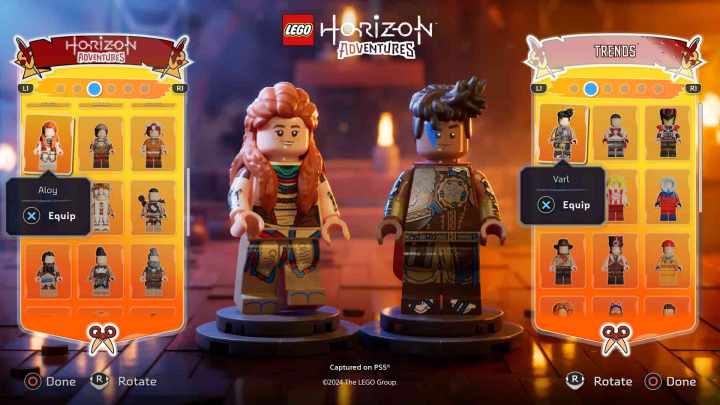
    To alter your character’s outfit, head to the building located just beside the Community Jobs board in the hub world. Interacting with this building will present you with a wide array of outfit options, ranging from Ninjago themes to styles based on Lego City. All outfits are compatible with every playable character.

    Once you’re in the customization menu, navigate across to find the Custom Outfits section, where you’ll see your saved creations as well. Select the first option to start crafting a unique look.

    You can save your amazing outfits in one of nine custom slots available for your use.

    You have the freedom to adjust various features of your character and combine different outfits from the game. Once you pick your preferred attire for each segment, you can save it for later and equip it right away.

    What Can You Customize?

    When designing your custom outfit, there are six distinct sections you can modify:

    • Headwear
    • Head
    • Accessory
    • Cloak
    • Torso
    • Legs

    Feel free to customize any or all of these sections. For instance, you could mix and match to sport a complete hot dog costume paired with a chicken head, or blend elements for a cosmic hot dog look. The decision is entirely in your hands!

  • Conquer the Ancient Goop Beast in Lego Horizon Adventures!

    Conquer the Ancient Goop Beast in Lego Horizon Adventures!

    Similar to the main Horizon games, Lego Horizon Adventures features numerous bosses. You’ll encounter recognizable machines like Thunderjaws and Stalkers, but the final boss presents a unique challenge.

    Related

    Lego Horizon Adventures: How to Complete All Community Jobs

    To collect all 100 Gold Bricks in Lego Horizon Adventures, you must finish every Community Job.

    The game concludes with a duel against the Ancient Goop Monster, a swirling mass of fiery goo and machinery. This boss is notably more challenging compared to the others in an otherwise straightforward game. It features unpredictable attacks and a substantial health bar, making it a tough opponent.

    Ancient Goop Monster Attacks


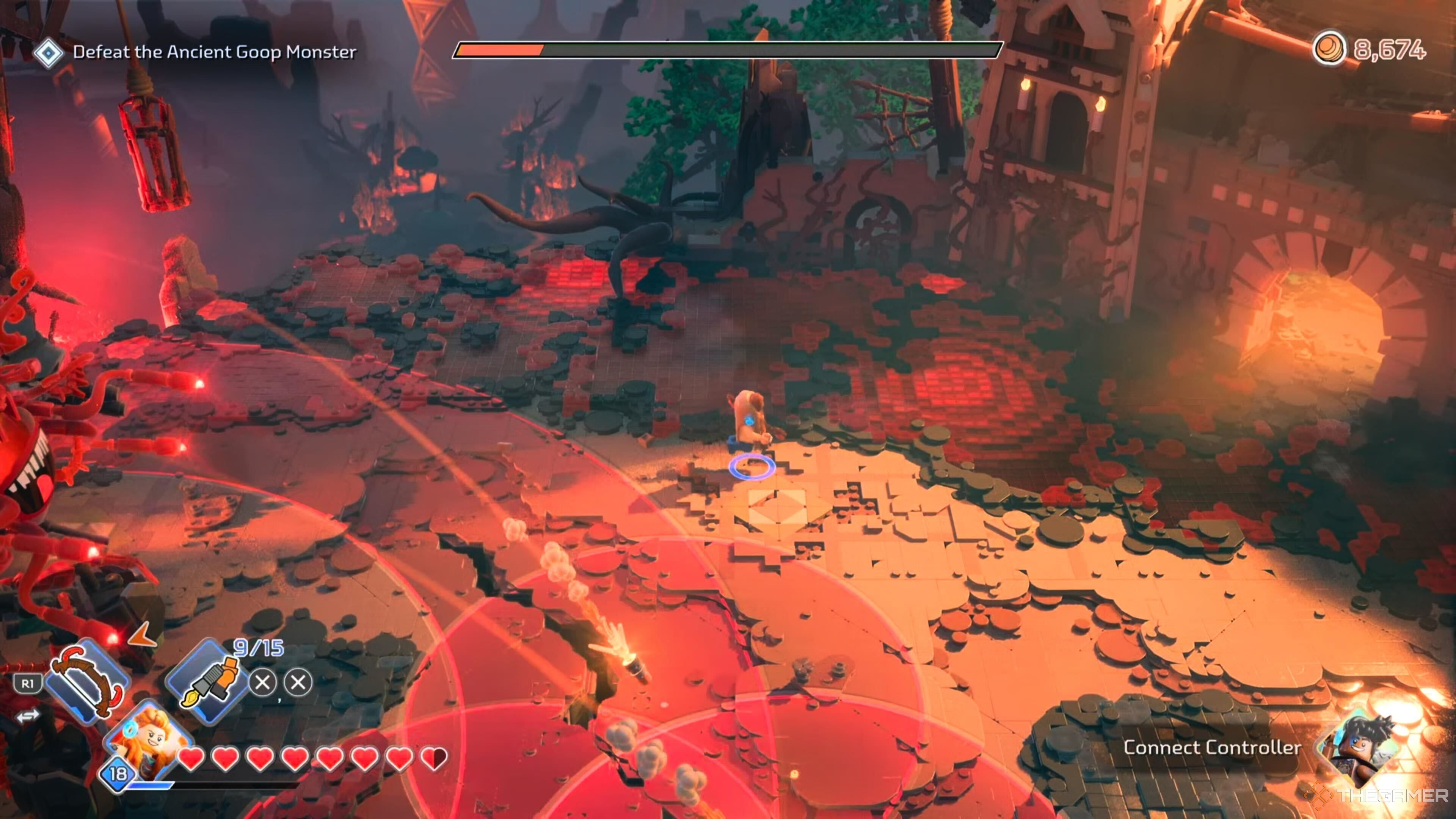
    The Goop Monster's fire attacks in Lego Horizon Adventures.

    Unlike the typical boss fight that involves multiple phases with varied attacks, the Ancient Goop Monster relies on a consistent set of attacks throughout the encounter. It’s crucial to recognize and dodge them effectively. Here are the attacks you need to watch out for:

    Attack

    How to Avoid

    Dual Fire Laser Guns

    A large red circle indicates where the beams of fire will strike. Simply sidestep this area.

    Rocket Barrage

    Three overlapping red circles will mark the ground where rockets will hit. Make sure to move out of these zones.

    Vertical Fire Guns

    After two red lines appear, the monster will shoot two flaming projectiles forward. This attack is easier to dodge compared to the circular one.

    Blight

    The monster calls down toxic blight, which deals damage upon contact.

    Slam Down

    The monster will slam down, creating a shockwave that you need to jump over to avoid taking damage.

    How to Beat the Ancient Goop Monster


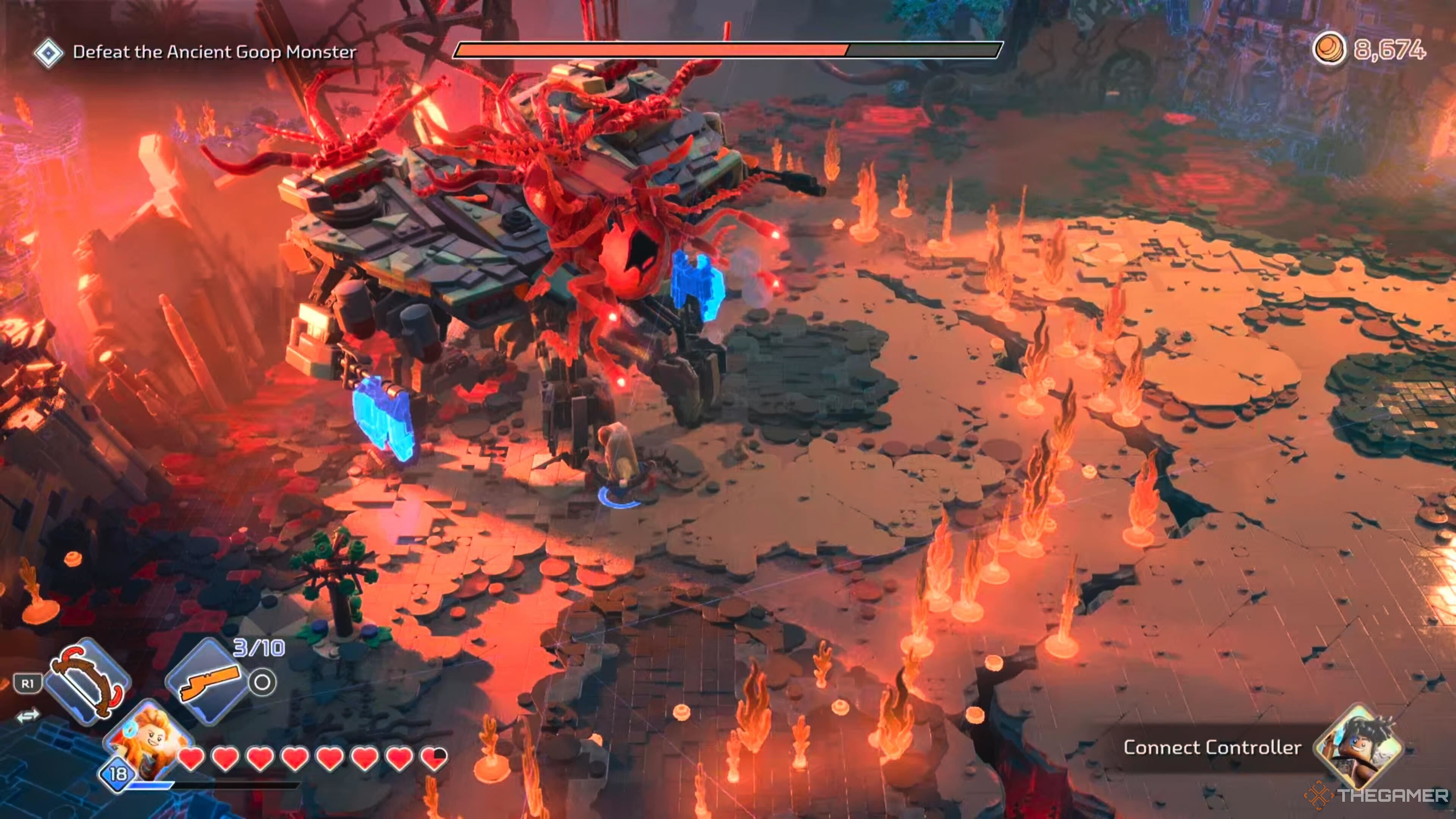
    Attacking the Goop Monster's legs in Lego Horizon Adventures.

    Once you’ve mastered how to dodge the Ancient Goop Monster’s attacks, it’s time to focus on inflicting damage. First, activate your Focus to survey the area at the start of the battle.

    This will reveal that the best approach is to target the joints on each of the monster’s legs. You have limited opportunities to land your attacks, so wait for the legs to glow blue and strike then. After hitting all four legs, the monster will topple, allowing you to deal significant damage while it’s vulnerable. Repeat this process until the battle concludes.

    Additionally, when Blight appears on the ground, make sure to attack it as well. This will also inflict damage on the Ancient Goop Monster.

  • How to Play Co-Op in Lego Horizon Adventures: A Complete Guide

    How to Play Co-Op in Lego Horizon Adventures: A Complete Guide


    Sony Interactive Entertainment

    Lego games have always been a great choice for cooperative play, thanks to their inviting design and engaging gameplay. Lego Horizon Adventures takes this to a new level by reimagining robotic dinosaurs as Lego creations. This game embraces its cooperative roots, making it a wonderful experience for both friends and family, with support for cross-platform play. Here’s how you can enjoy it with your preferred gaming buddy.

    Difficulty

    Easy


    Duration

    5 minutes

    What You Need

    • One or two copies of Lego Horizon Adventures

    • Two PlayStation 5 or Nintendo Switch controllers

    • Completion of the prologue

    Aloy and Varl customizing their outfits in Lego Horizon Adventures.

    Sony Interactive Entertainment

    How to Play Local Co-Op

    Local co-op is an excellent way to dive into Lego Horizon Adventures alongside your gaming partner, allowing for a seamless drop-in/drop-out experience whenever you choose. All it requires are two controllers for the PlayStation 5 or Nintendo Switch.

    Step 1: Launch Lego Horizon Adventures on your console.

    Step 2: Make sure to complete the prologue section.

    Step 3: When prompted at the bottom right of the screen, hit the Options button on the second controller to join the game.

    How to Play Online Co-Op

    With the release on both PS5 and Switch, Lego Horizon Adventures also includes online co-op that supports full cross-platform play. Here’s how to get connected online:

    Step 1: First, complete the prologue chapter.

    Step 2: Open the menu by pressing the Options button.

    Step 3: Invite your friends from your friends list to join your game.

    The co-op experience in Lego Horizon Adventures features a drop-in/drop-out style, meaning play doesn’t have to pause for someone to join or leave the session. Keep in mind that co-op supports a maximum of two players at a time, whether playing locally or online.