التصنيف: الألعاب

Latest Gaming News!

  • The 10 Best Cities Skylines 2 Maps

    The 10 Best Cities Skylines 2 Maps

    There are ten maps available in Cities Skylines 2 for you to choose from when starting to build your dream city. However, not all of these maps are of the same quality, as each one offers a different landscape and resources.

    When deciding which map to begin with, you should consider the type of city you have in mind and the connections and resources available on that particular map. Some maps are straightforward and easy to understand, while others require more creativity.

    To help you make the best choice, we have ranked these ten maps in terms of their difficulty and building plans. This way, you can select the most suitable map for your needs.

    1. Mountain Village

    image 2
    • Level: Beginner/Expert
    • Theme: European
    • Temperature: -12 to 27°C
    • Weather: Cold
    • Buildable area: 21%

    If you enjoy creating picturesque mountain villages with a warm ambiance, the Mountain Village map in Cities Skylines 2 is the perfect choice. The outskirts of the map feature stunning maps that create a striking contrast with the smaller, buildable area in the middle.

    Additionally, the base of the map is thoughtfully designed with a few rivers flowing through, adding variation to an otherwise flat terrain.

    2. River Delta

    image 3
    • Level: Intermediate
    • Theme: European
    • Temperature: -4 to 34°C
    • Weather: Wide range from Sunny to Rainy
    • Buildable area: 42%

    To enhance your creativity, a creative land design from River Delta can provide the necessary assistance. The area boasts a distinctive landscape of small islands nestled against the mountains, making it a delightful playground.

    These islands are interconnected by a network of bridges, offering endless inspiration. Although the map may appear to have ample building space, it actually comprises a significant 42 percent, which is remarkably high for all types of players.

    3. Barrier Islands

    image 4
    • Level: Beginner
    • Theme: American
    • Temperature: 10 to 29°C
    • Weather: Sunny
    • Buildable area: 42%

    If you are new and unfamiliar with navigating roads and buildings, Barrier Island is the ideal place for you. It is a spacious and level terrain where players can freely explore their creative ideas. Although it may not be visually appealing, it serves as the perfect starting point for beginners.

    4. Archipelago Haven

    image 5
    • Level: Expert
    • Theme: European
    • Temperature: 8 to 30°C
    • Weather: Rainy
    • Buildable area: 16%

    Archipelago Haven has the potential to be the best map if it were more user-friendly for beginners. Despite having minimal land and numerous islands, it offers a unique layout that allows players to construct bridges and small towns. The diverse terrain also provides an opportunity for creative city planning. Additionally, the map’s stunning appearance is a bonus, even without proper planning.

    5. Great Highlands

    image 6
    • Level: Beginner/Intermediate
    • Theme: European
    • Temperature: -3 to 19°C
    • Weather: Moderate/Cool
    • Buildable area: 41%

    Great Highland is a versatile city map suitable for all types of plans. It caters to beginners with its simple features such as mountains and rivers, making it accessible for intermediate players as well. The map includes a few roads and a potential connection to the highway, allowing easy access to neighboring cities.

    The design of the map strikes a balance by offering a flat middle ground, ideal for beginners to get started effortlessly. At the same time, it presents some challenging aspects like hills and cliffs, which experienced players can enjoy navigating around.

    6. Waterway Pass

    image 7
    • Level: Expert
    • Theme: European
    • Temperature: -6 to 18°C
    • Weather: Moderate/Sunny
    • Buildable area: 53%

    With a river running through it, Waterway Pass is the ideal map in Cities Skylines II for players who enjoy exploring diverse areas within a single map. The map features a flat surface alongside the river and mountains in the background.

    As you venture away from the river, the terrain becomes steeper, contributing to the map’s dynamic structure and variety. While this may pose a challenge, the map’s expansive size and visual appeal can assist in effective management.

    7. Windy Fjords

    image 8
    • Level: Expert
    • Theme: European
    • Temperature: -6 to 18°C
    • Weather: Cold
    • Buildable area: 21%

    Windy Fjords is a suitable map for players of all levels, featuring an appealing and visually pleasing design. It offers ample space for beginners to construct their city, complemented by diverse elements that add excitement and learning opportunities. The area experiences prolonged snowfall due to its cold temperature. While it is not without its drawbacks, it is still a viable option that requires careful consideration before selecting.

    8. Lakeland

    image 9
    • Level: Beginner
    • Theme: European
    • Temperature: -15 to 26°C
    • Weather: Moderate
    • Buildable area: 49%

    Another area with more character than Barrier Islands is Lakeland. The buildable area is large, but it is divided into small islands, which gives it an interesting appearance. There are also some forests and hilly spots in the area, adding some variation for beginners who want to start with more than just the basics.

    9. Twin Mountain

    image 10
    • Level: Beginner/Intermediate
    • Theme: European
    • Temperature: -4 to 23°C
    • Weather: Cold
    • Buildable area: 39%

    Twin Mountain is a modified version of Sweeping Plains, designed to be more manageable and adaptable. It features a larger, flatter terrain that allows for easier construction and more space for development. However, the map lacks train infrastructure, which means that transportation of goods and visitors must rely solely on boats or planes, and there is no connection to other cities.

    10. Sweeping Plains

    image 11
    • Level: Intermediate
    • Theme: American
    • Temperature: -4 to 23°C
    • Weather: Cold
    • Buildable area: 31%

    Sweeping Plain is a challenging map to construct and strategize. There are no simple areas, with variations at every turn, making it difficult to navigate. As a result, it is not suitable for beginners. However, if you have a good grasp of the mechanics, you can appreciate the map’s beauty and effectively utilize its structures.

  • All 9 Spider-Man 2 EMF Experiments Locations and Solutions

    All 9 Spider-Man 2 EMF Experiments Locations and Solutions

    Looking for a fun side activity in Spider-Man 2? Try the EMF Experiments! Some are exclusive to Peter Parker, while others require you to don the Spider-Man suit.

    The Plant Science Experiments are puzzles, while the Energy and Bee Drone Experiments are enjoyable activities that shouldn’t be too difficult to complete.

    During the “Healing the World” main mission at the start of the second act of Spider-Man 2, you’ll unlock your first EMF Experiment. This will take place at the Emily-May Foundation. Completing all EMF Experiment locations unlocks the Life Story Spider-Man 2 Suit and the Foundational trophy. You’ll also receive 700 XP, 3x Rare Tech Parts, and 140x Tech Parts for each experiment.

    Whether you’re aiming for 100% district completion or just want to follow up on the Emily May Foundation storyline, completing the EMF Experiment is a must. This guide will help you do just that.

    All EMF Experiment Locations in Spider-Man 2

    There are nine EMF Experiments to locate and complete in Spider-Man 2. The first eight are scattered throughout New York City, while the last one unlocks after you’ve completed the main story. To start an EMF Experiment, find and activate its terminal, usually located on the rooftops of buildings. The locations will be marked on your map with a green icon, or you can use your scanner if you’re nearby.

    1. Central Park: Energy (Harlem)

    The first energy experiment terminal is on the rooftop of one of the small buildings facing Central Park in Harlem. Activate the terminal to begin the energy experiment, exclusive to Peter Parker. Take a bike from the stand at the park entrance to start the experiment.

    Spider Man 2 Central Park Energy Experiment

    This EMF experiment requires you to cycle through the 10 checkpoints on the running track. However, after the 5th checkpoint, your bike’s tire will burst. A timer will appear on your HUD, and you’ll need to use the boost by pressing L1 to complete the experiment. Once all checkpoints are cleared, the first Energy EMF experiment will be marked complete.

    2. Central Park: Bee Drones (Upper West Side)

    To find the Bee Drone experiment, head to the area between the Upper West Side and Central Park Road. Right across from the park’s entrance, you’ll find a terminal on the rooftop of a building.

    Spider Man 2 Central Park Bee Drones

    To locate the terminal, use your map to set a waypoint toward the EMF experiment location, or use your scanner to see a green beam emitting from the building. Once you’ve found the terminal, activate it to begin the activity.

    In the Bee Drone experiment, you’ll pilot a bee drone and destroy purple holograms of wasps and rats, just like in the “Healing the World” main mission. After that, you’ll need to pilot the bee drone through yellow holographic markers to complete the experiment in Spider-Man 2.

    3. Little Tokyo: Plant Science (Chinatown)

    The Plant Science Experiment is located on a small rooftop with an abundance of plants and greenery right beside Little Tokyo in Chinatown. It’s relatively easy to find and quite enjoyable to complete.

    Spider Man 2 EMF Experiment Little Tokyo Plant Science

    To start the experiment, locate the rooftop with the plants and greenery using your map or by scanning for the green icon. Once you’ve found the terminal, activate it to begin the Plant Science Experiment. Follow the instructions and solve the puzzles related to plant biology to successfully complete the experiment in Spider-Man 2.

    To complete the Plant Science Experiment in Chinatown, you’ll need to find three suitable plant samples to create a better plant that can be used at F.E.A.S.T. After interacting with the terminal, scan the environment to locate three different sample plants.

    The first sample plant can be found on the west side of the rooftop where the terminal is located, the second will be on the east side, and the last will be on the south-facing wall.

    Once you’ve collected all three samples, return to the terminal to create a new specimen. A molecular puzzle will appear, and you’ll need to fill the structure with the required resources.

    Refer to the image below for the final puzzle solution to the Chinatown Plant Science Experiment in Spider-Man 2.

    Spider Man 2 EMF Experiment Little Tokyo Plant Science Solution

    Once you’ve created the new plant in the Chinatown Plant Science Experiment, turn right towards the water well. Activate the water supply to the plant by pressing L1 and R1. However, this will cause the pipes to start leaking from a few different areas, which you’ll need to patch up using your web shooters.

    All of the leaks will be marked, except for the one in the main garden area, which will be hidden behind a crate of plants. Press L1 and R1 to move the crate and seal the pipe. By completing this task, you’ll finish the Plant Science Experiment for the Emily May Foundation in Spider-Man 2.

    4. Brooklyn Heights: Energy (Downtown Brooklyn)

    The last EMF Energy Experiment is located on a small rooftop in the Downtown Brooklyn District, right in front of the Brooklyn Bridge. After interacting with the terminal, you’ll be given five wind turbines that you’ll need to deploy after reaching a certain height.

    Use the height monitor on the left side of your HUD to check your height. Once the monitor turns green, press Square to deploy the turbine. Your task is to deploy all five turbines to complete the Brooklyn Heights Energy EMF Experiment in Spider-Man 2.

    Spider Man 2 EMF Experiment Brooklyn Heights Energy

    To increase your height during the Downtown Brooklyn Energy EMF Experiment, use the web wings booster located around the map to gain momentum. This will help you reach the required height to deploy the five wind turbines. After deploying all five, one of them will malfunction and return to a lower level. Use your quest marker to track it down and press L1 and R1 to yank it back into the air, completing the EMF energy experiment.

    5. Queens Apiary: Bee Drones (Little Odessa)

    The second EMF Bee experiment location is on the corner right side of Little Odessa. Interact with the terminal placed on the rooftop, which is jumbled between wooden crates, to begin the activity. After interacting with the terminal, you’ll be tasked to calibrate the bee drone to take out 20 targets by firing a laser at them. Press L1 to activate the laser and eliminate the targets to complete the Queens Apiary Bee Drones EMF Experiment in Spider-Man 2.

    Spider Man 2 EMF Experiment Queens Apiary Bee Drones 1
    Spider Man 2 EMF Experiment Queens Apiary Bee Drones 2

    Once you’ve taken out the 20 targets in the Queens Apiary Bee Drones EMF Experiment, a pigeon will appear, attempting to disrupt your experiment. Press Triangle to switch to the sonic beam. Shoot the pigeon with the sonic beam to make it fly away, and then follow the pigeon until you reach its habitat.

    The pigeon will return to its cage, where you’ll be required to use your sonic beam once again to remove the wooden plank and close the cage. This will mark the end of the Bee Drones experiment for the EMF in Spider-Man 2.

    6. Prospect Park: Bee Drones (Downtown Brooklyn)

    The last Bee Drones EMF Experiment is located on a building rooftop near the entrance of Prospect Park in Downtown Brooklyn. Use your map to set a waypoint or scan the area to find the terminal that activates the EMF Experiment in Spider-Man 2. Interact with the terminal to begin the activity.

    Spider Man 2 EMF Experiment Prospect Park Bee Drones 1
    Spider Man 2 EMF Experiment Prospect Park Bee Drones 2

    The Prospect Park Bee Drones EMF Experiment in Spider-Man 2 will play out similarly to the Central Park one. However, while flying the bee drone through the yellow holograms, you’ll be interrupted by a group of criminals who steal the drone.

    A new task will appear on your HUD, instructing you to go to the last active location of the bee drone and scan the nearby garages to locate it. There will be three areas where you’ll have to scan for the drone.

    Once you’re at the correct building, you’ll be able to connect to the antenna of the building and activate the bee drone. When you finally connect with the bee drone, press Triangle to activate the sonic beam and shoot at the bee cage in the garage.

    All of the criminals will flee the garage, and as Peter Parker’s Spider-Man, you’ll need to deal with them to complete the last Bee Drones Experiment for the EMF.

    7. Portside: Plant Science (Hell’s Kitchen)

    The first Plant Science Experiment can be found in the northwest corner of Hell’s Kitchen, right next to a small rooftop facing the port. This experiment involves collecting a sample of polluted water and separating the intoxicants.

    To begin the experiment, locate the terminal on the rooftop using your map or scanner. Interact with the terminal to start the activity. Follow the instructions to collect a sample of polluted water and separate the intoxicants to complete the Portside Plant Science Experiment in Spider-Man 2.

    Spider Man 2 EMF Experiment Portside Plant Science 1

    To complete the Portside Plant Science Experiment in Hell’s Kitchen, take out your scanner and analyze the muddy water flowing right beside the terminal. A molecular puzzle will appear, in which you’re supposed to separate the red molecules without breaking the chain. If you’re finding it difficult, you can skip the puzzle by heading into your main menu.

    Once you’ve cleared the puzzle, make your way to the docks and scan for the correct fish from which you’ll be taking a sample. Press L1 when a fish comes on your radar to take a sample from it. This may take a few tries before you get the correct fish, but once you do, make your way back to the terminal to solve the molecular puzzle and complete the Plant Science Experiment in Spider-Man 2.

    Refer to the image below for the final puzzle solution to the Hell’s Kitchen Plant Science Experiment in Spider-Man 2.

    Spider Man 2 EMF Experiment Portside Plant Science Solution

    8. Two Bridges: Plant Science (Financial District)

    The last Plant Science Experiment for the EMF can be found on a small rooftop in the Financial District. Use your map or scanner to locate the terminal and interact with it to begin the experiment.

    This experiment involves fixing a fuse at one of the greenhouse stations planted by the EMF. However, when you reach the greenhouse, you’ll find that the fuse has been stolen.

    Spider Man 2 EMF Experiment Two Bridges Plant Science

    During this experiment, you will need to locate a stolen fuse by following small gas markers that lead to an unknown location with enemies. Defeat the enemies and retrieve the fuse.

    Once you have the fuse, return to the terminal and interact with it. However, be prepared for a group of goons to ambush you. Defeat them and then proceed to complete the molecular puzzle at the terminal.

    We have provided an image below to assist you in solving the EMF plant science experiment in Spider-Man 2.

    Spider Man 2 EMF Experiment Two Bridges Plant Science Solution

    9. Emily-May Foundation (Astoria)

    Once you have successfully completed all of the EMF Experiments and finished the main story of Spider-Man 2, a call from MJ will notify you about a parcel sent by Norman Osborn to your house in Astoria.

    Spider Man 2 EMF Experiment Emily May Foundation

    Return to your house and locate the package that awaits you. Interact with it and solve the final molecular puzzle to receive a heartfelt farewell message from Harry and unlock the Life Story Suit as a token of your achievements.

    It has come to our attention that some players have encountered a glitch where the Life Story Suit does not unlock after completing the last EMF experiment in Spider-Man 2. To address this issue, we recommend trying the following solutions:

    1. Collect the Science trophy from the roof of the Trinity Church Tower, as this has been reported to trigger the suit unlock for some players.
    2. If the first solution does not work, try restarting your game. In some cases, the suit may appear in your inventory after a fresh start.
    Spider Man 2 EMF Experiment Emily May Foundation Solution

    We apologize for any inconvenience caused by this glitch and hope that these solutions resolve the issue for you. Enjoy your new Life Story Suit and continue your adventures as Spider-Man!

  • How To Avoid Road Accidents In Cities Skylines 2

    How To Avoid Road Accidents In Cities Skylines 2

    In the exciting new release of Cities Skylines 2, a highly anticipated addition takes center stage: the introduction of traffic accidents.

    As you strive to build and maintain a thriving city, you’ll encounter both the positive and negative aspects that come with urban life. This includes not only natural disasters but also man-made incidents like traffic collisions and highway pileups.

    Now, you might be wondering how on earth you can effectively prevent and handle road accidents in Cities Skylines II. With countless cars bustling through the streets, it’s simply impossible to personally control each and every vehicle or provide driving lessons to the non-player characters (NPCs).

    However, fear not! There are still ways to tackle this challenge. By implementing smart city planning strategies, optimizing road networks, and enhancing traffic flow, you can significantly reduce the likelihood of accidents occurring. Additionally, investing in advanced traffic management systems and technologies can help you better monitor and respond to potential hazards.

    Remember, building a successful city in Cities Skylines 2 means embracing the responsibility of managing both the ups and downs. By staying vigilant and implementing effective measures, you’ll be well-equipped to handle the complexities of traffic accidents and ensure the safety of your citizens.

    How do road accidents happen in Cities Skylines 2?

    According to the developers, accidents on the roads in the game are not random. There is always a specific reason behind them, such as heavy traffic, a vehicle losing control, a planning issue, or a deliberate strategy set by the developers.

    The percentage of accidents is determined for each road segment and is compared to other features in the game. These features can include various natural occurrences like road conditions, weather conditions, or even disasters.

    When the calculated system decides it’s the right time for an accident, the vehicle will lose control, causing chaos and disturbance. Additionally, if there are any objects in the vehicle’s path, they can also be destroyed. In the case of other vehicles being present, the accident can be fatal and result in loss of life.

    Once an accident happens, road maintenance, ambulances, and police will promptly arrive to clean up the area. This process is automated, making the cleanup relatively easy. However, it also means that the road or area where the accident occurred will be temporarily blocked. Due to this automated system for dealing with traffic accidents in Cities Skylines II, it’s important to be prepared for the aftermath of such a crisis.

    Steps to prevent accidents and manage traffic in Cities Skylines 2

    After simulating accidents, the question arises: how can we prevent them? It’s true that we can have some fun by causing a few accidents and observing the outcome, but on a larger scale, we must find ways to manage them effectively. This way, traffic won’t always be a nightmare and the likelihood of accidents will decrease. After experiencing a few minor crashes, it’s important to take charge and rectify the situation.

    1. Making more roads and setting clear lanes

    Let’s begin by learning how to identify when a road is becoming too narrow for the number of vehicles that regularly pass through it. To address this, it’s important to either construct additional roads or ensure there is enough space to build new ones whenever the opportunity arises.

    It is crucial to have multiple roads leading to every destination. This prevents all vehicles from congesting at a single entrance and helps avoid traffic jams. In the event of a cleanup after an accident in Cities Skylines 2, these alternate roads will also assist in diverting traffic. Additionally, incorporating roundabouts at intersections can be beneficial.

    To enhance safety and prevent accidents and traffic congestion, it is essential to allocate a separate lane for heavy vehicles such as trolleys and buses in Cities Skylines II. Prioritizing this feature and implementing it as soon as it becomes available can make a significant difference. When planning for residents, it is important to consider the population and allocate lanes accordingly. Neglecting this aspect can lead to disruptions and cramped conditions.

    2. Focus on areas with high traffic accident chances

    If the city feels overwhelming, just head to the Info icon at the top of the screen. There, you can find areas with a high likelihood of heavy traffic, indicated by color. It’s best to take action when the color is orange, before it becomes too severe and reaches the red zone. Once you’ve made the necessary adjustments, take a moment to observe the road before proceeding.

    Additionally, it’s important to ensure that the roads are in good condition. You can do this by utilizing maintenance services specifically designed for roads. These services include installing streetlights and conducting regular checkups to keep the roads in optimal shape.

  • How To Get Gris-Gris In Cyberpunk 2077

    How To Get Gris-Gris In Cyberpunk 2077

    Gris-Gris, the legendary weapon concealed within the dystopian world of Cyberpunk 2077: Phantom Liberty, is a game-changer when it comes to engaging in combat. This iconic revolver possesses formidable firepower, making it a prized possession for any player daring enough to wield it. Acquiring the Gris-Gris is a thrilling adventure in itself, achievable by completing one of the daring gigs and a pivotal main mission within the Phantom Liberty storyline.

    I’ll provide you with a guide on how to obtain Gris-Gris. So, let’s dive right into it without any delay.

    Where to find the Gris-Gris Iconic Weapon

    The mission that allows you to acquire the Gris-Gris revolver is called “Treating Symptoms.” This task involves infiltrating the Voodoo Boys’ stronghold. As you progress through the mission, you will be faced with a decision that determines the fate of the Voodoo Leader, Milko.

    Regardless of the decision you make regarding the fate of Milko and Alan, you have the opportunity to obtain the Gris-Gris weapon. Both outcomes can lead to acquiring this powerful tool.

    Treating Symptoms location

    The Gris-Gris weapon in Cyberpunk 2077 can be found at the location of the “Treating Symptoms” gig, which is the Voodoo Boys’ base in Dogtown’s Pacifica. To access the weapon, you will need an access keycard to open a specific door.

    The access keycard is held by the person standing next to Milko, who will try to convince you not to kill him. Once you have entered the Voodoo Boys’ base, you will need to fight your way through the Voodoo Boys. After taking the stairs, turn right to enter a hallway that leads to the door.

    Upon entering the room, you will encounter and have to defeat the Robot R MK.2. Once the robot is defeated, follow the path that leads to the base in the room. Take the stairs, and the path will eventually lead you to a door behind which you will find Milko and Alan Noel. The Gris-Gris weapon can be obtained in this area.

    Door behind which you will find Milko and Alan Noel

    During the “Treating Symptoms” gig in Cyberpunk 2077, if you choose to kill Milko, Alan will resist. In order to obtain Alan’s Keycard, you will need to eliminate him. This keycard will be useful in acquiring the Gris-Gris weapon during another main mission called “The Damned.”

    In “The Damned,” when Reed leads you back to the Voodoo Boys’ base, make sure to head to the first floor. Look for a room with graffiti on the door, which is indicated in the image you provided. Using Alan’s Keycard, you will be able to access this room and obtain the Gris-Gris weapon.

    With Alan’s keycard, you can quickly access the room where the iconic Gris-Gris tech revolver is located. As you enter the room, you will find the revolver on the table, ready to be picked up and added to your arsenal.

    However, if you prefer to save both Milko and Alan, there is an alternative method to obtain the iconic tech revolver. This method involves completing a different set of tasks and missions. Please provide more details about the alternative method, and I’ll be happy to assist you further.

    Alternate Way to Find the Gris-Gris Iconic Weapon

    To spare Alan and Milko and still obtain the Gris-Gris revolver in Cyberpunk 2077, you can follow an alternative method. This involves acquiring the Slider’s Hideout Storage Room Key.You can easily obtain the key by starting the “Treating Symptoms” gig and eliminating the Voodoo Boys.

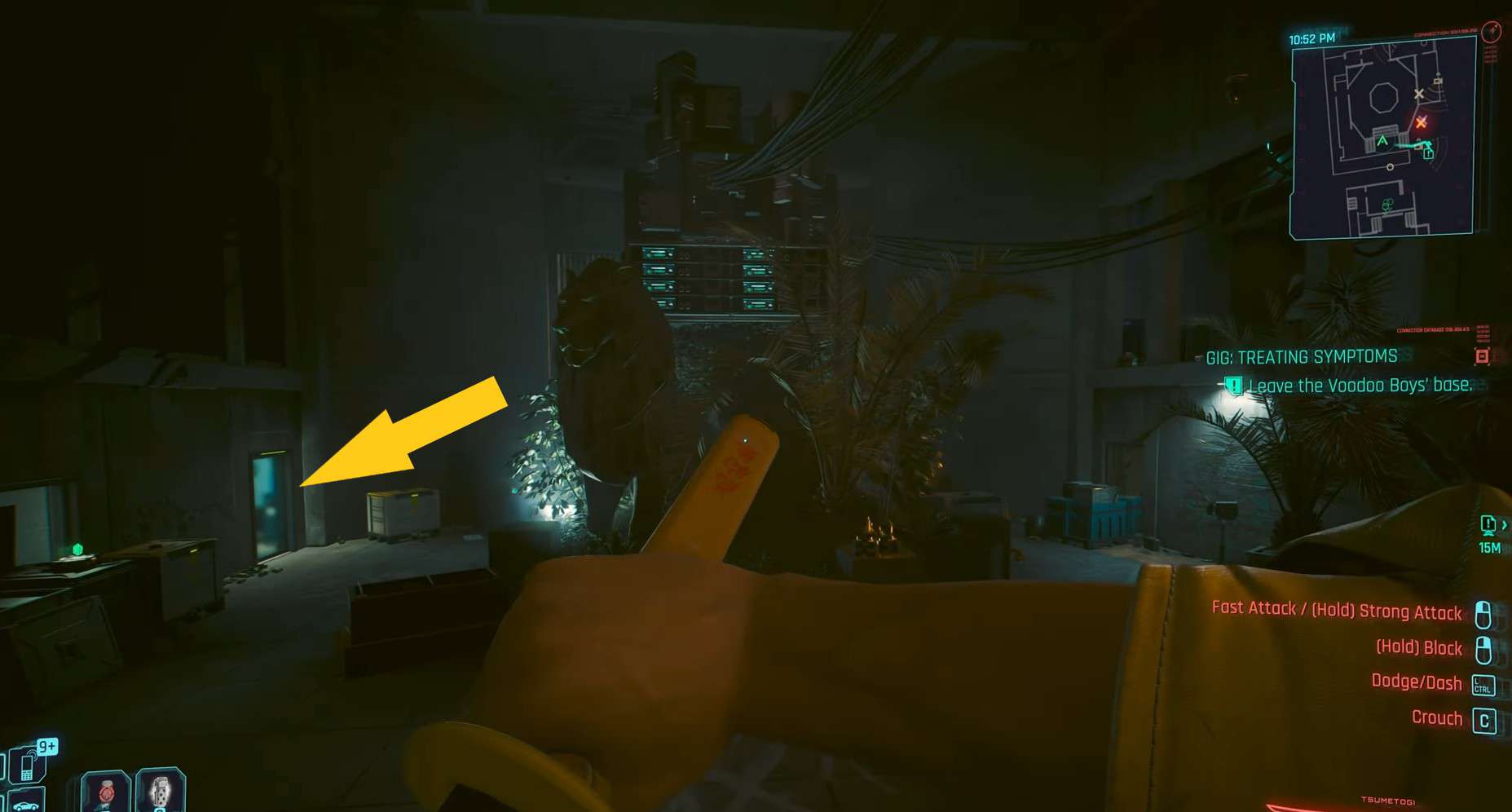
    Before proceeding to the stairs and hallway, enter the room indicated by the arrow below. Inside, you will find the Slider’s Hideout Storage Room Key, which will allow you to access the room where the Gris-Gris revolver is located.

    Once you have the key, continue with the “Phantom Liberty” mission. As you progress, you will eventually reach Slider’s Hideout. Use the key to open the storage room and claim the iconic Gris-Gris tech revolver without harming Alan and Milko.

    Slider's Hideout Storage key

    In the room indicated by the arrow below, you will find the Slider’s Hideout Storage Room Key. This key not only grants you access to the storage room but also allows you to enter the Graffiti room, where the Gris-Gris revolver is located. By obtaining the Slider’s Hideout Storage Room Key, you can access both areas and acquire the iconic Gris-Gris tech revolver without harming Alan and Milko.

    Is Gris-Gris Good in Cyberpunk 2077

    The Gris-Gris iconic tech revolver in Cyberpunk 2077 is one of the most powerful weapons available. It has the unique ability to upload a random quickhack per hit, allowing you to disrupt and hinder your enemies. The quickhack can either cause the enemy to become blind or start attacking their allies blindly, providing you with an advantage in combat.

    In addition to its quickhack capabilities, the Gris-Gris revolver also offers excellent armor penetration and headshot damage. When aiming for the heads of your enemies, you can deliver devastating blows and take down even the toughest opponents.

    It’s important to note that the Gris-Gris iconic tech weapon is missable. If you fail to acquire either of the keycards mentioned earlier, you will not be able to obtain the revolver. This is because the doors leading to the weapon are walled off after completing the “Treating Symptoms” side gig and visiting the Voodoo Boys’ location. Be sure to follow the appropriate steps and obtain the necessary keycards to ensure you don’t miss out on this powerful weapon.

  • How To Defeat Razor In Cyberpunk 2077

    How To Defeat Razor In Cyberpunk 2077

    Razor Hughes in Cyberpunk 2077 is the final boss of the Beat on the Brat side job. Razor is the toughest boss you have encountered till now. He has immense power, long-lasting HP, and durable stamina. All these qualities, combined with his powerful punches, make him almost impossible to defeat.

    But there is no need to worry, as this guide will provide you with the best strategy that you can implement to defeat Razor.

    Best Strategy to Defeat Razor in Cyberpunk 2077

    Razor Hughes is a tough boss who can quickly knock you out within the game’s first few minutes. Going straight into the ring without additional preparation is useless, as defeating Razor requires a carefully curated strategy.

    Stock up on consumables

    The first thing you need to do before starting the fight is to visit the Backpack from your Inventory. Select the Consumables tab and activate the ones that give you more HP and stamina. Razor Hughes has lots of HP; you need the same to last before him.

    The best consumable to activate before the fight is the Health Booster, which increases max health by 20% and lasts for 1800 seconds.

    Drop your melee weapon in the ring

    Weapons are not allowed in the ring, but this can be exploited by being close to the ring and dropping a melee weapon before the fight. You must ensure the weapon is non-lethal; otherwise, you cannot use it. You can use a Machete against Razor in this Cyberpunk 2077 fight.

    RECOMMENDED VIDEOS FOR YOU…

    Pick the melee weapon up once the fight starts and equip it. Now, you can use this weapon to block the opponent’s attacks. This is much better than participating in the fight with just your fists.

    Use Parrying

    Razor will use his famous Superman Punch to knock you down. This attack can deal loads of damage and cost a significant amount of HP. The best way to tackle this attack is to parry. It would be best to block the punch before it strikes you and immediately land a four-shot body hit combo.

    Maintain your distance

    Do not stay too close to Razor in the ring. Always maintain your distance because if you are in the range of his punches, he will take you down quickly. Parry his punches in Cyberpunk 2077 and then move to the other side of the ring.

    There is a Razor fight glitch that you can exploit and use to your advantage. To trigger this glitch, you must keep pushing Razor back toward the starting chairs until he is stuck there. Now, you can keep hitting him, and he will not be able to hit you back.

    Invest in Skill Points

    Another strategy you can implement to fight Razor Hughes is to invest in Skill Points in the Street Brawler tree, especially the Rush and Biding Time perks. The former will make your fists count as Blunt Weapon, and the latter will help you recover health for blocking attacks.

    Implement the strategies mentioned above and strike Razor whenever he is exhausted. Block and parry Razor’s attacks with your weapon and keep countering his attacks till all his HP is gone.

    Cyberpunk 2077 Razor Fight Rewards

    Once you successfully take down Razor Hughes, the Beat on the Brat side job will end, triggering a conversation with Razor. You will receive Eurodollars, Street cred, and EXP for taking down this boss.

    • 3480 Eddies
    • 2350 Street Credit
    • 1045 Experience

  • Cable Railway Key Location In Lies of P

    Cable Railway Key Location In Lies of P

    After you finish Moonlight Town in Lies of P, your next stop is Path of Misery. But guess what? The route is totally blocked because the train is out of service.

    To unlock it and make your way to Path of Misery in Lies of P, you need the Cable Railway Key. The problem is, the game doesn’t give you any hints on how to get it. But don’t worry, we’ve got your back!

    How to get the Cable Railway Key in Lies of P

    From the Stargazer in Moonlight Town, start your journey and head straight towards the train you’re trying to catch, which will take you to the Path of Misery. Right beside the train, you’ll spot an NPC standing with a spear weapon.

    Her name is The Atoned. Have a chat with her, and she’ll explain that the trains are no longer running. According to her, the cathedral isn’t the safe haven people thought it was, as those who went there never came back.

    Now, here’s the important part – she’ll ask you to prove your identity. This is where you need to show that you’re a Stalker by choosing the option to Give the Stalker’s greeting to her.

    After proving yourself as a Stalker, you’ll receive the Cable Railway Key. This key will allow you to board the train and operate the lever, which will take you straight to the Path of Misery.

  • Spider-Man 2 Symbiote Nest Locations Guide

    Spider-Man 2 Symbiote Nest Locations Guide

    Symbiote Nests are infested sites in Spider-Man 2, scattered throughout New York City. These sinister locations are overrun by alien parasites known as Symbiotes. Towering tendrils that reach into the sky mark these sites, making them easier to spot, but also significantly more perilous.

    To rid the city of these abominations, you’ll wield a special device called the Sonic Boom. This remarkable piece of technology unleashes an explosion that exclusively targets the Symbiotes, sparing you from any harm during the detonation.

    Clearing all the Symbiote Nests is a heroic feat, and your endeavors will be richly rewarded. Miles Morales can unlock the awe-inspiring King In Black Suit, and you can earn the prestigious Exterminator Achievement.

    While some of these Symbiote Nests are relatively straightforward to cleanse, others present greater challenges. Some have concealed cores, while others teleport between various locations. Certain nests even harbor multiple hearts, demanding agility and clever tactics to overcome.

    How to Obliterate Symbiote Nests in Spider-Man 2

    The process begins by deploying a Sonic Burst on the core of the Symbiote Nest. Your mission is to protect it from the relentless Symbiote attacks until the timer expires. Once you successfully defend it, the Sonic Burst erupts, obliterating the heart, the tower, and all the Symbiotes.

    As you defend the Sonic Burst, keep an eye on its health bar at the top of your screen to gauge your progress.

    Unveiling the Locations of All Symbiote Nests in Spider-Man 2

    These Symbiote Nests unlock in two phases. The first four become accessible after completing Main Quest 26: “Set Things Right,” and the remaining nests appear following the completion of the “It’s All Connected” mission.

    In total, there are ten Symbiote Nests scattered across eight districts, although you’ll need to uncover the city by de-fogging it before they’ll be visible.

    Harlem

    • First Nest: Situated in the southeast corner of Harlem, nestled between apartment buildings.
    • Second Nest: You’ll discover the second Symbiote Nest in the heart of Harlem, right next to Pizza Amigos.

    Astoria

    The next Symbiote Nest in Spider-Man 2 is hidden in the park, located to the east of Astoria.

    Upper East Side

    Much like Harlem, the Upper East Side harbors two Symbiote Nests, primarily infecting the northern region of the district.

    • First Nest: Found in the northwest corner of the Upper East Side, between residential buildings.
    • Second Nest: Located near the water, on the eastern border of the Upper East Side.

    Upper West Side

    Towards the western edge of the Upper West Side, you’ll stumble upon another Symbiote Nest.

    Chinatown

    This Symbiote Nest is positioned near the bridge to Williamsburg in the southwest of Chinatown.

    Little Odessa

    In the southern region of Little Odessa, yet another nest lurks inside an empty parking lot between buildings.

    Williamsburg

    You’ll encounter the nest surrounding a basketball court towards the south of Williamsburg.

    Financial District

    The final Symbiote Nest location in Spider-Man 2 can be found in the northwest corner of the Financial District.

    Reaping Rewards from Spider-Man 2’s Symbiote Nests

    Clearing each Symbiote Nest location is a rewarding endeavor. You’ll earn 200XP and 4 Hero Tokens for each nest you cleanse. These generous rewards add extra value to your heroic efforts in this thrilling side mission.

  • GTA on Netflix? The project is in discussion

    GTA on Netflix? The project is in discussion

    According to recent reports, Netflix is in talks with publisher Take-Two Interactive to bring the popular Grand Theft Auto (GTA) franchise to its streaming platform. This move could potentially strengthen Netflix’s presence in the gaming industry.

    According to the Wall Street Journal, Netflix is in talks with Take-Two Interactive, the publisher of the Grand Theft Auto franchise, to bring the popular game series to its streaming platform. This move could further solidify Netflix’s position in the gaming industry, where it already owns several successful titles such as Minecraft and Call of Duty, both of which belong to Microsoft.

    Competition between PlayStation and Xbox

    Since November 2021, Netflix has been offering downloadable games on its streaming service, similar to the Xbox Game Pass. These games are included in the subscription and can be played on smartphones or tablets, allowing users to discover hidden gems like Terra Nil on iPad.

    According to the Wall Street Journal, Netflix aims to offer more ambitious games directly streamed on TV and PC, in addition to the downloadable games available on mobile devices. This new approach would allow the streaming giant to take on PlayStation and Xbox more directly.

    According to the article, Netflix is interested in acquiring the rights to the Grand Theft Auto (GTA) franchise from Take-Two Interactive. The two companies may be discussing a deal that would allow Netflix to offer GTA as a streaming game, while Take-Two would continue to develop and publish the game itself.

    Netflix has been expanding its catalog of games, and this acquisition would be a significant addition to its library. The company has reportedly spent $1 billion on its gaming efforts so far, according to the Wall Street Journal, and is looking to develop AAA games with high production values. However, as the article notes, entering the gaming market without a strong background in the industry can be challenging, as seen with Amazon and Google’s attempts to do so in recent years.

    It’s worth noting that the article does not confirm whether a deal between Netflix and Take-Two has been finalized, nor what the terms of such a deal might be. It simply suggests that the two companies have been in talks regarding the possibility of integrating GTA into Netflix’s streaming service.

  • PlayStation Enables Cloud-Gaming For PS5 Games, Play Without Any Download

    PlayStation Enables Cloud-Gaming For PS5 Games, Play Without Any Download

    On October 23, cloud-game streaming for PlayStation 5 owners will be available in the UK, according to PlayStation.

    Members of PlayStation Plus Premium will have access to this feature. At £13.49 per month or£ 119 per year, that is the highest level of PlayStation Plus membership.

    You can use PlayStation Plus streaming to play games online from the Plus Game Catalogue, your own collection, and the service’s Game Trials.

    The main advantage is that these games won’t need to be installed on the internal storage of your PlayStation 5. As a result, there will be less game juggling and less time spent waiting for the data to download, which is significant given that some games are over 100GB in size.

    PlayStation 5 Cloud Streaming Eligible Games

    The following games will be available for PlayStation 5 owners to stream starting on October 23:

    1. Dead Island 2
    2. Fall Guys
    3. Fortnite
    4. Genshin Impact
    5. Ghost of Tsushima
    6. Hogwarts Legacy
    7. Horizon Forbidden West
    8. Marvel’s Spider-Man: Miles Morales
    9. Mortal Kombat 11
    10. Resident Evil 4
    11. Saints Row IV
    12. The Calisto Protocol
    13. The Witcher 3: Wild Hunt

    According to Nideaki Nishino, senior vice president of platform experience at Sony Interactive Entertainment, we intend to support this new benefit with hundreds of PS5 games.

    How Game Streaming on PS5 Works

    It’s important to note that PlayStation 5 game streaming doesn’t actually give players access to them. It’s just another way to play games that PlayStation Plus users already have access to, either directly from your own ownership of the games or through their Game Catalogue and Game Trials.

    Because you can only stream games from the PlayStation 5 itself at launch, it is also much more constrained than Xbox Game Pass.

    If you’d like, you can use Game Pass Ultimate to play Xbox games on your phone. Sony still has significant game streaming plans. On November 15, its PlayStation Portal streaming handheld will be available.

    There aren’t any overt criticisms of PlayStation 5’s initial cloud streaming quality expectations either.

    Requirements for PS5 Cloud Gaming

    Where available, it can broadcast in HDR at up to 4K resolution and 60 frames per second. The roll call also includes Tempest 3D Audiotech audio and surround sound.

    According to Sony, a connection speed of at least 38 mbps is required to stream 4K, 15 Mbps content at 1080p. Additionally, a minimum speed of 5 mbps is required, though it probably wouldn’t be enjoyable to stream on that connection.

    A week before the Americans, we have game streaming. On October 17, Sony will begin operations in Japan, followed by October 23, in the UK and Europe, and October 30, in North America.

    Of course, this is not the first time that PlayStation Plus has used game streaming. Since the PlayStation 5 cannot play games from that generation natively, every time you play a PlayStation 3 game from the Game Catalogue, it is streamed over your home internet.

    However, as a result of this development, PlayStation game streaming is now more comparable to that of Xbox.

  • PS5 Slim Digital Edition: Release Date, Price, Specs, Review

    PS5 Slim Digital Edition: Release Date, Price, Specs, Review

    The PS5 Slim Digital Edition is a slimmer and pricier version of the disc-less PS5. Here’s everything you need to know about its release date, price, specs, and review.

    Release Date

    The PS5 Slim Digital Edition is one of the two new models of the PS5 that Sony announced in October 2023. The other model is the PS5 Slim with Ultra HD Blu-ray Disc Drive, which has the same price as the original PS5.

    The PS5 Slim Digital Edition will be available from October 2023 in select regions and will roll out globally in the following months. Sony has not announced the exact release date for each region, but you can check the availability of the PS5 Slim Digital Edition on the PlayStation website or your local retailers.

    The PS5 Slim Digital Edition will replace the current PS5 Digital Edition once they sell out, so if you want to get the disc-less PS5 at its current lower price, you should act fast.

    Price

    The PS5 Slim Digital Edition will cost £389.99 / $449.99 / 449.99 Euro, which is £10 / $50 / 50 Euro more than the current PS5 Digital Edition model.

    However, you can also buy the disc drive separately for £99.99 / $79.99 / 119.99 Euro and attach it to your PS5 Slim Digital Edition whenever you want. This gives you more flexibility and choice when it comes to playing physical games and media on your console.

    The price increase for the PS5 Slim Digital Edition may also reflect the increased storage space and the second USB-C port that the new model offers.

    Specifications

    The PS5 Slim Digital Edition has the same hardware power as the original PS5, which means it can run games at up to 4K resolution and 120 frames per second, support ray tracing and 3D audio, and offer fast loading times with its custom SSD.

    The main difference is that the PS5 Slim Digital Edition has a 1TB SSD compared to the original PS5’s 825GB SSD, which means you can store more games and apps on your console. The PS5 Slim Digital Edition also has a second USB-C port on the front panel, replacing the USB-A port on the original PS5.

    The PS5 Slim Digital Edition is also much smaller and lighter than the original PS5. The PS5 Slim Digital Edition weighs 2.6kg, which is 24% less than the original PS5 Digital Edition’s 3.4kg. The PS5 Slim Digital Edition also has a 30% lower volume than the original PS5, which means it takes up less space in your entertainment setup.

    The PS5 Slim Digital Edition also has a new look that features a curved slit that divides each faceplate into glossy and matte sections. You can also customize your PS5 Slim Digital Edition with different colored faceplates that will be available for £54.99 / $54.99 / 59.99 Euro starting from early 2024.

    Review

    The PS5 Slim Digital Edition is a welcome update to Sony’s next-generation console that offers some improvements and enhancements over the original PS5.

    The slimmer and lighter design makes the console more portable and easier to fit in your living room, while the increased storage space and additional USB-C port are useful additions that enhance your gaming experience.

    The detachable disc drive is also a clever feature that gives you more options and flexibility when it comes to playing physical games and media on your console.

    However, the PS5 Slim Digital Edition is not a major upgrade that changes the core performance or features of the console. If you already own a PS5 or a PS5 Digital Edition, you may not feel the need to switch to the PS5 Slim Digital Edition unless you really care about saving some space or having more storage capacity.

    The price increase for the PS5 Slim Digital Edition may also deter some buyers who prefer to go digital-only with their games.

    Overall, the PS5 Slim Digital Edition is a refined and improved version of the original PS5 that offers some benefits and advantages for new buyers or those who want to upgrade their console.

    The PS5 Slim Digital Edition is still one of the best gaming consoles on the market that delivers stunning graphics, smooth gameplay, and immersive sound for a wide range of games and genres.

    If you are looking for a slimmer and sleeker way to enjoy your PlayStation games, you should definitely consider getting the PS5 Slim Digital Edition when it launches in October 2023.

    Deals

    If you are interested in buying the PS5 Slim Digital Edition, you may want to look out for some deals and discounts that may be available from time to time. You can check the PlayStation website or your local retailers for the latest offers and bundles that may include the PS5 Slim Digital Edition, games, accessories, or subscriptions.

    You can also sign up for PlayStation Plus, which gives you access to online multiplayer, free monthly games, exclusive discounts, and more. You can also use the PlayStation app on your smartphone or tablet to browse and buy games, manage your downloads, and chat with your friends.

    Bottom Line

    The PS5 Slim Digital Edition is a promising addition to the world of gaming consoles. With its sleek design, enhanced storage capacity, and the option to attach a disc drive, it offers greater flexibility and convenience to gamers. While it may not represent a groundbreaking transformation from the original PS5, it’s an ideal choice for those seeking a more compact gaming experience without compromising on performance.

    If you’re considering upgrading or diving into the world of gaming with a PlayStation console, the PS5 Slim Digital Edition is a solid choice. It’s set to hit the market in October 2023, promising top-notch graphics, immersive gameplay, and the familiarity of the PlayStation ecosystem. Keep an eye out for special deals and bundles to make the most of your gaming experience. Whether you’re a seasoned gamer or new to the scene, the PS5 Slim Digital Edition has something to offer everyone.

  • PS5 Slim: Release Date, Price, Specs, Review [year]

    PS5 Slim: Release Date, Price, Specs, Review [year]

    The PS5 Slim is a slimmer and lighter version of the PS5 that offers more storage space and a detachable disc drive.

    It is bulky, noisy, and expensive, and it can be hard to find in stock due to high demand and supply shortages. That’s why many gamers are eagerly waiting for the rumored PS5 Slim, a smaller and cheaper version of the PS5 this year.

    But what do we know about the PS5 Slim so far? How will it differ from the original PS5? Will it have a disc drive or not? And how much will it cost? In this article, we will try to answer these questions and more, based on the latest rumors and speculation about the PS5 Slim.

    The PS5 Slim is set to launch in October 2023, and will be available in two models: the PS5 Slim with Ultra HD Blu-ray Disc Drive and the PS5 Slim Digital Edition. Here is everything you need to know about the PS5 Slim, including its release date, price, specs, and review.

    PS5 Slim: Release Date, Price, Specs, Review [year]

    Specification

    The PS5 Slim is expected to have the same hardware specifications as the original PS5, which means it will have an AMD Zen 2-based CPU with 8 cores at 3.5GHz, an AMD RDNA 2-based GPU with 10.28 teraflops and 36 compute units at 2.23GHz, 16GB of GDDR6 memory, and an 825GB custom SSD. The PS5 Slim will also support ray tracing, 4K resolution, up to 120Hz refresh rate, HDR, and 3D audio.

    However, the PS5 Slim will likely have a smaller and sleeker design than the original PS5, which measures 15.4 x 10.2 x 4.1 inches and weighs 9.9 pounds. According to a leaked video from an Australian PlayStation repair specialist, the PS5 Slim will be about 5cm shorter than the current PS5, and will have a curved shape with two slits on each side of the case. The PS5 Slim will also have dual USB-C ports on the front instead of the single USB-C and USB-A ports found on the current PS5 models.

    The PS5 Slim will also be more power efficient and quieter than the original PS5, as it will generate less heat and require less cooling. The current PS5 models are known to have issues with overheating and loud fan noise, which can affect the performance and longevity of the console. The PS5 Slim will hopefully solve these problems with a better thermal design and ventilation system.

    Release Date

    The PS5 Slim will be available from October 2023 in select regions, and will roll out globally in the following months. Sony has not announced the exact release date for each region, but you can check the availability of the PS5 Slim on the PlayStation website or your local retailers.

    The PS5 Slim will replace the current PS5 models once they sell out, so if you want to get the original PS5 or the PS5 Digital Edition at their current prices, you should act fast.

    Price

    The price of the PS5 Slim is also a matter of speculation, but it is likely to be cheaper than the original PS5 models. The current digital-only PS5 costs $399, while the disc drive version costs $499. Assuming Sony doesn’t drop the price of these models, that should mean a disc drive-less PS5 Slim should cost around $400 or less.

    However, if Sony does decide to lower the price of its existing models to compete with Microsoft’s Xbox Series X ($499) and Xbox Series S ($299), then we could see a more significant price difference between the original and slim versions of the PS5. For example, if Sony reduces the price of its digital-only model to $349 or $299, then it could sell its slim model for $299 or $249 respectively.

    Of course, these are just hypothetical scenarios based on rumors and speculation. The actual price of the PS5 Slim will depend on many factors, such as production costs, market demand, and competitive strategies. Sony has not confirmed or denied the existence of the PS5 Slim, let alone its price, so we will have to wait for an official announcement to know for sure.

    Specifications

    The PS5 Slim has the same hardware power as the original PS5, which means it can run games at up to 4K resolution and 120 frames per second, support ray tracing and 3D audio, and offer fast loading times with its custom SSD. The main difference is that the PS5 Slim has a 1TB SSD compared to the original PS5’s 825GB SSD, which means you can store more games and apps on your console. The PS5 Slim also has a second USB-C port on the front panel, replacing the USB-A port on the original PS5.

    The PS5 Slim is also much smaller and lighter than the original PS5. The PS5 Slim with Ultra HD Blu-ray Disc Drive weighs 3.2kg, which is 18% less than the original PS5’s 3.9kg. The PS5 Slim Digital Edition weighs 2.6kg, which is 24% less than the original PS5 Digital Edition’s 3.4kg. The PS5 Slim also has a 30% lower volume than the original PS5, which means it takes up less space in your entertainment setup.

    The PS5 Slim also has a new look that features a curved slit that divides each faceplate into glossy and matte sections. You can also customize your PS5 Slim with different colored faceplates that will be available for £54.99 / $54.99 / 59.99 Euro starting from early 2024.

    Will PS5 Slim Have a Disc Drive?

    One of the most intriguing rumors about the PS5 Slim is that it will have a detachable disc drive that can be connected via a USB-C port. This would allow users to choose whether they want to use physical discs or digital downloads for their games, and also save space and money by not having a built-in disc drive.

    This rumor is based on a patent filed by Sony in 2019 , which describes a “removable device” that can be attached to a game console via a connector. The patent does not explicitly mention a disc drive, but it does show a diagram of a device that looks like one. The patent also states that the removable device can provide “additional functions” to the game console, such as “increasing processing speed, storage capacity, or battery life.”

    If this rumor is true, then it would be a revolutionary feature for the PS5 Slim, as it would give users more flexibility and options for their gaming experience. However, there are also some potential drawbacks and challenges to this idea, such as compatibility issues, security risks, and user confusion. It is also possible that Sony has abandoned or modified this idea since filing the patent, or that it is intended for a different product altogether.

    PS5 vs PS5 Slim

    The PS5 Slim is rumored to be a smaller and cheaper version of the PS5, but how will it compare to the original model in terms of performance and features? Here are some of the main differences and similarities between the two consoles:

    • The PS5 Slim will have a smaller and sleeker design than the original PS5, with a curved shape, two slits on each side of the case, and dual USB-C ports on the front. The original PS5 has a larger and more angular design, with a single slit on each side of the case and a single USB-C and USB-A port on the front.
    • The PS5 Slim will be about 5cm shorter than the current PS5, according to a leaked video. The original PS5 measures 15.4 x 10.2 x 4.1 inches and weighs 9.9 pounds.
    • The PS5 Slim will have a detachable disc drive that can be connected via a USB-C port, according to rumors. The original PS5 has two models: one with a built-in disc drive and one without.
    • The PS5 Slim will have the same hardware specs as the original PS5, which means it will have an AMD Zen 2-based CPU with 8 cores at 3.5GHz, an AMD RDNA 2-based GPU with 10.28 teraflops and 36 compute units at 2.23GHz, 16GB of GDDR6 memory, and an 825GB custom SSD.
    • The PS5 Slim will also support the same features as the original PS5, such as ray tracing, 4K resolution, up to 120Hz refresh rate, HDR, and 3D audio
    • The PS5 Slim will likely be cheaper than the original PS5 models, which cost $399 for the digital-only version and $499 for the disc drive version. Microsoft believes the PS5 Slim will cost $399.99, according to court documents.

    Will PS5 Slim Be Less Powerful

    The PS5 Slim is not expected to be less powerful than the original PS5, as it will have the same hardware specs and features. However, there may be some minor differences in performance due to the smaller size and design of the slim model.

    For example, the PS5 Slim may have less cooling capacity than the original PS5, which could affect its ability to run games at high settings or for long periods of time without overheating or throttling. On the other hand, the PS5 Slim may also have less power consumption than the original PS5, which could improve its energy efficiency and reduce its noise level.

    Ultimately, these differences are likely to be negligible or insignificant for most users, as both consoles will deliver similar gaming experiences in terms of graphics quality and frame rate. The main advantage of the PS5 Slim will be its smaller size and lower price, which could make it more appealing and accessible to gamers who want a more compact and affordable console.

    Review

    The PS5 Slim is a welcome update to Sony’s next-generation console that offers some improvements and enhancements over the original PS5. The slimmer and lighter design makes the console more portable and easier to fit in your living room, while the increased storage space and additional USB-C port are useful additions that enhance your gaming experience. The detachable disc drive is also a clever feature that gives you more options and flexibility when it comes to playing physical games and media on your console.

    However, the PS5 Slim is not a major upgrade that changes the core performance or features of the console. If you already own a PS5 or a PS5 Digital Edition, you may not feel the need to switch to the PS5 Slim unless you really care about saving some space or having more storage capacity. The price increase for the PS5 Slim Digital Edition may also deter some buyers who prefer to go digital-only with their games.

    Bottom Line

    Overall, the PS5 Slim is a refined and improved version of the original PS5 that offers some benefits and advantages for new buyers or those who want to upgrade their console.

    The PS5 Slim is still one of the best gaming consoles on the market that delivers stunning graphics, smooth gameplay, and immersive sound for a wide range of games and genres. If you are looking for a slimmer and sleeker way to enjoy your PlayStation games, you should definitely consider getting the PS5 Slim when it launches in October 2023.

  • 5 Reasons Why Starfield Keeps Crashing (PC, Xbox, PS5)

    5 Reasons Why Starfield Keeps Crashing (PC, Xbox, PS5)

    Starfield is a sci-fi RPG that has been plagued by crashing issues on PC, Xbox. Here are some possible causes and solutions for this problem.

    Starfield is one of the most anticipated games of 2023. The game is set in a vast and immersive space exploration sandbox, where players can create their own character, customize their spaceship, and embark on various missions across the galaxy.

    However, the game has also been facing some technical issues, especially crashing problems that prevent players from enjoying the game smoothly. In this article, we will try to explain why Starfield keeps crashing on PC, Xbox, and what you can do to fix it.

    Outdated or Incorrect Drivers

    One of the most common reasons why Starfield keeps crashing is outdated or incorrect drivers, especially for your graphics card. Drivers are software that allow your hardware to communicate with your operating system and applications.

    If your drivers are not up to date or compatible with the game, you may experience performance issues, glitches, or crashes. To fix this problem, you need to update your drivers to the latest version available from your manufacturer’s website or through Windows Update.

    Alternatively, you can use a driver updater tool that can automatically scan and update your drivers for you.

    Corrupted or Missing Game Files

    Another possible cause of Starfield crashing is corrupted or missing game files, which can happen due to various reasons such as incomplete installation, faulty download, virus infection, or disk errors. If your game files are damaged or missing, the game may not be able to load properly or run smoothly.

    To fix this problem, you need to verify and repair your game files through the platform you purchased the game from. For example, if you bought the game from Steam, you can follow these steps:

    • Open the Steam client and go to your Library.
    • Right-click on Starfield and select Properties.
    • Go to the Local Files tab and click on Verify Integrity of Game Files.
    • Wait for the process to complete and then restart the game.

    Incompatible Settings or Mods

    Another possible culprit for Starfield crashing is incompatible settings or mods that you have applied to the game. Settings such as resolution, graphics quality, frame rate, and others can affect the performance and stability of the game depending on your hardware specifications and preferences.

    Mods are user-created modifications that add new features, content, or changes to the game. While some mods can enhance your gaming experience, others can cause conflicts, errors, or crashes with the game or other mods.

    To fix this problem, you need to adjust your settings or disable your mods according to your system requirements and compatibility. You can also try running the game in windowed mode or with lower settings to see if it improves the situation.

    Hardware Issues

    Another potential cause of Starfield crashing is hardware issues such as overheating, insufficient power supply, faulty memory, or hard drive errors. These issues can affect the performance and stability of your system and cause various problems such as freezing, lagging, blue screen of death (BSOD), or crashing.

    To fix this problem, you need to check your hardware components and make sure they are working properly and not causing any errors. You can also try cleaning your system from dust, upgrading your hardware parts, or replacing any faulty ones.

    Conclusion

    Starfield is a great game that offers a lot of fun and excitement for sci-fi fans and RPG lovers. However, it also has some technical issues that can ruin your gaming experience and cause frustration. If you are one of the many players who are facing Starfield crashing problems on PC, Xbox, or PlayStation, we hope this article has helped you understand why it happens and how you can fix it.

    Remember to always keep your drivers updated, verify your game files regularly, check your internet connection and server status frequently, adjust your settings and mods accordingly, and monitor your hardware condition constantly.

    By following these tips, you should be able to enjoy Starfield without any crashes or interruptions. Happy gaming!

  • Nintendo Switch 2: Price, Release Dates, Specs, Games

    Nintendo Switch 2: Price, Release Dates, Specs, Games

    Nintendo Switch 2 is the rumored successor to the popular hybrid console. Here’s everything we know about its price, release dates, specs, games, and more.

    Nintendo Switch 2 is the name given to the possible next-generation console from Nintendo, which is expected to be a major upgrade from the current Nintendo Switch. The Switch 2 is rumored to have a larger OLED screen, a more powerful processor, 4K resolution support, and a new lineup of games.

    However, Nintendo has not officially confirmed or denied the existence of the Switch 2, so everything we know is based on leaks and speculation. In this article, we will try to answer some of the most common questions about the Nintendo Switch 2, such as:

    Release Date

    • Late 2024.

    When will the Nintendo Switch 2 come out? This is one of the most difficult questions to answer, as Nintendo has not announced any plans for a new console.

    However, some reports suggest that the Switch 2 could launch in late 2024 or early 2025, around the same time as the PS5 Pro. This would make sense, as Nintendo usually releases new hardware every five to six years. The original Switch came out in March 2017, so a late 2024 release would fit that pattern.

    However, other sources claim that the Switch 2 could be delayed until 2026 or later, due to various factors such as chip shortages, production challenges, and market competition.

    Nintendo may also want to extend the lifespan of the current Switch, which has been very successful and still has a strong demand. The recent release of the Nintendo Switch OLED model in October 2021 could also indicate that Nintendo is not in a hurry to launch a new console.

    Nintendo Switch 2 Games

    What games will be available for the Nintendo Switch 2? This is another question that depends on whether the Switch 2 is real or not.

    If it is, then we can expect some of the best Nintendo Switch games to be ported or remastered for the new console, such as

    We can also hope for some new games that take advantage of the improved hardware and features of the Switch 2, such as

    However, if the Switch 2 is not real or not coming anytime soon, then we may have to settle for the existing games on the current Switch or wait for new games that are compatible with both consoles.

    Some of the upcoming games that are confirmed or rumored for the Switch include Pokemon Legends: Arceus, Kirby and the Forgotten Land, Mario Party Superstars, Advance Wars 1+2: Re-Boot Camp, and The Legend of Zelda: Breath of the Wild sequel.

    Price

    • $399

    How much will the Nintendo Switch 2 cost? This is another question that is hard to answer without official confirmation from Nintendo. However, based on some leaks and rumors, we can make some educated guesses.

    One report claims that the Nintendo Switch 2 will cost $399 for the base model with 64 GB of storage and $499 for the premium model with 256 GB of storage and a pack-in game (Super Mario Wonder).

    This would make it more expensive than the current Switch models ($299 for the original and $349 for the OLED), but still cheaper than other current-gen consoles like the PS5 ($499) and Xbox Series X ($499).

    However, another report suggests that the Nintendo Switch 2 will use an LCD screen instead of an OLED one to save on costs and that it will have a cartridge slot for physical games.

    This could mean that the Switch 2 will be cheaper than expected or that it will have different price tiers depending on the features and specs. In any case, we can expect that the price of the Switch 2 will be influenced by factors such as supply and demand, market competition, production costs, and consumer preferences.

    Nintendo Switch 2 Specs

    What are the specs of the Nintendo Switch 2? This is another question that relies on leaks and rumors rather than official information from Nintendo. However, some sources have claimed to have some details about what kind of hardware and features we can expect from the Switch 2. Here are some of them:

    • Display: OLED screen with touch input, 900p resolution
    • Camera: Yes, two; one on the front other on the back
    • Joycons: Yes, features Hall effect thumbsticks. Also features a magnetic mechanism to snap onto the display unit’s sides
    • Dock: Yes, features built-in hardware
    • Processor: Nvidia Tegra Xavier SoC with custom GPU
    • Memory: LPDDR5X RAM
    • Storage: 64 GB or 256 GB internal storage
    • Resolution: Up to 4K when docked
    • Battery: Lithium-ion battery with fast charging
    • Connectivity: Wi-Fi, Bluetooth, USB-C, HDMI, Ethernet
    • Audio: Stereo speakers, headphone jack, microphone
    • Dimensions: 9.4 x 4.3 x 0.55 inches
    • Weight: 0.88 lbs

    These specs are not confirmed and may change or vary depending on the model and configuration of the Switch 2. However, they do suggest that the Switch 2 will be a significant upgrade from the current Switch in terms of performance, graphics, features, and functionality.

    Will Nintendo Switch 2 be backwards compatible?

    Will the Nintendo Switch 2 be backwards compatible with the original Switch games? This is a question that many Switch fans are wondering, as they may want to play their existing games on the new console or transfer their save data and digital purchases.

    The answer is not clear yet, as Nintendo has not confirmed or denied the existence of the Switch 2 or its compatibility features. However, some reports indicate that the Switch 2 will be backwards compatible with the current Switch games, while others suggest that it will not.

    One report confirms that Nintendo has publicly stated that the games of the current Nintendo Switch will be usable in the successor. Another report suggests that the next Nintendo console will not have backwards compatibility due to the use of new hardware to improve performance.

    A technical analysis suggests that the hardware differences between the original Switch and the Switch 2 may make it difficult to run original Switch games on the new console.

    However, a Nintendo director has talked about how easy it is to include backward compatibility with video game consoles nowadays, suggesting that it may be included in the Switch 2.

    Nintendo Switch vs Nintendo Switch 2

    How does the Nintendo Switch compare to the rumored Nintendo Switch 2? Here is a table that summarizes some of the main differences and similarities between the two consoles based on the available information:

    FeatureNintendo SwitchNintendo Switch 2
    DisplayLCD screen with touch input, 720p resolutionOLED screen with touch input, 900p resolution
    CameraNoYes, two; one on the front other on the back
    JoyconsYes, features analog thumbsticks. Also features a rail mechanism to slide onto the display unit’s sidesYes, features Hall effect thumbsticks. Also features a magnetic mechanism to snap onto the display unit’s sides
    DockYes, features no built-in hardwareYes, features built-in hardware
    ProcessorNvidia Tegra X1 SoC with custom GPUNvidia Tegra Xavier SoC with custom GPU
    MemoryLPDDR4 RAMLPDDR5X RAM
    Storage32 GB internal storage64 GB or 256 GB internal storage
    ResolutionUp to 1080p when dockedUp to 4K when docked
    BatteryLithium-ion battery with normal chargingLithium-ion battery with fast charging
    ConnectivityWi-Fi, Bluetooth, USB-C, HDMIWi-Fi, Bluetooth, USB-C, HDMI, Ethernet
    AudioStereo speakers, headphone jackStereo speakers, headphone jack, microphone
    Dimensions9.4 x 4 x 0.55 inches9.4 x 4.3 x 0.55 inches
    Weight0.88 lbs0.88 lbs

    Is Nintendo Switch 2 coming out?

    Is the Nintendo Switch 2 really coming out or is it just a rumor? The truth is that we don’t know for sure until Nintendo officially announces it or reveals it to the public.

    However, based on some credible sources and reports, we can say that there is a high possibility that the Nintendo Switch 2 is real and that it is in development. Some of these sources include:

    • Video Games Chronicle (VGC), a reputable gaming news site that has reported on various details about the Switch 2 based on anonymous development sources.
    • NateTheHate and Zippo, two well-known gaming tipsters who have shared some information about the Switch 2’s price, specs, release date, and name.
    • Eurogamer and Bloomberg , two respected media outlets that have corroborated some of the rumors and leaks about the Switch 2.
    • MoneyDJ and Nikkei Asia , two Chinese investment sites that have reported on some production and supply chain aspects of the Switch 2.
    • Shuntaro Furukawa , Nintendo’s president who has hinted at some plans for the transition from the current Switch to the next-generation console.

    These sources are not infallible and may change or contradict each other over time. However, they do provide some evidence and clues that suggest that the Nintendo Switch 2 is not just a fantasy but a reality.

    Bottom Line

    The Nintendo Switch 2 is one of the most anticipated and speculated consoles in the gaming industry right now. It promises to be a major upgrade from the current Nintendo Switch in terms of power, graphics, features, and games.

  • Are Starfield Planets Real? Based on Real Planets

    Are Starfield Planets Real? Based on Real Planets

    Starfield is a sci-fi RPG game that features over 1000 planets to explore. But are these planets based on real science or pure fiction?

    Table of Contents

    Starfield is one of the most anticipated games of 2023, developed by Bethesda Game Studios, the creators of Fallout and The Elder Scrolls series. The game is set in the 22nd century, where humanity has colonized the galaxy and formed various factions and alliances.

    The player can create their own character and customize their spaceship, and explore over 1000 planets and moons in the game’s vast open world.

    But how realistic are these planets? Are they based on real science or pure fiction? How did the developers create such a diverse and immersive galaxy? we will try to answer these questions and more, by looking at some of the major planets in Starfield and comparing them with real-world astronomy and physics.

    Earth

    • Based on planet Earth in real.
    earth in starfield
    earth in starfield

    Earth is the home planet of humanity and the headquarters of the United Colonies, one of the main factions in Starfield. Earth is also the location of the Spaceport, a massive orbital station that serves as a hub for interstellar travel. Earth is obviously based on the real planet we live on, but it is not exactly the same as we know it.

    The game takes place in a different timeline, where some historical events have changed or never happened. The game also features some futuristic technologies and structures, such as fusion reactors, space elevators, and arcologies.

    Akila

    • Based on planet Proxima B in real.
    akila in starfield
    akila in starfield

    Akila is a desert planet in the Alpha Centauri system, and the home of the Freestar Collective, another major faction in Starfield. Akila is a harsh and unforgiving world, where water is scarce and sandstorms are frequent. The planet has a thin atmosphere and high gravity, making it difficult for humans to breathe and move. The Freestar Collective is a group of rebels and outcasts who value freedom and independence above all else. They live in makeshift settlements and scavenge for resources.

    Akila is loosely based on Proxima b, a real exoplanet orbiting Proxima Centauri, the closest star to our sun. Proxima b is about 1.3 times the mass of Earth and orbits within the habitable zone of its star, meaning it could potentially have liquid water on its surface. However, Proxima b is also subject to intense stellar flares and radiation from its star, which could make it uninhabitable for life as we know it.

    Gagarin

    • Based on planet Gliese 710 b in real.
    Gagarin in starfield
    Gagarin in starfield

    Gagarin is an ice planet in the Sirius system, and the home of the Crimson Fleet, a mysterious and powerful faction in Starfield. Gagarin is a frozen wasteland, where temperatures can drop below -200°C. The planet has a thick atmosphere and low gravity, making it easy for humans to fly with jetpacks. The Crimson Fleet is a secretive organization that controls a massive fleet of spaceships and weapons. They are rumored to have access to alien technology and ancient secrets.

    Gagarin is loosely based on Gliese 710 b, a real exoplanet orbiting Gliese 710, a star that is expected to pass near our solar system in about 1.3 million years. Gliese 710 b is about 2.8 times the mass of Earth and orbits far away from its star, making it extremely cold and dark. It is unlikely that Gliese 710 b has any life or atmosphere.

    Jemison

    • Based on planet Epsilon Eridani B in real.
    Jemison in starfield
    Jemison in starfield

    Jemison is a jungle planet in the Epsilon Eridani system, and the home of the Xenofauna Preservation Society (XPS), a minor faction in Starfield. Jemison is a lush and vibrant world, where exotic plants and animals thrive. The planet has a moderate atmosphere and gravity, making it comfortable for humans to live. The XPS is a group of scientists and conservationists who study and protect the native wildlife of Jemison. They are opposed to any exploitation or destruction of the planet’s ecosystem.

    Jemison is loosely based on Epsilon Eridani b, a real exoplanet orbiting Epsilon Eridani, a star that is similar to our sun but younger. Epsilon Eridani b is about 1.5 times the mass of Jupiter and orbits within the habitable zone of its star, meaning it could have moons with liquid water on its surfaces. However, Epsilon Eridani b is also subject to frequent asteroid impacts and dust storms from its star’s debris disk, which could make it unstable and hazardous.

    Conclusion

    These are just some of the many planets that you can visit in Starfield. Each planet has its own unique features, challenges, and opportunities, making the game a rich and diverse experience. The developers have done a remarkable job of creating a realistic and immersive galaxy, based on real science and astronomy, but also adding their own creative twists and surprises.

    Whether you want to explore, fight, trade, or role-play, Starfield has something for everyone. Starfield was released on PC and Xbox Series X/S. Order your copy today and get ready for the adventure of a lifetime!

  • Top 10 Best Starfield-Like Games in [year]

    Top 10 Best Starfield-Like Games in [year]

    If you’ve explored the cosmos in Starfield and are now craving more interstellar adventures, you’re in luck!

    While Bethesda’s open-universe RPG has its own unique flavor, there are other games out there that capture the spirit of space exploration, storytelling, and immersive gameplay. Whether you’re a seasoned spacefarer or a rookie astronaut, these titles offer something special.

    1. Assassin’s Creed Valhalla

    Platform(s): PC, PS5, PS4, Xbox Series X, Xbox One

    Why It’s Stellar: Set in 873 CE during the Viking Age, Assassin’s Creed Valhalla lets you lead a clan of Vikings as they settle new lands in Anglo-Saxon England. It’s a grand adventure filled with sprawling landscapes, smart storytelling, and endless opportunities to shape your own saga.

    2. Cyberpunk 2077

    Platform(s): PC, PS5, Xbox Series X

    Why It’s Out of This World: Night City awaits! Dive into this neon-lit sandbox where you can run riot as a futuristic mercenary. Cyberpunk 2077 combines an expansive open world with an engaging narrative. Plus, it’s come a long way since its rocky launch in 2020.

    3. Fallout 4

    Platform(s): PC, PS5, PS4, Xbox Series X, Xbox One

    Why It’s Post-Apocalyptic Fun: While Fallout 3 may be gathering dust, Fallout 4 still shines. Explore the wasteland, build settlements, and face mutated creatures. The blend of RPG elements and survival mechanics keeps you hooked.

    4. The Outer Worlds

    Platform(s): PC, Xbox Series X, Xbox One

    Why It’s a Cosmic Delight: Obsidian Entertainment delivers a satirical space adventure where corporations rule the galaxy. Customize your character, make choices that matter, and explore quirky planets.

    5. Outer Wilds

    Platform(s): PC

    Why It’s Mind-Bending: In Outer Wilds, you’re stuck in a time loop exploring a miniature solar system. Uncover ancient mysteries and unravel the secrets of the cosmos.

    6. Mass Effect: Andromeda

    Platform(s): PC, Xbox Series X, Xbox One

    Why It’s Epic Sci-Fi: The Mass Effect series is iconic for its rich lore and memorable characters. Andromeda takes you to a new galaxy with alien species, romance options, and epic space battles.

    7. No Man’s Sky

    Platform(s): PC, PS5, PS4, Xbox Series X, Xbox One

    Why It’s Infinite Exploration: No Man’s Sky offers procedurally generated planets to explore, build bases on, and even hop into your starship for interplanetary jaunts.

    8. Kerbal Space Program

    Platform(s): PC

    Why It’s Quirky Science: Design rockets, launch missions, and learn orbital mechanics with adorable Kerbals. It’s educational fun wrapped in space exploration.

    9. Elite Dangerous

    Platform(s): PC

    Why It’s the Ultimate Space Odyssey: Elite Dangerous is a vast, open-world space simulator that lets you pilot your own spaceship. Whether you’re trading goods, mining asteroids, or engaging in epic dogfights, the galaxy is your playground. The attention to detail in the celestial bodies and the sense of scale are awe-inspiring.

    10. Star Citizen

    Platform(s): PC

    Why It’s Still in Development (But Worth Watching): Star Citizen has been in development for what feels like light-years, but its ambition is unmatched. Explore planets, engage in first-person combat, and live out your sci-fi fantasies. Keep an eye on this one—it might just become the ultimate starfaring experience.

    So there you have it! These games offer a cosmic escape from reality, allowing you to traverse the universe without leaving your gaming chair. Whether you’re a stargazer or a space cowboy, these titles will keep your warp drive engaged and your imagination soaring.

    Remember, the cosmos awaits—so grab your controller, set coordinates for adventure, and launch into the great unknown! ????

  • How Long Is Assassin’s Creed Mirage?

    How Long Is Assassin’s Creed Mirage?

    Assassin’s Creed Mirage takes approximately 20 hours to complete. Completionists may take up to 30 hours. Explore Baghdad as Basim in this engaging installment of the series.

    Table of Contents

    Assassin’s Creed Mirage is the latest addition to the Assassin’s Creed franchise, developed by Ubisoft. The game is set in the city of Baghdad and follows the story of Basim, a member of the Hidden Ones. The game has been highly anticipated by fans of the series, and many are curious about how long it will take to beat.

    20-30 hours

    According to lead producer Fabian Salomon, Assassin’s Creed Mirage will take approximately 20 hours to complete. However, completionists who want to finish everything in the game may take up to 30 hours. This estimate is based on internal playtesting conducted by Ubisoft.

    Assassin’s Creed Mirage is shorter than the last three releases in the series. The game is expected to be closer in length to the original games in the series, which typically lasted between 15 and 20 hours. The game’s length has been a topic of discussion among fans of the series, with many hoping for a shorter game that focuses on quality over quantity.

    The game’s length is not the only thing that sets it apart from its predecessors. Assassin’s Creed Mirage features a new protagonist, Basim, who is a member of the Hidden Ones. The game also takes place in Baghdad, which is a new location for the series. The city is beautifully rendered and provides an immersive experience for players.

    Assassin’s Creed Mirage has received positive reviews from critics and fans alike. The game has been praised for its engaging story, beautiful graphics, and immersive gameplay. Fans of the series will not be disappointed with this latest installment.

    In conclusion, Assassin’s Creed Mirage is expected to take approximately 20 hours to complete. Completionists may take up to 30 hours to finish everything in the game. The game is shorter than its predecessors but provides an engaging experience for players. Fans of the series will enjoy playing as Basim and exploring the city of Baghdad. If you’re looking for a shorter game that focuses on quality over quantity, then Assassin’s Creed Mirage is definitely worth checking out.

  • Will Assassin’s Creed Mirage Have Multiplayer?

    Will Assassin’s Creed Mirage Have Multiplayer?

    Assassin’s Creed Mirage will not have any multiplayer or co-op functions. Fans of the series can look forward to playing the game on all modern and last-generation consoles, save for the Switch.

    Assassin’s Creed Mirage, the upcoming game from Ubisoft, released on October 12, 2023. The game is set in 9th-century Baghdad and follows Basim Ibn Ishaq from Valhalla during the Samarra anarchy. The game retains the linearity of earlier entries and reduces role-playing elements. Fans have been clamoring for the series to return to the formula that made games like Assassin’s Creed II so good, and it appears Ubisoft is finally listening.

    Assassin’s Creed Mirage will not have a multiplayer Co-Op

    The question on everyone’s mind is whether Assassin’s Creed Mirage will have multiplayer or co-op support. Unfortunately, it has been confirmed that the game will not have any multiplayer or co-op functions. This news may come as a disappointment to fans who were hoping to play the game with friends.

    It’s worth noting that Assassin’s Creed games have featured multiplayer modes in the past, such as PvP and co-op campaigns. However, Ubisoft has opted to keep this series single-player after not having any multiplayer for nearly 10 years.

    In conclusion, Assassin’s Creed Mirage will be a strictly single-player experience with no multiplayer modes or co-op functions. Fans of the series can look forward to playing the game on all modern and last-generation consoles, save for the Switch. It’s even coming to Amazon Luna, Amazon’s cloud gaming platform that launched in March 2024.

    Meta Description: